Amazon Keyspaces ist jetzt im Rahmen der FedRAMP Moderate Compliance verfügbar, um Ihnen die Ausführung von stark regulierten Apache Cassandra-Arbeitslasten zu erleichtern

Amazon Keyspaces (für Apache Cassandra) — ein skalierbarer, hochverfügbarer und vollständig verwalteter Cassandra-kompatibler Datenbankservice – ist jetzt für die FedRAMP Moderate Compliance geeignet, um Ihnen die Ausführung von stark regulierten Cassandra-Workloads zu erleichtern.
Quelle: aws.amazon.com

Friday Five — February 4, 2022

The Friday Five is a weekly Red Hat® blog post with 5 of the week’s top news items and ideas from or about Red Hat and the technology industry. Consider it your weekly digest of things that caught our eye.

Quelle: CloudForms

Full Site Editing on WordPress.com

Earlier this month we announced that we were giving some customers early access to Full Site Editing, a new set of powerful tools to give you more control over every aspect of your site’s design. Now, we’re excited to let you know Full Site Editing will be rolling out to all customers, starting today and continuing over the next few weeks.

Why we’re excited (and you should be too!)

With Full Site Editing, controlling the appearance of your website is easier than ever:

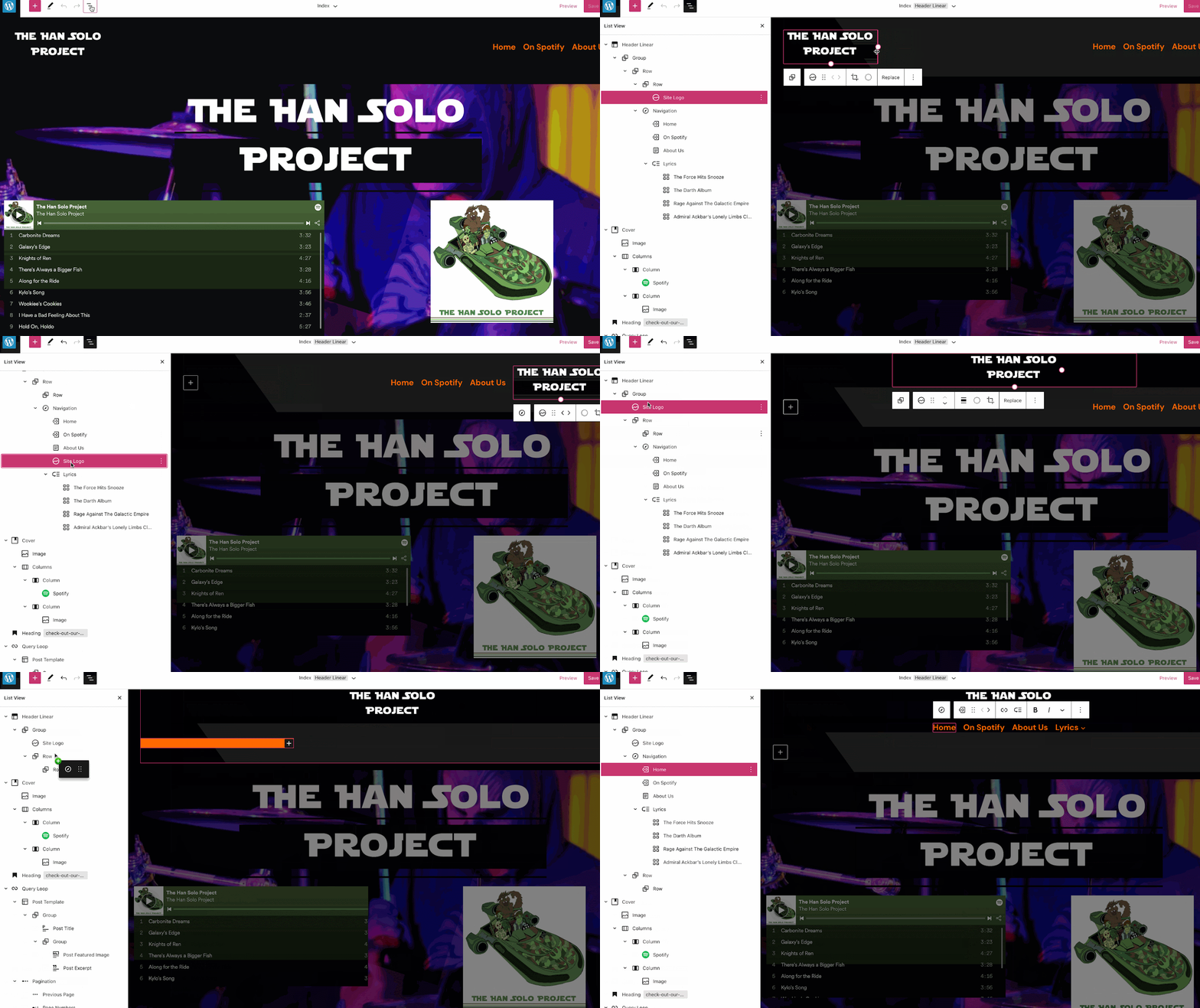
You can now use the same tools you use to create your content to edit every part of your site. This new release lets you edit your header and footer with blocks and simply by dragging and dropping the different pieces where you want them. No coding required.This release also comes with the ability to edit specific page templates from your home page to a single post, to your 404 page, and even your archive pages. What’s even cooler is that you can drill down into specific template parts to edit them with more focus. 

Here’s another look at Full Site Editing in action:

It’s easier than ever to change the entire look and feel of your site with subtle changes in the Styles Editor. Set global colors and fine-tune your typography to give your entire site a consistent look and feel. 

What you need to know:

There is no action needed from you. Your current site(s) will not be changed and you can continue managing your site and creating your content in exactly the same way. We’ve been rolling this feature out to some new sites and will be switching over to all new sites in the coming days. When you start a new site, you will have a chance to choose a theme that leverages the new Full Site Editing experience. We’re actively working to put together resources to help make learning those new features easier, and maybe even fun. Over the next few weeks we will be rolling out the ability to switch your existing site over to a theme that will give you access to these features. It will not be something that we do for you so watch out for that announcement and the details on how to access these new tools. 

Again, we want to make sure you know that there’s no action needed from you. That’s one of the major benefits of WordPress.com managed hosting after all  

What you need to know about versioning and WordPress

All changes to WordPress come in what is called a release. We keep track of these changes with a numbering system called versioning. These new tools were released in the WordPress 5.9 release, which went out on January 25th. As with all major releases, the WordPress.com team takes a little extra time to integrate them into our platform to help ensure that all of our users have a great first experience with these exciting new features. We’re excited to share these details of our rollout plan with you today so you know what to expect in the coming weeks. As always, please reach out if you have any questions!

Hungry for more?

Check out some of the full feature demos in the official WordPress 5.9 intro video Check out some of the detailed deep-dive content in our support docs.Looking for more help with the new Full Site Editor (FSE)? Join our WordPress experts for a webinar and be among the first to learn how to use the new tools, which allow you to edit all parts of your site without the need for code! Register for free today!

Quelle: RedHat Stack

Unveiling a new visual user interface for Google Cloud’s Speech-to-Text API

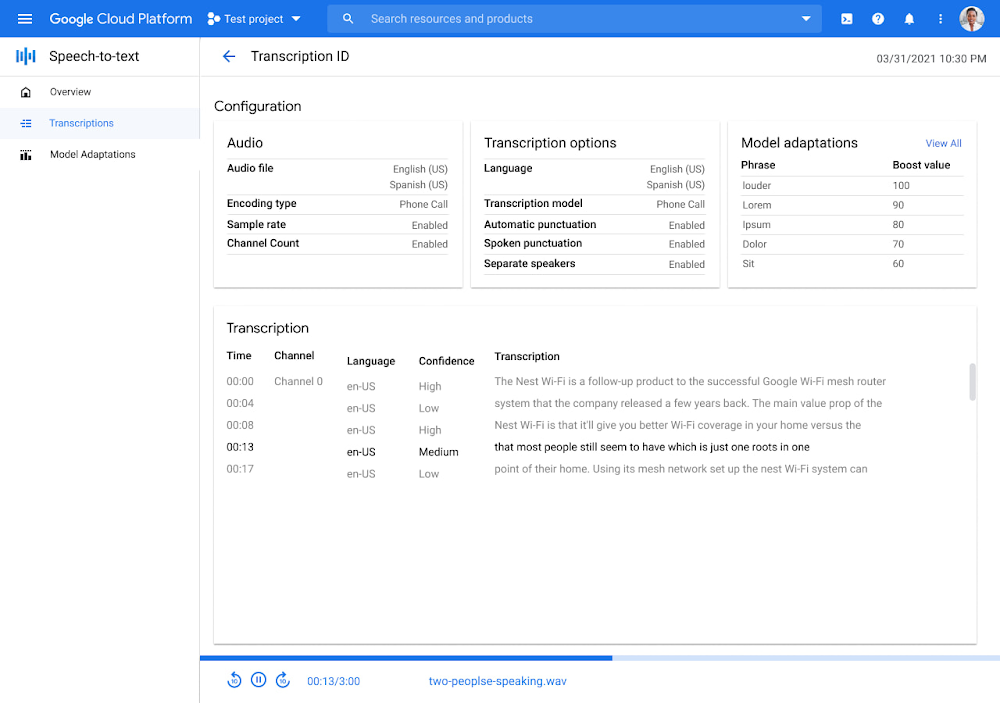
At Google Cloud, we’re committed to making artificial intelligence (AI) accessible to everyone and easier to harness for new use cases.  That’s why we’re excited to announce the general availability of our intuitive, new visual user interface for Google Cloud’s Speech-to-Text (STT) API, right in Google Cloud Console, which makes the API much simpler and easier for developers to use.  The STT API lets developers convert speech into text by leveraging Google’s years of research in automatic speech recognition and transcription technology. As advancements in AI continue to bring speech to new interfaces and devices, the STT API helps developers add speech functionality to their applications in order to better meet consumer demands. The STT API covers a wide variety of use cases, from dictation and short commands, to captioning and subtitles. Getting the most of STT, however, can be a complicated process. To achieve the highest accuracy on any AI use case requires careful testing and tuning. Previously, developers building on the STT API had to do this work manually by carefully experimenting with our API. Just to get started, developers needed familiarity with GCP integration concepts and had to either build their own tools or manage various scripts and API calls to fully understand the API documentation.  These actions required cumbersome and time-consuming effort and made measuring, customizing, and improving models even more difficult.  Today’s announcement significantly simplifies the process, facilitating iteration and integration of models into developers’ applications by letting developers perform every API function from within the Google Cloud Console.  These tools will make it easier for developers to integrate the STT API with their products or services. This update also gives developers the ability to manage and quickly iterate on their STT model customizations with Model Adaptation.Model Adaptation allows developers to customize STT specifically for their domains or use cases. Developers can maintain lists of words and weights that will be applied to either every request or just single requests, depending on their needs. Model adaptations are reusable and composable, so once developers have seen good results in the STT Cloud Console, they can deploy to their entire solution. The Speech-to-Text Cloud Console and Model Adaptation API is available now in all Google Cloud regions and languages and is accessible to all GCP users with no additional cost to that of the underlying API usage. The STT API supports over 70 languages in 120 different local variants. If you’re a developer looking for an easy to use, easy to integrate, and high-quality STT experience, sign up for our free trial and try our new interface on your own datasets today!Related ArticleMaking public services more accessible with AI-powered translations from Google CloudWe explain, with practical use cases, how public administrations can use AI translation technology to overcome language barriers.Read Article
Quelle: Google Cloud Platform