Retire your tech debt: Move vSphere 5.5+ to Google Cloud VMware Engine

It can happen so easily. You get a little behind on your payments. Then you start falling farther and farther behind until it becomes almost impossible to dig yourself out of debt. Tech debt, that is. IT incurs a lot of tech debt when it comes to keeping up infrastructure; most IT departments are already running as lean as they possibly can. Many VMware shops are in a particularly tough spot, especially if they’re still running on vSphere 5.5. If that describes you, it’s time to ask yourself how you intend to get out of this tech debt? General support for vSphere 5.5 ended back in September 2018, and technical guidance one year later. General support for 6.0 ended in March 2020, support for 6.5 ends November 15 of this year, and even the end of general support for vSphere 6.7 is only a couple of years away (November, 2022)! If you’re still running vSphere 5.5, moving to vSphere 7.0 is the right thing to do.But doing so is hard if you’ve fallen into a deep tech-debt hole.Traditionally, it means moving all your outdated vSphere systems through all the interim releases until you’ve migrated all your systems to the latest version. That involves upgrading hardware, software, and licenses, as well as all the additional work that goes along with the upgrades. Then, as soon as you’re done, the next upgrade cycle is already upon you. Making the task even more daunting, VMware HCX—the company’s application mobility service—will also stop supporting 5.5 soon, making migration even more complicated.If this paints an unsightly picture, don’t despair. You have the opportunity, right now, to easily retire your technical debt and be debt-free from here on out by migrating to Google Cloud VMware Engine. And you can migrate before you have to upgrade to the next vSphere release just to get migration support. Not only will you still be able to migrate to vSphere 7 using HCX, but even better, you don’t have to do the digging yourself.The cloud breaks the cycle of debtIf the effort and resources required to move was too steep a price before, now it’s a viable option with Google Cloud VMware Engine. With cloud-based infrastructure, you can not only migrate to the latest release of vSphere, but you can also take your workload—lock, stock, and barrel—out of your data center and put it into Google Cloud. Moving to Google Cloud VMware Engine makes the migration task fast and simple. Never again will you have to deal with spreadsheets to track how many watts of cooling you need for your data center, buy additional equipment, or manage upgrades.Migrating to the cloud is also the first step toward getting out of the business of managing your data center and into embracing an OpEx subscription model. And you can begin moving workloads to the cloud in increments, without having to worry about all the nuances — it’s all done for you.Work in a familiar environment and expand your toolsetOne of the biggest benefits of Google Cloud VMware Engine is that it offers the same, familiar VMware experience you have now. All the applications running on vSphere 5.5 can immediately run on a private cloud in Google Cloud VMware Engine with no changes. You’ll now be running on the latest release of vSphere 7, and when VMware releases patches, updates, and upgrades, Google Cloud keeps the infrastructure up to date for you. And as a VMware administrator, you can use the same tools that you’re familiar with on-premises.Migration doesn’t have to be a long, arduous processGoogle Cloud VMware Engine allows you to leverage your existing virtualized infrastructure to make migration fast and easy. Use familiar VMware tools to migrate your on-premises vSphere applications to vSphere in your own private cloud while maintaining continuity with all your existing tools, policies, and processes. It takes only a few clicks (see our demo video). Make sure you have your prerequisites, enable the Google Cloud VMware Engine API, and follow these 10 steps:Enable the VMware Engine node quota and assign at least three nodes to create your private cloud.Set your roles and permissions.Access the Google Cloud VMware Engine portal.Click ‘Create a private cloud’. This is fast — only about 30 minutes.Select the number of nodes (a minimum of three).Enter a CIDR range for the VMware management network.Enter a CIDR range for the HCX deployment network.Review your settings.Click Create.Connect an on-prem network to your VMware Engine private cloud or connect using a point-to-site VPN connection. Google Cloud VMware Engine supports multi-region networking with VPC global routing, which allows VPC subnets to be deployed in any region worldwide, greatly simplifying networking.When you use VMware HCX to migrate VMs from your on-premises environment to Google Cloud VMware Engine, VMware HCX abstracts vSphere resources running both on-prem and in the cloud and presents them to applications as one continuous resource to create a hybrid infrastructure.By partnering with Google Cloud, you can erase your tech debt and get out of the time-consuming, resource-draining business of data center management. Then, once your VMware-based workloads are running on Google Cloud VMware Engine, you can start modernizing your applications with Google Cloud services, including AI/ML, low-cost storage, and disaster recovery solutions. Check out the variety of pricing options for the service, from pre-pay with discounts up to 50% to pay-as-you-go and annual commitments.Related ArticleZero-footprint DR solution with Google Cloud VMware Engine and ActifioLearn how to use Actifio data management software plus Google Cloud VMware Engine to create a dynamic, low-cost DR site in the cloud.Read Article
Quelle: Google Cloud Platform

Diving into your documents with DocAI

We recently announced the GA of the Document AI Platform, Google’s solution for automating and validating documents to streamline  document workflows. Important business data is not always readily available in computer-readable formats. This is what we consider dark formats such as pdfs, handwritten forms and images. The platform is a console for document processing where customers can quickly access all parsers, tools, and solutions. Workflow solutions, built on our specialized parsers with models for common enterprise document types such tax forms, invoices, receipts and more, Lending DocAI and Procurement DocAI are now also in GA.So why use it? Your business is most likely sitting on a treasure trove of unstructured data, or maybe you have document workflows that require several manual steps. DocAI can help you programmatically extract data for gathering insights with data analytics and help automate tedious and error-prone tasks. Use one of our client libraries to ingest your documents and produce structured data in our new unified document format.Unified document formatThe unified document format (document.proto) is the protocol used to represent all metadata about a document in a standardized, universal format. It is an efficient, standoff format—where the content is kept separate from the annotations. This gives full flexibility to losslessly represent any annotation or attribute of a document or its content whether annotated by humans or an algorithm.It was created to make building document-based workflow applications easy across tools, components, platforms, and languages inside and outside of DocAI. It is a protocol buffer based format, allowing efficient, flexible encodings—typically binary or json.The format currently allows the representation of rich OCR representations as well as extracted entities so let’s dive in.Document representation – read itThe form parsers return the raw representation of the document content. In many documents, the layout structure is often as important as the actual text. The layout elements include several types such as tokens, lines, paragraphs, blocks, form fields, tables and visual elements. The format allows the representation of rich OCR representations in a hierarchical structure. You can use the layout bounding poly coordinates to detect and highlight the tokens in a UI.We’ve drafted a set of notebooks to help you quickly get started with the service. I’ll walk through a sample document with our general specialized form parser notebook.Extracted data – understand itHere is where the core of the structured data appears. If you’re processing a generic form, DocAI will extract the relevant key value pairs. If you’re using one of our specialized parsers for a form type such as an invoice, receipt, utility statement, etc. the data extracted will be merged into a predefined schema. To help you with your document processing journey we also provide tools for classification and splitting multi-page, multi-form packets. You could imagine the use case of needing to classify and split individual forms in a large mortgage packet such as W2s, W9s, payslips, etc. The classifier will label the document/entity type and the splitter will intelligently understand where the logical boundaries of the different form types start and end.ExtractionNot only do you get the “question and answers” from your document, you also get entity normalization and confidence scores. In our specialized parsers, if a certain field is a monetary or date type, the API will also provide an appropriate entity type. This makes it much easier when integrating with other systems or a database with strict schema types.For data assurance, we provide a score between 0 and 1 on the platform’s confidence for that entity. We are able to inspect the confidence scores for both the keys and the associated values on a generic form.We understand that accuracy is critical for business processes so you can use Human-in-the-Loop AI to incorporate a customizable human review workflow with trusted reviewers within their own or partner organizations. You can configure the human review to trigger if the whole document or specific fields do not meet confidence score at your choosing. Including human participation in ML processes allows AI and humans to work together for the best possible results for customers.Last but not least, making it useful is up to you! We hope we have inspired you to try out Document AI in your app or service. By using the platform you can build tools that reduce manual steps to prevent human errors, integrate other Google services for robust data processing or track documents changes for an audit. You can head over to the DocAI Platform in the Google Cloud console or try out one or our codelabs.Related ArticleCustomers cut document processing time and costs with DocAI solutions, now generally availableDocument AI platform, Lending DocAI and Procurement DocAI are generally available.Read Article
Quelle: Google Cloud Platform

Debugging your Proxyless gRPC service mesh

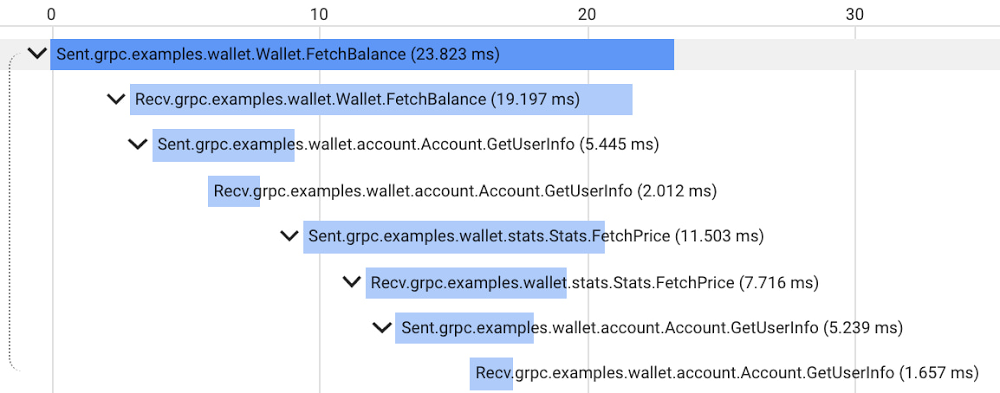
Proxyless gRPC applications in a service mesh now support many of the same features as deployments with a sidecar Envoy proxy, but in the past it has been difficult to get application-level insight into problems with specific nodes in the mesh. Today, we are happy to announce new tools, examples, and documentation to make it easier to debug your Proxyless gRPC applications. Proxyless gRPC now includes an admin API to allow live debugging of nodes in your mesh, and support for the xDS CSDS protocol to dive deeper into per-node control plane configurations to identify and resolve any issues. Further, we provide documentation and sample code illustrating how to add OpenCesus instrumentation to your gRPC clients and servers to send metric and tracing data to Cloud Monitoring and Cloud Trace.As a network library, gRPC provides some predefined admin services to make debugging easier. For example, there is a channel tracing service named Channelz (see gRPC blog). With Channelz, you can access the metrics about the requests going through each channel, like how many RPCs have been sent, how many succeeded or failed, and much more. Each existing admin service is packaged as a separate library, and the documentation of the predefined admin services is usually scattered. It can be time consuming to get the dependency management, module initialization, and library import right for each one of them. Recently, gRPC introduced admin interface APIs, which provide a convenient way to create a gRPC server to expose admin services. With this, any new admin services that you may add in the future are automatically available via the admin interface just by upgrading your gRPC version.Debugging a large service mesh can be a complex task. Unexpected routing behaviors could be due to a misconfiguration, unhealthy backends or issues in the control or data plane. As part of the admin interface API, gRPC can now expose the xDS configuration, the service mesh configuration that Traffic Director, our fully-managed service mesh, sends to gRPC applications. This configuration is exposed via the CSDS service, which you can easily start by using the admin interface APIs. Our grpcdebug CLI tool prints human-readable output based on the information it fetches from a target gRPC application.You can now also instrument gRPC C++, Go, and Java clients and servers with the OpenCensus library to send metrics and tracing to Cloud Monitoring and Cloud Trace. While gRPC’s OpenCensus integration has been available for a long time, our user guide and example code demonstrate clearly how to configure OpenCensus instrumentation in the context of a service mesh and ensure that traces are compatible across both Proxyless gRPC and Envoy-sidecar applications. After instrumenting your Proxyless gRPC application, you’ll be able to view traces such as the following example of our gRPC Wallet mesh:For more information about using gRPC with Traffic Director and these new features, see the following links:Traffic Director with proxyless gRPC services overviewRelated ArticleTraffic Director and gRPC—proxyless services for your service meshWith the addition of xDS API support, you can now use Traffic Director with proxyless gRPC services.Read Article
Quelle: Google Cloud Platform

Community Rooms at DockerCon LIVE 2021

The Docker community spans the four corners of the world. To celebrate the global nature of our community at DockerCon this year, we’ve created something new: Community Rooms.

Building on the learnings of our “regional rooms experiment” during our last Community All-Hands, Community Rooms are virtual spaces that DockerCon attendees will be able to join to discuss, share and learn about Docker in their own language and/or around a specific topic area. 

100% LIVE

The main focus of these Community Rooms is to bring people together and encourage interaction so we have set them up to be 100% live. Yep, that’s right, all the content you’ll find in these rooms, whether they’re talks, demos, workshops, panel discussions etc. will be in real-time, all broadcast over a live Zoom link. 

Hosted by the Community for the Community

Each Community Room will be overseen by Docker Captains and Community Leaders. They will be responsible for every aspect of the room, from the curation of content, to the management of the schedule, to the recruitment of the speakers, to the moderation of their room’s live chat. 

There will be seven community rooms to choose from, each with one or several hosts: 

Japan Room (language: Japanese / hosted by Akihiro Suda) Brazil Room (language: Portuguese / hosted by Lucas Santos and Rafael Gomes)Spanish Room (language: Spanish / Manuel Morejon, Javier Ramirez and Marcos Lilljedahl)French Room (language: French / hosted by Rachid Zarouali, Luc Juggery and Kevin Alvarez)German Room (language: German / hosted by Nicholas Dille and Nana Janashia)WSL2 Room (language: English / hosted by Nuno do Carmo)Docker for Super Beginners Room (language / hosted by Julie Lerman and Rachid Zarouali) 

Managing time-zones

We’re mindful that for a good portion of the world, the sun will have already set by the time DockerCon begins at 9am Pacific Time. To accommodate for this Community Rooms will be accessible for 24 hours from the event kick-off, ensuring all time zones are covered. For example, to factor in the 14 hour time difference with Japan, sessions in the Japan Room will take place *after* DockerCon is effectively over.  

Interested in speaking in a Community Room?

If you’re interested in participating in one of these rooms, whether it’s giving a talk about a cool project you’re working, or running a workshop or doing a mind-blowing demo, don’t hesitate to fill out this submission form. If you have any questions or if you want to know more about a specific Community Room, please feel free to contact one of the hosts mentioned above. 

Stay tuned!

In about two weeks we’ll publish the final schedule for each room. We’re really excited about DockerCon LIVE 2021 and we hope these community rooms will bring together as many people from the community from as many parts of the world as possible.

And May the 4th be with you. 

Join Us for DockerCon LIVE 2021  

Join us for DockerCon LIVE 2021 on Thursday, May 27. DockerCon LIVE is a free, one day virtual event that is a unique experience for developers and development teams who are building the next generation of modern applications. If you want to learn about how to go from code to cloud fast and how to solve your development challenges, DockerCon LIVE 2021 offers engaging live content to help you build, share and run your applications. Register today at https://dockr.ly/2PSJ7vn
The post Community Rooms at DockerCon LIVE 2021 appeared first on Docker Blog.
Quelle: https://blog.docker.com/feed/

Amazon Kinesis Data Analytics für Apache Flink führt benutzerdefinierte Wartungsfenster in der Vorschau ein

Amazon Kinesis Data Analytics für Apache Flink unterstützt jetzt UpdateApplicationMaintenanceConfiguration in einer Vorversion. Amazon Kinesis Data Analytics patcht regelmäßig die zugrunde liegende Infrastruktur von Anwendungen mit Sicherheits-Updates für Betriebssysteme und Container-Images, um die AWS-Compliance- und Sicherheitsziele während der Standard-Wartungsfenster in jeder Region zu erfüllen. Sie können UpdateApplicationMaintenanceConfiguration über die CLI oder die API verwenden, um die bevorzugten Startzeiten für das Wartungsfenster einer Anwendung auszuwählen.
Quelle: aws.amazon.com

Neue AWS-Lösungsimplementierung: AWS Blueprints

Wir freuen uns, die Aufnahme von AWS Blueprints in das Portfolio von AWS-Lösungsimplementierungen bekannt zu geben. AWS-Lösungsimplementierungen helfen Ihnen dabei, häufige Probleme zu lösen und mit der AWS-Plattform schneller Lösungen zu entwickeln.
Quelle: aws.amazon.com

Neue Entwickler-Desktop-Funktion in der integrierten Entwicklungsumgebung (IDE) von AWS RoboMaker

AWS RoboMaker hat eine neue Funktion veröffentlicht, mit der Entwickler eine Desktopsitzung für die IDE öffnen und grafische Tools ausführen können, um mit Simulationen zu interagieren. AWS RoboMaker IDE bietet einen Cloud-Robotik-Workspace, der mit den wichtigsten Tools vorkonfiguriert ist, um mit dem Erstellen und Testen von Roboteranwendungen zu beginnen, ohne dass zusätzliche Hardware bereitgestellt werden muss. Diese Funktion bietet Entwicklern einen einzigen Bereich, in dem sie mit dem Erstellen und Simulieren von Robotikanwendungen beginnen können.
Quelle: aws.amazon.com

Der Amazon Monitron Service ist jetzt in der Region Europa (Irland) verfügbar

Amazon Monitron ist ein End-to-End-System, das Machine Learning (ML) nutzt, um abnormale Bedingungen in industrieller Ausrüstung zu erkennen, sodass Sie eine vorausschauende Wartung einführen und ungeplante Ausfallzeiten reduzieren können. Es umfasst Sensoren zum Erfassen von Vibrations- und Temperaturdaten von Geräten, ein Gateway-Gerät zum sicheren Übertragen von Daten an AWS, den Amazon Monitron Service, der die Daten mithilfe von Machine Learning auf abnormale Gerätebedingungen analysiert, und eine dazugehörige mobile App zum Einrichten der Geräte und Empfangen der Berichte zum Betriebsverhalten und zur Warnung vor möglichen Fehlern in Ihren Geräten. Heute geben wir bekannt, dass der Amazon Monitron Service jetzt auch in Europa (Irland) verfügbar ist. Dies gilt zusätzlich zur Region USA Ost (Nord-Virginia), wo der Amazon Monitron Service bereits verfügbar ist.
Quelle: aws.amazon.com






