Amazon DynamoDB local unterstützt jetzt das AWS SDK für Java 2.x

Sie können jetzt das AWS SDK für Java 2.x mit DynamoDB local verwenden, der herunterladbaren Version von Amazon DynamoDB. Mit DynamoDB local können Sie Anwendungen entwickeln und testen, indem Sie eine Version von DynamoDB verwenden, die in Ihrer lokalen Entwicklungsumgebung läuft, ohne dass zusätzliche Kosten anfallen. Für DynamoDB Local ist keine Internetverbindung erforderlich, und es kann mit Ihren bestehenden DynamoDB API-Aufrufen verwendet werden.
Um mehr über das AWS SDK für Java 2.x zu erfahren, lesen Sie die Informationen zum offiziellen AWS SDK for Java, Version 2 auf GitHub. Weitere Informationen zu DynamoDB Local finden Sie unter Einrichten von DynamoDB Local (herunterladbare Version).
Quelle: aws.amazon.com

RDO Wallaby Released

RDO Wallaby Released
The RDO community is pleased to announce the general availability of the RDO build for OpenStack Wallaby for RPM-based distributions, CentOS Stream and Red Hat Enterprise Linux. RDO is suitable for building private, public, and hybrid clouds. Wallaby is the 23rd release from the OpenStack project, which is the work of more than 1,000 contributors from around the world.

The release is already available on the CentOS mirror network at http://mirror.centos.org/centos/8-stream/cloud/x86_64/openstack-wallaby/.

The RDO community project curates, packages, builds, tests and maintains a complete OpenStack component set for RHEL and CentOS Stream and is a member of the CentOS Cloud Infrastructure SIG. The Cloud Infrastructure SIG focuses on delivering a great user experience for CentOS users looking to build and maintain their own on-premise, public or hybrid clouds.

All work on RDO and on the downstream release, Red Hat OpenStack Platform, is 100% open source, with all code changes going upstream first.

PLEASE NOTE: RDO Wallaby provides packages for CentOS Stream 8 and Python 3 only. Please use the Victoria release for CentOS8.  For CentOS7 and python 2.7, please use the Train release.
Interesting things in the Wallaby release include:

With the Victoria release, source tarballs are validated using the upstream GPG signature. This certifies that the source is identical to what is released upstream and ensures the integrity of the packaged source code.
With the Victoria release, openvswitch/ovn are not shipped as part of RDO. Instead RDO relies on builds from the CentOS NFV SIG.
Some new packages have been added to RDO during the Victoria release:

RBAC supported added in multiple projects including Designate, Glance, Horizon, Ironic, and Octavia
Glance added support for distributed image import
Ironic added deployment and cleaning enhancements including UEFI Partition Image handling, NVMe Secure Erase, per-instance deployment driver interface overrides, deploy time “deploy_steps”, and file injection.
Kuryr added nested mode with node VMs running in multiple subnets is now available. To use that functionality a new option [pod_vif_nested]worker_nodes_subnets is introduced accepting multiple Subnet IDs.
Manila added the ability for Operators to now set maximum and minimum share sizes as extra specifications on share types.
Neutron added a new subnet type network:routed is now available. IPs on this subnet type can be advertised with BGP over a provider network.
TripleO moved network and network port creation out of the Heat stack and into the baremetal provisioning workflow.

Other highlights of the broader upstream OpenStack project may be read via https://releases.openstack.org/wallaby/highlights.html
Contributors

During the Wallaby cycle, we saw the following new RDO contributors:

Adriano Petrich
Ananya Banerjee
Artom Lifshitz
Attila Fazekas
Brian Haley
David J Peacock
Jason Joyce
Jeremy Freudberg
Jiri Podivin
Martin Kopec
Waleed Mousa

Welcome to all of you and Thank You So Much for participating!

But we wouldn’t want to overlook anyone. A super massive Thank You to all 58 contributors who participated in producing this release. This list includes commits to rdo-packages, rdo-infra, and redhat-website repositories:

Adriano Petrich
Alex Schultz
Alfredo Moralejo
Amol Kahat
Amy Marrich
Ananya Banerjee
Artom Lifshitz
Arx Cruz
Attila Fazekas
Bhagyashri Shewale
Brian Haley
Cédric Jeanneret
Chandan Kumar
Daniel Pawlik
David J Peacock
Dmitry Tantsur
Emilien Macchi
Eric Harney
Fabien Boucher
Gabriele Cerami
Gael Chamoulaud
Grzegorz Grasza
Harald Jensas
Jason Joyce
Javier Pena
Jeremy Freudberg
Jiri Podivin
Joel Capitao
Kevin Carter
Luigi Toscano
Marc Dequenes
Marios Andreou
Martin Kopec
Mathieu Bultel
Matthias Runge
Mike Turek
Nicolas Hicher
Pete Zaitcev
Pooja Jadhav
Rabi Mishra
Riccardo Pittau
Roman Gorshunov
Ronelle Landy
Sagi Shnaidman
Sandeep Yadav
Slawek Kaplonski
Sorin Sbarnea
Steve Baker
Takashi Kajinami
Tristan Cacqueray
Waleed Mousa
Wes Hayutin
Yatin Karel

The Next Release Cycle
At the end of one release, focus shifts immediately to the next release i.e Xena.
Get Started
There are three ways to get started with RDO.
To spin up a proof of concept cloud, quickly, and on limited hardware, try an All-In-One Packstack installation. You can run RDO on a single node to get a feel for how it works.
For a production deployment of RDO, use TripleO and you’ll be running a production cloud in short order.
Finally, for those that don’t have any hardware or physical resources, there’s the OpenStack Global Passport Program. This is a collaborative effort between OpenStack public cloud providers to let you experience the freedom, performance and interoperability of open source infrastructure. You can quickly and easily gain access to OpenStack infrastructure via trial programs from participating OpenStack public cloud providers around the world.
Get Help
The RDO Project has our users@lists.rdoproject.org for RDO-specific users and operators. For more developer-oriented content we recommend joining the dev@lists.rdoproject.org mailing list. Remember to post a brief introduction about yourself and your RDO story. The mailing lists archives are all available at https://mail.rdoproject.org. You can also find extensive documentation on RDOproject.org.
The #rdo channel on Freenode IRC is also an excellent place to find and give help.
We also welcome comments and requests on the CentOS devel mailing list and the CentOS and TripleO IRC channels (#centos, #centos-devel, and #tripleo on irc.freenode.net), however we have a more focused audience within the RDO venues.
Get Involved
To get involved in the OpenStack RPM packaging effort, check out the RDO contribute pages, peruse the CentOS Cloud SIG page, and inhale the RDO packaging documentation.
Join us in #rdo and #tripleo on the Freenode IRC network and follow us on Twitter @RDOCommunity. You can also find us on Facebook and YouTube.
 
Quelle: RDO

Translation API Advanced can translate business documents across 100+ languages

Translation is critical to many developers and localization providers, whether you’re releasing a document, a piece of software, training materials or a website in multiple languages. Companies acquire and share content in many languages and formats, and scaling translation to meet this need is a tall order, due to multiple document formats, integrations with OCR, and correcting for domain terminology. Now, developers can use machine learning to translate faster and more efficiently than ever with Google Cloud’s flagship Translation products.Today, we’re excited to announce a new feature to our Google Cloud’s Translation services, Document Translation, now in preview,for Translation API Advanced. This feature allows customers to directly translate documents in 100+ languages and formats such as Docx, PPTx, XLSx, and PDF while preserving document formatting.One company that’s pulling all this together is Welocalize. It uses Translation API Advanced to translate hundreds of millions of words per year using machine translation in widely disparate enterprise customer scenarios like multimedia, e-learning, and localization.”Google Cloud’s Translation API has helped us enforce broad terminology coverage for customers with sparse data, providing highly accurate translations for their documents. Translation API’s pre-trained models have allowed us to deliver real-time on demand translation, reducing lag so that our end users can get content in their language in seconds.” – Olga Beregovaya, VP Language Services, WelocalizeGet real-time online translation in secondsTraditional businesses may use batch-translation for their translation needs, but some companies require more immediate time to value. One of the biggest differentiators for Translation API Advanced’s Document feature is the ability to do real-time (synchronous processing), online translation, for a single file. For example, if you are translating a business document such as human resource (HR) documentation, online translation provides flexibility for customers who have smaller files and want faster results. You can easily integrate with our APIs via REST or gRPC with mobile or browser applications, with instant access to 100+ language pairs so that content can be understandable in any supported language. The figure below shows the workflow in which documents are translated with Translation API Advanced.Use AutoML Translation to build custom translation modelsInstead of the Google managed model, you can also use your own AutoML Translation models to translate documents. The new Document Translation feature translates business documents quickly and easily with our SOTA translation models and also combines Translation API Advanced features to easily control custom translations through a glossary or models you have trained on AutoML. Translation API’s glossary feature helps maintain brand names in translated content. You define the names and vocabulary in your source and target languages, then save the glossary file to your translation project. Those words and phrases will then be automatically included in the copy of your translation request.Our full Translation portfolio includes Translation API (basic & advanced) for those who want to use pre-trained models for common use cases such as chat applications, social media, and gaming. We also have AutoML Translation to help businesses build high-quality and production-ready custom translation models without writing a single line of code.This is just the latest example of how Google is continuing to drive AI-powered innovation in extracting structured data from unstructured sources. With Document AI, we brought this technology to some of the largest document based workflows in the world through data extraction and classification. And now with Document Support for Translation API Advanced, we’re delivering document processing solutions to help you translate your business documents at scale.More Cloud Translation resourcesLearn more about our Cloud Translation services on our website. For a technical review of how to use this feature, view the documentation.Related ArticleGartner names Google a leader in 2021 Magic Quadrant for Cloud AI Developer Services reportWe believe this recognition is based on Gartner’s evaluation of Google Cloud’s language, vision, conversational, and structured data serv…Read Article
Quelle: Google Cloud Platform

Enhance DDoS protection & get predictable pricing with new Cloud Armor service

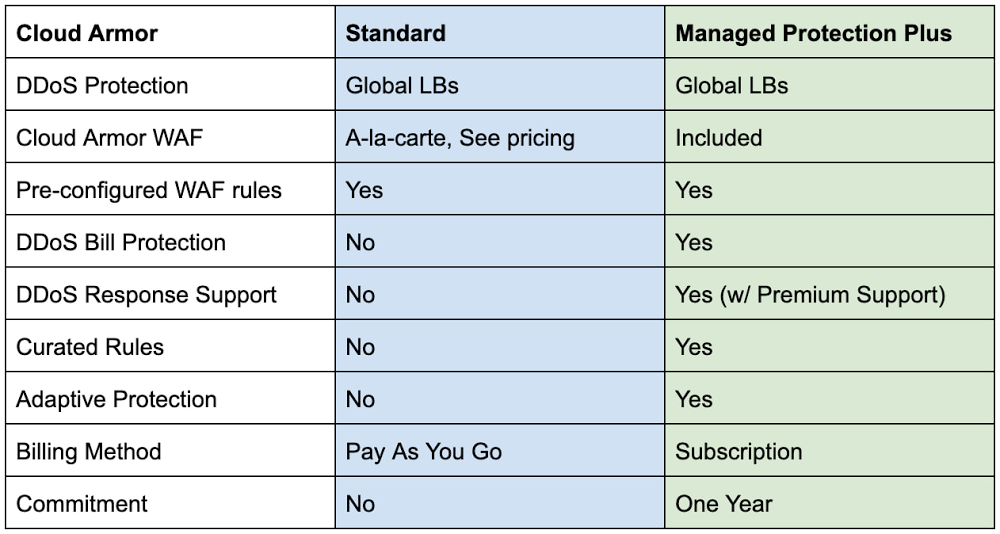
Securing websites and applications is a constant challenge for most organizations. To make it easier, we have introduced new capabilities within Cloud Armor over the past year that can help protect your applications. Today, we are announcing the general availability of Google Cloud Armor Managed Protection Plus. Cloud Armor, our Distributed Denial of Service (DDoS) protection and Web-Application Firewall (WAF) service on Google Cloud, leverages the same infrastructure, network, and technology that has protected Google’s internet-facing properties from some of the largest attacks ever reported. These same tools protect customers’ infrastructure from DDoS attacks, which are increasing in both magnitude and complexity every year. Deployed at the very edge of our network, Cloud Armor absorbs malicious network- and protocol-based volumetric attacks, while mitigating the OWASP Top 10 risks and maintaining the availability of protected services. Managed Protection Plus OverviewCloud Armor Managed Protection Plus is a managed application protection service that bundles advanced DDoS protection capabilities, WAF capabilities, ML-based Adaptive Protection, efficient pricing, bill protection and access to Google’s DDoS response support service into an enterprise-friendly subscription.Cloud Armor L3/L4 DDoS ProtectionAll Cloud Armor customers (Standard & Managed Protection Plus) receive the same in-line, always-on DDoS protection. This protection is deeply integrated into the Global Load Balancers sitting at Google Cloud’s edge. These capabilities defend target workloads from network- and protocol-based volumetric attacks (L3/L4 DDoS). This is the same protection and mitigation infrastructure that was used to protect against the 2.54 Tbps DDoS attack we shared last year.Malformed traffic targeting your globally load-balanced endpoints (HTTP/S LB, TCP Proxy, SSL Proxy) is automatically absorbed or dropped without impacting any well-formed requests heading to a protected service. Cloud Armor stops common attacks such as UDP-based amplification or reflection attacks as well TCP floods such as SYN-Flood. Cloud Armor Web-Application Firewall (WAF)Cloud Armor WAF protects their internet-facing applications from common attack types and enforce IP, Geo, and layer 7 filtering policies at the edge of Google’s network. Users can easily deploy pre-configured WAF rules to mitigate the OWASP Top 10 web vulnerability risks and can use the extensive custom rules language to configure security policies.Managed Protection Plus CapabilitiesAdaptive Protection Cloud Armor Adaptive Protection (currently in Preview) is a machine learning-powered service that detects layer 7 attacks and protects your applications and services from them. Adaptive Protection automatically learns what normal traffic patterns look like on a per-application/service basis. Because it is always monitoring, Adaptive Protection quickly identifies and analyzes suspicious traffic and provides customized, narrowly tailored rules that mitigate  ongoing attacks in near real-time. Curated RulesCloud Armor’s curated rules simplify the deployment of effective access controls in front of your applications. A range of named rules let you filter traffic based on threat intelligence data maintained, and regularly updated, by Google on behalf of Managed Protection Plus subscribers. For example, today’s curated rules include Named IP Lists containing IP ranges of third party proxies from Cloudflare, Imperva, or Fastly that users may deploy upstream of their Google Cloud endpoints. Future Capabilities Managed Protection Plus will continue to expand the breadth and depth of protection over time. This will include additional protection capabilities for subscribers, visibility into DDoS attacks and on-going mitigations, as well as access to Google’s threat intelligence.Managed Protection Plus ServicesDDoS Response SupportCustomers that come under attack can engage support to get rapid help from Google’s DDoS response team. Our team can help assess, advise, and assist in mitigating the attack. DDoS response support is available 24/7, and is staffed by a global team of DDoS and networking experts that protect Google’s own services as well as those of other Google Cloud customers. Response team members have a wide range of tactics and tools at their fingertips, including custom mitigations deployed across Google Cloud’s networking infrastructure. DDoS Bill ProtectionBill protection offers peace of mind and predictability by alleviating much of the financial impact of a DDoS attack. Subscribers that see their Google Cloud networking bill spike as a result of a DDoS attack will be able to open a claim to receive a credit in the amount of the bill spike. Not only does this service ensure that costs remain predictable in the face of DDoS attacks, it also decreases the incentive for attackers to target their victim’s infrastructure bill in the hopes of making it too expensive to operate.Managed Protection Plus brings to bear to the full scale of Google’s global network, machine learning capabilities, and unique experience and expertise. Subscribers can operate internet-facing services and workloads safely, and respond quickly and effectively to targeted or distributed attacks. Subscribe today by navigating to the Managed Protection tab in the console and click the subscribe button.Related ArticleExponential growth in DDoS attack volumesHow Google prepares for and protects against the largest volumetric DDoS attacks.Read Article
Quelle: Google Cloud Platform

Deliver zero trust on unmanaged devices with new BeyondCorp Enterprise protected profiles

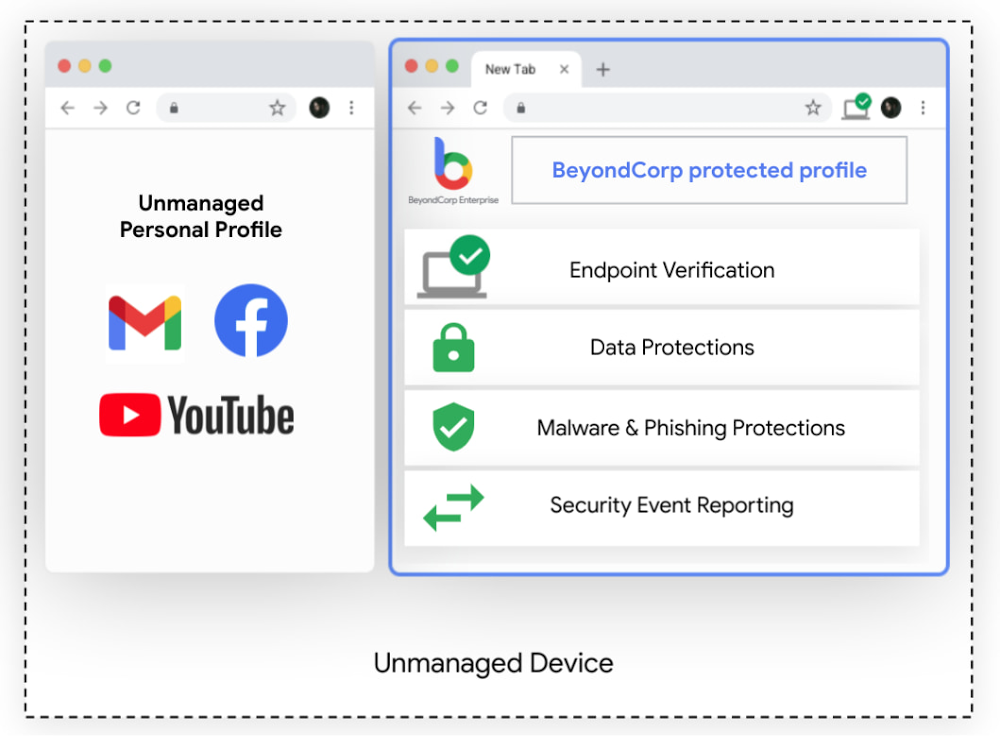
Modern enterprises rely on vast and complex networks of technologies and skillsets to accomplish their goals. Markets are global, workers are remote, and information needs to be accessible anywhere, while remaining secure. This increasing complexity has led many enterprises to adopt a zero trust approach to security and deploy Google’s BeyondCorp Enterprise, which provides customers with simple and secure access to applications and cloud resources with integrated threat and data protection. To help BeyondCorp Enterprise customers account for the global, mobile nature of work, we’re excited to unveil a new feature, the protected profile. Protected profiles enable users to securely access corporate resources from an unmanaged device with the same threat and data protections available in BeyondCorp Enterprise–all from the Chrome Browser. Building the Trusted CloudSome of your employees may not actually be employed directly by your organization, but instead are part of your extended workforce, contracted to serve in roles such as project support, advisory services, specialty freelance jobs, or temporary and seasonal help. You still need to know that these workers have secure and appropriate access to the applications and resources they need to do their work. This can be a challenging task. IT administrators often lack the ability to install security software or agents, let alone manage devices for an extended workforce. Similarly, VPNs for these groups can be costly, cumbersome, and unnecessary when users may only need access to a handful of apps. Worse, granting non-employees broad access to the corporate network presents significant security risks. Still, the job remains to ensure these workers can be productive.At Google, our trusted cloud vision means security technologies are engineered into our platforms and products for all who use them, whether they are your own employees, your extended workforce, or your partners. With zero trust as a central pillar of this vision, customers can operate with confidence that threats from ransomware, account takeovers, phishing, and even more advanced attacks are minimized, detectable, and recoverable.Enable BeyondCorp Enterprise on unmanaged devices with protected profilesProtected profiles utilize Chrome to deploy policies and protections to users, delivering access, threat and data protection to an unmanaged device, as if it were corporate-managed. Profiles are already an existing feature in Chrome, used across enterprises and personal devices for keeping things like bookmarks, history, passwords, and other settings separate from other users. Now, corporate access policies and protection from malicious websites, phishing, and data loss can be applied to profiles through BeyondCorp Enterprise so organizations can protect data and users against threats, and provide information to inform access decisions directly from the browser, while keeping work and personal profiles separate.Click to enlargeProtected profiles are great for the extended workforce and contractors using unmanaged devices, but they are also ideal for frontline workers sharing devices. In healthcare, for instance, doctors and nurses doing rounds may share a common computer in each wing. In retail, store clerks frequently share tablets and will sign in and out at shift change. In these cases, logging in from protected profiles ensures access to permitted applications based on user profiles, and prohibits access to resources that are considered out of scope. Data leakage policies can be used to detect, monitor and prevent loss of customer information.The simplicity of this solution and our agentless approach with Chrome is ideal for all end users, as they can securely and productively work and access resources as they normally would on a managed device. Admins can easily create granular policies and deploy them for specific user groups or activities without disrupting operations. BeyondCorp Enterprise can also generate reports that provide visibility into security events, helping to surface and address potential security risks.Click to enlargeInterested in learning more?If you’d like to learn more about BeyondCorp Enterprise or to speak with someone on our team, please visit our product page. To learn more about the new protected profiles feature, be sure to check out the BeyondCorp Enterprise session featured in the May 2021 Google Cloud Security Talks and read our white paper. Related ArticleBeyondCorp Enterprise: Introducing a safer era of computingThe GA of Google’s comprehensive zero trust product offering, BeyondCorp Enterprise, brings this modern, proven technology to organizatio…Read Article
Quelle: Google Cloud Platform

Deploying multi-YAML Workflows definitions with Terraform

I’m a big fan of using Workflows to orchestrate and automate services running on Google Cloud and beyond. In Workflows, you can define a workflow in a YAML or JSON file and deploy it using gcloud or using Google Cloud Console. These approaches work but a more declarative and arguably better approach is to use Terraform. Let’s see how to use Terraform to define and deploy workflows and explore options for keeping Terraform configuration files more manageable. Single Terraform fileTerraform has a google_workflows_workflow resource to define and deploy workflows. For step-by-step instructions, see our basic Terraform sample, which shows how to define a workflow in main.tf and how to deploy it using Terraform.Let’s take a closer look at how the Workflows resource is defined in Terraform:You can see that everything about the workflow, such as name, region, service account, and even the workflow definition itself are defined in this single file. While this is workable for simple workflow definitions, it’s hardly maintainable for larger workflows. Importing a Workflow definition fileA better approach is to keep the workflow definition in a separate YAML file and import that into Terraform. The templatefile function of Terraform makes this possible — and in fact very easy to do. In the Terraform with imported YAML sample, you can see how to import an external workflows.yaml file into your Terraform definition:Importing multiple Workflow definition filesImporting the workflow YAML file is a step in the right direction, but in large workflow definitions, you often have a main workflow calling multiple subworkflows. Workflows doesn’t currently support importing or merging workflow and subworkflow definitions. You end up with a single workflow definition file for the main workflow and all the subworkflows. This is not maintainable. Ideally, you’d have each subworkflow in its own file and have the main workflow simply refer to them. Thankfully, this is easy to do in Terraform. In the Workflows Terraform with multiple external YAMLs sample, you can see how to import an external workflows.yaml file for the main workflow and a subworkflow.yaml file for the subworkflow into your Terraform definition:This is more maintainable for sure! One minor issue is that all YAMLs do end up getting merged and deployed as a single YAM to Workflows. When you debug your workflows and subworkflows, you might get confused with line numbers of your subworkflows. This wraps up our discussion of Workflows and Terraform. You can check out our workflows-demos repo for all the source code for Terraform samples and more. Thanks to Jamie Thomson for the template file idea on Terraform. Please reach out to me on Twitter @meteatamel for any questions or feedback.Related ArticleBetter service orchestration with WorkflowsWorkflows is a service to orchestrate not only Google Cloud services such as Cloud Functions and Cloud Run, but also external services.Read Article
Quelle: Google Cloud Platform

Video: Docker Build – Working with Docker and VSCode

Tune in as host Peter McKee turns over the controls to Brandon Waterloo for a show-and-tell of how to work with Docker and Visual Studio Code (VSCode). A senior software engineer at Microsoft, Waterloo is the lead developer of the Docker extension and works mainly on the Docker extension for VSCode.

VSCode is a streamlined source-code editor made by Microsoft for Windows, Linux and macOS that’s fine-tuned for building and debugging modern web and cloud applications. The Docker extension makes it easier to build apps that leverage Docker containers, helps scaffold needed files, build Docker images, debug your app inside a container and more.

Follow along as Waterloo builds a basic Python FastAPI app with a Redis backend and a simple hit counter, adding Docker files in order to containerize it. Along the way, he and McKee talk scaffolding, running, debugging, syntax highlighting, intelligent code completion, snippets and the climate benefits of living in Texas (McKee) versus Michigan (Waterloo).

Watch the video here:

 Join Us for DockerCon LIVE 2021  

Join us for DockerCon LIVE 2021 on Thursday, May 27. DockerCon LIVE is a free, one day virtual event that is a unique experience for developers and development teams who are building the next generation of modern applications. If you want to learn about how to go from code to cloud fast and how to solve your development challenges, DockerCon LIVE 2021 offers engaging live content to help you build, share and run your applications. Register today at https://dockr.ly/2PSJ7vn
The post Video: Docker Build – Working with Docker and VSCode appeared first on Docker Blog.
Quelle: https://blog.docker.com/feed/