Agent installation options for Google Cloud VMs
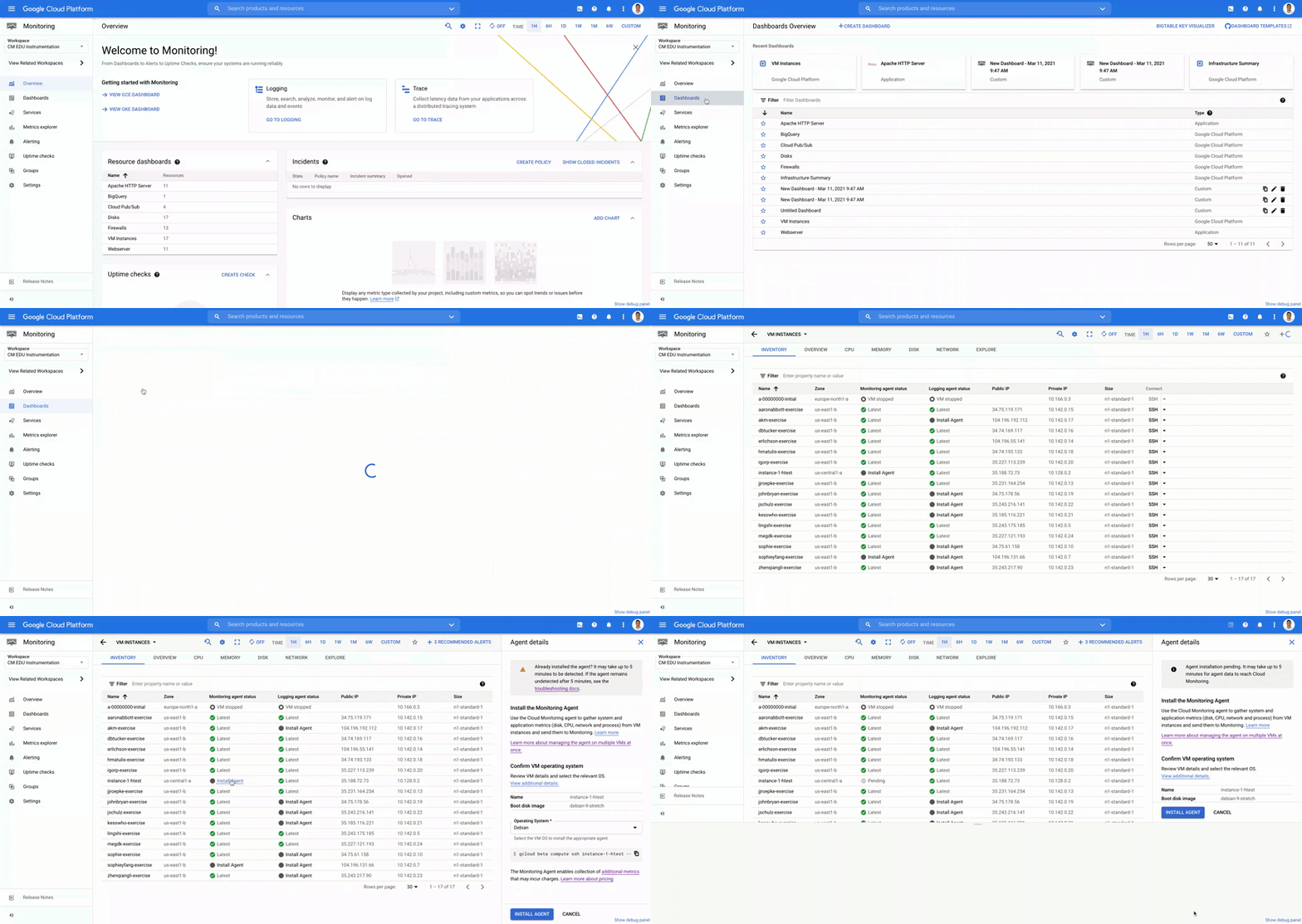
Site Reliability Engineering (SRE) and Operations teams responsible for operating virtual machines (VMs) are always looking for ways to provide a more stable, more scalable environment for their development partners. Part of providing that stable experience is having telemetry data (metrics, logs and traces) from systems and applications so you can monitor and troubleshoot effectively. Many Google Cloud services, including VMs, provide basic system metrics out of the box, without the need to install an agent. However, if you want in-depth metrics about your VMs or application telemetry, installing an agent is necessary.Agent installation options for Google Cloud VMsChoosing the right solution for installing agents on your VMs can save you a lot of time and effort. Google Cloud’s operations suite has created options ranging from one VM at a time, all the way to programmatic fleet installations. We know you’re overloaded with tools, so the options we present below leverage both the Google Cloud and third party tools which are likely already in use in your organization today.Before you begin installing agents, you have to determine which Google Cloud agent fits your needs. The Ops Agent is a single agent for both logs and metrics, targeted toward specialized high throughput logging workloads. Compared with the standard logging-only agent, you can capture more data and avoid OutofMemory errors. As of today, the Ops Agent is in preview, so be sure to confirm which agent will work best for your environment. If the Ops Agent doesn’t meet your needs, you should use the standard Logging and Monitoring agents.Single VM via the VM Instances dashboardIf you have only a small handful of VMs that need monitoring and logging, and you have determined that the standard Cloud Monitoring and Logging agents are your best options, you can use the VM Instances dashboard in Cloud Monitoring to begin the installation process. This dashboard provides a list of all VMs in your workspace and displays whether or not agents are installed on each VM. If agents are not installed, you can use the ‘Install Agent’ walk through to complete a simple installation flow. If agents are installed but they are out of date, you can click on “Learn more” and follow the linked instructions to upgrade the agent. The VM Instances dashboard in Cloud Monitoring, showing all VMs and the status of their agentsSingle VM via Google Compute Engine in-contextFrom the VM Instances page in Compute Engine, you can see important monitoring information about each of your VMs without having to navigate to Cloud Monitoring and you can also install the monitoring agent.The VM Instances dashboard in Compute Engine where you can deploy agentsMulti-VM with GCP Tooling (Agent Policies)If you are responsible for operating a fleet of hundreds or thousands of VMs, walking through a UI-based prompt for each machine does not scale. For those who do not prefer to use a third party configuration management or provisioning tools such as Ansible or Terraform, we provide a built-in option to programmatically manage the installation and management of your agents called Agent Policies, which is currently in preview. With one command, you can create a policy that governs new and existing VMs to ensure proper installation and optional auto-upgrade of the Ops Agent, the standard Logging agent, or the standard Monitoring agent on VMs that meet your specified criteria.Example of an Agent Policy with gcloud commands on VMs with Debian operating systemsMulti-VM with Ansible and TerraformUsing AnsibleAdministrators, SRE and IT managers spend enough time learning new tools. Therefore, if your organization already uses the configuration management/automation capabilities of the open source tool Ansible, we want to make sure you can use it to install agents for Cloud Logging and Cloud Monitoring. Using the Ansible Role, you can install and configure the agent(s) across your fleet of Linux and Windows VMs. For more information, refer to the Ansible Role for Cloud Ops documentation.Example playbook for installing the Ops Agent with AnsibleOther popular configuration management tool integrations such as Chef and Puppet are coming in the middle of this year.Using TerraformIf you are already using Terraform, the open-source provisioning management/infrastructure-as-code tool, you can use the Terraform module to install and configure our agents on your VMs. For more information, refer to the Terraform Agent Policy documentation.Sample module to install Ops Agent on all CentOS 8 VMs with two labels “env=prod” and “app=myproduct”Get started todayWhether you are managing a handful of VMs or an entire fleet, ensuring robust observability data is available from systems and applications is key to effective monitoring and troubleshooting. With the VM Instances dashboard in Cloud Monitoring, Agent Policies, or use of open source tooling such as Ansible and Terraform, you have many options to install agents on your Google Cloud VMs. While Google Cloud’s operations suite services like Cloud Logging and Cloud Monitoring have some VM metrics available out of the box, installing the Ops Agent or the Cloud Monitoring and Cloud Loggingagents allows you to gather the data that will help you operate your infrastructure and applications at their most optimal levels. Related ArticleRead Article
Quelle: Google Cloud Platform








