Deutsche Bank: iPhone statt Blackberry
Apples Enterprise-Offensive kommt beim größten Kreditinstitut Deutschlands an. Die Deutsche Bank modernisiert derzeit ihre IT.
Quelle: Heise Tech News

Apples Enterprise-Offensive kommt beim größten Kreditinstitut Deutschlands an. Die Deutsche Bank modernisiert derzeit ihre IT.
Quelle: Heise Tech News

Die Veröffentlichung der Spezifikation der digitalen Audio/Video-Schnittstelle wird sich verzögern. Dafür dürfte Microsofts kommende Spielekonsole Xbox One X bereits ein interessantes neues Feature unterstützen
Quelle: Heise Tech News
By Ivan Naranjo, Senior Software Engineer
Google Cloud Platform (GCP) is a great place to run your .NET workloads, and with the latest release of the Cloud Tools for Visual Studio extension, Cloud Tools for Powershell and our ASP.NET Core runtime for App Engine Flexible, it just got even better.
Cloud Tools for Visual Studio
We integrated the extension viewers for Stackdriver Logging and Stackdriver Error Reporting into Visual Studio to help you diagnose issues and monitor your code. We also enhanced Cloud Explorer with deeper integration into Google Cloud Storage and Google Cloud Pub/Sub so you can manage your resources without leaving Visual Studio.
Stackdriver integration
Sometimes even the best of code malfunctions in production. To help you diagnose what’s going on, we integrated Stackdriver Logging and Stackdriver Error Reporting right into Visual Studio, so you can find the source of the problem while you have your Visual Studio solution open.
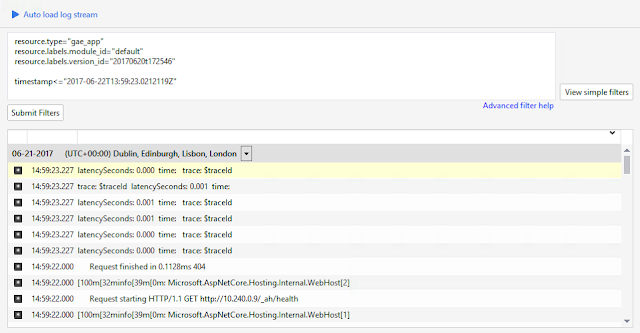
Regardless of whether your app is based on ASP.NET 4.x or ASP.NET Core, if you’re using Stackdriver Logging to log your .NET app, you can now browse the log entries that your app generated directly in Visual Studio:
You can also query for logs that originate from a particular service and version in Google App Engine (as the above image illustrates) or you can also browse log entries coming from a particular Compute Engine VM.
Even better, if you’re using our Google.Cloud.Logging.V2 NuGet package to send the log entries, the extension can match the log entries with the source code lines where they originated. The extension attempts to fetch the exact version of the source code from git, letting you see exactly from where the log entry originated. See the Stackdriver Log viewer documentation for full details on how to use this feature.
What about when your app crashes? Well, that’s where Stackdriver Error Reporting comes into play. If your application uses Stackdriver Error Reporting to send error reports to Stackdriver, you can now browse the error reports directly from within Visual Studio:
You can see the most frequent errors, the full stack trace of the error and even go directly to the source code line where the error originated. See the Stackdriver Error viewer for further details.
Cloud Explorer enhancements
We understand that you want to stay within Visual Studio when working on your apps, because moving in and out of Visual Studio is a huge context change. To that end, we keep enhancing our very own Cloud Explorer so you can manage the most important resources directly within Visual Studio. In the latest release we added deeper integration with Cloud Storage and added a new node to manage your Cloud Pub/Sub resources.
Let’s look at what you can now do with the Cloud Storage integration. You have always been able to see what buckets existed under the current project right in Cloud Explorer. Now, you can also open the buckets and see what what files are stored inside of them, treating buckets almost like a hard drive:
With the new integration, you can copy files in and out of buckets, rename them and create new directories — in short, manage the contents of your Cloud Storage buckets right inside of Visual Studio. See the documentation for full details on what you can now do with your Cloud Storage buckets.
Next up is the new Google Cloud Pub/Sub resource that we added to Cloud Explorer:
The new Cloud Pub/Sub node allows you to manage your Pub/Sub topics and subscriptions as well as send new messages to existing topics for testing, all within Visual Studio. Read the documentation for full details on what you can do with this new node.
New Powershell cmdlets
Visual Studio is a really good environment for most development work, but sometimes the right solution is to use Powershell to automate your GCP resources. To this effect we have added new cmdlets to manage even more resources. We added cmdlets to interact with BigQuery that allow you to run queries, create tables and more. We also added cmdlets to manage Google Container Engine clusters and nodes.
Kubernetes, and its GCP-managed variant Google Container Engine, is becoming one of the most popular ways to manage workloads in the cloud. That’s why we added a set of cmdlets to manage your Container Engine clusters from Powershell. For example, to create a new cluster use the following commands:
# Creates a Container Engine Node Config with image type CONTAINER_VM
# and 20 GB disk size for each node.
$nodeConfig = New-GkeNodeConfig -DiskSizeGb 20 `
-ImageType CONTAINER_VM
# Creates a cluster named “my-cluster” in the default zone of the
# default project using config $nodeConfig and network “my-network”.
Add-GkeCluster -NodeConfig $nodeConfig `
-ClusterName “my-cluster” `
-Network “my-network”
For more information on what you can do with the Container Engine cmdlets see the documentation.
Then there’s BigQuery, a great data warehousing solution for storing billions of rows and performing queries to extract insights from all that data. Here too we have new cmdlets to manage BigQuery directly from Powershell. For example, here’s how to create a new BigQuery table:
# Creates a schema object to be used in multiple tables.
$schema = New-BqSchema “Page” “STRING” | New-BqSchema “Referrer” “STRING” |
New-BqSchema “Timestamp” “DATETIME” | Set-BqSchema
# Creates a new table with the Schema object from above.
$table = $dataset | New-BqTable “logs2014″ -Schema $schema
For more information about what you can do with the BigQuery cmdlets see the documentation.
We want to hear from you
We want to work on the features that matter the most to you as we continue to improve .NET and Windows workloads on GCP. Please keep your feedback coming! You can open issues for Cloud Tools for Visual Studio and Cloud Tools for Powershell in their Github repos.
Quelle: Google Cloud Platform

Lenovo hofft auf die Zugkraft von Star Wars: Das Smartphone-Augmented-Reality-Headset namens Mirage unterstützt anfangs lediglich eine App: Star Wars Jede Challenges. Das Spiel macht Spaß; aber rechtfertigt es auch eine 300-Euro-Anschaffung?
Quelle: Heise Tech News

Es ist wohl einer der letzten Design Wins bei wichtigen Herstellern, den AMD erreicht hat. In naher Zukunft wird der Ryzen Pro es immerhin in die mittlere Optiplex-Serie schaffen. (Ifa 2017, Prozessor)
Quelle: Golem

Nach BB-8 nimmt sich Spielzeug-Hersteller Sphero zwei weitere Star-Wars-Roboter als Vorbild für seine fernsteuerbaren Spielzeuge. R2-D2 und BB-9E werden per App navigiert und können ab sofort beim US-Händler bestellt werden.
Quelle: Heise Tech News
The RDO community is pleased to announce the general availability of the RDO build for OpenStack Pike for RPM-based distributions, CentOS Linux 7 and Red Hat Enterprise Linux.
RDO is suitable for building private, public, and hybrid clouds. Pike is the 16th release from the OpenStack project, which is the work of more than 2300 contributors from around the world (source).
The release is making its way out to the CentOS mirror network, and should be on your favorite mirror site momentarily.
The RDO community project curates, packages, builds, tests and maintains a complete OpenStack component set for RHEL and CentOS Linux and is a member of the CentOS Cloud Infrastructure SIG.
The Cloud Infrastructure SIG focuses on delivering a great user experience for CentOS Linux users looking to build and maintain their own on-premise, public or hybrid clouds.
All work on RDO, and on the downstream release, Red Hat OpenStack Platform, is 100% open source, with all code changes going upstream first.
New and Improved
Interesting things in the Pike release include:
Ironic now supports booting from Cinder volumes, rolling upgrades and Redfish protocol.
We added OVN support to Packstack.
We added support to install the Horizon plugins for several services in Packstack.
Added/Updated packages
The following packages and services were added or updated in this
release:
Kuryr and Kuryr-kubernetes: an integration between OpenStack and Kubernetes networking.
Senlin: a clustering service for OpenStack clouds.
Shade: a simple client library for interacting with OpenStack clouds, used by Ansible among others.
python-pankoclient: a client library for the event storage and REST API for Ceilometer.
python-scciclient: a ServerView Common Command Interface Client Library, for the FUJITSU iRMC S4 – integrated Remote Management Controller.
Other additions include:
Python Libraries
os-xenapi
ovsdbapp (deps)
python-daiquiri (deps)
python-deprecation (deps)
python-exabgp
python-json-logger (deps)
python-netmiko (deps)
python-os-traits
python-paunch
python-scciclient
python-scrypt (deps)
python-sphinxcontrib-actdiag (deps) (pending)
python-sphinxcontrib-websupport (deps)
python-stestr (deps)
python-subunit2sql (deps)
python-sushy
shade (SDK)
update XStatic packages (update)
update crudini to 0.9 (deps) (update)
upgrade liberasurecode and pyeclib libraries to 1.5.0 (update) (deps)
Tempest Plugins
python-barbican-tests-tempest
python-keystone-testst-tempest
python-kuryr-tests-tempest
python-patrole-tests-tempest
python-vmware-nsx-tests-tempest
python-watcher-tests-tempest
Puppet-Modules
puppet-murano
puppet-veritas_hyperscale
puppet-vitrage
OpenStack Projects
kuryr
kuryr-kubernetes
openstack-glare
openstack-panko
openstack-senlin
OpenStack Clients
mistral-lib
python-glareclient
python-pankoclient
python-senlinclient
Contributors
During the Pike cycle, we started the
EasyFix initiative, which
has resulted in several new people joining our ranks. These include:
Christopher Brown
Anthony Chow
T. Nicole Williams
Ricardo Arguello
But, we wouldn’t want to overlook anyone. Thank you to all 172
contributors who participated in producing this release:
Aditya Prakash Vaja, Alan Bishop, Alan Pevec, Alex Schultz, Alexander Stafeyev, Alfredo Moralejo, Andrii Kroshchenko, Anil, Antoni Segura Puimedon, Arie Bregman, Assaf Muller, Ben Nemec, Bernard Cafarelli, Bogdan Dobrelya, Brent Eagles, Brian Haley, Carlos Gonçalves, Chandan Kumar, Christian Schwede, Christopher Brown, Damien Ciabrini, Dan Radez, Daniel Alvarez, Daniel Farrell, Daniel Mellado, David Moreau Simard, Derek Higgins, Doug Hellmann, Dougal Matthews, Edu Alcañiz, Eduardo Gonzalez, Elise Gafford, Emilien Macchi, Eric Harney, Eyal, Feng Pan, Frederic Lepied, Frederic Lepied, Garth Mollett, Gaël Chamoulaud, Giulio Fidente, Gorka Eguileor, Hanxi Liu, Harry Rybacki, Honza Pokorny, Ian Main, Igor Yozhikov, Ihar Hrachyshka, Jakub Libosvar, Jakub Ruzicka, Janki, Jason E. Rist, Jason Joyce, Javier Peña, Jeffrey Zhang, Jeremy Liu, Jiří Stránský, Johan Guldmyr, John Eckersberg, John Fulton, John R. Dennis, Jon Schlueter, Juan Antonio Osorio, Juan Badia Payno, Julie Pichon, Julien Danjou, Karim Boumedhel, Koki Sanagi, Lars Kellogg-Stedman, Lee Yarwood, Leif Madsen, Lon Hohberger, Lucas Alvares Gomes, Luigi Toscano, Luis Tomás, Luke Hinds, Martin André, Martin Kopec, Martin Mágr, Matt Young, Matthias Runge, Michal Pryc, Michele Baldessari, Mike Burns, Mike Fedosin, Mohammed Naser, Oliver Walsh, Parag Nemade, Paul Belanger, Petr Kovar, Pradeep Kilambi, Rabi Mishra, Radomir Dopieralski, Raoul Scarazzini, Ricardo Arguello, Ricardo Noriega, Rob Crittenden, Russell Bryant, Ryan Brady, Ryan Hallisey, Sarath Kumar, Spyros Trigazis, Stephen Finucane, Steve Baker, Steve Gordon, Steven Hardy, Suraj Narwade, Sven Anderson, T. Nichole Williams, Telles Nóbrega, Terry Wilson, Thierry Vignaud, Thomas Hervé, Thomas Morin, Tim Rozet, Tom Barron, Tony Breeds, Tristan Cacqueray, afazekas, danpawlik, dnyanmpawar, hamzy, inarotzk, j-zimnowoda, kamleshp, marios, mdbooth, michaelhenkel, mkolesni, numansiddique, pawarsandeepu, prateek1192, ratailor, shreshtha90, vakwetu, vtas-hyperscale-ci, yrobla, zhangguoqing, Vladislav Odintsov, Xin Wu, XueFengLiu, Yatin Karel, Yedidyah Bar David, adriano petrich, bcrochet, changzhi, diana, djipko, dprince, dtantsur, eggmaster, eglynn, elmiko, flaper87, gpocentek, gregswift, hguemar, jason guiditta, jprovaznik, mangelajo, marcosflobo, morsik, nmagnezi, sahid, sileht, slagle, trown, vkmc, wes hayutin, xbezdick, zaitcev, and zaneb.
Getting Started
There are three ways to get started with RDO.
To spin up a proof of concept cloud, quickly, and on limited hardware, try an All-In-One Packstack installation. You can run RDO on a single node to get a feel for how it works.
For a production deployment of RDO, use the TripleO Quickstart and you’ll be running a production cloud in short order.
Finally, if you want to try out OpenStack, but don’t have the time or hardware to run it yourself, visit TryStack, where you can use a free public OpenStack instance, running RDO packages, to experiment with the OpenStack management interface and API, launch instances, configure networks, and generally familiarize yourself with OpenStack. (TryStack is not, at this time, running Pike, although it is running RDO.)
Getting Help
The RDO Project participates in a Q&A service at ask.openstack.org, for more developer-oriented content we recommend joining the rdo-list mailing list. Remember to post a brief introduction about yourself and your RDO story. You can also find extensive documentation on the RDO docs site.
The #rdo channel on Freenode IRC is also an excellent place to find help and give help.
We also welcome comments and requests on the CentOS mailing lists and the CentOS and TripleO IRC channels (#centos, #centos-devel, and #tripleo on irc.freenode.net), however we have a more focused audience in the RDO venues.
Getting Involved
To get involved in the OpenStack RPM packaging effort, see the RDO community pages and the CentOS Cloud SIG page. See also the RDO packaging documentation.
Join us in #rdo on the Freenode IRC network, and follow us at @RDOCommunity on Twitter. If you prefer Facebook, we’re there too, and also Google+.
Quelle: RDO

Trekstor hat zwei Smartwatches für Geschäftskunden entwickelt. Die Uhren lassen sich auf spezielle Aufgaben anpassen, sollen etwa den Reinigungskräften in einem Hotel die Arbeit erleichtern. Wahlweise gibt es die Uhren mit Windows oder Android.
Quelle: Heise Tech News

Die rot-schwarze Koalition in Österreich hat sich nicht auf die Details für ein geplantes "Sicherheitspaket" einigen können. Vor der Wahl wird es so mit dem das Abhören von WhatsApp und Co. sowie der Vorratsdatenspeicherung nichts mehr.
Quelle: Heise Tech News

Nintendo und Western Digital verkaufen ab Oktober lizensierte, vorformatierte Speicherkarten für die Nintendo Switch. Die Konsole lässt sich allerdings auch mit ganz normalen Speicherkarten erweitern.
Quelle: Heise Tech News






