Welcome to Azure CLI Shell Preview

A few months ago, Azure CLI 2.0 was released. It provides a command line interface to manage/administer Azure resources. Azure CLI is optimized to run automation scripts composed of multiple commands, hence the commands and the overall user experience is not interactive. Azure CLI Shell (az-shell) provides an interactive environment to run Azure CLI 2.0 commands, which is ideal for new users learning the Azure CLI’s capabilities, command structures, and output formats. It provides autocomplete dropdowns, auto-cached suggestions combined with on the fly documentation, including examples of how each command is used. Azure CLI Shell provides an experience that makes it easier to learn and use Azure CLI commands.

Features

Gestures

The shell implements gestures that can be used by users to customize it. F3 function key in the toolbar can be used to look up all the available gestures at any time.

Scoping

The shell allows users to scope their commands to a specific group of commands. If you only want to work with ‘vm’ commands, you can use the following gesture to set the right scope so that you don’t have to type ‘vm’ with all subsequent commands:

  $ %%vm

Now, all the completions are ‘vm’ specific.

To remove a scope, the gesture is:

  $ ^^vm

Or, if I wish to remove all scoping:

   $ ^^

Scrolling through examples

The shell lists many examples for each command contextually, as you type your commands. However, some commands, like ‘vm create’ have too many examples to fit on the terminal screen. To look through all examples, you can scroll through the example pane with CTRLY and CTRLN for ‘up’ and ‘down’ , respectively.

Step-by-step examples

With all the examples, you can easily select a specific one to view in the example pane.

   $ [command] :: [example number]

The example number is indicated in the example pane. The shell takes the user through a step by step process to create the command and execute it.

Commands outside the shell

Azure CLI Shell allows a user to execute commands outside of Azure CLI from within the Shell itself. So you don’t need to exit out of the az-shell to add something to git, for example. Users can execute commands outside the shell with the gesture:

   $ #[command]

Query Previous Command

You can use a jmespath query on command outputs of type ‘json’ to quickly find properties/values that you want.

   $ ? [jmespath query]

Exit Code

There is a gesture that allows users to see the exit code of the last command they ran, to check if it executed properly.

   $ $

Installation

PyPI

   $ pip install –user azure-cli-shell

Docker

   $ docker run -it azuresdk/azure-cli-shell:0.2.0

To start the application

   $ az-shell

Welcome to Azure CLI Shell

Azure CLI Shell is open source and located on GitHub . If there are any issues, they can be filed on the Github repository or e-mailed to azfeedback. You can also use the “az feedback” command directly from within az-shell or az as well.
Quelle: Azure

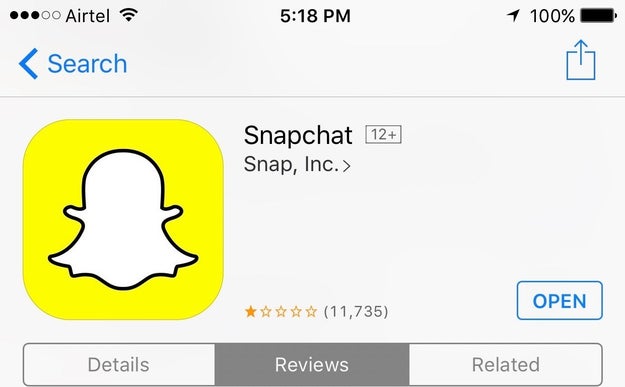
Furious Indians Are Leaving Snapchat One-Star Reviews In The App Store Because They're Mad At The CEO

A former Snap Inc. employee has claimed that CEO Evan Spiegel allegedly said that he didn&;t &;want to expand into poor countries like India and Spain.&;

A former Snap Inc. employee has claimed in a lawsuit that CEO Evan Spiegel said that Snapchat was “only for rich people”, and that he didn’t “want to expand into poor countries like India and Spain.”

A former Snap Inc. employee has claimed in a lawsuit that CEO Evan Spiegel said that Snapchat was “only for rich people”, and that he didn’t “want to expand into poor countries like India and Spain."

Lucas Jackson / Reuters

The news was reported by Variety earlier this week.

In a statement provided to BuzzFeed News, a Snap Inc. spokesperson said: “This is ridiculous. Obviously Snapchat is for everyone&; It&;s available worldwide to download for free.”

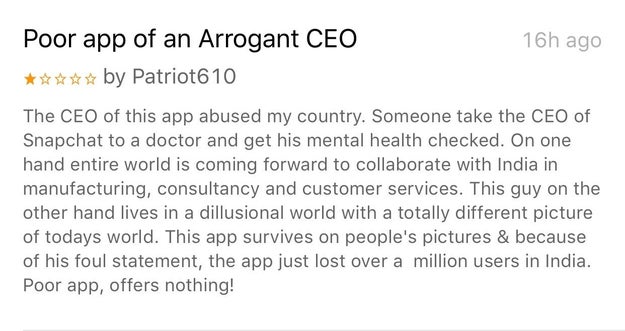
Over the weekend, however, Indians battered the Snapchat app with angry reviews and poor ratings in the Indian App Store.

Over the weekend, however, Indians battered the Snapchat app with angry reviews and poor ratings in the Indian App Store.

BuzzFeed News screenshot

They called Spiegel “delusional”…

They called Spiegel "delusional"...

App Store


View Entire List ›

Quelle: <a href="Furious Indians Are Leaving Snapchat One-Star Reviews In The App Store Because They&039;re Mad At The CEO“>BuzzFeed

Visualize Azure Machine Learning Models with MicroStrategy Desktop™


Have you ever wondered how you can use machine learning in your work?

It would be easy to assume that this type of advanced technology isn’t available to you because of simple logistics or complexities. The truth is, machine learning is more accessible than ever before – and even easy-to-use.

Together, Microsoft and MicroStrategy can help users create powerful, cloud-based machine learning applications through self-service analytics. MicroStrategy Desktop™, combined with Microsoft Azure ML, uses a drag-n-drop interface so users can efficiently plan, create and glean insights from a predictive dashboard.

April 18-20 at MicroStrategy World in Washington, DC, Microsoft will use a hands-on workshop to demonstrate how users can go from nothing to a fully-functional predictive data visualization built on machine learning within an hour. The three tools we’ll use are Microsoft R Open, Azure Machine Learning, and MicroStrategy 10 Desktop.

We invite you to attend the session and see it in action first-hand. If you can’t make the trip to MicroStrategy World, check out our step-by-step guide that we’ll review with the audience.

Sound like an easy way to begin using Machine Learning in your work? Here’s some more information on the three tools you need to get up and running in an hour.

Microsoft R Open

Microsoft R Open, formerly known as Revolution R Open (RRO), is the enhanced distribution of R from Microsoft Corporation. It is a complete open source platform for statistical analysis and data science. The current version, Microsoft R Open 3.3.2, is based on (and 100% compatible with) R-3.3.2, the most widely used statistics software in the world, and is therefore fully compatible with all packages, scripts, and applications that work with that version of R. It includes additional capabilities for improved performance, reproducibility, as well as support for Windows and Linux-based platforms.

Like R, Microsoft R Open is open source and free to download, use, and share. It is available from https://mran.microsoft.com/open/ .

Azure Machine Learning

Data can hold secrets, especially if you have lots of it. With lots of data about something, you can examine that data in intelligent ways to find patterns. And those patterns, which are typically too complex for you to detect yourself, can tell you how to solve a problem.

This is exactly what machine learning does: It examines large amounts of data looking for patterns, then generates code that lets you recognize those patterns in new data. Your applications can use this generated code to make better predictions. In other words, machine learning can help you create smarter applications. Azure Machine Learning enables you to build powerful, cloud-based machine learning applications.

MicroStrategy Desktop

Enterprise organizations use MicroStrategy Desktop to answer some of their most difficult business questions.

Available for Mac and PC, MicroStrategy Desktop is a powerful data discovery tool that allows users to access data on their own and build dashboards. With MicroStrategy Desktop, users can access over 70 data sources, from personal spreadsheets to relational databases and big data sources like Hadoop. With the ability to prepare, blend, and profile datasets with built-in data wrangling, users can go from data to dashboards in minutes on a single interface. MicroStrategy Desktop allows departmental users to visualize information with hundreds of chart and graph options, empowering them to make decisions on their own.

Come join us at MicroStrategy World or try the workshop out for yourself.
Quelle: Azure

Cloud Identity-Aware Proxy: Protect application access on the cloud

By Ameet Jani, Product Manager

Whether your application is lift-and-shift or cloud-native, administrators and developers want to provide simple protected application access for only those corporate users that should have access to it.

At Google Cloud Next ’17 last month, we launched Cloud Identity-Aware Proxy (Cloud IAP), which controls access to cloud applications running on Google Cloud Platform by verifying a user’s identity and determining whether that user is allowed to access the application.

Cloud IAP acts as the internet front end for your application, and you gain the benefits of group-based access control to your application and TLS termination and DoS protections from Google Cloud Load Balancer, which underlies Cloud IAP. Users and developers access the application as a public internet URL — no VPN clients to start up or manage.

With Cloud IAP, your developers can focus on writing custom code for their applications and deploy it to the internet with more protection from unauthorized access simply by selecting the application and adding users and groups to an access list. Google takes care of the rest.

How Cloud IAP works
As an administrator, you enable Cloud IAP protections by synchronizing your end-users’ identities to Google’s Cloud Identity Solution. You then define simple access policies for HTTPs web applications by selecting the users and groups who should be able to access them. Your developers, meanwhile, write and deploy HTTPs web applications to the internet behind Cloud Load Balancer, which passes incoming requests to Cloud IAP to perform identity checks and apply access policies. If the user is not yet signed-in, they’re prompted to do so before the policy is applied.

Cloud IAP is ideal if you need a fast and reliable way to access your applications more securely. No more hiding behind walled gardens of VPNs. Take advantage of Cloud IAP and let developers do what they’re good at, while giving security teams the peace of mind of increased protection of valuable enterprise data.

Cloud IAP is one of the suite of tools that enables you to implement the context-aware secure access described by Google’s BeyondCorp. You should also consider complementing Cloud IAP access control with phishing protection provided by our Security Key Management feature.

Cloud IAP pricing
Cloud IAP user- and group-based access control is available today at no cost. In the future, look for us to add features above and beyond controlling access based on users and groups. And stay tuned for further posts on getting started with Cloud IAP.
Quelle: Google Cloud Platform

Azure Search releases support for synonyms (public preview)

Today, we are happy to announce public preview support for synonyms in Azure Search, one of our most requested features on UserVoice. Synonyms functionality allows for Azure Search to not only return results which match the query terms that were typed into the search box, but also return results which match synonyms of the query terms. As a search-as-a-service solution, Azure Search is used in a wide variety of applications which span many languages, industries, and scenarios. Since terminology and definitions vary from case to case, Azure Search’s Synonyms API allows customers to define their own synonym mappings.

Synonyms aim to increase recall without sacrificing relevance

Synonyms functionality in Azure Search allows a user to get more results for a given query without sacrificing how relevant those results are to the query terms. In a real estate website, for example, a user may be searching for ‘jacuzzi.’ If some of the listings only have the term ‘hot tub’ or ‘whirlpool bath,’ then the user will not see those results. When ‘jacuzzi’ and ‘hot tub’ are mapped to one another in a synonym map, Azure Search does not have to do any guess-work in understanding that these terms are relevant even though the terms bear no resemblance in spelling.

Multi-word synonyms

In many full text search engines, support for synonyms is limited to single words. Our team has engineered a solution that allows Azure Search to support multi-word synonyms. This allows for phrase queries (“”) to function properly while using synonyms. If someone has mapped ‘hot tub’ to ‘whirlpool bath’ and they then search for “large hot tub,” Azure Search will return matches which contain both “large hot tub” and “large whirlpool bath.”

Support for Solr SynonymFilterFactory format

Azure Search’s synonyms feature supports the same format used by Apache Solr’s SynonymFilterFactory. As a widely-used open source standard, many existing synonym maps can be found for various languages and specific domains that can be used out-of-the box with Azure Search. 

Creating or updating a synonym map

Enabling synonyms functionality does not require any re-indexing of your content in Azure Search or any interruption of your service and you can add new synonyms at any time. Currently, the Synonyms API is in Public Preview and only available in the Service REST API (api-version=2016-09-01-Preview) and .NET SDK. 

When defining synonyms for Azure Search, you add a named resource to your search service called a synonymMap. You can enable synonyms for fields in your index by referring to the name of a synonymMap in the new synonymMaps property of the field definition.

Like an index definition, a synonym map is managed as an atomic resource that you read, update, or delete in a single operation. That means that if you want to make incremental changes to a synonym map, you will need to read, modify, and update the entire synonym map.

Below, there are some example operations using an example scenario of a real estate listings data set using the REST API. For examples using the .NET SDK, please visit the documentation. 

POST

You can create a new synonym map in the REST API using HTTP POST:

POST https://[servicename].search.windows.net/synonymmaps?api-version=2016-09-01-Preview
api-key: [admin key]
 

   "name":"addressmap",
   "format":"solr",
   "synonyms": "
      Washington, Wash., WA => WA
}

PUT

You can create a new synonym map or update an existing synonym map using HTTP PUT.

When using PUT, you must specify the synonym map name on the URI. If the synonym map does not exist, it will be created.

PUT https://[servicename].search.windows.net/synonymmaps/addressmap?api-version=2016-09-01-Preview
api-key: [admin key]
 

   "name":"addressmap",
   "format":"solr",
   "synonyms": "
      Washington, Wash., WA => WA
}


Types of synonym mappings

With the Synonyms API, it is possible to define synonyms in two ways: one-way mappings and equivalence-class mappings.

One-way mappings

With one-way mappings, Azure Search will treat multiple terms as if they all are a specific term. For example, the state where a property is located may only be stored as the two-letter abbreviation in the index for real estate listings. However, users may type in the full name of the state or other abbreviations.


   "name":"addressmap",
   "format":"solr",
   "synonyms": "
      Washington, Wash., WA => WA"
}

Equivalence-class mappings

In many domains, there are terms which all have the same or similar meaning. The Synonyms API makes it simple to map all like terms to one another so that the search term is expanded at query-time to include all synonyms. The above example of the multiple ways to describe ‘jacuzzi’ is demonstrated below.


   "name":"descriptionmap",
   "format":"solr",
   "synonyms": "hot tub, jacuzzi, whirlpool bath, sauna"
}

Setting the synonym map in the index definition

When defining a searchable field in your index, you can use the new property synonymMaps to specify a synonym map to use for the field. Multiple indexes in the same search service can refer to the same synonym map.

NOTE: Currently only one synonym map per field is supported.

POST https://[servicename].search.windows.net/indexes?api-version= 2016-09-01-Preview
api-key: [admin key]
 
{
   "name":"realestateindex",
   "fields":[
      {
         "name":"id",
         "type":"Edm.String",
         "key":true
      },
      {
         "name":"address",
         "type":"Edm.String",
         "searchable":true,
         "analyzer":"en.lucene",
         "synonymMaps":[
            "addressmap"
         ]
      },
      {
         "name":"description",
         "type":"Edm.String",
         "searchable":true,
         "analyzer":"en.lucene",
         "synonymMaps":[
            " descriptionmap "
         ]
      }
   ]
}

Synonyms + Search Traffic Analytics

Coupled with Search Traffic Analytics (STA), synonyms can be powerful in improving the quality of the search results that end users see. STA in Azure Search reveals the most common queries with zero results. By adding relevant synonyms to these terms, these zero-result queries can be mitigated. STA also shows the most common query terms for your Azure Search service, so you do not need to guess when determining proper terms for your synonym map.

Learn more

You follow these links for the detailed documentation around synonyms using the REST API and .NET SDK. Read more about Azure Search and its capabilities and visit our documentation. Please visit our pricing page to learn about the various tiers of service to fit your needs.
Quelle: Azure

Azure Analysis Services Backup and Restore

This post is authored by Bret Grinslade, Principal Program Manager and Josh Caplan, Senior Program Manager, Azure Analysis Services.

We have gotten good feedback from customers and partners starting to adopt Azure Analysis Services in production. Based on this feedback, this week we are releasing improvements around pricing options, support for backup and restore, and improved Azure Active Directory support. Please try them out and let us know how they work for you.

New Basic Tier

The new Basic Tier is designed to support smaller workloads with simpler refresh and processing needs. While you can put multiple models in one Standard instance, this new tier enables you to create models that are more targeted at less cost. The key differences between Standard and Basic is that the Basic tier does not support some specific enterprise features. Standard supports larger sizes and higher QPUs for concurrent queries and adds data partitioning for improved processing, translations, perspectives, and Direct Query. If your solution doesn’t need these capabilities, you can start with Basic. You can also scale up from Basic to Standard at any time. However, once you scale up to the higher tier you can’t scale back down to Basic. As an example, you can scale from B1 to S0 and then from S0 to S1 and back to S0, but you cannot scale from S0 to either the Basic or Develop tier.

Backup & Restore

We have added backup and restore. At a high level, you configure a backup storage location from your subscription for use with your Azure Analysis Services instance. If you do not have a storage account, you will need to create one. You can do this from the Azure Analysis Services blade for backup configuration or you can create it separately. Once you have associated a storage location, you can backup and restore from that location using TMSL commands or a tool like SQL Server Management Studio (SSMS) which will support this shortly. The documentation has more details on Backing Up and Restoring Azure Analysis Services models. One note, to restore a 1200 tabular model you have created with an on-premises version of SQL Server Analysis Services, you will need to copy it up to the storage account before it can be restored to Azure Analysis Services. The Microsoft Azure Storage Explorer or the AzCopy command-line utility are useful tools for moving large files in to Azure. In addition, if you restore a model from an on-premises server, the on-premises domain users will not have access to the model.  You will need to remove all of the on-premises users from the model roles and then you can add Azure Active Directory users to roles. The roles will be the same. Azure Analysis Services Server Admins will still have access as these are AAD based members. The setting on restore for “SkipMembership” will honored in a future service update to make managing cloud based role membership easier.

Improved Azure Active Directory integration

We have also done some work to improve the way Azure Analysis Services works with Azure Active Directory. Starting now, any newly created Azure AS server will be tied to the Azure AD tenant for which your Azure subscription is associated with and only users within that directory will be able to use your Azure AS server if granted access. This means that if a server is created in a subscription that is owned by Contoso.com than only users within the Contoso.com directory will be able to use those servers. In order to use that server, users must still be granted access to a role within the model. Azure AD supports a few options for allowing users outside of your organization to get access to resources within your tenant. One of these upcoming options will be Azure AD B2B. With B2B, you will be able to add guest access to users outside of your organization to your models through Azure Active Directory. We are hard at work enabling B2B for Azure Analysis Services end-to-end and will post an update when it is fully available in SSMS in SSDT as well as client tools.
Quelle: Azure

How do you build 12-factor apps using Kubernetes?

The post How do you build 12-factor apps using Kubernetes? appeared first on Mirantis | Pure Play Open Cloud.
It&;s said that there are 12 factors that define a cloud-native application.  It&8217;s also said that Kubernetes is designed for cloud native computing. So how do you create a 12-factor application using Kubernetes?  Let&8217;s take a look at exactly what twelve factor apps are and how they relate to Kubernetes.
What is a 12 factor application?
The Twelve Factor App is a manifesto on architectures for Software as a Service created by Heroku. The idea is that in order to be really suited to SaaS and avoid problems with software erosion &; where over time an application that&8217;s not updated gets to be out of sync with the latest operating systems, security patches, and so on &8212; an app should follow these 12 principles:

Codebase
One codebase tracked in revision control, many deploys
Dependencies
Explicitly declare and isolate dependencies
Config
Store config in the environment
Backing services
Treat backing services as attached resources
Build, release, run
Strictly separate build and run stages
Processes
Execute the app as one or more stateless processes
Port binding
Export services via port binding
Concurrency
Scale out via the process model
Disposability
Maximize robustness with fast startup and graceful shutdown
Dev/prod parity
Keep development, staging, and production as similar as possible
Logs
Treat logs as event streams
Admin processes
Run admin/management tasks as one-off processes

Let&8217;s look at what all of this means in terms of Kubernetes applications.
Principle I. Codebase
Principle 1 of a 12 Factor App is &;One codebase tracked in revision control, many deploys&;.
For Kubernetes applications, this principle is actually embedded in the nature of container orchestration itself.  Typically, you create your code using a source control repository such as a git repo, then store specific versions of your images in the Docker Hub. When you define the containers to be orchestrated as part of a a Kubernetes Pod, Deployment, DaemonSet, you also specify a particular version of the image, as in:

spec:
     containers:
     – name: AcctApp
       image: acctApp:v3

In this way, you might have multiple versions of your application running in different deployments.
Applications can also behave differently depending on the configuration information with which they run.
Principle II. Dependencies
Principle 2 of a 12 Factor App is &8220;Explicitly declare and isolate dependencies&8221;.
Making sure that an application&8217;s dependencies are satisfied is something that is practically assumed. For a 12 factor app, that includes not just making sure that the application-specific libraries are available, but also not counting on, say, shelling out to the operating system and assuming system libraries such as curl will be there.  A 12 factor app must be self-contained.
That includes making sure that the application is isolated enough that it&8217;s not affected by conflicting libraries that might be installed on the host machine.
Fortunately, if an application does have any specific or unusual system requirements, both of these requirements are handily satisfied by containers; the container includes all of the dependencies on which the application relies, and also provides a reasonably isolated environment in which the container runs.  (Contrary to popular belief, container environments are not completely isolated, but for most situations, they are Good Enough.)
For applications that are modularized and depend on other components, such as an HTTP service and a log fetcher, Kubernetes provides a way to combine all of these pieces into a single Pod, for an environment that encapsulates those pieces appropriately.
Principle III. Config
Principle 3 of a 12 Factor App is &8220;Store config in the environment&8221;.
The idea behind this principle is that an application should be completely independent from its configuration. In other words, you should be able to move it to another environment without having to touch the source code.
Some developers achieve this goal by creating configuration files of some sort, specifying details such as directories, hostnames, and database credentials. This is an improvement, but it does carry the risk that someone will check a config file into the source control repository.
Instead, 12 factor apps store their configurations as environment variables; these are, as the manifesto says, &8220;unlikely to be checked into the repository by accident&8221;, and they&8217;re operating system independent.
Kubernetes enables you to specify environment variables in manifests via the Downward API, but as these manifests themselves do get checked int source control, that&8217;s not a complete solution.
Instead, you can specify that environment variables should be populated by the contents of Kubernetes ConfigMaps or Secrets, which can be kept separate from the application.  For example, you might define a Pod as:
apiVersion: v1
kind: Pod
metadata:
 name: secret-env-pod
spec:
 containers:
   – name: mycontainer
     image: redis
     env:
       – name: SECRET_USERNAME
         valueFrom:
           secretKeyRef:
             name: mysecret
             key: username
       – name: SECRET_PASSWORD
         valueFrom:
           secretKeyRef:
             name: mysecret
             key: password
       – name: CONFIG_VERSION
         valueFrom:
           configMapKeyRef:
             name: redis-app-config
             key: version.id
As you can see, this Pod receives three environment variables, SECRET_USERNAME, SECRET_PASSWORD, and CONFIG_VERSION, the first two from from referenced Kubernetes Secrets, and the third from a Kubernetes ConfigMap.  This enables you to keep them out of configuration files.
Of course, there&8217;s still a risk of someone mis-handling the files used to create these objects, but it&8217;s them together and institute secure handling policies than it is to weed out dozens of config files scattered around a deployment.
What&8217;s more, there are those in the community that point out that even environment variables are not necessarily safe for their own reasons.  For example, if an app crashes, it may save all of the environment variables to a log or even transmit them to another service.  Diogo Mónica points to a tool called Keywhiz you can use with Kubernetes, creating secure secret storage.
Principle IV. Backing services
Principle 4 of the 12 Factor App is &8220;Treat backing services as attached resources&8221;.
In a 12 Factor app, any services that are not part of the core application, such as databases, external storage, or message queues, should be accessed as a service &8212; via an HTTP or similar request &8212; and specified in the configuration, so that the source of the service can be changed without affecting the core code of the application.
For example, if your application uses a message queuing system, you should be able to change from RabbitMQ to ZeroMQ (or ActiveMQ or even something else) without having to change anything but configuration information.
This requirement has two implications for a Kubernetes-based application.
First, it means that you must think about how your applications take in (and give out) information. For example, if you have a backing database, you wouldn&8217;t want to have a local Mysql instance, even if you&8217;re replicating it to other instances. Instead, you would want to have a separate container that handles database operations, and make those operations callable via an API. This way, if you needed to change to, say, PostgreSQL or a remotely hosted MySQL server, you could create a new container image, update the Pod definition, and restart the Pod (or more likely the Deployment or StatefulSet managing it).  
Similarly, if you&8217;re storing credentials or address information in environment variables backed by a ConfigMap, you can change that information and replace the Pod.
Note that both of these examples assume that though you&8217;re not making any changes to the source code (or even the container image for the main application) you will need to replace the Pod; the ability to do this is actually another principle of a 12 Factor App.
Principle V. Build, release, run
Principle 5 of the 12 Factor App is &8220;Strictly separate build and run stages&8221;.
These days it&8217;s hard to imagine a situation where this is not true, but a twelve-factor app must have a separate build stage.  In other words, you should be able to build or compile the code, then combine that with specific configuration information to create a specific release, then deliberately run the release.
Releases should be identifiable.  You should be able to say, &;This deployment is running Release 1.14 of this application&8221; or something similar, the same way we say we&8217;re running &8220;the OpenStack Ocata release&8221; or &8220;Kubernetes 1.6&8221;.  They should also be immutable; any changes should lead to a new release.  If this sounds daunting, remember that when we say &8220;application&8221; we&8217;re no longer talking about large, monolithic releases.  Instead, we&8217;re talking about very specific microservices, each of which has its own release, and which can bump releases without causing errors in consuming services.
All of this is so that when the app is running, that &8220;run&8221; process can be completely automated. Twelve factor apps need to be capable of running in an automated fashion because they need to be capable of restarting should there be a problem.
Translating this to the Kubernetes realm, we&8217;ve already said that the application needs to be stored in source control, then built with all of its dependencies.  That&8217;s your build process.  We talked about separating out the configuration information, so that&8217;s what needs to be combined with the build to make a release. And the ability to automatically run the application &8212; or multiple copies of the application &8212; is precisely what Kubernetes constructs like Deployments, ReplicaSets, and DaemonSets do.
Principle VI. Processes
Principle 6 of the 12 Factor App is &8220;Execute the app as one or more stateless processes&8221;.
Stateless processes are a core idea behind cloud native applications. Every twelve-factor application needs to run in individual, share-nothing processes. That means that any time you need to persist information, it needs to be stored in a backing service such as a database.
If you&8217;re new to cloud application programming, this might be deceptively simple; many developers are used to &8220;sticky&8221; sessions, storing information in the session with the confidence that the next request will come to the same server. In a cloud application, however, you must never make that assumption.
Instead, if you&8217;re running a Kubernetes-based application that hosts multiple copies of a particular pod, you must assume that subsequent requests can go anywhere.  To solve this problem, you will want to use some sort of backing volume or database for persistence.
One caveat to this principle is that Kubernetes StatefulSets can enable you to create Pods with stable network identities, so that you can, theoretically, direct requests to a particular pod. Technically speaking, if the process doesn&8217;t actually store state, and the pod can be deleted and recreated and still function properly, it satisfies this requirement &8212; but that&8217;s probably pushing it a bit.
Principle VII. Port binding
Principle 7 of the 12 Factor App is &8220;Export services via port binding&8221;.
In an environment where we&8217;re assuming that different functionalities are handled by different processes, it&8217;s easy to make the connection that these functionalities should be available via a protocol such as HTTP, so it&8217;s common for applications to be run behind web servers such as Apache or Tomcat.  Twelve-factor apps, however, should not be depend on an additional application in that way; remember, every function should be in its own process, isolated from everything else. Instead, the 12 Factor App manifesto recommends adding a web server library or something similar to the app itself, so that the app can await requests on a defined port, whether it&8217;s using HTTP or another protocol.
In a Kubernetes-based application, this is done partly through the architecture of the application itself, and partly by making sure that the application has all of its dependencies as part of the creation of the base containers on which the application is built.
Principle VIII. Concurrency
Principle 8 of the 12 Factor App is to &8220;Scale out via the process model&8221;.
When you&8217;re writing a twelve-factor app, make sure that you&8217;re designing it to be scaled out, rather than scaled up. That means that in order to add more capacity, you should be able to add more instances rather than more memory or CPU to the machine on which the app is running. Note that this specifically means being able to start additional processes on additional machines, which is, fortunately, a key capability of Kubernetes.
Principle IX. Disposability
Principle 9 of the 12 Factor App is to &8220;Maximize robustness with fast startup and graceful shutdown&8221;.
It seems like this principle was tailor made for containers and Kubernetes-based applications. The idea that processes should be disposable means that at any time, an application can die and the user won&8217;t be affected, either because there are others to take its place, because it&8217;ll start right up again, or both.
Containers are built on this principle, of course, and Kubernetes structures that manage multiple instances and maintain a certain level of availability even in the face of problems, such as ReplicaSets, complete the picture.
Principle X. Dev/prod parity
Principle 10 of the 12 Factor App is &8220;Keep development, staging, and production as similar as possible&8221;.
This is another principle that seems like it should be obvious, but is deeper than most people think. On the surface level, it does mean that you should have identical development, staging, and production environments, inasmuch as that is possible. One way to accomplish this is through the use of Kubernetes namespaces, enabling you to (theoretically) run code on the same actual cluster against the same actual systems while still keeping environments separate. In some situations, you can also use tools such as Minikube or kubeadm-dind-cluster to create near-clones of production systems.
At a deeper level, though, as the Twelve-Factor App manifesto puts it, it&8217;s about three different types of &8220;gaps&8221;:

The time gap: A developer may work on code that takes days, weeks, or even months to go into production.

The personnel gap: Developers write code, ops engineers deploy it.

The tools gap: Developers may be using a stack like Nginx, SQLite, and OS X, while the production deploy uses Apache, MySQL, and Linux.

The goal here is to create a Continuous Integration/Continuous Deployment situation in which changes can go into production virtually immediately (after testing, of course!), deployed by the developers who wrote it so they can actually see it in production, using the same tools on which the code was actually written in order to minimize the possibility of compatibility errors between environments.
Some of these factors are outside of the realm of Kubernetes, of course; the personnel gap is a cultural issue, for example. The time and tools gaps, however, can be helped in two ways.
For the time gap, Kubernetes-based applications are, of course, based on containers, which themselves are based on images that are stored in version-control systems, so they lend themselves to CI/CD. They can also be updated via rolling updates that can be rolled back in case of problems, so they&8217;re well-suited to this kind of environment.
As far as the tools gap is concerned, the architecture of Kubernetes-based applications make it easier to manage, both by making local dependencies simple to include in the various images, and by modularizing the application in such a way that external backing services can be standardized.
Principle XI. Logs
Principle 11 of the 12 Factor App is to &8220;Treat logs as event streams&8221;.
While most traditional applications store log information in a file, the Twelve-Factor app directs it, instead, to stdout as a stream of events; it&8217;s the execution environment that&8217;s responsible for collecting those events. That might be as simple as redirecting stdout to a file, but in most cases it involves using a log router such as Fluentd and saving the logs to Hadoop or a service such as Splunk.
In Kubernetes, you have at least two choices for automatic logging capture: Stackdriver Logging if you&8217;re using Google Cloud, and Elasticsearch if you&8217;re not.  You can find more information on setting Kubernetes logging destinations here.
Principle XII. Admin processes
Principle 12 of the 12 Factor App is &8220;Run admin/management tasks as one-off processes&8221;.
This principle involves separating admin tasks such as migrating a database or inspecting records from the rest of the application. Even though they&8217;re separate, however, they must still be run in the same environment and against the same base code and configuration as the application, and their code must be shipped alongside the application to prevent drift.
You can implement this a number of different ways in Kubernetes-based applications, depending on the size and scale of the application itself. For example, for small tasks, you might use kubectl exec to operate on a specific container, or you can use the Kubernetes Job to run a self-contained application. For more complicated tasks that involve orchestration of changes, however, you can also use Kubernetes Helm charts.
How many of these factors did you hit?
Unless you&8217;re still building desktop applications, chances are you can feel good about hitting at least a few of these essential principles of twelve-factor apps. But chances are you also found at least one or two you can probably work a little harder on.
So we want to know: which of these factors are the biggest struggle for you? Where do you think you need to work harder, and what would make it easier for you?  Let us know in the comments.
Thanks to Jedrzej Nowak, Piotr Shamruk, Ivan Shvedunov, Tomasz Napierala and Lukasz Oles for reviewing this article!
Check out more Kubernetes resources.
The post How do you build 12-factor apps using Kubernetes? appeared first on Mirantis | Pure Play Open Cloud.
Quelle: Mirantis


Protection in the cloud with a two-pronged approach

Hacking often conjures images of malicious criminals breaking into computer systems to steal and sell data for monetary gain. More recently, hacking has become known as a weapon that can cause public embarrassment and wreck reputations.
Cyber-extortion and the threat to expose sensitive information are on the rise. In a recent IBM report, “Ransomware: How consumers and businesses value their data,” almost half of executives (46 percent) reported that they’ve had some experience with ransomware attacks in the workplace, and 70 percent of those respondents paid to get data back.
Such threats and the news stories they generate are primary reasons why security is a top concern for businesses. However, executives at the forefront of implementing hybrid cloud strategies say they are overcoming this challenge, according to the report “Growing up hybrid: Accelerating digital transformation.” Extending the same level of security controls and best practices they have in place for traditional IT to the cloud is one way to reduce risk. Assigning business-critical work to on-premises resources is another. In fact, 78 percent of these executives say that hybrid cloud is actually improving security.
As the benefits of — agility, innovation and efficiency — become undeniable, information security is taking on greater importance. The best defense is to cultivate security as a behavior. Technology alone cannot protect companies. There must be a cultural change in the way all employees think about security.
Expanding cloud computing
Market demands are shifting the way CIOs think about data storage and security, says Roy Illsley, chief analyst with the digital consultancy firm Ovum. Most companies still store their most sensitive data in mainframes. However, Illsley expects that to change in the next five to 10 years as consumers insist on instant access to data.
“If you’ve got everything in a mainframe and it’s stored in Frankfurt, all nice and secure, but you’ve got customers all over the world, the latency of that from someone traveling in China is probably too great to be of any use to them,” he says.
Andras Cser, an analyst with Forrester Research, says financial concerns also weigh heavily. “You can’t choose to have a legacy system because of the cost,” he says. “The cloud is so much more inexpensive. The question isn’t whether a company should move to the cloud, it’s how.”
Cloud computing is no longer limited to just the world of computer servers, data storage and networking. Increasingly, it is core to mobile devices, sensors, cognitive and the Internet of Things (IoT). As innovations like cognitive and IoT become widespread, cloud computing is seemingly everywhere.
Outsmarting the hackers
As more information is digitized, security awareness needs to increase. Hackers gain entry to secure systems via phishing attacks in which employees click on malicious attachments or visit websites that download malware onto their machines. Organizations must take a two-pronged approach to security that uses tech-based solutions, and requires workers to change how they use technology.
For instance, encryption protects email, but employees also need to be careful about what they say in their emails. It goes back to human behavior. Is that the right medium for that communication or should you just pick up a phone? That decision is made by an individual.
Many high-profile email attacks that splashed across headlines were partly the result of inadequate technology, such as not using the right email signatures, and a misguided use of the medium. It all boils down to each user’s level of security consciousness and the best practices that he or she has internalized as a behavior. The adversary is getting cannier, so security relies upon individual actions and decisions.
Security requires a strong technical defense as well. Standard defenses include encryption and geofencing, which builds a virtual fence around data and monitors employees’ comings and goings. It’s not enough to merely have such technologies on hand, however. The key is to examine how well they are configured.
Organizations need people who not only know how to secure the system, but also stay ahead of emerging threats. One positive trend: companies are beginning to work together to fight hackers.
Such cooperation shows that security has become a global issue. Never before have businesses and public personalities had a better reason to work collaboratively to thwart cybersecurity threats.
The post Protection in the cloud with a two-pronged approach appeared first on Cloud computing news.
Quelle: Thoughts on Cloud