
DockerCon 2017 Day 1 Highlights

What an incredible 2017 we had last week. Big thank you to all of the 150+ confirmed speakers, 100+ sponsors and over 5,500 attendees for contributing to the success of these amazing 3 days in Austin. You’ll find below the videos and slides from general session day 1.All the slides will soon be published on our slideshare account and all the breakout session video recordings available on our DockerCon 2017 youtube playlist.

Here’s what we covered during the day 1 general session:

17:00 Developer Workflow improvements and demo
37:00 Secure Orchestration and demo
59:00 Introducing : a toolkit for building secure, lean and portable linux subsystems
1:15 Introducing the Moby Project: a new open source project to advance the software containerization movement

Development workflow Improvements
Solomon’s keynote started by introducing new Docker features to improve the development workflows of Docker users: multi-stage builds and desktop-to-cloud integration. With multi-stage builds you can now easily separate your build-time and runtime container images, allowing development teams to ship minimal and efficient images. It’s time to say goodbye to those custom and non-portable build scripts! With desktop-to-cloud you can easily connect to a remote swarm cluster using your Docker ID for authentication, without having to worry about maintaining a complex public key infrastructure, nor requiring developers to get ssh access to the hosts themselves. Desktop-to-cloud is the fastest way for development teams to collaborate on shared pre-production environments.
Secure orchestration
In his presentation, Diogo Monica talks about SwarmKit and how to take the security of orchestration to the next level with secure node introduction, cryptographic node identify, MTLS between all nodes, cluster segmentation, encrypted networks and secure secret distribution. Watch the video to see a demo of this secure orchestration layer in action within an enterprise.
LinuxKit
Solomon then introduced a new component bringing Linux container functionality to new and varied platforms, from IoT to mainframes. This component called LinuxKit includes the tooling to allow building custom Linux subsystems that only include exactly the components the runtime platform requires. All system services are containers that can be replaced, and everything that is not required can be removed. All components can be substituted with ones that match specific needs. It is a kit, very much in the Docker philosophy of batteries included but swappable. Read more about LinuxKit.

Moby Project
Finally, Solomon announced the Moby Project, a new open-source project to advance the software containerization movement and help the ecosystem take containers mainstream. It provides a library of components, a framework for assembling them into custom container-based systems and a place for all container enthusiasts to experiment and exchange ideas. Read more about the Moby Project. 
Docker users, please refer to Moby and Docker to clarify the relationship between the projects. Docker maintainers and contributors, please check out Transitioning to Moby for more details.

Watch the dockercon general session videos! Introducing linuxKit and @mobyClick To Tweet

Learn More about the general sessions announcements:

Read more about LinuxKit.
Read more about the Moby Project
Sign up for the DockerCon 2017 Recap Online Meetup
Register for DockerCon Europe 2017

The post DockerCon 2017 Day 1 Highlights appeared first on Docker Blog.
Quelle: https://blog.docker.com/feed/

Blockchain and the third trust revolution

Blockchain has the potential to sweep away the central trust authorities of governments, banks and corporations as  I discussed in my previous post.
Why? Because blockchain enables virtual communities to re-create the person-to-person trust of small villages and societies at a global scale.
Ancient societies were based on the idea of personal trust: I trust you because I know what you have done. I know the moral and ethical code by which you live.
Blockchain cannot enable people to know a person they have never met, but they can see what that person has done in the community network. Users know the business code which by they live, because it’s encoded into the blockchain as smart contracts.
It’s person-to-person trust at a global scale.
For example, there is a micro-energy grid in New York which lets people with solar panels sell that power directly to consumers using a blockchain. The grid is run for the mutual benefit of the small-scale generators and their customers. There is no utility company in that model.
Blockchain brings providers and consumers together in a mutually beneficial business network, where everyone agrees the rules in advance and plays by them.
If you doubt that blockchain has the potential to be at least as disruptive as the web, consider this: the web has changed how we live our lives with e-commerce, digital banking, streaming music, TV on demand, social media, Yet it has not fundamentally changed the economic models that our world is built on. We still buy music from a music company. We still book taxis from a taxi company or car service. It might be Spotify and Uber now, but they are still central trust authorities.
Imagine if we could connect providers and consumers directly, for the benefit of everyone, not just corporations. If we could connect passengers and drivers, authors and readers, people who want to lend, with people who want to borrow? What would that world be like?
The third revolution
Blockchain is a new type of database. It has key characteristics which enable participants to have a high degree of trust in the data, and the business network. It allows users to take the person-to-person trust of small groups and scale it globally.
Throughout history, we have had to invent new trust mechanisms. The first real trust revolution was coins, and the second was the intangible monetary system.
Blockchain has the potential to be the third trust revolution, sweeping away the monetary system in the same way that that system swept away coins, relegating them to loose change that we use to pay for coffees.
Just as coins and money helped to accelerate global wealth, the applications which blockchain will enable will drive our economy through 21st century and beyond.
Learn more about IBM Blockchain.
The post Blockchain and the third trust revolution appeared first on news.
Quelle: Thoughts on Cloud

Here's The Thing With Free Apps And Services

John Lamb / Getty Images

If there’s only one thing you take away from this article, let it be this: there’s no such thing as free lunch.

The New York Times recently reported that Unroll.me, an email management app that promises to de-clutter your inbox, sold its users’ anonymized Lyft receipt data to Uber. Unroll.me claims that it’s “trusted by millions of happy users” — but it’s likely that those users weren’t aware that they were forking over their personal emails to Slice Intelligence, a digital commerce analytics company. Now, some users are pledging to remove their inbox access from Unroll.me and delete their accounts.

The Unroll.me/Uber fury is a good reminder of the ol’ Internet adage, “if you’re not paying for it, you’re not the customer, you’re the product.”

But some sites are much more egregious than others. So here are some ways you can assess an app’s trustworthiness and find out if your free faves are problematic.

What does “you’re the product” even mean?

When you sign up for a free online service, you’re most likely giving up something in return: your data. On sites like Facebook and Google, that means the service uses your personal information (like your interests, location, gender, marital status, or age) to show you advertisements they think you’d be interested in. Last year, Facebook made more than $26 billion from advertising.

For many people, this sounds like a good trade off: You get to use something legitimately useful, like Gmail, for free, and the most visible consequence is an advertisement. But other companies go much farther. Unroll.me, for example, didn’t use user data to target ads — it looked at individual emails and sent them to Uber.

And if you found that story about Target knowing a teen girl was pregnant before her father did thanks to extensive customer data collection to be pretty creepy, you should know that that same kind of analytics-based-advertising-influence has probably been exercised on you.

How do I know what companies are doing with my data? Is it safe?

Be very careful about what kind of access you give apps. To do that, closely at what you’re agreeing to when you sign up.

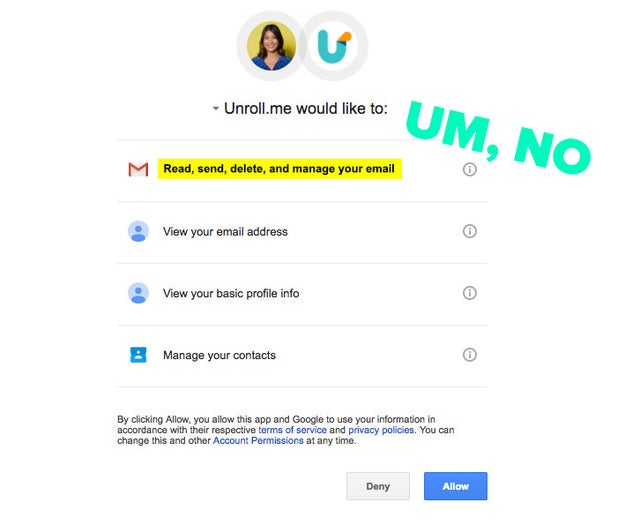
For example, when you sign up for Unroll.me, you’re giving the service the ability to read, send, delete, and manage your email. This is a good time to ask yourself: Does the service really need all of these permissions? Do I trust this service?
Nicole Nguyen / BuzzFeed News

A good place to start looking for answers is the service’s FAQ page. If there’s a section on security or privacy, it may reveal why it asks for something specifically, like access to your contacts.

And this is something I can’t stress enough: it’s really important to read – or, at the very least, comb through – the terms and conditions when you’re using a *free* app or service, especially when it’s a you’re giving it full access to your inbox.

I know you’re thinking “Who the hell has time for all that legalese?&;” You’re right. Terms of service pages are often long, complicated, and vague which is why no one reads them. But there are two great sites that can help you make sense of this consumer contract.

One is Terms of Service; Didn’t Read, which rates and labels policies based on their user-friendliness. For example, when a service warns of allowing access to third-party apps, that gets a thumbs up. If the service says it can make changes to terms without notifying users at any time, that gets a thumbs down.

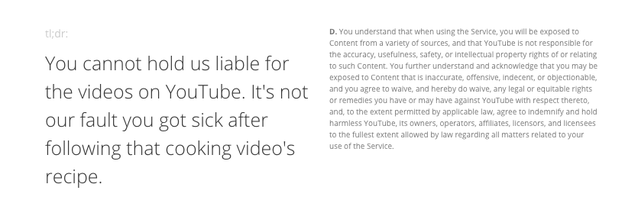
Another tool is TLDRLegal, which offers a short, plain-language synopsis next to the actual legal text of various company’s terms and conditions. This site is very new, so there aren’t many services on the platform yet, but you can currently look at YouTube’s, Apple’s, Dropbox’s, and Minecraft’s terms of service analyses to start familiarizing yourself with the legal language.
TL;DR Legal

If you’re really concerned about what you discover, contact the app’s support team or send them a tweet to see if there’s room for clarification. Might as well try&033;

Want to learn how to judge a privacy policy for yourself? Center of Plain Language created a great rubric for determining what makes a policy good and bad.

So, what are some things that I should do right now?

Take this time to review what apps are connected to your email or social accounts. You can easily revoke apps you don’t recognize or haven’t used in a while with access to Twitter, Google, and Facebook.

You should also see what the apps on your phone can access. In iOS, go to Settings > Privacy. Review which apps are using the microphone, location tracking, or your phone’s contacts. Then toggle permissions on and off for an app that, say, doesn’t need access to your photo library. On Android, you can go to Settings > Apps and tap on individual apps, then select where it says Permissions.

As previously mentioned, if you do use apps with access to your Gmail account, be extra vigilant.

Sanebox, a paid email management service similar to Unroll.me, specifically claims that they will never sell user data, “even aggregated information,” to another company. Unsubscriber, on the other hand, will use your personal info to improve advertising by third parties. Boomerang, an add-on that lets you schedule Gmails, says that “no personally-identifiable information will be sold or transferred to unaffiliated third parties” without permission, but isn’t clear about aggregate information, though the CEO did tweet that the company makes money from paid subscriptions, rather than selling data. Mailvelope, an email encryption extension, says that they do not share, sell, or market personal data unless you’ve given explicit consent.

Generally, stay away from free VPNs, or Virtual Private Networks. When you use provided Wi-Fi at a public venue like an airport, be aware that the service provider may sell your information to advertisers or use cookies to track website usage and access (Boingo and Gogo both do this). Additionally, note that some ad blockers like AdBlock Plus accept payment to let some advertisements through.

Consider using paid apps that prioritize user privacy above all else and have strong privacy language on their webpages.

And remember: if a service is free, look into how the company is making money and paying for server costs. If it’s with your data, make sure you know *exactly* what they’re doing with it.

cbc.ca / Via giphy.com

Quelle: <a href="Here&039;s The Thing With Free Apps And Services“>BuzzFeed






