Uber President Quits As Company Deals With Sexism, Management

Seth Wenig / AP

Uber president Jeff Jones is leaving the ride-hailing company as it continues to face issues of sexism and leadership.

Jones, previously an executive with retailer Target, joined Uber six months ago as its president of ride-sharing.

“The beliefs and approach to leadership that have guided my career are inconsistent with what I saw and experienced at Uber, and I can no longer continue as president of the ride sharing business,” Jones said in a statement to Recode. “There are thousands of amazing people at the company, and I truly wish everyone well.”

Uber confirmed Jones&; departure in a statement.

“We want to thank Jeff for his six months at the company and wish him all the best,” the statement said.

The company recently made headlines after former engineer Susan Fowler Rigetti wrote about rampant sexual harassment and inequality. Management was regularly in chaos as employees pursued their own interests, and human resources did nothing when complaints were reported, she said.

More than 100 other women engineers in the company agreed there was a systemic problem.

In response, Uber CEO Travis Kalanick ordered an internal investigation and held an emotional meeting, where he apologized.

The revelations about company culture come after deleteUber swept social media — a social media response to the company&039;s suspension of surge pricing in New York while taxi drivers were striking to protest President Trump&039;s travel ban, a move that was perceived as undermining the strike.

LINK: Uber Women To CEO Travis Kalanick: We Have A Systemic Problem

Quelle: <a href="Uber President Quits As Company Deals With Sexism, Management“>BuzzFeed

Using Kubernetes Helm to install applications

The post Using Kubernetes Helm to install applications appeared first on Mirantis | Pure Play Open Cloud.

After reading this introduction to Kubernetes Helm, you will know how to:

Install Helm
Configure Helm
Use Helm to determine available packages
Use Helm to install a software package
Retrieve a Kubernetes Secret
Use Helm to delete an application
Use Helm to roll back changes to an application

Difficulty is a relative thing. Deploying an application using containers can be much easier than trying to manage deployments of a traditional application over different environments, but trying to manage and scale multiple containers manually is much more difficult than orchestrating them using Kubernetes.  But even managing Kubernetes applications looks difficult compared to, say, &;apt-get install mysql&;. Fortunately, the container ecosystem has now evolved to that level of simplicity. Enter Helm.
Helm is a Kubernetes-based package installer. It manages Kubernetes &8220;charts&8221;, which are &8220;preconfigured packages of Kubernetes resources.&8221;  Helm enables you to easily install packages, make revisions, and even roll back complex changes.
Next week, my colleague Maciej Kwiek will be giving a talk at Kubecon about Boosting Helm with AppController, so we thought this might be a good time to give you an introduction to what it is and how it works.
Let&;s take a quick look at how to install, configure, and utilize Helm.
Install Helm
Installing Helm is actually pretty straightforward.  Follow these steps:

Download the latest version of Helm from https://github.com/kubernetes/helm/releases.  (Note that if you are using an older version of Kubernetes (1.4 or below) you might have to downgrade Helm due to breaking changes.)
Unpack the archive:
$ gunzip helm-v2.2.3-darwin-amd64.tar.gz
$ tar -xvf helm-v2.2.3-darwin-amd64.tar
x darwin-amd64/
x darwin-amd64/helm
x darwin-amd64/LICENSE
x darwin-amd64/README.md
Next move the helm executable to your path:
$ mv dar*/helm /usr/local/bin/.

Finally, initialize helm to both set up the local environment and to install the server portion, Tiller, on your cluster.  (Helm will use the default cluster for Kubernetes, unless you tell it otherwise.)
$ helm init
Creating /Users/nchase/.helm
Creating /Users/nchase/.helm/repository
Creating /Users/nchase/.helm/repository/cache
Creating /Users/nchase/.helm/repository/local
Creating /Users/nchase/.helm/plugins
Creating /Users/nchase/.helm/starters
Creating /Users/nchase/.helm/repository/repositories.yaml
Writing to /Users/nchase/.helm/repository/cache/stable-index.yaml
$HELM_HOME has been configured at /Users/nchase/.helm.

Tiller (the helm server side component) has been instilled into your Kubernetes Cluster.
Happy Helming!

Note that you can also upgrade the Tiller component using:
helm init –upgrade
That&8217;s all it takes to install Helm itself; now let&8217;s look at using it to install an application.
Install an application with Helm
One of the things that Helm does is enable authors to create and distribute their own applications using charts; to get a full list of the charts that are available, you can simply ask:
$ helm search
NAME                          VERSION DESCRIPTION                                       
stable/aws-cluster-autoscaler 0.2.1   Scales worker nodes within autoscaling groups.    
stable/chaoskube              0.5.0   Chaoskube periodically kills random pods in you…
stable/chronograf             0.1.2   Open-source web application written in Go and R…

In our case, we&8217;re going to install MySQL from the stable/mysql chart. Follow these steps:

First update the repo, just as you&8217;d do with apt-get update:
$ helm repo update
Hang tight while we grab the latest from your chart repositories…
…Skip local chart repository
Writing to /Users/nchase/.helm/repository/cache/stable-index.yaml
…Successfully got an update from the “stable” chart repository
Update Complete. ⎈ Happy Helming!⎈

Next, we&8217;ll do the actual install:
$ helm install stable/mysql
This command produces a lot of output, so let&8217;s take it one step at a time.  First, we get information about the release that&8217;s been deployed:
NAME:   lucky-wildebeest
LAST DEPLOYED: Thu Mar 16 16:13:50 2017
NAMESPACE: default
STATUS: DEPLOYED
As you can see, it&8217;s called lucky-wildebeest, and it&8217;s been successfully DEPLOYED.
Your release will, of course, have a different name. Next, we get the resources that were actually deployed by the stable/mysql chart:
RESOURCES:
==> v1/Secret
NAME                    TYPE    DATA  AGE
lucky-wildebeest-mysql  Opaque  2     0s

==> v1/PersistentVolumeClaim
NAME                    STATUS  VOLUME                                    CAPACITY  ACCESSMODES  AGE
lucky-wildebeest-mysql  Bound   pvc-11ebe330-0a85-11e7-9bb2-5ec65a93c5f1  8Gi       RWO          0s

==> v1/Service
NAME                    CLUSTER-IP  EXTERNAL-IP  PORT(S)   AGE
lucky-wildebeest-mysql  10.0.0.13   <none>       3306/TCP  0s

==> extensions/v1beta1/Deployment
NAME                    DESIRED  CURRENT  UP-TO-DATE  AVAILABLE  AGE
lucky-wildebeest-mysql  1        1        1           0          0s
This is a good example because we can see that this chart configures multiple types of resources: a Secret (for passwords), a persistent volume (to store the actual data), a Service (to serve requests) and a Deployment (to manage it all).
The chart also enables the developer to add notes:
NOTES:
MySQL can be accessed via port 3306 on the following DNS name from within your cluster:
lucky-wildebeest-mysql.default.svc.cluster.local

To get your root password run:
   kubectl get secret –namespace default lucky-wildebeest-mysql -o jsonpath=”{.data.mysql-root-password}” | base64 –decode; echo

To connect to your database:
Run an Ubuntu pod that you can use as a client:
   kubectl run -i –tty ubuntu –image=ubuntu:16.04 –restart=Never — bash -il

Install the mysql client:
   $ apt-get update && apt-get install mysql-client -y

Connect using the mysql cli, then provide your password:
$ mysql -h lucky-wildebeest-mysql -p

These notes are the basic documentation a user needs to use the actual application. There let&8217;s see how we put it all to use.
Connect to mysql
The first lines of the notes make it seem deceptively simple to connect to MySql:
MySQL can be accessed via port 3306 on the following DNS name from within your cluster:
lucky-wildebeest-mysql.default.svc.cluster.local
Before you can do anything with that information, however, you need to do two things: get the root password for the database, and get a working client with network access to the pod hosting it.
Get the mysql password
Most of the time, you&8217;ll be able to get the root password by simply executing the code the developer has left you:
$ kubectl get secret –namespace default lucky-wildebeest-mysql -o jsonpath=”{.data.mysql-root-password}” | base64 –decode; echo
DBTzmbAikO
Some systems &; notably MacOS &8212; will give you an error:
$ kubectl get secret –namespace default lucky-wildebeest-mysql -o jsonpath=”{.data.mysql-root-password}” | base64 –decode; echo
Invalid character in input stream.
This is because of an error in base64 that adds an extraneous character. In this case, you will have to extract the password manually.  Basically, we&8217;re going to execute the same steps as this line of code, but one at a time.
Start by looking at the Secrets that Kubernetes is managing:
$ kubectl get secrets
NAME                     TYPE                                  DATA      AGE
default-token-0q3gy      kubernetes.io/service-account-token   3         145d
lucky-wildebeest-mysql   Opaque                                2         20m
It&8217;s the second, lucky-wildebeest-mysql that we&8217;re interested in. Let&8217;s look at the information it contains:
$ kubectl get secret lucky-wildebeest-mysql -o yaml
apiVersion: v1
data:
 mysql-password: a1p1THdRcTVrNg==
 mysql-root-password: REJUem1iQWlrTw==
kind: Secret
metadata:
 creationTimestamp: 2017-03-16T20:13:50Z
 labels:
   app: lucky-wildebeest-mysql
   chart: mysql-0.2.5
   heritage: Tiller
   release: lucky-wildebeest
 name: lucky-wildebeest-mysql
 namespace: default
 resourceVersion: “43613”
 selfLink: /api/v1/namespaces/default/secrets/lucky-wildebeest-mysql
 uid: 11eb29ed-0a85-11e7-9bb2-5ec65a93c5f1
type: Opaque
You probably already figured out where to look, but the developer&8217;s instructions told us the raw password data was here:
jsonpath=”{.data.mysql-root-password}”
So we&8217;re looking for this:
apiVersion: v1
data:
 mysql-password: a1p1THdRcTVrNg==
 mysql-root-password: REJUem1iQWlrTw==
kind: Secret
metadata:

Now we just have to go ahead and decode it:
$ echo “REJUem1iQWlrTw==” | base64 –decode
DBTzmbAikO
Finally!  So let&8217;s go ahead and connect to the database.
Create the mysql client
Now we have the password, but if we try to just connect iwt the mysql client on any old machine, we&8217;ll find that there&8217;s no connectivity outside of the cluster.  For example, if I try to connect with my local mysql client, I get an error:
$ ./mysql -h lucky-wildebeest-mysql.default.svc.cluster.local -p
Enter password:
ERROR 2005 (HY000): Unknown MySQL server host ‘lucky-wildebeest-mysql.default.svc.cluster.local’ (0)
So what we need to do is create a pod on which we can run the client.  Start by creating a new pod using the ubuntu:16.04 image:
$ kubectl run -i –tty ubuntu –image=ubuntu:16.04 –restart=Never

$ kubectl get pods
NAME                                      READY     STATUS             RESTARTS   AGE
hello-minikube-3015430129-43g6t           1/1       Running            0          1h
lucky-wildebeest-mysql-3326348642-b8kfc   1/1       Running            0          31m
ubuntu                                   1/1       Running            0          25s
When it&8217;s running, go ahead and attach to it:
$ kubectl attach ubuntu -i -t

Hit enter for command prompt
Next install the mysql client:
root@ubuntu2:/# apt-get update && apt-get install mysql-client -y
Get:1 http://archive.ubuntu.com/ubuntu xenial InRelease [247 kB]
Get:2 http://archive.ubuntu.com/ubuntu xenial-updates InRelease [102 kB]

Setting up mysql-client-5.7 (5.7.17-0ubuntu0.16.04.1) …
Setting up mysql-client (5.7.17-0ubuntu0.16.04.1) …
Processing triggers for libc-bin (2.23-0ubuntu5) …
Now we should be ready to actually connect. Remember to use the password we extracted in the previous step.
root@ubuntu2:/# mysql -h lucky-wildebeest-mysql -p
Enter password:

Welcome to the MySQL monitor.  Commands end with ; or g.
Your MySQL connection id is 410
Server version: 5.7.14 MySQL Community Server (GPL)

Copyright (c) 2000, 2016, Oracle and/or its affiliates. All rights reserved.

Oracle is a registered trademark of Oracle Corporation and/or its
affiliates. Other names may be trademarks of their respective
owners.

Type ‘help;’ or ‘h’ for help. Type ‘c’ to clear the current input statement.
Of course you can do what you want here, but for now we&8217;ll go ahead and exit both the database and the container:
mysql> exit
Bye
root@ubuntu2:/# exit
logout
So we&8217;ve successfully installed an application &8212; in this case, MySql, using Helm.  But what else can Helm do?
Working with revisions
So now that you&8217;ve seen Helm in action, let&8217;s take a quick look at what you can actually do with it.  Helm is designed to let you install, upgrade, delete, and roll back revisions. We&8217;ll get into more details about upgrades in a later article on creating charts, but let&8217;s quickly look at deleting and rolling back revisions:
First off, each time you make a change with Helm, you&8217;re creating a Revision.  By deploying MySql, we created a Revision, which we can see in this list:
NAME              REVISION UPDATED                  STATUS CHART         NAMESPACE
lucky-wildebeest     1        Sun Mar 19 22:07:56 2017 DEPLOYEmysql-0.2.5   default  
operatic-starfish 2        Thu Mar 16 17:10:23 2017 DEPLOYEredmine-0.4.0 default  
As you can see, we created a revision called lucky-wildebeest, based on the mysql-0.2.5 chart, and its status is DEPLOYED.
We could also get back the information we got when it was first deployed by getting the status of the revision:
$ helm status intended-mule
LAST DEPLOYED: Sun Mar 19 22:07:56 2017
NAMESPACE: default
STATUS: DEPLOYED

RESOURCES:
==> v1/Secret
NAME                 TYPE    DATA  AGE
intended-mule-mysql  Opaque  2     43m

==> v1/PersistentVolumeClaim
NAME                 STATUS  VOLUME                                    CAPACITY  ACCESSMODES  AGE
intended-mule-mysql  Bound   pvc-08e0027a-0d12-11e7-833b-5ec65a93c5f1  8Gi       RWO          43m

Now, if we wanted to, we could go ahead and delete the revision:
$ helm delete lucky-wildebeest
Now if you list all of the active revisions, it&8217;ll be gone.
$ helm ls
However, even though the revision s gone, you can still see the status:
$ helm status lucky-wildebeest
LAST DEPLOYED: Sun Mar 19 22:07:56 2017
NAMESPACE: default
STATUS: DELETED

NOTES:
MySQL can be accessed via port 3306 on the following DNS name from within your cluster:
lucky-wildebeest-mysql.default.svc.cluster.local

To get your root password run:

   kubectl get secret –namespace default lucky-wildebeest-mysql -o jsonpath=”{.data.mysql-root-password}” | base64 –decode; echo

To connect to your database:

Run an Ubuntu pod that you can use as a client:

   kubectl run -i –tty ubuntu –image=ubuntu:16.04 –restart=Never — bash -il

Install the mysql client:

   $ apt-get update && apt-get install mysql-client -y

Connect using the mysql cli, then provide your password:

$ mysql -h lucky-wildebeest-mysql -p
OK, so what if we decide that we&8217;ve changed our mind, and we want to roll back that deletion?  Fortunately, Helm is designed for that.  We can specify that we want to rollback our application to a specific revision (in this case, 1).
$ helm rollback lucky-wildebeest 1
Rollback was a success! Happy Helming!
We can see that the application is back, and the revision has been incremented:
NAME              REVISION UPDATED                  STATUS CHART         NAMESPACE
lucky-wildebeest     2        Sun Mar 19 23:46:52 2017 DEPLOYEmysql-0.2.5   default  

We can also check the status:
$ helm status intended-mule
LAST DEPLOYED: Sun Mar 19 23:46:52 2017
NAMESPACE: default
STATUS: DEPLOYED

RESOURCES:
==> v1/Secret
NAME                 TYPE    DATA  AGE
intended-mule-mysql  Opaque  2     21m

==> v1/PersistentVolumeClaim
NAME                 STATUS  VOLUME                                    CAPACITY  ACCESSMODES  AGE
intended-mule-mysql  Bound   pvc-dad1b896-0d1f-11e7-833b-5ec65a93c5f1  8Gi       RWO          21m

Next time, we&8217;ll talk about how to create charts for Helm.  Meanwhile, if you&8217;re going to be at Kubecon, don&8217;t forget Maciej Kwiek&8217;s talk on Boosting Helm with AppController.
The post Using Kubernetes Helm to install applications appeared first on Mirantis | Pure Play Open Cloud.
Quelle: Mirantis

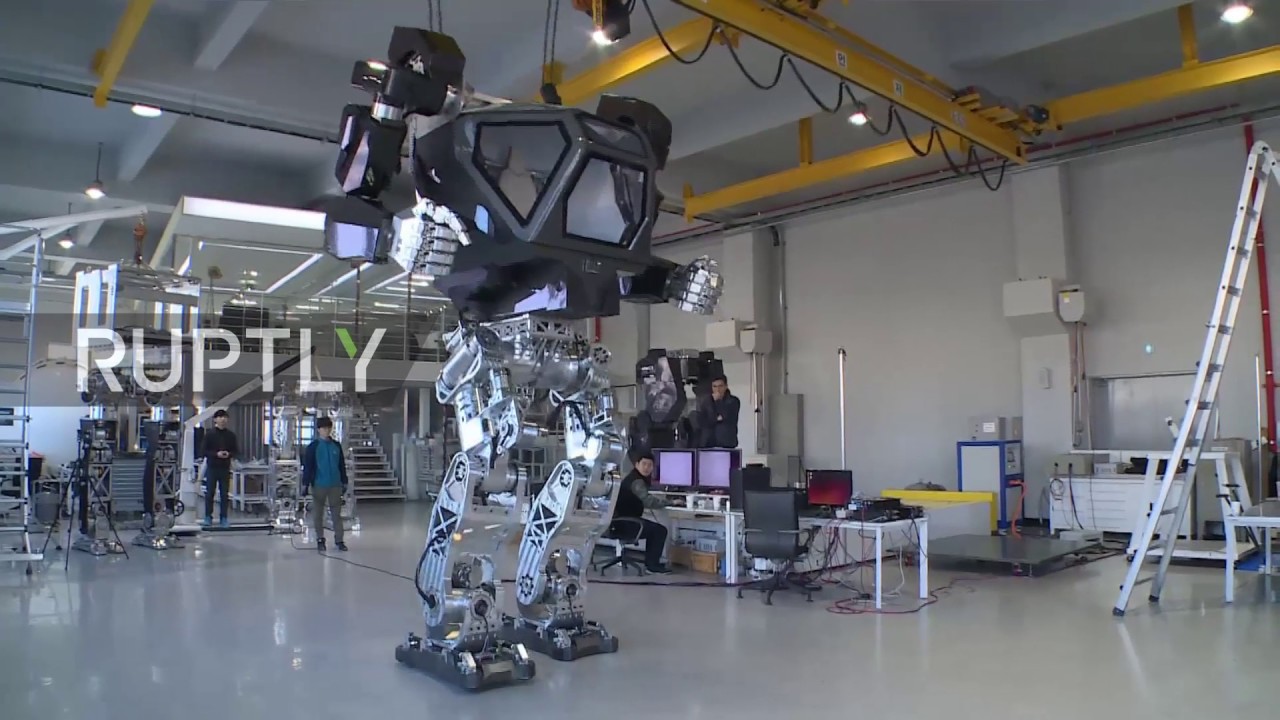
Here's Jeff Bezos In A Giant Robot Exoskeleton Because 2017 Isn't A Dystopia At All

Here's Jeff Bezos In A Giant Robot Exoskeleton Because 2017 Isn't A Dystopia At All

Here&;s Jeff Bezos, CEO of Amazon, evolving into his final form as a giant robot.

Bezos tried on the robot exoskeleton at at Amazon&039;s annual MARS conference, which covers machine learning, home automation, robotics, and space exploration.

Hankook Mirae Technology, which created the 13-foot, 1.6-ton Method-2 roboexoskeleton that Bezos is piloting, is a South Korean robotics company. The equipment resembles several iconic robots from science fiction movies and more advanced versions could theoretically be used for interplanetary or intergalactic human exploration. Bezos is particularly interested in space science and has invested $500 million into his space exploration company Blue Origin as of July 2016.

Here’s the suit in action without Jeff Bezos.

youtube.com

And here&039;s the iconic battle between Sigourney Weaver and the monster in the original Alien film.

The comparison wasn&039;t lost on Bezos, who asked at the conference crowd, “Why do I feel so much like Sigourney Weaver?” They chuckled nervously in response.

youtube.com

The Method-2 bears the same human-encased-in-glass-with-giant-robo-limbs design of the robot suits in Avatar:

youtube.com

Vitaly Bulgarov, one of the designers working with Hankook Mirae on Method-2, designed robots for the film Ghost in the Shell and the 2018 anime adaptation Battle Angel Alita.

He&039;s a co-founder of Kiln, a weapons company creating “innovative and custom gun parts,” according to his website. Bulgarov&039;s Instagram looks less than an engineer&039;s account and more like it belongs to the general of the robot army that will soon enslave the world.

“Here is the robot that will separate you from your loved ones very soon&;” —Vitaly Bulgarov, probably.

Instagram: @vitalybulgarov

“This one will round up the lawmakers&033;&033;” —Vitaly Bulgarov, maybe.

Instagram: @vitalybulgarov

Enjoy the fresh air while it lasts&033;

Quelle: <a href="Here&039;s Jeff Bezos In A Giant Robot Exoskeleton Because 2017 Isn&039;t A Dystopia At All“>BuzzFeed

Come prove your building skills with WebSphere

Remember how awesome your building block structures were as a kid? Sure, others followed the instructions and built “by-the-book” pieces, but not you. Your designs were completely original, and therefore the greatest contraptions of all, complete with trap doors and aircraft vehicles that could transform into submarines.
You didn’t know this then: that life has led you to a career in microservices. That’s why you have what it takes to build the best original building block creation of all time.
You just have to prove it. Here’s how: Visit the IBM WebSphere booth at the concourse during InterConnect 2017 to participate in our WebSphere microservices building contest.
Wait, what are microservices?
Glad you asked. Microservices are an architecture style in which developers can build large, complex software applications using many small components known as microservices. They are independently deployable and loosely coupled, making each service easier to develop, deploy and scale. These characteristics are why microservices architectures are gaining traction for developing and delivering cloud-native workloads across public, private, and hybrid cloud application environments.
That’s great, but what do microservices have to do with toy building blocks?
The toy building blocks represent a microservices architecture, which are, by nature, comprised of loosely coupled, smaller pieces, making each service easier to scale and the ability to develop and deploy services independently. IBM WebSphere Application Server makes it easy to build and deploy these microservices across any cloud environment.
How does the contest work?

Starting Monday, 20 March, come to the IBM WebSphere booth at the concourse anytime during concourse hours to build your original creation. All toy building blocks will be provided. You can come back as often as you’d like — during concourse hours, no sneaking in at midnight — to make modifications to your structure.
The contest will close at 1 PM PT on Wednesday, 22 March. No building will happen after this time. From there, our panel of judges will decide the winners. Creations will be judged on originality, may only use the toy building blocks provided, fit within an 18”x18” space and be no taller than four feet.
The winners will be announced starting at 3 PM on Wednesday, 22 March on the open mic stage at the IBM WebSphere booth. The decisions of the contest judges are final. No takebacks.
Let’s get to what’s important — what can I win?
Our top four winners will receive two floor seat wristbands to Wednesday night’s Zac Brown Band concert.
Social Superstar Award
You don’t have to be a building master to win prizes. Instead, you can be our Social Superstar and still win two floor seat wristbands to Zac Brown Band. Here’s how to win: post a picture of your creation, using our hashtag and . Your name will be added to a drawing for the Social Superstar prize each time you do.
Bring your A-game, originality, and creativity and come visit the IBM WebSphere booth during Concourse hours:
Monday, 20 March:  5 PM – 7 PM PT
Tuesday, 21 March: 11 AM – 7:30 PM PT
Wednesday, 22 March: 9 AM – 5 PM PT (contest closes at 1 PM PT)
The post Come prove your building skills with WebSphere appeared first on news.
Quelle: Thoughts on Cloud

Data Simulator For Machine Learning

Virtually any data science experiment that uses a new machine learning algorithm requires testing across different scenarios. Simulated data allows one to do this in a controlled and systematic way that is usually not possible with real data.

A convenient way to implement and re-use data simulation in Azure Machine Learning (AML) Studio is through a custom R module. Custom R modules combine the convenience of having an R script packaged inside a drag and drop module, with the flexibility of custom code where the user has the freedom of adding and removing functionality parameters, seen as module inputs in the AML Studio GUI, as needed. A custom R module has identical behavior to native AML Studio modules. Its input and output can be connected to other modules or be set manually, and they can process data of arbitrary schema, if the underlying R code allows it, inside AML experiments. An added benefit is that they provide a convenient way of deploying code without revealing the source, which may be convenient for IP sensitive scenarios. By publishing it in Cortana Intelligence Gallery one can easily expose to the world any algorithm functionality without worrying about classical software deployment process.

Data simulator

We present here an AML Studio custom R module implementation of a data simulator for binary classification. Current version is simple enough to have the complete code inside Cortana Intelligence Gallery item page. It allows one to generate custom feature dimensionality datasets with both label relevant and irrelevant columns. Relevant features are univariately correlated with the label column. Correlation directionality (i.e. positive or negative correlation coefficient) is controlled by correlationDirectionality parameter(s). All features are generated using separate runif calls. In the future, the module functionality can be further extended to allow the user to choose other distributions by adding and exposing ellipsis/three dots argument feature in R. Last module parameter (seedValue) can be used to control results reproducibility. Figure 1 shows all module parameters exposed in AML Studio.


Figure 1. Data Simulator Custom R module in an AML Experiment. 1000000 samples are simulated, with 1000 irrelevant and 10 label relevant columns. Data is highly imbalanced since only 20 samples are of “FALSE” class. 2 values (.03 and 5) long array value for the “noiseAmplitude” property is reused for all relevant columns. Similarly, the sign of the 4 values (1, -1, 0, 3.5) “label-features correlation” property is reused for all 10 relevant columns to control the correlation directionality (i.e. positive or negative) with the label column.​

By visualizing, as shown below in Figure 2, the module output (right click and then “Visualize”), we can check basic properties of the data. This includes data matrix size and univariate statistics like range and missing values.


Figure 2. Visualization of simulated data. Data has 1,000,000 rows and 1011 columns (10 relevant and 1000 irrelevant feature columns, plus label). Histogram of the label column (right graph) indicate large class imbalance chosen for this simulation.​

Univariate Feature Importance Analysis of simulated data

Note: Depending on the size chosen for simulated data, it may take some time to generate them: e.g. 1 hour for a 1e6 rows x 2000 feature columns (2001 total columns) dataset. However, new modules can be added to the experiment even after data were generated, and the cashed data can be processed as described below without having to simulate them again.

Univariate Feature Importance Analysis (FIA) measures similarity between each feature column and label values using metrics like Pearsonian Correlation and Mutual Information (MI). MI is more generic than Pearsonian Correlation since it has the nice property that it does not depend of directionality of data dependence: a feature that has labels of one class (say “TRUE”) for all middle values, and the other class (“FALSE”) for all small and large values will still have a large MI value although its Pearsonian Correlation may be close to zero.

Although feature-wise univariate FIA does not capture multivariate dependencies, it provides a simple to understand picture of the relationship between features and classification target (labels). An easy way to perform univariate FIA in AML Studio is by employing existing AML module for Filter Based Feature Selection for similarity computation and Execute R Script module(s) for results concatenation. To do this, we extend the default experiment deployed though CIS gallery page by adding several AML Studio modules as described below.

We first add a second Filter Based Feature Selection module, and we choose Mutual Information value for its “Feature scoring method” property. The original Filter Based Feature Selection module, with “Feature scoring method” property set to Pearson Correlation should be left unchanged. For both Filter Based Feature Selection modules, the setting for “Number of desired features” property is irrelevant. since we will use the similarity metrics computed for all data columns, available by connecting to the second (right) output of each Filter Based Feature Selection module. The “Target column” property for both modules needs to point to the label column name in the data. Figure 3 shows the settings chosen for the second Filter Based Feature Selection module.

Figure 3. Property settings for the Filter Based Feature Selection AML Studio module added for Mutual Information computation. By connecting to the right side output of the module we get the MI values for all data columns (features and label).​

The next two Execute R Script module(s) added to the experiment are used for results concatenation. Their scripts are listed below.

First module (rbind with different column order):

dataset1 <- maml.mapInputPort(1) # class: data.frame
dataset2 <- maml.mapInputPort(2) # class: data.frame

dataset2 <- dataset2[,colnames(dataset1)]
data.set = rbind(dataset1, dataset2)

maml.mapOutputPort("data.set")

Second module (add row names):

dataset <- maml.mapInputPort(1) # class: data.frame

myRowNames <- c("PearsCorrel", "MI")
data.set <- cbind(myRowNames, dataset)
names(data.set)[1] <- c("Algorithms")

maml.mapOutputPort("data.set")

The last module, Convert to CSV, added to experiment allows one to download the results in a convenient format (csv) if needed. The results file is in plain text and can be opened in any text editor or Excel (Figure 4):

Figure 4. Downloaded results file visualized in Excel.

Simulated data properties

FIA results for relevant columns are shown in Figure 5. Although MI and Pearsonian correlation are on different scales, both similarity metrics are well correlated. They are also in sync with the “noiseAmplitude” property of the custom R module described in Figure 1. The 2 noiseAmplitude values (.03 and 5) are reused for all 10 relevant columns, such that relevant features 1, 3, 5, 7, and 9 are much better correlated with the labels dues to their lower noise amplitude.

Figure 5. FIA results for the 10 relevant features simulated before. Although MI (left axis) and Pearsonian correlation (right axis) are on different scales, both similarity metrics are well correlated.​

As expected, for each of the 1000 irrelevant features columns, min, max and average statistics for both MI and Pearsonian Correlation are below 1e-2 (see Table 1).


PearsCorrel

MI

min

9.48E-07

3.23E-07

max

3.93E-03

8.31E-06

average

7.67E-04

3.02E-06

stdev

5.84E-04

1.27E-06

Table 1. Statistics of similarity metrics for the 1000 irrelevant columns simulated above.

This result is heavily dependent on sample size (i.e. number of simulated rows). For significantly smaller row sizes than 1e3 used here, the max and average MI and Pearsonian Correlation values for irrelevant columns may be larger due to the probabilistic nature of simulated data.

Conclusion

Data simulation is an important tool for understanding ML algorithms. The Custom R module presented here is available in Cortana Intelligence Gallery and its results can be analyzed using AML module for Filter Based Feature Selection. Future extension of the algorithm should include regression data and multivariate dependencies.
Quelle: Azure






