What’s new in OpenStack Ocata webinar — Q&A

The post What&;s new in OpenStack Ocata webinar &; Q&;A appeared first on Mirantis | Pure Play Open Cloud.
On February 22, my colleagues Rajat Jain, Stacy Verroneau, and Michael Tillman and I held a webinar to discuss the new features in OpenStack&8217;s latest release, Ocata. Unfortunately, we ran out of time for questions and answers, so here they are.
Q: What are the benefits of using the cells capability?
Rajat: The cells concept was introduced in the Juno release, and as some of you may recall, it was to allow a large number of nova/compute instances to share openstack services.

Therefore, Cells functionality enables you to scale an OpenStack Compute cloud in a more distributed fashion without having to use complicated technologies like database and message queue clustering. It supports very large deployments.

When this functionality is enabled, the hosts in an OpenStack Compute cloud are partitioned into groups called cells. Cells are configured as a tree. The top-level cell should have a host that runs a nova-api service, but no nova-compute services. Each child cell should run all of the typical nova-* services in a regular Compute cloud except for nova-api. You can think of cells as a normal Compute deployment in that each cell has its own database server and message queue broker. This was achieved by the nova cells and nova api services to provide the capabilities.
One of the key changes in Ocata is the upgrade to cells v2, which now only relies on the nova api service for all the synchronization across the cells.
Q: What is the placement service and how can I leverage it?
Rajat: The placement service, which was introduced in the Newton release, is now a key part of OpenStack and also mandatory in determining the optimum placement of VMs. Basically, you set up pools of resources, provide an inventory of the compute nodes, and then set up allocations for resource providers. Then you can set up policies and models for optimum placements of VMs.
Q: What is the OS profiler, and why is it useful?
Rajat: OpenStack consists of multiple projects. Each project, in turn, is  composed of multiple services. To process a request &8212; for example, to boot a virtual machine &8212; OpenStack uses multiple services from different projects. If something in this process runs slowly, it&8217;s extremely complicated to understand what exactly goes wrong and to locate the bottleneck.
To resolve this issue,  a tiny but powerful library, osprofiler, was introduced. The osprofiler library will be used by all OpenStack projects and their python clients. It provides functionality to be able to generate 1 trace per request, flowing through all involved services. This trace can then be extracted and used to build a tree of calls which can be quite handy for a variety of reasons (for example, in isolating cross-project performance issues).
Q: If I have keystone connected to a backend active directory, will i benefit from the auto-provisioning of the federated identity?
Rajat: Yes. The federated identity mapping engine now supports the ability to automatically provision projects for federated users. A role assignment will automatically be created for the user on the specified project. Prior to this, a federated user had to attempt to authenticate before an administrator could assign roles directly to their shadowed identity, resulting in a strange user experience. This is therefore a big usability enhancement for deployers leveraging the federated identity plugins.
Q: Is FWaaS really used out there?
Stacy: Yes it is, but its viability in production is debatable and going with a 3rd party with a Neutron plugin is still, IMHO, the way to go.
Q: When is Octavia GA planned to be released?
Stacy: Octavia is forecast to be GA in the Pike release.
Q: Are DragonFlow and Tricircle ready for Production?
Stacy: Those are young big tent projects but pretty sure we will see a big evolution for Pike.  
Q: What&8217;s the codename for placement service please?
Stacy: It&8217;s just called the Placement API. There&8217;s no fancy name.
Q: Does Ocata continue support for Fernet tokens?
Rajat: Yes.
Q: With federated provider,  can i integrate openstack env with my on-prem AD and allow domain users to use Openstack?
Rajat: This was always supported, and is not new to ocata. More details at https://docs.openstack.org/admin-guide/identity-integrate-with-ldap.html
What&8217;s new in this area is that the federated identity mapping engine now supports the ability to automatically provision projects for federated users. A role assignment will automatically be created for the user on the specified project. Prior to this, a federated user had to attempt to authenticate before an administrator could assign roles directly to their shadowed identity, resulting in a strange user experience.

Q: if i&8217;m using my existing domain users from AD to openstack,  how would i control their rights/role to perform specific tasks in the openstack project?
Rajat: You would first set up authentication via LDAP, then provide connection settings for AD and also set the identity driver to ldap in the keystone.conf. Next you will have to do an assignment of roles and projects to the AD users. Since Mitaka, the only option that you can use is the SQL driver for the assignment in the keystone.conf, but you will have to do the mapping. Most users prefer this approach anyway, as they want to keep the AD as read only from the OpenStack connection. You can find more details on how to configure keystone with LDAP here.
Q: What, if anything, was pushed out of the &;big tent&; and/or did not get robustly worked?
Nick:  You can get a complete view of work done on every project at Stackalytics.
Q: So when is Tricircle being released for use in production?
Stacy: Not soon enough.  Being a new Big Tent project, it needs some time to develop traction.  
Q: Do we support creation of SRIOV ports from horizon during instance creation. If not, are there any plans there?
Nick: According to the Horizon team, you can pre-create the port and assign it to an instance.
Q: Way to go warp speed Michael! Good job Rajat and Stacy. Don&8217;t worry about getting behind, I blame Nick anyway. Then again I always I always blame Nick.
Nick: Thanks Ben, I appreciate you, too.

Uber's 'Greyball' Technology Helped It Sidestep Law Enforcement Around The World

Uber's 'Greyball' Technology Helped It Sidestep Law Enforcement Around The World

For years, Uber&;s been using a proprietary technology around the world to “identify and circumvent” law enforcement officials who were tracking the ride-hail giant, according to a New York Times story published Friday. When asked for comment on the technology, dubbed “Greyball,” Uber said, “This program denies ride requests to users who are violating our terms of service — whether that’s people aiming to physically harm drivers, competitors looking to disrupt our operations, or opponents who collude with officials on secret ‘stings’ meant to entrap drivers.”

If Uber&039;s research indicated an app user was a city official, the Times reports, the backend of the app would tag that user “greyball.” Greyballed users would see a fake version of the app with animated cars that did not correspond to the real locations of drivers, and rides requested by those users were usually cancelled. The company&039;s legal team approved the program as part of its terms of service, according to the Times.

This may or may not mire the company in legal trouble, the Times reports. Greyball could be a violation of the federal Computer Fraud and Abuse Act or intentional obstruction of justice, depending on how the program interacted with local law enforcement.

According to the Times, Uber deployed Greyball in Boston, Paris, and Las Vegas, among other cities, and across Australia, China, Italy, and South Korea, most often when it first introduced its service to cities. Often when Uber first came to new markets, there were little or no regulations for the ride-hail service. The company does not require drivers to be commercially licensed. So as local officials tried to gather details on Uber or collude with taxi drivers on stings, the company would greyball them, the Times reports.

The company said it rarely used Greyball to evade law enforcement. The technology&039;s primary use, according to a spokesperson, was to circumvent competitors and to keep Uber drivers safe in places where they had faced intimidation and physical violence.

On the same day as the Times story broke, Uber&039;s vice president of product and growth Ed Baker resigned, telling employees he wanted to focus on the public sector. According to Recode, his departure may have ties to a complaint that Baker had a sexual relationship with another Uber employee. He&039;s the second senior executive to leave the company in a week after CEO Travis Kalanick asked Amit Singhal, vice president of engineering, to resign after it came to light that he had been investigated for sexual harassment at his previous employer, Google, according to Recode.

Times published yet another story on Friday detailing more internal Uber drama: The company is considering revamping its stock options program after complaints by employees. Uber is a privately held company that partially compensates employees via stock that they can purchase at discounted rates; however, it only allows 30 days for employees who quit to buy said stock before they forfeit the right. Many other tech companies give months or even years, according to the Times. By contrast, Uber employees who have bought the private stock have been saddled with high fees as the company&039;s valuation has risen to $70 billion, forcing them to choose between staying at the company to preserve those options or leave and abandon a potential windfall.

Uber has had a rough time the past few weeks:

In response to a blog post on February 19 by former Uber employee Susan Fowler that detailed blistering accusations of sexism at the company, women working at Uber met with Travis Kalanick and told him that the problem was company-wide. Following the revelations of sexism came an embarrassing video, published Tuesday by Bloomberg, of CEO Travis Kalanick arguing with a driver over pay. Kalanick said he&039;d seek “leadership help.

In addition to the internal shuffle, Alphabet&039;s self-driving car company Waymo filed suit against Uber last week, alleging that Uber&039;s Anthony Lewandoski, an engineer who once worked at Google, stole Waymo&039;s technology and shared it with Uber.

In January, began trending in response to the perception that the company was strikebreaking in New York City, leading roughly 200,000 people to erase the app from their phones. The campaign preceded and seemed to play a role in Kalanick quitting his much-contested spot on President Trump&039;s advisory council.

In response to a request for comment, Uber said it used Greyball in places where its service was not explicitly banned and it believed it had a right to operate.

youtube.com

Quelle: <a href="Uber&039;s &039;Greyball&039; Technology Helped It Sidestep Law Enforcement Around The World“>BuzzFeed

A new issue tracker for Google Cloud Platform

By Kasia Derc-Fenske, Technical Solutions Engineer Manager, Google Cloud and Jesse Scherer, Technical Program Manager, Google Cloud Platform Support

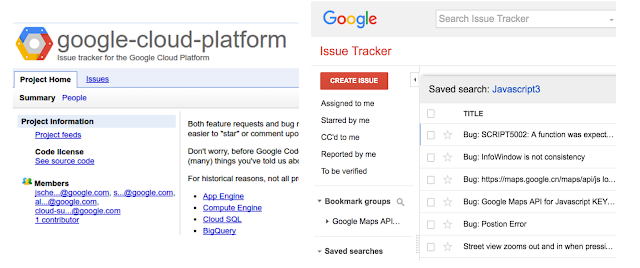
Starting today, we’re working on facilitating better collaboration between you and the Google Cloud Platform product teams, by upgrading to Issue Tracker, a tool we also use internally at Google. We have migrated all issues from the old code.google.com tracker to the new Issue Tracker hosted at issuetracker.google.com.

Left: Google Code issue tracker, right: new Google Issue Tracker 

Getting started with Google Issue Tracker should be easy. Check out our documentation for more information about how to create, edit, search and group issues. By default, Google Issue Tracker only displays issues assigned to you, but you can easily change that to show a hotlist of your choice, a bookmark group or saved searches. You can also adjust notification settings by clicking the gear icon in the top right corner and selecting settings. For more information, check out the discussion of notification levels in the developer documentation.

The Google App Engine open issues saved search

GCP team wants your feedback!
Starring an issue shows us you’re interested in getting it fixed/implemented — please take advantage of this feature. It also allows you to quickly view all issues you starred.

Searching for product-specific issues
Opening any code.google.com issue link will automatically redirect you to the new system. You’ll be able to find all of the issues from code.google.com in the Issue Tracker, including any issue you’ve reported, commented on or starred. If you feel like anything is missing, let us know (how meta!) — we have backups available!

Issue Tracker organizes issues into a component hierarchy. Starting at the Cloud Platform component, you can drill down to a particular product’s issues. And because each product (and some product features) have their own component, you can easily search for them. For example, you can view all Google App Engine or Google Compute Engine issues, which correspond to the old tracker’s full issue list for App Engine and Compute Engine. You can find links to each product’s issues in our support documentation. To search within those issues, leave the component ID in the search bar; removing it will search public issues from all Google products.

For detailed instructions on how to create issues check out this guide, Still have questions? Take a peek at our FAQ. If you can’t find the answer please let us know by commenting on this post.

Please continue helping us improve our products by reporting issues and feature requests!
Quelle: Google Cloud Platform

The Hidden Risks Of Watching Porn Online

It’s not just those scary pop-ups you need to worry about.

Nothin’ wrong with watching adults have consensual sex&; But porn sites, especially free “tube” sites, come with a lot of security risks. Here’s how to take some basic precautions.

While you may already be familiar with the perils of streaming online porn, a less experienced cyber citizen, someone who might be consuming adult content for the first time, could head to the wrong site when ~ curiosity strikes ~ and put their data or personal information at risk.

So, here are some things to know about what’s at stake when watching porn online.

Alice Mongkongllite / BuzzFeed / Via buzzfeed.com

With plain HTTP, anyone – like hackers, the government, or snooping neighbors – sitting between your browser and the webserver can see what’s moving back and forth.

“Live cam” sites, like Chaturbate, Livejasmin, and Bongacams, are more likely to have HTTPS protections than other types of pages – but free “tube” sites (the ones that don’t require payment to watch adult content) have been slow to adopt the secure protocol. Of the top 11 adult websites in the world, according the latest Google Transparency Report, only three offer HTTPS by default: Chaturbate, xHamster, and, most recently, RedTube.

That’s alarming. HTTPS is important because it encrypts the data on a webpage, making it difficult for an interested third party to see what you’re looking at. Larger sites like Amazon, Google, and Facebook use it to give their users an extra layer of security. You can tell whether the site you’re on has HTTPS by looking for a padlock (Safari) or “Secure” (Chrome) next to the URL in your browser.

Here&;s what an HTTPS site looks like in Chrome.

Here&039;s what an HTTPS site looks like in Safari.


View Entire List ›

Quelle: <a href="The Hidden Risks Of Watching Porn Online“>BuzzFeed

From Reddit To Trump's Twitter — In Less Than 24 Hours

20 hours. That&;s about how long it took for a picture to make its way from the depths of Reddit to the Twitter account of the president of the United States.

In response to reports that various members of Trump&039;s campaign and transition team met with Russian officials during last year&039;s election, the White House and areas of the pro-Trump internet are zeroing in on a photograph of Senator Chuck Schumer posing with Russian President Vladimir Putin. The photo, they argue, is proof of hypocrisy on the part of Democrats who are calling for further investigations into Trump&039;s Russia ties. This afternoon, the image was tweeted by President Trump with the caption: “We should start an immediate investigation into @SenSchumer and his ties to Russia and Putin. A total hypocrite&;”

The image is an AP photograph from September 2003, which appeared in newspapers after Putin visited the first New York gas station of the Russian company, Lukoil. However, before it was tweeted by Trump on Friday, the image gained popularity last night on Reddit and across the fringes of the conservative internet. And while it&039;s not unusual for Trump to tweet from unconventional sources and odd corners of the web, rarely has there been a more clear cut example of how a Trump tweet gets made.

Here&039;s a brief timeline:

Late Thursday afternoon, Redditor willdogs posted the image of New York Senator Chuck Schumer enjoying coffee and donuts with Russian President Vladimir Putin. The image was posted to r/The_Donald, the popular and active pro-Trump subreddit. Willdogs urged The_Donald to upvote the image to the top of Reddit.

Given Reddit&039;s popularity and The_Donald&039;s reputation among the pro-Trump corners of the internet, the image was quickly up-voted to the top of r/The_Donald and picked up among Trump supporters across the web.

The far-right blog, The Gateway Pundit, posted the image on its site just two hours later at 7:10 p.m. with the caption, “Where&039;s the outrage?”

One hour later, the image was picked up and tweeted by Infowars Editor-at-Large Paul Joseph Watson. The image was quickly retweeted over 6,500 times.

The image bounced around the internet, amassing RTs and comments on The_Donald. Other far-right, alt-right, and new-right websites picked it up. Here it is in the comments of an article yesterday on the conservative site, Free Republic:


Then, early Friday morning White House Social Media Director Dan Scavino posted the image to his personal Twitter account. The image was posted as a response to a tweet from Senator Schumer who pledged to “evaluate the scope of Russia&039;s interference in our election.”

By noon on Friday, the photo was the lead image on The Drudge Report.

As the image hit peak saturation on the conservative internet, it received its final push. At 12:54 p.m. President Trump&039;s personal account posted the tweet.

You can also see the the blurred image outlay on the right side of the Scavino and Trump photos, which indicate that it came from the Reddit photo.

As a number of journalists and Trump Twitter watchers have pointed out, the tweet was sent from an iPhone, potentially signaling that it was tweeted by a staffer (potentially Scavino) rather than Trump himself, who is known to tweet from his Android phone.

Fin.

LINK: People Think Trump Is “So Presidential” After He Tried To Pivot Russia Allegations

Quelle: <a href="From Reddit To Trump&039;s Twitter — In Less Than 24 Hours“>BuzzFeed

Openshift Commons Gathering Berlin Adds New Speakers from Google, Atos, Volvo, T-Systems, OCI, CNCF and More!

The OpenShift Commons Gathering brings together experts from all over the world to discuss the container technologies, best practices for cloud native application developers and the open source software project that underpin the OpenShift ecosystem to help take the OpenShift ecosystem to the next level in cloud native computing. The 2017 event will gather 200+ developers, devops professionals and sysadmins together to explore the next steps in making container technologies successful and secure.
Quelle: OpenShift

Swarm Mode with Fleet Management and Collaboration now in public beta, powered by Docker Cloud

With the introduction of swarm mode in 1.12, we showed the world how simple it can be to provision a secure and fully-distributed Docker cluster on which to deploy highly available and scalable applications. The latest Docker 1.13 builds on and improves these capabilities with new features, such as secrets management.
Continuing with the trend that simplicity is paramount to empowering individuals and teams to achieve their goals, today we are bringing swarm mode support to Docker Cloud, with a number of new cloud-enabled capabilities. All of this is in addition to the continuous integration (CI) features of Docker Cloud, including automatic builds, tests, security scans and the world’s largest hosted registry of public and private Docker image repositories.

Fleet Management using Docker ID
Keeping track of many swarms sprawling multiple regions or cloud providers can be a challenge. And securely connecting to remote swarms with TLS means teams must also spend time configuring and maintaining a Public Key Infrastructure. By registering your new or existing swarms with Docker Cloud, teams can now easily manage a large number of swarms running anywhere, and only need their Docker ID to authenticate and securely access any of them.
Docker for AWS and Docker for Azure Integration
Individuals and teams can now also provision new swarms on their IaaS provider of choice using Docker Cloud. Swarms are created using Docker CE for AWS and Docker CE for Azure, which allows these swarms to take advantage of the native capabilities of their respective cloud platforms. Swarms provisioned this way are automatically registered with Docker Cloud and can be accessed remotely and securely using your Docker ID.

Swarm Collaboration
Using the team capabilities in Docker Cloud, organizations have full control over who has access to which swarms. Allowing you, for example, to grant your development team access to your staging swarms, and your operations team access to your production swarms.
Docker for Mac and Docker for Windows Integration
We’re bringing fleet management to the developer desktop too! When using Docker for Mac or Docker for Windows, simply login with your Docker ID to see a list of all your accessible swarms registered with Docker Cloud. From there, it’s a single click to securely connect to any swarm and begin managing it. You and your team can easily check the status of an existing application or deploy new applications right from within your local shell.
But wait, there’s more! Docker for Mac and Docker for Windows users that login using their Docker ID can now also create and manage public and private repositories directly through their desktop application.
Please note: fleet management and other integrations with Docker Cloud are currently only available in the Docker for Mac and Docker for Windows edge channel.

Under the hood of Swarm Mode with Fleet Management and Collaboration
Swarm mode with Fleet Management and Collaboration, powered by Docker Cloud, is only possible thanks to the many and diverse open source projects and tools created by Docker and its open source contributors. This announcement is the culmination of work that spans our open source SwarmKit project, our best-in-class IaaS integrations with the industry’s top cloud providers, the native Docker for Mac and Docker for Windows applications, and Docker’s own hosted cloud services. This is an experience that only Docker can deliver.
It is our mission to build tools of mass innovation. At Docker we build powerful technology that is simple to use, providing individuals and teams with the tools they need to accomplish their goals. We hope you enjoy this newest public beta release and look forward to your feedback.
Check out these additional resources to learn more:

Docs for Swarm Mode in Docker Cloud
Get Docker for Mac (edge channel)
Get Docker for Windows (edge channel)
Watch the Fleet Management demo
E-mail us your feedback

 Fleet management and collaboration for Docker now availableClick To Tweet

The post Swarm Mode with Fleet Management and Collaboration now in public beta, powered by Docker Cloud appeared first on Docker Blog.
Quelle: https://blog.docker.com/feed/