Amazon Elastic File System (Amazon EFS) Now Supports NFSv4 Lock Upgrading and Downgrading

Amazon Elastic File System (Amazon EFS) now supports NFS version 4 lock upgrading and downgrading functionality. This new capability extends support in Amazon EFS for the NFSv4.1 and NFSv4.0 protocols by allowing you to run applications that upgrade a read lock atomically to a write lock and downgrade a write lock atomically to a read lock. One example is SQLite, a popular library that’s embedded into many applications and programming language tools like Python and PHP.
Quelle: aws.amazon.com

New Azure Storage JavaScript client library for browsers – Preview

Today we are announcing our newest library: Azure Storage Client Library for JavaScript. The demand for the Azure Storage Client Library for Node.js, as well as your feedback, has encouraged us to work on a browser-compatible JavaScript library to enable web development scenarios with Azure Storage. With that, we are now releasing the preview of Azure Storage JavaScript Client Library for Browsers.

Enables web development scenarios

The JavaScript Client Library for Azure Storage enables many web development scenarios using storage services like Blob, Table, Queue, and File, and is compatible with modern browsers. Be it a web-based gaming experience where you store state information in the Table service, uploading photos to a Blob account from a Mobile app, or an entire website backed with dynamic data stored in Azure Storage.

As part of this release, we have also reduced the footprint by packaging each of the service APIs in a separate JavaScript file. For instance, a developer who needs access to Blob storage only needs to require the following scripts:

<script type=”javascript/text” src=”azure-storage.common.js”/>
<script type=”javascript/text” src=”azure-storage.blob.js”/>

Full service coverage

The new JavaScript Client Library for Browsers supports all the storage features available in the latest REST API version 2016-05-31 since it is built with Browserify using the Azure Storage Client Library for Node.js. All the service features you would find in our Node.js library are supported. You can also use the existing API surface, and the Node.js Reference API documents to build your app!

Built with Browserify

Browsers today don’t support the require method, which is essential in every Node.js application. Hence, including a JavaScript written for Node.js won’t work in browsers. One of the popular solutions to this problem is Browserify. The Browserify tool bundles your required dependencies in a single JS file for you to use in web applications. It is as simple as installing Browserify and running browserify node.js -o browser.js and you are set. However, we have already done this for you. Simply download the JavaScript Client Library.

Recommended development practices

We highly recommend use of SAS tokens to authenticate with Azure Storage since the JavaScript Client Library will expose the authentication token to the user in the browser. A SAS token with limited scope and time is highly recommended. In an ideal web application it is expected that the backend application will authenticate users when they log on, and will then provide a SAS token to the client for authorizing access to the Storage account. This removes the need to authenticate using an account key. Check out the Azure Function sample in our Github repository that generates a SAS token upon an HTTP POST request.

Use of the stream APIs are highly recommended due to the browser sandbox that blocks users from accessing the local filesystem. This makes the stream APIs like getBlobToLocalFile, createBlockBlobFromLocalFile unusable in browsers. See the samples in the link below that use createBlockBlobFromStream API instead.

Sample usage

Once you have a web app that can generate a limited scope SAS Token, the rest is easy! Download the JavaScript files from the repository on Github and include in your code.

Here is a simple sample that can upload a blob from a given text:

1. Insert the following script tags in your HTML code. Make sure the JavaScript files located in the same folder.

<script src="azure-storage.common.js"></script/>
<script src="azure-storage.blob.js"></script/>

2. Let’s now add a few items to the page to initiate the transfer. Add the following tags inside the BODY tag. Notice that the button calls uploadBlobFromText method when clicked. We will define this method in the next step.

<input type="text" id="text" name="text" value="Hello World!" />
<button id="upload-button" onclick="uploadBlobFromText()">Upload</button>

3. So far, we have included the client library and added the HTML code to show the user a text input and a button to initiate the transfer. When the user clicks on the upload button, uploadBlobFromText will be called. Let’s define that now:

<script>
function uploadBlobFromText() {
     // your account and SAS information
     var sasKey ="….";
     var blobUri = "http://<accountname>.blob.core.windows.net";
     var blobService = AzureStorage.createBlobServiceWithSas(blobUri, sasKey).withFilter(new AzureStorage.ExponentialRetryPolicyFilter());
     var text = document.getElementById(&;text&039;);
     var btn = document.getElementById("upload-button");
     blobService.createBlockBlobFromText(&039;mycontainer&039;, &039;myblob&039;, text.value,  function(error, result, response){
         if (error) {
             alert(&039;Upload filed, open browser console for more detailed info.&039;);
             console.log(error);
         } else {
             alert(&039;Upload successfully!&039;);
         }
     });
}
</script>

Of course, it is not that common to upload blobs from text. See the following samples for uploading from stream as well as a sample for progress tracking.

•    JavaScript Sample for Blob
•    JavaScript Sample for Queue
•    JavaScript Sample for Table
•    JavaScript Sample for File 

Share

Finally, join our Slack channel to share with us your scenarios, issues, or anything, really. We’ll be there to help!
Quelle: Azure

Blogs, week of March 6th

There’s lots of great blog posts this week from the RDO community.

RDO Ocata Release Behind The Scenes by Haïkel Guémar

I have been involved in 6 GA releases of RDO (From Juno to Ocata), and I wanted to share a glimpse of the preparation work. Since Juno, our process has tremendously evolved: we refocused RDO on EL7, joined the CentOS Cloud SIG, moved to Software Factory.

Read more at http://tm3.org/ec

Developing Mistral workflows for TripleO by Steve Hardy

During the newton/ocata development cycles, TripleO made changes to the architecture so we make use of Mistral (the OpenStack workflow API project) to drive workflows required to deploy your OpenStack cloud.

Read more at http://tm3.org/ed

Use a CI/CD workflow to manage TripleO life cycle by Nicolas Hicher

In this post, I will present how to use a CI/CD workflow to manage TripleO deployment life cycle within an OpenStack tenant.

Read more at http://tm3.org/ee

Red Hat Knows OpenStack by Rich Bowen

Clips of some of my interviews from the OpenStack PTG last week. Many more to come.

Read more at http://tm3.org/ef

OpenStack Pike PTG: TripleO, TripleO UI – Some highlights by jpichon

For the second part of the PTG (vertical projects), I mainly stayed in the TripleO room, moving around a couple of times to attend cross-project sessions related to i18n.

Read more at http://tm3.org/eg

OpenStack PTG, trip report by rbowen

last week, I attended the OpenStack PTG (Project Teams Gathering) in Atlanta.

Read more at http://tm3.org/eh
Quelle: RDO

IBM and Salesforce partner to unlock data across clouds and enterprises

A recent Bain & Company survey found that 80 percent of companies say they deliver superior service, but only 8 percent of customers find that to be true. While many companies preach about great customer service, not many actually practice it. We want to change that.
Think about your own experiences when it comes to the challenge of providing great customer service. How many times have you had to provide the same information over and over? How often have you been bounced from department to department or “expert” to “expert” because they didn’t have the right information to solve your issue?  How many times have you dealt with an automated voice system that couldn’t understand you or repeatedly sent you to the wrong place?
For many organizations, the issue is not that they don’t have the right data. It’s that they don’t have access to the right data when and where they need it.
As companies grow, expand and evolve, in many cases their IT environment has not been able to keep pace. The result is a myriad of applications and data scattered across mainframes, cloud applications, servers in other divisions, business partner records and personal spreadsheets. Even when organizations can get access to the data, they can’t work with it in a format that helps them to drive insights.
The best companies are focused on using cognitive solutions to deliver incredible customer moments.  That’s why IBM and Salesforce, the world’s number one CRM company, have entered a strategic partnership to accelerate how customers unlock and monetize data and intelligence with joint solutions.  With new integration patterns designed specifically for Salesforce, IBM Application Suite for Salesforce helps organizations realize their full potential by unlocking access to data across multiple clouds and enterprises for use by Salesforce clouds.
The crux of these solutions is their simplicity. Now, it’s easy for anyone to make the right connections in minutes without needing any technical support. Business users are empowered to be even more responsive to customers through do-it-yourself interfaces that enable integrating Salesforce data with other business systems to quickly analyze, manipulate and act upon customer data held in Marketo, Asana, SAP and more.
For organizations looking to get even more functionality out of Salesforce, the solution expands to enable powerful interactions between Salesforce and enterprise IT systems. IT professionals can broadcast Salesforce events to enterprise applications for real-time updates. They can easily keep data in sync across the CRM and other applications through pre-built templates to popular software-as-a-service (SaaS) and on-premises apps. Developers building Lightning or Apex applications have Odata 4.0 support to ensure fast, virtual access to any record in any enterprise system, whether off the shelf or home grown.
The key advantage of the IBM and Salesforce partnership is the ability to connect enterprise and external data that sits outside a company’s CRM system to its CRM data to gain better insights on how those elements will impact clients. Organizations will have a full picture where and how events are impacting their customers, and consequently, their bottom line.
Through this partnership, IBM and Salesforce customers will create more engaging customer interactions.  For example, a financial advisor will be able to more easily consider outside factors such as news and financial market reports that may affect individual clients. The advisor can use that knowledge to take a preemptive and more personalized approach to managing those portfolios and relationships. Insurers will have better insights into adverse weather events that can impact clients in a particular region, helping them to proactively engage with those who might be affected.  That is the vision we are bring to our customers.
And the best part is you can get started today. If you want to learn more join the webcast or visit our website.
Follow @IBMIntegration on Twitter to find out all the latest news.
The post IBM and Salesforce partner to unlock data across clouds and enterprises appeared first on news.
Quelle: Thoughts on Cloud

Launching online training and certification for Azure SQL Data Warehouse

Azure SQL Data Warehouse (SQL DW) is a SQL-based fully managed, petabyte-scale cloud solution for data warehousing. SQL Data Warehouse is highly elastic, enabling you to provision in minutes and scale capacity in seconds. You can scale compute and storage independently, allowing you to burst compute for complex analytical workloads or scale down your warehouse for archival scenarios, and pay based off what you&;re using instead of being locked into predefined cluster configurations.

We are pleased to announce that Azure SQL Data Warehouse training is now available online via the edX training portal. In this computer science course, you will learn how to deploy, design, and load data using Microsoft&039;s Azure SQL Data Warehouse, or SQL DW. You&039;ll learn about data distribution, compressed in-memory indexes, PolyBase for Big Data, and elastic scale.

Course Syllabus

Module 1: Key Concepts of MPP (Massively Parallel Processing) Technology and SQL Data Warehouse
This module makes a case for deploying a data warehouse in the cloud, introduces massively parallel processing and explores the components of Azure SQL Data Warehouse.

Module 2: Provisioning a SQL Data Warehouse
This module introduces the tasks needed to provision Azure SQL Data Warehouse, the tools used to connect to and manage the data warehouse and key querying options.

Module 3: Designing Tables and Loading Data
This module covers data distribution in an MPP data warehouse, creating tables and loading data.

Module 4: Integrating SQL DW in a Big Data Solution
This module introduces Polybase to access big data, managing, protecting, and securing your Azure SQL Data Warehouse, and integrating your Azure SQL Data Warehouse into a big data solution.

Final Exam
The final exam accounts for 30% of your grade and will be combined with the weekly quizzes to determine your overall score. You must achieve an overall score of 70% or higher to pass this course and earn a certificate.

Note: To complete the hands-on elements in this course, you will require an Azure subscription. You can sign up for a free Azure trial subscription (a valid credit card is required for verification, but you will not be charged for Azure services).  Note that the free trial is not available in all regions. It is possible to complete the course and earn a certificate without completing the hands-on practices.

Exclusive free trial

We’re giving all our customers free access to Azure SQL Data Warehouse for a whole month!  More information on the SQL DW Free Trial.  All you need to do is sign up with your Azure Subscription details before 30th June 2017.

Azure Subscription

If you don’t have an Azure subscription you can sign up for free.  Provision for yourself the industry leading elastic-scale data warehouse literally in minutes and experience how easy it is to go from ‘just data’ to ‘business insights’.  Load your data or try out pre-loaded sample data set and run queries with compute power of up to 1000 DWU (Data Warehouse Units) and 12TB of storage to experience this fully managed cloud-based service for an entire month for free.

Learn more

What is Azure SQL Data Warehouse?

What is Azure Data Lake Store?

SQL Data Warehouse best practices

Load Data into SQL Data Warehouse

MSDN forum

Stack Overflow forum
Quelle: Azure

Google Cloud Container Builder: a fast and flexible way to package your software

By David Bendory, Tech Lead and Software Engineer and Christopher Sanson, Product Manager, Google Cloud Container Builder Team

At Google everything runs in containers, from Gmail to YouTube to Search. With Google Cloud Platform (GCP) we’re bringing the scale and developer efficiencies we’ve seen with containers to our customers. From cluster management on Google Container Engine, to image hosting on Google Container Registry, to our contributions to Spinnaker (an OSS release management tool), we’re always working to bring you the best, most open experience for working with containers in the cloud.

Furthering that mission, today we’re happy to announce the general availability of Google Cloud Container Builder, a stand-alone tool for building container images regardless of deployment environment.

Whether you’re a large enterprise or a small startup just starting out with containers, you need a fast, reliable, and consistent way to package your software into containers as part of an automated workflow. Container Builder enables you to build your Docker containers on GCP. This helps empower a tighter release process for teams, more reliable build environment across workspaces and frees you from having to manage your own scalable infrastructure for running builds.

Back in March, 2016, we began using Container Builder as the build-and-package engine behind “gcloud app deploy” for the App Engine flexible environment. Most App Engine flexible environment customers didn’t notice, but some who did commented that deploying code was faster and more reliable. Today we’re happy to extend that same speed and reliability to all container users. With its command-line interface, automated build triggers and build steps — a container-based approach to executing arbitrary build commands — we think you’ll find that Container Builder is remarkably flexible as well.

We invite you to try out our “Hello, World!” and to incorporate Container Builder into your release workflow. Contact us at gcr-contact@google.com or by using the “google-container-registry” tag on Stackoverflow and we look forward to your feedback.

Interacting with Container BuilderREST API and Cloud SDKContainer Builder provides a REST API for programmatically creating and managing builds as well as a gcloud command line interface for working with builds from the CLI. Our online documentation includes examples using the Cloud SDK and curl that will help enable you to integrate Container Builder into your workflows however you like.

UI and automated build triggersContainer Builder enables two new UIs in the Google Cloud Console under Container Registry, build history and build triggers. Build history shows all your builds with details for each including logs. Build triggers lets you set up automated CI/CD workflows that start new builds on source code changes. Triggers work with Cloud Source Repository, Github, and Bitbucket on pushes to your repository based on branch or tag.

Getting started: “Hello, world!”Our Quickstarts walk you through the complete setup needed to get started with your first build. Once you’ve enabled the Google Container Builder API and authenticated with the Cloud SDK, you can execute a simple cloud build from the command line.

Let’s run a “Hello, World!” Docker build using one of our examples in GitHub. In an empty directory, execute these commands in your terminal:

git clone

https://github.com/GoogleCloudPlatform/cloud-builders.git

cd cloud-builders/go/examples/hello_world_app
gcloud container builds submit –config=cloudbuild.yaml .
This last command will push the local source in your current directory (specified by “.”) to Container Builder, which will then execute your build based on the Dockerfile. Your build logs will stream to the terminal as your build executes, finishing with a hello-app image being pushed to Google Container Registry.

The README.md file explains how to test your image locally if you have Docker installed. To deploy your image on Google App Engine, run this command, substituting your project id for <project-id>:

gcloud app deploy
–image-url=gcr.io//hello-app app.yaml
Using the gcloud container builds submit command, you can easily experiment with running any of your existing Dockerfile-based builds on Container Builder. Images can be deployed to any Docker runtime, such as App Engine or Google Container Engine.

Beyond Docker buildsContainer Builder is not just a Docker builder, but rather a composable ecosystem that allows you to use any build steps that you wish. We have open-sourced builders for common languages and tasks like npm, git, go and the gcloud command line interface. Many images on DockerHub like Maven, Gradle and Bazel work out of the box. By composing your custom build steps, you can run unit tests with your build, reduce the size of your final image by rebaking your built image onto a leaner base image and removing build and test tooling and much more.

In fact, our build steps will let you run any Docker image as part of your build, so you can easily package the tools of your choice to move your existing builds onto GCP. While you may want to package your builds into containers to take advantage of other GCP offerings, there’s no requirement that your build produce a container as output.

For example, here’s a “Hello, world” example in Go that defines two build steps in a cloudbuild.yaml: the first step does a standard Go build, and the second uploads the built application into a Cloud Storage bucket. You can arbitrarily compose build steps that can do anything that you can do in a Docker container.

PricingContainer Builder includes 120 free build minutes per day per billing account. Most of our alpha program users found they were able to move their builds onto Container Builder in that time allotment at no cost. Over 120 minutes, builds cost $.0034 per minute. For full details on pricing and quota limitations, please see our pricing documentation.
Quelle: Google Cloud Platform

Announcing Microsoft Azure Storage Explorer 0.8.9

We just released Microsoft Azure Storage Explorer 0.8.9 last week. You can download it from http://storageexplorer.com/​.

Recent new features in the past two releases:

Automatically download the latest version when it is available
Create, manage, and promote blob snapshots
Sign-in to Sovereigh Clouds like Azure China, Azure Germany and Azure US Government
Zoom In, Zoom Out, and Reset Zoom from View menu

Try out and send us feedback from the links on the bottom left corner of the app.
Quelle: Azure

This Trojan Horse App Sneaks Vital Info To Women In Iran

Atta Kenare / AFP / Getty Images

When Silicon Valley started building smartphone apps for women’s health a few years ago, venture capitalists and startup founders gravitated toward period-tracking. Hamdam, an app aimed at Iranian women, offers the same service. Except that Hamdam, which launched this weekend, uses period-tracking as a Trojan horse to give women in Iran access to information about contraception, STDs, rape, sexual harassment, and domestic violence. Hamdam also provides legal language that women can use to strengthen their rights in a marriage contract, which are standard in Iran and typically favor the husband. Text inside the app covers rights around child custody and the ability to work, to continue education, or to seek a divorce.

Hamdam is the second app to be spun out of IranCubator, an app development program launched last year by United for Iran, a Berkeley-based nonprofit formed after the 2009 uprising in Iran. IranCubator was conceived as a way to leverage the Bay Area’s software expertise to promote civil rights — and take advantage of the explosion of smartphones in Iran — by running a global contest to build Android apps for social good. (Its first offering was RadiTo, a podcasting app that launched in February to help Iranians access banned foreign stations like the BBC and eventually create podcasts of their own.)

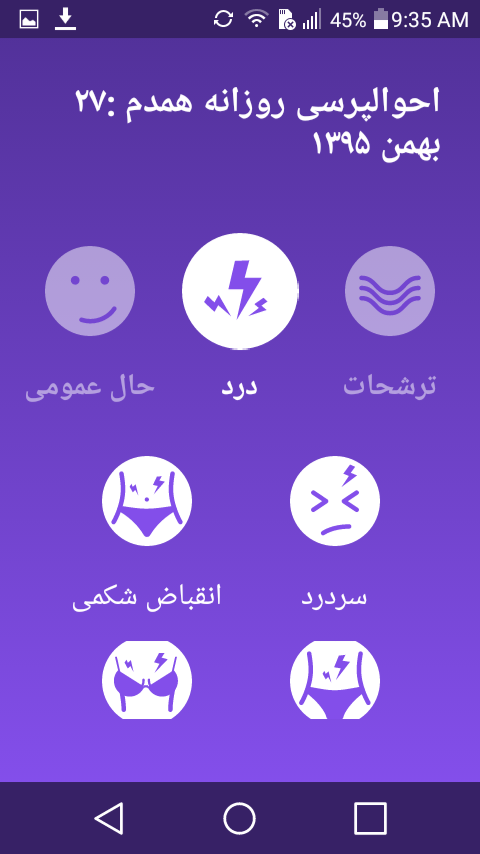
A screenshot from Hamdam asking the user whether she is experiencing any pain associated with her period.

Soudeh Rad, the French-Iranian gender equality activist who submitted the idea for Hamdam, told BuzzFeed News that she felt compelled to focus on sexual health because the topic can be so hard to broach. “We come out of Iran and we take all the taboos with us,” she explained, adding that the scant information available to women in Iran tends to be “biased, heteronormative, and male pleasure–centered.”

That restrictiveness led Rad to the idea of creating Hamdam as a Trojan horse: The app labels itself as a period tracker, and contains plenty of information about menstruation, but also covers topics to empower Iranian women and help them exercise their rights.

Hamdam’s creators say that every aspect of the app is tailored to the needs of Iranian users, from content to distribution to privacy. The app is launching on Android, the most widely used operating system Iran. But users don’t have to rely on Google&;s Play app store to find it. They can also download Hamdam on popular channels of Telegram, a messaging app that has roughly 20 million users inside Iran.

In an effort to circumvent potential censorship issues and low bandwidth connections that could slow Hamdam’s momentum, the app&039;s developers plan to release an Android application package (APK) so that the app can be downloaded by email, Reza Ghazinouri, a co-director of United for Iran, told BuzzFeed News.

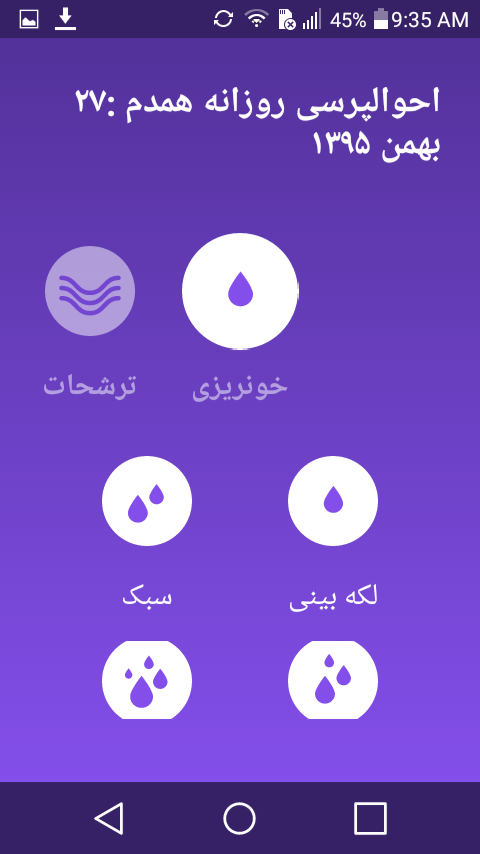
A screenshot from Hamdam asking the user how light or heavy her period is.

Personal information fed into the app will only be stored on the user’s phone, with no communication between the client and server, Ghazinouri said. For all its apps, IranCubator also uses an independent firm in Berlin to run a full penetration test, which looks for vulnerabilities a hacker could exploit and then implements all the firm&039;s security recommendations. In Hamdam’s case, that included disabling screenshots. Rad just finished some beta testing with users in Iran last week. “As soon as they understood it was an app, in their mobile [devices], and not connected to a server, they kind of became super excited about it,” she said.

When developing the app&039;s content, the goal was to make Hamdam as accessible as possible. According to Rad, it&039;s the first period-tracking app in Iran that lets people use the Persian calendar. She also tried to avoid anything that might label the app sensitive content for users under 18. The information about self breast exams, for instance, includes detailed descriptions, but no pictures. That philosophy extended to the text as well: “The wording and language used in the app is not designed for only Tehrani upper- and middle-class women — it’s designed for everyone,” Ghazinouri told BuzzFeed News.

A screenshot from Hamdam asking the user how her general mood is.

Quelle: <a href="This Trojan Horse App Sneaks Vital Info To Women In Iran“>BuzzFeed

Twitter Suspends, Then Re-Instates White Supremacist David Duke

Today Twitter suspended and then re-instated the account of former Imperial Wizard of the Ku Klux Klan and senate candidate David Duke. For a period on Monday morning, Duke&;s account is inaccessible, displaying a message that the account has been taken offline. By 2:00 P.M. EST on Monday afternoon, the account was reinstated. Duke tweeted that he wasn&039;t sure why the account was taken down.

While its currently not clear which specific tweets brought about the suspension, Duke is well known on Twitter for his White Nationalist and political rhetoric. In the run up to and after the 2016 election, Duke has been a vocal proponent of Donald Trump and a number of his domestic policies.

Duke also mixes it up, picking fights with politicians, liberals, and celebrities. Last month, Duke got in a prolonged Twitter fight with actor Chris Evans, who plays Captain America. “Why does Chris Evans, who plays the Jewish inspired super hero, Captain America, hate the women of his people so much? WhiteGenocide,” Duke tweeted at the actor.

Most recently, Duke was tweeting about this weekend&039;s dueling Trump and anti-Trump protests in places like Berkeley, California, causing some to wonder on Twitter if Duke was inciting pro-Trump supporters toward violence.

Duke&039;s brief suspension comes at a time when Twitter is making a concerted, public effort to crack down on its abuse problem. Since January, the company has rolled out better spam filters and algorithmic tools to de-prioritize egg accounts and comments from trolls. The company also started relying on algorithms last week to police accounts for violating rules. It&039;s unclear whether the suspension was the result of any new algorithmic abuse prevention practices. Twitter has yet to respond to a request for comment.

White nationalist, Richard Spencer, (who was banned from Twitter recently on a technicality and later reinstated) tweeted and suggested that those angered by Duke&039;s suspension should join a crowdsourced lawsuit to sue Twitter for discrimination.

For Duke&039;s part, he appears hopeful that the (potentially mistaken) suspension and re-instatement will help him get a verified Twitter account.

Quelle: <a href="Twitter Suspends, Then Re-Instates White Supremacist David Duke“>BuzzFeed

Comparing SELECT..INTO and CTAS use cases in Azure SQL Data Warehouse

The team recently introduced SELECT..INTO to the SQL language of Azure SQL Data Warehouse. SELECT..INTO enables you to create and populate a new table based on the result-set of a SELECT statement. So now users have two options for creating and populating a table using a single statement. This post summarises the usage scenarios for both CTAS and SELECT..INTO and summarizes the differences between the two approaches:

Look at the example of SELECT..INTO below:

SELECT *

INTO [dbo].[FactInternetSales_new]

FROM [dbo].[FactInternetSales]

;

The result of this query is also a new round robin distributed clustered columnstore table called dbo.FactInternetSales_new. All done and dusted in three lines of code. Great!

Let’s now contrast this with the corresponding CTAS statement below:

CREATE TABLE [dbo].[FactInternetSales_new]

WITH

( DISTRIBUTION = HASH(Product_key)

, HEAP

)

AS

SELECT *

FROM [dbo].[FactInternetSales]

;

The result of this query is a new hash distributed heap table called dbo.FactInternetSales_new. Note that with CTAS you have full control of the distribution key and the organisation of the table. However, the code is more verbose as a result. With SELECT..INTO that code is significantly reduced and also might be more familiar.

With that said there are some important differences to be mindful of when using SELECT..INTO. There are no options to control the table organization or the distribution method. SELECT..INTO also always creates a round robin distributed clustered columnstore table. It is also worth noting that there is a small difference in behavior when compared with SQL Server and SQL Database. In SQL Server and SQL Database the SELECT..INTO command creates a heap table (the default table creation structure). However, in SQL Data Warehouse, the default table type is a clustered columnstore and so we follow the pattern of creating the default table type.

Below is a summary table of the differences between CTAS and SELECT..INTO:

 
CTAS
SELECT INTO

Distribution Key
Any (full control)
ROUND_ROBIN

Table type
Any (full control)
CLUSTERED COLUMNSTORE INDEX

Verbosity
Higher (WITH section required)
Lower (defaults fixed so no additional coding)

Familiarity
Lower (newer syntax to Microsoft customers)
Higher (very familiar syntax to Microsoft customers)


Despite these slight differences and variations there still several reasons for including SELECT..INTO in your code.

In my mind there are three primary reasons:

Large code migration projects
Target object is a round robin clustered columnstore index
Simple cloning of a table.

When customers migrate to SQL Data Warehouse they are often times migrating existing solutions to the platform. In these cases the first order of business is to get the existing solution up and running on SQL Data Warehouse. In this case SELECT..INTO may well be good enough. The second scenario is the compact code scenario. Here a round_robin clustered columnstore table may be the desired option. In which case SELECT..INTO is much more compact syntactically. SELECT..INTO can also be used to create simple sandbox tables that mirror the definition of the source table. Even empty tables can created when paired with a WHERE 1=2 is used to ensure no rows are moved. This is a useful technique for creating empty tables when implementing partition switching patterns.

Finally, customers may not even realize they require SELECT..INTO support. Many customers use off the shelf ISV solutions that require support for SELECT..INTO. A good example might be a rollup Business Intelligence tool that generates its own summary tables using SELECT..INTO on the fly. In this case customers may be issuing SELECT..INTO queries without even realizing it.

For more information please refer to the product documentation for CTAS where the main differences are captured.
Quelle: Azure