10 do-not-miss hands-on labs at IBM InterConnect

Looking for a hands-on experience with technologies and services that can help your organization work smarter?
The InterConnect Hands-on Lab Center provides an opportunity for attendees at this year’s conference to get first-hand, technical experience with the latest IBM products and solutions. Stop by and meet experts. Try hands-on exercises at your own pace.
Choose from more than 200 hands-on labs in areas including Bluemix, hybrid cloud and more, and of three types: Bootcamp, scheduled, and open.
Bootcamp Labs are three- to four-hour sessions providing enrollees the opportunity for a deeper dive through hands-on work with new products and technologies. Attendees will also be eligible to receive an IBM Open Badge upon successful completion of the lab. You can find the details about the Bootcamp Labs at InterConnect here.
Attendees must enroll to secure seats at scheduled labs, so early enrollment is strongly suggested. See the detailed agenda of scheduled labs and enroll by using the IBM Events mobile app or InterConnect Session Expert.
Open labs are open to attendees on a first-come, first-serve basis. No registration is required. Attendees complete labs in a classroom setting, each with a dedicated laptop. Open labs are self-paced, but expert proctors are available to answer questions and guide users through the step-by-step instructions provided for the lab.
Here are five scheduled labs not to miss:
1. Make your processes cognitive by infusing Watson services
In this lab, attendees create and train a Watson Conversation Service in IBM Bluemix, then train it to conduct a conversation. Using IBM BPM, attendees will create a REST Service from a local Watson Conversation Swagger file. They’ll use Human Services to wire the Watson Conversation Service to a Coach, and finally, attendees will test the solution by conducting a machine-to-human conversation with Watson.
2. Build a custom web portal for IBM SoftLayer on Bluemix using Docker
In this lab, attendees will build a Python web application into an Ubuntu-based Docker image, which hosts and runs on IBM Bluemix. The Slick web portal for SoftLayer is built using the SoftLayer API. This lab is accompanied by a developerWorks Recipe.
3. Build, deploy and manage microservices with IBM API Connect and Docker container orchestration
Here, attendees can learn how to effectively deploy IBM API Connect in a Docker environment to create, secure and manage APIs and microservices. Using a Docker container orchestration (Swarm or Kubernetes), attendees orchestrate a complete API Connect setup for different environments.
4. Cognitive IoT transformation using Watson IoT platform, NodeRED, NoSQL and data science experience
This lab offers attendees the chance to implement their own cognitive Internet of Things (IoT) workflow using an open source pipeline backed by Linux and Raspberry Pi, MQTT, Apache CouchDB, NodeRED/Node.js, Apache Spark, Jupyter and Python. Attendees will capture, store, analyze and act based on insights created on-the-fly using different data science methods, including exploratory data analysis, time series analysis and artificial intelligence on IoT sensor data.
5. Agile development using MicroProfile and IBM WebSphere Liberty
In this lab, attendees learn how to use MicroProfile, as well as key application development technologies in Java EE 7 and beyond, to create a microservice that uses CDI, JAX-RS, WebSockets, Concurrency Utilities for Java and a NoSQL database running on WebSphere Liberty.
Check out these five open labs not to miss:
1. Build a travel application on IBM Bluemix using Watson and Cloudant in 15 minutes
This lab showcases the advantage of combining and using multiple services such as Cloudant as storage, Watson as an analytics engine and Node-RED to build/design an application. During this lab, attendees have a choice to build an application using either Watson Visual Recognition service or Watson Tradeoff Analytics service in Bluemix.
2. Working with containers in IBM Bluemix
In this lab, attendees learn to build and deploy a container in IBM Bluemix. They deploy a Cloud Foundry application, then build that same application as a Docker container and deploy it in Bluemix.
3, Learn how to extend API Connect to use IBM MQ
This lab reviews how IBM API Connect out-of-the-box capabilities can be extended by using DataPower extensions and Custom Properties to integrate with IBM MQ.
4. Using related Docker containers for Liberty and MongoDB database
In this exercise, attendees run the Liberty MongoDB sample application in one container with MongoDB database running in another container. Then, they’ll link the two containers and run a multi-container application using Docker Compose.
5. IBM UrbanCode Deploy: Introduction to designing software deployments
Here, attendees will configure IBM UrbanCode Deploy for the deployment of a pet store application to two different environments. They’ll create resources and versioned components, configure the environments, and deploy the application and snapshots. Attendees will also create teams and roles and learn the fundamentals of security.
Open Labs will be held in the Mandalay Bay South Seas ballrooms on the third floor in South Seas room F. Open labs are available at the following times:
Sunday 2:00 PM &; 5:00 PM
Monday 11:15 AM &8211; 5:00 PM
Tuesday 11:30 AM &8211; 6:00 PM
Wednesday 8:00 AM &8211; 5:00 PM
Thursday 8:30 AM &8211; 12:30 PM
Follow @IBMCloudEdu to get the latest on labs and the InterConnect Hands-on Lab Center. Don’t forget to register today and enroll for your Bootcamp and scheduled labs.
The post 10 do-not-miss hands-on labs at IBM InterConnect appeared first on news.
Quelle: Thoughts on Cloud

4 can’t-miss cloud storage sessions at InterConnect

Cloud storage can provide a flexible, scalable opportunity to help your organization grow and keep up with storage demands. It’s an excellent business opportunity, and IBM InterConnect 2017 is an outstanding place to learn how to capture it.
More than 20,000 cloud professionals will gather at the conference to network, train and learn about the future of technology. Planning your schedule? Since there are far too many sessions to mention, I’ll share four of my favorites.
1. Making sense of data with Bitly
Bitly is the world’s leading link management platform. But they are so much more. Bitly continually looks for new ways to help organizations gain actionable insights about their customers. In this session, learn how Bitly uses IBM Cloud Object Storage to quickly and easily analyze historical data from more than 10 billion clicks each month.
2. Changing photo storage with Shutterfly
Shutterfly provides its customers with free, unlimited and secure photo storage and a promise to never delete images. To do this, the company safely houses billions of images on the IBM Cloud Object Storage platform. In this session, learn how Shutterfly has created an innovative, sustainable platform that leads the industry in performance, availability and cost.
3. An introduction to IBM Bluemix apps and object storage services
IBM Cloud Object Storage provides a portfolio of robust, cloud-based object storage services designed to deliver flexibility and resiliency. Come learn about the new class of storage services for data workloads and IBM resiliency options for regional and cross-regional availability. Meet with product management and IBM subject matter experts in this interactive session.
4. An overview of current and upcoming hybrid, dedicated and public offerings
Is your organization looking to improve flexibility, cost-efficiency or security? This session addresses how IBM Cloud Object Storage answers these needs. Learn about the IBM portfolio through client use cases, and hear about solutions that integrate IBM storage with offerings such as IBM Cloud, Bluemix and IBM Watson.
Bonus: One-on-one sessions
Have a question? Is there a new opportunity you’re dying to discuss? Set up a one-on-one with an IBM executive to build a conversation around your specific needs.
There are many more sessions for all levels around IBM Cloud Object Storage. And these are only a few of the many cloud sessions at InterConnect. In all, the conference will feature over 2,000 exciting sessions, trainings and labs to help attendees position themselves to succeed in the digital economy. If you still haven’t signed up, register today.
To plan your InterConnect schedule, explore the sessions here. To learn more about InterConnect or IBM Cloud Storage, visit the website.
The post 4 can’t-miss cloud storage sessions at InterConnect appeared first on news.
Quelle: Thoughts on Cloud

Your favorite languages, now on Google App Engine

By Justin Beckwith, Product Manager

Since 2008, Google App Engine has made it easy to build web applications, APIs and mobile backends at Google scale. Our core goal has always been to let developers focus on code, while we handle the rest. Liberated from the need to manage and patch servers, hand-hold rollouts and maintain infrastructure, organizations from startups to Fortune 500 companies have been able to achieve unprecedented time to market, scale and agility on our platform.

At Google Cloud Next last week, we delivered on the promise of Google App Engine while evolving the platform toward the openness and flexibility that developers demand. Any language. Any framework. Any library. The App Engine team is thrilled that the App Engine flexible environment is now generally available.

Your favorite languages, libraries and tools
General availability means support for Node.js, Ruby, Java 8, Python 2.7 or 3.5, and Go 1.8 on App Engine. All of these runtimes are containerized, and are of course available as open source on GitHub.

If we don’t have support for the language you want to use, bring your own. If it runs in a Docker container, you can run it on App Engine. Like Swift? Want to run Perl? Love Elixir? Need to migrate your Parse app? You can do all this and more in App Engine.

In addition to the GA supported runtimes, we’re also excited to announce two new beta runtimes today: ASP.NET Core and PHP 7.1.

ASP.NET Core on App Engine goes beta
With this release, we also announced beta support for ASP.NET Core on App Engine. This is a great choice for developers building web applications with C# and .NET Core who want to enjoy the benefits of running on App Engine. The Google Cloud .NET client libraries make it easy to use the full breadth of Google Cloud services from your application, and are currently available on NuGet.

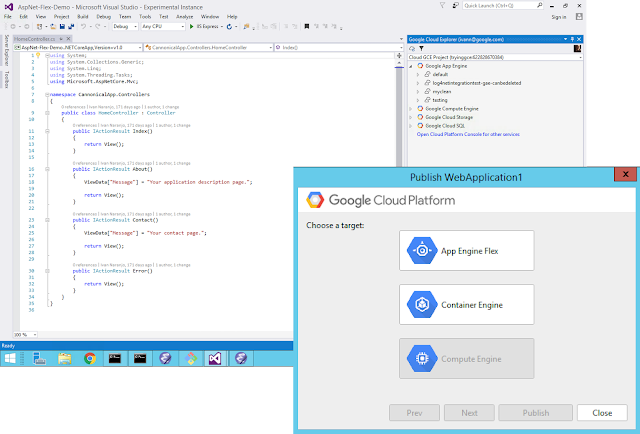
To make developing applications for .NET core on GCP even better, we’ve added support for deploying your apps directly with the Cloud Tools for Visual Studio extension.

To get started, check out the App Engine for .NET getting started guide.

PHP 7.1 on App Engine goes beta
Along with .NET support, PHP 7.1 support on App Engine is now beta. This runtime allows you to choose between PHP 5.6, 7.0, or 7.1. There are step-by-step guides for running Symfony, Laravel or Drupal and our client libraries make it easy to take advantage of Google Cloud Platform’s advanced APIs and services.

To get started, check out the App Engine for PHP getting started guide.

Our commitment to open source
At Google, we’re committed to open source and open development. The Docker-based App Engine runtimes, the client libraries, the tooling — all open source, and available on GitHub.

Node.js

Docker runtime

Client library

Samples

Ruby

Docker runtime

Client library

Samples

Java

Docker runtimes

Client library, Maven, Gradle, IntelliJ

Samples

Python

Docker runtime

Client library

Samples

Go

Docker runtime

Client library

Samples

.NET

Docker runtime

Client library, Visual Studio, Powershell

Samples

PHP

Docker runtime

Client library

Samples

The best part about these runtimes and libraries is that they run anywhere that supports a Docker-based environment. The code you write for App Engine works across App Engine, Google Container Engine or Google Compute Engine. You can even grab your Docker image and run it on your own infrastructure.

We’re excited to welcome developers of all languages to App Engine. We’d like to extend a warm welcome to Node.js, Ruby and .NET developers, and we’re committed to making further investments to help make you as productive as possible.

If you’re an App Engine developer who loves the unique features of the standard environment, we’ve got more coming for you too. Over the next few months, we’ll be rolling out support for Java 8, updated libraries and improved connectivity with other GCP services. Developers that sign up for the alpha release of Java 8 on the App Engine standard environment can get started today. You can expect multiple announcements on both the standard and flexible environments in App Engine in the coming months.

We can’t wait to hear what you think. If you’re new to Google Cloud Platform (GCP), make sure to sign up and give it a try. Feel free to reach out to us on Twitter @googlecloud, or request an invite to the Google Cloud Slack community and join the channel.

Quelle: Google Cloud Platform

Power BI solution templates now support Azure Analysis Services

We’re pleased to announce support for Azure Analysis Services for Power BI solution templates. Effective today, we support Azure Analysis Services for the Campaign/Brand Management for Twitter, System Center Configuration Manager, Sales Management for Dynamics 365, and Sales Management for Salesforce solution templates.

Power BI solution templates simplify and accelerate building analytics solutions on popular applications, many that you probably use today. They offer a very quick guided experience to create compelling analytics and visualizations on an extensible, scalable, and secure architecture that offer immediate value and that you can customize as you see fit. This means that instead of spending weeks or months getting going, you can get started immediately and spend your time on extending and customizing the result to meet your organization’s needs. Learn more about Power BI solution templates.

So what is Azure Analysis Services and why should I care?

Well – first some background. Azure AS (let’s call it AAS) is another incarnation of the same engine that runs in Power BI Desktop, the Power BI service, and in SQL Server Analysis Services. Azure Analysis Services was announced several months ago in an article on the Azure blog. (Read it – good stuff.)

Now, why should you care about AAS? The Power BI Service is an amazing thing – why would you want to store your data in AAS rather than leaving it in Power BI? Especially when there is an added cost to do so.

The simplest and most obvious answer is data volume. The maximum size of a power BI desktop file that can be published to the Power BI Service is 1GB, after compression. For larger databases, you’ll need to bring in Azure Analysis Services.

This is a pretty simplistic way to look at things and AAS brings enterprise-ready capabilities that you might need long before you hit this data size limit. Size is a leading indicator, but here are some other things to consider.

Processing – How often do you want to refresh your reports? A report published to the Power BI service can be refreshed several times per day. If you want your model to be processed more frequently or you need more control on how it is processed, then AAS is one of your options. Reports bound to AAS are as fresh as the data inside it.

Partitioning – A table can be divided into logical parts each of which can be processed independently of the other. We don’t exploit this capability directly with solution templates (at least not yet) but you can. Solution templates are designed to be extended. So, for example, if you anticipate marrying your own data with what we provide, this can be important.

Client tools – As hard as this is to say, Power BI might not meet all your needs. Other tools like Excel offer some capabilities that Power BI does not. You might even have to use a *cough* competitor product. Azure Analysis Services supports not only Excel, but too many other client tools to mention here.

Size – Yes, it’s simplistic but it matters. If your model gets large you may need to turn to AAS to give you the Azure resources you need to not only host the data you have, but give you the performance you need.

So please try it out. As always, we look forward to your reaction and feedback. You can comment on your community site or simply email us at PBISolnTemplates@microsoft.com.
Quelle: Azure