Learn Docker with our DockerCon 2017 Hands-On Labs

We’re excited to announce that 2017 will feature a comprehensive set of hands-on labs. We first introduced hands-on labs at DockerCon EU in 2015, and they were also part of DockerCon 2016 last year in Seattle. This year we’re offering a broader range of topics that cover the interests of both developers and operations personnel on both Windows and Linux (see below for a full list)
These hands-on labs are designed to be self-paced, and are run on the attendee’s laptop. But, don’t worry, all the infrastructure will be hosted again this year on Microsoft Azure. So, all you will need is a laptop capable of instantiating a remote session over SSH (for Linux) or RDP (for Windows).

We’ll have a nice space set up in between the ecosystem expo and breakout rooms for you to work on the labs. There will be tables and stools along with power and wireless Internet access as well as lab proctors to answer questions. But, because of the way the labs are set up, you could also stop by, sign up, and take your laptop to a quiet spot and work on your own.
As you can tell, we’re pretty stoked on the labs, and we think you will be to.
See you in Austin!
DockerCon 2017 Hands-on Labs

Title

Abstract

Orchestration

In this lab you can play around with the container orchestration features of Docker. You will deploy a Dockerized application to a single host and test the application. You will then configure Docker Swarm Mode and deploy the same application across multiple hosts. You will then see how to scale the application and move the workload across different hosts easily.

Docker Networking

In this lab you will learn about key Docker Networking concepts. You will get your hands dirty by going through examples of a few basic concepts, learn about Bridge and Overlay networking, and finally learning about the Swarm Routing Mesh.

Modernize .NET Apps &; for Devs.

A developer’s guide to app migration, showing how the Docker platform lets you update a monolithic application without doing a full rebuild. You’ll start with a sample app and see how to break components out into separate units, plumbing the units together with the Docker platform and the tried-and-trusted applications available on Docker Hub.

Modernize .NET Apps &8211; for Ops.

An admin guide to migrating .NET apps to Docker images, showing how the build, ship, run workflow makes application maintenance fast and risk-free. You’ll start by migrating a sample app to Docker, and then learn how to upgrade the application, patch the Windows version the app uses, and patch the Windows version on the host &8211; all with zero downtime.

Getting Started with Docker on Windows Server 2016

Get started with Docker on Windows, and learn why the world is moving to containers. You’ll start by exploring the Windows Docker images from Microsoft, then you’ll run some simple applications, and learn how to scale apps across multiple servers running Docker in swarm mode

Building a CI / CD Pipeline in Docker Cloud

In this lab you will construct a CI / CD pipeline using Docker Cloud. You&;ll connect your GitHub account to Docker Cloud, and set up triggers so that when a change is pushed to GitHub, a new version of your Docker container is built.

Discovering and Deploying Certified Content with Docker Store

In this lab you will learn how to locate certified containers and plugins on docker store. You&8217;ll then deploy both a certified Docker image, as well as a certified Docker plugin.

Deploying Applications with Docker EE (Docker DataCenter)

In this lab you will deploy an application that takes advantage of some of the latest features of Docker EE (Docker Datacenter). The tutorial will lead you through building a compose file that can deploy a full application on UCP in one click. Capabilities that you will use in this application deployment include:
&8211; Docker services
&8211; Application scaling and failure mitigation
&8211; Layer 7 load balancing
&8211; Overlay networking
&8211; Application secrets
&8211; Application health checks
&8211; RBAC-based control and visibility with teams

Vulnerability Detection and Remediation with Docker EE (Docker Datacenter)

Application vulnerabilities are a continuous threat and must be continuously managed. In this tutorial we will show you how DTR can detect known vulnerabilities through image security scanning. You will detect a vulnerability in a running app, patch the app, and then apply a rolling update to gradually deploy the update across your cluster without causing any application downtime.

 
Learn More about DockerCon:

What’s new at DockerCon?
5 reasons to attend DockerCon
Convince your manager to send you to DockerCon
DockerCon for Windows containers practitioners 

Check out all the Docker Hands-on labs at DockerCon To Tweet

The post Learn Docker with our DockerCon 2017 Hands-On Labs appeared first on Docker Blog.
Quelle: https://blog.docker.com/feed/

Take the InterConnect celebrity challenge

As I mentioned in my last blog, I’m the person you want to talk to if you’re looking for the inside scoop on finding fun at InterConnect. I’ve already shared where you can find beer, enjoy some video games and even hang out with Wayne Brady. Now, I want to give you the inside scoop on a very famous guest.
Let me put it this way.
What if I told you  one of the most talented rappers in history, one of the most hilarious comedic actors in the world and one of the biggest dramatic actors ever was going to InterConnect? What if I told you this one person had broken box office records, won Grammys and been nominated for Academy Awards? Sounds like someone who understands how to redefine possible, doesn’t it?
Drumroll please…
Will Smith will be joining us at InterConnect.
With a resume like this one, Will Smith knows better than just about anyone what it means to redefine yourself. It wasn’t enough to succeed with his music, he had to push himself by becoming a comedic icon. It wasn’t enough to have a list of hit TV and film comedies under his belt, he had to branch out to become one of the most successful and beloved dramatic actors in the world.
Not only is Will Smith a talented performer, but he also calls to mind a valuable business lesson. To remain culturally important and continue to give the most to your customers and fans, it’s essential to explore, challenge and redefine. If Will Smith can go from hit rapper, to hilarious agent in Men in Black, to the inspiring embodiment of the American dream in The Pursuit of Happiness, your business can redefine itself too.
Will Smith reminds us that the ability to redefine yourself is not only an asset. It is essential to thriving at the highest level. Be sure to hear him share his thoughts on innovation and redefinition — only at IBM InterConnect.

The post Take the InterConnect celebrity challenge appeared first on news.
Quelle: Thoughts on Cloud

Discover and redact sensitive data with the Data Loss Prevention API

By Scott Ellis, Product Manager

Last week at Google Cloud Next ’17, we introduced a number of security enhancements across Google Cloud, including the Data Loss Prevention API. Like many Google Cloud Platform (GCP) products, the DLP API began its life as an internal product used in development and support workflows. It also uses the same codebase as DLP on Gmail and Drive.

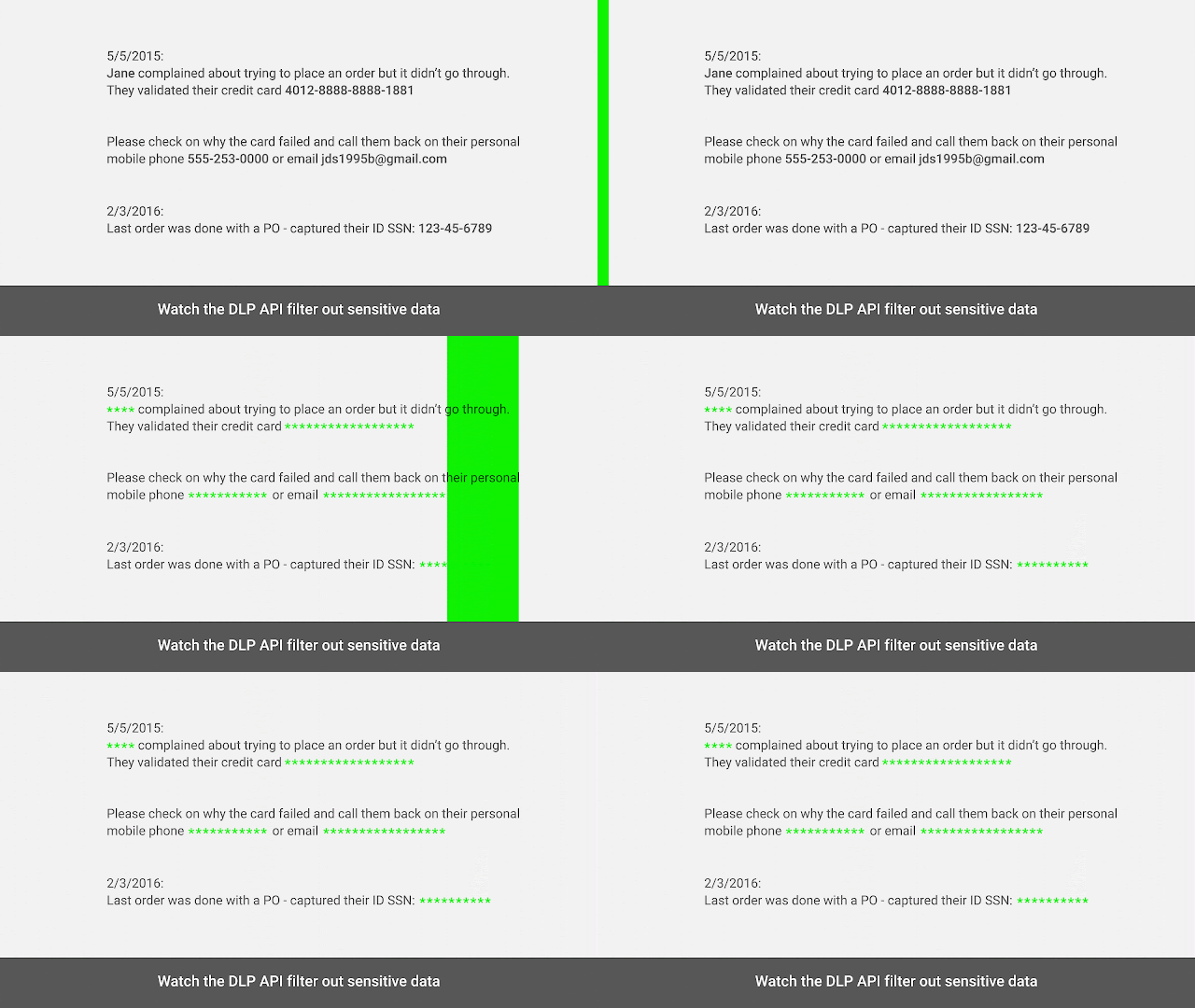
Now in beta, the DLP API gives GCP users access to a classification engine that includes over 40 predefined content templates for credit card numbers, social security numbers, phone numbers and other sensitive data. Users send the API textual data or images and get back classification types, along with likelihood categories and offsets or bounding boxes.

Be smart with your data
The DLP API helps you minimize what data you collect, expose or copy. For example, it can be used to automatically classify or redact sensitive data from a text stream before you write it to disk, generate logs or perform analysis. Use it to alert users before they save sensitive data in an application or triage content to the right storage system or user based on the presence of sensitive content.

As an API, DLP takes in raw data such as customer service chat logs that may contain personally identifiable information, and returns either a stream of redacted data or a set of findings along with metadata such as likelihood and offsets (for text) and bounding boxes (for images).

Your data is your most critical asset
The DLP API helps you to manage and run analytics on cloud data, without introducing additional risk to your organization. Pre-process with the DLP API, then analyze trends in Google BigQuery, understand context with Google Cloud Natural Language API and run predictive models with Cloud Machine Learning Engine—all on redacted textual content.

Try the DLP API out here with our demo application. Watch as it detects credit card numbers based on pattern formatting, contextual information and checksum.

To find out more and get started, visit the DLP API product page.
Quelle: Google Cloud Platform

Instant File Recovery from Azure Linux VM backup using Azure Backup – Preview

We earlier announced Instant file recovery from Azure Windows VM backups which enables you to restore files instantly from the Azure Recovery Services Vault with no additional cost or infrastructure. Today, we are excited to announce the same feature for Azure Linux VM backups in preview. If you are new to Azure Backup, you can start backing directly from the Azure IaaS VM blade and start using this feature. Value proposition: Instant recovery of files – Now instantly recover files from the cloud backups of Azure VMs. Whether it’s accidental file deletion or simply validating the backup, instant restore drastically reduces the time to recover your data. Mount application files without restoring them – Our iSCSI-based approach allows you to open/mount application files directly from cloud recovery points to application instances, without having to restore them. For e.g. In case of backup of a Azure Linux VM running mongoDB, you can mount BSON data dumps from the cloud recovery point and quickly validate the backup or retrieve individual items such as tables without having to download the entire data dump. Learn how to instantly recover files from Azure Linux VM backups:     Basic requirements The downloaded recovery script can be run on a machine which meets the following requirements. OS of the machine where the script is run (recovery machine) should support/recognize the underlying file-system of the files present in the backed-up Linux VM. Ensure that the OS of the recovery machine is compatible with the backed up VM and the versions are as mentioned in the following table Linux OS Versions Ubuntu 12.04 and above CentOS 6.5 and above RHEL 6.7 and above Debian 7 and above Oracle Linux 6.4 and above The script requires python and bash components to execute and provide a secure connection to the recovery point. Component Version Python 2.6.6 and above Bash 4 and above Only users with root level access can view the paths mounted by the script.   Advanced configurations Recovering files from LVM/Software RAID Arrays: In case you are using LVM/RAID Arrays in the backed-up Linux VM,  you cannot run the script on the same virtual machine due to disk conflicts. Run the script on any other Recovery machine (meeting the basic requirements as mentioned above) and the script will attach the relevant disks as shown in the output below. The following additional commands need to be run by the user to make LVM/RAID Array partitions visible and online. For LVM Partitions: $ pvs <volume name as shown above in the script output>  –  This will list all the volume groups under this physical volume $ lvdisplay <volume-group-name from the previous command’s result>  –  This will list all logical volumes, names and their paths in a volume group $ mount <LV path> </mountpath> –  Now mount the logical volumes to a path of your choice.   For RAID Arrays: $ mdadm –detail –scan – This will display details about all RAID Disks in this machine. The relevant RAID disk from the backed-up VM will be displayed with its name (</dev/mdm/<RAID array name in the backed up VM>) If the RAID Disk has physical volumes, mount the disk directly to view all the volumes within it. $ mount [RAID Disk Path] [/mounthpath] If the RAID disk was used to configure LVM over and above it, then re-use the process defined for LVM above and supply the volume name as an input.   Related links and additional content Want more details about this feature? Check out Azure Backup Linux Restore documentation Need help? Reach out to Azure Backup forum for support Tell us how we can improve Azure Backup by contributing new ideas and voting up existing ones. Follow us on Twitter @AzureBackup for the latest news and updates New to Azure Backup, sign up for a free Azure trial subscription 
Quelle: Azure