Merrick Garland Has A Higher "Scalia Score" Than Neil Gorsuch

Ravel

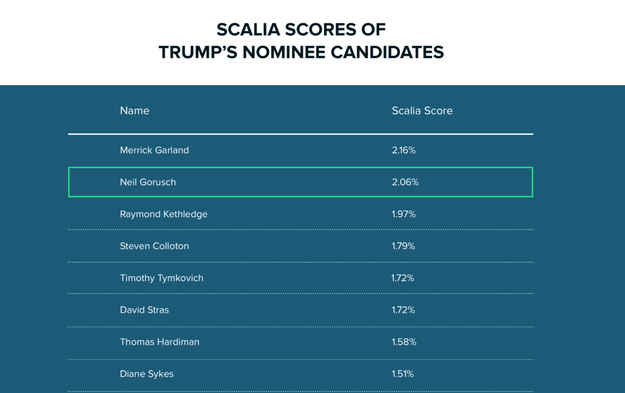
Neil Gorsuch, the judge President Trump selected to fill the vacancy on the Supreme Court created after the death of Justice Antonin Scalia, has often been compared, in style and philosophy, to the judge he&;s been nominated to replace. But there&039;s another prominent federal appeals court judge that, according to data analysis of case law citations, fits the Scalia mold even more snugly: Merrick Garland.

Garland, the judge tapped by President Obama 50 weeks ago to join the Supreme Court but whom Senate Republicans refused to consider, has cited Justice Scalia in his opinions more often than Trump&039;s pick, as a percentage of their total citations, according to the legal search and analytics company Ravel.

The “Scalia Score,” Ravel&039;s cofounder and COO Nick Reed told BuzzFeed News, takes the number of times a judge cites opinions authored by Scalia and then divides them by the number of their total citations. Garland cited Scalia 2.16% of the time — slightly more than Gorsuch, who referenced Scalia in 2.06% of his citations. Gorsuch also had fewer citations than Garland; in his career, he&039;s made 7,972 of them, while Garland&039;s had 10,665, according to Ravel.

Reed noted that Garland sits on the DC Circuit, the same court that Scalia sat on before he became a Supreme Court Justice. “If you&039;re a DC Circuit judge, Scalia also wrote a lot of precedential case law that applies directly in your circuit.” Reed said. “Merrick just had more Scalia arguments to draw from.”

Ravel calculated Scalia scores for all 21 judges that Trump listed as his potential Supreme Court nominees. Gorsuch bested them all, which Ravel noted in a blog is an indication of his “ideology and conservative bonafides.”

“Of all of Trump&039;s picks, Gorsuch is the most like Scalia in the citation index, but Merrick Garland was even closer,” Reed said. “That&039;s something Republicans can chew on.”

After Scalia&039;s death last year, Ravel ran a series of calculations to reveal his influence in American legal thought. One of the insights gleaned from the data was that out of all active and inactive Supreme Court justices, Ruth Bader Ginsburg had the 6th most similar citation pattern compared to Scalia. Justice William Rehnquist took the top spot.

Quelle: <a href="Merrick Garland Has A Higher "Scalia Score" Than Neil Gorsuch“>BuzzFeed

Highly Available Kubernetes Clusters

Today’s post shows how to set-up a reliable, highly available distributed Kubernetes cluster. The support for running such clusters on Google Compute Engine (GCE) was added as an alpha feature in Kubernetes 1.5 release. MotivationWe will create a Highly Available Kubernetes cluster, with master replicas and worker nodes distributed among three zones of a region. Such setup will ensure that the cluster will continue operating during a zone failure.  Setting Up HA clusterThe following instructions apply to GCE. First, we will setup a cluster that will span over one zone (europe-west1-b), will contain one master and three worker nodes and will be HA-compatible (will allow adding more master replicas and more worker nodes in multiple zones in future). To implement this, we’ll export the following environment variables: $ export KUBERNETES_PROVIDER=gce$ export NUM_NODES=3$ export MULTIZONE=true $ export ENABLE_ETCD_QUORUM_READ=trueand run kube-up script (note that the entire cluster will be initially placed in zone europe-west1-b): $ KUBE_GCE_ZONE=europe-west1-b ./cluster/kube-up.shNow, we will add two additional pools of worker nodes, each of three nodes, in zones europe-west1-c and europe-west1-d (more details on adding pools of worker nodes can be find here): $ KUBE_USE_EXISTING_MASTER=true KUBE_GCE_ZONE=europe-west1-c ./cluster/kube-up.sh$ KUBE_USE_EXISTING_MASTER=true KUBE_GCE_ZONE=europe-west1-d ./cluster/kube-up.shTo complete setup of HA cluster, we will add two master replicase, one in zone europe-west1-c, the other in europe-west1-d:$ KUBE_GCE_ZONE=europe-west1-c KUBE_REPLICATE_EXISTING_MASTER=true ./cluster/kube-up.sh$ KUBE_GCE_ZONE=europe-west1-d KUBE_REPLICATE_EXISTING_MASTER=true ./cluster/kube-up.shNote that adding the first replica will take longer (~15 minutes), as we need to reassign the IP of the master to the load balancer in front of replicas and wait for it to propagate (see design doc for more details).Verifying in HA cluster works as intendedWe may now list all nodes present in the cluster: $ kubectl get nodesNAME                           STATUS                     AGEkubernetes-master              Ready,SchedulingDisabled   48mkubernetes-master-2d4          Ready,SchedulingDisabled   5mkubernetes-master-85f          Ready,SchedulingDisabled   32skubernetes-minion-group-6s52   Ready                      39mkubernetes-minion-group-cw8e   Ready                      48mkubernetes-minion-group-fw91   Ready                      48mkubernetes-minion-group-h2kn   Ready                      31mkubernetes-minion-group-ietm   Ready                      39mkubernetes-minion-group-j6lf   Ready                      31mkubernetes-minion-group-soj7   Ready                      31mkubernetes-minion-group-tj82   Ready                      39mkubernetes-minion-group-vd96   Ready                      48mAs we can see, we have 3 master replicas (with disabled scheduling) and 9 worker nodes. We will deploy a sample application (nginx server) to verify that our cluster is working correctly: $ kubectl run nginx –image=nginx –expose –port=80After waiting for a while, we can verify that both the deployment and the service were correctly created and are running: $ kubectl get podsNAME                     READY    STATUS      RESTARTS   AGE…nginx-3449338310-m7fjm   1/1      Running     0          4s…$ kubectl run -i –tty test-a –image=busybox /bin/shIf you don’t see a command prompt, try pressing enter.# wget -q -O- http://nginx.default.svc.cluster.local…<title>Welcome to nginx!</title>…Now, let’s simulate failure of one of master’s replicas by executing halt command on it (kubernetes-master-137, zone europe-west1-c):$ gcloud compute ssh kubernetes-master-2d4 –zone=europe-west1-c…$ sudo haltAfter a while the master replica will be marked as NotReady:$ kubectl get nodesNAME                           STATUS                        AGEkubernetes-master              Ready,SchedulingDisabled      51mkubernetes-master-2d4          NotReady,SchedulingDisabled   8mkubernetes-master-85f          Ready,SchedulingDisabled      4m…However, the cluster is still operational. We may verify it by checking if our nginx server works correctly:$ kubectl run -i –tty test-b –image=busybox /bin/shIf you don’t see a command prompt, try pressing enter.# wget -q -O- http://nginx.default.svc.cluster.local…<title>Welcome to nginx!</title>…We may also run another nginx server:$ kubectl run nginx-next –image=nginx –expose –port=80The new server should be also working correctly:$ kubectl run -i –tty test-c –image=busybox /bin/shIf you don’t see a command prompt, try pressing enter.# wget -q -O- http://nginx-next.default.svc.cluster.local…<title>Welcome to nginx!</title>…Let’s now reset the broken replica:$ gcloud compute instances start kubernetes-master-2d4 –zone=europe-west1-cAfter a while, the replica should be re-attached to the cluster:$ kubectl get nodesNAME                           STATUS                     AGEkubernetes-master              Ready,SchedulingDisabled   57mkubernetes-master-2d4          Ready,SchedulingDisabled   13mkubernetes-master-85f          Ready,SchedulingDisabled   9m…Shutting down HA clusterTo shutdown the cluster, we will first shut down master replicas in zones D and E:$ KUBE_DELETE_NODES=false KUBE_GCE_ZONE=europe-west1-c ./cluster/kube-down.sh$ KUBE_DELETE_NODES=false KUBE_GCE_ZONE=europe-west1-d ./cluster/kube-down.shNote that the second removal of replica will take longer (~15 minutes), as we need to reassign the IP of the load balancer in front of replicas to the remaining master and wait for it to propagate (see design doc for more details).Then, we will remove the additional worker nodes from zones europe-west1-c  and europe-west1-d:$ KUBE_USE_EXISTING_MASTER=true KUBE_GCE_ZONE=europe-west1-c ./cluster/kube-down.sh$ KUBE_USE_EXISTING_MASTER=true KUBE_GCE_ZONE=europe-west1-d ./cluster/kube-down.shAnd finally, we will shutdown the remaining master with the last group of nodes (zone europe-west1-b):$ KUBE_GCE_ZONE=europe-west1-b ./cluster/kube-down.shConclusionsWe have shown how, by adding worker node pools and master replicas, a Highly Available Kubernetes cluster can be created. As of Kubernetes version 1.5.2, it is supported in kube-up/kube-down scripts for GCE (as alpha). Additionally, there is a support for HA cluster on AWS in kops scripts (see this article for more details).Download KubernetesGet involved with the Kubernetes project on GitHub Post questions (or answer questions) on Stack Overflow Connect with the community on SlackFollow us on Twitter @Kubernetesio for latest updates–Jerzy Szczepkowski, Software Engineer, Google
Quelle: kubernetes

APM and DevOps: A complementary approach to agile, responsive development

Digital transformation has profound ramifications for your organization. The new landscape is disrupting business models, raising customer expectations and creating new channels to do business.
I bet you’re seeing the impact of digital transformation on your organization’s application development cycle as well. The rate of development probably isn’t decided entirely by you anymore. Instead, it’s driven by customers and the pace of the competitive marketplace—and the time between releases grows ever shorter.
Today, it’s standard for development teams to start on the next version of an application before the previous version is delivered or even completed. So how do you keep pace with these iterative, responsive and agile development cycles? An environment that incorporates both DevOps and end-to-end Application Performance Management (APM) is critical to business success.
What DevOps delivers

DevOps is a vital component of digital transformation. A recent survey by Evans Data found that 76 percent of developers polled considering DevOps to be very or somewhat important for their future.
DevOps breaks down the barrier between development and operations to deliver three key value propositions:

Accelerate the delivery of innovation with more frequent application updates
Reduce operational costs of delivering releases, eliminating expenses that have traditionally hindered agile delivery
Engage directly with the user base to focus development resources on high-value initiatives.

If you’re still uncertain how to make DevOps and APM a reality, download your very own APM DevOps for Dummies ebook.
What APM delivers
Before DevOps, APM tools used to be focused on production operations. But as more organizations adopt DevOps models, APM tools are expanding from operations into development. Development and testing environments tie closely to production environments, which makes APM easier to expand and implement. This enables development teams to take advantage of traditionally production-oriented APM capabilities that include:

Lower overhead and low cost monitoring
Management of complex dependencies and end-user experience
Highly scalable and flexible deployments with effective collaboration across development and operations

As one CIO of a retail organization summarized, “you’re going to increase productivity because you’re going to give the users [their] applications faster. You’re going to reduce IT resources and get more things done.”
Bring DevOps and APM together
To summarize, environments that incorporate both DevOps and complete APM enable development teams to be agile, responsive and ultimately more optimized for the dynamic, always-on hybrid cloud world. Embracing the DevOps methodology will help your organization reduce your delivery cycle times to hours instead of months, leaving more time to work on delivering a richer user experience.
Read this DevOps whitepaper to learn how development and operations can collaborate to optimize user experience every step of the way, leaving more time for your next big innovation.
Finally, check out all the DevOps expertise and best practices to be shared at IBM InterConnect 2017 in March.
The post APM and DevOps: A complementary approach to agile, responsive development appeared first on news.
Quelle: Thoughts on Cloud

Calculating the TCO of moving SAP workloads to cloud

As I was leaving our local movie theater on a recent day out with my family, my daughter noticed that I looked annoyed. She asked what was wrong. I decided not to say what I was really thinking: that’s two hours and $30 we’d never get back.
This made me think about all the other small investments we make, and then the bigger things, which ultimately reminded me of a question I get asked regularly when talking to clients: how can I assess the benefits of moving to cloud and managed services before making the investment?
Moving to the cloud can affect the bottom line. It can be hard to justify the total cost of ownership (TCO) up front when you don’t have a clear understanding of what the key tangible and intangible benefits might be, especially when moving ERP applications to the cloud. Fortunately, there are tools that can help you assess the net incremental revenue benefits of getting services to market faster.
One of those tools is the Cost Benefits Estimator, which helps organizations look at managed infrastructure, including those designed specifically SAP workloads. The results are based on third-party validated financial metrics and justification models.
How does it work?
It’s a self-driven tool that asks a few basic questions such as:

How many servers will be moved to the cloud?
How many full-time equivalent headcounts are required to support your current infrastructure and applications?
What industry are you in?
How many customers do you have?
What are the key drivers? (To increase customer reach? Improve time to market? Other factors?)

By answering these questions, the tool can help organizations estimate annual savings based on their environments. It can help them determine the numeric value of infrastructure savings. For example, it enables comparisons between the costs of SAP support labor costs for the current environment versus managed services on the IBM cloud infrastructure.
Wherever you decide to invest your time and money, tools like these can help spur wiser investments. As Lynda Stadtmueller, vice president of services with Stratecast-Frost & Sullivan, wrote in a recent blog post, “Whether you are in the information or finance organization, the smartest technology investment is the one that delivers maximum value to the business.”
Calculate your estimated annual savings from an investment in IBM cloud managed services by trying the Cost Benefits Estimator for SAP Applications. You can also try it for non-SAP applications. It takes no more than 15 to 20 minutes to see your results.
The post Calculating the TCO of moving SAP workloads to cloud appeared first on Cloud computing news.
Quelle: Thoughts on Cloud

8 must-see sessions for application developers at Google Cloud Next ’17

By Chris Sells, Product Manager, Google Cloud

With 200-plus sessions to choose from at Google Cloud Next ‘17 on March 8 – 10, there’s a little bit of something for everyone. But if you’re an application developer coming to the show, here are a few sessions in particular that I recommend you check out.

The most popular application development platform on Google Cloud Platform (GCP) is Java. If that describes your shop, be sure to check out “Power your Java workloads on Google Cloud Platform,” with Amir Rouzrokh, Product Manager for all things Java on GCP. Amir will show attendees how to deploy a Spring Boot application to GCP, plus how to use Cloud Tools for IntelliJ to troubleshoot production problems.

In the past year, we’ve also made big strides supporting Microsoft platforms like ASP.NET on GCP. For a taste, check out Google Developer Advocate Mete Atamel’s talk “Take your ASP.NET apps to the next level with Google Cloud,” where he’ll cover how to migrate an ASP.NET app to GCP, how to work with our Powersehll cmdlets and Visual Studio plugins and how to tie into advanced GCP services like Google Cloud Storage, Cloud Pub/Sub and our Machine Learning APIs. Then there’s “Running .NET and containers in Google Cloud Platform” with Jon Skeet and Chris Smith, who will show you the next generation of OSS, cross-platform .NET Core apps running in Containers in Google App Engine and in Kubernetes.

Speaking of App Engine, here’s your chance to learn all about App Engine flexible environment, our next-generation PaaS offering. In “You can run that on App Engine?,” Product Manager Justin Beckwith shows you how to easily build production-scale web apps for an expanded variety of application patterns.

We’re also excited to talk more about Apigee, the API management platform we acquired in the fall. At “Using Apigee Edge to create and publish APIs that developers love,” Greg Brail, Principal Software Engineer and Prithpal Bhogil, GCP Sales Engineer, will walk developers through how to use Apigee Edge and best practices for building developer-friendly APIs.

Newcomers to GCP may also enjoy Google Cloud Product Manager Omar Ayoub’s session, “Developing made easy on Google Cloud Platform”, where we’ll provide an overview of all the different libraries, IDE and framework integrations and other tools for developing applications on GCP.

But the hottest application development topic at Next ’17 is arguably Google Cloud Functions, our event-based computing platform that we announced in alpha last year. For an introduction to Cloud Functions, there’s “Building serverless applications with Google Cloud Functions” with Product Manager Jason Polites. Mobile developers should also consider “Google Cloud Functions and Firebase”, marrying our mobile backend as a service offering with Cloud Functions’ lightweight, asynchronous compute.

Of course, that’s just the tip of the iceberg when it comes to application development sessions. Be sure to check out the full session catalog, and register sooner rather than later to secure your spot in the most coveted sessions and bootcamps.
Quelle: Google Cloud Platform