Everything You Need To Know About Google's New Smartwatches

Android Wear 2.0, the platform’s first big update since 2014, starts rolling out to supported devices this week.

Whaddya know&; Google still makes smartwatches. After nearly three years of incremental software updates to a small fleet of wearable devices, Android Wear 2.0 is finally available on two new watches – the LG Watch Style and LG Watch Sport – designed specifically for the refined software. Existing, supported watches, like the Moto 360 2 and ASUS ZenWatch 2, will be able to download 2.0 in the coming weeks.

You might be wondering: Why is Google continuing to invest resources in wearables, a D-list gadget category that it isn’t doing so hot right now? Operations at Kickstarter darling Pebble shut down in December 2016, and the company folded into Fitbit, which recently cut between 5% to 10% of its workforce after disappointing holiday sales. Intel-owned Basis had to recall its devices when they began overheating and melting their own chargers. Jawbone is reportedly winding down its fitness-focused wearables business. Even the number of smartwatches sold by the industry’s two leading manufacturers, Samsung (with 800,000 watches) and Apple (with 5.2 million), pale in comparison those companies’ smartphone sales (77.5 and 78.3 million, respectively, in the last quarter of 2016 alone). Furthermore, compared to Samsung and Apple, Google has struggled to gain traction in the smartwatch category.

Well, Google, it seems, wants its core suite of software services available in as many form factors as possible, from smart speakers to routers. There are many ways one can “google” something and, if smartwatches are your thing, the wrist is another place where you can do just that. Google&;s hardware is merely a vessel for its software – and Android Wear is no different.

The new Android watches designed in partnership with LG were clearly made to prioritize Google’s software, and don’t have some of the more premium hardware features that its competitors do, like the Samsung Gear S3’s multi-day battery life or the Apple Watch Series 2’s swim-proofness. The new update most notably includes access to Google Assistant, the “smart” voice-activated personal assistant that can send messages, set reminders, or make restaurant reservations. It’s also compatible with Android Pay, a mobile tap-and-go payment platform.

In my week of testing the first Android watches slated to ship with 2.0, I found that, while the new update will most likely satisfy longtime Android Wear loyalists, if you’re not sold on smartwatches, the LG Watch Sport and Style aren’t going to be the ones that convince you otherwise. Here are some of my first impressions:

Google / BuzzFeed News

Look at how big this damn thing is.
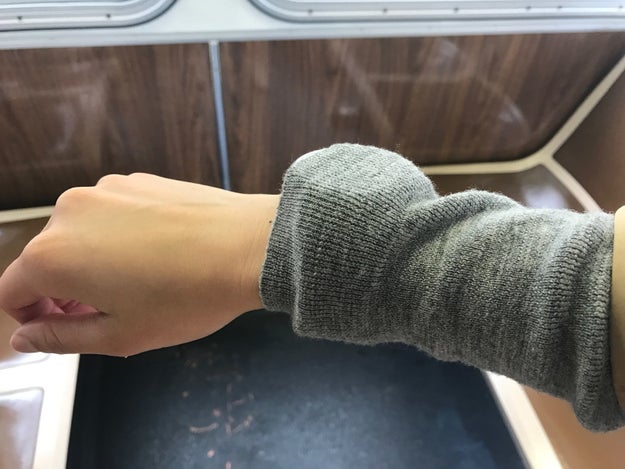
Look at how big this damn thing is.

This is the size of the LG Watch Sport on my wrist. It is Not Good. The watch is 14.2 mm thick, which may not sound like a lot, but it is, especially when you’re trying to jam it through a fitted sweater.

The Sport version of the watch has cellular LTE data, built-in GPS, NFC for mobile payments, a heart rate sensor, and a battery to support all of those energy-draining technologies crammed underneath its 1.38-inch diameter display. It’s water resistant in up to 1.5 meters for 30 minutes, which is good for running in the rain, but wouldn’t survive a swim. The device feels heavy too, like a metal paperweight strapped to your wrist, though those with thicker, stronger forearms might disagree. Those 89.4 grams start to feel like a burden after all-day wear.

The slimmer, more lightweight Style is more my speed, but it doesn’t have any of the features I mentioned above. It’s essentially a step counter with a display for apps, notifications, and Google Assistant.

Nicole Nguyen / BuzzFeed News

Android Wear has the best tiny typing experience for wearables, period.

Android Wear has the best tiny typing experience for wearables, period.

You’d think that replying to messages, Slacks, and emails on a watch would be a typo nightmare, but Android’s new on-watch keyboard is anything but. You can swipe your finger over the mini keyboard or peck each letter, and Google will employ machine learning to figure out what you’re trying to say.

There are also a number of “smart” replies, generated by Google based on the contents of your message, that you can choose from. For example, for an email requesting a meeting, the watch suggested “OK, let me get back to you” as an automatic response, along with “I agree,” “Nice,” and the smiley face emoji.

You can also respond purely with emoji, by choosing them from a long list or attempting to draw one. And by draw, I mean, scribble the “Pinterest fail” version of a thumbs up and Google’s algorithms are smart enough to understand what you intended.

Nicole Nguyen / BuzzFeed News

During my briefing with Google, two product managers explained that this feature was introduced so you can easily switch between your “work” watch face and your “home” watch face. But it’s not super clear that, like, anybody wants or needs that??


View Entire List ›

Quelle: <a href="Everything You Need To Know About Google&039;s New Smartwatches“>BuzzFeed

What’s next for containers and standardization?

Containers are all the rage among developers who use open source software to build, test and run applications.
In the past couple of years, container interest and usage have grown rapidly. Nearly every major cloud provider and vendor has announced container-based solutions. Meanwhile, a proliferation of container-related start-ups has also appeared.
Hybrid solutions are the future of . They allow developers to more quickly and easily package applications to run across multiple environments. The open standardization of container runtimes and image specifications will help enable portability in a multi-cloud ecosystem.
While I welcome the spread of ideas in this space, the promise of containers as a source of application portability requires the establishment of certain standards. A little over a year ago, the Open Container Initiative (OCI) was founded with the mission of promoting a set of common, minimal, open standards and specifications around container technology. Since then, the OCI community has made a lot of progress.
In terms of developer activity, the OCI community has been busy. Last year the project saw 3000-plus project commitments from 128 different authors across 36 different organizations. With the addition of the Image Format specification project, OCI expanded its initial scope from just the runtime specification. We also added new developer tools projects such as runtime-tools and image-tools.
These serve as repositories for conformance testing tools and have been instrumental in gearing up for the upcoming v1.0 release. We’ve also recently created a new project within OCI called go-digest (which was donated and migrated from docker/go-digest). This provides a strong hash-identity implementation in Go and serves as a common digest package across the container ecosystem.
Regarding early adoption, Docker has supported the OCI technology through containerd. Recently, Docker announced it is spinning out its core container runtime functionality into a standalone component, incorporating it into a separate project called containerd and donating it to a neutral foundation in early 2017. Containerd will feature full OCI support, including the extended OCI image specification.
And Docker is only one example. The Cloud Foundry community was also an early consumer of OCI. It embedded runc through Garden as the cornerstone of its container runtime technology. The Kubernetes project is incubating a new Container Runtime Interface (CRI) that adopts OCI components through implementations like CRI-O and rklet. The rkt community is adopting OCI technology already and is planning to leverage the reference OCI container runtime runc in 2017. The Apache Mesos community is currently building out support for the OCI image specification. AWS recently announced its support of draft OCI specifications in its latest ECR release. IBM is also strongly committed to adopting the OCI draft specifications. The adoption is live today as part of the IBM Bluemix Container Service.
We are getting closer to launching the v1.0 release. The milestone release of the OCI Runtime and Image Format Specifications version 1.0 will hopefully be available later in 2017, drawing the industry that much closer to standardization and true portability. To that end, we’ll be launching an official OCI Certification program once the v1.0 release is out. With OCI certification, folks will be confident that their OCI-certified solutions meet a high set of criteria that deliver agile, interoperable solutions.
There is still a lot of work to do. The OCI community will be onsite at several industry events, including IBM InterConnect. The success of the OCI community depends on a wide array of contributions from across the industry. The door is always open, so please come join us in shaping the future of container technology.
If you’re interested in contributing, I recommend joining the OCI developer community, which is open to everyone. If you’re building products on OCI technology, I recommend joining as a member and participating in the upcoming certification program. Please follow us on Twitter to stay in touch: @OCI_ORG.
The post What&;s next for containers and standardization? appeared first on Cloud computing news.
Quelle: Thoughts on Cloud

Run Deep Learning with PaddlePaddle on Kubernetes

Editor’s note: Today’s post is a joint post from the deep learning team at Baidu and the etcd team at CoreOS. What is PaddlePaddlePaddlePaddle is an easy-to-use, efficient, flexible and scalable deep learning platform originally developed at Baidu for applying deep learning to Baidu products since 2014. There have been more than 50 innovations created using PaddlePaddle supporting 15 Baidu products ranging from the search engine, online advertising, to Q&A and system security. In September 2016, Baidu open sourced PaddlePaddle, and it soon attracted many contributors from outside of Baidu.Why Run PaddlePaddle on KubernetesPaddlePaddle is designed to be slim and independent of computing infrastructure. Users can run it on top of Hadoop, Spark, Mesos, Kubernetes and others.. We have a strong interest with Kubernetes because of its flexibility, efficiency and rich features.While we are applying PaddlePaddle in various Baidu products, we noticed two main kinds of PaddlePaddle usage — research and product. Research data does not change often, and the focus is fast experiments to reach the expected scientific measurement. Products data changes often. It usually comes from log messages generated from the Web services.A successful deep learning project includes both the research and the data processing pipeline. There are many parameters to be tuned. A lot of engineers work on the different parts of the project simultaneously.To ensure the project is easy to manage and utilize hardware resource efficiently, we want to run all parts of the project on the same infrastructure platform.The platform should provide:fault-tolerance. It should abstract each stage of the pipeline as a service, which consists of many processes that provide high throughput and robustness through redundancy.auto-scaling. In the daytime, there are usually many active users, the platform should scale out online services. While during nights, the platform should free some resources for deep learning experiments.job packing and isolation. It should be able to assign a PaddlePaddle trainer process requiring the GPU, a web backend service requiring large memory, and a CephFS process requiring disk IOs to the same node to fully utilize its hardware.What we want is a platform which runs the deep learning system, the Web server (e.g., Nginx), the log collector (e.g., fluentd), the distributed queue service (e.g., Kafka), the log joiner and other data processors written using Storm, Spark, and Hadoop MapReduce on the same cluster. We want to run all jobs — online and offline, production and experiments — on the same cluster, so we could make full utilization of the cluster, as different kinds of jobs require different hardware resource. We chose container based solutions since the overhead introduced by VMs is contradictory to our goal of efficiency and utilization. Based on our research of different container based solutions, Kubernetes fits our requirement the best.Distributed Training on KubernetesPaddlePaddle supports distributed training natively. There are two roles in a PaddlePaddle cluster: parameter server and trainer. Each parameter server process maintains a shard of the global model. Each trainer has its local copy of the model, and uses its local data to update the model. During the training process, trainers send model updates to parameter servers, parameter servers are responsible for aggregating these updates, so that trainers can synchronize their local copy with the global model.Figure 1: Model is partitioned into two shards. Managed by two parameter servers respectively. Some other approaches use a set of parameter servers to collectively hold a very large model in the CPU memory space on multiple hosts. But in practice, it is not often that we have such big models, because it would be very inefficient to handle very large model due to the limitation of GPU memory. In our configuration, multiple parameter servers are mostly for fast communications. Suppose there is only one parameter server process working with all trainers, the parameter server would have to aggregate gradients from all trainers and becomes a bottleneck. In our experience, an experimentally efficient configuration includes the same number of trainers and parameter servers. And we usually run a pair of trainer and parameter server on the same node. In the following Kubernetes job configuration, we start a job that runs N Pods, and in each Pod there are a parameter server and a trainer process.yamlapiVersion: batch/v1kind: Jobmetadata:  name: PaddlePaddle-cluster-jobspec:  parallelism: 3  completions: 3  template:    metadata:      name: PaddlePaddle-cluster-job    spec:      volumes:      – name: jobpath        hostPath:          path: /home/admin/efs      containers:      – name: trainer        image: your_repo/paddle:mypaddle        command: [“bin/bash”,  “-c”, “/root/start.sh”]        env:        – name: JOB_NAME          value: paddle-cluster-job        – name: JOB_PATH          value: /home/jobpath        – name: JOB_NAMESPACE          value: default        volumeMounts:        – name: jobpath          mountPath: /home/jobpath      restartPolicy: NeverWe can see from the config that parallelism, completions are both set to 3. So this job will simultaneously start up 3 PaddlePaddle pods, and this job will be finished when all 3 pods finishes.Figure 2: Job A of three pods and Job B of one pod running on two nodes.The entrypoint of each pod is start.sh. It downloads data from a storage service, so that trainers can read quickly from the pod-local disk space. After downloading completes, it runs a Python script, start_paddle.py, which starts a parameter server, waits until parameter servers of all pods are ready to serve, and then starts the trainer process in the pod.This waiting is necessary because each trainer needs to talk to all parameter servers, as shown in Figure. 1. Kubernetes API enables trainers to check the status of pods, so the Python script could wait until all parameter servers’ status change to “running” before it triggers the training process.Currently, the mapping from data shards to pods/trainers is static. If we are going to run N trainers, we would need to partition the data into N shards, and statically assign each shard to a trainer. Again we rely on the Kubernetes API to enlist pods in a job so could we index pods / trainers from 1 to N. The i-th trainer would read the i-th data shard.Training data is usually served on a distributed filesystem. In practice we use CephFS on our on-premise clusters and Amazon Elastic File System on AWS. If you are interested in building a Kubernetes cluster to run distributed PaddlePaddle training jobs, please follow this tutorial.What’s NextWe are working on running PaddlePaddle with Kubernetes more smoothly.As you might notice the current trainer scheduling fully relies on Kubernetes based on a static partition map. This approach is simple to start, but might cause a few efficiency problems.First, slow or dead trainers block the entire job. There is no controlled preemption or rescheduling after the initial deployment. Second, the resource allocation is static. So if Kubernetes has more available resources than we anticipated, we have to manually change the resource requirements. This is tedious work, and is not aligned with our efficiency and utilization goal.To solve the problems mentioned above, we will add a PaddlePaddle master that understands Kubernetes API, can dynamically add/remove resource capacity, and dispatches shards to trainers in a more dynamic manner. The PaddlePaddle master uses etcd as a fault-tolerant storage of the dynamic mapping from shards to trainers. Thus, even if the master crashes, the mapping is not lost. Kubernetes can restart the master and the job will keep running. Another potential improvement is better PaddlePaddle job configuration. Our experience of having the same number of trainers and parameter servers was mostly collected from using special-purpose clusters. That strategy was observed performant on our clients’ clusters that run only PaddlePaddle jobs. However, this strategy might not be optimal on general-purpose clusters that run many kinds of jobs.PaddlePaddle trainers can utilize multiple GPUs to accelerate computations. GPU is not a first class resource in Kubernetes yet. We have to manage GPUs semi-manually. We would love to work with Kubernetes community to improve GPU support to ensure PaddlePaddle runs the best on Kubernetes. –Yi Wang, Baidu Research and Xiang Li, CoreOS Download KubernetesGet involved with the Kubernetes project on GitHub Post questions (or answer questions) on Stack Overflow Connect with the community on SlackFollow us on Twitter @Kubernetesio for latest updates
Quelle: kubernetes

Instant File Recovery from Cloud using Azure Backup

Since its inception, Azure Backup has empowered enterprises to embark on the digital transformation to cloud by providing a cloud-first approach to backup enterprise data both on-premises and in the cloud. Today, we are excited to go beyond providing Backup-as-a-Service (BaaS) and introduce Restore-as-a-Service (RaaS) in the form of Azure Backup instant restore!

With Instant Restore, you can restore files and folders instantly from cloud based recovery points without provisioning any additional infrastructure, and at no additional cost. Instant Restore provides a writeable snapshot of a recovery point that you can quickly mount as one or more iSCSI based recovery volumes. Once the snapshot is mounted, you can browse through it and recover items by simply copying them from the recovery volumes to a destination of your choice.

Value proposition

One restore mechanism for all backup sources – The Restore-as-a-Service model of Azure Backup unifies the approach for recovering individual files and folders backed up from sources in the cloud or on-premises. You can use instant restore, whether you are backing up on-premises data to cloud using Azure Backup agent or protecting Azure VMs using Azure VM backup.
Instant recovery of files – Instantly recover files from the cloud backups of Azure VMs or on-premises file-servers. Whether it’s a case of accidental file deletion or simply validating the backup, instant restore drastically reduces the time taken to recover your first file.
Open and review files in the recovery volumes before restoring them – Our Restore-as-a-Service approach allows you to open application files such as SQL, Oracle directly from cloud recovery point snapshots as if they are present locally, without having to restore them, ​and attach them to live application instances. 
Recover any combination of files to any target – Since Azure Backup provides the entire snapshot of the recovery point and relies on copy of items for recovery, you can restore multiple files from multiple folders to a local server or even to a network-share of your choice.

Availability

Azure Backup Instant Recovery of files is available in preview for customers of Azure Backup agent and Azure VM backup (Windows VMs).

Learn how to instantly recover files using Azure Backup Agent

Watch the video below to start using Instant Restore for recovering files backed up with Azure Backup Agent for files and folders.

The supported regions for this preview are available here and will be updated as new regions are included in the preview.

Learn how to instantly recover files from Azure Virtual Machine Backups

Watch the video below to instantly recover files from an Azure VM (Windows) backup.

Visit this document to know more about how to instantly recover files from  Windows Azure VM backups.

The instant file restore capability will be available soon for users who are protecting their Linux VMs using Azure VM backup. If you are interested in being an early adopter and provide valuable feedback, please let us know at linuxazurebackupteam@service.microsoft.com. Watch the video below to know more.


Related links and additional content

Learn more about Azure Backup
Want more details? Check out Azure Backup documentation
Sign up for a free Azure trial subscription
Need help? Reach out to Azure Backup forum for support
Tell us how we can improve Azure Backup by contributing new ideas and voting up existing ones.
Follow us on Twitter @AzureBackup for the latest news and updates
Azure Backup Agent version for instant restore

Quelle: Azure

Run Deep Learning with PaddlePaddle on Kubernetes

Editor’s note: Today’s post is a joint post from the deep learning team at Baidu and the etcd team at CoreOS.  What is PaddlePaddlePaddlePaddle is an easy-to-use, efficient, flexible and scalable deep learning platform originally developed at Baidu for applying deep learning to Baidu products since 2014. There have been more than 50 innovations created using PaddlePaddle supporting 15 Baidu products ranging from the search engine, online advertising, to Q&A and system security. In September 2016, Baidu open sourced PaddlePaddle, and it soon attracted many contributors from outside of Baidu.Why Run PaddlePaddle on KubernetesPaddlePaddle is designed to be slim and independent of computing infrastructure. Users can run it on top of Hadoop, Spark, Mesos, Kubernetes and others.. We have a strong interest with Kubernetes because of its flexibility, efficiency and rich features.While we are applying PaddlePaddle in various Baidu products, we noticed two main kinds of PaddlePaddle usage — research and product. Research data does not change often, and the focus is fast experiments to reach the expected scientific measurement. Products data changes often. It usually comes from log messages generated from the Web services.A successful deep learning project includes both the research and the data processing pipeline. There are many parameters to be tuned. A lot of engineers work on the different parts of the project simultaneously.To ensure the project is easy to manage and utilize hardware resource efficiently, we want to run all parts of the project on the same infrastructure platform.The platform should provide:fault-tolerance. It should abstract each stage of the pipeline as a service, which consists of many processes that provide high throughput and robustness through redundancy.auto-scaling. In the daytime, there are usually many active users, the platform should scale out online services. While during nights, the platform should free some resources for deep learning experiments.job packing and isolation. It should be able to assign a PaddlePaddle trainer process requiring the GPU, a web backend service requiring large memory, and a CephFS process requiring disk IOs to the same node to fully utilize its hardware.What we want is a platform which runs the deep learning system, the Web server (e.g., Nginx), the log collector (e.g., fluentd), the distributed queue service (e.g., Kafka), the log joiner and other data processors written using Storm, Spark, and Hadoop MapReduce on the same cluster. We want to run all jobs — online and offline, production and experiments — on the same cluster, so we could make full utilization of the cluster, as different kinds of jobs require different hardware resource. We chose container based solutions since the overhead introduced by VMs is contradictory to our goal of efficiency and utilization. Based on our research of different container based solutions, Kubernetes fits our requirement the best.Distributed Training on KubernetesPaddlePaddle supports distributed training natively. There are two roles in a PaddlePaddle cluster: parameter server and trainer. Each parameter server process maintains a shard of the global model. Each trainer has its local copy of the model, and uses its local data to update the model. During the training process, trainers send model updates to parameter servers, parameter servers are responsible for aggregating these updates, so that trainers can synchronize their local copy with the global model.Figure 1: Model is partitioned into two shards. Managed by two parameter servers respectively. Some other approaches use a set of parameter servers to collectively hold a very large model in the CPU memory space on multiple hosts. But in practice, it is not often that we have such big models, because it would be very inefficient to handle very large model due to the limitation of GPU memory. In our configuration, multiple parameter servers are mostly for fast communications. Suppose there is only one parameter server process working with all trainers, the parameter server would have to aggregate gradients from all trainers and becomes a bottleneck. In our experience, an experimentally efficient configuration includes the same number of trainers and parameter servers. And we usually run a pair of trainer and parameter server on the same node. In the following Kubernetes job configuration, we start a job that runs N Pods, and in each Pod there are a parameter server and a trainer process.yamlapiVersion: batch/v1kind: Jobmetadata:  name: PaddlePaddle-cluster-jobspec:  parallelism: 3  completions: 3  template:    metadata:      name: PaddlePaddle-cluster-job    spec:      volumes:      – name: jobpath        hostPath:          path: /home/admin/efs      containers:      – name: trainer        image: your_repo/paddle:mypaddle        command: [“bin/bash”,  “-c”, “/root/start.sh”]        env:        – name: JOB_NAME          value: paddle-cluster-job        – name: JOB_PATH          value: /home/jobpath        – name: JOB_NAMESPACE          value: default        volumeMounts:        – name: jobpath          mountPath: /home/jobpath      restartPolicy: NeverWe can see from the config that parallelism, completions are both set to 3. So this job will simultaneously start up 3 PaddlePaddle pods, and this job will be finished when all 3 pods finishes.Figure 2: Job A of three pods and Job B of one pod running on two nodes.The entrypoint of each pod is start.sh. It downloads data from a storage service, so that trainers can read quickly from the pod-local disk space. After downloading completes, it runs a Python script, start_paddle.py, which starts a parameter server, waits until parameter servers of all pods are ready to serve, and then starts the trainer process in the pod.This waiting is necessary because each trainer needs to talk to all parameter servers, as shown in Figure. 1. Kubernetes API enables trainers to check the status of pods, so the Python script could wait until all parameter servers’ status change to “running” before it triggers the training process.Currently, the mapping from data shards to pods/trainers is static. If we are going to run N trainers, we would need to partition the data into N shards, and statically assign each shard to a trainer. Again we rely on the Kubernetes API to enlist pods in a job so could we index pods / trainers from 1 to N. The i-th trainer would read the i-th data shard.Training data is usually served on a distributed filesystem. In practice we use CephFS on our on-premise clusters and Amazon Elastic File System on AWS. If you are interested in building a Kubernetes cluster to run distributed PaddlePaddle training jobs, please follow this tutorial.What’s NextWe are working on running PaddlePaddle with Kubernetes more smoothly.As you might notice the current trainer scheduling fully relies on Kubernetes based on a static partition map. This approach is simple to start, but might cause a few efficiency problems.First, slow or dead trainers block the entire job. There is no controlled preemption or rescheduling after the initial deployment. Second, the resource allocation is static. So if Kubernetes has more available resources than we anticipated, we have to manually change the resource requirements. This is tedious work, and is not aligned with our efficiency and utilization goal.To solve the problems mentioned above, we will add a PaddlePaddle master that understands Kubernetes API, can dynamically add/remove resource capacity, and dispatches shards to trainers in a more dynamic manner. The PaddlePaddle master uses etcd as a fault-tolerant storage of the dynamic mapping from shards to trainers. Thus, even if the master crashes, the mapping is not lost. Kubernetes can restart the master and the job will keep running. Another potential improvement is better PaddlePaddle job configuration. Our experience of having the same number of trainers and parameter servers was mostly collected from using special-purpose clusters. That strategy was observed performant on our clients’ clusters that run only PaddlePaddle jobs. However, this strategy might not be optimal on general-purpose clusters that run many kinds of jobs.PaddlePaddle trainers can utilize multiple GPUs to accelerate computations. GPU is not a first class resource in Kubernetes yet. We have to manage GPUs semi-manually. We would love to work with Kubernetes community to improve GPU support to ensure PaddlePaddle runs the best on Kubernetes. –Yi Wang, Baidu Research and Xiang Li, CoreOS Download KubernetesGet involved with the Kubernetes project on GitHub Post questions (or answer questions) on Stack Overflow Connect with the community on SlackFollow us on Twitter @Kubernetesio for latest updates
Quelle: kubernetes






