Here’s How To Protect Your Privacy In Trump’s America
Gregor Cresnar / The Noun Project / Getty / Chip Somodevilla
You’d think texts to your mom and calls to your takeout place are hardly in the government’s interest, but the feds might be monitoring your communications anyway. Sweeping government surveillance programs have grown in recent years – and some digital privacy advocates believe that civilian snooping will continue to expand under President Trump’s watch.
In the first half of 2016, government requests for Facebook account data were up 27% from the previous year, while requests for Google user data in the same period hit a record high of 44,943. The country that submitted the most requests to both of those sites? The United States.
Both presidents Bush and Obama supported domestic surveillance, and experts are concerned that the Trump administration will only strengthen that authority. According to Jay Stanley, a senior policy analyst at the American Civil Liberties Union, “There are extra reasons to worry under a Trump administration based on things he has supported.”
Trump has specifically called for the monitoring of mosques and activist groups like Black Lives Matter. He has also supported the reauthorization of NSA’s data collection program, which was discontinued in June 2015.
So, if you’re feeling, er, unnerved, here’s how to protect your information not only from Uncle Sam, but from hackers and prying corporations, too.

When you’re looking for tools to protect your privacy, there are many aspects to consider, but here are three important ones, according to the Electronic Frontier Foundation’s Noah Swartz:
1. Is the program open source? This allows other engineers to verify that its code is kept up to date, and that its encryption and privacy settings retain strong encryption and best practices.
2. Where is the data stored? Is it on someone else’s servers? In that case, find out who has the encryption keys.
3. Does it make promises that are too good to be true? Steer clear of vague language.
Hackers find security vulnerabilities all the time, so nothing is 100% bulletproof. That’s why it’s important to update your personal technology frequently, create strong passwords, and change those passwords often.
The word encryption is thrown around a lot when you’re looking for secure apps and services. Here’s what it means: When a message sent to you is encrypted, the message looks like gibberish to anyone except you and the sender. It’s a complex algorithm that ensures the message can’t be intercepted by your internet provider or your data carrier.
The most common way apps use encryption is in transit, when the message is traveling through Internet cables or bouncing between cell towers. If you’re looking for a platform that’s truly secure, it should offer what’s called end-to-end encryption, which means that it’s encrypted all the way, as it travels between “ends”: when it leaves the sender’s device, when it hits the platform’s servers, and when it arrives at the recipient’s device.
But, ultimately, end-to-end encryption doesn’t matter if an unauthorized person can easily get into one of those “ends” AKA your phone, computer, or accounts. Encryption is only as secure as your personal devices, so here are the most ~*basic*~ security measures you can, and should, take:
Add a passcode, dummy!
You wouldn’t leave your bike unlocked on the street, would you? At the very least, add a numeric code to your phone. (Pro-tip: don’t use “1234” or “0000.”) For those who want to be *super* secure, add a passcode with both numbers and letters, or an alphanumeric code.
For now, police can’t compel you to give up your passcode, but they can force you to use your fingerprint. So be wary of Touch ID, Pixel Imprint, and other fingerprint unlock features that are convenient, but may compromise your security.
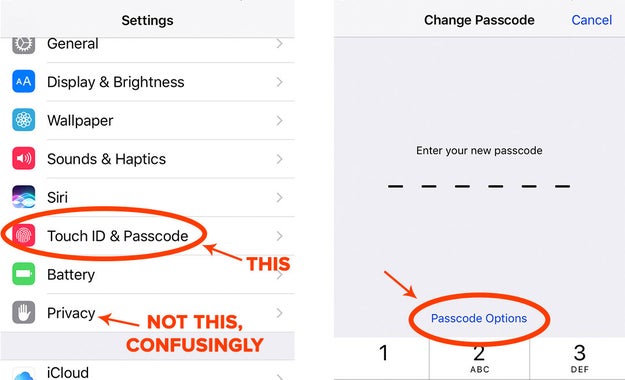
In iOS, go to Settings > Touch ID & Passcode > Change Passcode > tap Passcode Options > Custom Alphanumeric Code.
In Android, go to Settings > under Personal, tap Security > Screen lock > PIN or Password. Additionally, encrypt your phone from the Security page (iPhones are encrypted by default).
Nicole Nguyen / BuzzFeed News
On your computer, add a login password and encrypt your computer’s hard drive.
On the Mac, go to System Preferences > Security & Privacy and set to Require a password for a certain time after sleep. Then move to the FileVault tab to turn on encryption. Don’t forget your FileVault recovery key&033;
On a PC, go to Start > type encryption > select Change device encryption settings > Manage BitLocker > Turn on BitLocker.
Turn on remote lock-and-erase for your devices.
For Mac and iOS, set up Find My Mac and Find My iPhone. From iCloud.com/find, you can completely wipe data from your Apple device remotely, as soon as it connects to the Internet.
For Android, find my phone is automatically enabled once you’ve connected the device to your Google account. Go to android.com/devicemanager to locate or erase data on the phone by performing a factory reset.
For Windows 10 computers, go to https://account.microsoft.com/devices to locate, ring, lock, and erase.
Update your software as soon as a new version is available, no matter how annoying those pop-ups are.
It is always worth your time to do so. If you don’t, it’ll make you more vulnerable to hackers who monitor which security holes were patched in the new update, in order to target those in older versions of the software.
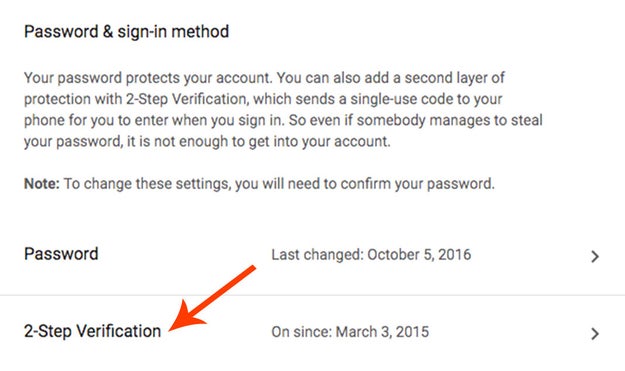
Add two-factor authentication to every account you can.
Not just for email and social media accounts, but for online banking, gaming, and retail, too. It requires that you submit a verification code sent to your phone, in addition to a traditional password, to log in.
Do it for Gmail immediately&033; Then, make sure your recovery email or phone are equally secure. Here’s a comprehensive list of websites that support two-factor authentication.
Nicole Nguyen / BuzzFeed News
After enabling two-factor, add an additional layer of security to your mobile carrier account by requiring a PIN when you call customer service. If someone has your name and the last four digits of your Social Security number, they can change the SIM number associated with your phone, rerouting two-factor verification codes to another device. An extra PIN helps prevent this. Here’s how to add one if you’re a Verizon, T-Mobile, Sprint, or AT&T customer.

OK, this is going to be a long section, because there are a lot of encrypted messaging apps out there. The TL;DR is that if you’re using one of the five apps mentioned here, you’re already communicating pretty securely.
Signal (free for iOS and Android), Wickr (free for iOS and Android), WhatsApp (free for iOS, Android and Windows Phone), Google Allo’s incognito mode (free for iOS and Android), and iMessage between iPhones (free for iOS) are five messaging apps that provide end-to-end encryption. If a government issues a request to any of these platforms, they won’t be able to hand over the content of messages.
However, each service handles their users’ metadata (in other words, who you messaged and when) a bit differently. It’s important to keep in mind that none of these apps can guarantee you total, uncrackable security — each one has its pros and cons.
Signal
The pros: Signal is very popular. NSA whistleblower Edward Snowden endorsed the app, and after Trump was elected, downloads increased by 400%.
By default, Signal doesn’t store your messages or metadata. The app provides a “safety number” for each conversation used to verify a person’s authenticity. Users can also elect to make messages disappear during intervals, whether it’s of five seconds or a week. Most important of all, Signal’s code is open to review and anyone can audit the software or contribute improvements.
The cons: When you sign up, Signal requires access to your address book, and as my colleague Hamza Shaban pointed out, that risks ratting out whistleblowers — if someone knows your number, they can tell whether or not you’re on Signal. If you were spilling stories about your company’s wrongdoings to a journalist, you might not want your boss to know that you’re using Signal. Moxie Marlinspike, the founder of Open Whisper Systems, the nonprofit behind Signal, suggests using a throwaway Google Voice or VoIP number as a workaround to sign up for Signal.
Wickr
The pros: Wickr offers all of Signal’s encrypted features. One advantage the app has over Signal is that Wickr does not need your phone number to sign up. Users have the option to create a unique handle, which protects those who don’t want their identities linked to the service.
The cons: Its code isn’t available for independent review, and Wickr’s user base isn’t as large as Signal’s, so it’s likely that you’ll need to convince contacts to sign up before you can start messaging with them.
The pros: WhatsApp uses Signal’s protocol for encryption. It has the advantage of having over one billion users already on its platform, and it’s a feature-rich app with group messaging, voice calls and video chat built-in.
The cons: While the app, which is owned by Facebook, can’t read individual messages, it can record metadata like date, time stamp, and phone numbers associated with that message, according to a recently revised privacy policy. The app also announced last year that it was going to start sharing user information with Facebook, though it does let you opt out before agreeing to the updated terms of service. If you don’t opt out at that time, you have an additional 30 days to make your choice.
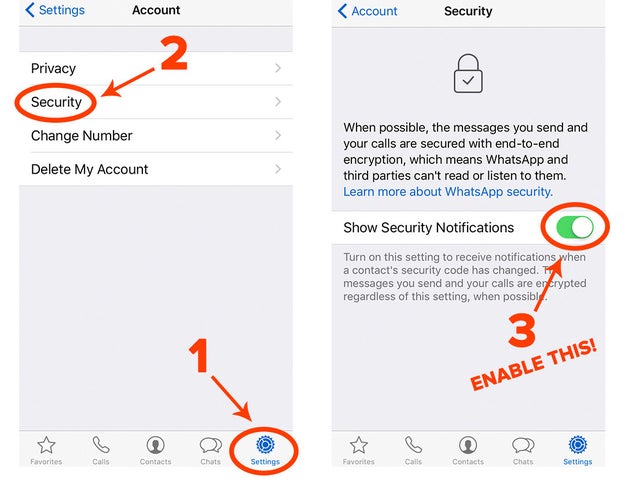
WhatsApp doesn’t include the option for disappearing messages. It also turns off security notifications when a contact’s key has changed (which occurs when they’ve re-installed WhatsApp on a new phone) by default, making you more susceptible to “man-in-the-middle” attacks by hackers.
Furthermore, the app allows you to backup your messages to iCloud or Google, which, while convenient if you lose your phone to switch to a new one, is not protected by WhatsApp’s end-to-end encryption.
Nicole Nguyen / BuzzFeed News
Allo
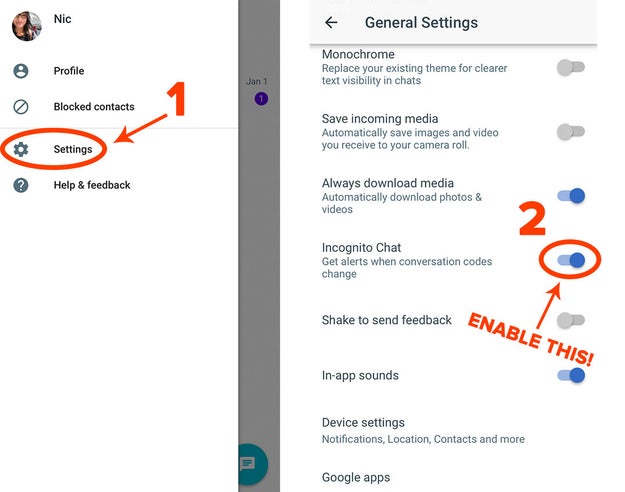
The pros: Google’s new messaging app includes the company’s artificial intelligence Google Assistant, which can help with tasks like making restaurant reservations or looking up movie times. It offers encrypted messaging with limited features (Google Assistant won’t work with it turned on) and you can set their messages to disappear after a certain period of time.
The cons: End-to-end encryption is disabled by default and you need to turn on incognito mode yourself.
Nicole Nguyen / BuzzFeed News
iMessage
The pros: Apple does provide end-to-end encryption for iMessage content (read more about its encryption technique on page 41 of this guide), and the company itself can’t decrypt the data – but only when both users sending messages have iPhones.
The cons: When you enter a phone number into iMessage, that number is sent to to Apple servers to determine whether or not that contact’s bubble should be green or blue (or, rather, whether to send the text through iMessage or SMS). Apple retains that data for up to 30 days and can be forced to hand it over to law enforcement with a subpoena or court order.

Many of the same apps that offer secure messaging also offer encrypted phone calls, including Signal and WhatsApp.
If you don’t use Signal or Whatsapp, any app that uses Ostel, an open source, end-to-end encrypted phone call tool, allows you to talk freely and securely. The easiest and cheapest way (it’s free&033;) to place a call through Ostel is through the Jitsi app for Mac, Windows, and Linux. An iOS app called Acrobits Softphone will cost you a one-time $7 fee to download the app, but this version only allows you to receive encrypted calls. Placing encrypted calls costs an additional $25.

While Gmail emails are encrypted in transit, Google’s popular email service is not secure enough for sensitive information. Google reads the contents of your email to determine which email appears in the Priority Inbox and, ultimately, to show you more personalized ads. If you’re getting a lot of emails about winter boots, you’ll see more winter boot banner ads.
For simple encryption, you can use Chrome extension CryptUp for Gmail, which is easy to set up for n00bs but has an advanced settings options for nerds. It allows users to add a “challenge question” that only your recipient can answer to decrypt the message. If the recipient has CryptUp installed, you can send small, encrypted attachments as well.
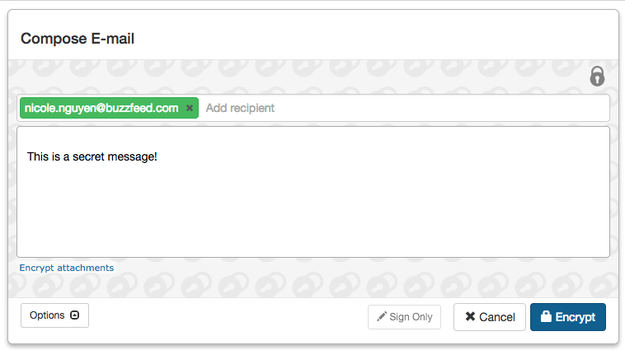
To take your email security a step further, you’ll need to familiarize yourself with “PGP” or “Pretty Good Privacy” encryption. First, install the Mailvelope extension for Chrome or Firefox, which works for Gmail, Outlook.com, Yahoo&033; Mail, and GMX. Click on the extension icon and then click Options. Follow the instructions to Generate Key. Now, you have a public and private key.
Nicole Nguyen / BuzzFeed News
Quelle: <a href="Here’s How To Protect Your Privacy In Trump’s America“>BuzzFeed








