Azure Stream Analytics support for IoT Hub Operations Monitoring

Azure Stream Analytics is a real-time, highly scalable, and fully managed stream analytics service that can process millions of events per second and perform aggregations and computations in near real-time.

Stream Analytics and Azure IoT Hub have worked really well together for some time, allowing you to easily gather insights over the data your IoT devices send to the IoT Hub. To get going with the IoT Hub all you need to do is simply configure an Input as described in the Create an IoT Hub data stream input documentation. We have many customers using this today with their IoT solutions and it works really well; however, a common ask from customers is how to monitor the status of operations on your IoT hub in real time. Well, today, we’re happy to announce that you can now do this by hooking up to the IoT Hub Operations Monitoring endpoint.

IoT Hub operations monitoring enables you to monitor the status of operations on your IoT hub in real time. IoT Hub tracks events across several categories of operations, and you can opt into sending events from one or more categories to an endpoint of your IoT hub for processing. You can monitor the data for errors or set up more complex processing based on data patterns.

IoT Hub monitors five categories of events:

Device identity operations
Device telemetry
Cloud-to-device commands
Connections
File uploads

For more information on IoT Hub Operations Monitoring please refer to the Introduction to operations monitoring documentation.

A common ask by customers is how to know in near real-time if a device disconnects from your IoT Hub and does not reconnect within a period of time, say one minute. When this occurs you want to send an email or kick-off a workflow in near real-time. For some devices it is crucial that these alerts go out as soon as possible and maintenance is carried out before there becomes a problem.

To demonstrate how easy it is to do this with Stream Analytics we’re going to use the IoT Hub Operations Monitoring capabilities and configure the “Connections” event monitoring.


As you can see from the image above, enabling starts logging events when devices connect and when they disconnect. To start using this, toggle the Connections switch to Verbose as shown:


Once this has been configured, events should start being captured when devices connect to your IoT hub. To verify this, use a tool like the Service Bus explorer and connect it to the "Event Hub – compatible name / endpoint" and view the messages.

A sample message collected could resemble something like this:

{
"durationMs": 1234,
"authType": "{"scope":"hub","type":"sas","issuer":"iothub"}",
"protocol": "Amqp",
"time": "2016-09-13T20:00Z",
"operationName": "deviceConnect",
"category": "Connections",
"level": "Error",
"statusCode": 4XX,
"statusType": 4XX001,
"statusDescription": "MessageDescription",
"deviceId": "device-ID"
}

Similarly, when a device disconnects from the IoT Hub, an event will be captured with the operationName == deviceDisconnect.

Now that we have confirmed these messages are arriving in our IoT Hub, using them in a Stream Analytics job is easy:

1. Create a new Stream Analytics job.

For assistance in creating a new Stream Analytics job, refer to How to create a data analytics processing job for Stream Analytics

2. Create a data stream Input pointed to your IoT Hub. Be sure to select “Operations monitoring” from Endpoint and not “Messaging”.

3. Create the following query:

WITH
Disconnected AS (
SELECT *
FROM input TIMESTAMP BY [Time]
WHERE OperationName = &;deviceDisconnect&039;
AND Category = &039;Connections&039;
),
Connected AS (
SELECT *
FROM input TIMESTAMP BY [Time]
WHERE OperationName = &039;deviceConnect&039;
AND Category = &039;Connections&039;
)

SELECT Disconnected.DeviceId, Disconnected.Time
INTO Output
FROM Disconnected
LEFT JOIN Connected
ON DATEDIFF(second, Disconnected, Connected) BETWEEN 0 AND 180
AND Connected.deviceId = Disconnected.deviceId
WHERE Connected.DeviceId IS NULL

This query has two steps: the first step that gets all disconnect events, and the second that gets all connect events.

We then join these two streams together using the Stream Analytics DATEDIFF operation on the LEFT JOIN, and then filter out any records where there was a match. This gives us devices that had a disconnect event, but no corresponding connect event within 180 seconds.

The output of this job can now be directed to any of the supported Stream Analytics outputs, including Service Bus queues. Once it lands in a Service Bus Queue, it is easy to create an Azure Function, or even an Azure Logic App, which will run as soon any message is published to the queue.

And just like that, with a very simple SQL-like query you can have real-time updates from your IoT Hub Operations Monitoring endpoint.

Sometimes I miss the good old days when coding complex scenarios like this was difficult and time consuming…no, wait, I don’t! Using the PaaS services and serverless computing capabilities of Azure is so much easier and powerful, allowing me to focus on building value add.

Related Services

Microsoft Azure IoT Hub – connect, monitor, and manage millions of IoT assets

Microsoft Azure Event Hubs – ingest data from websites, apps, and devices

Microsoft Azure Service Bus – Keep apps and devices connected across private and public clouds

Microsoft Azure Logic Apps – Quickly build powerful integration solutions

Microsoft Azure Functions – Process events with serverless code

Next Steps

We’re really excited about this close integration with IoT Hubs and hope it will unlock many new, exciting capabilities for you and your IoT applications.

We invite you to provide feedback on our User Voice page about what you want added next to the service!

If you are new to either Microsoft Azure or Stream Analytics, try it out by signing up for a free Azure trial account and create your first Stream Analytics job.

If you need help or have questions, please reach out to us through the MSDN or Stackoverflow forums, email the product team directly.
Quelle: Azure

This Company Wants You to Stop Making Terrible Charts in Excel

Melanie Perkins, CEO of Canva, a company that makes online graphic design tools, wants her to software to “power the modern workforce.” But what she really wants is for people to stop making ugly graphics.

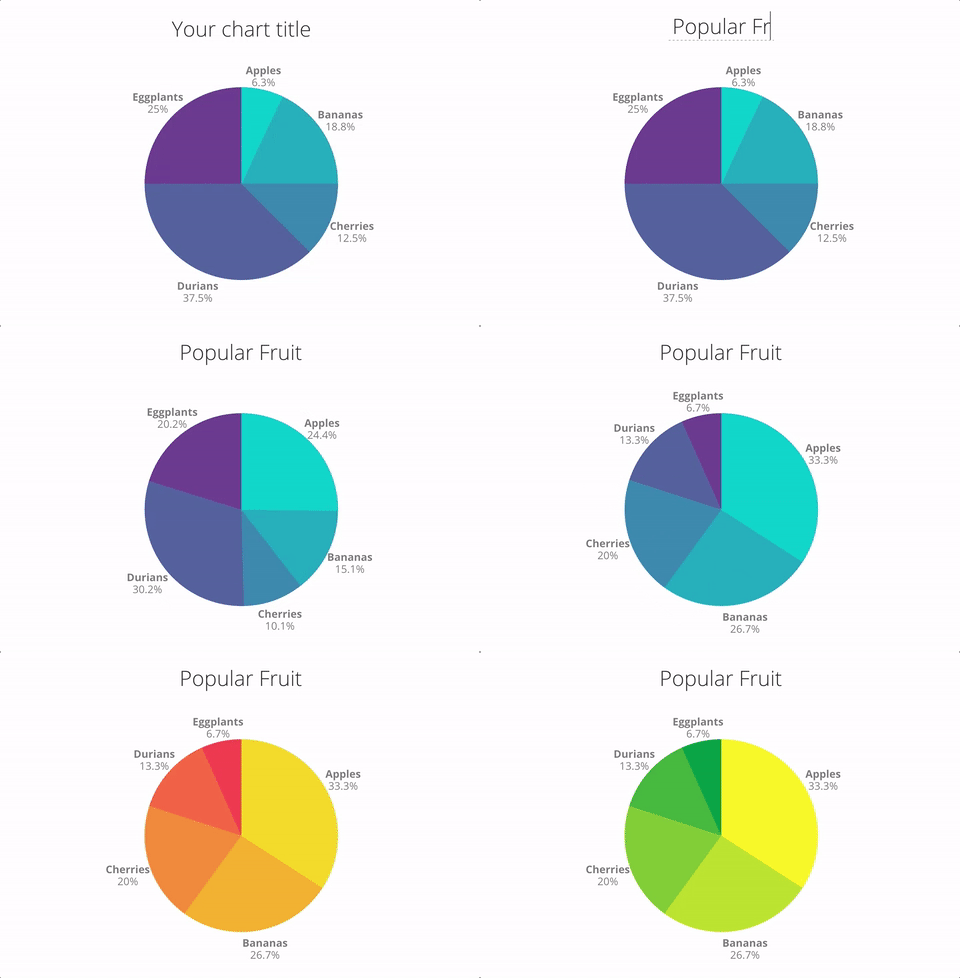
That’s why the company is debuting Canva for Charts, a simple tool to turn columns of data into pie charts and bar graphs with tasteful color schemes and fonts.

Canva, launched in 2013 in Perth, Australia, allows you to easily create and collaborate on visual content—like invitations, graphics, posters—and save them in the cloud. Most of the images you can make with Canva resemble greeting cards and are meant to be shared on social media. But with the introduction of Charts, Perkins is hoping that eventually, you’ll start using Canva in your office.

Regular Canva:

Regular Canva:

Examples of Canva&;s social graphics templates.

Canva / Via canva.com

Canva for Charts:

Canva for Charts:

A pie chart made with Canva for Charts.

Canva

Why the shift from cute social images to hard data? “Every profession is becoming more visual. There’s a huge demand for visual content in every industry,” Perkins told BuzzFeed News. She said things like sales pitches and investment decks — traditionally drab parts of doing business — are places where companies are looking for much more visual oomph in 2016.

Canva has big goals. Perkins hopes Canva for Charts will someday replace legacy software like Microsoft Office or Adobe Creative Cloud. It’s not total war, though: Canva users will still be able to download their charts in PDF format or as images to insert them into other applications.

Either way, it will be an uphill battle. Canva has 12 million users, Perkins said. The Microsoft Office suite boasts 1.2 billion users worldwide, according to Microsoft. And Adobe Creative Cloud cites a community of 6.6 million people on its Behance social network as of March 2016, though the company has not disclosed the total number of Creative Cloud subscribers. Convincing more than a billion individual users — and the historically slow-moving corporations where they work — to switch to a new design software will not be easy.

Canva’s ambition to take down legacy software recalls another attempt to make more user-friendly professional software: Prezi, which went after PowerPoint several years ago. As of February 2016, it has registered 60 million users, which is still a drop in the bucket compared to Office’s one billion plus. Perkins, though, told BuzzFeed News that Canva will make more of an impact because of its “high quality ingredients, previously only accessible to designers and a niche market, that we combine and make available to everyone. Now lots of people can use them.”

“Most design tools are too complicated,” Perkins added. “They’re hard to use and look bad.” Canva, she says, is so simple to use, it doesn’t require any design training.

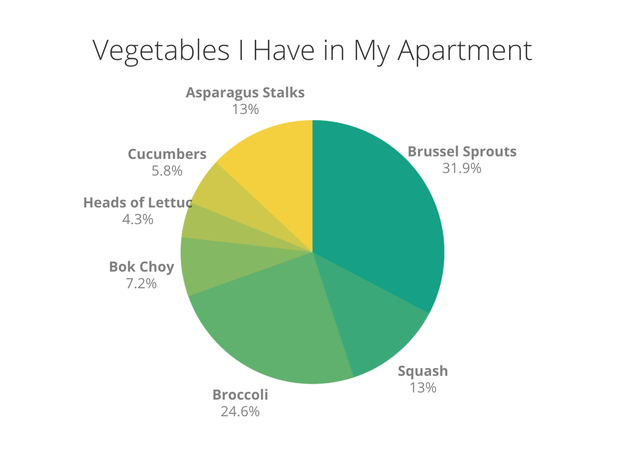
I mocked up this chart in Canva, visualizing the vegetables in my apartment. It isn’t that much fancier than one I’d make in Microsoft Word, Excel, or Adobe, but it was easier to do — it only took me about five minutes, including taking inventory of my fridge.

Blake Montgomery

On a larger scale, Perkins hopes that being able to save and share work in the cloud will eliminate the frustrating, chaotic workflow of sending multiple versions of visual content back and forth to a designer to make every single change. However, Microsoft Office 365 also allows users to save their creations in the Cloud and collaborate on them, as does Adobe Creative Cloud.

Canva for Charts is free, like the other tools Canva offers, though Perkins said she can imagine a premium version in the future. Currently, about 50,000 teams pay for Canva for Work, the site’s professional subscription version, which retails for $120 per user per year or $12.95 per user per month. Canva also makes money when users buy stock images for $1 from its library.

Quelle: <a href="This Company Wants You to Stop Making Terrible Charts in Excel“>BuzzFeed

New data center brings security, integration and choice to Nordic region

Demand for turnkey cloud solutions is on the rise in the Nordic countries. By 2019, the cloud market is expected to reach a whopping $18 billion.
Enterprises in Norway, Sweden, Denmark, Finland and Iceland aren’t just looking for cloud capabilities, though. They’re also looking for ways to ensure security, perform hybrid integration and choose the absolute best cloud services for them.

IBM has opened its brand new IBM Cloud Nordic Data Center — the 48th to open worldwide and the 12th in Europe — in Fetsund, Norway, to address just those challenges. The data center, located about 30 km outside of Oslo, enables local organizations to access the full IBM portfolio of cloud services, including Bluemix and Watson, to run critical workloads close to home.
Though the center itself is in Norway, Swedish customers will have a point of presence in their home country to ensure high-speed connections to the IBM Cloud network.
In addition to ensuring network speed, the local data center will help companies keep up with regulatory requirements. The data center is compliant with European Union data and privacy regulations and the upcoming 2018 General Data Protection Regulation.
Cloud bare metal capabilities will help clients extend onto the cloud securely, an open source approach and innovative cloud platform offer them choice, and a hybrid cloud approach will help them make the best possible choices on their cloud journeys.
“We are committed to providing global and local clients the fastest and easiest onramp to the IBM Cloud to accelerate their digital transformation,” said Robert LeBlanc, senior vice president of IBM Cloud. “This investment will provide Nordic customers, especially those in regulated industries, with more flexibility to manage and gain insight into data within the region.”
The new cloud data center demonstrates the commitment of IBM to foster the growth of cognitive and artificial intelligence technologies throughout the region. Developers will have access to Bluemix &; IBM’s Cloud innovation platform – and more than 150 APIs and services spanning key areas such as cognitive, blockchain, Internet of Things and big data.
Learn more about the new IBM Cloud Nordic Data Center.
Read the press release.
The post New data center brings security, integration and choice to Nordic region appeared first on news.
Quelle: Thoughts on Cloud