Using MCP Servers: From Quick Tools to Multi-Agent Systems
Model Context Protocol (MCP) servers are a spec for exposing tools, models, or services to language models through a common interface. Think of them as smart adapters: they sit between a tool and the LLM, speaking a predictable protocol that lets the model interact with things like APIs, databases, and agents without needing to know implementation details.
But like most good ideas, the devil’s in the details.
The Promise—and the Problems of Running MCP Servers
Running an MCP sounds simple: spin up a Python or Node server that exposes your tool. Done, right? Not quite.
You run into problems fast:
Runtime friction: If an MCP is written in Python, your environment needs Python (plus dependencies, plus maybe a virtualenv strategy, plus maybe GPU drivers). Same goes for Node. This multiplies fast when you’re managing many MCPs or deploying them across teams.
Secrets management: MCPs often need credentials (API keys, tokens, etc.). You need a secure way to store and inject those secrets into your MCP runtime. That gets tricky when different teams, tools, or clouds are involved.
N×N integration pain: Let’s say you’ve got three clients that want to consume MCPs, and five MCPs to serve up. Now you’re looking at 15 individual integrations. No thanks.
To make MCPs practical, you need to solve these three core problems: runtime complexity, secret injection, and client-to-server wiring.
If you’re wondering where I’m going with all this, take a look at those problems. We already have a technology that has been used by developers for over a decade that helps solve them: Docker containers.
In the rest of this blog I’ll walk through three different approaches, going from least complex to most complex, for integrating MCP servers into your developer experience.
Option 1 — Docker MCP Toolkit & Catalog
For the developer who already uses containers and wants a low-friction way to start with MCP.
If you’re already comfortable with Docker but just getting your feet wet with MCP, this is the sweet spot. In the raw MCP world, you’d clone Python/Node servers, manage runtimes, inject secrets yourself, and hand-wire connections to every client. That’s exactly the pain Docker’s MCP ecosystem set out to solve.
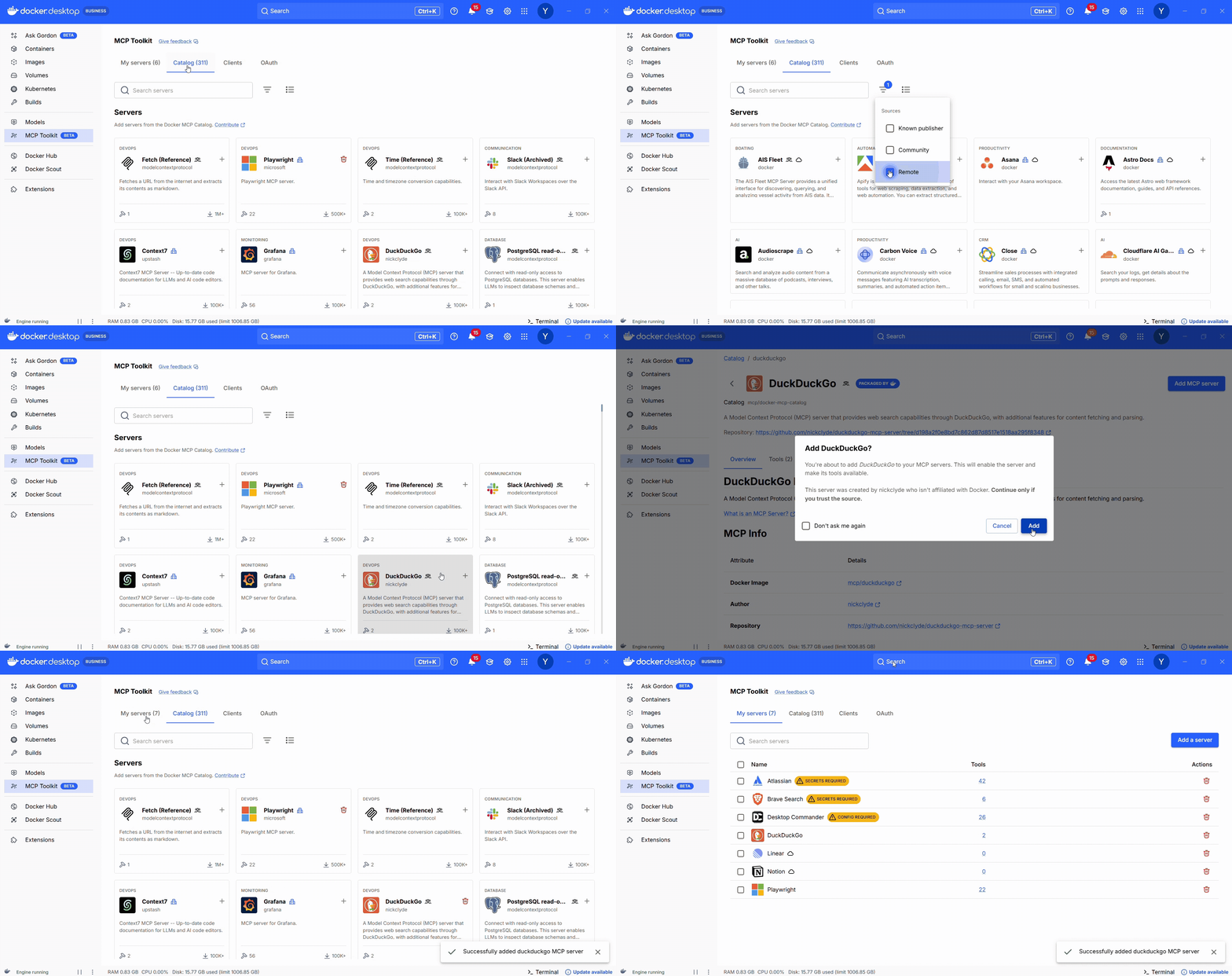
Docker’s MCP Catalog is a curated, containerized registry of MCP servers. Each entry is a prebuilt container with everything you need to run the MCP server.
The MCP Toolkit (available via Docker Desktop) is your control panel: search the catalog, launch servers with secure defaults, and connect them to clients.
How it helps:
No language runtimes to install
Built-in secrets management
One-click enablement via Docker Desktop
Easily wire the MCPs to your existing agents (Claude Desktop, Copilot in VS Code, etc)
Centralized access via the MCP Gateway
Figure 1: Docker MCP Catalog: Browse hundreds of MCP servers with filters for local or remote and clear distinctions between official and community servers
A Note on the MCP GatewayOne important piece working behind the scenes in both the MCP Toolkit and cagent (a framework for easily building multi-agent applications that we cover below) is the MCP Gateway, an open-source project from Docker that acts as a centralized frontend for all your MCP servers. Whether you’re using a GUI to start containers or defining agents in YAML, the Gateway handles all the routing, authentication, and translation between clients and tools. It also exposes a single endpoint that custom apps or agent frameworks can call directly, making it a clean bridge between GUI-based workflows and programmatic agent development.
Moving on: Using MCP servers alongside existing AI agents is often the first step for many developers. You wire up a couple tools, maybe connect to a calendar or a search API, and use them in something like Claude, ChatGPT, or a small custom agent. For step-by-step tutorials on how to automate dev workflows with Docker’s MCP Catalog and Toolkit with popular clients, check out these guides on ChatGPT, Claude Desktop,Codex, Gemini CLI, and Claude Code. Once that pattern clicks, the next logical step is to use those same MCP servers as tools inside a multi-agent system.
Option 2 — cagent: Declarative Multi-Agent Apps
For the developer who wants to build custom multi-agent applications but isn’t steeped in traditional agentic frameworks.
If you’re past simple MCP servers and want agents that can delegate, coordinate, and reason together, cagent is your next step. It’s Docker’s open-source, YAML-first framework for defining and running multi-agent systems—without needing to dive into complex agent SDKs or LLM loop logic.
Cagent lets you describe:
The agents themselves (model, role, instructions)
Who delegates to whom
What tools each agent can access (via MCP or local capabilities)
Below is an example of a pirate flavored chat bot:
agents:
root:
description: An agent that talks like a pirate
instruction: Always answer by talking like a pirate.
welcome_message: |
Ahoy! I be yer pirate guide, ready to set sail on the seas o' knowledge! What be yer quest?
model: auto
cagent run agents.yaml
You don’t write orchestration code. You describe what you want, and Cagent runs the system.
Why it works:
Tools are scoped per agent
Delegation is explicit
Uses MCP Gateway behind the scene
Ideal for building agent systems without writing Python
If you’d like to give cagent a try, we have a ton of examples in the project’s GitHub repository. Check out this guide on building multi-agent systems in 5 minutes.
Option 3 — Traditional Agent Frameworks (LangGraph, CrewAI, ADK)
For developers building complex, custom, fully programmatic agent systems.
Traditional agent frameworks like LangGraph, CrewAI, or Google’s Agent Development Kit (ADK) let you define, control, and orchestrate agent behavior directly in code. You get full control over logic, state, memory, tools, and workflows.
They shine when you need:
Complex branching logic
Error recovery, retries, and persistence
Custom memory or storage layers
Tight integration with existing backend code
Example: LangGraph + MCP via Gateway
import requests
from langgraph.graph import StateGraph
from langchain.agents import Tool
from langchain_openai import ChatOpenAI
# Discover MCP endpoint from Gateway
resp = requests.get("http://localhost:6600/v1/servers")
servers = resp.json()["servers"]
duck_url = next(s["url"] for s in servers if s["name"] == "duckduckgo")
# Define a callable tool
def mcp_search(query: str) -> str:
return requests.post(duck_url, json={"input": query}).json()["output"]
search_tool = Tool(name="web_search", func=mcp_search, description="Search via MCP")
# Wire it into a LangGraph loop
llm = ChatOpenAI(model="gpt-4")
graph = StateGraph()
graph.add_node("agent", llm.bind_tools([search_tool]))
graph.add_edge("agent", "agent")
graph.set_entry_point("agent")
app = graph.compile()
app.invoke("What’s the latest in EU AI regulation?")
In this setup, you decide which tools are available. The agent chooses when to use them based on context, but you’ve defined the menu.And yes, this is still true in the Docker MCP Toolkit: you decide what to enable. The LLM can’t call what you haven’t made visible.
Choosing the Right Approach
Approach
Best For
You Manage
You Get
Docker MCP Toolkit + Catalog
Devs new to MCP, already using containers
Tool selection
One-click setup, built-in secrets, Gateway integration
Cagent
YAML-based multi-agent apps without custom code
Roles & tool access
Declarative orchestration, multi-agent workflows
LangGraph / CrewAI / ADK
Complex, production-grade agent systems
Full orchestration
Max control over logic, memory, tools, and flow
Wrapping UpWhether you’re just connecting a tool to Claude, designing a custom multi-agent system, or building production workflows by hand, Docker’s MCP tooling helps you get started easily and securely.
Check out the Docker MCP Toolkit, cagent, and MCP Gateway for example code, docs, and more ways to get started.
Quelle: https://blog.docker.com/feed/








