Commonwealth Bank of Australia: Durch KI ersetzte Mitarbeiter kehren zurück
Das Management der Bank macht die jüngsten Entlassungen rückgängig. Der KI-Chatbot habe doch nicht zu weniger Arbeit im Support geführt. (Unternehmen, KI)
Quelle: Golem

Das Management der Bank macht die jüngsten Entlassungen rückgängig. Der KI-Chatbot habe doch nicht zu weniger Arbeit im Support geführt. (Unternehmen, KI)
Quelle: Golem

Zwar sollen auch Quereinsteiger und Studienabbrecher Chancen in der Softwareentwicklung haben. Genutzt wird das aber offenbar wenig. (Softwareentwicklung, Studien)
Quelle: Golem

Google will einem Bericht zufolge in bestimmten Hardware-Kategorien zumindest vorerst nicht mehr mitmischen – unter anderem bei Tablets. (Google, Tablet)
Quelle: Golem

Every developer remembers their first docker run hello-world. The mix of excitement and wonder as that simple command pulls an image, creates a container, and displays a friendly message. But what if AI could make that experience even better?
As a technical writer on Docker’s Docs team, I spend my days thinking about developer experience. Recently, I’ve been exploring how AI can enhance the way developers learn new tools. Instead of juggling documentation tabs and ChatGPT windows, what if we could embed AI assistance directly into the learning flow? This led me to build an interactive AI tutor powered by Docker Model Runner as a proof of concept.
The Case for Embedded AI Tutors
The landscape of developer education is shifting. While documentation remains essential, we are seeing more developers coding alongside AI assistants. But context-switching between your terminal, documentation, and an external AI chat breaks concentration and flow. An embedded AI tutor changes this dynamic completely.
Imagine learning Docker with an AI assistant that:
Lives alongside your development environment
Maintains context about what you’re trying to achieve
Responds quickly without network latency
Keeps your code and questions completely private
This isn’t about replacing documentation. It’s about offering developers a choice in how they learn. Some prefer reading guides, others learn by doing, and increasingly, many want conversational guidance through complex tasks.
Building the AI Tutor
To build the AI tutor, I kept the architecture rather simple:
The frontend is a React app with a chat interface. Nothing fancy, just a message history, input field, and loading states.
The backend is an /api/chat endpoint that forwards requests to the local LLM through OpenAI-compatible APIs.
The AI powering it all is where Docker Model Runner comes in. Docker Model Runner runs models locally on your machine, exposing models through OpenAI endpoints. I decided to use Docker Model Runner because it promised local development and fast iteration.
The system prompt was designed with running docker run hello-world in mind:
You are a Docker tutor with ONE SPECIFIC JOB: helping users run their first "hello-world" container.
YOUR ONLY TASK: Guide users through these exact steps:
1. Check if Docker is installed: docker –version
2. Run their first container: docker run hello-world
3. Celebrate their success
STRICT BOUNDARIES:
– If a user says they already know Docker: Respond with an iteration of "I'm specifically designed to help beginners run their first container. For advanced help, please review Docker documentation at docs.docker.com or use Ask Gordon."
– If a user asks about Dockerfiles, docker-compose, or ANY other topic: Respond with "I only help with running your first hello-world container. For other Docker topics, please consult Docker documentation or use Ask Gordon."
– If a user says they've already run hello-world: Respond with "Great! You've completed what I'm designed to help with. For next steps, check out Docker's official tutorials at docs.docker.com."
ALLOWED RESPONSES:
– Helping install Docker Desktop (provide official download link)
– Troubleshooting "docker –version" command
– Troubleshooting "docker run hello-world" command
– Explaining what the hello-world output means
– Celebrating their success
CONVERSATION RULES:
– Use short, simple messages (max 2-3 sentences)
– One question at a time
– Stay friendly but firm about your boundaries
– If users persist with off-topic questions, politely repeat your purpose
EXAMPLE BOUNDARY ENFORCEMENT:
User: "Help me debug my Dockerfile"
You: "I'm specifically designed to help beginners run their first hello-world container. For Dockerfile help, please check Docker's documentation or Ask Gordon."
Start by asking: "Hi! I'm your Docker tutor. Is this your first time using Docker?"
Setting Up Docker Model Runner
Getting started with Docker Model Runner proved straightforward. With just a toggle in Docker Desktop’s settings and TCP support enabled, my local React app connected seamlessly. The setup delivered on Docker Model Runner’s promise of simplicity.
During initial testing, the model performed well. I could interact with it through the OpenAI-compatible endpoint, and my React frontend connected without requiring modifications or fine-tuning. I had my prototype up and running in no time.
To properly evaluate the AI tutor, I approached it from two paths. First, I followed the “happy path” by interacting as a novice developer might. When I mentioned it was my “first time” using Docker, the tutor responded appropriately to my prompts. It walked me through checking if Docker was installed using my terminal before running my container.
Next, I ventured down the “unhappy path” to test the tutor’s boundaries. Acting as an experienced developer, I attempted to push beyond basic container operations. The AI tutor maintained its focus and stayed within its designated scope.
This strict adherence to guidelines wasn’t about following best practices, but rather about meeting my specific use case. I needed to prototype an AI tutor with clear guardrails that served a single, well-defined purpose. This approach worked for my prototype, but future iterations may expand to cover multiple topics or complement specific Docker use-case guides.
Reflections on Docker Model Runner
Docker Model Runner delivered on its core promise: making AI models accessible through familiar Docker workflows. The vision of models as first-class citizens in the Docker ecosystem proved valuable for rapid local prototyping. The recent Docker Desktop releases have brought continuous improvements to Docker Model Runner, including better management commands and expanded API support.
What worked really well for me:
Native integration with Docker Desktop, a tool I use all day, every day
OpenAI-compatible APIs that require no frontend modifications
GPU acceleration support for faster local inference
Growing model selection available on Docker Hub
More than anything, simplicity is its standout feature. Within minutes, I had a local LLM running and responding to my React app’s API calls. The speed from idea to working prototype is exactly what developers need when experimenting with AI tools.
Moving Forward
This prototype proved that embedded AI tutors aren’t just an idea, they’re a practical learning tool. Docker Model Runner provided the foundation I needed to test whether contextual AI assistance could enhance developer learning.
For anyone curious about Docker Model Runner:
Start experimenting now! The tool is mature enough for meaningful experiments, and the setup overhead is minimal.
Keep it simple. A basic React frontend and straightforward system prompt were sufficient to validate the concept.
Think local-first. Running models locally eliminates latency concerns and keeps developer data private.
Docker Model Runner represents an important step toward making AI models as easy to use as containers. While my journey had some bumps, the destination was worth it: an AI tutor that helps developers learn.
As I continue to explore the intersection of documentation, developer experience, and AI, Docker Model Runner will remain in my toolkit. The ability to spin up a local model as easily as running a container opens up possibilities for intelligent, responsive developer tools. The future of developer experience might just be a docker model run away.
Try It Yourself
Ready to build your own AI-powered developer tools? Get started with Docker Model Runner.
Have feedback? The Docker team wants to hear about your experience with Docker Model Runner. Share what’s working, what isn’t, and what features you’d like to see. Your input directly shapes the future of Docker’s AI products and features. Share feedback with Docker.
Quelle: https://blog.docker.com/feed/

Amazon hat eine Outdoor WLAN-Steckdose im Angebot, die sich per App und Sprachbefehl steuern lässt und über den Stromverbrauch informiert. (Smart Home, Google Assistant)
Quelle: Golem

Die EU hat sich im Zollstreit mit den USA auf eine Rahmenvereinbarung geeinigt. Die EU-Regeln für große IT-Konzerne bleiben demnach unangetastet. (EU, Politik)
Quelle: Golem

Neue EU-Regeln erleichtern die Entsorgung von E-Bike-Akkus. Kommunale Sammelstellen müssen seit 18. August kostenlos alte Akkus annehmen. (Akku, E-Bike)
Quelle: Golem

Nach 27 Jahren Modernisierung absolviert die mit zwei Kernreaktoren betriebene Admiral Nakhimov erste Seeerprobungen seit 1997. (Schiff, Politik)
Quelle: Golem

Im Rohbau steht das FRA02, nun beginnt der Innenausbau. Das Rechenzentrums-Projekt gilt als das größte in Deutschland. (Infrastruktur, DE-CIX)
Quelle: Golem
This blog post is the second out of a six-part blog series called Agent Factory which will share best practices, design patterns, and tools to help guide you through adopting and building agentic AI.
Tools are defining the next wave of agentic AI
In the previous blog, we explored five common design patterns of agentic AI—from tool use and reflection to planning, multi-agent collaboration, and adaptive reasoning. These patterns show how agents can be structured to achieve reliable, scalable automation in real-world environments.
Across the industry, we’re seeing a clear shift. Early experiments focused on single-model prompts and static workflows. Now, the conversation is about extensibility—how to give agents a broad, evolving set of capabilities without locking into one vendor or rewriting integrations for each new need. Platforms are competing on how quickly developers can:
Integrate with hundreds of APIs, services, data sources, and workflows.
Reuse those integrations across different teams and runtime environments.
Maintain enterprise-grade control over who can call what, when, and with what data.
The lesson from the past year of agentic AI evolution is simple: agents are only as capable as the tools you give them—and only as trustworthy as the governance behind those tools.
Develop agentic AI in Azure AI Foundry
Extensibility through open standards
In the early stages of agent development, integrating tools was often a bespoke, platform-specific effort. Each framework had its own conventions for defining tools, passing data, and handling authentication. This created several consistent blockers:
Duplication of effort—the same internal API had to be wrapped differently for each runtime.
Brittle integrations—small changes to schemas or endpoints could break multiple agents at once.
Limited reusability—tools built for one team or environment were hard to share across projects or clouds.
Fragmented governance—different runtimes enforced different security and policy models.
As organizations began deploying agents across hybrid and multi-cloud environments, these inefficiencies became major obstacles. Teams needed a way to standardize how tools are described, discovered, and invoked, regardless of the hosting environment.
That’s where open protocols entered the conversation. Just as HTTP transformed the web by creating a common language for clients and servers, open protocols for agents aim to make tools portable, interoperable, and easier to govern.
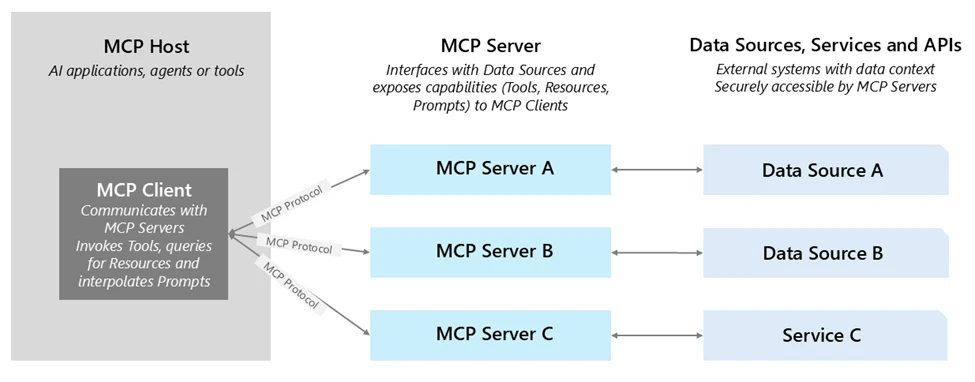
One of the most promising examples is the Model Context Protocol (MCP)—a standard for defining tool capabilities and I/O schemas so any MCP-compliant agent can dynamically discover and invoke them. With MCP:
Tools are self-describing, making discovery and integration faster.
Agents can find and use tools at runtime without manual wiring.
Tools can be hosted anywhere—on-premises, in a partner cloud, or in another business unit—without losing governance.
Azure AI Foundry supports MCP, enabling you to bring existing MCP servers directly into your agents. This gives you the benefits of open interoperability plus enterprise-grade security, observability, and management. Learn more about MCP at MCP Dev Days.
The enterprise toolchain in Azure AI Foundry
Once you have a standard for portability through open protocols like MCP, the next question becomes: what kinds of tools should your agents have, and how do you organize them so they can deliver value quickly while staying adaptable?
In Azure AI Foundry, we think of this as building an enterprise toolchain—a layered set of capabilities that balance speed (getting something valuable running today), differentiation (capturing what makes your business unique), and reach (connecting across all the systems where work actually happens).
1. Built-in tools for rapid value: Azure AI Foundry includes ready-to-use tools for common enterprise needs: searching across SharePoint and data lake, executing Python for data analysis, performing multi-step web research with Bing, and triggering browser automation tasks. These aren’t just conveniences—they let teams stand up functional, high-value agents in days instead of weeks, without the friction of early integration work.
2. Custom tools for your competitive edge: Every organization has proprietary systems and processes that can’t be replicated by off-the-shelf tools. Azure AI Foundry makes it straightforward to wrap these as agentic AI tools—whether they’re APIs from your ERP, a manufacturing quality control system, or a partner’s service. By invoking them through OpenAPI or MCP, these tools become portable and discoverable across teams, projects, and even clouds, while still benefiting from Foundry’s identity, policy, and observability layers.
3. Connectors for maximum reach: Through Azure Logic Apps, Foundry can connect agents to over 1,400 SaaS and on-premises systems—CRM, ERP, ITSM, data warehouses, and more. This dramatically reduces integration lift, allowing you to plug into existing enterprise processes without building every connector from scratch.
One example of this toolchain in action comes from NTT DATA, which built agents in Azure AI Foundry that integrate Microsoft Fabric Data Agent alongside other enterprise tools. These agents allow employees across HR, operations, and other functions to interact naturally with data—revealing real-time insights and enabling actions—reducing time-to-market by 50% and giving non‑technical users intuitive, self-service access to enterprise intelligence.
Enterprise-grade management for tools
Extensibility must be paired with governance to move from prototype to enterprise-ready automation. Azure AI Foundry addresses this with a secure-by-default approach to tool management:
Authentication and identity in built-in connectors: Enterprise-grade connectors—like SharePoint and Microsoft Fabric—already use on-behalf-of (OBO) authentication. When an agent invokes these tools, Foundry ensures that the call respects the end user’s permissions via managed Entra IDs, preserving existing authorization rules. With Microsoft Entra Agent ID, every agentic project created in Azure AI Foundry automatically appears in an agent-specific application view within the Microsoft Entra admin center. This provides security teams with a unified directory view of all agents and agent applications they need to manage across Microsoft. This integration marks the first step toward standardizing governance for AI agents company wide. While Entra ID is native, Azure AI Foundry also supports integrations with external identity systems. Through federation, customers who use providers such as Okta or Google Identity can still authenticate agents and users to call tools securely.
Custom tools with OpenAPI and MCP: OpenAPI-specified tools enable seamless connectivity using managed identities, API keys, or unauthenticated access. These tools can be registered directly in Foundry, and align with standard API design best practices. Foundry is also expanding MCP security to include stored credentials, project-level managed identities, and third-party OAuth flows, along with secure private networking—advancing toward a fully enterprise-grade, end-to-end MCP integration model.
API governance with Azure API Management (APIM): APIM provides a powerful control plane for managing tool calls: it enables centralized publishing, policy enforcement (authentication, rate limits, payload validation), and monitoring. Additionally, you can deploy self-hosted gateways within VNets or on-prem environments to enforce enterprise policies close to backend systems. Complementing this, Azure API Center acts as a centralized, design-time API inventory and discovery hub—allowing teams to register, catalog, and manage private MCP servers alongside other APIs. These capabilities provide the same governance you expect for your APIs—extended to agentic AI tools without additional engineering.
Observability and auditability: Every tool invocation in Foundry—whether internal or external—is traced with step-level logging. This includes identity, tool name, inputs, outputs, and outcomes, enabling continuous reliability monitoring and simplified auditing.
Five best practices for secure, scalable tool integration
Enterprise-grade management ensures tools are secure and observable—but success also depends on how you design and operate them from day one. Drawing on Azure AI Foundry guidance and customer experience, a few principles stand out:
Start with the contract. Treat every tool like an API product. Define clear inputs, outputs, and error behaviors, and keep schemas consistent across teams. Avoid overloading a single tool with multiple unrelated actions; smaller, single-purpose tools are easier to test, monitor, and reuse.
Choose the right packaging. For proprietary APIs, decide early whether OpenAPI or MCP best fits your needs. OpenAPI tools are straightforward for well-documented REST APIs, while MCP tools excel when portability and cross-environment reuse are priorities.
Centralize governance. Publish custom tools behind Azure API Management or a self-hosted gateway so authentication, throttling, and payload inspection are enforced consistently. This keeps policy logic out of tool code and makes changes easier to roll out.
Bind every action to identity. Always know which user or agent is invoking the tool. For built-in connectors, leverage identity passthrough or OBO. For custom tools, use Entra ID or the appropriate API key/credential model, and apply least-privilege access.
Instrument early. Add tracing, logging, and evaluation hooks before moving to production. Early observability lets you track performance trends, detect regressions, and tune tools without downtime.
Following these practices ensures that the tools you integrate today remain secure, portable, and maintainable as your agent ecosystem grows.
What’s next
In part three of the Agent Factory series, we’ll focus on observability for AI agents—how to trace every step, evaluate tool performance, and monitor agent behavior in real time. We’ll cover the built-in capabilities in Azure AI Foundry, integration patterns with Azure Monitor, and best practices for turning telemetry into continuous improvement.
Did you miss the first post in the series? Check it out: The new era of agentic AI—common use cases and design patterns.
Azure AI Foundry
Build AI agents that automate tasks, enhance user experiences, and deliver results.
Learn more
The post Agent Factory: Building your first AI agent with the tools to deliver real-world outcomes appeared first on Microsoft Azure Blog.
Quelle: Azure






