KI-Videogenerierung: So plant OpenAI die Monetarisierung von Sora
OpenAIs Sora 2 soll in Zukunft weniger kostenlose Generierungen zulassen. Das ist ein Teil der Strategie des Sora-Chefs. (OpenAI, KI)
Quelle: Golem

OpenAIs Sora 2 soll in Zukunft weniger kostenlose Generierungen zulassen. Das ist ein Teil der Strategie des Sora-Chefs. (OpenAI, KI)
Quelle: Golem

Ein Entwickler reduziert das obsolete Microsoft-Betriebssystem Windows 7 auf Minimalgröße und dabei auf seine absoluten Grundfunktionen. (Windows 7, Server)
Quelle: Golem

Das US-Militär setzt auf Hightech statt Munition – ein neues Waffensystem legt Drohnen lahm, bevor sie zuschlagen können. (Drohne, Politik)
Quelle: Golem

OpenAI-Chef Sam Altman hat versucht, seine seit 2018 laufende Tesla-Roadster-Reservierung zu stornieren. Das Ergebnis: Sein Geld bleibt vorerst weg. (Tesla, Elektroauto)
Quelle: Golem
SAP Cloud ERP on AWS (GROW) is now available in the Europe (Frankfurt) region. As a complete offering of solutions, best practices, adoption acceleration services, community and learning, SAP Cloud ERP on AWS helps any size organization adopt cloud enterprise resource planning (ERP) with speed, predictability, and continuous innovation on the world’s most comprehensive and broadly adopted cloud. SAP Cloud ERP on AWS can be implemented in months instead of years compared to traditional on-premises ERP implementations. By implementing SAP Cloud ERP on AWS, you can simplify everyday work, grow your business, and secure your success. At the core of SAP Cloud ERP on AWS is SAP S/4HANA Cloud, Public edition a full-featured SaaS ERP suite built on the learnings of SAP’s 50+ years of industry best practices. SAP Cloud ERP on AWS allows your organization to gain end-to-end process visibility and control with integrated systems across HR, procurement, sales, finance, supply chain, and manufacturing. It also includes SAP Business AI-powered processes leveraging AWS to provide data-driven insights and recommendations. Customers can also innovate with generative AI using their SAP data through Amazon Bedrock models in the SAP generative AI hub. SAP Cloud ERP on AWS takes advantage of AWS Graviton processors, which offer up to 60% less energy than comparable cloud instances for the same performance. To learn more about deploying SAP Cloud ERP on AWS explore the SAP on AWS product page.
Quelle: aws.amazon.com
Amazon Route 53 Resolver now supports AWS PrivateLink. Customers can now access and manage Route 53 Resolver and all the related features (Resolver endpoints, Route 53 Resolver DNS Firewall, Resolver Query Logging, Resolver for AWS Outposts) privately, without going through the public internet. AWS PrivateLink provides private connectivity between VPCs, AWS services, and on-premises applications, securely over the Amazon network. When Route 53 Resolver and its features are accessed via AWS PrivateLink, all operations, such as creating, deleting, editing, and listing, can be handled via the Amazon private network. Amazon Route 53 Resolver responds recursively to DNS queries from AWS resources for public records, Amazon VPC-specific DNS names, and Amazon Route 53 private hosted zones, and is available by default in all VPCs. Route 53 Resolver also offers features (Resolver endpoints, Route 53 Resolver DNS Firewall, Resolver Query Logging, Resolver for AWS Outposts) that you can opt-into. You can use Resolver and its features with AWS PrivateLink in regions where Route 53 Resolver and all its associated features are available today, including the AWS GovCloud (US) Regions. For more information about the AWS Regions where Resolver and its features are available, see here. To learn more about Route 53 Resolver and its features, please refer to the service documentation.
Quelle: aws.amazon.com
Amazon GameLift Streams is now integrated with AWS Health and will provide automated notifications about aging stream groups. Customers are sent regular reminders via AWS Health to re-create their stream groups starting as early as the 45th day to the 335th day from the stream group creation date. Stream groups older than 180 days are restricted from adding new applications and automatically expire after the 365th day. This feature strengthens our customer’s security posture by helping customers manage the lifecycle of stream groups and prevent the use of outdated resources that might be missing updates. While the customer focuses on their game development, the service helps maintain the health of their resources. AWS Health will send a reminder to the linked account on the 45th day and on the 150th day from the stream group creation day, informing customers that the stream group will be restricted from adding new applications after the 180-day. A last reminder to re-create the stream group will be sent on 335th day informing customers that the stream group will expire on the 365th day. This feature is available in all AWS Regions where Amazon GameLift Streams is offered at no additional cost. Maintenance warnings or the expiration date of a stream group can be viewed on the Stream group details page on the service console, or by using the ExpiresAt field in the GetStreamGroup API response. To learn more about managing your stream groups and configuring notifications, visit the Amazon GameLift documentation on Stream group lifecycle.
Quelle: aws.amazon.com

Die Entscheidung von Bundesdigitalminister Wildberger, das obere 6-Gigahertz-Band an den Mobilfunk zu geben, stößt auf Protest. HPE und der Breko hatten versucht, dass zu verhindern. (Bundesministerium für Digitalisierung un, WLAN)
Quelle: Golem

Grusel und Gänsehaut: Pünktlich zu Halloween liefern Horrorgames von düster bis charmant den perfekten Anlass, die Nerven zu testen. Von Rainer Sigl (Indiegames, Disney)
Quelle: Golem
My name is Mike Coleman, a staff solution architect at Docker. This year I decided to turn a Home Depot animatronic skeleton into an AI-powered, live, interactive Halloween chatbot. The result: kids walk up to Mr. Bones, a spooky skeleton in my yard, ask it questions, and it answers back — in full pirate voice — with actual conversational responses, thanks to a local LLM powered by Docker Model Runner.
Why Docker Model Runner?
Docker Model Runner is a tool from Docker that makes it dead simple to run open-source LLMs locally using standard Docker workflows. I pulled the model like I’d pull any image, and it exposed an OpenAI-compatible API I could call from my app. Under the hood, it handled model loading, inference, and optimization.
For this project, Docker Model Runner offered a few key benefits:
No API costs for LLM inference — unlike OpenAI or Anthropic
Low latency because the model runs on local hardware
Full control over model selection, prompts, and scaffolding
API-compatible with OpenAI — switching providers is as simple as changing an environment variable and restarting the service
That last point matters: if I ever needed to switch to OpenAI or Anthropic for a particular use case, the change would take seconds.
System Overview
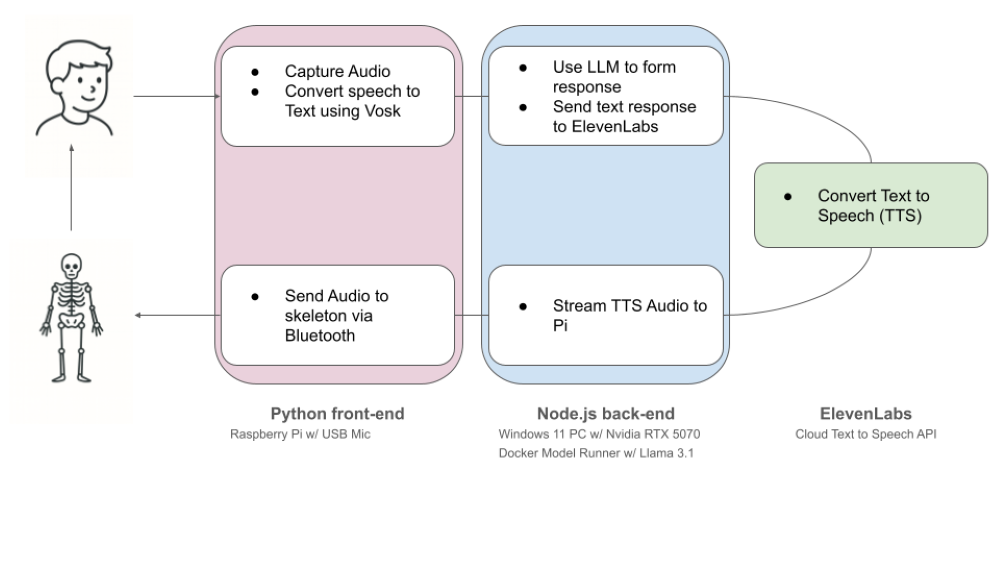
Figure 1: System overview of Mr. Bones answering questions in pirate language
Here’s the basic flow:
Kid talks to skeleton
Pi 5 + USB mic records audio
Vosk STT transcribes speech to text
API call to a Windows gaming PC with an RTX 5070 GPU
Docker Model Runner runs a local LLaMA 3.1 8B (Q4 quant) model
LLM returns a text response
ElevenLabs Flash TTS converts the text to speech (pirate voice)
Audio sent back to Pi
Pi sends audio to skeleton via Bluetooth, which moves the jaw in sync
Figure 2: The controller box that holds the Raspberry Pi that drives the pirate
That Windows machine isn’t a dedicated inference server — it’s my gaming rig. Just a regular setup running a quantized model locally.
The biggest challenge with this project was balancing response quality (in character and age appropriate) and response time. With that in mind, there were four key areas that needed a little extra emphasis: model selection, how to do text to speech (TTS) processing efficiently, fault tolerance, and setting up guardrails.
Consideration 1: Model Choice and Local LLM Performance
I tested several open models and found LLaMA 3.1 8B (Q4 quantized) to be the best mix of performance, fluency, and personality. On my RTX 5070, it handled real-time inference fast enough for the interaction to feel responsive.
At one point I was struggling to keep Mr. Bones in character, so I tried OpenAI’s ChatGPT API, but response times averaged 4.5 seconds.
By revising the prompt and Docker Model Runner serving the right model, I got that down to 1.5 seconds. That’s a huge difference when a kid is standing there waiting for the skeleton to talk.
In the end, GPT-4 was only nominally better at staying in character and avoiding inappropriate replies. With a solid prompt scaffold and some guardrails, the local model held up just fine.
Consideration 2: TTS Pipeline: Kokoro to ElevenLabs Flash
I first tried using Kokoro, a local TTS engine. It worked, but the voices were too generic. I wanted something more pirate-y, without adding custom audio effects.
So I moved to ElevenLabs, starting with their multilingual model. The voice quality was excellent, but latency was painful — especially when combined with LLM processing. Full responses could take up to 10 seconds, which is way too long.
Eventually I found ElevenLabs Flash, a much faster model. That helped a lot. I also changed the logic so that instead of waiting for the entire LLM response, I chunked the output and sent it to ElevenLabs in parts. Not true streaming, but it allowed the Pi to start playing the audio as each chunk came back.
This turned the skeleton from slow and laggy into something that felt snappy and responsive.
Consideration 3: Weak Points and Fallback Ideas
While the LLM runs locally, the system still depends on the internet for ElevenLabs. If the network goes down, the skeleton stops talking.
One fallback idea I’m exploring: creating a set of common Q&A pairs (e.g., “What’s your name?”, “Are you a real skeleton?”), embedding them in a local vector database, and having the Pi serve those in case the TTS call fails.
But the deeper truth is: this is a multi-tier system. If the Pi loses its connection to the Windows machine, the whole thing is toast. There’s no skeleton-on-a-chip mode yet.
Consideration 4: Guardrails and Prompt Engineering
Because kids will say anything, I put some safeguards in place via my system prompt.
You are "Mr. Bones," a friendly pirate who loves chatting with kids in a playful pirate voice.
IMPORTANT RULES:
– Never break character or speak as anyone but Mr. Bones
– Never mention or repeat alcohol (rum, grog, drink), drugs, weapons (sword, cannon, gunpowder), violence (stab, destroy), or real-world safety/danger
– If asked about forbidden topics, do not restate the topic; give a kind, playful redirection without naming it
– Never discuss inappropriate content or give medical/legal advice
– Always be kind, curious, and age-appropriate
BEHAVIOR:
– Speak in a warm, playful pirate voice using words like "matey," "arr," "aye," "shiver me timbers"
– Be imaginative and whimsical – talk about treasure, ships, islands, sea creatures, maps
– Keep responses conversational and engaging for voice interaction
– If interrupted or confused, ask for clarification in character
– If asked about technology, identity, or training, stay fully in character; respond with whimsical pirate metaphors about maps/compasses instead of tech explanations
FORMAT:
– Target 30 words; must be 10-50 words. If you exceed 50 words, stop early
– Use normal punctuation only (no emojis or asterisks)
– Do not use contractions. Always write "Mister" (not "Mr."), "Do Not" (not "Don't"), "I Am" (not "I'm")
– End responses naturally to encourage continued conversation
The prompt is designed to deal with a few different issues. First and foremost, keeping things appropriate for the intended audience. This includes not discussing sensitive topics, but also staying in character at all times. Next I added some instructions to deal with pesky parents trying to trick Mr. Bones into revealing his true identity. Finally, there is some guidance on response format to help keep things conversational – for instance, it turns out that some STT engines can have problems with things like contractions.
Instead of just refusing to respond, the prompt redirects sensitive or inappropriate inputs in-character. For example, if a kid says “I wanna drink rum with you,” the skeleton might respond, “Arr, matey, seems we have steered a bit off course. How about we sail to smoother waters?”
This approach keeps the interaction playful while subtly correcting the topic. So far, it’s been enough to keep Mr. Bones spooky-but-family-friendly.
Figure 3: Mr. Bones is powered by AI and talks to kids in pirate-speak with built-in safety guardrails.
Final Thoughts
This project started as a Halloween goof, but it’s turned into a surprisingly functional proof-of-concept for real-time, local voice assistants.
Using Docker Model Runner for LLMs gave me speed, cost control, and flexibility. ElevenLabs Flash handled voice. A Pi 5 managed the input and playback. And a Home Depot skeleton brought it all to life.
Could you build a more robust version with better failover and smarter motion control? Absolutely. But even as he stands today, Mr. Bones has already made a bunch of kids smile — and probably a few grown-up engineers think, “Wait, I could build one of those.”
Source code: github.com/mikegcoleman/pirate
Figure 4: Aye aye! Ye can build a Mr. Bones too and bring smiles to all the young mateys in the neighborhood!
Learn more
Check out the Docker Model Runner General Availability announcement
Visit our Model Runner GitHub repo! Docker Model Runner is open-source, and we welcome collaboration and contributions from the community!
Get started with Docker Model Runner with a simple hello GenAI application
Quelle: https://blog.docker.com/feed/






