Docker Model Runner now supports vLLM on Windows

Great news for Windows developers working with AI models: Docker Model Runner now supports vLLM on Docker Desktop for Windows with WSL2 and NVIDIA GPUs!

Until now, vLLM support in Docker Model Runner was limited to Docker Engine on Linux. With this update, Windows developers can take advantage of vLLM’s high-throughput inference capabilities directly through Docker Desktop, leveraging their NVIDIA GPUs for accelerated local AI development.

What is Docker Model Runner?

For those who haven’t tried it yet, Docker Model Runner is our new “it just works” experience for running generative AI models.

Our goal is to make running a model as simple as running a container.

Here’s what makes it great:

Simple UX: We’ve streamlined the process down to a single, intuitive command: docker model run <model-name>.

Broad GPU Support: While we started with NVIDIA, we’ve recently added Vulkan support. This is a big deal—it means Model Runner works on pretty much any modern GPU, including AMD and Intel, making AI accessible to more developers than ever.

vLLM: Perform high-throughput inference with an NVIDIA GPU

What is vLLM?

vLLM is a high-throughput inference engine for large language models. It’s designed for efficient memory management of the KV cache and excels at handling concurrent requests with impressive performance. If you’re building AI applications that need to serve multiple requests or require high-throughput inference, vLLM is an excellent choice. Learn more here.

Prerequisites

Before getting started, make sure you have the prerequisites for GPU support:

Docker Desktop for Windows (starting with Docker Desktop 4.54)

WSL2 backend enabled in Docker Desktop

NVIDIA GPU with updated drivers with compute capability >= 8.0

GPU support configured in Docker Desktop

Getting Started

Step 1: Enable Docker Model Runner

First, ensure Docker Model Runner is enabled in Docker Desktop. You can do this through the Docker Desktop settings or via the command line:

docker desktop enable model-runner –tcp 12434

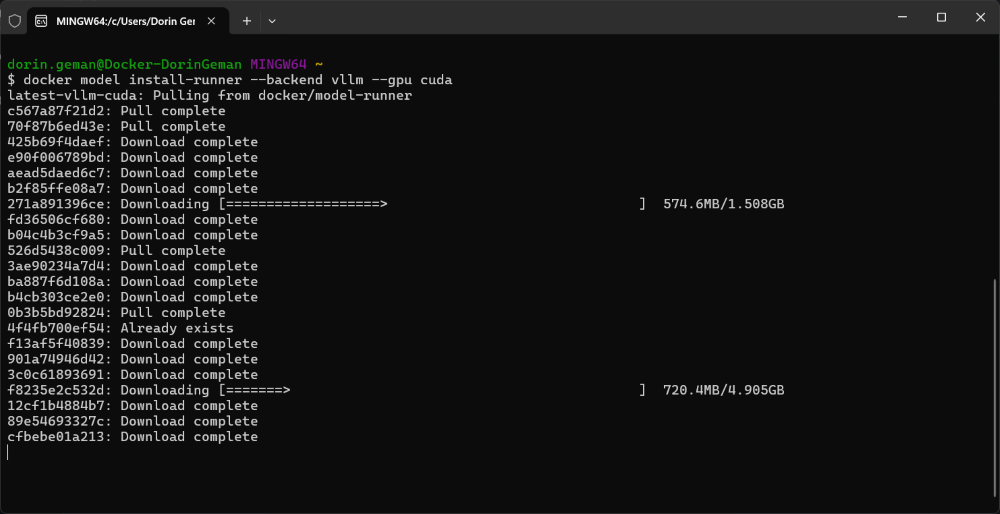
Step 2: Install the vLLM Backend

In order to be able to use vLLM, install the vLLM runner with CUDA support:

docker model install-runner –backend vllm –gpu cuda

Step 3: Verify the Installation

Check that both inference engines are running:

docker model install-runner –backend vllm –gpu cuda

You should see output similar to:

Docker Model Runner is running

Status:
llama.cpp: running llama.cpp version: c22473b
vllm: running vllm version: 0.12.0

Step 4: Run a Model with vLLM

Now you can pull and run models optimized for vLLM. Models with the -vllm suffix on Docker Hub are packaged for vLLM:

docker model run ai/smollm2-vllm "Tell me about Docker."

Troubleshooting Tips

GPU Memory Issues

If you encounter an error like:

ValueError: Free memory on device (6.96/8.0 GiB) on startup is less than desired GPU memory utilization (0.9, 7.2 GiB).

You can configure the GPU memory utilization for a specific mode:

docker model configure –gpu-memory-utilization 0.7 ai/smollm2-vllm

This reduces the memory footprint, allowing the model to run alongside other GPU workloads.

Why This Matters

This update brings several benefits for Windows developers:

Production parity: Test with the same inference engine you’ll use in production

Unified workflow: Stay within the Docker ecosystem you already know

Local development: Keep your data private and reduce API costs during development

How You Can Get Involved

The strength of Docker Model Runner lies in its community, and there’s always room to grow. We need your help to make this project the best it can be. To get involved, you can:

Star the repository: Show your support and help us gain visibility by starring the Docker Model Runner repo.

Contribute your ideas: Have an idea for a new feature or a bug fix? Create an issue to discuss it. Or fork the repository, make your changes, and submit a pull request. We’re excited to see what ideas you have!

Spread the word: Tell your friends, colleagues, and anyone else who might be interested in running AI models with Docker.

We’re incredibly excited about this new chapter for Docker Model Runner, and we can’t wait to see what we can build together. Let’s get to work!
Quelle: https://blog.docker.com/feed/

AWS Application Migration Service supports IPv6

AWS Application Migration Service (MGN) now supports Internet Protocol version 6 (IPv6) for both service communication and application migrations. Organizations can migrate applications that use IPv6 addressing, enabling transitions to modern network infrastructures.
You can connect to AWS MGN using new dual-stack service endpoints that support both IPv4 and IPv6 communications. When migrating applications, you can transfer replication data using IPv4 or IPv6 while maintaining network connections and security. Then, during testing and cutover phases, you can use your chosen network configuration (IPv4, IPv6, or dual-stack) to launch servers in your target environment. This feature is available in every AWS Region that supports AWS MGN and Amazon Elastic Compute Cloud (Amazon EC2) dual-stack endpoints. For supported regions, see the AWS MGN Supported AWS Regions and Amazon EC2 Endpoints documentation. To learn more about AWS MGN, visit our product page or documentation. To get started, sign in to the AWS Application Migration Service Console.
Quelle: aws.amazon.com

Amazon EC2 High Memory U7i instances now available in additional regions

Amazon EC2 High Memory U7i instances with 24TB of memory (u7in-24tb.224xlarge) are now available in AWS Europe (Frankfurt), U7i instances with 16TB of memory (u7in-16tb.224xlarge) are now available in AWS Asia Pacific (Mumbai), and U7i instances with 6TB of memory (u7i-6tb.112xlarge) are now available in the AWS Europe (Paris) region. U7i instances are part of AWS 7th generation and are powered by custom fourth generation Intel Xeon Scalable Processors (Sapphire Rapids). U7in-24tb instances offer 24TiB of DDR5 memory, U7in-16tb instances offer 16TiB of DDR5 memory, and U7i-6tb instances offer 6TiB of DDR5 memory, enabling customers to scale transaction processing throughput in a fast-growing data environment.
U7i-6tb instances offer 448 vCPUs, support up to 100Gbps Elastic Block Storage (EBS) for faster data loading and backups, deliver up to 100Gbps of network bandwidth, and support ENA Express. U7in-16tb instances offer 896 vCPUs, support up to 100Gbps Elastic Block Storage (EBS) for faster data loading and backups, deliver up to 200Gbps of network bandwidth, and support ENA Express. U7in-24tb instances offer 896 vCPUs, support up to 100Gbps Elastic Block Storage (EBS) for faster data loading and backups, deliver up to 200Gbps of network bandwidth, and support ENA Express. U7i instances are ideal for customers using mission-critical in-memory databases like SAP HANA, Oracle, and SQL Server.
To learn more about U7i instances, visit the High Memory instances page.
Quelle: aws.amazon.com

Amazon EC2 I7i instances now available in additional AWS regions

Amazon Web Services (AWS) announces the availability of high performance Storage Optimized Amazon EC2 I7i instances in AWS Asia Pacific (Singapore, Jakarta), Europe (Stockholm) regions. Powered by 5th generation Intel Xeon Scalable processors with an all-core turbo frequency of 3.2 GHz, these instances deliver up to 23% better compute performance and more than 10% better price performance over previous generation I4i instances. Powered by 3rd generation AWS Nitro SSDs, I7i instances offer up to 45TB of NVMe storage with up to 50% better real-time storage performance, up to 50% lower storage I/O latency, and up to 60% lower storage I/O latency variability compared to I4i instances. I7i instances are ideal for I/O intensive and latency-sensitive workloads that demand very high random IOPS performance with real-time latency to access small to medium size datasets (multi-TBs). I7i instances support torn write prevention feature with up to 16KB block sizes, enabling customers to eliminate database performance bottlenecks. I7i instances are available in eleven sizes – nine virtual sizes up to 48xlarge and two bare metal sizes – delivering up to 100Gbps of network bandwidth and 60Gbps of Amazon Elastic Block Store (EBS) bandwidth. To learn more, visit the I7i instances page.
Quelle: aws.amazon.com

Amazon Cognito identity pools now support private connectivity with AWS PrivateLink

Amazon Cognito identity pools now support AWS PrivateLink, enabling you to securely exchange federated identities for AWS credentials through private connectivity between your virtual private cloud (VPC) and Cognito. This eliminates the need to route authentication traffic over the public internet, providing enhanced security for your workloads. Identity pools map authenticated and guest identities to your AWS Identity and Access Management (IAM) roles and provide temporary AWS credentials, with this new feature, through a secure and private connection. You can use PrivateLink connections in all AWS Regions where Amazon Cognito identity pools are available, except AWS China (Beijing) Region, operated by Sinnet, and AWS GovCloud (US) Regions. Creating VPC endpoints on AWS PrivateLink will incur additional charges; refer to AWS PrivateLink pricing page for details. You can get started by creating an AWS PrivateLink VPC interface endpoint for Amazon Cognito identity pools using the AWS Management Console, AWS Command Line Interface (CLI), AWS Software Development Kits (SDKs), AWS Cloud Development Kit (CDK), or AWS CloudFormation. To learn more, refer to the documentation on creating a VPC interface endpoint and Amazon Cognito’s developer guide. 
Quelle: aws.amazon.com

Amazon WorkSpaces Secure Browser introduces Web Content Filtering

Amazon WorkSpaces Secure Browser now includes Web Content Filtering, a comprehensive security and compliance feature that enables organizations to control and monitor web content access. This new capability allows administrators to define granular access policies, block specific URLs or entire domain categories using 25+ predefined categories, and seamlessly integrate with Session Logger for enhanced monitoring and compliance reporting. While existing Chrome policies for domain control remain supported, Web Content Filtering provides a more comprehensive way to control web access through category-based filtering and improved logging capabilities. Organizations can better manage their remote work security and compliance requirements through centralized policy management that scales across the enterprise. IT security teams can implement default-deny policies for high-security environments, while compliance officers benefit from detailed logging and monitoring capabilities. The feature maintains flexibility by allowing customized policies and exceptions based on specific business needs. This feature is available at no additional cost in 10 AWS Regions, including US East (N. Virginia), US West (Oregon), Canada (Central), Europe (Frankfurt, London, Ireland), and Asia Pacific (Tokyo, Mumbai, Sydney, Singapore). WorkSpaces Secure Browser offers pay-as-you go pricing. To get started with WorkSpaces Secure Browser, see Getting Started with Amazon WorkSpaces Secure Browser. You can enable this feature in your AWS console and automatically migrate any browser policies for URL Blocklists or URL Allowlists. To learn more about the feature, please refer to the feature documentation.
Quelle: aws.amazon.com






