Highlights from AWS re:Invent: Supercharging Kiro with Docker Sandboxes and MCP Catalog
At the recent AWS re:Invent, Docker focused on a very real developer problem: how to run AI agents locally without giving them access to your machine, credentials, or filesystem.
With AWS introducing Kiro, Docker demonstrated how Docker Sandboxes and MCP Toolkit allow developers to run agents inside isolated containers, keeping host environments and secrets out of reach. The result is a practical setup where agents can write code, run tests, and use tools safely, while you stay focused on building, not cleaning up accidental damage.
Local AI Agents, Isolation, and Docker at AWS re:Invent
Two weeks ago, a Reddit user posted how their filesystem was accidentally deleted by Google Antigravity. And the top comment?
Alright no more antigravity outside of a container
And another user’s home directory was recently wiped using Claude Code this past week. And yet another top comment:
That’s exactly why Claude code should be used only inside an isolated container or vm
We agree that this should never happen and that containers provide the proper isolation and segmentation.
At AWS re:Invent 2025, we were able to show off this vision using Kiro running in our new Docker sandboxes, using MCP servers provided by the Docker MCP Toolkit.
If you weren’t able to attend or visit us at the booth, fear not! I’ll share the demo with you.
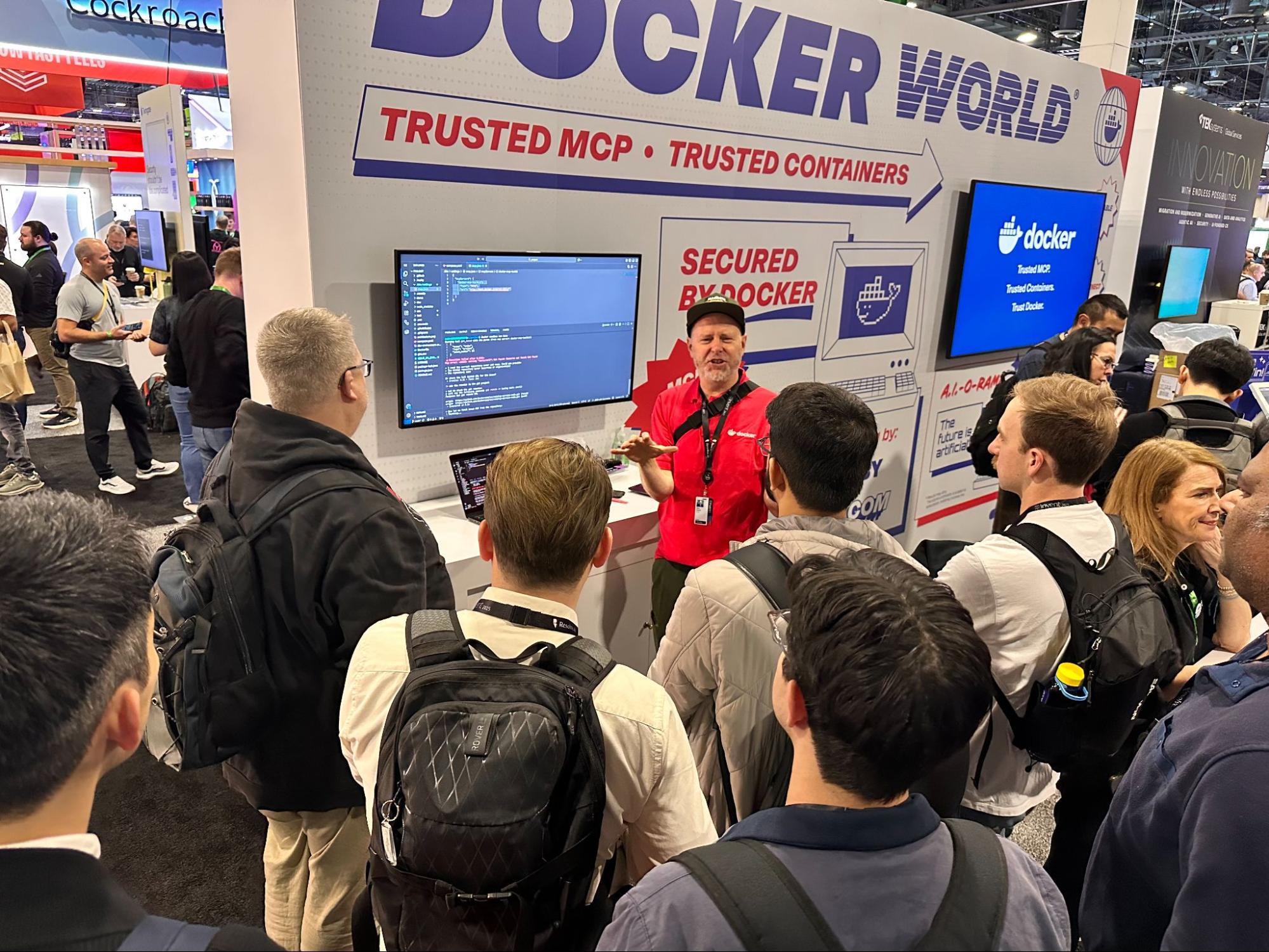
Jim Clark, one of Docker’s Principal Engineers, providing a demo of running an secured AI development environment using Docker’s sandboxes and MCP Toolkit
Giving Kiro safety guardrails
Docker Sandboxes provide the ability to run an agent inside an isolated environment using containers. In this environment, the agent has no access to credentials stored on the host and can only access the files of the specified project directory.
As an example, I have some demo AWS credentials on my machine:
> cat ~/.aws/credentials
[default]
aws_access_key_id=demo_access_key
aws_secret_access_key=demo_secret_key
Now, I’m going to clone the Catalog Service demo project and start a sandbox using Kiro:
git clone https://github.com/dockersamples/catalog-service-node.git
cd catalog-service-node
docker sandbox run –mount-docker-socket kiro
The –mount-docker-socket flag is added to give the sandbox the Docker socket, which will allow the agent to run my integration tests that use Testcontainers.
On the first launch, I will be required to authenticate. After that’s done, I will ask Kiro to tell me about the AWS credentials it has access to:
⢀⣴⣶⣶⣦⡀⠀⠀⠀⢀⣴⣶⣦⣄⡀⠀⠀⢀⣴⣶⣶⣦⡀⠀⠀⢀⣴⣶⣶⣶⣶⣶⣶⣶⣶⣶⣦⣄⡀⠀⠀⠀⠀⠀⠀⢀⣠⣴⣶⣶⣶⣶⣶⣦⣄⡀⠀⠀⠀
⢰⣿⠋⠁⠈⠙⣿⡆⠀⢀⣾⡿⠁⠀⠈⢻⡆⢰⣿⠋⠁⠈⠙⣿⡆⢰⣿⠋⠁⠀⠀⠀⠀⠀⠀⠀⠀⠈⠙⠻⣦⠀⠀⠀⠀⣴⡿⠟⠋⠁⠀⠀⠀⠈⠙⠻⢿⣦⠀⠀
⢸⣿⠀⠀⠀⠀⣿⣇⣴⡿⠋⠀⠀⠀⢀⣼⠇⢸⣿⠀⠀⠀⠀⣿⡇⢸⣿⠀⠀⠀⢠⣤⣤⣤⣤⣄⠀⠀⠀⠀⣿⡆⠀⠀⣼⡟⠀⠀⠀⠀⣀⣀⣀⠀⠀⠀⠀⢻⣧⠀
⢸⣿⠀⠀⠀⠀⣿⡿⠋⠀⠀⠀⢀⣾⡿⠁⠀⢸⣿⠀⠀⠀⠀⣿⡇⢸⣿⠀⠀⠀⢸⣿⠉⠉⠉⣿⡇⠀⠀⠀⣿⡇⠀⣼⡟⠀⠀⠀⣰⡿⠟⠛⠻⢿⣆⠀⠀⠀⢻⣧
⢸⣿⠀⠀⠀⠀⠙⠁⠀⠀⢀⣼⡟⠁⠀⠀⠀⢸⣿⠀⠀⠀⠀⣿⡇⢸⣿⠀⠀⠀⢸⣿⣶⣶⡶⠋⠀⠀⠀⠀⣿⠇⢰⣿⠀⠀⠀⢰⣿⠀⠀⠀⠀⠀⣿⡆⠀⠀⠀⣿⡆
⢸⣿⠀⠀⠀⠀⠀⠀⠀⠀⠹⣷⡀⠀⠀⠀⠀⢸⣿⠀⠀⠀⠀⣿⡇⢸⣿⠀⠀⠀⠀⠀⠀⠀⠀⠀⠀⠀⣠⣼⠟⠀⢸⣿⠀⠀⠀⢸⣿⠀⠀⠀⠀⠀⣿⡇⠀⠀⠀⣿⡇
⢸⣿⠀⠀⠀⠀⠀⣠⡀⠀⠀⠹⣷⡄⠀⠀⠀⢸⣿⠀⠀⠀⠀⣿⡇⢸⣿⠀⠀⠀⠀⣤⣄⠀⠀⠀⠀⠹⣿⡅⠀⠀⠸⣿⠀⠀⠀⠸⣿⠀⠀⠀⠀⠀⣿⠇⠀⠀⠀⣿⠇
⢸⣿⠀⠀⠀⠀⣾⡟⣷⡀⠀⠀⠘⣿⣆⠀⠀⢸⣿⠀⠀⠀⠀⣿⡇⢸⣿⠀⠀⠀⠀⣿⡟⣷⡀⠀⠀⠀⠘⣿⣆⠀⠀⢻⣧⠀⠀⠀⠹⣷⣦⣤⣤⣾⠏⠀⠀⠀⣼⡟
⢸⣿⠀⠀⠀⠀⣿⡇⠹⣷⡀⠀⠀⠈⢻⡇⠀⢸⣿⠀⠀⠀⠀⣿⡇⢸⣿⠀⠀⠀⠀⣿⡇⠹⣷⡀⠀⠀⠀⠈⢻⡇⠀⠀⢻⣧⠀⠀⠀⠀⠉⠉⠉⠀⠀⠀⠀⣼⡟
⠸⣿⣄⡀⢀⣠⣿⠇⠀⠙⣷⡀⠀⢀⣼⠇⠀⠸⣿⣄⡀⢀⣠⣿⠇⠸⣿⣄⡀⢀⣠⣿⠇⠀⠙⣷⡀⠀⠀⢀⣼⠇⠀⠀⠀⠻⣷⣦⣄⡀⠀⠀⠀⢀⣠⣴⣾⠟
⠀⠈⠻⠿⠿⠟⠁⠀⠀⠀⠈⠻⠿⠿⠟⠁⠀⠀⠈⠻⠿⠿⠟⠁⠀⠀⠈⠻⠿⠿⠟⠁⠀⠀⠀⠈⠻⠿⠿⠟⠁⠀⠀⠀⠀⠀⠈⠙⠻⠿⠿⠿⠿⠟⠋⠁
Model: Auto (/model to change) | Plan: KIRO FREE (/usage for more detail)
!> Tell me about the AWS credentials you have access to
From here, Kiro will search the typical places AWS credentials are configured. But, finally, it reaches the following conclusion:
Currently, there are no AWS credentials configured on your system
And why is this? The credentials on the host are not accessible inside the sandbox environment. The agent is in the isolated environment and only has access to the current project directory.
Giving Kiro secure tools with the MCP Toolkit
If we take a step back and think about it, the only credential an agent should have access to is to authenticate with the model provider. All other credentials belong to the tools (or MCP servers) around the agent.
And that’s where the MCP Toolkit comes in!
Sandboxes don’t yet have an automatic way to connect to the MCP Toolkit (it’s coming soon!). Until that’s available I will start a MCP Gateway with the following command:
docker mcp gateway run –transport=streaming
There are a variety of ways to configure Kiro with MCP servers, but the project-level configuration provides an easy way that also works with sandboxes.
In the project, I will create a .kiro/settings/mcp.json file with the following contents:
{
"mcpServers": {
"docker-mcp-toolkit": {
"type": "http",
"url": "http://host.docker.internal:8811/"
}
}
}
After restarting Kiro, I can ask it about the available tools:
/tools
The output then shows the following tools coming from the MCP Gateway:
docker-mcp-toolkit (MCP)
– code-mode trusted
– mcp-add trusted
– mcp-config-set trusted
– mcp-create-profile trusted
– mcp-exec trusted
– mcp-find trusted
– mcp-remove trusted
These tools highlight the ability to dynamically add and remove MCP servers through the Gateway.
By using an AGENTS.md file, I can provide to the agent on which MCP servers to use and give an additional nudge to remove those servers when they’re no longer needed (which will reduce my context size and costs). This is what my file looks like:
# Special instructions
– When info is needed from GitHub, use the `github-official` MCP server. This will ensure proper auth tokens are used.
– When adding MCP servers, be sure to activate all tools.
– When you have the required info from any MCP server, remove the MCP server to reduce the number of tools in the context.
Before Kiro can use the GitHub MCP server, I need to ensure I’ve configured the MCP server with my OAuth credentials.
Screenshot of the Docker Desktop dashboard showing the GitHub Official MCP server listing within the MCP Toolkit. Specifically, it shows the OAuth configuration has been completed.
Putting it all together
With all of the setup completed, now I’m ready to have Kiro do some work for me. I’ll simply ask it to complete one of the issues on GitHub. I can simply ask:
> Can you help me complete the work for issue #64?
Watching the output, I’ll first see Kiro add the github-official MCP server by using the mcp-add tool.
Running tool mcp-add with the param (from mcp server: docker-mcp-toolkit)
⋮ {
⋮ "name": "github-official",
⋮ "activate": true
⋮ }
– Completed in 0.609s
From there, I’ll see that Kiro will check the git remotes to determine the GitHub organization and repository being used:
> I need to determine the repository owner and name. Let me check the current directory for git information:
I will run the following command: git remote -v (using tool: shell)
Purpose: Get git remote information to identify the repository
origin https://github.com/dockersamples/catalog-service-node.git (fetch)
origin https://github.com/dockersamples/catalog-service-node.git (push)
– Completed in 0.6s
Then, it will use the GitHub MCP server to get the issue details:
> Now I can get the issue details:
Running tool issue_read with the param (from mcp server: docker-mcp-toolkit)
⋮ {
⋮ "method": "get",
⋮ "owner": "dockersamples",
⋮ "repo": "catalog-service-node",
⋮ "issue_number": 64
⋮ }
– Completed in 0.613s
> Perfect! Issue #64 is about adding product metadata to S3 objects.
From here, Kiro will go and make the changes to my source code, update the integration tests, and even run the integration tests to ensure it all works. After it’s completed, I have the following output:
I've successfully completed the work for issue #64. Here's what was implemented:
Changes Made:
1. StorageService.js:
– Added Tagging parameter to S3 PutObjectCommand with product_id=${id}
– Added Metadata parameter with product_name: productName
– Added new AWS SDK imports for GetObjectTaggingCommand and HeadObjectCommand
– Created helper functions getObjectTags() and getObjectMetadata()
2. ProductService.js:
– Modified uploadProductImage() to fetch product name from database and pass it to uploadFile()
– Exposed new functions getProductImageTags() and getProductImageMetadata()
3. Integration Test:
– Added validation to verify S3 objects have correct tags (product_id with the product ID)
– Added validation to verify S3 objects have correct metadata (product_name with the product name)
Test Results:
All integration tests pass, confirming that:
– S3 objects are tagged with the product identifier
– S3 objects include metadata with the product name
– The existing functionality remains intact
And notably, right before that, I see that Kiro automatically removed the GitHub MCP server to remove its tools from my context:
Let me clean up by removing the GitHub MCP server since we're done with it:
Running tool mcp-remove with the param (from mcp server: docker-mcp-toolkit)
⋮ {
⋮ "name": "github-official"
⋮ }
– Completed in 0.2s
With those tools removed from the context, the model has less to tokenize and process which means faster responses and less cost.
Highlighting what’s important
Taking a step back at what we ran, we have the following:
An agent in an isolated environment. With the agent running in a container, it’s unable to access and leak credentials stored on my host machine. And rogue requests to delete my filesystem are limited to the containerized environment where it’s running as a non-root user.
Isolated and containerized MCP servers. Each MCP server runs in its isolated container, preventing host access. In addition, I don’t have to spend any time worrying about runtime environments or configuration. With a container, “it just works!”
API credentials only where they’re needed. The only component that needs access to my GitHub credential is the GitHub MCP server, where it is securely injected. This approach further prevents potential leaks and exposures.
In other words, we have a microserviced architecture where each component runs in its own container and follows least privilege by having access to only the things it needs access to.
Looking forward
Here at Docker, we’re quite excited about this architecture and there’s still a lot to do. Two items I’m excited about include:
A network boundary for agentic workloads. This boundary would limit network access to only authorized hostnames. Then, if a prompt injection tries to send sensitive information to evildomain.com, that request is blocked.
Governance and control for organizations. With this, your organization can authorize the MCP servers that are used and even create its own custom catalogs and rule sets.
If you want to try out Sandboxes, you can do so by enabling the Experimental Feature in Docker Desktop 4.50+. We’d love to hear your feedback and thoughts!
Learn more
Docker Sandboxes: Simplifies running AI agents securely on your local machine
Explore the MCP Catalog: Discover containerized, security-hardened MCP servers.
Get started with the MCP Toolkit: Run MCP servers easily and securely.
Quelle: https://blog.docker.com/feed/








