Your gcloud command-line questions answered in printable cheat sheet

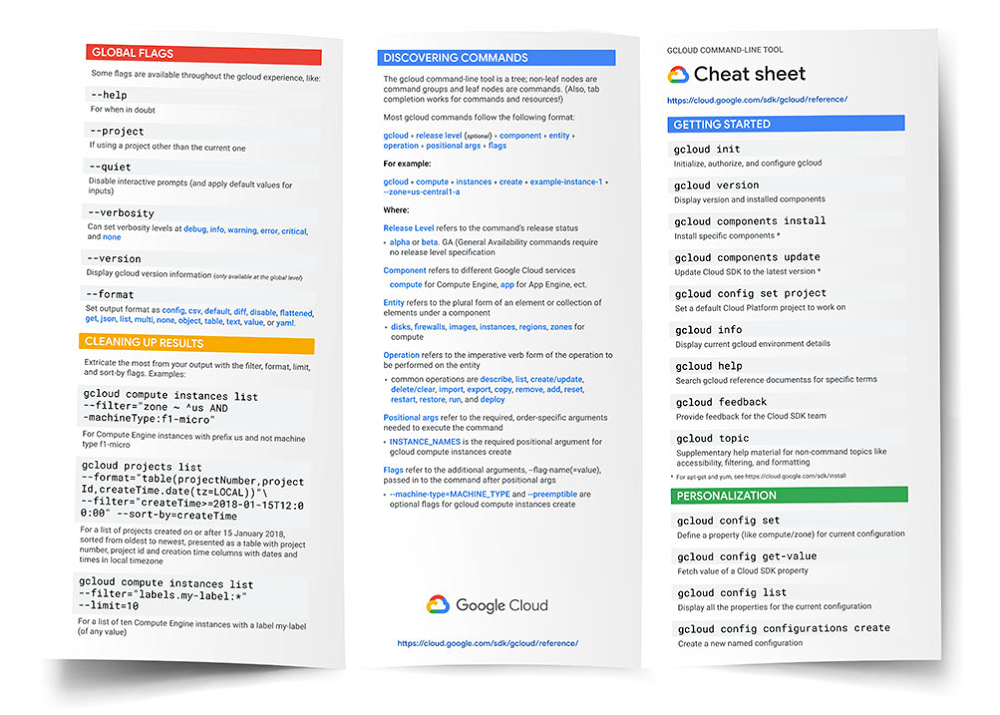
If you have a Google Cloud environment, you’ve probably spent some time with the gcloud command-line tool, the primary command-line tool for creating and managing Google Cloud resources. But with over 2,000 commands, it can be a little overwhelming to get started with its multitude of flags, filters, and formats. Fear not for the gcloud command-line tool cheat sheet is now here to help guide the way! It’s a handy tool to stow in your proverbial knapsack or actual back pocket as you start out with the Cloud SDK, helping you recognize command patterns and find useful gcloud commands, to get you on your way. The gcloud command-line tool cheat sheet is available as a one-page sheet, an online resource, and quite fittingly, a command itself, gcloud cheat-sheet.We’ve organized the gcloud command-line tool cheat sheet around common command invocations (like creating a Compute Engine virtual machine instance), essential workflows (such as authorization and setting properties for your configuration), and core tool capabilities (like filtering and sorting output). This list of useful commands, all neatly packed into a single double-sided page, is ready to be downloaded and printed. As a bonus, the cheat sheet also includes a quick rundown of how gcloud commands are structured, enabling you to easily discover commands beyond the confines of this pithy list.Whether you’re new to the gcloud command-line tool and need a good starting point, or are a seasoned user and need a map to situate yourself, the gcloud command-line tool cheat sheet is a nifty companion as you traverse the expansive landscape of Google Cloud. You can access the cheat sheet online, or download the printable PDF. Or if you’ve already got the latest version of Cloud SDK installed, give the cheat sheet a whirl right now with gcloud cheat-sheet. We hope you find it to be a useful resource!
Quelle: Google Cloud Platform

Making buildings smarter with Azure IoT

Commercial real estate developers, building owners, facilities management companies, and tenants have a huge opportunity to address, and solve for, the unique business challenges faced by their industry, by applying the Internet of Things (IoT) to buildings. For example, by leveraging data from IoT sensors and building management systems, companies can gain insights that enable them to save energy, reduce operational expenses, increase occupant comfort, and optimize space.

However, the COVID-19 crisis has presented a new set of challenges for developers, owners, and management companies. New forecasts show the smart building market size growing between 7.3 percent and 11.6 percent annually to overall market revenues of between $65.2 billion and $82.7 billion USD in 2025.1

Smart buildings also help companies meet regulations for tracking and reducing greenhouse gas emissions.

Let’s look at how Bosch Building Technologies, Bentley Systems, Schneider Electric, and ICONICS use Azure IoT to deliver the benefits of smart buildings.

Decreasing energy requirements

The American Council for an Energy-Efficient Economy estimates that implementing smart building technology in an existing building can result in energy savings of 30–50 percent.2 For example, companies can combine data from occupancy sensors with data from HVAC and lighting systems to lower room temperatures and turn lights off in unoccupied rooms.

Bosch Building Technologies developed an in-house Energy Platform to analyze energy consumption and pursue ongoing energy efficiency. Based on Microsoft Azure, the Energy Platform monitors and analyzes energy consumption in real-time. Bosch customers use the Energy Platform to connect to IoT enabled devices and then link to existing meters, sensors, and machines. Customers can make informed decisions to improve energy and resource efficiency.

Bosch offers the solution to customers and uses it internally at more than 100 manufacturing plants worldwide. At one of their larger plants, Bosch saves up to €1.2 million (approximately $1.3 million USD) a year.

Bosch also created a Building Intelligence as a Service program to provide new IoT-based services for customers. Bosch adopted Azure Digital Twins as part of their Connected Building Services offering. By leveraging Azure Digital Twins, the company can query data from entire rooms or spaces, rather than from disparate sensors, to build complete digital models of the physical building environment.

By using Azure Digital Twins, Bosch gains more precise data for a wide range of building technology systems. With this level of precision, it’s easier for customers to fully understand data points, consumption results, context, and how they relate to the physical environment to quickly gain insights on energy usage to inform their business decisions.

Human factor design of new buildings can help decrease energy requirements.

Creating a connected workplace

At Microsoft’s Frasers Tower in Singapore, Bentley Systems and Schneider Electric implemented sensors and telemetry to create a connected workplace. They used a mix of 179 Bluetooth beacons in meeting rooms and 900 sensors for lighting, air quality, and temperature. The platform generates nearly 2,100 data points that are stored and analyzed in Azure. Using the data, Microsoft optimizes various aspects of the spaces, making them more comfortable for employees, while reducing energy consumption in a sustainable and economical manner.

Additionally, Bentley Systems built a digital twin of the Fraser Towers on its Bentley iTwin platform—using Azure Digital Twins, Azure IoT Hub, and Azure Time Series Insights. The iTwin platform uses both historical and real-time data from IoT sensors to create an exact digital replica of the physical building. The building management team uses the information to dynamically allocate space, increase utilization, reduce costs, improve competitiveness, and enhance collaboration and productivity.

Sensors generate data that is stored and analyzed to decrease energy use.

Monitoring occupancy and reducing costs

ICONICS smart building software has run on Microsoft Azure since 2015. The software is an integration hub for building management systems that control heating, ventilation, and lighting and collect and centralize each system’s sensor data. ICONICS relies on Azure Digital Twins to boost solution scalability and rapidly deliver innovative capabilities to customers, such as viewing space occupancy and spatial analytics.

Microsoft uses the ICONICS smart building software to collect sensor data in office buildings in the Puget Sound area of Washington State. The ICONICS solution aggregates the data over multiple buildings to give facility managers visibility into building health and applies big data analytics to provide insights that drive decisions in order to deliver energy savings. In fact, the Microsoft Energy Smart Buildings program, leveraging ICONICS software, has saved Microsoft 20 percent off its energy bills.

Next steps

Smart buildings provide insights that enable real estate developers, commercial building owners, facilities managers, and tenants to save energy, reduce operational expenses, increase occupant comfort, and meet regulatory and sustainability goals.

To learn more about best practices for planning smart building projects, download the white paper, Smart buildings: From design to reality, co-written by Microsoft and L&T Technology Services.

Also visit, Azure IoT to find the right IoT approach for your solutions.


1Impact of COVID-19 on the Global IoT in Smart Commercial Buildings Market to 2025 – ResearchAndMarkets.com.

2 Smart Buildings: Using Smart Technology to Save Energy in Existing Buildings.
Quelle: Azure
From Docker Straight to AWS

Just about six years ago to the day Docker hit the first milestone for Docker Compose, a simple way to layout your containers and their connections. A talks to B, B talks to C, and C is a database. Fast forward six years and the container ecosystem has become complex.  New managed container services have arrived bringing their own runtime environments, CLIs, and configuration languages. This complexity serves the needs of the operations teams who require fine grained control, but carries a high price for developers.

One thing has remained constant over this time is that developers love the simplicity of Docker and Compose. This led us to ask, why do developers now have to choose between simple and powerful? Today, I am excited to finally be able to talk about the result of what we have been working on for over a year to provide developers power and simplicity from desktop to the cloud using Compose. Docker is expanding our strategic partnership with Amazon and integrating the Docker experience you already know and love with Amazon Elastic Container Service (ECS) with AWS Fargate. Deploying straight from Docker straight to AWS has never been easier.

Today this functionality is being made available as a beta UX using docker ecs to drive commands. Later this year when the functionality becomes generally available this will become  part of our new Docker Contexts and will allow you to  just run docker run and docker compose.

To learn more about what we are building together with Amazon go read Carmen Puccio’s post over at the Amazon Container blog. After that register for the Amazon Cloud Container Conference and come see Carmen and my session at 3:45 PM Pacific.

We are extremely excited for you to try out the public beta starting right now. In order to get started, you can sign up for a Docker ID, or use your existing Docker ID, and download the latest version of Docker Desktop Edge 2.3.3.0 which includes the new experience. You can also head straight over to the GitHub repository which will include the conference session’s demo you can follow along. We are excited for you to try it out, report issues and let us know what other features you would like to see on the Roadmap!
The post From Docker Straight to AWS appeared first on Docker Blog.
Quelle: https://blog.docker.com/feed/






