Azure Storage innovations: Unlocking the future of data

Microsoft is redefining what’s possible in the public cloud and driving the next wave of AI-powered transformation for organizations. Whether you’re pushing the boundaries with AI, improving the resilience of mission-critical workloads, or modernizing legacy systems with cloud-native solutions, Azure Storage has a solution for you.

Learn more about Azure Storage tools and products

At Microsoft Ignite 2025 and KubeCon North America last month, we showcased the latest innovations in Azure Storage, powering your workloads. Here is a recap of those releases and advancements.

Innovating for the future with AI

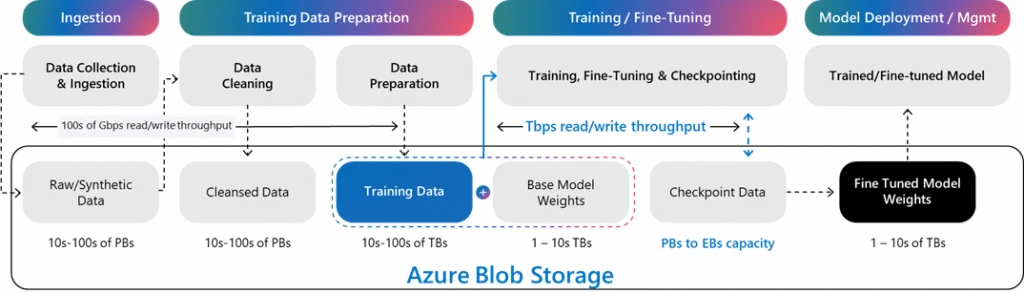
Azure Blob Storage provides a unified storage foundation for the entire AI lifecycle, powering everything from ingestion and preparation to checkpoint management and model deployment.

To enable customers to rapidly train, fine-tune, and deploy AI models, we evolved the Azure Blob Storage architecture to scale and deliver exabytes of capacity, 10s of Tbps throughput, and millions of IOPS to GPUs. In this video, you can see a single storage account scaling to over 50 Tbps on read throughput. Azure Blob Storage is also the foundation that enables OpenAI to train and serve models at unprecedented speed and scale. 

Fig 1. Storage-centric view of AI training and fine-tuning

For customers handling terabyte or petabyte scale AI training data, Azure Managed Lustre (AMLFS) is a high-performance parallel file system delivering massive throughput and parallel I/O to keep GPUs continuously fed with data. AMLFS 20 (preview) supports 25 PiB namespaces and up to 512 GBps throughput. Hierarchical Storage Management (HSM) integration enhances AMLFS scalability by enabling seamless data movement between AMLFS and your exabyte-scale datasets in Azure Blob Storage. Auto-import (preview) allows you to pull only required datasets into AMLFS, and auto-export sends trained models to long-term storage or inferencing.

Rakuten is accelerating the training of Japanese large language models on Microsoft Azure, leveraging Azure Managed Lustre, Azure Blob Storage, and Azure Kubernetes Service to maximize GPU utilization and simplify scaling.
Natalie Mao, VP, AI & Data Division, Rakuten Group

Once models are trained and fine-tuned, inferencing takes center stage delivering real-time predictions and insights. Azure Blob Storage provides best-in-class storage for Microsoft AI services, including Microsoft Foundry Agent Knowledge (preview) and AI Search retrieval agents (preview), enabling customers to bring their own storage accounts for full flexibility and control, ensuring that enterprise data remains secure and ready for retrieval-augmented generation (RAG).

Additionally, Premium Blob Storage delivers consistent low-latency and up to 3X faster retrieval performance, critical for RAG agents. For customers that prefer open-source AI frameworks, Azure Storage built LangChain Azure Blob Loader which delivers granular security, memory-efficient loading of millions of objects and up to 5x faster performance compared to prior community implementations.

Fig 2. Storage-centric view of AI inference with enterprise data

Azure Storage is evolving to be an integrated, intelligent AI-driven platform simplifying management of exabyte-scale AI data. Storage Discovery and Copilot work together to help you analyze and understand how your data estate is evolving over time using dashboards and questions in natural language. With Storage Discovery and Storage Actions, you can optimize costs, protect your data and govern large datasets with hundreds of billions of objects used for training, and fine-tuning.

Optimizing modern applications with Cloud Native

Modern cloud-native applications demand agility. Two principles consistently stand out: elasticity and flexibility. Your storage should scale seamlessly with dynamic workloads—without operational overhead. The innovations below are designed for the cloud, enabling you to auto-scale, optimize costs intelligently, and deliver the performance needed by modern applications.

Azure Elastic SAN provides cloud-native block storage for scale and tight Kubernetes integration for fast scaling, and multi‑tenancy that optimizes cost. With new auto scaling support, Elastic SAN automatically expands resources as needed, making it easier to manage storage footprints across workloads. Early next year, we’ll extend Kubernetes integration via Azure Container Storage for Azure Kubernetes Service (AKS) to general availability (GA). These enhancements let you maintain familiar hosting environments while layering in cloud-native capabilities.

Cloud-native agility is also critical for modern applications built on object storage, with the need to optimize costs and performance for dynamic and unpredictable traffic patterns. Smart Tier (preview) on Azure Blob Storage continuously analyzes access patterns, moving data between tiers automatically.

New data starts in the hot tier. After 30 days of inactivity, it moves to cool, and after 90 days, to cold. If an object is accessed again, it’s promoted back to hot which keeps data in the most cost-effective tier automatically. You can optimize costs without sacrificing performance, simplifying data management at scale and keeping your focus on building.

Hosting mission-critical workloads

Enterprises today run mission-critical workloads that require block storage and deliver predictable performance and uncompromising business continuity. Azure Ultra Disk is our highest-performance block storage offering, purpose-built for workloads like high-frequency trading, ecommerce platforms, transactional databases, and electronic health record systems that demand exceptional speed, reliability, and scalability.

With Azure Ultra Disk, we can confidently scale our platform globally, knowing that performance and resilience will meet enterprise expectations, that consistency allows our teams to focus on AI innovation and workflow automation rather than infrastructure.
Charles McDaniels, Director of Systems Engineering Management for Global Cloud Services, ServiceNow

We know performance, cost, and business continuity remain the top priorities for our customers and we are raising the bar in every category:

Performance: We have further improved the average latency for Azure Ultra Disk by 30% with average latency well under 0.5ms for small IOs on virtual machines (VMs) with Azure Boost. A single Azure Ultra Disk can deliver industry leading performance of 400K IOPS and 10 GBps throughput. In addition, with Ebsv6 VMs, both Premium SSD v2 and Azure Ultra Disk can deliver industry leading VM performance scale of 800K IOPS and 14 GBps throughput for the most demanding applications.

Cost: Flexible provisioning for Azure Ultra Disk reduces total cost of ownership by up to 50%, letting you scale capacity, IOPS, and MBps independently at finer granularity.

Business continuity: Instant Access Snapshots (preview) lets you backup and restore your workloads instantly with exceptional performance on rehydration. This differentiated experience for Azure Premium v2 and Ultra Disk helps eliminate the operational overhead of monitoring snapshot readiness or pre‑warming resources, while reducing recovery, refresh, and scale‑out times from hours to seconds.

Azure NetApp Files (ANF) is designed to deliver low latency, high performance, and data management at scale. Its large volumes capabilities have been significantly expanded providing an over 3x increase in single volume capacity scale to 7.2 PiB and a 4x increase in throughput to 50 GiBps. Cache volumes bring data and files closer to where users need rapid access in a space efficient footprint. These make ANF suitable for several high-performance computing workloads such as Electronic Design Automation (EDA), Seismic Interpretation and Visualization, Reservoir Simulations, and Risk Modeling. Microsoft is not only positioning ANF for mission critical applications but also using ANF for in-house silicon design.

Breaking barriers—migrating your storage infrastructure

Every organization’s cloud journey is unique. Whether you need to move existing environments to the cloud with minimal disruption or plan a full modernization, Azure Storage offers solutions for you. Storage Migration Solution Advisor in Copilot can provide recommendations to help streamline the decision-making process for these migrations. 

Azure Data Box and Storage Mover simplify the migration journey from on-premises and other clouds to Azure. The next generation Azure Data Box is now GA. Storage Mover is our fully managed data migration service that is secure, efficient and scalable with new capabilities: on-premises NFS shares to Azure Files NFS 4.1, on-premises SMB shares to Azure Blob storage, and cloud-to-cloud transfers. Storage Migration Solution Advisor in Copilot accelerates decision-making for migrations.

For users ready to migrate their NAS data estates, Azure Files now makes this easier than ever. We have introduced a new management model making it easier and more cost effective to use file shares. Additionally, Azure Files now enables you to eliminate complex on-premises Active Directory or domain controller infrastructure, with Entra-only identities for SMB shares. With cloud native identity support, you can now manage your user permissions directly in Azure, including external identities for applications like Azure Virtual Desktop (AVD).

Entra-only identities support with Azure Files transforms SLB’s Petrel workflows by removing dependencies on on-premises domain controllers, simplifying identity management and storage infrastructure for globally distributed teams working on complex exploration and reservoir characterization. This cloud-native architecture allows customers to access SMB shares in an easy and secure manner without complex VPN or hybrid infrastructure setups.
Swapnil Daga, Storage Architect for Tenant Infrastructure, SLB

ANF Migration Assistant simplifies moving ONTAP workloads from on-premises or other clouds to Azure. Behind the scenes, the Migration Assistant uses NetApp’s SnapMirror replication technology, providing efficient, full fidelity, block-level incremental transfers. You can now leverage large datasets without impacting production workloads.

For customers running on-premises partner solutions who want to migrate to Azure using the same partner-provided technology, Azure has recently introduced Azure Native offers with Pure Storage and Dell PowerScale.

To make migrations easier, Azure Storage’s Migration Program connects you with a robust ecosystem of experts and tools. Trusted partners like Atempo, Cirata, Cirrus Data, and Komprise can accelerate migration of SAN and NAS workloads. This program offers secure, low-risk transfers of files, objects, and block storage to help enterprises unlock the full potential of Azure.

Start your next chapter with Azure Storage

The era of AI-powered transformation is here. Begin your journey by exploring Azure’s advanced storage offerings and migration tools, designed to accelerate AI adoption, cloud migration, and modernization. Take the next step today and unlock new possibilities with Azure Storage as the foundation for your AI initiatives.

For any questions, reach out at azurestoragefeedback@microsoft.com.

Get started with Azure Storage
Secure, high-performance, reliable, and scalable cloud storage.

Start exploring

The post Azure Storage innovations: Unlocking the future of data appeared first on Microsoft Azure Blog.
Quelle: Azure
Introducing GPT-5.2 in Microsoft Foundry: The new standard for enterprise AI

The age of AI small talk is over. Enterprise applications demand more than clever chat. They require a reliable, reasoning partner capable of solving the most ambiguous, high-stakes problems, including planning multi-agent workflows and delivering auditable code.

Azure is the foundation for solving these challenges. Today, OpenAI’s GPT-5.2 is announced as generally available in Microsoft Foundry, introducing a new frontier model series purposefully built to meet the needs of enterprise developers and technical leaders—setting a new standard for a new era.

Explore GPT-5.2 in Foundry today

GPT-5.1 vs. GPT-5.2: Key upgrades for developers to know

GPT-5.2 series introduces deeper logical chains, richer context handling, and agentic execution that prompts shippable artifacts. For example, design docs, runnable code, unit tests, and deployment scripts can be generated with fewer iterations. The GPT-5.2 series is built on new architecture, delivering superior performance, efficiency, and reasoning depth compared to prior generations. It’s also trained on the proven GPT-5.1 dataset and further enhanced with improved safety and integrations. GPT-5.2 leaps beyond previous models with substantial performance improvements across core metrics.

Today, we’re shipping GPT-5.2 and GPT-5.2-Chat. Each is greatly improved from its predecessor, and together they excel in everyday professional excellence.

GPT-5.2: The most advanced reasoning model that solves harder problems more effectively and with more polish. An example of this is information work, where great thinking is now complemented with better communication skills and improved formatting in spreadsheets and slideshow creation.

GPT-5.2-Chat: A powerful yet efficient workhorse for everyday work and learning, with clear improvements in info-seeking questions, how-to’s and walk-throughs, technical writing, and translation. It’s also more effective at supporting studying and skill-building, as well as offering clearer job and career guidance.

Why GPT-5.2 sets a new standard for enterprise AI

For long term success in complex professional tasks, teams need structured outputs, reliable tool use, and enterprise guardrails. GPT‑5.2 is optimized for these agent scenarios within Foundry’s enterprise-grade platform, offering consistent developer experience across reasoning, chat, and coding.

Multi-Step Logical Chains: Decomposes complex tasks, justifies decisions, and produces explainable plans.

Context-Aware Planning: Ingests large inputs (project briefs, codebases, meeting notes) for holistic, actionable output.

Agentic Execution: Coordinates tasks end-to-end, across design, implementation, testing, and deployment, reducing iteration cycles and manual oversight.

Safety and Governance: Enterprise-grade controls, managed identities, and policy enforcement for secure, compliant AI adoption.

GPT-5.2’s deep reasoning capabilities, expanded context handling, and agentic patterns make it the smart choice for building AI agents that can tackle long-running, complex tasks across industries, including financial services, healthcare, manufacturing, and customer support.

Analytics and Decision Support: Useful for wind tunneling scenarios, explaining trade-offs, and producing defensible plans for stakeholders.

Application Modernization: Make rapid progress in refactoring services, generating tests, and producing migration plans with risk and rollback criteria.

Data and Pipelines: Audit ETL, recommend monitors/SLAs, and generate validation SQL for data integrity.

Customer Experiences: Build context-aware assistants and agentic workflows that integrate into existing apps.

The results? Agents that maintain reliability through complex workflows and agent service, while producing structured, auditable outputs that scale confidently in Microsoft Foundry.

GPT-5.2 deployment and pricing

Model Deployment Pricing (USD $/million tokens)   InputCached Input Output GPT-5.2Standard Global  $1.75 $0.175 $14.00 Standard Data Zones (US) $1.925 $0.193 $15.40GPT-5.2-Chat Standard Global  $1.75 $0.175 $14.00

Start building with GPT-5.2 today
Build in Microsoft Foundry, where enterprise agents go from vision to production.

Start your next project

The post Introducing GPT-5.2 in Microsoft Foundry: The new standard for enterprise AI appeared first on Microsoft Azure Blog.
Quelle: Azure

Docker Hardened Images: Security Independently Validated by SRLabs

Earlier this week, we took a major step forward for the industry. Docker Hardened Images (DHI) is now available at no cost, bringing secure-by-default development to every team, everywhere. Anyone can now start from a secure, minimal, production-ready foundation from the first pull, without a subscription.  

With that decision comes a responsibility: if Docker Hardened Images become the new starting point for modern development, then developers must be able to trust them completely. Not because we say they’re secure, but because they prove it: under scrutiny, under pressure, and through independent validation.

Security threats evolve constantly. Supply chains grow more complex. Attackers get smarter. The only way DHI stays ahead is by continuously pushing our security forward. That’s why we partnered with  SRLabs, one of the world’s leading cybersecurity research groups, known for uncovering high-impact vulnerabilities in highly sensitive systems.

This review included threat modeling, architecture analysis, and grey-box testing using publicly available artifacts. At Docker, we understand that trust is not earned through claims, it is earned through testing, validation and a commitment to do this continuously.  

Phase One: Grey Box Assessment

SRLabs started with a grey box assessment focused on how we build, sign, scan, and distribute hardened images. They validated our provenance chain, our signing practices, and our vulnerability management workflow.

One of the first things they called out was the strength of our verifiability model. Every artifact in DHI carries SLSA Build Level 3 provenance and Cosign signatures, all anchored in transparency logs via Rekor. This gives users a clear, cryptographically verifiable trail for where every hardened image came from and how it was built. As SRLabs put it:

“Docker incorporates signed provenance with Cosign, providing a verifiable audit trail aligned with SLSA level 3 standards.”

They also highlighted the speed and clarity of our vulnerability management process. Every image includes an SBOM and VEX data, and our automated rebuild system responds quickly when new CVEs appear. SRLabs noted:

“Fast patching. Docker promises a 7 day patch SLA, greatly reducing vulnerability exposure windows.”

They validated the impact of our minimization strategy as well. Non root by default, reduced footprint, and the removal of unnecessary utilities dramatically reduce what an attacker could exploit inside a container. Their assessment:

“Non root, minimal container images significantly reduce attack vectors compared to traditional images.”

After three weeks of targeted testing, including adversarial modeling and architectural probing, SRLabs came back with a clear message: no critical vulnerabilities, no high-severity exploitation paths, just a medium residual risk driven by industry-wide challenges like key stewardship and upstream trust. And the best part? The architecture is already set up to reach even higher assurance without needing a major redesign. In their words:

“Docker Hardened Images deliver on their public security promises for today’s threat landscape.”

 “No critical or high severity break outs were identified.”

And 

“By implementing recommended hardening steps, Docker can raise assurance to the level expected of a reference implementation for supply chain security without major re engineering.”

Throughout the assessment, our engineering teams worked closely with SRLabs. Several findings, such as a labeling issue and a race condition, were resolved during the engagement. Others, including a prefix-hijacking edge case, moved into remediation quickly. For SRLabs, this responsiveness showed more than secure technology; it demonstrated a security-first culture where issues are triaged fast, fixes land quickly, and collaboration is part of the process. 

SRLabs pointed to places where raising the bar would make DHI even stronger, and we are already acting on them. They told us our signing keys should live in Hardware Security Modules with quorum controls, and that we should move toward a keyless Fulcio flow, so we have started that work right away. They pointed out that offline environments need better protection against outdated or revoked signatures, and we are updating our guidance and exploring freshness checks to close that gap.They also flagged that privileged builds weaken reproducibility and SBOM accuracy. Several of those builds have already been removed or rebuilt, and the rest are being redesigned to meet our hardening standards.

 You can read more about the findings from the report here.

Phase Two: Full White Box Assessment

Grey box testing is just the beginning. 

This next phase goes much deeper. SRLabs will step into the role of an insider-level attacker. They’ll dig through code paths, dependency chains, and configuration logic. They’ll map every trust boundary, hunt for logic flaws, and stress-test every assumption baked into the hardened image pipeline. We expect to share that report in the coming months.

SRLabs showed us how DHI performs under pressure, but validation in the lab is only half the story.The real question is: what happens when teams put Docker at the center of their daily work? The good news is,  we have the data. When organizations adopt Docker, the impact reaches far beyond reducing vulnerabilities.New research from theCUBE, based on a survey of 393 IT, platform, and engineering leaders, reveals that 95 percent improved vulnerability detection and remediation, 93 percent strengthened policy and compliance, and 81 percent now meet most or all of their security goals across the entire SDLC. You can read about it in the report linked above.

By combining Independent validation, Continuous security testing and Transparent attestations and provenance, Docker is raising the baseline for what secure software supply chains should look like.

The full white-box report from SRLabs will be shared when complete, and every new finding, good or bad, will shape how we continue improving DHI. Being secure-by-default is something we aim to prove, continuously.
Quelle: https://blog.docker.com/feed/

From the Captain’s Chair: Igor Aleksandrov

Docker Captains are leaders from the developer community that are both experts in their field and are passionate about sharing their Docker knowledge with others. “From the Captain’s Chair” is a blog series where we get a closer look at one Captain to learn more about them and their experiences.

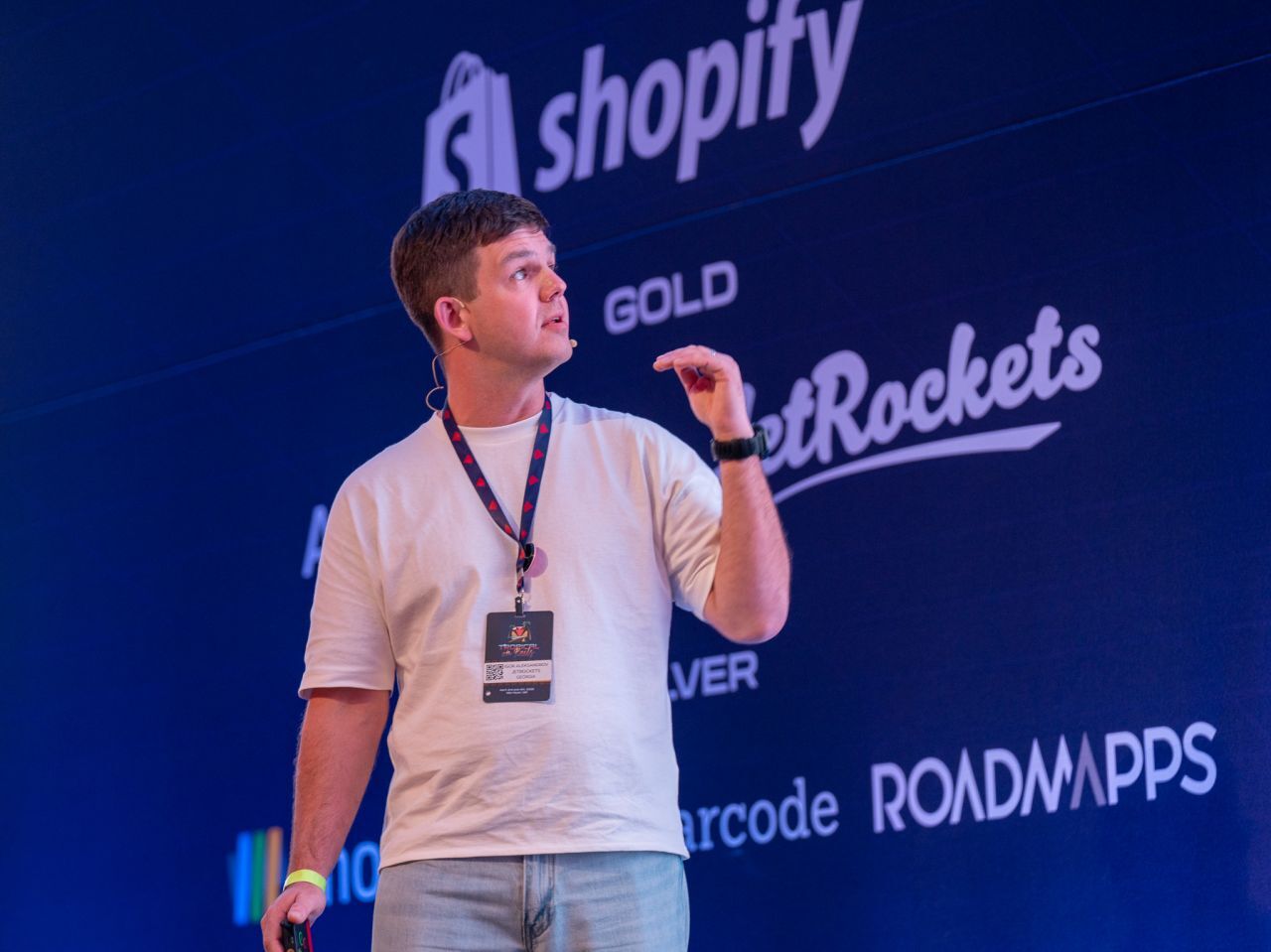
Today we are interviewing Igor Aleksandrov. Igor is the CTO and co-founder of JetRockets, a Ruby on Rails development agency based in NYC, bringing over 20 years of software engineering experience and a deep commitment to the Rails ecosystem since 2008. He’s an open-source contributor to projects like the Crystal programming language and Kamal, a regular conference speaker sharing expertise on different topics from container orchestration to migration from React to Hotwire.

Can you share how you first got involved with Docker? What inspired you to become a Docker Captain?

Looking back at my journey to becoming a Docker Captain, it all started with a very practical problem that many Rails teams face: dependency hell. 

By 2018, JetRockets had been building Ruby on Rails applications for years. I’d been working with Rails since version 2.2 back in 2009, and we had established solid development practices. But as our team grew and our projects became more complex, we kept running into the same frustrating issues:

“It works on my machine” became an all-too-common phrase during deployments

Setting up new developer environments was a time-consuming process fraught with version mismatches

Our staging and production environments occasionally behaved differently despite our best efforts

Managing system-level dependencies across different projects was becoming increasingly complex

We needed a unified way to manage application dependencies that would work consistently across development, staging, and production environments.

Unlike many teams that start with Docker locally and gradually move to production, we decided to implement Docker in production and staging first. This might sound risky, but it aligned perfectly with our goal of achieving true environment parity.

We chose our first Rails application to containerize and started writing our first Dockerfile. Those early Dockerfiles were much simpler than the highly optimized ones we create today, but they solved our core problem: every environment now ran the same container with the same dependencies.

Even though AWS Beanstalk has never been a developer friendly solution, the goal was reached – we had achieved true environment consistency, and the mental overhead of managing different configurations across environments had virtually disappeared.

That initial Docker adoption in 2018 sparked a journey that would eventually lead to me becoming a Docker Captain. What began with a simple need for dependency management evolved into deep expertise in container optimization, advanced deployment strategies with tools like Kamal, and ultimately contributing back to the Docker community.

Today, I write extensively about Rails containerization best practices, from image slimming techniques to sophisticated CI/CD pipelines. But it all traces back to that moment in 2019 when we decided to solve our dependency challenges with Docker.

What are some of your personal goals for the next year?

I want to speak at more conferences and meetups, sharing the expertise I’ve built over the years. Living in the Atlanta area, I would like to become more integrated into the local tech community. Atlanta has such a vibrant IT scene, and I think there’s a real opportunity to contribute here. Whether that’s organizing Docker meetups, participating in Rails groups, or just connecting with other CTOs and technical leaders who are facing similar challenges.

If you weren’t working in tech, what would you be doing instead?

If I weren’t working in tech, I think I’d be doing woodworking. There’s something deeply satisfying about creating things with your hands, and woodworking offers that same creative problem-solving that draws me to programming – except you’re working with natural materials and traditional tools instead of code.

I truly enjoy working with my hands and seeing tangible results from my efforts. In many ways, building software and building furniture aren’t that different – you’re taking raw materials, applying craftsmanship and attention to detail, and creating something functional and beautiful.

If not woodworking, I’d probably pursue diving. I’m already a PADI certified rescue diver, and I truly like the ocean. There’s something about the underwater world that’s entirely different from our digital lives – it’s peaceful, challenging, and always surprising. Getting my diving instructor certification and helping others discover that underwater world would be incredibly rewarding.

Can you share a memorable story from collaborating with the Docker community?

One of the most rewarding aspects of being a Docker Captain is our regular Captains meetings, and honestly, I enjoy each one of them. These aren’t just typical corporate meetings – they’re genuine collaborations with some of the most passionate and knowledgeable people in the containerization space.

What makes these meetings special is the diversity of perspectives. You have Captains from completely different backgrounds – some focused on enterprise Kubernetes deployments, others working on AI, developers like me optimizing Rails applications, and people solving problems I’ve never even thought about.

What’s your favorite Docker product or feature right now, and why?

Currently, I’m really excited about the Build Debugging feature that was recently integrated into VS Code. As someone who spends a lot of time optimizing Rails Dockerfiles and writing about containerization best practices, this feature has been a game-changer for my development workflow.

When you’re crafting complex multi-stage builds for Rails applications – especially when you’re trying to optimize image size, manage build caches, and handle dependencies like Node.js and Ruby gems – debugging build failures used to be a real pain.

Can you walk us through a tricky technical challenge you solved recently?

Recently, I was facing a really frustrating development workflow issue that I think many Rails developers can relate to. We had a large database dump file, about 150GB, that we needed to use as a template for local development. The problem was that restoring this SQL dump into PostgreSQL was taking up to an hour every time we needed to reset our development database to a clean state.

For a development team, this was killing our productivity. Every time someone had to test a migration rollback, debug data-specific issues, or just start fresh, they’d have to wait an hour for the database restore. That’s completely unacceptable.

Initially, we were doing what most teams do: running pg_restore against the SQL dump file directly. But with a 150GB database, this involves PostgreSQL parsing the entire dump, executing thousands of INSERT statements, rebuilding indexes, and updating table statistics. It’s inherently slow because the database engine has to do real work.

I realized the bottleneck wasn’t the data itself – it was the database restoration process. So I wrote a Bash script that takes an entirely different approach:

Create a template volume: Start with a fresh Docker volume and spin up a PostgreSQL container

One-time restoration: Restore the SQL dump into this template database (this still takes an hour, but only once)

Volume snapshot: Use a BusyBox container to copy the entire database volume at the filesystem level

Instant resets: When developers need a fresh database, just copy the template volume to a new working volume

The magic is in step 4. Instead of restoring from SQL, we’re essentially copying files at the Docker volume level. This takes seconds instead of an hour because we’re just copying the already-processed PostgreSQL data files.

Docker volumes are just filesystem directories under the hood. PostgreSQL stores its data in a very specific directory structure with data files, indexes, and metadata. By copying the entire volume, we’re getting a perfect snapshot of the database in its “ready to use” state.

The script handles all the orchestration – creating volumes, managing container lifecycles, and ensuring the copied database starts up cleanly. What used to be a one-hour reset cycle is now literally 5-10 seconds. Developers can experiment freely, test destructive operations, and reset their environment without hesitation. It’s transformed how our team approaches database-dependent development.

What’s one Docker tip you wish every developer knew?

If something looks weird in your Dockerfile, you are doing it wrong. This is the single most important lesson I’ve learned from years of optimizing Rails Dockerfiles. I see this constantly when reviewing other developers’ container setups – there’s some convoluted RUN command, a bizarre COPY pattern, or a workaround that just feels off.

Your Dockerfile should read like clean, logical instructions. If you find yourself writing something like:

RUN apt-get update && apt-get install -y wget &&
wget some-random-script.sh && chmod +x some-random-script.sh &&
./some-random-script.sh && rm some-random-script.sh

…you’re probably doing it wrong.

The best Dockerfiles are almost boring in their simplicity and clarity. Every line should have a clear purpose, and the overall flow should make sense to anyone reading it. If you’re adding odd hacks, unusual file permissions, or complex shell gymnastics, step back and ask why.

This principle has saved me countless hours of debugging. Instead of trying to make unusual things work, I’ve learned to redesign the approach. Usually, there’s a cleaner, more standard way to achieve what you’re trying to do.

If you could containerize any non-technical object in real life, what would it be and why?

If I could containerize any non-technical object, it would definitely be knowledge itself. Imagine being able to package up skills, experiences, and expertise into portable containers that you could load and unload from your mind as needed. As someone who’s constantly learning new technologies and teaching others, I’m fascinated by how we acquire and transfer knowledge. Currently, if I want to dive deep into a new programming language like I did with Crystal, or master a deployment tool like Kamal, it takes months of dedicated study and practice.

But what if knowledge worked like Docker containers? You could have a “Ruby 3.3 expertise” container, a “Advanced Kubernetes” container, or even a “Woodworking joinery techniques” container. Need to debug a complex Rails application? Load the container. Working on a diving certification course? Swap in the marine biology knowledge base.

The real power would be in the consistency and portability – just like how Docker containers ensure your application runs the same way everywhere, knowledge containers would give you the same depth of understanding regardless of context. No more forgetting syntax, no more struggling to recall that one debugging technique you learned years ago.

Plus, imagine the collaborative possibilities. Experienced developers could literally package their hard-earned expertise and share it with the community. It would democratize learning in the same way Docker democratized deployment.

Of course, the human experience of learning and growing would be lost, but from a pure efficiency standpoint? That would be incredible.

Where can people find you online? (talks, blog posts, or open source projects, etc)

I am always active in X (@igor_alexandrov) and on LinkedIn. I try to give at least 2-3 talks at tech conferences and meetups each year, and besides this, I have my personal blog.

Rapid Fire Questions

Cats or Dogs?

Dogs

Morning person or night owl?

Both

Favorite comfort food?

Dumplings

One word friends would use to describe you?

Perfectionist

A hobby you picked up recently?

Cycling

Quelle: https://blog.docker.com/feed/

Amazon WorkSpaces Applications now supports Microsoft Windows Server 2025

Amazon WorkSpaces Applications now offers images powered by Microsoft Windows Server 2025, enabling customers to launch streaming instances with the latest features and enhancements from Microsoft’s newest server operating system. This update ensures your application streaming environment benefits from improved security, performance, and modern capabilities. With Windows Server 2025 support, you can deliver the Microsoft Windows 11 desktop experience to your end users, giving you greater flexibility in choosing the right operating system for your specific application and desktop streaming needs. Whether you’re running business-critical applications or providing remote access to specialized software, you now have expanded options to align your infrastructure decisions with your unique workload requirements and organizational standards. You can select from AWS-provided public images or create custom images tailored to your requirements using Image Builder. Support for Microsoft Windows Server 2025 is now generally available in all AWS Regions where Amazon WorkSpaces Applications is offered. To get started with Microsoft Windows Server 2025 images, visit the Amazon WorkSpaces Applications documentation. For pricing details, see the Amazon WorkSpaces Applications Pricing page.
Quelle: aws.amazon.com

Amazon RDS enhances observability for snapshot exports to Amazon S3

Amazon Relational Database Service (RDS) now offers enhanced observability for your snapshot exports to Amazon S3, providing detailed insights into export progress, failures, and performance for each task. These notifications enable you to monitor your exports with greater granularity and enables more predictability. With snapshot export to S3, you can export data from your RDS database snapshots to Apache Parquet format in your Amazon S3 bucket. This launch introduces four new event types, including current export progress and table-level notifications for long-running tables, providing more granular visibility into your snapshot export performance and recommendations for troubleshooting export operation issues. Additionally, you can view export progress, such as the number of tables exported and pending, along with exported data sizes, enabling you to better plan your operations and workflows. You can subscribe to these events through Amazon Simple Notification Service (SNS) to receive notifications and view the export events through the AWS Management Console, AWS CLI, or SDK. This feature is available for RDS PostgreSQL, RDS MySQL, and RDS MariaDB engines in all Commercial Regions where RDS is generally available. To learn more about the new event types, see Event categories in RDS. 
Quelle: aws.amazon.com

Amazon Application Recovery Controller region switch now supports three new capabilities

Amazon Application Recovery Controller (ARC) Region switch allows you to orchestrate the specific steps to switch your multi-Region applications to operate out of another AWS Region and achieve a bounded recovery time in the event of a Regional impairment to your applications. Region switch saves hours of engineering effort and eliminates the operational overhead previously required to complete failover steps, create custom dashboards, and manually gather evidence of a successful recovery for applications across your organization and hosted in multiple AWS accounts. Today, we are announcing three new Region switch capabilities: AWS GovCloud (US) support: ARC Region switch is now generally available in AWS GovCloud (US-East and US-West) Regions. Plan execution reports: Region switch now automatically generates a comprehensive report from each plan execution and saves it to an Amazon S3 bucket of your choice. Each report includes a detailed timeline of events for the recovery operation, resources in scope for the Region switch, alarm states for optional application status alarms, and recovery time objective (RTO) calculations. This eliminates the manual effort previously required to compile evidence and documentation for compliance officers and auditors. DocumentDB global cluster execution blocks: Adding to the catalog of 9 execution blocks, Region switch now supports Amazon DocumentDB global cluster execution blocks for automated multi-Region database recovery. This feature allows you to orchestrate DocumentDB global cluster failover and switchover operations within your Region switch plans. To get started, build a Region switch plan using the ARC console, API, or CLI. See the AWS Regional Services List for availability information. Visit our home page or read the documentation.
Quelle: aws.amazon.com

Amazon SageMaker Studio now supports SOCI indexing for faster container startup times

Today, AWS announces SOCI (Seekable Open Container Initiative) indexing support for Amazon SageMaker Studio, reducing container startup times by 30-50% when using custom images. Amazon SageMaker Studio is a fully integrated, browser-based environment for end-to-end machine learning development. SageMaker Studio provides pre-built container images for popular ML frameworks like TensorFlow, PyTorch, and Scikit-learn that enable quick environment setup. However, when data scientists need to tailor environments for specific use cases with additional libraries, dependencies, or configurations, they can build and register custom container images with pre-configured components to ensure consistency across projects. As ML workloads become increasingly complex, these custom container images have grown in size, leading to startup times of several minutes that create a bottlenecks in iterative ML development where quick experimentation and rapid prototyping are essential. SOCI indexing addresses this challenge by enabling lazy loading of container images, downloading only the necessary components to start applications with additional files loaded on-demand as needed. Instead of waiting several minutes for complete custom image downloads, users can begin productive work in seconds while the environment completes initialization in the background. To use SOCI indexing, create a SOCI index for your custom container image using tools like Finch CLI, nerdctl, or Docker with SOCI CLI, push the indexed image to Amazon Elastic Container Registry (ECR), and reference the image index URI when creating SageMaker Image resources. SOCI indexing is available in all AWS Regions where Amazon SageMaker Studio is available. To learn more about implementing SOCI indexing for your SageMaker Studio custom images, see Bring your own SageMaker image in the Amazon SageMaker Developer Guide. 
Quelle: aws.amazon.com

AWS Private CA OCSP now available in China and AWS GovCloud (US) Regions

AWS Private Certificate Authority (AWS Private CA) now supports Online Certificate Status Protocol (OCSP) in China and AWS GovCloud (US) Regions. AWS Private CA is a fully managed certificate authority service that makes it easy to create and manage private certificates for your organization without the operational overhead of running your own CA infrastructure. OCSP enables real-time certificate validation, allowing applications to check the revocation status of individual certificates on-demand rather than downloading Certificate Revocation List (CRL) files. With OCSP support, customers in these Regions can implement more efficient certificate validation with minimal bandwidth, typically requiring a few hundred bytes per query, versus downloading large Certificate Revocation Lists (CRLs) that can be hundreds of kilobytes or larger. This enables real-time revocation checks for use cases such as validating internal microservices communications, implementing zero trust security architectures, and authenticating IoT devices. AWS Private CA fully manages the OCSP responder infrastructure, providing high availability without requiring you to deploy or maintain OCSP servers. OCSP is now also available in the following AWS Regions: China (Beijing), and China (Ningxia), AWS GovCloud (US-East), AWS GovCloud (US-West). To enable OCSP for your certificate authorities, use the AWS Private CA console, AWS CLI, or API. To learn more about OCSP, see Certificate Revocation in the AWS Private CA User Guide. For pricing information, visit the AWS Private CA pricing page.
Quelle: aws.amazon.com






