Smarter Lautsprecher: Google zeigt Nest Audio für 100 Euro
Google hat mit Nest Audio einen neuen smarten Lautsprecher mit Google Assistant vorgestellt. (Smarter Lautsprecher, Google)
Quelle: Golem

Google hat mit Nest Audio einen neuen smarten Lautsprecher mit Google Assistant vorgestellt. (Smarter Lautsprecher, Google)
Quelle: Golem

Das neue Pixel 5 kommt mit einer Dualkamera, einem 90-Hz-Display und dem Snapdragon765G. Das Pixel 4a gibt es jetzt zudem in einer 5G-Version. (Google, Smartphone)
Quelle: Golem

Patek Philippe, Rolex oder Cartier – okay. Aber kann man auch mit einer Smartwatch angeben? Wir haben uns angesehen, ob das Luxussegment von Tissot und Montblanc den Preis wert ist. Ein Test von Tobias Költzsch (Smartwatch, Google Play)
Quelle: Golem

Vier HDMI-Buchsen und Thunderbolt 4 sind im kleinen 1,16-Liter-Gehäuse verbaut. Angetrieben wird das System von Intels Tiger Lake. (Gigabyte, Intel)
Quelle: Golem

Die Deutsche Wohnen will Ladepunkte für ihre Mieter errichten, damit Laternenparker ihre E-Autos auch ohne eigenes Haus oder Wallbox laden können. (Elektroauto, Technologie)
Quelle: Golem

Dank Valve ist der Vulkan-Support für AMD-GPUs in Mesa verbessert worden. Auch Intels Xe und der Panfrost-Treiber für ARM bekommen Updates. (Mesa, Applikationen)
Quelle: Golem

Sony und Microsoft haben Cyberpunk 2077 zur Zertifizierung bekommen – und Studiochef Adam Badowski hat Überstunden angeordnet. (Cyberpunk 2077, Rollenspiel)
Quelle: Golem
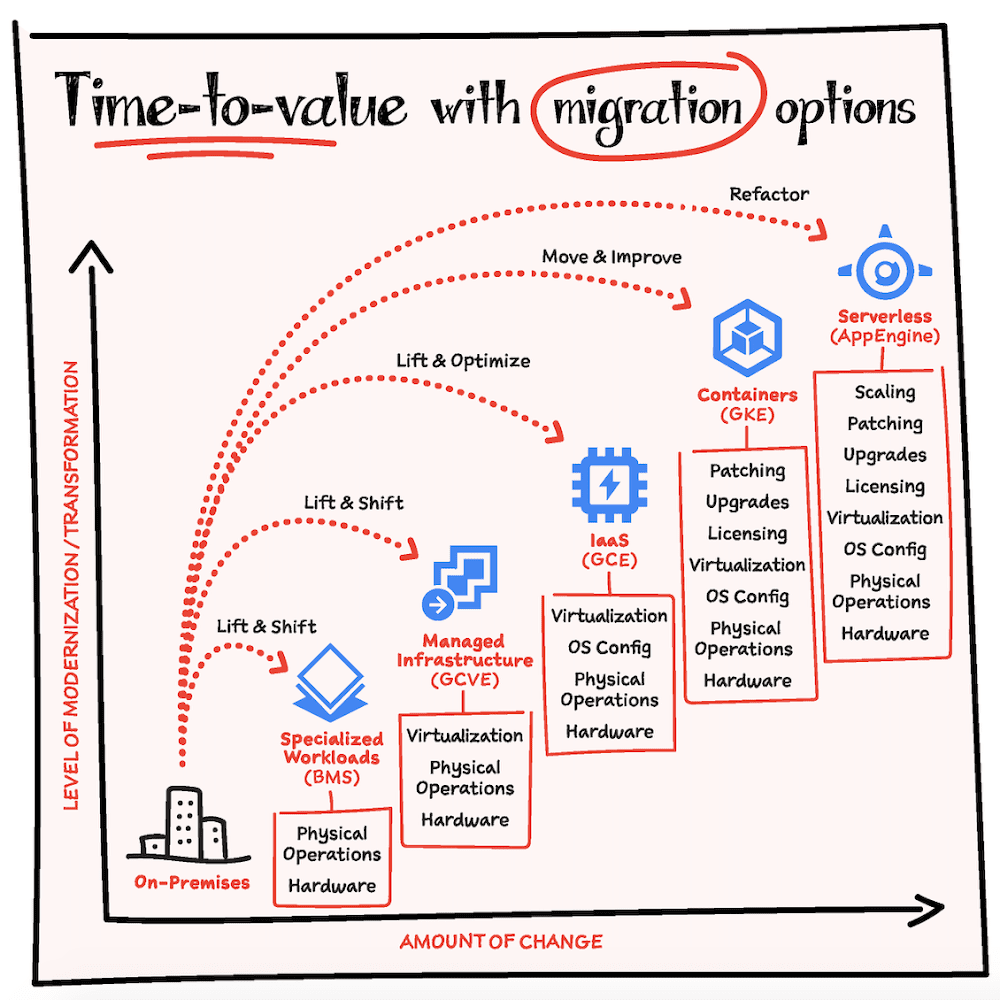
At Google Cloud, we believe that effective integration of public cloud capabilities is fundamental to an enterprise’s digital transformation journey. A well-designed digital transformation strategy should do much more than keep you competitive… instead, it should position you to excel by untethering IT staff from low value, labor-intensive tasks, allowing them to focus on innovation and high-impact projects.In most cases migration to cloud is the first step to digital transformation because it offers a quick, simple path to cost savings and enhanced flexibility. In this article we’ll focus on migration of on-premise or public cloud hosted infrastructure into Google Cloud.Honestly, there is no single right answer when embarking on digital transformation and planning a corresponding migration strategy. Every transformation will have its own nuances and unique considerations. It’s about understanding the pros and cons of the options and making the decisions accordingly. Where to begin?Understanding your starting point is essential to planning and executing a successful application migration strategy. Take a comprehensive approach, including not only technical requirements, but also consideration of your business goals (both present and future), any critical timelines, and your own internal capabilities. Depending on your situation you might fall in any of the below categories as it relates to time-to-value. There is no one size fits all approach to migration but the key here is to know that whichever path you choose, there is always a way to build on top of that and continue to take more advantages of the cloud in an incremental fashion. Should you migrate to Google Cloud?To determine whether your application can and should migrate to cloud, begin by asking yourself the following questions:Are the components of my application stack virtualized or virtualizable?Can my application stack run in a cloud environment while still supporting any and all licensing, security, privacy, and compliance requirements?Can all application dependencies (e.g. 3rd party languages, frameworks, libraries, etc.) be supported in the cloud? If the answer is “no” for any of the above questions, it is recommended to evaluate whether it is feasible to replace those application components with a cloud offering. If not, it is recommended to leave those components on-premises during the initial phase of your digital transformation, while you focus on the migration of your other application components. If retention on-premises is no longer viable (e.g. if you must completely shut down your datacenter) or if you want to increase proximity to cloud resources, then taking advantage of Google Cloud’s Bare Metal Solution, or shifting to a colocation facility (colo) adjacent to the appropriate cloud region are recommended alternatives. Which migration path is right for you? As you embark on your transformation journey, we recommend considering five key types of migration to Google Cloud:Migrating to Google Cloud managed servicesMigrating to containers on Google Kubernetes Engine (GKE) or AnthosMigrating to VMs (“Lift and Shift”) on GCE (Google Compute Engine)Migrating to Google Cloud VMware EngineMigrating to the Google Cloud Bare Metal SolutionHere are some example scenarios:If you are dealing with aggressive timelines “lift and shift” might be a good choice to gain immediate infrastructure modernization via relocation to cloud. And you can follow up with additional modernization at a later time.If you seek to take immediate advantages from moving to cloud but are still under a constrained time and skills then “lift and optimize” is a great choice. Using compute virtual machines or VMware engine in the cloud you use the same virtualized familiar environment but can now take advantage of cloud elasticity and scale.If you are seeking to immediately leverage the full benefits of cloud (e.g. elasticity, scale, managed services), it may be most efficient to modernize more aggressively (e.g. by adopting container technology) in conjunction with migration. “Move and improve” and “refactoring” are great fit in this situation but know that it will take a bit longer to execute this strategy due to some changes required in the current apps to make them container friendly and/or severless.The following decision tree will help you decide which path is right for your application.Common use casesUse case 1: Hybrid Cloud BurstSet up the connectivity between on-premise and cloud using the cloud interconnect.Create a cloud landing zone, this includes creating the project and the resources such as Google Compute Engine (GCE), Google Kubernetes Engine (GKE), Google Cloud VMware Engine (GCVE) or Anthos.Then lift and shift or lift and optimize from on-premise to cloud in the appropriate resource. At this point you are ready to send the traffic bursts or excess traffic to Google Cloud to lower the stress on the existing data center.Use case 2: Modernize with AnthosEstablish network connectivity to GCP using cloud interconnect.Create cloud landing zone.Then, Lift-&-Shift Workloads to free up capacity on-prem.Build Anthos on-prem landing zone.Then, modernize Apps both on-prem and in the cloud.Use case 3: Land, Expand, RetireEstablish network connectivity to GCP using cloud interconnect.Create cloud landing zone.Then, migrate all workloads.Finally, retire Data Center once complete. Iterate through hardware retirement as needed.Use case 4: DR Site promotionEstablish network connectivity to GCP using cloud interconnect.Create cloud landing zone.You are then ready to duplicate all workloads in Cloud.Then, swap user connectivity to Cloud as PRIMARY.Finally, retire co-lo all at once.ConclusionWhether you are starting or in the middle of your digital transformation journey, Google Cloud meets you wherever you are and makes it easy for you to move towards a more flexible and agile infrastructure. Hopefully these steps act as a starting point in your journey and make your digital transformation journey easier. Here is an entire video series on Cloud Migration that walks you through how to get started.For more resources on migration checkout this whitepaper and this solution guide.For more #GCPSketchnote and similar cloud content follow me on twitter @pvergadia and keep an eye out on thecloudgirl.devRelated Article13 sample architectures to kickstart your Google Cloud journeyThe 13 most popular application architectures on Google Cloud, and how to get started.Read Article
Quelle: Google Cloud Platform
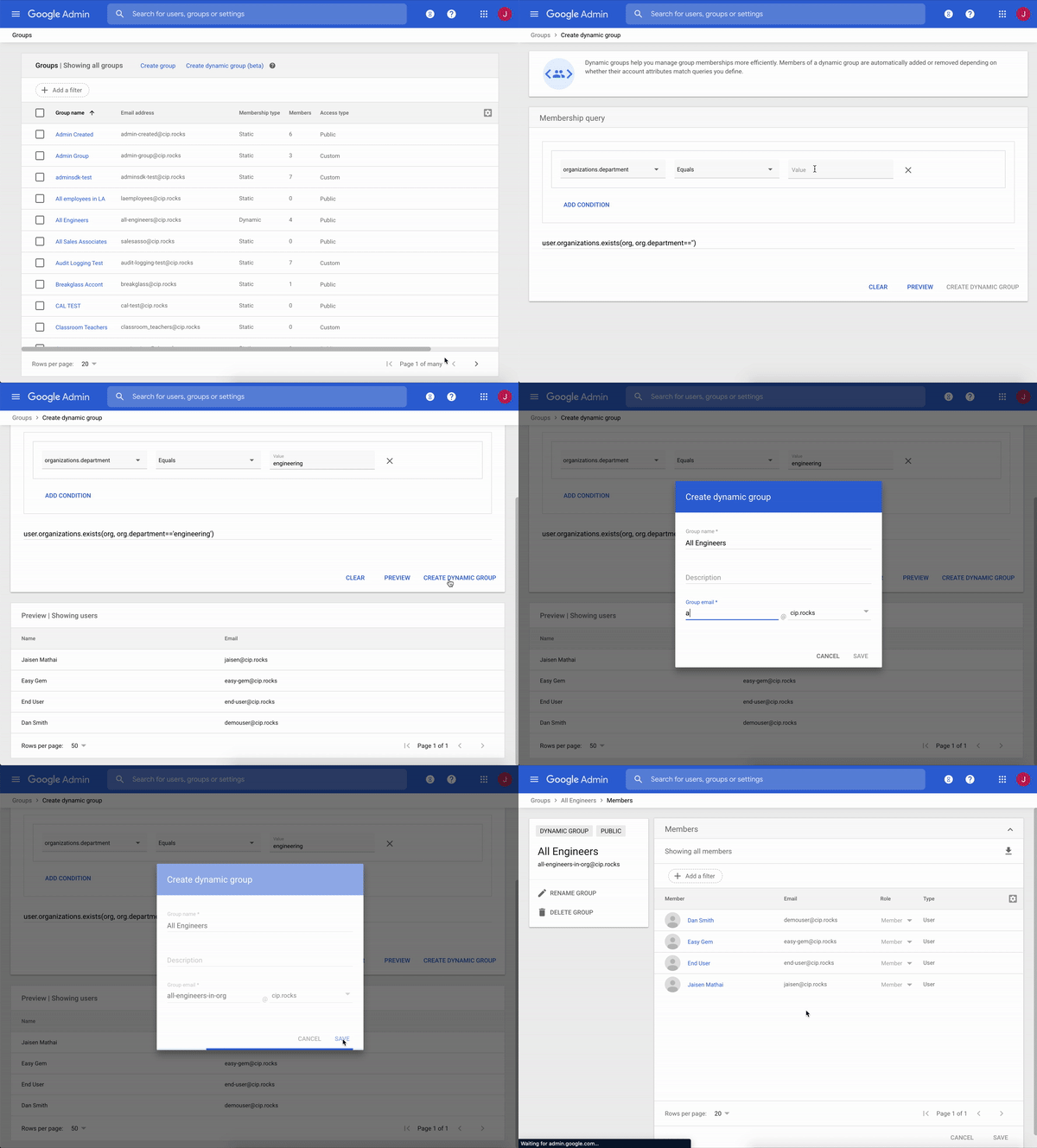
With so many people working remotely, it’s imperative that the tools we use to stay productive are secure. Already this year we have worked to strengthen security for our customers and help make threat defense more effective. Today, we’re sharing new advancements that provide robust controls, enable automation, and simplify managing security-at-scale with both G Suite and Google Cloud Platform. Enabling extensibility through APIsFirst, let’s take a look at enabling extensibility with APIs with the general availability of both Cloud Identity groups API and service account API access for Cloud Identity customers. We recognize that some Google Cloud customers rely heavily on groups but are not G Suite administrators. We are now enabling programmatic access to manage groups without requiring admin roles with Cloud Identity groups API. With this feature, we’ve expanded access to non-admin service accounts and users as group owners and managers. Further, you can programmatically manage groups using service accounts without needing to grant domain-wide delegation or use admin impersonation with service account API access. Hand-in-hand with this feature is service accounts as members, in general availability, which natively supports service accounts in groups without changing group settings, and indicates if a member is a service account. These features also allow for more accurate visibility into actions taken by service accounts; now, audit logs will show the service account as the actor as opposed to an impersonated user via domain-wide delegation. “Before API access without domain wide delegation, we required many Group Admin accounts to manage the capability. We are now able to limit access to only those who absolutely need it, helping us to strengthen our security posture.” – Woolworths Next, we’re adding to G Suite’s Vault API with the general availability of Count API. This API enables you to see the number of messages, files, or other data items that match a search query. Since this functionality can help you estimate the size of an export, Count API helps you ensure a successful export by reducing the likelihood of export errors due to size.Saving time and effort with group membership automationWe’re helping Cloud Identity customers save time and effort with new automation in group membership. Complete automation of group membership is possible with dynamic groups, now in beta. By simply utilizing the appropriate user attributes in a membership query, you can create groups whose membership is automatically kept up-to-date.We’re also introducing membership expiration for Cloud Identity in beta, which allows you to set a time-based expiration on group membership to automatically revoke group membership once the specified time period has passed. This can be especially useful to allow engineers to debug in production for a limited time, or grant temporary contractors or vendors time-based access to resources, for example.Adding controls to enhance securityWe want our customers to feel empowered with all of the controls they need to customize security according to their organization’s needs. Here are some ways that we’re giving you even greater control to meet your security objectives when managing groups. With security groups for Cloud Identity, now in beta, you can add security labels to groups to differentiate between groups used for access control and those only used for email or other communication. This labeling helps you ensure that security groups cannot contain any groups from outside of your organization or email-only groups. Next, to give you more control in managing groups, we launched the beta of groups in GCP console in May. With this feature, we’ve simplified creating groups, adding users, and assigning permission. You can try it here.Use visibility and insights to strategically prioritize your security effortsHaving visibility into the access and data within your organization is a critical step in protecting it. Taking that a step further, having insights to act upon helps you strategically prioritize your security efforts.First, let’s talk about the visibility you’ll gain with indirect membership visibility & hierarchy APIs, now in beta for Cloud Identity. To help you easily visualize group membership, this feature allows you to view all direct and indirect members of a group, view all direct and indirect memberships of a user, and find paths from a user to a group. In addition, with a new check API, you can identify if an account is a member of a given group or not. You’ll get all of the information you need to create visualization of complex group structures and hierarchies. Having this kind of membership visibility can help you make decisions about who to add to or remove from your groups.Next, we’re helping you take visibility to the next level with actionable insights that help you keep your organization’s data safe. We’re happy to announce that we are rolling out the general availability of data protection insights in the next couple weeks to help you identify the top sensitive data types for your organization. Beyond just being able to see what sensitive data your organization is dealing with, we’re helping you prioritize and focus your data protection efforts. Data protection insights will be available to G Suite Business customers, in addition to the G Suite Enterprise customers.With these tools, we are giving organizations the ability to manage security-at-scale more effectively and securely, while saving time and effort. To help you navigate the latest thinking in cloud security, explore the latest installment of our Google Cloud Security Talks, on-demand now.
Quelle: Google Cloud Platform
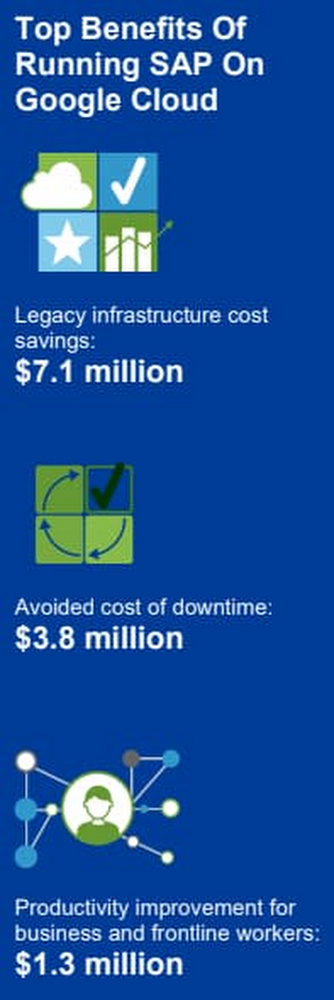
Cloud migration is top of mind for most companies with SAP applications. While the advantages of the cloud for SAP customers is generally understood, the move itself can be complicated and disruptive. So what actually are the business benefits and cost savings? How long will it take to recoup such an investment? Two recently published reports from Forrester and IDC can help to quantify the benefits and ROI. Getting answers to the million-dollar questionsForrester and IDC bring different methodologies to the table; they asked somewhat different questions and used different models to calculate their financial KPIs. This allows you to get two different points of view on the same basic questions about value, risk, and ROI.As it turns out, both reports found that customers who migrate their SAP environments to Google Cloud see an impressive return on their investments. From uptime and infrastructure to efficiency and productivity—both Forrester and IDC identified major benefits to companies that have made the move to Google Cloud.Let’s walk through some of the highlights from both reports.Forrester’s TEI model spotlights the power of uptime improvementsBased on in-depth conversations and quantitative research with six companies, here are the key findings from the Forrester Total Economic Impact (TEI) study for companies running SAP systems on Google Cloud: Direct cost savings. When they compare cloud subscription and related costs to what they spent on legacy systems and infrastructure, most IT leaders expect a cloud migration to deliver up-front savings. But according to Forrester, the companies interviewed reported average savings of more than $3 million a year, including eliminated hardware purchases, right-sized software licensing, staffing efficiencies, and other operational cost savings.Dramatically improved uptime. Customers told Forrester that migrating SAP to Google Cloud pretty much eliminates downtime—planned or unplanned—as a significant IT concern. According to Forrester, companies realized an average of $1.5 million in savings per year by avoiding the revenue and user productivity losses that had once been a fact of life for their IT teams.Significant efficiency gains. Because Google Cloud works to mitigate performance bottlenecks, infrastructure mishaps, network delays and more, the companies Forrester interviewed reported a yearly average of $500,000 in productivity gains for SAP business users and frontline workers.Companies also reported an annual average of $500,000 in additional IT efficiency gains after migrating SAP to Google Cloud. This quantifies what happens when IT practitioners no longer have to deal with the bottlenecks that come with legacy systems, and are able to spend their time on tasks that actually build value and help the business. Based on the Forrester analysis, the companies interviewed could expect average three-year net benefits of about $15.4 million.“We benefit from any technical innovation in the infrastructure area because Google Cloud is doing that for us,” one customer told Forrester. “So, whenever there’s new hardware available or new processes or whatever, I don’t have to run the specific project to migrate from A to B.” IDC finds that good things happen when SAP downtime is reduced The IDC report highlights four areas where Google Cloud generates the most value for customers:1. Cutting infrastructure costs. According to IDC, customers running SAP on Google Cloud spent 31% less on infrastructure each year, or an average of $233,000 less per company. The ability to scale SAP environments dynamically and to keep them right-sized was a major factor; so were the advantages of automated infrastructure monitoring and savings on software licenses once these companies could stop overprovisioning.2. Giving a team better things to do. IDC found that the infrastructure, database, and security teams of the companies they interviewed reduced the time they need to maintain and manage SAP environments by an average of 66% per year, for a savings of $443,000, per company. As a result, these companies got the equivalent of a major staff expansion from their SAP migrations—giving them both the staff time and the expertise to focus on far more valuable activities.3. Limiting unplanned downtime. These companies reported to IDC an average 98% reduction in unplanned downtime. Migrating SAP to Google Cloud significantly reduces the threat of downtime and saves the business an average of nearly $770,000 per year in lost revenue and user productivity. For some firms, the downtime savings topped $1 million per year.4. Making users more productive. The companies interviewed told IDC that by avoiding downtime and disruptions associated with upgrade and maintenance tasks for their legacy SAP systems, they saved an average of $363,000 annually in user productivity. But there’s an even more interesting under-the-hood stat contributing to these gains: These companies reduced the time required to deploy new SAP compute and storage resources from an average of 8.8 days to 1 hour.When IDC added up these and other savings associated with running SAP on Google Cloud, it found an average three-year savings of more than $3.5 million and a five-month payback period. “We acquired another company, so basically overnight we needed to be able to deal with that increase,” said one customer IDC spoke with. “We doubled our footprint overnight, and we had to take on hundreds of additional employees. We needed a platform that we could easily scale up if we required, and that’s the benefit of running SAP on Google Cloud for us.” Explore the reportsThere is a lot to think about when considering a move of SAP systems to the cloud. The cloud has many advantages, but migration can seem complicated and tricky; we appreciate that you are looking to understand the full picture. These papers are a great place to start. Download the reports—Forrester’s “Total Economic Impact of SAP on Google Cloud” and IDC’s “Business Value of SAP for Google Cloud Environments.” Then, get in touch.
Quelle: Google Cloud Platform






