Next-Gen: Klingeling, jetzt ist auch die Playstation 5 da
Wie fühlt sich das Gamepad an? Nach dem Auspacken der PS5 konnte Golem.de den Dualsense anfassen – und durch den Konsolenkühler hopsen. (Playstation 5, Sony)
Quelle: Golem

Wie fühlt sich das Gamepad an? Nach dem Auspacken der PS5 konnte Golem.de den Dualsense anfassen – und durch den Konsolenkühler hopsen. (Playstation 5, Sony)
Quelle: Golem

Der US-Botschafter in Jamaika droht, humanitäre Hilfe bei Naturkatastrophen abzulehnen, wenn das Land chinesische Anbieter bei 5G nicht ausschließt. (5G, Huawei)
Quelle: Golem

Hoher Takt plus Infinity-Cache: AMDs Radeon RX 6000 mit RNDA2-Technik machen Nvidia starke Konkurrenz im Highend-Segment. Ein Bericht von Marc Sauter (AMD Navi, AMD)
Quelle: Golem

Der Onlinehändler hat mehrere Personen entlassen, die offenbar Mailadressen von Amazon-Accounts an Dritte verkauft haben. (Amazon, Spam)
Quelle: Golem

Serial 1 heißt die E-Bike-Firma von Harley-Davidson. Das erste Fahrrad erinnert an das erste Motorrad des Herstellers. (E-Bike, Technologie)
Quelle: Golem

Der Ergo M575 ist ein ergonomischer Trackball, der gut in der Hand liegt und weniger als die Hälfte des MX Ergo kostet. Es gibt technische Einschnitte im Vergleich zum MX Ergo, aber die sind verschmerzbar. Ein Test von Tobias Költzsch (Logitech, Ergonomie)
Quelle: Golem

Der Ok-Smart-TV bietet 4K-Auflösung mit Dolby Vision und hat eine Bilddiagonale von 55 Zoll. (Fire TV, Amazon)
Quelle: Golem

In der Ladestation Pixel Stand wird das Pixel 5 ungewollt zum Nachtlicht: Der Bildschirm schaltet sich unverhofft bei voller Helligkeit ein. (Pixel 5, Smartphone)
Quelle: Golem
The post What is container orchestration? appeared first on Mirantis | Pure Play Open Cloud.
The past several years have brought the onset of applications built in containers such as Docker containers, but running a production application means more than simply creating a container and running it on Docker Engine. It means container orchestration.
Understanding container orchestration
Before we get into the specifics of how it works, we should understand what is meant by container orchestration.
Containerization of applications makes it possible to more easily run them in diverse environments, because Docker Engine acts as the application’s conceptual “home”. However, it doesn’t solve all of the problems involved in running a production application — just the opposite, in fact.
A non-containerized application assumes that it will be installed and run manually, or at least delivered via a virtual machine. But a containerized application has to be placed, started, and provided with resources. This kind of container automation is why you need container orchestration tools.
These Docker container orchestration tools perform the following tasks:
Determine what resources, such as compute nodes and storage, are available
Determine the best node (or nodes) on which to run specific containers
Allocate resources such as storage and networking
Start one or more copies of the desired containers, based on redundancy requirements
Monitor the containers and in the event that one or more of them is no longer functional, replace them.
Multiple container orchestration tools exist, and they don’t all handle objects in the same way.
How to plan for container orchestration
In an ideal situation, your application should not be dependent on which container orchestration platform you’re using. Instead, you should be able to orchestrate your containers using any platform as long as you configure that platform correctly.
All of this relies, again, on knowing the architecture of your application so that you can implement it outside of the application itself. For example, let’s say we’re building an e-commerce site.
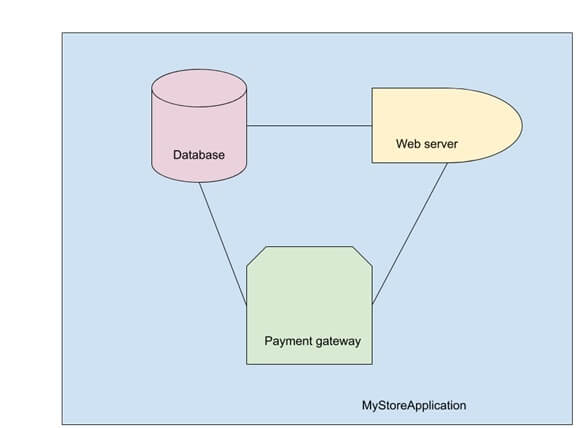
We have a database, web server, and payment gateway, all of which communicate over a network. We also have all of the various passwords needed for them to talk to each other.
The compute, network, storage, and secrets are all resources that need to be handled by the container orchestration platform, but how that happens depends on the platform that you choose.
Types of container orchestration platforms
Because different environments require different levels of orchestration, the market has spun off multiple container orchestration tools over the last few years. While they all do the same basic job of container automation, they work in different ways and were designed for different scenarios.
Docker Swarm Orchestration
To the engineers at Docker, orchestration was a capability to be provided as a first class citizen. As such, Swarm is included with Docker itself. Enabling Swarm mode is straightforward, as is adding nodes.
Docker Swarm enables developers to define applications in a single file, such as:
version: “3.7”
services:
database:
image: dockersamples/atsea_db
ports:
– “5432”
environment:
POSTGRES_USER: gordonuser
POSTGRES_DB_PASSWORD_FILE: /run/secrets/postgres-password
POSTGRES_DB: atsea
PGDATA: /var/lib/postgresql/data/pgdata
networks:
– atsea-net
secrets:
– domain-key
– postgres-password
deploy:
placement:
constraints:
– ‘node.role == worker’
appserver:
image: dockersamples/atsea_app
ports:
– “8080”
networks:
– atsea-net
environment:
METADATA: proxy-handles-tls
deploy:
labels:
com.docker.lb.hosts: atsea.docker-ee-stable.cna.mirantis.cloud
com.docker.lb.port: 8080
com.docker.lb.network: atsea-net
com.docker.lb.ssl_cert: wildcard_docker-ee-stable_crt
com.docker.lb.ssl_key: wildcard_docker-ee-stable_key
com.docker.lb.redirects: http://atsea.docker-ee-stable.cna.mirantis.cloud,https://atsea.docker-ee-stable.cna.mirantis.cloud
com.libkompose.expose.namespace.selector: “app.kubernetes.io/name:ingress-nginx”
replicas: 2
update_config:
parallelism: 2
failure_action: rollback
placement:
constraints:
– ‘node.role == worker’
restart_policy:
condition: on-failure
delay: 5s
max_attempts: 3
window: 120s
secrets:
– domain-key
– postgres-password
payment_gateway:
image: cna0/atsea_gateway
secrets:
– staging-token
networks:
– atsea-net
deploy:
update_config:
failure_action: rollback
placement:
constraints:
– ‘node.role == worker’
networks:
atsea-net:
name: atsea-net
secrets:
domain-key:
name: wildcard_docker-ee-stable_key
file: ./wildcards.docker-ee-stable.key
domain-crt:
name: wildcard_docker-ee-stable_crt
file: ./wildcards.docker-ee-stable.crt
staging-token:
name: staging_token
file: ./staging_fake_secret.txt
postgres-password:
name: postgres_password
file: ./postgres_password.txt
In this example, we have three services: the database, the application server, and the payment gateway, all of which include their own particular configurations. These configurations also refer to objects such as networks and secrets, which are defined independently.
The advantage of Swarm is that it’s got a small learning curve, and developers can run their applications in the same environment on their laptop as it will use when it runs in production. The disadvantage is that it’s not as full-featured as its companion, Kubernetes.
Kubernetes Orchestration
While Swarm is still widely used in many contexts, the acknowledged champion of container orchestration is Kubernetes. Like Swarm, Kubernetes enables developers to create resources such as groups of replicas, networking, and storage, but it’s done in a completely different way.
For one thing, Kubernetes is a separate piece of software; in order to use it, you must either install a distribution locally or have access to an existing cluster. For another, the entire architecture of applications and how they’re created is totally different from Swarm. For example, the application we created in the earlier example would look like this:
apiVersion: v1
data:
staging-token: c3RhZ2luZw0K
kind: Secret
metadata:
creationTimestamp: null
labels:
io.kompose.service: staging-token
name: staging-token
type: Opaque
—
apiVersion: v1
data:
postgres-password: cXdhcG9sMTMNCg==
kind: Secret
metadata:
creationTimestamp: null
labels:
io.kompose.service: postgres-password
name: postgres-password
type: Opaque
—
apiVersion: apps/v1
kind: Deployment
metadata:
annotations:
kompose.version: 1.21.0 (HEAD)
creationTimestamp: null
labels:
io.kompose.service: payment-gateway
name: payment-gateway
spec:
replicas: 1
selector:
matchLabels:
io.kompose.service: payment-gateway
strategy: {}
template:
metadata:
annotations:
kompose.version: 1.21.0 (HEAD)
creationTimestamp: null
labels:
io.kompose.network/atsea-net: “true”
io.kompose.service: payment-gateway
spec:
containers:
– image: cna0/atsea_gateway
name: payment-gateway
resources: {}
volumeMounts:
– mountPath: /run/secrets/staging-token
name: staging-token
nodeSelector:
node-role.kubernetes.io/worker: “true”
restartPolicy: Always
volumes:
– name: staging-token
secret:
items:
– key: staging-token
path: staging-token
secretName: staging-token
status: {}
—
apiVersion: networking.k8s.io/v1
kind: NetworkPolicy
metadata:
creationTimestamp: null
name: ingress-appserver
spec:
ingress:
– from:
– namespaceSelector:
matchLabels:
app.kubernetes.io/name: ingress-nginx
– podSelector: {}
podSelector:
matchLabels:
io.kompose.network/atsea-net: “true”
policyTypes:
– Ingress
—
apiVersion: v1
data:
domain-key: <snip>
kind: Secret
metadata:
creationTimestamp: null
labels:
io.kompose.service: domain-key
name: domain-key
type: Opaque
—
apiVersion: v1
data:
Domain-crt: <snip>
kind: Secret
metadata:
creationTimestamp: null
labels:
io.kompose.service: domain-crt
name: domain-crt
type: Opaque
—
apiVersion: v1
kind: Service
metadata:
annotations:
kompose.version: 1.21.0 (HEAD)
creationTimestamp: null
labels:
io.kompose.service: database
name: database
spec:
ports:
– name: “5432”
port: 5432
targetPort: 5432
selector:
io.kompose.service: database
status:
loadBalancer: {}
—
apiVersion: apps/v1
kind: Deployment
metadata:
annotations:
kompose.version: 1.21.0 (HEAD)
creationTimestamp: null
labels:
io.kompose.service: database
name: database
spec:
replicas: 1
selector:
matchLabels:
io.kompose.service: database
strategy: {}
template:
metadata:
annotations:
kompose.version: 1.21.0 (HEAD)
creationTimestamp: null
labels:
io.kompose.network/atsea-net: “true”
io.kompose.service: database
spec:
containers:
– env:
– name: PGDATA
value: /var/lib/postgresql/data/pgdata
– name: POSTGRES_DB
value: atsea
– name: POSTGRES_DB_PASSWORD_FILE
value: /run/secrets/postgres-password
– name: POSTGRES_USER
value: gordonuser
image: dockersamples/atsea_db
name: database
ports:
– containerPort: 5432
resources: {}
volumeMounts:
– mountPath: /run/secrets/domain-key
name: domain-key
– mountPath: /run/secrets/postgres-password
name: postgres-password
nodeSelector:
node-role.kubernetes.io/worker: “true”
restartPolicy: Always
volumes:
– name: domain-key
secret:
items:
– key: domain-key
path: domain-key
secretName: domain-key
– name: postgres-password
secret:
items:
– key: postgres-password
path: postgres-password
secretName: postgres-password
status: {}
—
apiVersion: networking.k8s.io/v1
kind: NetworkPolicy
metadata:
creationTimestamp: null
name: atsea-net
spec:
ingress:
– from:
– podSelector:
matchLabels:
io.kompose.network/atsea-net: “true”
podSelector:
matchLabels:
io.kompose.network/atsea-net: “true”
—
apiVersion: v1
kind: Service
metadata:
annotations:
kompose.version: 1.21.0 (HEAD)
creationTimestamp: null
labels:
io.kompose.service: appserver
name: appserver
spec:
ports:
– name: “8080”
port: 8080
targetPort: 8080
selector:
io.kompose.service: appserver
status:
loadBalancer: {}
—
apiVersion: v1
kind: Pod
metadata:
creationTimestamp: null
labels:
io.kompose.network/atsea-net: “true”
io.kompose.service: appserver
name: appserver
spec:
containrs:
– env:
– name: METADATA
value: proxy-handles-tls
image: dockersamples/atsea_app
name: appserver
ports:
– containerPort: 8080
resources: {}
volumeMounts:
– mountPath: /run/secrets/domain-key
name: domain-key
– mountPath: /run/secrets/postgres-password
name: postgres-password
nodeSelector:
node-role.kubernetes.io/worker: “true”
restartPolicy: OnFailure
volumes:
– name: domain-key
secret:
items:
– key: domain-key
path: domain-key
secretName: domain-key
– name: postgres-password
secret:
items:
– key: postgres-password
path: postgres-password
secretName: postgres-password
status: {}
—
apiVersion: networking.k8s.io/v1beta1
kind: Ingress
metadata:
annotations:
kompose.version: 1.21.0 (HEAD)
creationTimestamp: null
labels:
io.kompose.service: appserver
name: appserver
spec:
rules:
– host: atsea.docker-ee-stable.cna.mirantis.cloud
http:
paths:
– backend:
serviceName: appserver
servicePort: 8080
tls:
– hosts:
– atsea.docker-ee-stable.cna.mirantis.cloud
secretName: tls
status:
loadBalancer: {}
The application is the same, it’s just created in a different way. As you can see, the web application server, the database, and the payment gateway are still created using Kubernetes, just with a different structure. In addition, the support structures such as networks and secrets must be created.
The additional complexity does bring a number of benefits, however. Kubernetes is much more full-featured than Swarm, and can be appropriate in both small and large environments.
Where to find container orchestration
Not only are there different types of container orchestration, you can also find it in different places, depending on your situation.
Local desktop/laptop
Most developers work on their desktop or laptop machine, so it’s convenient if the target container orchestration platform is available at that level.
For Swarm users, the process is straightforward; Swarm is already part of Docker and just needs to be enabled.
For Kubernetes, the developer needs to take an additional step to install Kubernetes on their machine, but there are several tools that make this possible, such as Kubeadm.
Internal network
Once the developer is ready to deploy, if the application will live on an on-premise data center, typically the user won’t need to install a cluster because it will have been installed by administrators; instead they will connect using the connection information given to them.
Administrators can deploy a number of different cluster types; for example, enterprise grade Docker Swarm clusters and Kubernetes clusters can be deployed by Docker Enterprise Container Cloud.
AWS
Businesses that run their infrastructure on Amazon Web Services have a number of different choices. For example, you can run install Docker Enterprise on Amazon EC2 compute servers, or you can use Docker Enterprise Container Cloud to deploy clusters directly on Amazon Web Services. You also have the option to use specific container resources, such as Amazon Container Services or Amazon Kubernetes service.
Google
Choices for Google cloud are similar; you can install a container management platform such as Docker Enterprise, or you can use Google Kubernetes Engine to spin up clusters using Google’s hardware and software — and their API.
Azure
The situation is the same for Azure Cloud: you must choose between deploying a distribution such as Docker Enterprise on compute nodes, providing Swarm and Kubernetes capabilities, or use the Azure Kubernetes Service to provide Kubernetes clusters to your users.
Getting started with container orchestration
The best way to get started with container orchestration is to simply pick a system and try it out! You can try installing kubeadm, or you can make it easy on yourself and install a full system such as Docker Enterprise, which provides you with multiple options for container orchestration platforms.
The post What is container orchestration? appeared first on Mirantis | Pure Play Open Cloud.
Quelle: Mirantis
Telecommunications providers are under a lot of pressure. Customers increasingly expect one provider to meet all their telephony, digital entertainment, and broadband needs. And as the choice of providers increases and switching costs decrease, it’s harder than ever to create and maintain loyalty. At UPC Polska, we know this challenge all too well. As a leading telecommunications provider in Poland, we serve 1.5 million of customers with 3 million services each day, via an IT infrastructure built over the past 20 years. While we still run several business critical applications on premises, it also became increasingly clear to us that we could not develop, test, and deploy new features fast enough in our existing environment. As a result, we came to a stark realization: we had to transform our IT infrastructure to accelerate our feature release process, or risk losing customers. After considering several options, we selectedGoogle Cloud’s Anthos because it offered a uniform management experience across our hybrid environment and easy application modernization. We wanted to implement Anthos as soon as possible, but also knew we needed an experienced global systems integrator to help us do so securely and effectively. As a result, we turned to Accenture who helped us complete the project in just six weeks.Blending cultural and technology transformationOur customer service application allows us to build highly personalized relationships with over a million customers. Since rapid feature releases are critical to our commercial success, that application was one of the first targets for modernization with Anthos. Accenture came in, worked hard to understand our architecture, and provided the cloud-first strategy and assurance we needed to confidently migrate the app to the new hybrid environment. With the support of Google Cloud and Accenture, our team embraced the shift in management and development models from Waterfall to Agile. Although this was a difficult transition due to significant technological and infrastructure shifts and changes in processes, responsibilities, and ways of working, it ultimately increased speed-to-market on new features .To help ensure success for our DevOps team with this new approach, we deployed Anthos in our on-premises data centers. With Anthos, we can uniformly set policy at scale and continuously release features without worrying about security, vulnerability management or downtime across different environments. Our developers can then focus on writing better code, while operators use Anthos to effectively manage and run those applications anywhere. Accenture further drove the cloud-first DevOps culture shift we needed to make this all work, through training and support that quickly got our staff up to speed.The biggest advantage of working with Google Cloud and Accenture to deploy Anthos has been increased engagement among our staff. Teams are working passionately to achieve as much as possible because they can now focus on their core responsibilities rather than infrastructure management. Anthos helps us control which workloads, features, and data go into the cloud, and which are better suited for our on-premises infrastructure. Anyone working on this project today at UPC Polska would tell you that Anthos gives us the best of both worlds—the agility and speed of the cloud along with the power and comfort of still being able to use our traditional on-premises infrastructure.With the incredible collaboration between our team, Accenture, and Google Cloud, we have the development, testing, and production clusters we need integrated into our Agile development process. Now, both developers and operators enjoy increased scalability, stronger system resiliency, and more knowledge about containers.Making efforts countEverything we have done with Accenture and Google Cloud is driven by our commitment to creating, delivering, and improving the quality of services we offer to our 1.5 million customers. Personalization at that scale can be challenging, even with all the right technologies and DevOps strategies in place. Luckily, we have an impressive team and plenty of support through Google Cloud and Accenture. With our IT infrastructure and culture working together as part of a more Agile model powered by Anthos, the sky’s the limit for our personalization efforts, which frees us to dream up more ways to serve our customers. For example, we’re exploring projects like Software Defined Access Networks, cloud-based CRM, more personalized customer experiences, smart home technology, integrations between mobile and fixed networks, and an ever-growing portfolio of content and services. As we enter this new and fast-paced time in UPC Polska’s history, we look forward to working with Accenture and Google Cloud to better serve our customers.Read the full case study to learn more about how UPC partnered with Google Cloud and Accenture on this project.
Quelle: Google Cloud Platform






