Cybersecurity Awareness Month—New security announcements for Google Cloud

Security is at the heart of any cloud journey. On the one hand, as you adopt cloud services and move workloads to the cloud, you need to make sure you’re conforming to your established security policies. On the other hand, you can take advantage of new capabilities, use new tools, and help improve your security posture. Today’s announcements include new security features, whitepapers that explore our encryption capabilities and use-case demos to help deploy products optimally. These updates will help facilitate safer cloud journeys and give admins increased visibility and control for their organizations.New Google Cloud Security Showcase videosThe Google Cloud Security Showcase is a video resource that’s focused on solving security problems and helping you create a safer cloud deployment. With more than 50 step-by-step videos on specific security challenges or use cases, complete with actionable information to help you solve that specific issue, there’s something for every security professional. We’ve added 2 new use-case based videos this month:How do I get started on Confidential GKE nodes?Built on Confidential VMs, which utilize the AMD Secure Encrypted Virtualization (SEV) feature, Confidential GKE Nodes encrypt the memory of your nodes and the workloads that run on top of them with a dedicated per-Node instance key that is generated and managed by the AMD Secure Processors, which is embedded in the AMD EPYC™ processor.How do I enable safer and more productive meetings on Google Meet?Get a deeper look at the security controls available within Google Meet and how to use them.SMS based MFA in Identity PlatformMulti-factor authentication (MFA) is an essential option for users of online apps and services to help keep account data safe and protect against account takeovers. To better protect your applications and user accounts, Identity Platform, Google Cloud’s customer identity and access management platform, is making MFA via SMS generally available.Refer to the quickstart guide for more information. If your project has multiple tenants, you will need to enable MFA individually for each tenant. Select the tenant that you want to enable MFA for using the drop down menu on the left navigation panel, and follow the same process as documented in the guide. Encryption whitepapers for Google Cloud and Google WorkspaceCentral to our comprehensive security strategy is encryption in transit and at rest, which ensure that data can be accessed only by authorized roles and services with audited access to the encryption keys. Our updated encryption-at-rest whitepaper describes Google Cloud’s approach to encryption at rest, and how we use it to keep your information more secure.Alongside the encryption-at-rest whitepaper, we have rolled out a new Google Workspace encryption deep-dive whitepaper that details how Google Workspace helps keep your data safe with encryption. In this paper, you’ll find information around our encryption methodology and key management processes.We also recently released a new Cloud Key Management Service Deep Dive whitepaper to help you make informed decisions about cloud key management. Discussing Google Cloud’s Key Management Service (Cloud KMS) platform and generally available key management capabilities, this paper can help you understand the options you have to protect your keys and other sensitive information you store in Google Cloud. With these announcements, we’re adding to our constantly growing security portfolio that aims to help you prioritize security in your move to the cloud. To learn more about Google Cloud’s security vision and understand how to implement cutting-edge security technology in your organization, tune into the latest installment of our Google Cloud Security Talks on November 18th.Related ArticleA better, safer normal: Helping you modernize security in the cloud or in placeWe’re sharing more on unique and powerful capabilities Google Cloud has to simplify security operations in your organization.Read Article
Quelle: Google Cloud Platform
Setting Up Cloud Deployments Using Docker, Azure and Github Actions

A few weeks ago I shared a blog about how to use GitHub Actions with Docker, prior to that Guillaume has also shared his blog post on using Docker and ACI. I thought I would bring these two together to look at a single flow to go from your code in GitHub all the way through to deploying on ACI using our new Docker to ACI experience!

To start, let’s remember where we were with our last Github action. Last time we got to a point where our builds to master would be re-built and pushed to Docker Hub (and we used some caching to speed these up).  

name: CI to Docker Hub

on:
push:
tags:
– “v*.*.*”

jobs:

build:
runs-on: ubuntu-latest
steps:
–
name: Checkout
uses: actions/checkout@v2
–
name: Set up Docker Buildx
id: buildx
uses: docker/setup-buildx-action@v1
–
name: Cache Docker layers
uses: actions/cache@v2
with:
path: /tmp/.buildx-cache
key: ${{ runner.os }}-buildx-${{ github.sha }}
restore-keys: |
${{ runner.os }}-buildx-
–
uses: docker/login-action@v1
with:
username: ${{ secrets.DOCKER_USERNAME }}
password: ${{ secrets.DOCKER_PASSWORD }}
–
name: Build and push
id: docker_build
uses: docker/build-push-action@v2
with:
context: ./
file: ./Dockerfile
builder: ${{ steps.buildx.outputs.name }}
push: true
tags: bengotch/simplewhale:latest
cache-from: type=local,src=/tmp/.buildx-cache
cache-to: type=local,dest=/tmp/.buildx-cache
–
name: Image digest
run: echo ${{ steps.docker_build.outputs.digest }}

Now we want to find out how we could take our image we have built and get that deployed onto ACI. 

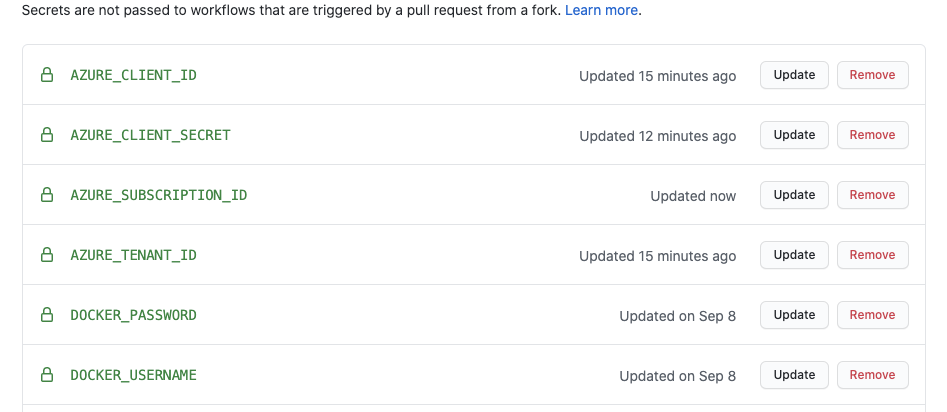
The first thing I will need to do is head over to my Github repository and add in a few more secrets which will be used to store my credentials for Azure. If you already have an Azure account and can grab your credentials that is great. If not, you will need to create your Azure credentials that we are going to use, but we cover that as well. 

I will need to add in my tenant ID as the secret AZURE_TENANT_ID, I will then need to go and create an App in Azure to get a client and a secret. The easiest way to do this is to use the Azure console with the command 

az ad sp create-for-rbac –name http://myappname –role contributor –sdk-auth

This will output your AZURE_CLIENT_ID and an AZURE_CLIENT_SECRET.

Lastly I will need to add my subscription ID, I can find this here and will add it as AZURE_SUBSCRIPTION_ID.

If this is the first time you have used Azure you will also need to create a resource group, this is the Azure way to group a set of resources for a single solution. You can set up new resource groups by going here and adding one, for example I created a new one called simplewhale in uk-south.  

Now we can start to build out our action, we will want to put in a condition for when we want this workflow to trigger. I would like to be quite continuous so will deploy the image each time I have pushed it to Docker Hub:

on:
workflow_run:
workflows: [”CI to Docker Hub”]
branches: [main]
types:
– completed

With this in place, I will now setup on an Ubuntu box for my action:

jobs:
run-aci:
runs-on: ubuntu-latest
steps:
– name: Checkout code
uses: actions/checkout@v2

Next I will need to install the Docker Compose CLI onto the actions instance I am running on:

– name: Install Docker Compose CLI
run: >
curl -L https://raw.githubusercontent.com/docker/compose-cli/main/scripts/install/install_linux.sh | sh

With this installed, I can then log into Azure using the Compose CLI and making use of our secrets we entered earlier:

– name: “login azure”
run: “docker login azure –client-id $AZURE_CLIENT_ID –client-secret $AZURE_CLIENT_SECRET –tenant-id $AZURE_TENANT_ID”
env:
AZURE_TENANT_ID: ‘${{ secrets.AZURE_TENANT_ID }}’
AZURE_CLIENT_ID: ‘${{ secrets.AZURE_CLIENT_ID }}’
AZURE_CLIENT_SECRET: ‘${{ secrets.AZURE_CLIENT_SECRET }}’

Having logged in, I need to create an ACI context to use for my deployments:

– name: “Create an aci context”
run: ‘docker context create aci –subscription-id $AZURE_SUBSCRIPTION_ID –resource-group simplewhale –location uksouth acicontext’
env:
AZURE_SUBSCRIPTION_ID: ‘${{ secrets.AZURE_SUBSCRIPTION_ID }}’

Then I will want to deploy my container using my ACI context. I have added a curl it to make sure it exists:

– name: “Run my App”
run: ‘docker –context acicontext run -d –name simplewhale –domainname simplewhale -p 80:80 bengotch/simplewhale ‘

– name: “Test deployed server”
run: ‘curl http://simplewhale.uksouth.azurecontainer.io/’

And then we can just double check to be sure:

Great! Once again my Whale app has been successfully deployed! Now I have a CI that stores things in the Github Registry for minor changes, that ships my full numbered versions to Docker Hub and then re-deploys these to ACI for me!

To run through a deeper example using Compose as well, why not check out Karol’s example of using the ACI experience with his Compose application which also includes how to use mounts and connect to another registry.You can get started using the ACI experience locally using Docker Desktop today. Remember, you will also need to have your images in a repo to use them in ACI, which can easily be done with Docker Hub.
The post Setting Up Cloud Deployments Using Docker, Azure and Github Actions appeared first on Docker Blog.
Quelle: https://blog.docker.com/feed/

AWS Auto Scaling ist jetzt in den AWS-Regionen Europa (Mailand) und Afrika (Kapstadt) verfügbar

AWS Auto Scaling mit Skalierungsplänen und vorausschauender Skalierung (für Amazon EC2) ist nun in den AWS-Regionen Europa (Mailand) und Afrika (Kapstadt) verfügbar. AWS Auto Scaling überwacht Ihre Anwendungen und passt die Kapazität automatisch an, um eine stabile, vorhersagbare Leistung zu den geringstmöglichen Kosten zu erreichen. Mit einer einfachen, leistungsstarken Benutzeroberfläche können Sie in Minutenschnelle Skalierungspläne für alle Ressourcen erstellen, einschließlich Amazon EC2-Instances und Spot-Flotten, Amazon ECS-Aufgaben, Amazon DynamoDB-Tabellen und -Indizes sowie Amazon Aurora-Replikate.
Quelle: aws.amazon.com

Neuer digitaler Kurs: Fortgeschrittene Testpraktiken mit AWS DevOps Tools

Dieser neue digitale Kurs, Fortgeschrittene Testpraktiken mit AWS DevOps Tools, lehrt Sie, wie Sie die Zuverlässigkeit und Sicherheit von Anwendungen durch die Integration und Automatisierung von Tests in Ihre AWS DevOps Pipelines verbessern können. Dieser Kurs für Fortgeschrittene richtet sich an DevOps-Ingenieure und -Entwickler, die über beträchtliche Erfahrung mit der DevOps-Methodik und -Praxis verfügen.
Quelle: aws.amazon.com

AWS Shield bietet jetzt allen AWS-Kunden globale und kontobezogene Ereigniszusammenfassungen

AWS Shield bietet jetzt allen AWS-Kunden globale und kontobezogene Ereigniszusammenfassungen. Diese Zusammenfassungen geben Ihnen einen Überblick über alle von AWS Shield erkannten Ereignisse, wie z. B. Distributed Denial of Service (DDoS)-Angriffe und andere volumetrische Anomalien, für jedes Ihrer Konten und für alle auf AWS erkannten und behandelten Ereignisse. 
Quelle: aws.amazon.com

Amazon Textract gibt Verbesserungen bekannt, um die durchschnittlichen API-Verarbeitungszeiten um bis zu 20 % zu reduzieren

Amazon Textract ist ein Machine Learning Service, der es Ihnen ermöglicht, Text und Daten automatisch zu extrahieren, auch aus Tabellen und Formularen in gescannten Dokumenten und Bildern. Als verwalteter Service liefert Textract im Laufe der Zeit kontinuierliche Verbesserungen. Wir freuen uns, heute bekannt geben zu können, dass wir Verbesserungen an den zugrunde liegenden Machine Learning-Modellen vorgenommen haben, die zu einer Verringerung der durchschnittlichen Latenzzeit beim Aufruf sowohl der synchronen als auch der asynchronen APIs um 20 % geführt haben. Diese Verbesserungen gelten für die DetectDocumentText-API und AnalyzeDocument-APIs. 
Quelle: aws.amazon.com

Amazon SageMaker Studio Notebooks unterstützen jetzt benutzerdefinierte Images

Amazon SageMaker Studio ist die erste integrierte Entwicklungsumgebung (Integrated Development Environment, IDE) für Machine Learning (ML). Mit einem einzigen Mausklick können Daten-Wissenschaftler und Entwickler SageMaker Studio Notebooks schnell in Betrieb nehmen, um Datasets zu untersuchen und Modelle zu erstellen. Ab heute können Sie SageMaker Studio Notebooks mit Ihren eigenen Images starten.
Quelle: aws.amazon.com






