Tips for writing and deploying Node.js apps on Cloud Functions

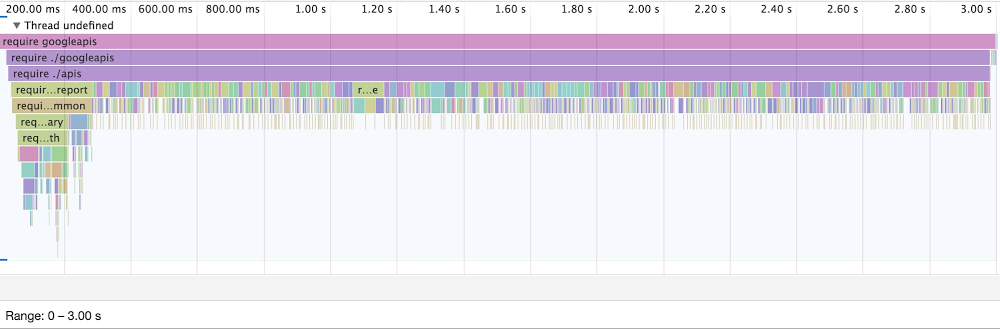
The DPE Client Library team at Google handles the release maintenance, and support of Google Cloud client libraries. Essentially, we act as the open-source maintainers of Google’s 350+ repositories on GitHub. It’s a big job…For this work to scale, it’s been critical to automate various common tasks such as validating licenses, managing releases, and merging pull requests (PRs) once tests pass. To build our various automations, we decided to use the Node.js-based framework Probot, which simplifies the process of writing web applications that listen for Webhooks from the GitHub API. [Editor’s note: The team has deep expertise in Node.js. The co-author Benjamin Coe was the third engineer at npm, Inc, and is currently a core collaborator on Node.js.]Along with the Probot framework, we decided to use Cloud Functions to deploy those automations, with the goal of reducing our operational overhead. We found that Cloud Functions are a great option for quickly and easily turning Node.js applications into hosted services:Cloud Functions can scale automatically as your user-base grows, without the need to provision and manage additional hardware.If you’re familiar with creating an npm module, it only takes a few additional steps to deploy it as a Cloud function; either with the gcloud CLI, or from the Google Cloud Console (see: “Your First Function: Node.js”).Cloud Functions integrate automatically with Google Cloud services, such as Cloud Logging and Cloud Monitoring.Cloud Functions can be triggered by events, from services such as Firestore, PubSub, Cloud Storage, and Cloud Tasks.Jump forward two years, we now manage 16 automations that handle over 2 million requests from GitHub each day. And we continue to use Cloud Functions to deploy our automations. Contributors can concentrate on writing their automations, and it’s easy for us to deploy them as functions in our production environment. Designing for serverless comes with its own set of challenges, around how you structure, deploy, and debug your applications, but we’ve found the trade-offs work for us.Throughout the rest of this article, drawing on these first-hand experiences, we outline best practices for deploying Node.js applications on Cloud Functions, with an emphasis on the following goals:Performance – Writing functions that serve requests quickly, and minimize cold start times.Observability – Writing functions that are easy to debug when exceptions do occur.Leveraging the platform – Understanding the constraints that Cloud Functions and Google Cloud introduce to application development, e.g., understanding regions and zones.With these concepts under your belt, you too can reap the operational benefits of running Node.js-based applications in a serverless environment, while avoiding potential pitfalls.  Best practices for structuring your applicationIn this section, we discuss attributes of the Node.js runtime that are important to keep in mind when writing code intended to deploy Cloud Functions. Of most concern:The average package on npm has a tree of 86 transitive dependencies (see: How much do we really know about how packages behave on the npm registry?). It’s important to consider the total size of your application’s dependency tree.Node.js APIs are generally non-blocking by default, and these asynchronous operations can interact surprisingly with your function’s request lifecycle. Avoid unintentionally creating asynchronous work in the background of your application. With that as the backdrop, here’s our best advice for writing Node.js code that will run in Cloud Functions. 1. Choose your dependencies wiselyDisk operations in the gVisor sandbox, which Cloud Functions run within, will likely be slower than on your laptop’s typical operating system (that’s because gVisor provides an extra layer of security on top of the operating system, at the cost of some additional latency). As such, minimizing your npm dependency tree reduces the reads necessary to bootstrap your application, improving cold start performance.You can run the command npm ls –production to get an idea of how many dependencies your application has. Then, you can use the online tool bundlephobia.com to analyze individual dependencies, including their total byte size. You should remove any unused dependencies from your application, and favor smaller dependencies.Equally important is being selective about the files you import from your dependencies. Take the library googleapis on npm: running require(‘googleapis’) pulls in the entire index of Google APIs, resulting in hundreds of disk read operations. Instead you can pull in just the Google APIs you’re interacting with, like so:It’s common for libraries to allow you to pull in the methods you use selectively—be sure to check if your dependencies have similar functionality before pulling in the whole index.2. Use ‘require-so-slow’ to analyze require-time performanceA great tool for analyzing the require-time performance of your application is require-so-slow. This tool allows you to output a timeline of your application’s require statements, which can be loaded in DevTools Timeline Viewer. As an example, let’s comparet loading the entire catalog of googleapis, versus a single required API (in this case, the SQL API):Timeline of require(‘googleapis’):The graphic above demonstrates the total time to load the googleapis dependency. Cold start times will include the entire 3s span of the chart.Timeline of require(‘googleapis/build/src/apis/sql’):The graphic above demonstrates the total time to load just the sql submodule. The cold start time is a more respectable 195ms.In short, requiring the SQL API directly is over 10 times faster than loading the full googleapis index!3. Understand the request lifecycle, and avoid its pitfallsThe Cloud Functions documentation issues the following warning about execution timelines: A function has access to the resources requested (CPU and memory) only for the duration of function execution. Code run outside of the execution period is not guaranteed to execute, and it can be stopped at any time. This problem is easy to bump into with Node.js, as many of its APIs are asynchronous by default. It’s important when structuring your application that res.send() is called only after all asynchronous work has completed. Here’s an example of a function that would have its resources revoked unexpectedly:In the example above, the promise created by set() will still be running when res.send() is called. It should be rewritten like this:This code will no longer run outside the execution period because we’ve awaited set() before calling res.send(). A good way to debug this category of bug is with well-placed logging: Add debug lines following critical asynchronous steps in your application. Include timing information in these logs relative to when your function begins a request. Using Logs Explorer, you can then examine a single request and ensure that the output matches your expectation; missing log entries, or entries coming significantly later (leaking into subsequent requests) are indicative of an unhandled promise.During cold starts, code in the global scope (at the top of your source file, outside of the handler function) will be executed outside of the context of normal function execution. You should avoid asynchronous work entirely in the global scope, e.g, fs.read(), as it will always run outside of the execution period.4. Understand and use the global scope effectivelyIt’s okay to have ‘expensive’ synchronous operations, such as require statements, in the global scope. When benchmarking cold start times, we found that moving require statements to the global scope (rather than lazy-loading within your function) lead to a 500ms to 1s improvement in cold start times. This can be attributed to the fact that Cloud Functions are allocated compute resources while bootstrapping.Also consider moving other expensive one-time synchronous operations, e.g., fs.readFileSync, into the global scope. The important thing to avoid asynchronous operations, as they will be performed outside of the execution period.Cloud functions recycle the execution environment; this means that you can use the global scope to cache expensive one-time operations that remain constant during function invocations:It’s critical that we await asynchronous operations before sending a response, but it’s okay to cache their response in the global scope.5. Move expensive background operations into Cloud TasksA good way to improve the throughput of your Cloud function, i.e., reduce overall latency during cold starts and minimize the necessary instances during traffic spikes, is to move work outside of the request handler. Take the following application that performs several expensive database operations:The response sent to the user does not require any information returned by our database updates. Rather than waiting for these operations to complete, we could instead use Cloud Tasks to schedule this operation in another Cloud function, and respond to the user immediately. This has the added benefit that Cloud Task queues support retry attempts, shielding your application from intermittent errors, e.g., a one-off failure writing to the database.Here’s our prior example split into a user-facing function and a background function:User-facing function:Background function:Deploying your applicationThe next section of this article discusses settings, such as memory, and location,that you should take into account when deploying your application.1. Consider memory’s relationship to performanceAllocating more memory to your functions will also result in the allocation of more CPU (see: ‘’Compute Time”). For CPU-bound applications, e.g., applications that require a significant number of dependencies at start up, or that are performing computationally expensive operations (see: “ImageMagick Tutorial”), you should experiment with various instance sizes as a first step towards improving request and cold-start performance.You should also be mindful of whether your function has a reasonable amount of available memory when running; applications that run too close to their memory limit will occasionally crash with out-of-memory errors, and may have unpredictable performance in general. You can use the Cloud Monitoring Metrics Explorer to view the memory usage of your Cloud functions. In practice, my team found that 128Mb functions did not provide enough memory for our Node.js applications, which average 136Mb. Consequently, we moved to the 256Mb setting for our functions and stopped seeing memory issues2. Location, location, locationThe speed of light dictates that the best case for TCP/IP traffic will be ~2ms latency per 100 miles1. This means that a request between New York City and London has a minimum of 50ms of latency. You should take these constraints into account when designing your application.If your Cloud functions are interacting with other Google Cloud services, deploy your functions in the same region as these other services. This will ensure a high-bandwidth, low-latency network connection between your Cloud function and these services (see: “Regions and Zones”).Make sure you deploy your Cloud functions close to your users. If people using your application are in California, deploy in us-west rather than us-east; this alone can save 70ms of latency.Debugging and analyzing your applicationThe next section of this article provides some recommendations for effectively debugging your application once it’s deployed.1. Add debug logging to your application:In a Cloud Functions environment, avoid using client libraries such as @google-cloud/logging, and @google-cloud/monitoring for telemetry. These libraries buffer writes to the backend API, which can lead to work remaining in the background after calling res.send() outside of your application’s execution period.Cloud functions are instrumented with monitoring and logging by default, which you can access with Metrics Explorer and Logs Explorer:For structured logging, you can simply use JSON.stringify() which Cloud Logging interprets as structured logs:The entry payload follows the structure described here. Note the timingDelta, as discussed in “Understand the request lifecycle”—this information can help you debug whether you have any unhandled promises hanging around after res.send().There are CPU and network costs associated with logging, so be mindful about the size of entries that you log. For example, avoid logging huge JSON payloads when you could instead log a couple of actionable fields. Consider using an environment variable to vary logging levels; default to relatively terse actional logs, with the ability to turn on verbose logging for portions of your application using util.debuglog.Our takeaways from using Cloud FunctionsCloud Functions work wonderfully for many types of applications:Cloud Scheduler tasks: We have a Cloud function that checks for releases stuck in a failed state every 30 minutes.Pub/Sub consumers: One of our functions parses XML unit test results from a queue, and opens issues on GitHub for flaky tests.HTTP APIs: We use Cloud Functions to accept Webhooks from the GitHub API; for us it’s okay if requests occasionally take a few extra seconds due to cold starts.As it stands today, though, it’s not possible to completely eliminate cold starts with Cloud Functions: instances are occasionally restarted, bursts of traffic lead to new instances being started. As such, Cloud Functions still isn’t a great fit for applications that can’t shoulder the additional seconds that cold starts occasionally add. As an example, blocking a user-facing UI update on the response from a Cloud Function is not a good idea.We want Cloud Functions to work for these types of time-sensitive applications, and have features in the works to make this a reality:Allowing a minimum number of instances to be specified; this will allow you to avoid cold starts for typical traffic patterns (with new instances only being allocated when requests are made above the threshold of minimum instances).Performance improvements to disk operations in gVisor, the sandbox that Cloud Functions run within: A percentage of cold-start time is spent loading resources into memory from disk, which these changes will speed up.Publishing individual APIs from googleapis on npm. This will make it possible for people to write Cloud functions that interact with popular Google APIs, without having to pull in the entire googleapis dependency.With all that said, it’s been a blast developing our automation framework on Cloud Functions, which, if you accept the constraints, and follow the practices outlined in this article is a great option for deploying small Node.js applications;.Have feedback on this article? Have an idea as to how we can continue to improve Cloud Functions for your use case? Don’t hesitate to open an issue on our public issue tracker.1. High Performance Browser NetworkingRelated ArticleNew in Cloud Functions: languages, availability, portability, and moreCloud Functions includes a wealth of new capabilities that make it a robust platform on which to build your applicationsRead Article
Quelle: Google Cloud Platform
Introducing Monitoring Query Language, now GA in Cloud Monitoring

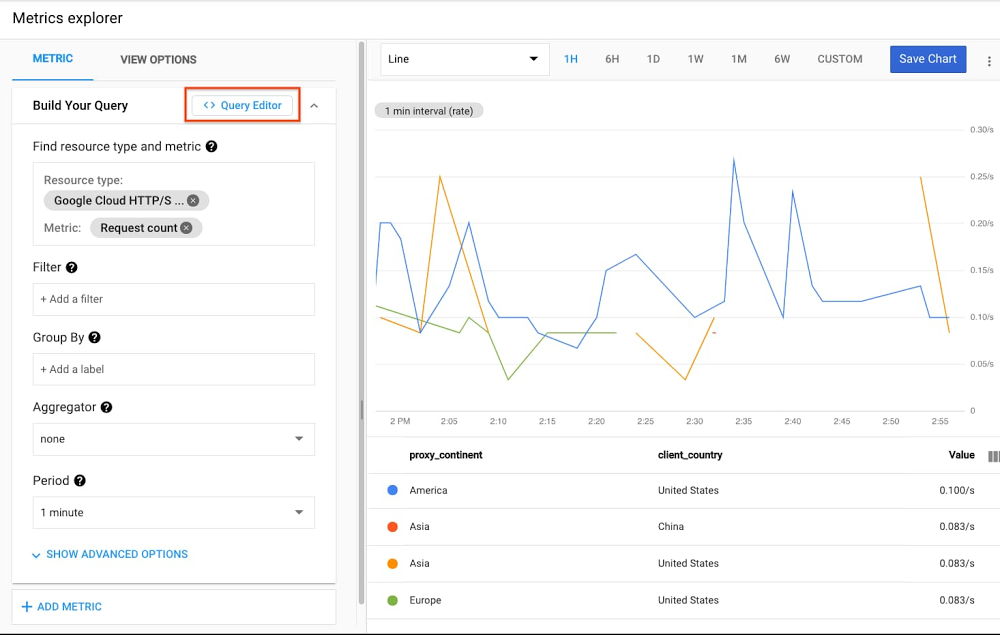
Developers and operators on IT and development teams want powerful metric querying, analysis, charting, and alerting capabilities to troubleshoot outages, perform root cause analysis, create custom SLI / SLOs, reports and analytics, set up complex alert logic, and more. So today we’re excited to announce the General Availability of Monitoring Query Language (MQL) in Cloud Monitoring!MQL represents a decade of learnings and improvements on Google’s internal metric query language. The same language that powers advanced querying for internal Google production users, is  now available to Google Cloud users as well. For instance, you can use MQL to:Create ratio-based charts and alertsPerform time-shift analysis (compare metric data week over week, month over month, year over year, etc.)Apply mathematical, logical, table operations, and other functions to metricsFetch, join, and aggregate over multiple metricsSelect by arbitrary, rather than predefined, percentile valuesCreate new labels to aggregate data by, using arbitrary string manipulations including regular expressionsLet’s take a look at how to access and use MQL from within Cloud Monitoring.Getting started with MQLIt’s easy to get started with MQL. To access the MQL Query Editor, just click on the button in Cloud Monitoring Metrics Explorer:Then, create a query in the Metrics Explorer UI, and click the Query Editor button. This converts the existing query into an MQL query:MQL is built using operations and functions. Operations are linked together using the common ‘pipe’ idiom, where the output of one operation becomes the input to the next. Linking operations makes it possible to build up complex queries incrementally. In the same way you would compose and chain commands and data via pipes on the Linux command line, you can fetch metrics and apply operations using MQL. For a more advanced example, suppose you’ve built a distributed web service that runs on Compute Engine VM instances and uses Cloud Load Balancing, and you want to analyze error rate—one of the SRE “golden signals”.You want to see a chart that displays the ratio of requests that return HTTP 500 responses (internal errors) to the total number of requests; that is, the request-failure ratio. The loadbalancing.googleapis.com/https/request_count metric type has a response_code_class label, which captures the class of response codes.In this example, because the numerator and denominator for the ratio are derived from the same time series, you can also compute the ratio by grouping. The following query shows this approach:This query uses an aggregation expression built on the ratio of two sums:The first sum uses the if function to count 500-valued HTTP responses and a count of 0 for other HTTP response codes. The sum function computes the count of the requests that returned 500.The second sum adds up the counts for all requests, as represented by val().The two sums are then divided, resulting in the ratio of 500 responses to all responses.Now let’s say that we want to create an alert policy from this query. You can go to Alerting, click “Create Policy”, click “Add Condition”, and you’ll see the same “Query Editor” button you saw in Metrics Explorer.You can use the same query as above, but with a condition operator that provides the threshold for the alert:The condition tests each data point in the aligned input table to determine whether the ratio value exceeds the threshold value of 50%. The string ’10^2.%’ specifies that the value should be used as a percentage.In addition to ratios, another common use case for MQL is time shifting. For brevity, we won’t cover this in our blog post, but the example documentation walks you through performing week-over-week or month-over-month comparisons. This is particularly powerful when coupled with long-term retention of 24 months of custom and Prometheus metrics.Take monitoring to the next levelThe sky’s the limit for the use cases that MQL makes possible. Whether you need to perform joins, display arbitrary percentages, or make advanced calculations, we’re excited to make this available to all customers and we are interested to see how you will use MQL to solve your monitoring, alerting, and operations needs. To learn more about MQL, check out the documentation, quickstarts, examples (queries, alerts), a language and function reference, and more.Related ArticleExtended retention for custom and Prometheus metrics in Cloud MonitoringRetention times for custom and Prometheus metrics in Cloud Monitoring has gone from six weeks to 24 months.Read Article
Quelle: Google Cloud Platform

AWS Pricing Calculator unterstützt jetzt Windows Server und SQL Server-Workload-Kostenkalkulation

AWS Pricing Calculator unterstützt jetzt Windows Server und SQL Server-Workload-Kostenkalkulation. Die Workload-Kalkulation erfasst jetzt die Microsoft-Lizenzierung. Der Windows Server und SQL Server auf Amazon EC2-Rechner bietet eine Auswahl an Lizensierungsoptionen wie z. B. von AWS bereitgestellte Lizenzen mit License Included (LI)-Angeboten und bestehenden Lizenzen von Kunden mit bring your own license (BYOL)-Angeboten für optimale Kosteneinsparungen. Es erkennt auch eine geeignete Cloud-Tenancy und ein Kosteneinsparungs-Preismodell, basierend auf Lizensierungs- und Infrastruktur-Eingaben.
Quelle: aws.amazon.com

AWS CodeBuild ist jetzt in der Region Afrika (Kapstadt) verfügbar

AWS CodeBuild ist jetzt in der Region Afrika (Kapstadt) verfügbar. AWS CodeBuild ist ein vollständig verwalteter Service für die kontinuierliche Integration. Sie können damit Quellcode kompilieren, Tests ausführen und implementierbare Softwarepakete generieren. Dank CodeBuild brauchen Sie keine eigenen Entwicklungsserver mehr bereitzustellen, zu verwalten und zu skalieren. CodeBuild passt sich kontinuierlich der Arbeitslast an und kann auch mehrere Builds gleichzeitig verarbeiten. Keine Builds bleiben mehr in Warteschlangen hängen. Mit den vorkonfigurierten Build-Umgebungen gelingt der Einstieg leicht. Jedoch können Sie auch benutzerdefinierte Build-Umgebungen mit Ihren eigenen Entwicklungstools erstellen. Die für CodeBuild in Anspruch genommenen Rechenressourcen werden minutengenau abgerechnet.
Quelle: aws.amazon.com

Ankündigung der allgemeinen Verfügbarkeit von Amazon Corretto 11 für Linux in ARM32 und für Windows in x86 (32-bit)

Amazon Corretto11 in ARM32 für Linux-Plattformen und x86 (32-bit) in Windows sind jetzt allgemein verfügbar. Mit unserer Entwicklung von ARM32, können Sie jetzt Corretto 11 in Linux-Distributionen auf 32bit ARMv7-Hardware ausführen. Unser x86 auf Windows-Built wird auf den gleichen unterstützten Versionen von Windows ausgeführt und die Nutzung von 32-bit-Bibliotheken ermöglichen. Diese sind voll funktionsfähige, vollständig unterstützte JDK 11-Builds. Jedes Problem zu unsem GitHub-Repository können Sie unter https://github.com/corretto melden.
Quelle: aws.amazon.com

Amazon Connect unterstützt jetzt die Freigabe von Anhängen im Chat

Sie können jetzt Anhänge direkt über Amazon Connect Chat versenden, was es einfacher denn je macht, die Anforderungen Ihres Kundenservice zu lösen. Ein Mitarbeiter kann beispielsweise eine Kopie einer aktuellen Hotelrechnung senden oder ein Kunde kann ein Foto eines beschädigten Produktes freigeben. Anhänge sind in das Chat-Transkript eingeschlossen, um sicherzustellen, dass der vollständige Kontext von der Konversation verfügbar ist, wenn ein Kontakt an einen anderen Agenten übertragen wird. Die Dateien werden auch in Ihrem S3-Bucket gespeichert, um den Zugriff von anderen Systemen wie Customer Relationship Management (CRM)- oder Fallverwaltungssysteme zu ermöglichen. Sie können Anhänge in der AWS-Konsole mit wenigen Klicks einschalten.
Quelle: aws.amazon.com

A revolution is coming for data and the cloud: 6 predictions for 2021

Offering predictions can be a challenge, because specific predictions depend on specific timeframes. But looking at the trends that we’re seeing in cloud adoption, there are a few things I’ve seen in 2020 that imply changes we will be seeing in 2021. As someone who was a network engineer when the internet revolution happened, I can see the signs of another revolution—this time built around the cloud and data—and acting on the signs of change will likely tell the difference between the disruptors and the disrupted. Here’s what I see coming down the road, and what’s important to keep in mind as we head into a new year.1. The next phase of cloud computing is about the benefits of transformation (not just cost). In 2021, cloud models will start to include a governed data architecture, with accelerated adoption of analytics and AI throughout an organization. In the past, we’ve seen notable developments that have driven massive cloud adoption movements. The first wave of cloud migration was driven by applications as a service, which gave businesses the tools to develop more quickly and securely for specific applications, e.g. CRM. Then, the second generation saw a lot of companies modernizing infrastructure to move on from physical data center maintenance.  That’s all been useful for businesses, but with all that’s happened in 2020, the third phase—digital transformation—will arrive in earnest. As this happens, we’ll start to see the benefits that come from truly transforming your business. Positive outcomes include the infusion of data analytics and AI/ML into everyday business processes, leading to profound impacts across every industry and society at large.2. Compliance can’t just be an add-on item.The modern cloud model has to be one that can withstand the scrutiny around data sovereignty and accessibility questions. It’ll change how companies do business and how much of society is run. Even large, traditional enterprises are moving to the cloud to handle urgent needs, like increased regulations. The stakes are too high now for enterprises to ignore the critical components of security and privacy. One of the big reasons the cloud—and Google Cloud specifically—is so vital to better data analytics revolves around these questions of compliance and governance. Around the world, for businesses of every size, there’s an increased focus on security, privacy, and data sovereignty. So much of the digital transformation that we’ll see in 2021 will happen out of necessity, but today’s cloud is what makes it possible. Google Cloud is a platform built ground-up based on these foundational requirements, so enterprises can make the transition to the cloud with the assurance that data is protected.  3. Open infrastructure will reign supreme. By 2021, we’ll see 80% or more of enterprises adopt a multicloud or hybrid IT strategy. Cloud customers want options for their workloads. Open infrastructure and open APIs are the way forward, and the open philosophy is one you should embrace. No business can afford to have its valuable data locked into a particular provider or service. This emerging open standard means you’ll start to see multi-cloud and on-premises data sources coming together rapidly. With the right tools, organizations can use multiple cloud services together, letting them gain the specific benefits they need from each cloud as if it was all one infrastructure. The massive shift we’re seeing toward both openness and cloud also brings a shift toward stronger data assets and better data analytics. If you’ve been surprised over the past year about how many data sources exist for your company, or how much of it is gathered, you’re not alone. An open infrastructure will let you choose the cloud path that works best for your business. Data solutions like Looker and BigQuery Omni are specifically designed to work in an open API environment on our open platform to stay ahead of continually changing data sources.4. Harnessing the power of AI/ML will no longer require a degree in data science. Data science, with all of the expertise and specialized tools that have typically been involved, can no longer be the purview of just the privileged few. Teams throughout an organization need to have access to the power of data science, with capabilities like ML modeling and AI, without having to learn an entirely new discipline. For many of these team members, it’ll bring new life into their jobs and the decisions they need to make. If they haven’t been consuming data, they’ll start. With this capacity to give the whole team the power of analytics, businesses will be able to gather, analyze, and act on data far quicker than those who are still using the traditional detached data science model. This improves productivity and informed decision making by giving employees the tools to gather, sort, and share data on demand. It also frees up teams with data science experience that would normally be assembling, analyzing, and creating presentations to concentrate on tasks that are more suited to their abilities and training.  With Google Cloud’s infrastructure and our data and AI/ML solutions, it’s easy to move data to the cloud easily and start analyzing it. Tools like Connected Sheets, Data QnA, and Looker make data analytics something that all employees can do, regardless of whether they are certified data analysts or scientists. 5. More and more of the world’s enterprise data will need to be processed in real time. We’re quickly getting to the point where data residing in the cloud outpaces data residing in data centers. That’s happening as worldwide data is expected to grow 61% by 2025, to 175 zettabytes. That’s a lot of data, which offers a trove of opportunity for businesses to explore. The challenge is capturing data usefulness in the moment. Following past stored data can be informative, but more and more use cases require immediate information, especially when it comes to reacting to unexpected events. For example, identifying and stopping a network security breach in the moment, with real-time data and a real-time reaction, has enormous consequences for a business. That one moment can save untold hours and costs spent on mitigation.This is the same method that we use to help our customers overcome DDOS attacks, and if 2020 has taught us anything, it’s that businesses will need this ability to instantly respond to unexpected problems more than ever moving forward.While real-time data revolutionizes how quickly we gather data, perhaps the most unexpected yet incredibly useful source of data we’ve seen is predictive analytics. Traditionally, data is gathered only from the physical world, meaning the only way to plan for what will happen was to look at what could physically be tested. But with predictive models and AI/ML tools like BigQuery ML, organizations can run simulations based on real-life scenarios and information, giving them data on circumstances that would be difficult, costly, or even impossible to test for in physical environments.Related ArticleRead Article6. More than 50% of data lakes will span multiple clouds and on-premises. We know that aligning the right services to the right use cases can be complicated. And while the cloud opens up a ton of opportunities for better data options, the fact that so many businesses are moving to these cloud solutions means that organizations will need a strong digital strategy to stay competitive, and this extends down to their data storage. Lots of businesses are choosing multicloud for flexibility, especially with so many options available. In the cloud, data storage has taken the shape of either a data warehouse—which stores primarily structured data so that everything is easily searchable—or data lakes—which bring together all of a business’ data together, regardless of structure. We’ll see more of the trend we’ve already seen, starting with the line between lake and warehouse getting blurrier. Google Cloud has a variety of data lake modernization solutions that give organizations the ability to integrate unstructured data as well as use AI/ML solutions to make data lakes easier to navigate, driving insights and collaboration.What’s next for your business?Change is happening fast, and while it can be overwhelming, all these technology changes are really exciting. At the end of it, you’ll be able to respond in real-time to problems, help your business users get their data without delay, and know for sure the entire lifecycle of any of your data. Let’s get started.Check out our guide to building a modern data warehouse or see how data-to-value leaders succeed in driving results from their enterprise data strategy in the report by Harvard Business Review Analytic Services: Turning data into unmatched business value.
Quelle: Google Cloud Platform

Top 9 posts from Google Cloud in 2020

In 2020, everything changed. Who would have expected that how we live, work, communicate, and learn would be different by the end of the year? At Google Cloud, we saw how COVID-19 forced changes not only in how our customers worked in offices, but also how software developers and IT practitioners innovated. To support these changes, we introduced new products, features, and resources to address the needs we hear most from our customers: how to better connect people, how to get smarter with your data, how to build faster, and how to do this all with the confidence that your data is safe. Meeting your customers’ needs is essential, and so is empowering your employees with the tools and information they need in real time.Here, we take a look back at the year’s most popular posts from the Google Cloud blog:1. Google Workspace brought productivity to a new levelThe arrival of Google Workspaceallowed our customers to better connect their workforce with the tools they needed to get anything done, in one place. It included everything our customers loved about G Suite, including all of the familiar productivity apps—Gmail, Calendar, Drive, Docs, Sheets, Slides, Meet—and added a new, deeply integrated user experience. For example, we introduced new ways that core Workspace tools like video, chat, email, files, and tasks became more deeply integrated, powerful, and efficient.2. New features and security measures made Google Meet the place to be2020 was all about connecting virtually. As more employees, educators, and students worked remotely in response to the spread of COVID-19, we wanted to help them stay connected and productive. We rolled out free access to our advanced Google Meet video-conferencing capabilities to all G Suite and G Suite for Education customers globally through September. We added features such as support for larger meetings for up to 250 participants per call; live streaming for up to 100,000 viewers; and the ability to record meetings and save them to Google Drive. We also rolled out other top-requested features, including tiled layouts, low-light mode, noise cancellation, and others. And as the year progressed, we never stopped innovating, introducing Meet on the Nest Hub Max, customizable backgrounds, and moderation controls like meeting attendance, Q&A, and polling. We also shared the array of counter-abuse protections we built to give you confidence that your meetings are safe, including anti-hijacking measures for both web meetings and dial-ins and browser-based security features, 2-step Verification, and our Advanced Protection Program. For schools, we introduced several features to improve the remote learning experiences for teachers and students. 3. Google Cloud learning resources connected cloud students with new topicsTo help you transition to remote work and learning, we shared details about our Google Cloud learning resources, which you can use at home. These include our extensive catalog of over 100 on-demand training courses on Pluralsight and Coursera designed to get you started on the path to certification in cloud architecture, data engineering, and machine learning; hands-on labs on Qwiklabs; and interactive webinars at no cost for 30 days, so you can gain cloud experience—and get smarter about cloud—no matter where you are.  4. The COVID-19 public dataset program opened up a world of research possibilitiesTo aid researchers, data scientists, and analysts in the fight against COVID-19, we made a hosted repository of public datasets, like our COVID-19 Open Data dataset, free to access and query through our COVID-19 Public Dataset Program. Researchers can also use BigQuery MLto train advanced machine learning models with this data right inside BigQuery at no additional cost. 5. Google Cloud’s coronavirus response combined business continuity, monitoring, free resources, and moreWith all of the challenges impacting our customers, we wanted to give them confidence that our people were here when you needed them. We outlined all of the measures we take to make our services available to customers everywhere during the pandemic and beyond. These include regular disaster recovery testing (DiRT) of our infrastructure and processes; multiple SRE coverage areas; compute and storage hardware capacity monitoring and reserves; remote access and backup contingencies for our support teams; enhanced support structure for customers on the front lines; and free access to the premium version of Hangouts Meet to existing customers. 6. AppSheet empowered citizen app developers with no-codeWe were proud to share that Google acquired AppSheet, a leading no-code application development platform used by enterprises across a variety of industries. This acquisition helps enterprises empower millions of citizen developers to more easily and quickly create and extend applications without the need for professional coding skills. Employees will be able to develop richer applications at scale that use Google Sheets and Forms, and top Google technologies like Android, Maps, and Google Analytics. In addition, AppSheet customers can continue to integrate with a number of cloud-hosted data sources, including Salesforce, Dropbox, AWS DynamoDB, and MySQL. 7. API experts brought order to complex design decisionsAs many software developers know, there are two primary models for API design: RPC and REST. Most modern APIs are implemented by mapping them to the same HTTP protocol. It’s also common for RPC API designs to adopt one or two ideas from HTTP while staying within the RPC model, which has increased the range of choices that an API designer faces. We looked at the choices and offered guidance on how to choose between them, focusing on gRPC, OpenAPI, and REST—three significant and distinct approaches for building APIs that use HTTP.8. Google Cloud detective work solved a tricky networking problemIf you’ve ever wondered how Google Cloud Technical Solutions Engineers (TSE) approach your support cases, we offered a Google Cloud mystery story—the case of the missing DNS packets. Follow along to see how they worked closely with our customer to gather information in the course of their troubleshooting, and how they reasoned their way through to a resolution. This true story offers insight into what to expect the next time you submit a ticket to Google Cloud support.9. Google Cloud Next ‘20: OnAir lit up the digital stageFinally, to keep you up to date with all of the important announcements made at Google Cloud Next ‘20: On Air, we offered a week-by-week breakdown focused on product areas like application development, artificial intelligence and machine learning, databases, data analytics and much more. Check out the blog for the full list.That’s a wrap for 2020! Keep coming back to the Google Cloud blog for announcements, helpful advice, customer stories, and more in 2021.Related ArticleRead Article
Quelle: Google Cloud Platform





