Can machine learning make you a better athlete?

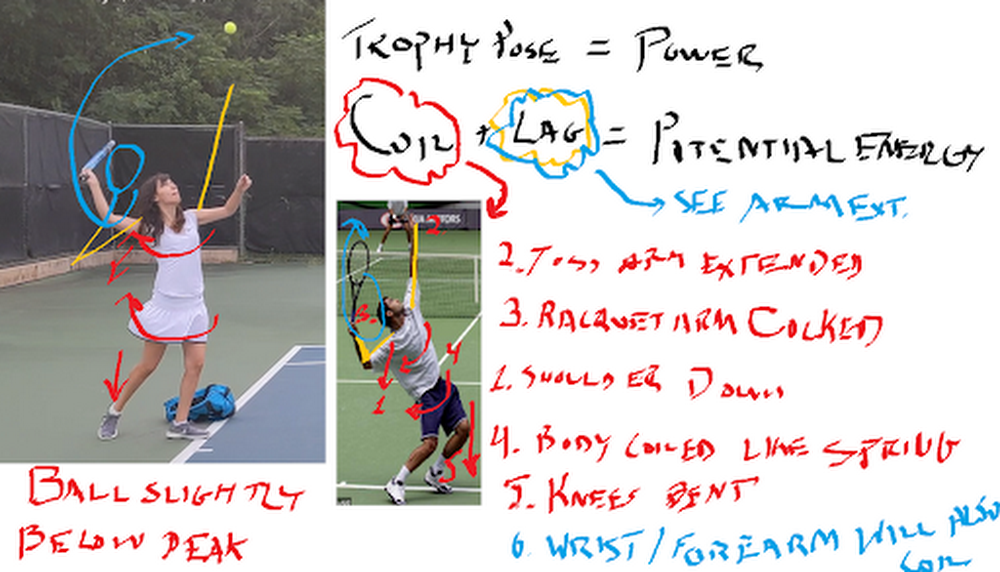
Ah, the Super Bowl. Or, as I prefer to say, the Superb Owl—that oh-so-American Sunday defined by infinite nachos, high-budget commercials, and memes that can last us half a decade. As an uncoordinated math geek, I can’t say I’ve ever had much connection to the “Football” part of the Super Bowl. That said, sports, data analytics, and machine learning make a powerful trio: most professional teams use this technology in one way or another, from tracking players’ moves to detecting injuries to reading numbers off players’ jerseys. And, for the less athletic of us, machine learning may even be able to help us improve our own skills.Which is what we’ll attempt today. In this post, I’ll show you how to use machine learning to analyze your performance in your sport of choice (as an example, I’ll use my tennis serve, but you can easily adopt the technique to other games). We’ll use the Video Intelligence API to track posture, AutoML Vision to track tennis balls, and some math to tie everything together in Python.Want to try this project for yourself? Follow along in the Qwiklab.I give full credit for this idea from my fellow Googler Zack Akil, who used the same technique to analyze penalty kicks in soccer (sorry, “football”).Using machine learning to analyze my tennis serveTo get started, I set out to capture some video data of my tennis serve. I went to a tennis court, set up a tripod, and captured some footage. Then I sent the clips to my tennis coach friend, who gave me some feedback that looked like this:These diagrams were great because they analyzed key parts of my serve that differed from those of professional athletes. I decided to use this to hone in on what my machine learning app would analyze:Were my knees bent as I served?Was my arm straight when I hit the ball?How fast did the ball actually travel after I hit it? (This one was just for my personal interest)Analyzing posture with pose detectionTo compute the angle of my knees and arms, I decided to use pose detection—a machine learning technique that analyzes photos or videos of humans and tries to locate their body parts. There are lots of tools you can use to do pose detection (like TensorFlow.js), but for this project, I wanted to try out the new Person Detection feature of the Google Cloud Video Intelligence API. (You might recognize this API from my AI-Powered Video Archive, where I used it to analyze objects, text, and speech in my family videos.) The Person Detection feature recognizes a whole bunch of body parts, facial features, and clothing. From the docs:To start, I clipped the video of my tennis serves down to just the sections where I was serving. Since I only caught 17 serves on camera, this took me about a minute. Next, I uploaded the video to Google Cloud Storage and ran it through the Video Intelligence API. In code, that looks like: To call the API, you pass the location in Cloud Storage where your video is stored as well as a destination in cloud storage where the Video Intelligence API can write the results.When the Video Intelligence API finished analyzing my video, I visualized the results using this neat tool built by @wbobeirne. It spits out neat visualization videos like this:Pose detection makes a great pre-processing step for training machine learning models. For example, I could use the output of the API (the position of my joints over time) as input features to a second machine learning model that tries to predict (for example) whether or not I’m serving, or whether or not my serve will go over the net. But for now, I wanted to do something much simpler: analyze my serve with high school math!For starters, I plotted the y position of my left and right wrists over time:It might look messy, but that data actually shows pretty clearly the lifetime of a serve. The blue line shows the position of my left wrist, which peaks as I throw the tennis ball a few seconds before I hit it with my racket (the peak in the right wrist, or orange line).Using this data, I can tell pretty accurately at what points in time I’m throwing the ball and hitting it. I’d like to align that with the angle my elbow is making as I hit the ball. To do that, I’ll have to convert the output of the Video Intelligence API–raw pixel locations–to angles. How do you do that? Obviously using the Law of Cosines, duh! (Just kidding, I definitely forgot this and had to look it up. Here’s a great explanation of the Law of Cosines and some Python code.)The Law of Cosines is the key to converting points in space to angles. In code, that looks something like:Using these formulae, I plotted the angle of my elbow over time:By aligning the height of my wrist and the angle of my elbow, I was able to determine the angle was around 120 degrees (not straight!). If my friend hadn’t told me what to look for, it would have been nice for an app to catch that my arm angle was different from professionals and let me know.I used the same formula to calculate the angles of my knees and shoulders. (You can find all the details in the code.)Computing the speed of my servePose detection let me compute the angles of my body, but I also wanted to compute the speed of the ball after I hit it with my racket. To do that, I had to be able to track the tiny, speedy little tennis ball over time.As you can see here, the tennis ball was sort of hard to identify because it was blurry and far away.I handled this the same way Zack did in his Football Pier project: I trained a custom AutoML Vision model.If you’re not familiar with AutoML Vision, it’s a no-code way to build computer vision models using deep neural networks. The best part is, you don’t have to know anything about ML to use it.AutoML Vision lets you upload your own labeled data (i.e. with labeled tennis balls) and trains a model for you.Training an object detection model with AutoML VisionTo get started, I took a thirty second clip of me serving and split it into individual pictures I could use as training data to a vision model:ffmpeg -i filename.mp4 -vf fps=10 -ss 00:00:01 -t 00:00:30 tmp/snapshots/%03d.jpgYou can run that command from within the notebook I provided, or from the command line if you have ffmpeg installed. It takes an mp4 and creates a bunch of snapshots (here at fps=20, i.e. 20 frames per second) as jpgs. The -ss flag controls how far into the video the snapshots should start (i.e. start “seeking” at 1 second) and the flag -t controls how many seconds should be included (30 in this case).Once you’ve got all your snapshots created, you can upload them to Google Cloud storage with the command:gsutil mb gs://my_neat_bucket  # create a new bucketgsutil cp tmp/snapshots/* gs://my_neat_bucket/snapshotsNext, navigate to the Google Cloud console and select Vision from the left hand menu:Create a new AutoML Vision Model and import your photos.Quick recap: what’s a machine learning classifier? It’s a type of model that learns how to label things from example. So to train our own AutoML Vision model, we’ll need to provide some labeled training data for the model to learn from.Once your data has been uploaded, you should see it in the AutoML Vision “IMAGES” tab:Here, you can start applying labels. Click into an image. In the editing view (below), you’ll be able to click and drag a little bounding box:For my model, I hand-labeled about 300 images which took me ~30 minutes. Once you’re done labeling data, it’s just one click to train a model with AutoML–just click the “Train New Model” button and wait.When your model is done training, you’ll be able to evaluate its quality in the “Evaluate” tab below.As you can see, my model was pretty darn accurate, with about 96% precision and recall.This was more than enough to be able to track the position of the ball in my pictures, and therefore calculate its speed:Once you’ve trained your model, you can use the code in this Jupyter notebook to make a cute little video like the one I plotted above.You can then use this to plot the position of the ball over time, to calculate speed:Unfortunately, I realized too late I’d made a grave mistake here. What is speed? Change in distance over time, right? But because I didn’t actually know the distance between me, the player, and the camera, I couldn’t compute distance in miles or meters–only pixels! So I learned I serve the ball at approximately 200 pixels per second. Nice.So there you have it–some techniques you can use to build your own sports machine learning trainer app. And if you do build your own sports analyzer, let me know!Related ArticleBaking recipes made by AIIn this post, we’ll show you how to build an explainable machine learning model that analyzes baking recipes, and we’ll even use it to co…Read Article
Quelle: Google Cloud Platform

Ergreifen Sie Maßnahmen vor und nach dem Patching, um die Sicherheit während der Patch-Installation zu verbessern

Mit Patch Manager, einer Funktion von AWS Systems Manager, können Sie jetzt Aktionen konfigurieren, die auf einer verwalteten Instance vor und nach der Installation von Patches ausgeführt werden. Mit dieser Funktion können Sie Aktionen konfigurieren, um Prüfungen vor der Installation durchzuführen, z. B. um sicherzustellen, dass der "Windows Update Service" vor dem Patchen von Instanzen ausgeführt wird. Darüber hinaus können Sie Aktionen konfigurieren, die Zustandsprüfungen nach der Installation durchführen, um sicherzustellen, dass Ihre Instanzen nach dem Patching gesund sind.  
Quelle: aws.amazon.com

AWS Elemental MediaLive bietet Support für VPC-Ausgaben

Sie können AWS Elemental MediaLive jetzt so konfigurieren, dass Live-Videos direkt in Ihrer eigenen Amazon Virtual Private Cloud (Amazon VPC) bereitgestellt werden. Für Kunden, die spezielle Video-Workflows in ihrer eigenen Amazon VPC ausführen, kann MediaLive jetzt Live-Video für diese Anwendungen bereitstellen, ohne öffentliche IPs zu verwenden. MediaLive unterstützt bereits VPC-Eingänge für einen MediaLive-Kanal.
Quelle: aws.amazon.com

The time for digital excellence is here—Introducing Apigee X

Digital transformation has been a top enterprise priority for years, and in the wake of the global pandemic, that urgency has only increased. Many industries have had to manage in weeks or months what previously would have taken years. According to surveys conducted for our “State of the API Economy 2021” report, three-quarters of enterprises remained focused on digital transformation in 2020, and two-thirds of those companies actually increased their investments. APIs are the backbone of digital transformation, and to help organizations navigate today’s challenging landscape, we’re announcing Apigee X. A major release of our API management platform, Apigee X seamlessly weaves together Google Cloud’s expertise in AI, security and networking to help enterprises efficiently manage the assets on which digital transformation initiatives are built. “APIs have become one of the most crucial steps for enterprises to achieve digitalization. APIs are key to adopting modern architecture patterns such as microservices, EDA, serverless or hybrid/multicloud,” wrote research & advisory firm Gartner in its July 2020 report “Gartner Market Share Analysis: Full Life Cycle API Management, Worldwide, 2019.” “As enterprises reopen post-COVID-19, they will have to find their own path to the new normal. The most successful will have started rescaling and reinventing themselves during the crisis, but the bulk of them will start at reopening. Rescaling and reinventing goes through a decomposition and a recomposition of their operating practices, and the role of an API platform in those activities is paramount. The more effective and extensive the API platform is, the quicker and easier rescaling and reinventing will be.”  Because APIs are how software talks to software and how developers leverage data and functionality at scale, APIs are not just a component in the software stack, but rather products that developers use to execute business strategies and achieve innovation at scale. Like all products, APIs need to be managed, and as Apigee turns 10 this month, we bring a decade of deep expertise and experience from working with over a thousand customers globally. “Apigee provided guidance on how we should roll out our API strategy and how we can think strategically about digital transformation using APIs,” said Rick Schnierer, Vice President, Annuity Technology, at Nationwide Insurance. “What used to take us two to three months to develop as a monolithic service now takes days as a microservice. Apigee has also allowed us to federate development, meaning our developers are empowered to create and share APIs on their own rather than going through a centralized model. We have business connections coming through the Apigee API management platform that we wouldn’t have even thought to initiate on our own.”  “At Deutsche Bank we are looking forward to using Apigee X as we design and implement API solutions integrated into our ecosystem,” said Shaun Cotter, Managing Director, Corporate Bank Technology at Deutsche Bank. “The effective and secure use of API-led integration is a key component of our Google Cloud partnership, and will enable the bank to better connect services internally, innovate with third parties and offer our products to a broader client base.” Achieving digital excellence with Apigee XAs increased digital transformation investments may suggest, competitiveness is increasingly less about transformation ambitions and more about actual transformation. It’s not enough to simply use the cloud, have APIs, or even adopt API management. Rather, the requirement is digital excellence: the ability to rapidly and repeatedly deploy and scale, and to consistently deliver on digital programs. It involves adopting digital as a core enterprise strategy for building profitable API-based platforms and delivering measurable business outcomes. Helping customers make this leap–from gradual transformation and API-based programs to digital excellence and API-based platforms–has been our core goal for Apigee X. “At Pitney Bowes we are always looking for ways to provide the best experience for our clients and Apigee’s technology helps us make this possible. We are very excited about the launch of Apigee X, as it can help businesses elevate API-led programs, and accelerate digital transformation even more,” said James Fairweather, Chief Innovation Officer at Pitney Bowes. “During these uncertain times, organizations worldwide are doubling-down on their API strategies to operate anywhere, automate processes, and deliver new digital experiences quickly and securely. By powering APIs with new capabilities like reCAPTCHA Enterprise, Cloud Armor (WAF), and Cloud CDN, Apigee X makes it easy for enterprises like us to scale digital initiatives, and deliver innovative experiences to our customers, employees and partners.” What Differentiates Apigee XLet’s take a closer look at Apigee X.Global reach, high performance & reliabilityWith shifting market conditions and dynamic work environments, organizations are scaling API programs for global expansion and supporting distributed workforces. Apigee X makes it easy for customers to harness the power of Cloud CDN to maximize the availability and performance of APIs globally. Customers can now deploy their APIs across 24 Google Cloud regions and enhance caching at more than 100 locations. Multi-layer security & privacyScaling API programs also opens up more doors for fraudulent activities, both internally and outside of the organizational boundaries. As our “State of the Economy 2021” report elaborates, in the past year, Apigee saw an increase in abusive API traffic of over 170%. Apigee X offers an integrated approach for applying capabilities like Cloud Armor web application firewall for enhanced API security and Cloud Identity and Access Management (IAM) for authenticating and authorizing access to the Apigee platform. It gives businesses more control over encrypted data with CMEK while allowing them to store data in the region of their choice and control the network locations from which users can access data by using VPC Service Controls.AI-powered automationWith the increasing adoption of APIs for powering enterprise business-critical applications, there’s growing pressure on operations and security teams to ensure they’re always available, secure and performing as expected. Apigee X applies Google’s industry-leading AI and machine learning capabilities to historical API metadata to autonomously identify anomalies, predict traffic for peak seasons, and ensure APIs adhere to compliance requirements. This helps API operators and security admins focus on programs that really matter to their business, rather than spending time on trivial tasks.Being an industry leader in the space of API management, and having worked across customers for a decade, we’ve seen how enterprises can truly transform their businesses by leveraging APIs to build new digital experiences, more powerful and intelligent automations, and more impactful data-driven applications. Today’s launch continues to expand what API management can do, and it offers businesses an onramp to achieve digital excellence over the next decade. We can’t wait to see what you’ll do next with us. Click here to try the new release of Apigee for free.Gartner does not endorse any vendor, product or service depicted in its research publications and does not advise technology users to select only those vendors with the highest ratings or other designation. Gartner research publications consist of the opinions of Gartner’s research organization and should not be construed as statements of fact. Gartner disclaims all warranties, expressed or implied, with respect to this research, including any warranties of merchantability or fitness for a particular purpose.Related ArticleTop 5 trends for API-powered digital transformation in 2021Google Cloud’s State of APIs report investigates digital transformation in 2020 and where trends point in 2021 and beyond.Read Article
Quelle: Google Cloud Platform

Google Cloud AI leaders share tips for getting started with AI

Machine learning (ML) can help you solve hard business problems in new ways, but getting started can feel overwhelming. We are fortunate to have some great leaders in Google Cloud AI who have decades of experience in artificial intelligence (AI) and have generously agreed to share a few words of advice from their learnings. In the following videos they share tips for businesses and organizations getting started in AI, as well as what’s top of mind for them in Cloud AI this year.How do you enjoy these revenue and efficiency gains? Here’s why this field of artificial intelligence has the business world so enthralled. According to a recent McKinsey & Company study, AI is expected to increase economic output by $13 trillion in the next decade. The firm states businesses that fully absorb this technology could double their cash flow in that time, while companies that don’t could see a 20% decline. Businesses in every sector and across the globe are seeing this opportunity and choosing Google Cloud AI to solve some of their toughest challenges. From Etsy, which exemplifies the new era of scaling a business, to deluged government agencies like the Illinois Department of Employment Security—organizations in every industry are using our Cloud AI services to solve problems and innovate. There’s lots of ways to get started with Google Cloud AI: from prepackaged solutions that integrate with your existing systems and workflows, to our managed AI Platform for building and managing the entire ML model development lifecycle, to pretrained models accessible via APIs, to easily add sight, language, conversation and data into your apps.   If you’d like to take our AI Platform for a spin, you can explore labs on Qwiklabs and other course offerings in our ML learning path to gain more ML experience on Google Cloud. And there’s a $300 creditand free tier to start experimenting today.Related ArticleEmpowering teams to unlock the value of AIThe latest and greatest AI and machine learning news from Google CloudRead Article
Quelle: Google Cloud Platform






