Analyze your logs easier with log field analytics

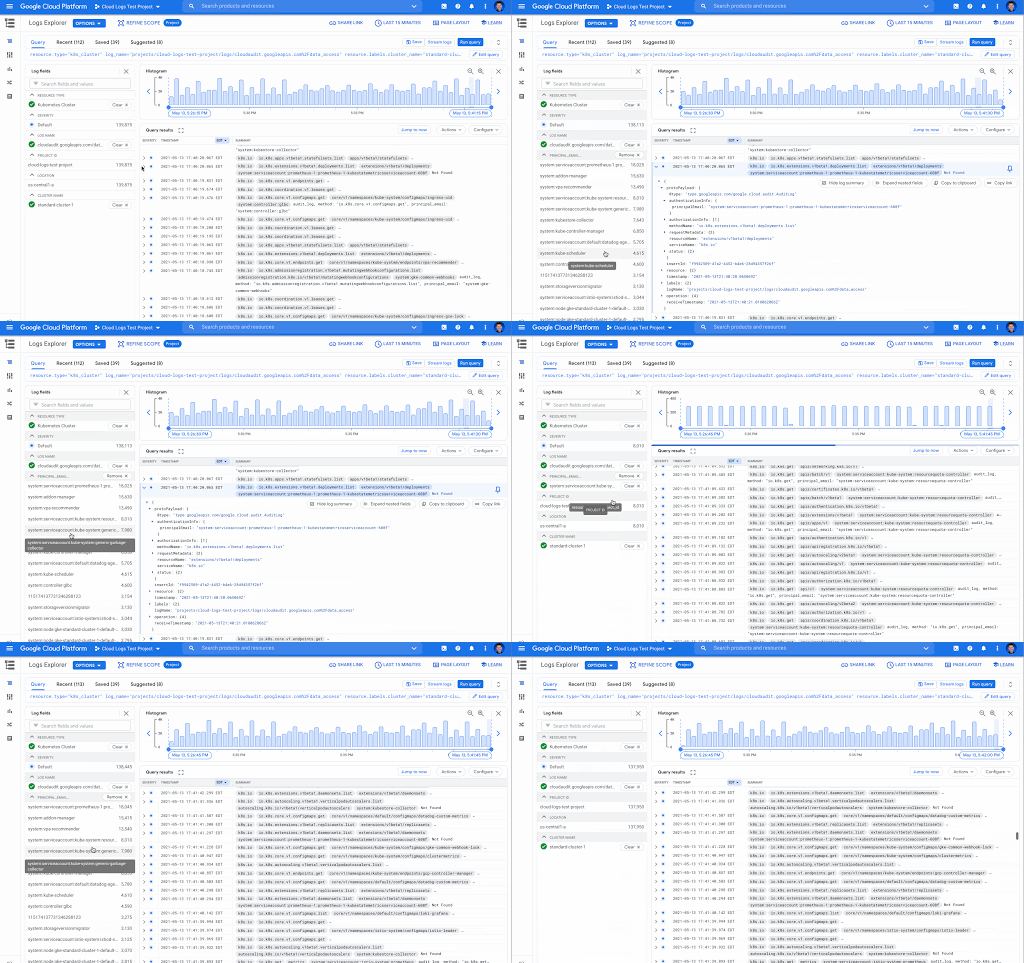
We know that developers or operators troubleshooting applications and systems have a lot of data to sort through while getting to the root cause of issues. Often there are fields like error response codes that are critical for finding answers and resolving those issues. Today, we’re proud to announce log field analytics in Cloud Logging, a new way to search, filter and understand the structure of your logs so you can find answers faster and easier than ever before.Log field analyticsLast year we launched Logs Explorer to make it faster to find and analyze your logs, with features like the Log fields pane and the histogram, as well as saved and shared queries. In Logs Explorer, the Log fields pane and histogram both provide useful information to help analyze your logs. With the Log fields pane, each resource type, which maps to a specific Google Cloud service like BigQuery or Google Kubernetes Engine (GKE), includes a set of default fields and values found in the logs loaded in Logs Explorer. The Log fields pane includes the name of the log field, a list of values and an aggregated count of the number of logs that fall in that category. Let’s look at these key terms more closely: a log field – These are the specific fields in your logs. All logs in Cloud Logging use the LogEntry message format. For example, the logName field is present in all logs in Cloud Logging. When you write logs, you also include textPayload, jsonPayload or protoPayload fields such as jsonPayload.http_req_status.a log field value –  The value of a specific log field. For example, for a log entry with the jsonPayload.http_req_status field, some example values could be a “200”, “404” or “500”.Now you can gain insight into the full list of values for selected log fields and a count of how many logs match the value with log field analytics. You can analyze application or system logs using fields in the jsonPayload or protoPayloads of your log entries and then easily refine your query by selecting the field values to drill down into the matching logs. A view of the Logs fields pane in Cloud LoggingBetter troubleshooting by analyzing log valuesLog field analytics make it easy to quickly spot unexpected values. By adding a field to the Log fields pane, you can view all values that appear in logs and then select any of the values to filter the logs by those values. In this example ecommerce application, we’ve added the jsonPayload.http_req_path field, and now it is possible to look at the request paths over time. In the screenshot below, it’s easy to see that there are several unexpected values that would indicate a problem such as “/products/error” and “products/incorrectproduct”. Next to those values are the aggregated number of matching log entries. These values can help you narrow your troubleshooting or analysis. Aggregated Logs field showing number of entries for each http_req_path log value (notice /products/error and /products/incorrectproduct)Filter using field values The field value selection in the Log fields pane can be used to refine your query so you can see just the logs that contain the selected value. In our example above using the jsonPayload.http_req_path field, it’s possible to select a specific value, “/cart” in this case, and view the logs broken down by severity. Aggregated number of logs entries for a selected http_req_path (notice /cart has been selected)Better understand your audit logsUsing log field analytics, you can easily find values in audit logs for Google Cloud services. For example, you may want to identify the accounts that are making data access requests for a particular GKE cluster. If you add the protoPayload.authenticationInfo.principalEmail field as a custom field to the Log fields pane, you get both a list of the accounts making the requests and the number of log entries for each of the account values.The Log fields pane displaying the number of log entries for each principalEmail valueGet started todayLog field analytics, Log fields, and the Histogram are features that we’ve recently added to Logs Explorer and they’re ready for you to get started with today. But we’re not stopping there! Please join us in our discussion forum for more information about what is coming next and to provide feedback on your experiences using Cloud Logging.If you would like to learn more about Cloud Logging, you can also visit our qwiklab quest for a guided walk through of the capabilities.Related ArticleTroubleshooting your apps with Cloud Logging just got a lot easierLearn how to use the Logs Explorer feature in Cloud Logging to troubleshoot your applicationsRead Article
Quelle: Google Cloud Platform
The State & Local Government tech tightrope: Balancing COVID-19 impacts and the road ahead

State and local government (SLG) agencies are reeling from a combination of unbudgeted COVID-related expenses and reduced tax revenue caused by unemployment and business closures. Any way you look at it, the situation is challenging. To understand how SLG agencies are coping, Google Cloud collaborated with MeriTalk to survey 200 SLG IT and program managers, uncovering some revealing trends in SLG technology innovation. Unsurprisingly,approximately 84% of SLG organizations report making budgetary tradeoffs to bridge funding the gaps the ongoing pandemic has created. However, researchers discovered a silver lining: The pandemic has also been a catalyst to modernize the legacy infrastructure in states and cities. The majority of survey respondents (88%) reported that their agency made greater modernization progress this past year than in the prior 10 years.Walking a tightrope between innovation and budget pressureAccording to 89% of state and local leaders, now is the time to invest in technology modernization. But 80% are experiencing a funding gap due to unbudgeted expenses related to the pandemic and declining tax revenue, which makes finding that balance between innovation and budget a serious challenge.Some agencies are achieving the impossible, though. For example, theCity of Pittsburgh Department of Innovation and Performance is working with Google Cloud to migrate  and modernize its legacy IT infrastructure. By decommissioning their data center and moving to Google Cloud, the city can build new data analytics tools to drive smart city initiatives and create entirely new applications to improve digital service delivery for its residents. As a result, the city will save costs, abandon its brittle legacy IT structure, and create a cloud-based technology platform for the future—becoming the region’s leader in cloud-native software development.Google Cloud is enabling the city’s IT team by curating and delivering our certification training at no cost. The program includes live training sessions as well as on-demand training. Bridging funding gapsIn their drive to modernization, many SLG leaders are turning to grants as an important source of funding. Approximately 84% of those surveyed report making tradeoffs to bridge funding gaps, such as moving resources away from operations and maintenance (37%), increasing reliance on pandemic-related funding (31%), and delaying internal modernization efforts to enable remote work for employees (29%). One way that states are dealing with this tension between budget gaps and the need for innovation is to turn to Google Cloud for cost savings and improved capabilities.For example, Google Cloud is helping the State ofWest Virginia innovate and enhance IT security despite decreased state funding. The state entered a multi-year agreement to ensure full access to enterprise-level Google Workspace capabilities for 25,000 state employees, keeping the state at the forefront of technology advancements at a projected cost savings of $11.5 million.Similarly, Google Cloud helped build theRhode Island Virtual Career Center to help the state’s constituents get back to work. Using familiar productivity tools within Google Workspace, employees can access new career opportunities quickly, while employers can reach more candidates. Skipper, the CareerCompass RI bot, uses data and machine learning to connect Rhode Islanders with potential new career paths and reskilling opportunities.Enhancing servicesGoogle Cloud is also helping agencies enhance services, including working with the State ofIllinois to get unemployment funding to constituents in need.The state is usingContact Center AI to rapidly deploy virtual agents that help more than 1 million out of work citizens file unemployment claims faster. Capable of engaging in human-like conversations, these intelligent agents provide constituents with 24/7 access and enable government employees to focus on more complex, mission-critical tasks—such as combating fraud. In summer 2020, the virtual agents handled more than 140,000 phone and web inquiries per day, including 40,000 after-hours calls every night. The state anticipates an estimated annual savings of $100 million from the solution, which was deployed in just two weeks.Working with Google, Ohio also uncovered $2 billion in fraudulent unemployment claims. We will continue to partner with the state to find fraudulent claims, and prioritize the processing of legitimate claims. Focusing on cybersecurityDespite expanding security threats topping NASCIO’s list of 2021 State CIO priorities, more than one in three IT managers (35%) say their organization reduces security measures to expedite timelines. Partnering with Google Cloud has enabled many agencies to enhance their security measures while modernizing and staying within budget, investing in support for remote work devices, digital services for residents, and cybersecurity.NYC Cyber Command works with city agencies to ensure systems are designed, built, and operated in a highly secure manner. NYC3 followed a cloud-first strategy using the Google Cloud Platform. The virtual operations demanded by the pandemic have increased the importance of security and compliance in SLG. Google Cloud is committed to act as asecurity transformation partner and be the trusted cloud for public sector agencies. Finally, to strengthen public and private partnerships, SLG organizations told MeriTalk that they need vendor partners to support modernization efforts for flexibility and collaboration (46%), need innovation-focused leadership groups to help balance technology needs with budget constraints (41%), and they expect significant returns on investments in cloud computing (38%), and data management/analytics (33%).Google Cloud is helping SLG customers across the country invest in innovation to walk the tech tightrope—balancing innovation and budgets—and helping to build a more resilient future. Visit the State and Local Government solutions page to learn more.Related ArticleHow Cloud Technology Can Help Support Economic RecoveryAs new COVID-19 relief dollars flow into state and local budgets, agency leaders can embrace cloud technology to help deliver critical se…Read Article
Quelle: Google Cloud Platform

Integrating Eventarc and Workflows

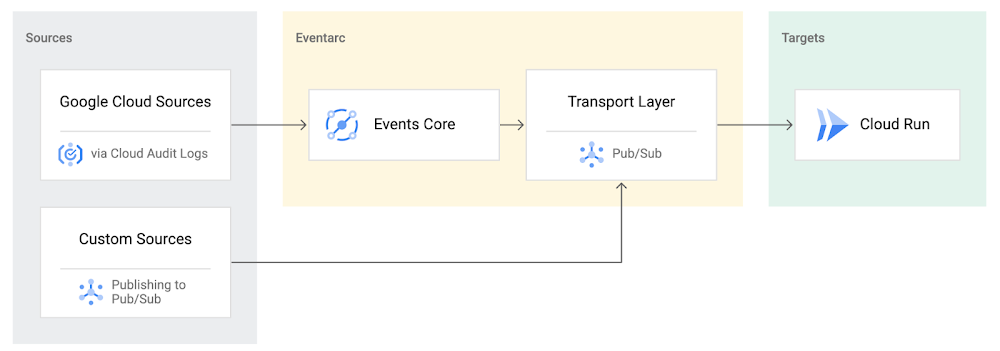
I previously talked about Eventarc for choreographed (event-driven) Cloud Run services and introduced Workflows for orchestrated services.Eventarc and Workflows are very useful in strictly choreographed or orchestrated architectures. However, you sometimes need a hybrid architecture that combines choreography and orchestration. For example, imagine a use case where a message to a Pub/Sub topic triggers an automated infrastructure workflow or where a file upload to a Cloud Storage bucket triggers an image processing workflow. In these use cases, the trigger is an event but the actual work is done as an orchestrated workflow.How do you implement these hybrid architectures in Google Cloud? The answer lies in Eventarc and Workflows integration. Eventarc triggersTo recap, an Eventarc trigger enables you to read events from Google Cloud sources via Audit Logs and custom sources via Pub/Sub and direct them to Cloud Run services:One limitation of Eventarc is that it currently only supports Cloud Run as targets. This will change in the future with more supported event targets. It’d be nice to have a future Eventarc trigger to route events from different sources to Workflows directly. In absence of such a Workflows enabled trigger today, you need to do a little bit of work to connect Eventarc to Workflows. Specifically, you need to use a Cloud Run service as a proxy in the middle to execute the workflow. Let’s take a look at a couple of concrete examples.Eventarc Pub/Sub + Workflows integrationIn the first example, imagine you want a Pub/Sub message to trigger a workflow. Define and deploy a workflowFirst, define a workflow that you want to execute. Here’s a sample workflows.yaml that simply decodes and logs the Pub/Sub message body:Deploy a Cloud Run service to execute the workflowNext, you need a Cloud Run service to execute this workflow. Workflows has an execution API and client libraries that you can use for your favorite language. Here’s an example of the execution code from a Node app.js file. It simply passes the received HTTP request headers and body to the workflow and executes it:Deploy the Cloud Run service with the Workflows name and region passed as environment variables:Connect a Pub/Sub topic to the Cloud Run serviceWith Cloud Run and Workflows connected, the next step is to connect a Pub/Sub topic to the Cloud Run service by creating an Eventarc Pub/Sub trigger:This creates a Pub/Sub topic under the covers that you can access with:Trigger the workflowNow that all the wiring is done, you can trigger the workflow by simply sending a Pub/Sub message to the topic created by Eventarc:gcloud pubsub topics publish ${TOPIC_ID} –message=”Hello there”In a few seconds, you should see the message in Workflows logs, confirming that the Pub/Sub message triggered the execution of the workflow:Eventarc Audit Log-Storage + Workflows integrationIn the second example, imagine you want a file creation event in a Cloud Storage bucket to trigger a workflow. The steps are similar to the Pub/Sub example with a few differences.Define and deploy a workflowAs an example, you can use this workflow.yaml that logs the bucket and file names:Deploy a Cloud Run service to execute the workflowIn the Cloud Run service, you read the CloudEvent from Eventarc and extract the bucket and file name in app.js using the CloudEvent SDK and the Google Event library:Executing the workflow is similar to the Pub/Sub example, except you don’t pass in the whole HTTP request but rather just the bucket and file name to the workflow:Connect Cloud Storage events to the Cloud Run serviceTo connect Cloud Storage events to the Cloud Run service, create an Eventarc Audit Logs trigger with the service and method names for Cloud Storage:Trigger the workflowFinally, you can trigger the workflow by creating and uploading a file to the bucket:In a few seconds, you should see the workflow log the bucket and object name.ConclusionIn this blog post, I showed you how to trigger a workflow with two different event types from Eventarc. It’s certainly possible to do the opposite, namely, trigger a Cloud Run service via Eventarc with a Pub/Sub message (see connector_publish_pubsub.workflows.yaml) from Workflows or a file upload to a bucket from Workflows. All the code mentioned in this blog post is in eventarc-workflows-integration. Feel free to reach out to me on Twitter @meteatamel for any questions or feedback.Related ArticleBetter service orchestration with WorkflowsWorkflows is a service to orchestrate not only Google Cloud services such as Cloud Functions and Cloud Run, but also external services.Read Article
Quelle: Google Cloud Platform

Today Is The Day!

It’s here! Ready or not, DockerCon — our free, one-day, all-digital event designed for developers by developers — has arrived. Registration is open until 9 a.m., so if you haven’t already done so, go ahead and sign up!

This is your chance to learn all you can about modern application delivery in a cloud-native world — including the application development technology, skills, tools and people you need to help solve the problems you face day to day.

Final reminders: Don’t forget to catch our line-up of keynote speakers including Docker CEO Scott Johnston, and to bring your questions to Live Panels hosted by Docker Captain Bret Fisher, as well as our two developer-focused panels and Hema Ganapathy’s women’s panel. Just put your questions on selected topics in chat, and the team will do their best to answer them.

If you still need guidance on what to focus on, here’s a reminder of what not to miss. And don’t forget to come celebrate our global community in Community Rooms — a first at DockerCon.

That’s it! Now go forth and carpe DockerCon!

DockerCon LIVE 2021

Join us for DockerCon LIVE 2021 on Thursday, May 27. DockerCon LIVE is a free, one day virtual event that is a unique experience for developers and development teams who are building the next generation of modern applications. If you want to learn about how to go from code to cloud fast and how to solve your development challenges, DockerCon LIVE 2021 offers engaging live content to help you build, share and run your applications. Register today at https://dockr.ly/2PSJ7vn
The post Today Is The Day! appeared first on Docker Blog.
Quelle: https://blog.docker.com/feed/

Cloud AI in the developer community

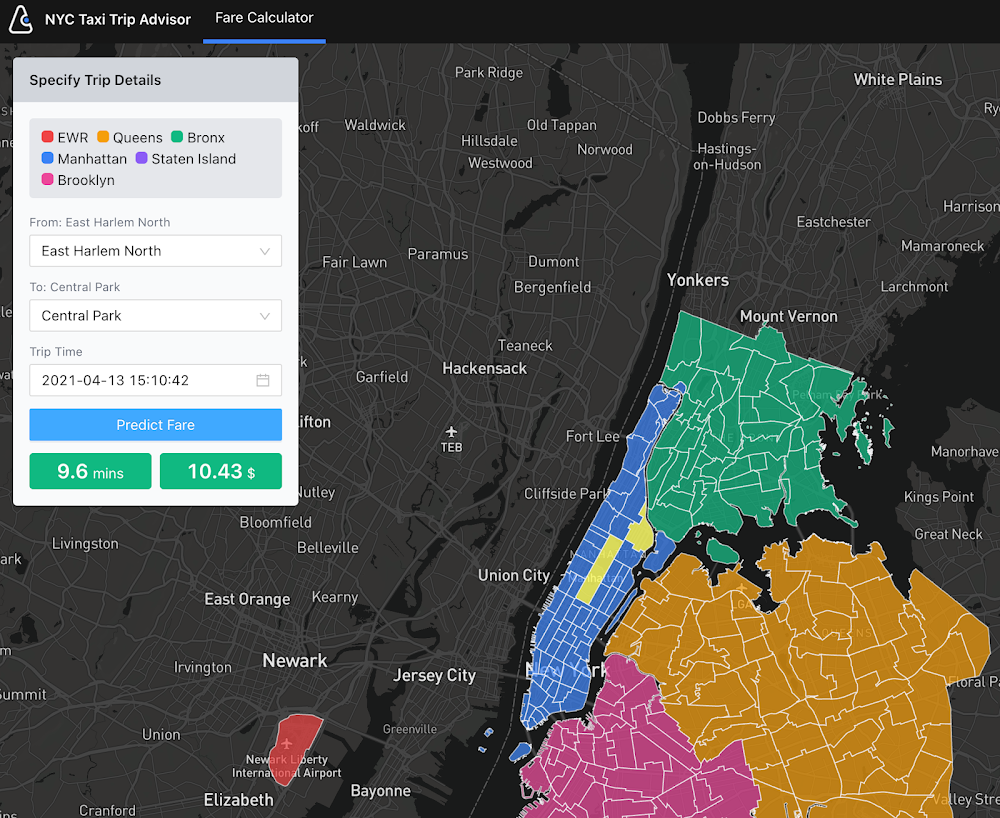
Editor’s note: This post features third party projects built with AI Platform. At Google I/O on May 18, 2021 Google Cloud announced Vertex AI, a unified UI for the entire ML workflow, which includes equivalent functionality from the AI Platform and new MLOps services. Most of the sample code and materials introduced in this post will also be applicable to Vertex AI products.Do you know Google Developers Experts (GDEs)? The GDE program is a network of highly experienced technology experts, influencers and thought leaders who are passionate in sharing their knowledge and experiences with fellow developers. Among the many GDEs specialized in various Google technologies, ML (Machine Learning) GDEs have been very active across the globe hence we would like to share some of the great demos, samples and blog posts these ML GDEs have recently published for learning Cloud AI technologies. If you are interested in becoming an ML GDE, please check the bottom of this article to apply.Try the live demo: and learn how to train and serve scikit-learn modelsVictor Dibia created a great live demo NYC Taxi Trip Advisor with Cloud AI tools. Anyone can try it out. With this demo, you can choose a starting point and destination point (e.g. from JFK Airport to Central Park) so the tool shows a predicted trip time and fare using a multitask ML model (sklearn)Live demo: NYC Taxi Trip AdvisorOn the Notebooks published on the GitHub repo, Victor explains how he designed the demo with Vertex AI Notebooks, Prediction and App Engine, including the process for downloading the training data, preprocessing, training of the ML models (Random Forest and MLP) with scikit-learn, deploying to Prediction and serving with App Engine. The repo will be improved to further fine tune the user experience and the underlying ML models (e.g. use of a bayesian prediction model that allows for principled measures of uncertainty).Systems architectureVisual sanity checks on the MLP model predictions.AutoML + Notebooks + BigQuery = a fast, quick and efficient MLMinori Matsuda published a blog post Empowering Google Cloud AI Platform Notebooks by powerful AutoML where he explains how you can integrate Vertex AI Notebooks and AutoML Tables with BigQuery by using New York City taxi trips public dataset. He says: “Combining these, we can quickly implement efficient iterations of feature engineering, modeling, evaluation, and prediction to increase the accuracy.”In the post, Minori explains how AutoML technology works, using Model Search Google published recently. “The article says the concept of model search uses greedy beam-search the multiple trainers (even try RNNs such as LSTM), tunes the depth of the layers and the connection, and eventually does ensembles. It creates a model written in TensorFlow finally”. Minori actually tries out the framework and shows how it works with a video:Model Search trial by Minori MatsudaAlso, Minori points out that one of the easiest ways to create an AutoML model from the dataset on BigQuery is to use BigQuery ML on Vertex AI Notebooks.Creating an AutoML Tables model from BigQuery ML on Vertex AI NotebooksThis is a great example of an integrated solution you can compose with the powerful platform and services on Google Cloud.Video tutorials on Google Cloud AI platform and services Srivatsan Srinivasan has been posting a great series of videos on YouTube: Artificial Intelligence on Google Cloud Platform with sample code. One of those videos features a telecom churn prediction use case where he trains a XGBoost model and deploys it to Vertex AI Prediction.This is not only a sample code, but a great online learning content. The video includes introductions to the following concepts:Google Cloud Vertex AI OverviewCreating Cloud AI Notebook InstanceDeveloping Your First ML Model on Google CloudCreating Custom Predictor for InferenceBundling Dependency for DeploymentDeploying model on Vertex AI predictionCloud StorageFeature importance with the XGBoost modelIn addition to Google cloud AI platform and AI platform prediction, the video tutorial covers:Deploying model on Google Cloud Run, App Engine and GKEBigQuery MLCloud AutoML VisionSpeech to TextMLOps on Google CloudDistributed Training in TensorFlow with AI Platform and DockerLast April, Sayak Paul posted a full-fledged content Distributed Training in TensorFlow with AI Platform & Docker. He starts with: “Operating with a Jupyter Notebook environment can get very challenging if you are working your way through large-scale training workflows as is common in deep learning.” He uses AI Platform and Docker for solving this problem by providing a training workflow that is fully managed by a secure and reliable service with high availability.Sayak says: “While developing this workflow, I considered the following aspects for services I used to develop the workflow:” The service should automatically provision and deprovision the resources we would ask it to configure allowing us to only get charged for what’s been truly consumed.The service should also be very flexible. It must not introduce too much technical debt into our existing pipelines.In this post, he explains the end-to-end processes starting from designing the data pipeline that takes images for cats and dogs and converts to TFRecord stored on Cloud Storage.Data pipeline with TensorFlowAlso, his published repository contains the all code required for implementing the workflow, with rich documentation explaining how those files are organized and packaged in a Docker container to be submitted to AI Platform Training.Dockerfile for the container packagingTraining logs on Cloud LoggingIf you are a TensorFlow user, Sayak’s post could be the best way to learn what benefit you can get from the AI Platform and how to get started with the actual sample code.SNS curation with AI Platform + GKEChansung Park’s project Curated Personal Newsletter is a great sample with an actual demo app and the source code that aims for “collecting all the posts from one’s SNS wall (including personal note/shared/retweeted), then it will send an automatically curated periodic newsletter”.The system combines AI Platform Training and Prediction with Google Kubernetes Engine for building an end-to-end MLOps pipelines for continuous training and deployment whenever a new version of data or code for a model is integrated.Systems ArchitectureAlthough the project is still in development, it is a useful example as an end-to-end ML pipeline built with various Google Cloud services. Chansung also published a great write up on MLOps in Google Cloud which also helps understanding how you can build a production ML pipeline with various Cloud AI tools. Next stepsIf you are interested in joining the community nearby you, please check Google Cloud community page and find relevant information on meetups, tutorials and discussions.If you share the same passion in sharing your Cloud AI knowledge and experiences with fellow developers and interested in joining this ML GDE network, please check the GDE Program website, watch this ML GDE Program intro video and send an email to cloudai-gde@google.com with your intro and relevant activity information. Related ArticleGoogle Cloud unveils Vertex AI, one platform, every ML tool you needGoogle Cloud launches Vertex AI, a managed platform for experimentation, versioning and deploying ML models into production.Read Article
Quelle: Google Cloud Platform