How to load Salesforce data into BigQuery using a code-free approach powered by Cloud Data Fusion

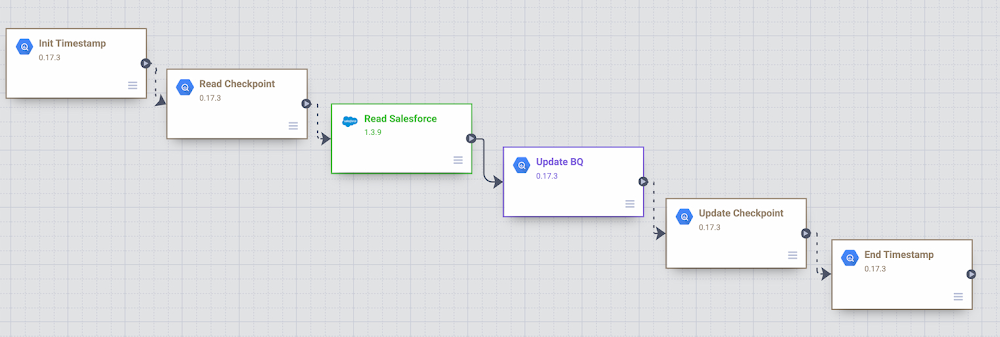
Organizations are increasingly investing in modern cloud warehouses and data lake solutions to augment analytics environments and improve business decisions. The business value of such repositories increases as customer relationship data is loaded and additional insights are generated.In this post, we’ll cover different ways to incrementally move Salesforce data into BigQuery using the scalability and reliability of Google services, an intuitive drag-and-drop solution based on pre-built connectors, and the self-service model of a code-free data integration service. A Common Data Ingestion Pattern:To provide a little bit more context, here is an illustrative (and common) use case:Account, Lead and Contact Salesforce objects are frequently manipulated by call center agents when using the SalesForce application.Changes to these objects need to be identified and incrementally loaded into a data warehouse solution using either a batch or streaming approach.A fully managed and cloud-native enterprise data integration service is preferred for quickly building and managing code-free data pipelines.  Business performance dashboards are created by joining Salesforce and other related data available in the data warehouse.Cloud Data Fusion to the rescue To address the Salesforce ETL (extract, transform and load) scenario above, we will be demonstrating the usage of Cloud Data Fusion as the data integration tool. Data Fusion is a fully managed, cloud-native, enterprise data integration service for quickly building and managing code-free data pipelines. Data Fusion’s web UI allows organizations to build scalable data integration solutions to clean, prepare, blend, transfer, and transform data without having to manage the underlying infrastructure. Its integration with Google Cloud ensures data is immediately available for analysis. Data Fusion offers numerous pre-built plugins for both batch and real-time processing. These customizable modules can be used to extend Data Fusion’s native capabilities and are easily installed though the Data Fusion Hub component.For Salesforce source objects, the following pre-built plugins are generally available:Batch Single Source – Reads one sObject from Salesforce. The data can be read using SOQL queries (Salesforce Object Query Language queries) or using sObject names. You can pass incremental/range date filters and also specify primary key chunking parameters. Examples of sObjects are opportunities, contacts, accounts, leads, any custom object, etc. Batch Multi Source – Reads multiple sObjects from Salesforce. It should be used in conjunction with multi-sinks.Streaming Source – Tracks updates in Salesforce sObjects. Examples of sObjects are opportunities, contacts, accounts, leads, any custom object, etc.If none of these pre-built plugins fit your needs, you can always build your own by using Cloud Data Fusion’s plugin APIs. For this blog, we will leverage the out of the box Data Fusion plugins to demonstrate both batch and streaming Salesforce pipeline options.Batch incremental pipelineThere are many different ways to implement a batch incremental logic. The Salesforce batch multi source plugin has parameters such as “Last Modified After”, “Last Modified Before”, “Duration” and “Offset” which can be used to control the incremental loads.Here’s a look at a sample Data Fusion batch incremental pipeline for Salesforce objects Lead, Contact and Account. The pipeline uses the previous’ start/end time as the guide for incremental loads.Batch Incremental Pipeline – From Salesforce to BigQueryThe main steps of this sample pipeline are:For this custom pipeline, we decided to store start/end time in BigQuery and demonstrate different BigQuery plugins. When the pipeline starts, timestamps are stored on a user checkpoint table in BigQuery. This information is used to guide the subsequent runs and incremental logic.Using the BigQuery Argument Setter plugin, the pipeline reads from the BigQuery checkpoint table, fetching the minimum timestamp to read from.With the Batch Multi Source plugin, the objects lead, contact and account are read from Salesforce, using the minimum timestamp as a parameter passed to the plugin.BigQuery tables lead, contact and account are updated using the BigQuery Multi Table sink pluginThe checkpoint table is updated with the execution end time followed by an update to current_time column.Adventurous?You can exercise this sample Data Fusion pipeline in your development environment by downloading its definition file from GitHub and importing it through the Cloud Data Fusion Studio. After completing the import, adjust the plugin properties to reflect your own Salesforce environment. You will also need to:      Create a BigQuery dataset named from_salesforce_cdf_stagingCreate the sf_checkpoint BigQuery table on dataset from_salesforce_cdf_staging as described below:3. Insert the following record into the sf_checkpoint table:Attention: The initial last_completion date  = “1900-01-01T23:01:01Z” indicates the first pipeline execution will read all Salesforce records with LastModifedDate column greater than 1900-01-01. This is a sample value targeted for initial loads. Adjust the last_completion column as needed to reflect your environment and requirements for the initial run.After executing this sample pipeline a few times, observe how sf_checkpoint.last_completion column evolves as executions finish. You can also validate that changes are being loaded incrementally into BigQuery tables as shown below:BigQuery output – Salesforce incremental pipelineStreaming pipeline  When using the Streaming Source plugin with Data Fusion, changes in Salesforce sObjects are tracked using PushTopic events. The Data Fusion streaming source plugin can either create a Salesforce PushTopic for you, or use an existing one you defined previously using Salesforce tools. The PushTopic configuration defines the type of events (insert, update, delete) to trigger notifications, and the objects columns in scope. To learn more about Salesforce PushTopics, click here.   When streaming data, there is no need to create a checkpoint table in BigQuery as data gets replicated near real time, automatically capturing only changes, as soon as they occur. The Data Fusion pipeline becomes super simple as demonstrated in the sample below:Salesforce streaming pipeline with Cloud Data FusionThe main steps of this sample pipeline are:1. Add a Salesforce streaming source and provide its configuration details. For this exercise, only inserts and updates are being captured from CDFLeadUpdates PushTopic. As a reference, here is the code we used to pre-create the CDFLeadUpdates PushTopic in Salesforce. The Data Fusion plugin can also pre-create the PushTopic for you if preferred.Hint: In order to run this code block, login to Salesforce with the appropriate credentials and privileges, open the Developer Console and click on Debug | Open Execute Anonymous Window.2. Add a BigQuery sink to your pipeline in order to receive the streaming events. Notice the BigQuery table gets created automatically once the pipeline executes and the first change record is generated.After starting the pipeline, make some modifications to the Lead object in Salesforce and observe the changes flowing into BigQuery as exemplified below:BigQuery output – Salesforce streaming pipeline with Cloud Data FusionAdventurous?You can exercise this sample Data Fusion pipeline in your development environment by downloading its definition file from GitHub and importing it through the Cloud Data Fusion Studio. After completing the import, adjust the plugin properties to reflect your own Salesforce environment.Got deletes?  If your Salesforce implementation allows “hard deletes” and you must capture them, here is a non-exhaustive list of ideas to consider:An audit table to track the deletes. A database trigger, for example, can be used to populate a custom audit table. You can then use Data Fusion to load the delete records from the audit table and compare/update the final destination table in BigQuery.An additional Data Fusion job that reads the primary keys from the source and compare/merge with the data in BigQuery.A Salesforce PushTopic configured to capture delete/undelete events and a Data Fusion Streaming Source added to capture from the PushTopic.Salesforce Change Data Capture.Conclusion:If your enterprise is using Salesforce and If it’s your job to replicate data into a data warehouse then Cloud Data Fusion has what you need. And if you already use Google Cloud tools for curating a data lake with Cloud Storage, Dataproc, BigQuery and many others, then Data Fusion integrations make development and iteration fast and easy. Have a similar challenge? Try Google Cloud and this Cloud Data Fusion quickstart next. For a more in-depth look into Data Fusion check out the documentation.Have fun exploring!
Quelle: Google Cloud Platform

Docker is Updating and Extending Our Product Subscriptions

Docker is used by millions of developers to build, share, and run any app, anywhere, and 55% of professional developers use Docker every day at work. In these work environments, the increase in outside attacks on software supply chains is accelerating developer demand for Docker’s trusted content, including Docker Official Images and Docker Verified Publisher images. Finally, the rapid global growth in developers – to an estimated 45 million by 2030 – pushes us to scale sustainably so we may continue to provide an innovative, free Docker experience that developers love.

To meet these challenges, today we’re announcing updates and extensions to our product subscriptions: Personal, Pro, Team, and Business. These updated product subscriptions provide the productivity and collaboration developers rely on with the scale, security, and trusted content businesses require, and do so in a manner sustainable for Docker.

What you need to know:

We’re introducing a new product subscription, Docker Business, for organizations using Docker at scale for application development and require features like secure software supply chain management, single sign-on (SSO), container registry access controls, and more.Our Docker Subscription Service Agreement includes a change to the terms for Docker Desktop:Docker Desktop remains free for small businesses (fewer than 250 employees AND less than $10 million in annual revenue), personal use, education, and non-commercial open source projects.It requires a paid subscription (Pro, Team or Business), starting at $5 per user per month, for professional use in larger businesses. You may directly purchase here, or share this post and our solution brief with your manager.While the effective date of these terms is August 31, 2021, there is a grace period until January 31, 2022 for those that require a paid subscription to use Docker Desktop.Docker Pro, Docker Team, and Docker Business subscriptions include commercial use of Docker Desktop.The existing Docker Free subscription has been renamed Docker Personal.No changes to Docker Engine or any upstream open source Docker or Moby project.Check out our FAQ or more information.

Docker Personal = Free

The new Docker Personal subscription replaces the Docker Free subscription. With its focus on open source communities, individual developers, education, and small businesses – which together account for more than half of Docker users – Docker Personal is free for these communities and continues to allow free use of all its components – including Docker CLI, Docker Compose, Docker Build/BuildKit, Docker Engine, Docker Desktop, Docker Hub, Docker Official Images, and more.

Docker Business = Management and security at scale

The new Docker Business subscription enables organization-wide management and security for businesses that use Docker for software development at scale. With an easy-to-use SaaS-based management plane, IT leaders can now efficiently observe and manage all their Docker development environments and accelerate their secure software supply chain initiatives. In addition to all the capabilities available in the Docker Pro and Docker Team subscriptions, Docker Business adds the ability to control what container images developers can access from Docker Hub, ensuring teams are building securely from the start by using only trusted content. And shortly, Docker Business will provide SAML SSO, the ability to control what registries developers can access, and the ability to remotely manage Docker Desktop instances.

More generally, the objective of the new Docker Business subscription is to help large businesses address the following challenges across their development organizations:

Gain visibility and control over content  Which container registries are my developers pulling container images from? What images are they running locally on their laptops? What versions are they running? What security vulnerabilities do those container images have? How can I help my developers protect the organization?

Manage local resources and access to external services How can I ensure my developers’ local Docker environments are safe? How do I make sure Docker is effectively sharing resources with other local tools? How can I manage the networks accessible to Docker?

Manage Docker development environments at scale  Many organizations have 100s and 1000s of developers using Docker and need a centralized point of control for developer onboarding/off-boarding with SSO, authentication and authorization, observability of behavior and content, and configuring the above controls.

The Docker Business subscription launches today at a price of $21 per user per month billed annually. And there’s more on the way – check-out our public roadmap for details.

Docker Desktop = New subscription terms

At Docker we remain committed to continuing to provide an easy-to-use, free experience for individual developers, open source projects, education, and small businesses. In fact, altogether these communities represent more than half of all Docker usage.  Docker Personal and all its components – including Docker CLI, Docker Compose, Kubernetes, Docker Desktop, Docker Build/BuildKit, Docker Hub, Docker Official Images, and more – remain free for these communities. 

Specifically, small businesses (fewer than 250 employees AND less than $10 million in revenue) may continue to use Docker Desktop with Docker Personal for free. The use of Docker Desktop in large businesses, however, requires a Pro, Team, or Business paid subscription, starting at $5 per user per month.

With Docker Desktop managing all the complexities of integrating, configuring, and maintaining Docker Engine and Kubernetes in Windows and Mac desktop environments – filesystems, VMs, networking, and more – developers can spend more of their time building apps, less on fussing with infrastructure. And with a paid subscription, businesses get additional value in Docker Desktop, including capabilities for managing secure software supply chains, centralizing policy visibility and controls, and managing users and access.

The updated terms for Docker Desktop reflect our need to scale our business sustainably and enable us to continue shipping new value in all Docker subscriptions. These new terms take effect August 31, 2021, and there is a grace period until January 31, 2022 for those who require a paid subscription to use Docker Desktop. (Note that licensing for Docker Engine and the upstream Docker and Moby open source projects is not changing.)

What’s next

We know this may be a significant change for some organizations, and we’re committed to helping you make this transition as smooth as possible. Individuals and small teams may purchase directly here. If you’re part of a larger organization that’s using Docker, share this post and our solution brief with your manager.

Over the next several months we’ll be covering the details of this announcement via webinars, community get-togethers, blog posts, and more. To kick things off, we have our Community All-Hands on September 16th and our first webinar introducing Docker Business on September 23rd – hope to see you at both! And for more details on the updated product subscriptions please visit docker.com/pricing and our FAQs. 

These last 12 months have seen a whirlwind of releases, from image scanning in the Docker CLI to Docker Desktop on Apple Silicon, Audit Logs in Docker Hub, GPU support in Docker Desktop, BuildKit Dockerfile mounts, new Docker Verified Publisher images, and more. And – as you can see from our public roadmap – there’s more to come in the next 12 months, and we invite all members of the Docker community to contribute, vote, and make your voices heard. In doing so, we will together continue our shared journey of helping all developers build, share, and run any app, anywhere.

Learn more

Part of a larger organization? Check out our Docker Solution Brief.Read the Press ReleaseRead the FAQ

[1] Stack Overflow Survey 2021 – https://insights.stackoverflow.com/survey/2021[2] SlashData Global Developer Population 2019 – https://dockr.ly/3t7VNO4

The post Docker is Updating and Extending Our Product Subscriptions appeared first on Docker Blog.
Quelle: https://blog.docker.com/feed/

Die Amazon SageMaker-Modellregistrierung unterstützt jetzt Inferenz-Pipelines

Amazon SageMaker Pipelines, der erste speziell entwickelte Continuous Integration and Continuous Delivery (CI/CD)-Service für Machine Learning (ML), unterstützt jetzt die Registrierung und Bereitstellung der SageMaker-Inferenz-Pipelines mithilfe der Modellregistrierung. SageMaker Pipelines enthält eine Modellregistrierung, die ein zentrales Repository für die Katalogisierung von Modellen für die Produktion, die Verwaltung von Modellversionen, das Verknüpfen von Metadaten mit Modellen, die Verwaltung des Genehmigungsstatus von Modellen und die Automatisierung ihrer Bereitstellung mit CI/CD darstellt. Eine Inferenz-Pipeline ist ein SageMaker-Modell, das aus einer linearen Folge von zwei bis fünfzehn Containern besteht, die Anforderungen für Inferenzen auf Daten verarbeiten. In der Vergangenheit unterstützte die Modellregistrierung nur Modelle, die aus einem einzigen Container zur Verarbeitung von Inferenzanforderungen bestanden. Jetzt können Kunden auch Inferenz-Pipelines in der Modellregistrierung registrieren. Jede Modellpaketversion einer Inferenz-Pipeline verfolgt nun gemeinsam alle Container der Pipeline. Eine genehmigte Modellpaketversion kann dann als Inferenz-Pipeline bereitgestellt und auf einem SageMaker-Inferenzendpunkt mit CI/CD gehostet werden.

Quelle: aws.amazon.com

AWS Snowcone ist jetzt in den AWS-Regionen Asien-Pazifik (Singapur) und Asien-Pazifik (Tokio) verfügbar

Der Service AWS Snowcone ist jetzt für Kundenbestellungen in den AWS-Regionen Asien-Pazifik (Singapur) und Asien-Pazifik (Tokio) verfügbar. Mit dieser Einführung ist Snowcone ab sofort in den AWS-Regionen Asien-Pazifik (Singapur), Asien-Pazifik (Tokio), Kanada (Zentral), Asien-Pazifik (Sydney), Europa (Frankfurt), Europa (Irland), USA Ost (Nord-Virginia) und USA West (Oregon) verfügbar. AWS Snowcone ist das kleinste Mitglied der AWS-Snow-Familie mit Geräten für Edge-Computing, Edge-Speicherung und Datenübertragung. Snowcone ist tragbar, robust und sicher – klein und leicht genug, um in einen Rucksack zu passen, und in der Lage, widrigen Umgebungen zu widerstehen. Kunden verwenden Snowcone, um Anwendungen dezentral am Rand des Netzwerks bereitzustellen und um Daten zu sammeln, lokal zu verarbeiten und entweder offline (durch Versand des Geräts an AWS) oder online (durch Verwendung von AWS DataSync auf Snowcone, um die Daten über das Netzwerk an AWS zu senden) an AWS zu übertragen.
Quelle: aws.amazon.com






