Recommendations AI modeling

In this series of Recommendations AI deep dive blog posts, we started with an overview of Recommendations AIand then walked through the data ingestion process. In this post, we will walk you through the model creation process and how you can get the best of Google’s AI and ML techniques to solve your business problems without deep ML expertise. When you ingest the data into Recommendations AI, the product catalog and user events form the two key pillars to train the recommendation models. Product features such as Item id, title, categories, description, price, stock status, and Events such as homepage views, detail page views, add to cart, purchases depict the whole journey of each user. They enable Recommendations AI to capture the interconnection between a user’s history, current landing page, and next action, and build a deep neural network to provide personalized recommendations. Once the data successfully ingested, you are now ready to train your very first model. Woohoo!Create recommendations in the graphical interfaceRecommendations AI provides an easy-to-use graphical interface, with which you can choose your model type, define your optimization objective, customize your business rules, and begin training your model with just a few clicks.The model will be trained for you from scratch using the data you sent to us within the bounds of the GCP project.​​ In 3-7 days the initial model training and tuning will conclude, and you’ll see a visual indicator in the dashboard that the model is ready to query. You can then begin serving recommendations to your customers, or visually preview the recommendations being generated by the model before you serve them to production traffic to ensure that your setup is satisfactory.Google has spent years delivering recommended content across flagship properties such as Google Ads, Google Search, and YouTube. Recommendations AI draws on that experience to deliver personalized recommendations that suit each customer’s tastes and preferences across all your touchpoints.Recommendation model typesRecommendations AI offers five recommendation model types including “Others you may like”, “Frequently bought together”, “Recommended for you”, “Similar items”, and “Recently Viewed”, with the first four model types powered by machine learning, and the new model type “Similar items” in preview.The “Others you may like” recommendation predicts the next product that a user is most likely to engage or convert with. The prediction is based on the shopping and viewing history of the user and the candidate product’s relevance to a current specified product. In the example below, on a product detail page of a blue dress, the “Others you may like” model recommends another three dresses that the customer is likely to click on or purchase.The “Frequently Bought Together” recommendation predicts items frequently bought together for a specific product within the same shopping session. If a list of products is being viewed, then it predicts items frequently bought with that product list. This recommendation is useful when the user has indicated an intent to purchase a particular product (or list of products) already, and you are looking to recommend complements (as opposed to substitutes). This recommendation is commonly displayed on the “add to cart” page, or on the “shopping cart” or “registry” pages (for shopping cart expansion). In the example below, the “Frequently Bought Together” model recommends heels and a watch, which go well with the blue dress just added to cart, and a green dress as the customer may need multiple dresses for different occasions.The “Recommended for You” recommendation predicts the next product that a user is most likely to engage with or purchase, based on the shopping or viewing history of that user and contextual information of requests, such as timestamps. This recommendation is typically used on the home page. “Recommended for You” can also be useful on category pages. A category page is similar to a home page, except that you display only items from that category. You can achieve this using a standard Recommended for You model with filter tags. For example, you can add customized filter tags (corresponding to each category page) to the items in your catalog. When you send the prediction request, set the user event object as category-page-view and specify a specific category page’s tag in the `filter` field. Only recommendation results matching the requested filter tag are returned.”Others You May Like” and “Recommended For You” are highly personalized recommendations powered by Transformer-based sequence modeling. “Others You May Like” recommendation requires an anchor item and is usually used on product detail pages, while “Recommended For You” can be used on pages without anchor items, such as home pages and category pages. They take into account both the content and order of a user’s historical clicks and purchases, correctly identify their true intentions, and precisely predict the next items that they would love to check out or purchase. For example, if a user browses a variety of maxi dresses and switches to fashionable shoes, “Others You May Like” model may recommend a mix of scandals and heels that go well with maxi dresses for a casual look during the day or a dressier look at night.”Similar Items” is a new model type we’ve recently developed and is currently in preview. The “Similar Items” model will use only the product catalog, and not require user events in an effort to accelerate time to test model and preview recommendations results in the console for customers. We’ve leveraged self-supervised learning to accurately capture item similarities based on the metadata such as titles and categories, even if there is no user event ingested.Optimization objectivesMachine learning models are created to optimize for a particular objective, which determines how the model is built. “Others You May Like” and “Recommended for You” recommendation models have click-through rate (CTR) as the default optimization objective. Optimizing for CTR emphasizes engagement, and you should optimize for CTR when you want to maximize the likelihood that the user interacts with the recommendation. In contrast, revenue per order is the default optimization objective for the “Frequently Bought Together” recommendation model type, as “Frequently Bought Together” focuses on cross-selling and increasing order values.For “Others You May Like” and “Recommended for You” recommendation models, we also support conversion rate (CVR) as the objective. Optimizing for conversion rate maximizes the likelihood that the user adds the recommended item to their cart. When CVR is specified as the objective for a customer with sparse add-to-cart events, the multi-task learning mechanism will be automatically activated, and transfer learn from detail-page-view events, which are typically much denser than add-to-cart events.User event data requirementsBefore you create a new model, you must have met the requirements for creating a new model. The type of user events you import, and the amount of data you need, depends on your recommendation (model) type and your optimization objective. For example, you need to meet the following data requirement to train an “Others You May Like” model optimizing for click-through rate:10,000 detail-page-view events that include at least 100 unique visitor IDs, and1 week, with an average of 10 detail-page-view events per joined catalog item, or 60 days with at least one joined detail-page-view event.When you reach the minimum data requirement, you can begin model training. You can import historical user event data to meet the minimum event data requirements faster, or wait until the user event data collection meets the minimum requirements.Other features for better performanceOur models also support massive catalogs of tens of millions of items and ensure that your customers have the opportunity to discover the entire breadth of your catalog through personalized recommendations. Models are re-trained daily to draw insights from changing catalogs, user behavior, or shopping trends and incorporate them into the recommendations being served. We also correct for bias with extremely popular or on-sale items and better handle long-tail items with sparse data as well as seasonal items to ultimately drive better CTR, CVR and revenue lift for our customers.Getting recommendationsThe “Ready to Query” column on the Models page will change to “Yes” once the models are finished with the initial training and tuning.  Once your models are trained and ready to query, you can preview the results in the cloud console and make prediction requests with the API.  Requests aren’t made to a model directly, a predict request is made to a specific Serving Config (previously called a Placement).  A Serving Config contains some additional options to use – so you can have multiple placements that call the same model, each with different options like price reranking or diversification settings.Creating a Serving Config:Name your Serving ConfigChoose a modelSelect OptionsUsually you’ll want to create a separate serving config for each different placement of a model.  This is useful for reporting, and also allows you to change the model type in one particular place on a site without affecting other placements.Recommendations AI is migrating to a general Retail UI that can be used for both recommendations and search, and some options will change in the new Retail UI. For example, we will be supporting the configuration of business rules in serving configs instead of models, so that you can quickly try out serving configs with various business rules, such as different levels of price reranking or diversification, using the same underlying model.The Evaluate (preview) tab allows you to quickly see what the actual results look like.  The required parameters like visitorId or item ids can be entered in the form and then submitted to get results from a particular Serving Config/Model combination:You can leverage Recommendations AI anywhere in the customer journey.  Home page, product detail pages and cart pages are the most common placements, but you can also include recommendations in email campaigns and mobile apps. Let’s take a look at the customer journey here as an example.A customer begins their journey on their laptop, browsing the sports apparel category when Recs AI recommends shoes. The customer leaves, but comes back to the site on their phone to view more shoes. Recs AI steps in again to recommend sunglasses. Our customer adds sunglasses and shoes to their cart, indicating an interest in both items. Here, Recs AI recommends shorts which the customer clicks on to look at, but ultimately abandons their cart.Three days later, you can send a personalized follow-up email to the customer with recommended items based on the customers clicks and interests. Recs AI closes the loop, spurring the customer to buy sunglasses and shorts, both recommended based on the customer’s previous activity across devices.As we can see, Rec AI works throughout the entire buying process – from initial product discovery on a laptop, to consideration on a mobile device, to purchasing follow-through via email channels.And that’s just one example of delivering recommendations in the customer journey. Customers can use recommendations across different device types (mobile, computer), in email campaigns, in physical retail settings (kiosks), or even indirectly (call center representative, sales representative).If you’ve been following along the steps with these blog posts series, you would now have a ML model that is trained for your custom data and ready to query. In our next post, we will go over how to include the Recommendations from these models to incorporate on your site. Related ArticleHow to get better retail recommendations with Recommendations AIRecommendations AI is a solution that uses machine learning to bring product recommendations to their shoppers across any catalog or clie…Read Article
Quelle: Google Cloud Platform

Updated data processing terms to reflect new EU Standard Contractual Clauses

For years, Google Cloud customers who are subject to European data protection laws1 have relied on our Standard Contractual Clauses (SCCs), as previously approved by regulators, to legitimize overseas transfers of their customer personal data when using our services. Today, we are glad to announce an update to our data processing terms for Google Cloud Platform, and Google Workspace (including Workspace for Education) and Cloud Identity, to incorporate various modules of the new EU SCCs approved by the European Commission on June 4, 2021, as well as separate UK SCCs. For all Google Cloud customers, this new approach:Offers clear and transparent support for their compliance with applicable European data protection laws;Simplifies the entities involved in contracting by no longer requiring any customer to deal with an additional Google entity only for SCC purposes; andAligns more closely with potential flows of data within the services.For customers located in Europe2, Google has further simplified data transfer compliance by assuming all the responsibilities imposed by the new SCCs.We have also published a new whitepaper that outlines the European legal rules for data transfers and explains our approach to implementing the new EU SCCs – as well as separate UK SCCs – so that our customers can better understand what our updated terms mean for them and their privacy compliance.We remain committed to helping all customers who rely on our cloud services meet applicable regulatory requirements by protecting any international transfers of their data.FOOTNOTESWe refer specifically to the EU GDPR, UK GDPR and Swiss Federal Data Protection Act (FDPA)We refer specifically to customers located in the EEA, UK and SwitzerlandRelated ArticleReaffirming Google Cloud’s commitments to EU businesses in light of the EDPB’s RecommendationsReaffirming our commitment to GDPR and updated European Data Protection Board recommendations.Read Article
Quelle: Google Cloud Platform

Introducing Quota Monitoring Solution: Single Dashboard with Alerting capabilities

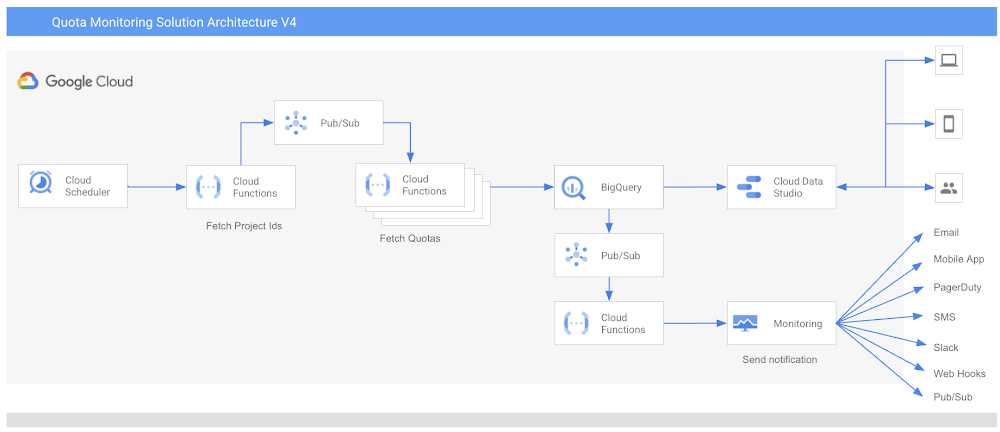
If you are looking for an automated way to manage quotas over a large number of projects, we are excited to introduce a Quota Monitoring Solution from Google Cloud Professional Services. By default, Google Cloud employs resource quotas to restrict how much of a particular shared Google Cloud resource you can use. Each quota represents a specific countable resource, such as API calls to a particular service or the number of compute cores used concurrently by your project.Quotas are enforced for a variety of reasons, including:To protect the community of Google Cloud users by preventing unforeseen spikes in usage and overloaded services.To help you manage resources. For example, you can set your own limits on service usage while developing and testing your applications to avoid unexpected bills from using expensive resources.Quota Monitoring Solution solution benefits anyone who manages quotas across projects, folders, or organizations. It offers an easy and centralized way to view and monitor the quota usage in a central dashboard and to use default alerting capabilities across all quotas. Specifically, the solution provides:Automated aggregation of quotas across all projects in given organizations or folders and a recurring scan at a defined frequency (e.g. hourly, daily) for new projects to automatically capture their quotas.A dashboard that provides visibility into recent resource usage against the individual quotas across all projects.Preconfigured alerting through email or other communication channels (e.g., email, SMS, Pub/Sub, etc.) when a resource reaches a certain threshold of its quota.The solution is easily deployable through Terraform so that you can adopt it into your project with minimal time investment.Outside of the Quota Monitoring Solution, there are additional ways of viewing your quota information, such as using the Google Cloud Console or using the gcloud command-line tool. You can also manually define Alerting Policies in Cloud Monitoring to send out notifications when a resource reaches a certain threshold of its quota. For example, you can define an alerting policy that triggers when the CPU usage of Compute Engine VM instances goes above 75% of the quota in any region.In case your project needs more of a particular resource than your quota allows, you can request a quota limit increase for the majority of quotas directly in the Google Cloud Console. In the vast majority of cases, quota increase requests are evaluated and processed automatically. However, depending on the nature of your request, a small number of quota increase requests needs to be handled by human reviewers. They typically process your request within 2-3 business days, so it is important to plan ahead.Ineffective quota management can lead to many different problems. For example, the lack of sufficient quota can prevent consuming additional resources, which could be needed for auto-scaling events, or for performing a GKE cluster upgrade. This can cause outages or service degradation, which could impact your customers’ experience and potentially impact your business revenues.Please note: Many services also have limits that are unrelated to the quota system. These are fixed constraints, such as maximum file sizes or database schema limitations, which cannot be increased or decreased. You can find out about these on the relevant service’s Quotas and limits page (for example, Cloud Storage quotas and limits).1. Technical ArchitectureThe diagram below shows the Quota Monitoring Solution architecture flow you can deploy in minutes using the deployment guide and accompanying terraform scripts.The solution includes a terraform script that you can deploy in a GCP project. This templates provisions the following resources in a GCP project:Cloud Scheduler- Cloud Scheduler is a fully managed, enterprise-grade cron-job scheduler. It is used to trigger Cloud Functions at scheduled intervals.Cloud Functions – Cloud Functions is an event-driven serverless compute platform. It contains the code logic to scan project quotas.Pub/Sub- Pub/Sub allows services to communicate asynchronously, with very low latency. It is used to support event-driven application design and high scalability. BigQuery –  BigQuery is a serverless, highly scalable data warehouse. It is used to store data for project quotas.Data Studio – Data Studio is a Dashboard and reporting tool. It is used to display quotas across multiple projects in a single view. You can configure other visualization tools of your choice, like Looker. In the future, we will also provide a Looker-based Dashboard.Cloud Monitoring Custom Log Metric and Alert – Google Cloud Monitoring offers logging and alerting capabilities. This is used to enable alerting that gives timely awareness to quota issues in your cloud applications so you can request a quota increase quickly. In this solution, Cloud Scheduler also works as an interface for you to provide configurations:You can provide folder IDs, organization IDs as parent nodes for which you want to monitor quotas. Parent nodes can be a single folder ID or organization ID or list of folder IDs or Organization IDs. You can also configure metric threshold and email addresses for Alerting. Currently, you can receive alerts via Email, Mobile App, PagerDuty, SMS, Slack, Web Hooks and Pub/Sub.Metric threshold is used to generate alerts. For example you can choose 70% or 80% as a threshold to generate alerts. The alerts will be sent to the configure alerting channel. Please note:Any changes in the projects like addition of new projects or deletion of existing projects will be reflected automatically in the subsequent scheduled scanning.Any changes in the GCP Cloud Monitoring APIs will be reflected. For example,  the introduction of new quota metrics will be reflected automatically in the solution without making any code changes.Any changes in the Cloud Monitoring alert notification channels will also be available automatically without the need to make any code changes.1.1 WorkflowIf we put all these components together, the workflow starts at Cloud Scheduler. You can provide your preferences of folders and organization IDs, metric threshold, email addresses and configure to run the job at scheduled intervals. Create a service account and grant access to view quota usage in the target organization/s or folder/s.Cloud scheduler automatically runs at configured frequency, for example daily, and passes user configurations to Cloud Functions. Based on the service account access, the first Cloud Functions instance lists projects of the parent node, generates the list of project IDs, and publishes them to the Pub/Sub topic.The second Cloud Function instance is triggered from the message generated in the previous step and receives the project IDs as a separate message from the topic.Upon receiving the project IDs, the second Cloud Function instance fetches the quotas for each project using publicly available GCP cloud monitoring APIs. Cloud Function loads the project’s quota data in the BigQuery table. Alerting A scheduled query on the BigQuery table filters all quotas with usage greater than the configured threshold.The third Cloud Function’s instance logs the data for metrics in Cloud Logging.Preconfigured custom log metrics in Google Cloud Monitoring create alerts, which are sent to the configured notification channel. ReportingOnce the data is loaded into BigQuery, Data Studio fetches the data from BigQuery and displays it in the Dashboard in a single view across all projects and metrics.Data Studio Dashboard is easy to use, customize, and share. You can also configure scheduled reporting from this Dashboard to receive Quota monitoring reports in email as PDF.2. Deployment ProcessThe Google Cloud custom quota monitoring solution can be deployed in a few minutes using the deployment guide and accompanying terraform scripts. Following are three simple steps:Create a service account and grant accessRun terraform script to provision all resources in a Google Cloud projectConfigure the Data Studio Dashboard For step-by-step details, please see the Readme section of the deployment guide on PSO Github. 3. How to Customize?This is an open source code available on Google Cloud PSO Github repository. You can fork the repository and customize as per your requirements. During the deployment, Terraform downloads the code. The code and the data stays in the customer’s environment. 4. SummaryQuota Monitoring solution lets you to view and monitor quotas for Google Cloud services from one central location for an organization or folder. Service Quotas enables you to easily and consistently track quota usage and receive alerts to save time and effort in setting up quota monitoring for new projects.If you have questions or suggestions for this solution, please fill out this form or reach out to us at pso-quota-monitoring@google.com AcknowledgementWe would like to thank Darpan Shah, Raghavendra Kyatham, and Marlon Pimentel for their contribution in building the solution as well as Rahul Khandkar, Karina Rivera, and Rohan Karne for sponsoring this project. We would also like to extend our gratitude to all Technical Account Managers who helped prototype and roll out the solution globally, especially Naveen Nelapudi, Vijay Narayanan, Rohit Iyer, Emily Wong, and Isha Rana.Related ArticleBest practices for optimizing your cloud costsFollowing these best practices will help optimize your cloud costs to the needs of your business, so you can get through these unpredicta…Read Article
Quelle: Google Cloud Platform

AWS Elastic Beanstalk unterstützt die dynamische Auswahl des Instance-Typs

AWS Elastic Beanstalk unterstützt jetzt die dynamische Auswahl des Instance-Typs für die Umgebungen von Elastic Beanstalk. Das bedeutet, dass Elastic Beanstalk automatisch alle kompatiblen Instance-Typen abruft, damit Sie eine Vielzahl von Anwendungen ausführen können. Mit dem dynamischen Instance-Typ können Sie den am besten geeigneten Instance-Typ auswählen, um die Leistung Ihrer Anwendung zu optimieren. Wenn Sie beispielsweise über Anwendungen für Machine Learning verfügen, können Sie die Leistung optimieren, indem Sie einen beschleunigten Computing-Instance-Typ wie p3 oder p4d auswählen.
Quelle: aws.amazon.com

Kontoübergreifende Amazon-Redshift-Datenfreigabe ist nun allgemein in den AWS-GovCloud-Regionen (USA) verfügbar

Mit der Datenfreigabe von Amazon Redshift können Sie Live-Daten und transaktionskonsistente Daten über verschiedene Redshift-Cluster hinweg freigeben, ohne die Komplexität und Verzögerungen, die mit Datenkopien und Datenbewegungen verbunden sind. Die Möglichkeit der gemeinsamen Nutzung von Daten in Clustern, die sich im selben AWS-Konto befinden, ist bereits in AWS-GovCloud-Regionen (USA) verfügbar. Jetzt ist auch die gemeinsame Nutzung von Daten über Redshift-Cluster in verschiedenen AWS-Konten allgemein in AWS-GovCloud-Regionen (USA) verfügbar. Die kontoübergreifende Datenfreigabe wird für alle Amazon-Redshift-RA3-Knotentypen unterstützt. Es entstehen keine zusätzlichen Kosten für die Nutzung der kontoübergreifenden Freigabe auf Ihren Amazon-Redshift-Clustern. 
Quelle: aws.amazon.com

Amazon Detective unterstützt S3- und DNS-Suchtypen und fügt Suchdetails hinzu

Amazon Detective erweitert die Unterstützung für Sicherheitsuntersuchungen für Amazon Simple Storage Service (S3) und DNS-bezogene Ergebnisse zu Amazon GuardDuty und bietet eine vollständige Abdeckung aller Erkennungen von GuardDuty. Darüber hinaus macht es Detective jetzt für einen Sicherheitsanalysten noch einfacher, Entitäten und Verhaltensweisen mit einer überarbeiteten Benutzererfahrung zu untersuchen. 
Quelle: aws.amazon.com

Optimieren Sie Ihr Amazon-Forecast-Modell mit der Genauigkeitsmetrik Ihrer Wahl

Wir freuen uns, Ihnen mitteilen zu können, dass Sie in Amazon Forecast jetzt die Genauigkeitsmetrik Ihrer Wahl auswählen können, um AutoML anzuweisen, das Training eines Prädiktors für die ausgewählte Genauigkeitsmetrik zu optimieren. Darüber hinaus haben wir drei weitere Genauigkeitsmetriken hinzugefügt, um Ihren Prädiktor zu bewerten: durchschnittlicher gewichteter Quantilverlust (Durchschnitt wQL), mittlerer absoluter prozentualer Fehler (MAPE) und mittlerer absoluter skalierter Fehler (MASE).
Quelle: aws.amazon.com

Amazon Connect Chat unterstützt jetzt die Übergabe eines Kundennamens und von Kontaktattribute über die Chat-Benutzeroberfläche

Amazon Connect Chat unterstützt jetzt die Übergabe eines Kundennamens und von Kontaktattributen über die Chat-Benutzeroberfläche, damit Sie die Chat-Benutzererfahrung personalisieren können. Kontaktattribute umfassen relevante Metadaten, die mit dem Kontakt verknüpft sind, wie z. B. Kunden-ID, Treuestatus oder sogar Kontext zu der Webseite, auf der sich der Kunde beim Starten des Chats befand. Kontaktattribute sind in Amazon-Connect-Flows verfügbar und machen es einfach, einzigartige und überzeugende Kundenerlebnisse zu schaffen, z. B. die Priorisierung eines Platinum-Kunden oder das Ausführen eines Agenten-Bildschirms mit den angezeigten relevanten Kundeninformationen. Darüber hinaus können Sie den Kundennamen auch über die Chat-Benutzeroberfläche freigeben und so sicherstellen, dass der Name sowohl für den Agenten als auch für den Kunden während der gesamten Interaktion sichtbar ist und Ihre Agenten die Konversation personalisieren können.
Quelle: aws.amazon.com