Your guide to all things AI & ML at Google Cloud Next

Mark your calendars—Google Cloud Next is coming October 12–14, 2021.We’ll kick off each day with a live broadcast and keynote to showcase our latest launches and share how customers and partners are tackling today’s greatest business challenges. You can also participate in online interactive experiences and attend on-demand sessions that align with your interests and schedule. Overall, we’ve designed Next ’21 as a customizable digital adventure to allow for a more personalized experience. If you’re anything like me, you’ll be tuning in to learn more about AI and ML. And good news—we have a lot to share! Below is your guide to my top recommendations for AI and ML content. Whether you want to hear directly from our customers about applying AI to real challenges, learn more about our newest products and announcements, or get hands on with training opportunities, we’ve got you covered.Plus, Google Cloud Next is free this year, so the experience is inclusive and accessible to everyone. Register now! Level Up Data Analytics with AIWith organizations investing rapidly in their AI/ML strategies, Google Cloud is doubling down on our commitment to meet customers where they are. Whether that means making it easier to build custom ML models or providing out-of-box AI capabilities built for specific use cases, our goal is to accelerate our customers’ paths from AI investment to improved business outcomes. . Within the Data Analytics and AI sessions at Next, learn how customers are finding success with Vertex AI, and discover new product announcements that will transform the way your data end users ingest and analyze data and deploy ML models. SessionsAI102: Why Vertex AI is even easier for developersDA200: Build an interactive machine learning application with Looker and Vertex AIGCD118: The State of Data Science and Machine Learning in 2021Learning Labs HOL103: Vertex AI: Qwik StartHOL104: Build an AutoML forecasting model with Vertex AIGCD103: Data Science with Vertex AISpeaker SpotlightJaime Espinosa, Senior PM, Machine Learning, Twitter Jaime’s career as a Product Manager is focused on ML and/or Platforms, and he’s educated as a technology generalist, with multiple engineering degrees focused on end-to-end systems. He has delivered ML-based products for scientific computing, sales, real-estate, robotics, business intelligence, HPC, and CPU design. Often working from ideation to delivery, he has worked on eight platforms, including the first serverless product. Jaime has led six ML platforms at Microsoft, Intel, Algorithmia, and Twitter. Jaime joins the panel discussion AI102: Why Vertex AI is even easier for developers.Matt Ferrari, Head of Ad Tech, Customer Intelligence, and Machine Learning, WayfairMatt Ferrari has more than 15 years of executive experience, with the last 10 as a C-suite executive in the cloud managed services and healthcare SaaS ecosystem spaces. Presently, Matt is the Head of Martech and Data/Machine Learning Platforms, where he leads both the Product and Engineering strategy for Adtech, Customer Intelligence, and Machine Learning organizations. Prior, Matt was CTO and co-founder of ClearDATA, where he was responsible for the strategy and execution of the company’s healthcare technology platform and services. He also oversaw strategy and corporate development, ensuring the differentiation of ClearDATA’s vision and strategic roadmap. Matt has also led product management, product development, engineering, and solution architecture. Matt joins the panel discussion AI102: Why Vertex AI is even easier for developers.Reimagine Customer Experience with Conversational AIProviding great customer experience is a pivotal part of gaining and retaining customers. From virtual customer service agents to AI designed to extract insights from call center transcripts, learn  how our Conversational AI products can help your business serve more customers in a more personalized and efficient manner. Hear how our customers have used products like Contact Center AI to improve their customer satisfaction scores, reduce time-to-resolution for call center inquiries, and reduce costs. SessionsAI103: Using CCAI insights to better understand your customersAI104: Customer impact with Conversational AIGWS105: Drive results by transforming the customer experience with AI-powered Business MessagesLearning LabsHOL102: Design Conversational Flows for your AgentSpeaker SpotlightDinesh Mahtani, Director, Digital Analytics and Insights, TELUSDinesh leads the Data Analytics team at TELUS Digital. The team’s mandate is to create a platform of integrated capabilities across data, machine learning and targeting that allow TELUS to deliver personalized experiences across channels including TELUS.com and the MyTELUS app. The team’s goal is to leverage data to simplify their customers’ experience and unlock key outcomes for TELUS. View Dinesh’s session here.Unlock the Power of Unstructured Data with Document AIEvery enterprise is focused on turning unstructured data, which lacks the metadata and organization required for analysis, into structured data from which insights can be extracted. Google Cloud Document AI platform is built on decades of AI innovation at Google and gives customers the power to digitize document workflows and analyze the information that documents contain. Join us at Next 2021 to gain a holistic understanding of our AI strategy around helping enterprises unlock value from unstructured data. SessionsAI100: Google Cloud and Ironclad partner to accelerate document workflowsA1200: Process billions of pages and cut operational costs with DocAIDEV202: AI-powered applications with Google CloudLearning LabsHOL100: Form Parsing Using Document AIHOL101: Process Procurement Documents Asynchronously using the Document AI APISpeaker SpotlightNadia Aqsa, Sr. Outbound Product Manager, Workday Nadia Aqsa is the face of Workday Expenses to customers, partners, and go-to-market teams such as Sales, Services, Marketing, Support, and Education. She is passionate about solving customer pain-points and helping them get the most out of their Workday experience. She also leads product adoption initiatives, chairs the product advisory council, and regularly hosts live webinars to engage with customers. View Nadia’s session here.More AI ContentStill hungry for more AI? We aim to please! Here are some of the other sessions at Next 2021 that cover critical AI topics like Translation, Sustainability, AI & ML Next Gen Infrastructure, Vision, Voice, Text, Speech, and more. Take a look! SessionsAI201: Eli Lilly uses Cloud Translation to translate content globallyAI300: Achieve system-level sustainable change with AI and MLAI105: What’s new and what’s next with infrastructure for AI and MLSPTL102: Data Cloud: Simply transform with a universal data platform [Spotlight]DEVKEY1: Developer Keynote with Urs Holzle, SVP, Technical Infrastructure, Google Cloud [Keynote] Learning LabsGCD104: Bring the power of senses to your applications with Cloud AILP106: Machine learning and AI learning pathSpeaker SpotlightThomas Griffin, Translation Tech Lead & Global Regulatory Architect, Eli LillyThomas is a technologist and software engineer that is currently focused on cloud enablement and adoption within Eli Lilly’s Medicines Development organisation. See Thomas’ session here.Check out all our AI & ML sessions and stay tuned for some exciting announcements. We can’t wait for you to join us at Google Cloud Next.
Quelle: Google Cloud Platform
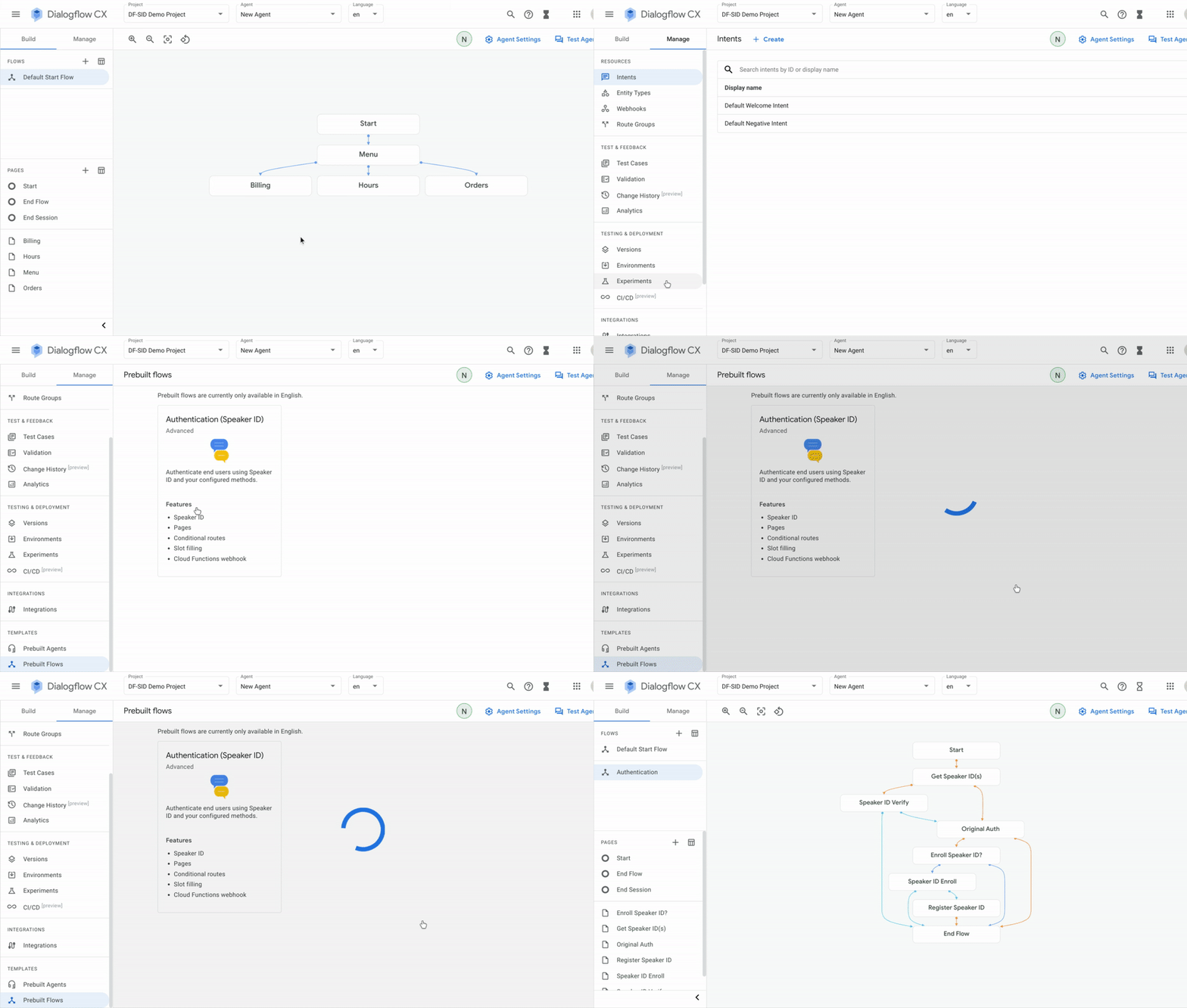
Speaker ID unlocks Machine Learning Speech Identification capability for Contact Centers

We launchedContact Center AI (CCAI) to kick off our work with the world’s largest call centers to reimagine customer experiences through the power of our Conversational AI. Our approach has shown its value over the last few years: a 2020 study based on CCAI customer interviews projected 20-35% call deflection away from agents, $1.3 million – $3.7 million in agent productivity gains through reduced average call times, and up to 75% reduced effort to manage contact center solutions (New Technology: The Projected Total Economic Impact™ Of Google Cloud Contact Center AI, a commissioned study conducted by Forrester Consulting, August 2020).We continue our investment in the space of reimagining customer experience with the launch of Speaker ID today. Speaker ID brings Google’s speech identification technology directly to Google Cloud customers and our contact center partners. Instead of subjecting callers to tedious and circuitous authentication processes, such as phone trees or menus, with Speaker ID, our customers and partners can now initiate service using the most intuitive interface of all: voice.”We are excited to see Google bring ML-based speaker identification to CCAI. As a launch partner for Google Cloud CCAI, we have seen the impact that Google’s AI technology can have on contact centers. Our customers are excited by the opportunity to add ML-based verification on top of their existing Dialogflow agents with no additional telephony or technology integrations necessary,” said Eric Rossman, VP of Technology Partners and Alliances, at Avaya.Contact Centers and their need for Speed and Convenience Calling into a contact center is still the preferred method of support or interaction for many customers. In fact, in 2020, customer preference for voice calls increased by 10 percentage points, to 43%, and was by far the most preferred service channel, with text interactions ranking second at 22% (Aspect Consumer Index Annual Report 2020). However, in order to receive the most personalized service available, callers still need to pass through archaic authentication processes, requiring them to remember passwords or provide personal information for verification. Not only is this highly inconvenient for the callers, it also significantly slows down the time to query resolution and burns through valuable agent time. While applying AI to these outdated policies can help to an extent, what is required is a complete reimagination of customer interaction that leverages the power of Conversational AI.Introducing Speaker IDSpeaker ID lets your callers authenticate over the phone, using their own voice. Using machine learning (ML)-based voice identification, Speaker ID identifies and verifies the caller. There are two primary components to using Speaker ID: Enrollment and Verification.The first time a caller encounters this new system, they will have to enroll. Typically, enrollment starts with authentication using the existing process, after which callers provide a brief voice sample that can be used in lieu of the old process to fast track verification in the future. Google Cloud Speaker ID is “text independent,” meaning that once a user is enrolled, verification can be performed with any audio snippet as short as three seconds. No password phrase is required and the user can say anything they want to authenticate their voice and thus their identity. Contact Center AI IntegrationSpeaker ID is directly integrated with Google Cloud’s Contact Center AI platform. Dialogflow CX, within CCAI, allows businesses to architect conversational experiences for their callers. With the integration with Speaker ID, Dialogflow CX can now leverage audio sent for intent detection and entity extraction. Along with full audio integration, Speaker ID also has pre-built Dialogflow CX components available to easily add enrollment and verification flows to existing or new Dialogflow CX bots. Customers can also configure Dialogflow CX to perform passive verification. This provides a speaker validation check based on the caller’s usual interaction with the voice bot. Users don’t need to be prompted or speak a specific phrase.Get Started TodaySpeaker ID is generally available today. At Google Cloud, we are committed to ensuring that our products and features are aligned with our AI Principles. If you are interested in Speaker ID, there is a review process to help ensure that your use case is aligned with our AI Principles and best practices for using Speaker ID for authentication and security. Contact your GCP seller to get started. For more information on Speaker ID, visit cloud.google.com/speaker-id. We also encourage you to register for Google Cloud Next 2021 to learn more about our Conversation AI offerings.
Quelle: Google Cloud Platform

Introducing Workflows callbacks

With Workflows, developers can easily orchestrate various services together, on Google Cloud or third-party APIs. Workflows connectors handle long-running operations of Google Cloud services till completion. And Workflow executions can also wait for time to pass with the built-in sys.sleep function, till some computation finishes, or some event takes place. But what if you need some user input or some approval in the middle of the workflow execution, like validating automatic text translation? Or an external system like a fulfillment center or an inventory system that is going to notify that products are back in stock? Instead of using a combination of “sleep” instructions and API polling, now you’ll be able to use Workflows callbacks! With callbacks, the execution of a workflow can wait until it receives a call to a specific callback endpoint. Let’s have a look at a concrete example.Case study: human validation of automated translationLet’s have a look at a concrete example! Machine learning based translations have reached an incredible level of quality, but sometimes, you want a human being to validate the translations produced. Thanks to Workflows callbacks, we can add a human, or an autonomous system, into the loop.To illustrate this case study, the following diagram will show you a possible implementation of the whole process:Click to enlargeFirst, the user visits a translation web page. They fill a textarea with the text they want to translate, and click on the translate button.Clicking on the button will call a Cloud Function that will launch an execution of the workflow. The text to translate is passed as a parameter of the function, and as a parameter of the workflow too.The text is saved in Cloud Firestore, and the Translation API is called with the input text, and will return the translation, which will be stored in Firestore as well. The translation appears on the web page in real-time thanks to the Firebase SDK.A step in the workflow creates a callback endpoint (also saved in Firestore), so that it can be called to validate or reject the automatic translation. When the callback endpoint is saved in Firestore, the web page displays validation and rejection buttons.The workflow now explicitly awaits the callback endpoint to be called. This pauses the workflow execution.The user decides to either validate or reject the translation. When one of the two buttons is clicked, a Cloud Function is called, with the approval status as parameter, which will in turn call the callback endpoint created by the workflow, also passing the approval status. The workflow resumes its execution, and saves the approval in Firestore. And this is the end of our workflow.Creating a callback and awaiting incoming callsTwo new built-in functions are introduced in the standard Workflows library:events.create_callback_endpoint — to create and setup the callback endpointevents.await_callback — to wait for the callback endpoint to be calledWith events.create_callback_endpoint you specify the HTTP method that should be used for invoking the callback endpoint, and you get a dictionary with the URL of that endpoint that you can pass to other systems. And with events.await_callback, you pass the callback endpoint to wait on, pass a timeout defining how long you want to wait, and when the endpoint is called, you get access to the body that was sent to the endpoint.Let’s have a look at the YAML definition of our workflow, where we apply those two new functions. First, we’re going to create the callback:The callback endpoint is now ready to receive incoming requests via a POST HTTP method, and the details of that endpoint are stored in the callback_details dictionary (in particular, the url key will be associated with the URL of the endpoint).Next, we pause the workflow, and await the callback with:The callback_details from earlier is passed as argument, as well as a timeout in seconds to wait for the callback to be made. When the call is received, all the details of the request are stored in the callback_request dictionary. You then have access to the full HTTP request, including its headers or its body. In case the timeout is reached, a TimeoutError is raised and can be caught by a try /except block.Going further and calling us back!If you want to have a closer look at the above example, all the code for this workflow can be found in the Workflows samples Github repository. And you can follow the details of this tutorial to replicate this workflow in your own project. As this is still a preview feature for now, please be sure to request access to this feature, if you want to try it on your own.For more information on callbacks, be sure to read the documentation. To dive deeper into the example above, please checkout the Github repository of this translation validation sample. Don’t hesitate to let us know via Twitter to @glaforge what you think of this feature, and how you intend on taking advantage of it in your own workflows!Related ArticleIntroducing new connectors for WorkflowsWe’re announcing new connectors for Workflows, which simplify calling Google Cloud services and APIs.Read Article
Quelle: Google Cloud Platform

Google named a leader in the 2021 Gartner® Magic Quadrant® for Full Life Cycle API Management

We’re excited to share that Gartner has recognized Google Cloud’s Apigee as a Leader in the 2021 Magic Quadrant for Full Life Cycle API Management, marking the sixth time in a row we’ve earned this recognition. We believe this achievement is a testimony to Google Cloud’s differentiated vision for API management and strong track record of delivering continuous product innovation. In this year’s report, Apigee is placed highest among all the vendors for the ability to execute.  We want to take this opportunity to thank our thriving community of customers, developers and partners for voicing their opinion.APIs are one of the key mechanisms through which organizations bring digital-first strategies to life in the form of new experiences and applications for partners and customers. To get the most out of these APIs in an efficient and scalable manner, API management is a must and partnering with the right API management vendor is critical to building and scaling a successful API program. Research from industry analyst firms like Gartner can help enterprises evaluate and choose the right solution.Many enterprise customers like Nationwide Insurance, ABN Amro, Bed Bath & Beyond, and Pizza Hut chose Google Cloud’s Apigee as their API management partner. Our mission is to help our customers make the leap to digital excellence – the ability to rapidly and repeatedly deploy and scale, and to consistently deliver on digital programs. We want to support our customers in building profitable API-based platforms and delivering measurable business outcomes.“APIs allow Veolia to access new ecosystems and partners that will bring new innovation opportunities for us. Apigee helps us quickly and easily deliver great customer experiences. It abstracts away the backend IT complexity, and helps us provide information and data to our customers quickly, consistently and securely,” – Pascal Dalla-Torre, Group CTO at Veolia.As part of this vision, we are focused on delivering continuous innovation.Achieve hyperscale – To help customers scale globally, connect their distributed workforce, and collaborate with regional partners using APIs, we announced Apigee X earlier this year. It’s a major release of our API management platform that seamlessly weaves together Google Cloud’s expertise in AI, security and networking to help enterprises efficiently manage the assets on which digital transformation initiatives are built. Developer efficiency – Developers today are using multiple tools to address their API and integration needs. Adding to the complexity is the proliferation of newer API styles and software development tools. Therefore, we recently announced Apigee Integration, a unified platform for API and integration needs,  Apigee Adapter for Envoy to support microservices needs, support for new API styles like GraphQL, flexibility of using existing SDLC tools to manage APIs, and fulfilment solutions for conversational AI. Democratizing application development – Across industries, tech savvy employees outside of the IT teams are increasingly using no-code development tools like AppSheet to build internal applications. To help organizations extend their API management investments to these tech savvy employees, we continue to invest in integrations between Apigee and AppSheet platforms. AIOps for APIs – In a digital excellence strategy, APIs take the center stage acting as the central nervous system for connecting various customer and employee facing applications. Therefore, ensuring APIs are always available and performing as expected is critical. To overcome monitoring challenges of hyperscale API programs, we harness the power of Google’s industry-leading machine learning capabilities to equip API operators with capabilities such as anomaly detection.Industry-specific solutions – To reduce the time to market of new digital programs and address specific industry requirements, we delivered a robust set of API industry accelerators such as Open Banking, Health APIx, eCommerce modernization, and Contact Center AI fulfilment for Telco.We are honored to be a Leader in the 2021 Gartner Magic Quadrant for Full Life Cycle Management and look forward to continuing to innovate and partner with you on your digital transformation journey. Download the full report here (requires an email address). To learn more about Apigee, visit the website here.Gartner Magic Quadrant for Full Life Cycle API Management, Shameen Pillai, Kimihiko Iijima, Mark O’Neill, John Santoro, Akash Jain, Fintan Ryan,28th September 2021.Gartner does not endorse any vendor, product or service depicted in its research publications and does not advise technology users to select only those vendors with the highest ratings or other designation. Gartner research publications consist of the opinions of Gartner’s Research & Advisory organization and should not be construed as statements of fact. Gartner disclaims all warranties, expressed or implied, with respect to this research, including any warranties of merchantability or fitness for a particular purpose.Gartner and Magic Quadrant are registered trademarks of Gartner, Inc. and/or its affiliates in the U.S. and internationally and is used herein with permission. All rights reserved.  This graphic was published by Gartner, Inc. as part of a larger research document and should be evaluated in the context of the entire document. The Gartner document is available upon request from Google(Apigee).Related ArticleRead Article
Quelle: Google Cloud Platform