Get started, build and grow your Startup on Google Cloud

We understand how crucial it is for startups that are experimenting with technologies, to get the right support on this journey, build fast, optimize and scale. At Google Cloud, we want to help you build your business and partner with you at every stage of your startup journey.Elevate your startup with our how-to guided series We’re very excited to announce the launch of Google Cloud Technical Guides for Startups, a video series for technical enablement aimed at helping startups to start, build and grow their businesses successfully and sustainably on Google Cloud.Through this multi series, you will not only be guided on how your startup can get started on Google Cloud, you will also be able to understand how other startups are leveraging our solutions across industries.This is a three part video series designed to match your startup’s stage of growth:The Start Series: Begin by building, deploying and managing new applications on Google Cloud from start to finish.The Build Series: Optimize and scale existing deployments to reach your target audiences.The Grow Series: Grow and attain scale with deployments on Google Cloud.Get started with the first episodeWe have launched  the Start Series, focused on the early stage startups and how to get started on Google Cloud by building and deploying new applications. Check out the first episode of the series here.Join us on this journeyWe hope that you will come with us on this journey, as we navigate through the topics on Google Cloud for startups  through the Start, Build, Grow Series together.  Join us by checking out the video series on the Google Cloud Tech channel, and subscribe to stay up to date. We can’t wait to see you there.
Quelle: Google Cloud Platform
Analyzing Twitter sentiment with new Workflows processing capabilities

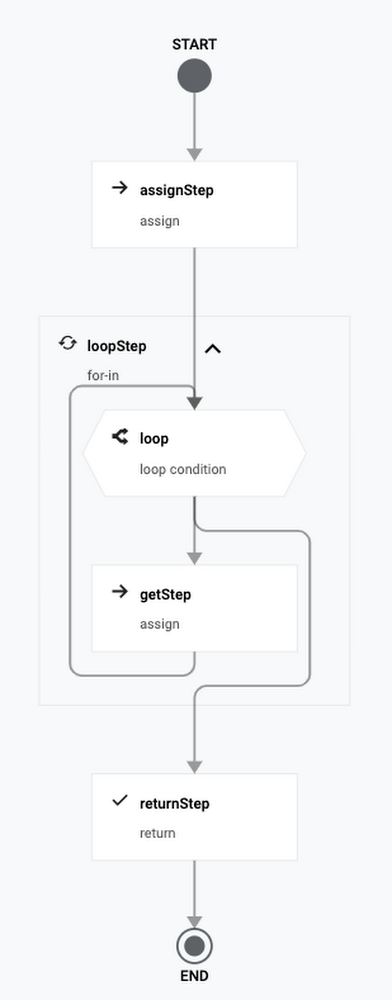
The Workflows team recently announced the general availability of iteration syntax and connectors! Iteration syntax supports easier creation and better readability of workflows that process many items. You can use a for loop to iterate through a collection of data in a list or map, and keep track of the current index. If you have a specific range of numeric values to iterate through, you can also use range-based iteration. Click to enlargeConnectors have been in preview since January. Think of connectors like client libraries for workflows to use other services. They handle authentication, request formats, retries, and waiting for long-running operations to complete. Check out our previous blog post for more details on connectors. Since January, the number of available connectors has increased from 5 to 20.The combination of iteration syntax and connectors enables you to implement robust batch processing use cases. Let’s take a look at a concrete sample. In this example, you will create a workflow to analyze sentiments of the latest tweets for a Twitter handle. You will be using the Cloud Natural Language API connector and iteration syntax.APIs for Twitter sentiment analysisThe workflow will use the Twitter API and Natural Language API. Let’s take a closer look at them.Twitter API To use the Twitter API, you’ll need a developer account. Once you have the account, you need to create an app and get a bearer token to use in your API calls. Twitter has an API to search for Tweets. Here’s an example to get 100 Tweets from the @GoogleCloudTech handle using the Twitter search API:Natural Language APINatural Language API uses machine learning to reveal the structure and meaning of text. It has methods such as sentiment analysis, entity analysis, syntactic analysis, and more. In this example, you will use sentiment analysis. Sentiment analysis inspects the given text and identifies the prevailing emotional attitude within the text, especially to characterize a writer’s attitude as positive, negative, or neutral.You can see a sample sentiment analysis response here. You will use the score of documentSentiment to identify the sentiment of each post. Scores range between -1.0 (negative) and 1.0 (positive) and correspond to the overall emotional leaning of the text. You will also calculate the average and minimum sentiment score of all processed tweets.Define the workflowLet’s start building the workflow in a workflow.yaml file.In the init step, read the bearer token, Twitter handle, and max results for the Twitter API as runtime arguments. Also initialize some sentiment analysis related variables:In the searchTweets step, fetch tweets using the Twitter API:In the processPosts step, analyze each tweet and keep track of the sentiment scores. Notice how each tweet is analyzed using the new for-in iteration syntax with its access to the current index.Under the processPosts step, there are multiple substeps. The analyzeSentiment step uses the Language API connector to analyze the text of a tweet and the next two steps calculate the total sentiment and keep track of the minimum sentiment score and index:Once outside the processPosts step, calculate the average sentiment score, and then log and return the resultsDeploy and execute the workflowTo try out the workflow, let’s deploy and execute it.Deploy the workflow:Execute the workflow (don’t forget to pass in your own bearer token):After a minute or so, you should see the see the result with sentiment scores:NextThanks to the iteration syntax and connectors, we were able to read and analyze Tweets in an intuitive and robust workflow with no code. Please reach out to @meteatamel and krisabraun@ for questions and feedback.Twitter sentiment analysis on GitHub.Share feedback, interesting use cases and customer requestsRelated ArticleIntroducing Workflows callbacksIntroducing Workflows callbacks. Thanks to callbacks, you can put a human being or autonomous system into the loop. If your processes req…Read Article
Quelle: Google Cloud Platform

Join Docker This Month at KubeCon and the Cloud Engineering Summit

Two cloud-related conferences are coming up this month, and Docker will have speakers at both. First up, Docker CTO Justin Cormack will present at KubeCon next week. The week after that Peter McKee, Docker’s head of Developer Relations, will speak at  Pulumi Cloud Engineering Summit.

At KubeCon, Justin and co-presenter Steve Lasker of Microsoft will speak on the topic of tooling for supply chain security with special reference to the Notary project. They’ll also look at the future roadmap and the supply chain landscape. KubeCon, the flagship conference of the Cloud Native Computing Foundation, is geared toward adopters and technologists from leading open source and cloud native communities. The conference runs Oct. 11 – 15 in Los Angeles and virtually. Justin’s presentation, titled Notary: State of the Container Supply Chain, takes place Thursday, Oct. 14 at 4:30 p.m. – 5:05 p.m. Pacific.

At the Cloud Engineering Summit, Peter will team up with Uffizzi’s Josh Thurman to speak about Continuous Previews — a cousin of Continuous Integration and Continuous Deployments that allows developers to easily share new features and changes to a wide audience within their organization, thereby speeding the delivery of features to users. The Wednesday, Oct. 20 summit is a virtual day of learning for cloud practitioners that focuses on best practices for building, deploying and managing modern cloud infrastructure. Peter’s presentation, titled Continuous Previews: Using Infrastructure as Code to Continuously Share and Preview Your Application, takes place at 3:00 p.m. – 3:30 p.m. Pacific.
The post Join Docker This Month at KubeCon and the Cloud Engineering Summit appeared first on Docker Blog.
Quelle: https://blog.docker.com/feed/

Ankündigung der allgemeinen Verfügbarkeit von Amplify Geo für AWS Amplify

Heute geben wir bekannt, dass Amplify Geo für JavaScript nach unserer ersten Entwicklervorschauversion im August allgemein verfügbar ist. Amplify Geo ermöglicht es Frontend-Entwicklern, ihren Webanwendungen schnell standortbezogene Funktionen hinzuzufügen. Amplify Geo erweitert bestehende Anwendungsfallkategorien von Amplify wie Auth, DataStore und Storage und umfasst eine Reihe abstrahierter Clientbibliotheken, die auf Amazon Location Service aufbauen, sowie gebrauchsfertige Karten-UI-Komponenten basierend auf der beliebten Open-Source-Bibliothek MapLibre. Amplify Geo aktualisiert auch das Amplify-Command-Line-Interface (CLI)-Tool, um es Personen zu erleichtern, die mit AWS nicht vertraut sind, gängige Mapping-Anwendungsfälle durch Bereitstellung aller erforderlichen Cloud-Services zu erreichen
Quelle: aws.amazon.com

Amazon SES unterstützt jetzt 2048-Bit-DKIM-Schlüssel

Kunden von Amazon Simple Email Service (Amazon SES) können jetzt 2048-Bit-DomainKeys-Identified-Mail-(DKIM)-Schlüssel verwenden, um ihre E-Mail-Sicherheit zu verbessern. DKIM ist ein E-Mail-Sicherheitsstandard, der sicherstellen soll, dass eine E-Mail, die angeblich von einer bestimmten Domäne stammt, tatsächlich vom Inhaber dieser Domäne autorisiert wurde. DKIM basiert auf der Public-Key-Kryptografie und der Signierung von E-Mails mit einem privaten Schlüssel. Der empfangende Server verwendet einen öffentlichen Schlüssel, der auf einem DNS der Domäne bereitgestellt wird, und überprüft damit, dass die Teile der E-Mail während der Übertragung nicht verändert wurden.
Quelle: aws.amazon.com

Amazon Monitron launcht die iOS-App

Heute geben wir den Start der Amazon-Monitron-iOS-App bekannt. Die iOS-App ergänzt die bestehende Android-App und bietet Kunden mehr Optionen für die Nutzung von Amazon Monitron. iPhone-Nutzer können jetzt die Amazon-Monitron-iOS-App verwenden, um ihre Sensoren und Gateway-Geräte einzurichten und Berichte über das Betriebsverhalten und Warnungen zu möglichen Ausfällen ihrer Geräte zu erhalten.
Quelle: aws.amazon.com

Überwachung der Uhrgenauigkeit auf AWS Fargate mit Amazon ECS

Sie können jetzt die Genauigkeit der Systemzeit für Ihre Amazon-ECS-Aufgaben überwachen, die auf AWS Fargate ausgeführt werden. Bei zeitkritischen Workloads, die auf Fargate ausgeführt werden, können Kunden die Uhrfehlergrenze überwachen, die als Proxy für Uhrfehler verwendet wird, um festzustellen, ob die Differenz zwischen Referenzzeit und Systemzeit einen Schwellenwert überschreitet. Diese Funktion nutzt Amazon Time Sync Service, um die Uhrzeitgenauigkeit zu messen und den für Container-gebundenen Uhrzeitfehler bereitzustellen.
Quelle: aws.amazon.com

Cloud Sovereignty: a Fashionable Trend or Vital Need?

f newly founded NGOs announcing Sovereign Cloud development as their primary goal has vastly increased last year. The modern trend of sovereignty becomes the must-have of the season. What should you choose for your cloud data – to be trendy and protected or stay in the dark for your data safety? In fact, you have no choice and no right to risk. 
Quelle: openstack.org