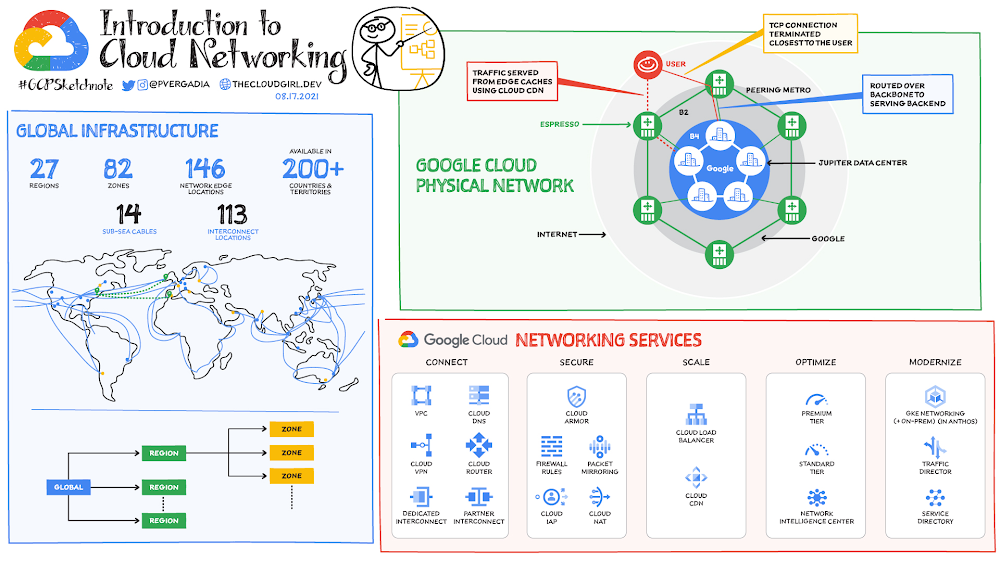
Google Cloud Networking overview
How is the Google Cloud physical network organized? Google Cloud is divided into regions, which are further subdivided into zones. A region is a geographic area where the round trip time (RTT) from one VM to another is typically under 1 ms. A zone is a deployment area within a region that has its own fully isolated and independent failure domain. This means that no two machines in different zones or in different regions share the same fate in the event of a single failure. At the time of this writing, Google has more than 27 regions and more than 82 zones across 200+ countries. This includes 146 network edge locations and CDN to deliver the content. This is the same network that also powers Google Search, Maps, Gmail, and YouTube. Click to enlargeGoogle network infrastructureGoogle network infrastructure consists of three main types of networks: Data center network, which connects all the machines in the network together. This includes 100s of 1000s of miles of fiber optic cables including more than a dozen subsea cables. Software-based private network WAN connects all data centers together Software defined public WAN for user-facing traffic entering the Google network A machine gets connected from the internet via the public WAN and gets connected to other machines on the network via the private WAN. For example, when you send a packet from your virtual machine running in the cloud in one region to a GCS bucket in another, the packet does not leave the Google network backbone. In addition, network load balancers and layer 7 reverse proxies are deployed at the network edge, which terminates the TCP/SSL connection at a location closest to the user — eliminating the two network round trips needed to establish an HTTPS connection.Cloud networking servicesGoogle’s physical network infrastructure powers the global virtual network that you need to run your applications in the cloud. It offers virtual networking and tools needed to lift-and-shift, expand, and/or modernize your applications:Click to enlargeConnectThe first thing you need is to provision the virtual network, connect to it from other clouds or on-premises, and isolate your resources so other projects and resources cannot inadvertently access the network.Hybrid Connectivity: Consider company X, which has an on-premises environment with a prod and dev network. They would like to connect their on-premises environment with Google Cloud so the resources and services can easily connect between the two environments. They can either use Cloud Interconnect for dedicated connection or Cloud VPN for connection via an IPSec secure tunnel. Both work, but the choice would depend on how much bandwidth they need; for higher bandwidth and more data dedicated interconnect is recommended. Cloud Router would help enable the dynamic routes between the on-premises environment and Google Cloud VPC. If they have multiple networks/locations, they could also use Network Connectivity Center to connect their different enterprise sites outside of Google Cloud by using the Google network as a wide area network (WAN). Virtual Private Cloud (VPC): They deploy all their resources in VPC but one of the requirements is to keep the Prod and Dev environments separate. For this the team needs to use Shared VPC, which allows them to connect resources from multiple projects to a common Virtual Private Cloud (VPC) network, so that they can communicate with each other securely and efficiently using internal IPs from that network. Cloud DNS: They use Cloud DNS to manage:Public and private DNS zonesPublic/private IPs within the VPC and over the internetDNS peering ForwardingSplit horizonsDNSSEC for DNS security ScaleScaling includes not only quickly scaling applications, but also enabling real-time distribution of load across resources in single or multiple regions, and accelerating content delivery to optimize last-mile performance.Cloud Load Balancing: Quickly scale applications on Compute Engine—no pre-warming needed. Distribute load-balanced compute resources in single or multiple regions (and near users) while meeting high-availability requirements. Cloud Load Balancing can put resources behind a single anycast IP, scale up or down with intelligent autoscaling, and integrate with Cloud CDN.Cloud CDN: Accelerate content delivery for websites and applications served out of Compute Engine with Google’s globally distributed edge caches. Cloud CDN lowers network latency, offloads origin traffic, and reduces serving costs. Once you’ve set up HTTP(S) load balancing, you can enable Cloud CDN with a single checkbox.SecureNetworking security tools for defense against infrastructure DDoS attacks, mitigating data exfiltration risks when connecting with services within Google Cloud, and network address translation to enable controlled internet access for resources without public IP addresses.Firewall Rules: Lets you allow or deny connections to or from your virtual machine (VM) instances based on a configuration that you specify. Every VPC network functions as a distributed firewall. While firewall rules are defined at the network level, connections are allowed or denied on a per-instance basis. You can think of the VPC firewall rules as existing not only between your instances and other networks, but also between individual instances within the same network.Cloud Armor: It works alongside an HTTP(S) load balancer to provide built-in defenses against infrastructure DDoS attacks. IP-based and geo-based access control, support for hybrid and multi-cloud deployments, preconfigured WAF rules, and Named IP ListsPacket Mirroring: Packet Mirroring is useful when you need to monitor and analyze your security status. VPC Packet Mirroring clones the traffic of specific instances in your Virtual Private Cloud (VPC) network and forwards it for examination. It captures all traffic (ingress and egress) and packet data, including payloads and headers.The mirroring happens on the virtual machine (VM) instances, not on the network, which means it consumes additional bandwidth only on the VMs.Cloud NAT: Lets certain resources without external IP addresses create outbound connections to the internet.Cloud IAP: Helps work from untrusted networks without the use of a VPN. Verifies user identity and uses context to determine if a user should be granted access. Uses identity and context to guard access to your on-premises and cloud-based applications. Optimize It’s important to keep a watchful eye on network performance to make sure the infrastructure is meeting your performance needs.This includes visualizing and monitoring network topology, performing diagnostic tests, and assessing real-time performance metrics. Network Service Tiers – Premium Tier delivers traffic from external systems to Google Cloud resources by using Google’s low-latency, highly reliable global network while Standard Tier is for routing traffic over the internet. Choose Premium Tier for performance and Standard Tier as a low-cost alternative.Network Intelligence Center – provides a single console for Google Cloud network observability, monitoring, and troubleshootingModernize As you modernize your infrastructure, adopt microservices-based architectures, and expand your use of containerization you will need access to tools that can help manage the inventory of your heterogeneous services and route traffic amongst them. GKE Networking (+ on-prem in Anthos) – When you use GKE, Kubernetes and Google Cloud dynamically configure IP filtering rules, routing tables, and firewall rules on each node, depending on the declarative model of your Kubernetes deployments and your cluster configuration on Google Cloud.Traffic Director – Helps you run microservices in a global service mesh (outside of your cluster). This separation of application logic from networking logic helps you improve your development velocity, increase service availability, and introduce modern DevOps practices in your organization. Service Directory – Platform for discovering, publishing, and connecting services, regardless of the environment. It provides real-time information about all your services in a single place, enabling you to perform service inventory management at scale, whether you have a few service endpoints or thousands. For a more in-depth look into Google Cloud Networking products check out this. For more #GCPSketchnote, follow the GitHub repo. For similar cloud content follow me on Twitter @pvergadia and keep an eye out on thecloudgirl.dev Related ArticleTraffic Director explained!If your application is deployed in a microservices architecture then you are likely familiar with the networking challenges that come wit…Read Article
Quelle: Google Cloud Platform