One of the most exciting advances in modern AI is multimodal support, the ability for models to understand and generate multiple types of input, such as text, images, or audio.
With multimodal models, you’re no longer limited to typing prompts; you can show an image or play a sound, and the model can understand it. This opens a world of new possibilities for developers building intelligent, local AI experiences.In this post, we’ll explore how to use multimodal models with Docker Model Runner, walk through practical examples, and explain how it all works under the hood.
What Is Multimodal AI?
Most language models only understand text, but multimodal models go further. They can analyze and combine text, image, and audio data. That means you can ask a model to:
Describe what’s in an image
Identify or reason about visual details
Transcribe or summarize an audio clip
This unlocks new ways to build AI applications that can see and listen, not just read.
How to use multimodal models
Not every model supports multimodal inputs, so your first step is to choose one that does.
In Docker Hub we indicate the inputs supported on each model on its model card, for example:
Moondream2, Gemma3, or Smolvlm models supports text and image as input, while GPT-OSS supports text only
The easiest way to start experimenting is with the CLI. Here’s a simple example that asks a multimodal model to describe an image:
docker model run gemma3 "What's in this image? /Users/ilopezluna/Documents/something.jpg"
The image shows the logo for **Docker**, a popular platform for containerization.
Here's a breakdown of what you see:
* **A Whale:** The main element is a stylized blue whale.
* **A Shipping Container:** The whale's body is shaped like a shipping container.
* **A Stack of Blocks:** Inside the container are a stack of blue blocks, representing the layers and components of an application.
* **Eye:** A simple, white eye is featured.
Docker uses this iconic whale-container image to represent the concept of packaging and running applications in isolated containers.
Using the Model Runner API for More Control
While the CLI is great for quick experiments, the API gives you full flexibility for integrating models into your apps. Docker Model Runner exposes an OpenAI-compatible API, meaning you can use the same client libraries and request formats you already know, just point them to Docker Model Runner.
Here’s an example of sending both text and image input:
curl –location 'http://localhost:12434/engines/llama.cpp/v1/chat/completions'
–header 'Content-Type: application/json'
–data '{
"model": "ai/gemma3",
"messages": [
{
"role": "user",
"content": [
{
"type": "text",
"text": "describe the image"
},
{
"type": "image_url",
"image_url": {
"url": "data:image/png;base64,iVBORw0KGgoAAAANSUhEUgAAAAgAAAAIAQMAAAD+wSzIAAAABlBMVEX///+/v7+jQ3Y5AAAADklEQVQI12P4AIX8EAgALgAD/aNpbtEAAAAASUVORK5CYII"
}
}
]
}
]
}'
Run Multimodal models from Hugging Face
Thanks to our friends at Hugging Face (special shout-out to Adrien Carreria), you can also run multimodal models directly from Hugging Face in Docker Model Runner.
Here’s an example using a model capable of audio transcription:
curl –location 'http://localhost:12434/engines/llama.cpp/v1/chat/completions'
–header 'Content-Type: application/json'
–data '{
"model": "hf.co/ggml-org/ultravox-v0_5-llama-3_1-8b-gguf",
"temperature": 0,
"messages": [
{
"role": "user",
"content": [
{
"type": "text",
"text": "transcribe the audio, one word"
},
{
"type": "input_audio",
"input_audio": {
"data": "//PoxAB8RA5OX53xAkRAKBwMBQLRYMhmLDEXQQI0CT8QFQNMawxMYiQtFQClEDCgjDHhCzjtkQuCpb4tQY+IgZ3bGZtttcm+GnGYNIBBgRAAGB+AuYK4N4wICLCPmW0GqZsapZtCnzmq4V4AABgQA2YGoAqQ5gXgWDoBRgVBQCQWxgXAXgYEswTQHR4At2IpfL935ePAKpgGACAAvlkDP2ZrfMBkAdpq4kYTARAHCoABgWAROIBgDPhUGuotB/GkF1EII2i6BgGwwAEVAAMAoARpqC8TRUMFcD2Ly6AIPTnuLEMAkBgwVALjBsBeMEABxWAwUgSDAIAPMBEAMwLAPy65gHgDmBgBALAOPIYDYBYVARMB0AdoKYYYAwYAIAYNANTcMBQAoEAEmAcApBRg+g5mCmBGIgATAPBFMEsBUwTwMzAXAHfMwNQKTAPAPDAHwcCoCAGkHAwBNYRHhYBwWhhwBEPyQuuHAJwuSmAOAeEAKLBSmQR2zbhC81/ORKWnsDhhrjlrxWcBgI2+hCBiAOXzMGLoTHb681deaxoLMAUAFY5gHgCxaTQuIZUsmnpTXVsglpKonHlejAXAHXHOJ0QxnHJyafakpJ+CJAziA/izoImFwFIO/E37iEYij/0+8s8c/9YJAiAgADAHADa28k4sSA3vhE9GrcCw/lPpTEFNRQMACQgABAAAAAAAAAAAAAAAAAAAAAAAAAAAAAAAAAAAAAAAAAAAAAAAAAAAAAAAAAAAAAAAAAAAAAAAAAAAAAAAAAAAAAAAAAAAAAAAAAAAAAAAAAAAAAAAAAAAAAAAAAAAAAAAAAAAAAAAAAAAAAAAAAAAAAAAAAAAAAAAAAAAAAAAAAAAAAAAAAAAAAAAAAAAAAAAAAAAAAAAAAAAAAAAAAAAAAAAAAAAAAAAAAAAAAAAAAAAAAAAAAAAAAAAAAAAAAAAAAAAAAAAAAAA//PoxAB6jBZABd3gAADj6KbWk8H+MCSbKw3Jgvlxg+JpjWF5uKl4QJgiEcw5EIyCSY3E4IyvS0wFHwz3E8wrG0yzIU8E7Q5zK8xTFwwbE0HDmYaXhvZCqGoKGEgIFRyZzQxmZ2mXBOY1Aw4LDDyIN/F47SVzdzIMqAowELgCszjgFMvmMxiHzE4hMLicyaGQUaTCoDfuaSaIhgLAsuAFQSYRC4sMxISiQtMGi0ymWTKYvCoHMyjUwAJDIBIMbAhPIKgsdACDpgkFoVGLB8Fg+YTHpkoEGFxCFh0DBeYeECPyEBgQEGDxSCRijDSLJYGwBE4wOBjDYABwWLAMC4fXCFiYHEsuGCQcY2BIcQBIqGAhGYjD5iAKGNwOYgLplAAv2OgJEsCBUwsHDBILBQuEAiMnBcDHIw4AgsACgIlAJDkGY6OICSsgEh2FBOYfCwMBLcJuHE/0elvMKaw1UHBNFB9IdQDxxxH2V/AvvK9cPSJonarWZcyeYd2XQ3BLhUD0yvrpQK0hscP0UesPM0FgDjoAEb1VntaO5MPzDYnJpn4fd9EnS5isDTQSGQoAAEFzAwhBQLTQAQIdi1Arwvo4z6t9FoCcdw2/biq9fDTQ4NrsKBCFwGRDYIAiB7PFPPczALAJS4UAK3G7Sle95iVl+qKL00NXaWsmIKaigYAEhAACAAAAAAAAAAAAAAAAAAAAAAAAAAAAAAAAAAAAAAAAAAAAAAAAAAAAAAAAAAAAAAAAAAAAAAAAAAAAAAAAAAAAAAAAAAAAAAAAAAAAAAAAAAAAAAAAAAAAAAAAAAAAAAAAAAAAAAAAAAAAAAAAAAAAAAAAAAAAAAAAAAAAAAAAAAAAAAAAAAAAAAAAAAAAAAAAAAAAAAAAAAAAAAAAAAAAAAAAAAAAAAAAAAAAAAAAAAAAAAAAAAAAAAAAAAAAAAAAAAAAAAAAAAAAAAAAAAAA//PoxABxxBZIBua3UAy9KUzYdYeFxCZJEQOExhYDGHg4bB7J5W0GV0QYdAhig3G9IQbDT53SunFlCZmoh0DsGmVOc6bZmZqnK0Ga7ABrYqmWUsZSNZeMwgDhYJlULjAfFQGOlAwYfTGYBMMDUmZgYazW4aNBM8w0XD5JMPDxo1KQjLilMbBA24QLviy5lAxhwzWwaFaIk+YIKg5cIAQKKgw4bI6DjJsEqERhHZtCBCdNInOgRVnMAEWNARfMuyIAxnwAJGGlBA0YFiQYSFggKBmHDlAcxIUmQsEX9HF/R1YUeDNzJiKZKgMLBwsAhE5pSCQiDiK6bJfUOCCxswBgmKo4IjrwAoWCQ8wgtMpUjOYEZE/DAYEgwNGxIIMMAzBAAdAbK/qVDxv2wWN3WXNJX0opEXta2XUQBMrAACNAhh4IECTV4CRXaQzqUsScKOypSqiemQTMxelkY6/ucCu1QwxfuSajv1pSzmXrJRxZK4Hxb2Fr7dJR+H2mlYcXmFQEmCEzR6BFCAxxTDjIRDANCVLW3LR0MKaE2N41VmiIpO+UB4sFpfoK1TFB0HCiwKBgkqhx0YKCDQQjWXlXmBgQLg6mSLCbSv2Gs8i0OL4h56926SbxTEFNRQMACQgABAAAAAAAAAAAAAAAAAAAAAAAAAAAAAAAAAAAAAAAAAAAAAAAAAAAAAAAAAAAAAAAAAAAAAAAAAAAAAAAAAAAAAAAAAAAAAAAAAAAAAAAAAAAAAAAAAAAAAAAAAAAAAAAAAAAAAAAAAAAAAAAAAAAAAAAAAAAAAAAAAAAAAAAAAAAAAAAAAAAAAAAAAAAAAAAAAAAAAAAAAAAAAAAAAAAAAAAAAAAAAAAAAAAAAAAAAAAAAAAAAAAAAAAAAAAAAAAAAAAAAAAAAAAAAAAAAAAAAAAAAAAAAAAAAAAAAAAAAAAAAAAAAAAAAAAAAAAAAAAAAAA//PoxAB19BY4BOd00gCrS9rgyDTAxEMTgsQDA0HNzlqJNvgM31dzOAbHRAYyXZqNHG8TwaPCBhMHmn1oaiThh8gmQXQatWOcLz8dTEgaBoaYkmwYvDcaECZBZg8FJiQQhekwbCcwtE8tUYSCeYRAkJECY9BoZQjoYgmEY3r8Y2hEYsnaZuryaPT4ba1aZqr8bjGkZCmSAQqMSALCAeBoFmCoFllgUEQdJB0cCuhaSYJcYowRIjkmjWizNGTDLTOjzQRUigKFb1TktU4iqIGCF6QI1CAIWDgEAgUZUYTJwoZDwhqCpsTpCFEA8s+utVJYcQNwaPMzTDI4hRmVAmICGXOm5FmDEIBCak2hg3Znx50Z5k4o07SAAAMFHBATAWIR8gpFNonBX8xH0zxcAhw40a5aaAqYQ+Y1CYdWHIk2n/SkVUWRLJAomXnZu8CKb+iwxE+Wui1JZZgRTvzzPonOOxYoYGgNmyuGTKnfSRxaTu3duS57aaNvtMSt4qaVxqYdWKwcytpaiDNbb4Sq1UoGwOU5bKJYoGmUwNEx3VzCMIoHSMMTnmHaL/Splj9MZZs3MOBgwWSDKhMYS0WFLvGADiEimQXbFCLuIcVGgsOgd9AcUTCfyOKFLEWLAsafeOQmnpbMWpUxBTUUDAAkIAAQAAAAAAAAAAAAAAAAAAAAAAAAAAAAAAAAAAAAAAAAAAAAAAAAAAAAAAAAAAAAAAAAAAAAAAAAAAAAAAAAAAAAAAAAAAAAAAAAAAAAAAAAAAAAAAAAAAAAAAAAAAAAAAAAAAAAAAAAAAAAAAAAAAAAAAAAAAAAAAAAAAAAAAAAAAAAAAAAAAAAAAAAAAAAAAAAAAAAAAAAAAAAAAAAAAAAAAAAAAAAAAAAAAAAAAAAAAAAAAAAAAAAAAAAAAAAAAAAAAAAAAAAAAAAAAAAAAAAAAAAAAAAAAAAAAAAAAAAAAAA//PoxAB0zAI0AO7fcaG1AIUAUDAI3ph2SpjEhxkiG4yVAGjcysGkaCkwaG4xgFcLA8BhFMSxnMAyVAoRiMkzGlnDKqtT66qTfpcjBtgTE2UjUxyzaRVmsmXA1GWASGAIbmA4cgkDDAMjjEkFDDMCAgdjFANjDEUjCcRzJUlRIrTW8/TIsDjwdgDKlbjetyTIw4TdoxRpojFwBDFwAwgIQqCQCBMwxEIxcvSzGFI1MuCzUUBpoQOI3QIQTAEEVOjZQUysGMYDDBgsoC2ENGGAFMsEAAJJQIEIC37MBHBwKCDcxJCNTOTBCF5DTg0i3zKQwRiJh4NfJAIwV1OTKjThszB+N4vwgCNfbDSyMxs+NFLjJV438TN2OwcsklwZovmLFRkqsQioiIwhTHZ8wQ0MihzXkU2iKFGF5gQaAwaMJAxIqMqSTGBYwZrNEMTHyBREaAwACLpkCXgGD08Q+gJoJEbxNlwyk9To0S2hXloiTaSYuS92ZGqdQKITZRsrgm0XROrCGZdztDUiI7o7Hpf08ex8P0LFiTByoa+P1SF0sgHBCFceqNS0N0bpYFcN8K8XNclxOsfQpSeNwviFGgk1KRAtiKJsW00VWnamIPEzblsJwfCsQs60gjPPi8sOcBrEpiCmooGABIQAAgAAAAAAAAAAAAAAAAAAAAAAAAAAAAAAAAAAAAAAAAAAAAAAAAAAAAAAAAAAAAAAAAAAAAAAAAAAAAAAAAAAAAAAAAAAAAAAAAAAAAAAAAAAAAAAAAAAAAAAAAAAAAAAAAAAAAAAAAAAAAAAAAAAAAAAAAAAAAAAAAAAAAAAAAAAAAAAAAAAAAAAAAAAAAAAAAAAAAAAAAAAAAAAAAAAAAAAAAAAAAAAAAAAAAAAAAAAAAAAAAAAAAAAAAAAAAAAAAAAAAAAAAAAAAAAAAAAAAAAAAAAAAAAAAAAAAAAAAAAAAAAAAAA//PoxAByRBYwBt800Am7elzDkQl9GYCJm2CfcMHAmBjsIcZfGLogAETDRMwkkAJURaYURjMjkBX5lwqBl85jBzsAHNIK0w/RjyJSN8L804rDXpaMXBQx6fAERzN4XM8FkwiDDDYqQDGBgKBSsYPD4YOjArTN7Gkxq7TcJKNpKw+2GzsFXNEYU5cCzIoDMcDsDAZOYwaDEjgcAgSTM8LABMyAw1qZIY0wdBgmZJ7AkOEDSAaELUlF1sajKOyX6mCH4ECjoZLN+RCEMaBMCQBVMWWtbNjKUGDAQUBqNjgJfxsyB8AYOQgS8bW4RezPPwURRWRILoFgOUcTGljLtwFjAxoza446IEAwsLMYHFqJn1xwGJsD5j3CKaNAkBbQHElGF4CFAEGggs6TIH+f5yGXvCsKncX7JAqcjSFlszX9QqprCR6/Ik9oCUtjc1yJ138kr+P/QMfdymbpDLPJxrVPYhDouhDbPU7lAmpP68cWcVsqqqLC+s5Q5DWJtwlBl9LSUqLAJg6TrGVyEQtK8wgAqizFDEo1xLQW8vd2WMLte5xkqBoEwVZRVDqKIghCllhfZwyYIhCniDB4QRayY9IY4i5S1k5FIq3InM6aVLZbGWuwK2SVUl9MQU1FAwAJCAAEAAAAAAAAAAAAAAAAAAAAAAAAAAAAAAAAAAAAAAAAAAAAAAAAAAAAAAAAAAAAAAAAAAAAAAAAAAAAAAAAAAAAAAAAAAAAAAAAAAAAAAAAAAAAAAAAAAAAAAAAAAAAAAAAAAAAAAAAAAAAAAAAAAAAAAAAAAAAAAAAAAAAAAAAAAAAAAAAAAAAAAAAAAAAAAAAAAAAAAAAAAAAAAAAAAAAAAAAAAAAAAAAAAAAAAAAAAAAAAAAAAAAAAAAAAAAAAAAAAAAAAAAAAAAAAAAAAAAAAAAAAAAAAAAAAAAAAAAAAAAAAAAAAAAAAAAAAAAAAAA",
"format": "mp3"
}
}
]
}
]
}'
This model can listen and respond, literally.
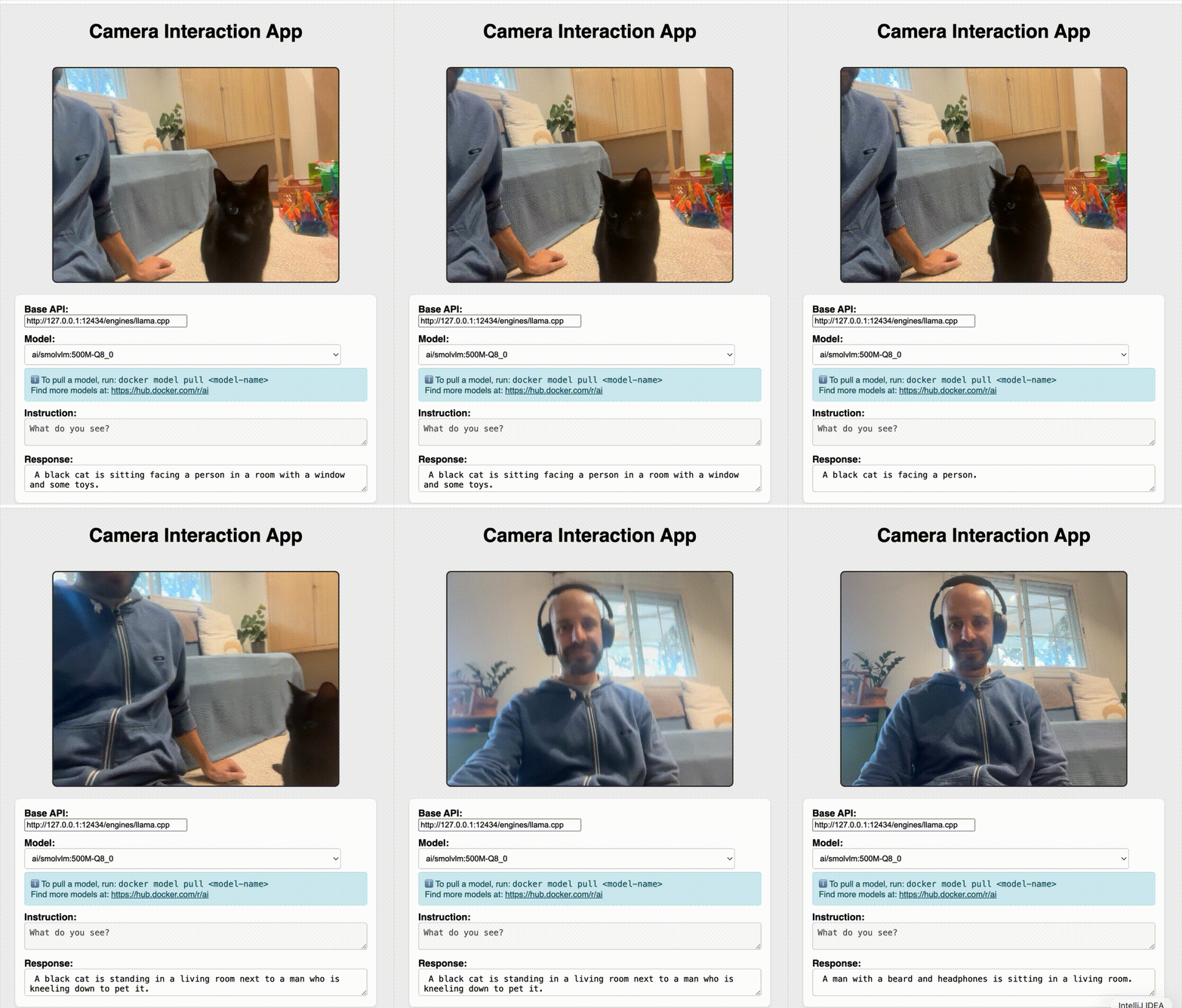
Multimodal AI example: A real-time webcam vision model
We have created a couple of demos in the Docker Model Runner repository, and of course, we couldn’t miss a demo based on ngxson’s example:
You can run this same demo by following the instructions, spoiler alert: it’s just Docker Model Runner and an HTML page.
How multimodel AI works: Understanding audio and images
How are these large language models capable of understanding images or audio? The key is something called a multimodal projector file.
This file acts as an adapter, a small neural network layer that converts non-text inputs (like pixels or sound waves) into a token representation the language model can understand. Think of it as a translator that turns visual or auditory information into the same kind of internal “language” used for text.
In simpler terms:
The projector takes an image or audio input
It processes it into numerical embeddings (tokens)
The language model then interprets those tokens just like it would words in a sentence
This extra layer allows a single model architecture to handle multiple input types without retraining the entire model.
Inspecting the Projector in OCI Artifacts
In Docker Model Runner, models are packaged as OCI artifacts, so everything needed to run the model locally (weights, configuration, and extra layers) is contained in a reproducible format.
You can actually see the multimodal projector file by inspecting the model’s OCI layers. For example, take a look at ai/gemma3.
You’ll find a layer with the media type: “application/vnd.docker.ai.mmproj”.
This layer is the multimodal projector, the component that makes the model multimodal-capable. It’s what enables gemma3 to accept images as input in addition to text.
We’re Building This Together!
Docker Model Runner is a community-friendly project at its core, and its future is shaped by contributors like you. If you find this tool useful, please head over to our GitHub repository. Show your support by giving us a star, fork the project to experiment with your own ideas, and contribute. Whether it’s improving documentation, fixing a bug, or a new feature, every contribution helps. Let’s build the future of model deployment together!
Learn more
Check out the Docker Model Runner General Availability announcement
Visit our Model Runner GitHub repo! Docker Model Runner is open-source, and we welcome collaboration and contributions from the community!
Get started with Docker Model Runner with a simple hello GenAI application
Quelle: https://blog.docker.com/feed/