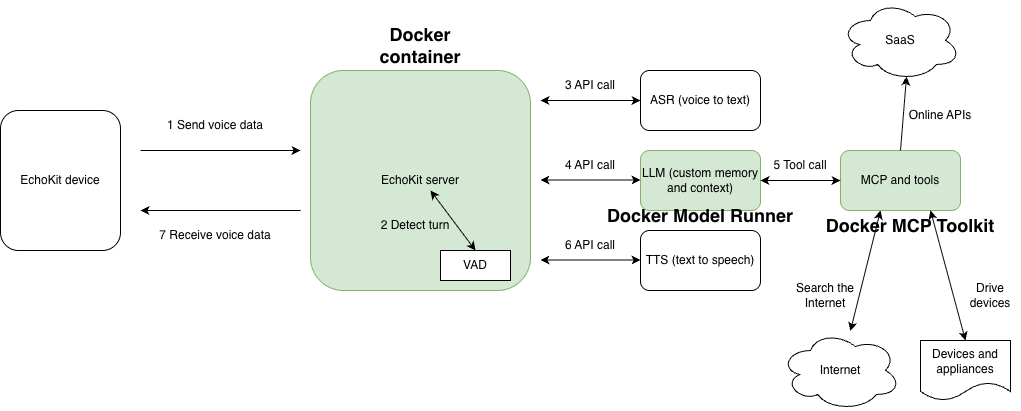
Voice is the next frontier of conversational AI. It is the most natural modality for people to chat and interact with another intelligent being. However, the voice AI software stack is complex, with many moving parts. Docker has emerged as one of the most useful tools for AI agent deployment.
In this article, we’ll explore how to use open-source technologies and Docker to create voice AI agents that utilize your custom knowledge base, voice style, actions, fine-tuned AI models, and run on your own computer. It is based on a talk I recently gave at the Docker Captains Summit in Istanbul.
Docker and AI
Most developers consider Docker the “container store” for software. The Docker container provides a reliable and reproducible environment for developing software locally on your own machine and then shipping it to the cloud. It also provides a safe sandbox to isolate, run, and scale user-submitted software in the cloud. For complex AI applications, Docker provides a suite of tools that makes it easy for developers and platform engineers to build and deploy.
The Docker container is a great tool for running software components and functions in an AI agent system. It can run web servers, API servers, workflow orchestrators, LLM actions or tool calls, code interpreters, simulated web browsers, search engines, and vector databases.
With the NVIDIA Container Toolkit, you can access the host machine’s GPU from inside Docker containers, enabling you to run inference applications such as LlamaEdge that serve open-source AI models inside the container.
The Docker Model Runner runs OpenAI-compatible API servers for open-source LLMs locally on your own computer.
The Docker MCP Toolkit provides an easy way to run MCP servers in containers and make them available to AI agents.
The EchoKit platform provides a set of Docker images and utilizes Docker tools to simplify the deployment of complex AI workflows.
EchoKit
The EchoKit consists of a server and a client. The client could be an ESP32-based hardware device that can listen for user voices using a microphone, stream the voice data to the server, receive and play the server’s voice response through a speaker. EchoKit provides the device hardware specifications and firmware under open-source licenses. To see it in action, check out the following video demos.
EchoKit tells the story about the Diana exhibit at the MET museum
EchoKit recommends BBQ in a Texas accent
EchoKit helps a user practice for the US Civics test
You can check out the GitHub repo for EchoKit.
The AI agent orchestrator
The EchoKit server is an open-source AI service orchestrator focused on real-time voice use cases. It starts up a WebSocket server that listens for streaming audio input and returns streaming audio responses. It ties together multiple AI models, including voice activity detection (VAD), automatic speech recognition (ASR), large language models (LLM), and text-to-speech (TTS), using one model’s output as the input for the next model.
You can start an EchoKit server on your local computer and configure the EchoKit device to access it over the local WiFi network. The “edge server” setup reduces network latency, which is crucial for voice AI applications.
The EchoKit team publishes a multi-platform Docker image that you can use directly to start an EchoKit server. The following command starts the EchoKit server with your own config.toml file and runs in the background.
docker run –rm
-p 8080:8080
-v $(pwd)/config.toml:/app/config.toml
secondstate/echokit:latest-server &
The config.toml file is mapped into the container to configure how the EchoKit server utilizes various AI services in its voice response workflow. The following is an example of config.toml. It starts the WebSocket server on port 8080. That’s why in the Docker command, we map the container’s port 8080 to the same port on the host. That allows the EchoKit server to be accessible through the host computer’s IP address. The rest of the config.toml specifies how to access the ASR, LLM, and TTS models to generate a voice response for the input voice data.
addr = "0.0.0.0:8080"
hello_wav = "hello.wav"
[asr]
platform = "openai"
url = "https://api.groq.com/openai/v1/audio/transcriptions"
api_key = "gsk_XYZ"
model = "whisper-large-v3"
lang = "en"
prompt = "Hellon你好n(noise)n(bgm)n(silence)n"
[llm]
platform = "openai_chat"
url = "https://api.groq.com/openai/v1/chat/completions"
api_key = "gsk_XYZ"
model = "openai/gpt-oss-20b"
history = 20
[tts]
platform = "elevenlabs"
url = "wss://api.elevenlabs.io/v1/text-to-speech/"
token = "sk_xyz"
voice = "VOICE-ID-ABCD"
[[llm.sys_prompts]]
role = "system"
content = """
You are a comedian. Engage in lighthearted and humorous conversation with the user. Tell jokes when appropriate.
"""
The AI services configured for the above EchoKit server are as follows.
It utilizes Groq for ASR (voice-to-text) and LLM tasks. You will need to fill in your own Groq API key.
It utilizes ElevenLabs for streaming TTS (text-to-speech). You will need to fill in your own ElevenLabs API key.
Then, in the EchoKit device setup, you just need to point your device to the local EchoKit server.
ws://local-network-ip.address:8080/ws/
For more options on the EchoKit server configuration, please refer to our documentation!
The VAD server
The voice-to-text ASR is not sufficient by itself. It could hallucinate and generate nonsensical text if the input voice is not human speech (e.g., background noise, street noise, or music). It also would not know when the user has finished speaking, and the EchoKit server needs to ask the LLM to start generating a response.
A VAD model is used to detect human voice and conversation turns in the voice stream. The EchoKit team has a multi-platform Docker image that incorporates the open-source Silero VAD model. The image is much larger than the plain EchoKit server, and it requires more CPU resources to run. But it delivers substantially better voice recognition results. Here is the Docker command to start the EchoKit server with VAD in the background.
docker run –rm
-p 8080:8080
-v $(pwd)/config.toml:/app/config.toml
secondstate/echokit:latest-server-vad &
The config.toml file for this Docker container also needs an additional line in the ASR section, so that the EchoKit server knows to stream incoming audio data to the local VAD service and act on the VAD signals. The Docker container runs the Silero VAD model as a WebSocket service inside the container on port 8000. There is no need to expose the container port 8000 to the host.
addr = "0.0.0.0:8080"
hello_wav = "hello.wav"
[asr]
platform = "openai"
url = "https://api.groq.com/openai/v1/audio/transcriptions"
api_key = "gsk_XYZ"
model = "whisper-large-v3"
lang = "en"
prompt = "Hellon你好n(noise)n(bgm)n(silence)n"
vad_url = "http://localhost:9093/v1/audio/vad"
[llm]
platform = "openai_chat"
url = "https://api.groq.com/openai/v1/chat/completions"
api_key = "gsk_XYZ"
model = "openai/gpt-oss-20b"
history = 20
[tts]
platform = "elevenlabs"
url = "wss://api.elevenlabs.io/v1/text-to-speech/"
token = "sk_xyz"
voice = "VOICE-ID-ABCD"
[[llm.sys_prompts]]
role = "system"
content = """
You are a comedian. Engage in lighthearted and humorous conversation with the user. Tell jokes when appropriate.
"""
We recommend using the VAD enabled EchoKit server whenever possible.
MCP services
A key feature of AI agents is to perform actions, such as making web-based API calls, on behalf of LLMs. For example, the “US civics test prep” example for EchoKit requires the agent to get exam questions from a database, and then generate responses that guide the user toward the official answer.
The MCP protocol is the industry standard for providing tools (function calls) to LLM agents. For example, the DuckDuckGo MCP server provides a search tool for LLMs to search the internet if the user asks for current information that is not available in the LLM’s pre-training data. The Docker MCP Toolkit provides a set of tools that make it easy to run MCP servers that can be utilized by EchoKit.
The command below starts a Docker MCP gateway server. The MCP protocol defines several ways for agents or LLMs to access MCP tools. Our gateway server is accessible through the streaming HTTP protocol at port 8011.
docker mcp gateway run –port 8011 –transport streaming
Next, you can add the DuckDuckGo MCP server to the gateway. The search tool provided by the DuckDuckGo MCP server is now available on HTTP port 8011.
docker mcp server enable duckduckgo
You can simply configure the EchoKit server to use the DuckDuckGo MCP tools in the config.toml file.
[[llm.mcp_server]]
server = "http://localhost:8011/mcp"
type = "http_streamable"
call_mcp_message = "Please hold on a few seconds while I am searching for an answer!"
Now, when you ask EchoKit a current event question, such as “What is the latest Tesla stock price?”, it will first call the DuckDuckGo MCP’s search tool to retrieve this information and then respond to the user.
The call_mcp_message field is a message the EchoKit device will read aloud when the server calls the MCP tool. It is needed since the MCP tool call could introduce significant latency in the response.
Docker Model Runner
The EchoKit server orchestrates multiple AI services. In the examples in this article so far, the EchoKit server is configured to use cloud-based AI services, such as Groq and ElevenLabs. However, many applications—especially in the voice AI area—require the AI models to run locally or on-premises for security, cost, and performance reasons.
Docker Model Runner is Docker’s solution to run LLMs locally. For example, the following command downloads and starts OpenAI’s open-source gpt-oss-20b model on your computer.
docker model run ai/gpt-oss
The Docker Model Runner starts an OpenAI-compatible API server at port 12434. It could be directly utilized by the EchoKit server via config.toml.
[llm]
platform = "openai_chat"
url = "http://localhost:12434/engines/llama.cpp/v1/chat/completions"
model = "ai/gpt-oss"
history = 20
At the time of this writing, the Docker Model Runner only supports LLMs. The EchoKit server still relies on cloud services, or local AI solutions such as LlamaEdge, for other types of AI services.
Conclusion
The complexity of the AI agent software stack has created new challenges in software deployment and security. Docker is a proven and extremely reliable tool for delivering software to production. Docker images are repeatable and cross-platform deployment packages. The Docker container isolates software execution to eliminate large categories of security issues.
With new AI tools, such as the Docker Model Runner and MCP Toolkit, Docker continues to address emerging challenges in AI portability, discoverability, and security.
The easiest, most reliable, and most secure way to set up your own EchoKit servers is to use Docker.
Learn more
Check out the GitHub repo for EchoKit
Explore the MCP Catalog: Discover containerized, security-hardened MCP servers.
Get started with the MCP Toolkit: Run MCP servers easily and securely.
Visit our Model Runner GitHub repo! Docker Model Runner is open-source, and we welcome collaboration and contributions from the community!
Quelle: https://blog.docker.com/feed/