Introducing Azure Multicloud Interconnect for AWS

As organizations accelerate AI adoption and modernize their digital estates, applications, data, and infrastructure increasingly span multiple cloud environments. Customers are choosing the best platform for each workload, leveraging unique capabilities across providers to drive innovation, resilience, and business agility.

Yet while multicloud strategies have become commonplace, networking between cloud environments remains complex. Establishing private connectivity often requires customers to manually stitch together services, coordinate provisioning across providers, manage multiple operational processes, and navigate fragmented support experiences. What should be a straightforward connectivity decision can take weeks or months to implement and manage.

Explore Azure Multicloud Interconnect

Today, Microsoft and Amazon Web Services (AWS) are taking an important step toward simplifying that experience.

Microsoft Azure and AWS are excited to collaborate on a multicloud networking solution that uses both AWS Interconnect – multicloud and Azure Multicloud Interconnect for network interoperability, enabling customers to establish a private, high-performance private connectivity between Microsoft Azure and AWS through a streamlined, cloud-native experience.

This collaboration is built using the Open API specifications for network interoperability. Azure Multicloud Interconnect helps remove much of the complexity traditionally associated with multicloud networking. Customers can provision connectivity through an integrated experience while benefiting from enterprise-grade performance, resiliency, security, and operational simplicity.

Simplifying multicloud connectivity

Until now, organizations connecting Azure and AWS environments required careful planning, physical connectivity, routing configuration, provisioning coordination, monitoring, and lifecycle management to assemble and maintain multiple components across providers.

Azure Multicloud Interconnect fundamentally changes this model. With Microsoft and AWS collaborating using the standardized Open API specification, customers can establish dedicated private connectivity through a simplified experience that abstracts the underlying complexity of multicloud networking. Rather than focusing on infrastructure management, organizations can focus on delivering applications, moving data, and accelerating business outcomes.

The result is a high-bandwidth, more predictable path to deploying multicloud architectures for mission-critical workloads.

Designed for the AI era

Training and inference workloads frequently require access to data distributed across environments. Enterprises are increasingly architecting applications that span cloud boundaries while maintaining performance, security, and compliance requirements.

Azure Multicloud Interconnect is designed to support these evolving requirements with high-capacity private connectivity that extends to Azure Private Link, providing an end-to-end private path between the clouds.

This combination of high-performance connectivity and operational simplicity enables customers to move faster as they build the next generation of AI-enabled applications and services.

As AI transforms every industry, customers need the freedom to place data, applications, and infrastructure wherever it delivers the greatest business value. Azure Multicloud Interconnect helps make that possible by providing resilient, high-performance, private connectivity between Azure and AWS through a simplified, cloud-native experience. Together, we are reducing the complexity of multicloud networking and giving customers the scale, reliability, and agility they need to power the next generation of AI and data-driven innovation.

Customers told us they wanted a better way to connect workloads spanning AWS and Azure, and the old ways of doing it were clunky. With AWS Interconnect-multicloud and Azure Multicloud Interconnect, we’re proving what’s possible when both sides commit to a high bar: MACsec security out of the box, four-nines availability, and scalability at the click of a button.
—Robert Kennedy, VP of Network Services at AWS

Advancing an open multicloud future

Azure Multicloud Interconnect represents more than a new connectivity offering—it is a step toward a more open and interconnected cloud ecosystem.

Looking ahead, we see the opportunity to extend this model beyond a single cloud-to-cloud relationship. The same open API specification can help enable broader interoperability across hyperscale cloud providers, creating a more consistent experience for customers operating in increasingly diverse multicloud environments.

Customers can deploy connectivity at speeds up to 100 Gbps from day one at general availability, helping meet the needs of high-bandwidth applications while providing the foundation for future growth. As demand increases, capacity can expand dynamically, enabling organizations to scale without disrupting operations or redesigning their network architecture.

Beyond hyperscalers, this approach has the potential to simplify connectivity with network service providers and telecommunications carriers. By adopting a common interoperability model, cloud providers and carriers can work together to streamline last-mile connectivity, accelerate provisioning, and reduce operational complexity across the end-to-end customer journey.

Our long-term vision is an open ecosystem where hyperscalers, network service providers, and telecommunications carriers use a common interoperability framework to establish and operate connectivity through standardized APIs. Customers should be able to provision trusted, high-performance connectivity between clouds, metro networks, and enterprise locations with the same simplicity and automation they expect from modern cloud services.

To learn more about how to implement multicloud networking on Azure, please visit the in-depth blog or visit the Microsoft Learn page to get started. To read the AWS announcement, please visit their blog.

Get started with Azure Multicloud Interconnect

Explore technical guidance for implementing private, high-performance connectivity between Azure and AWS.

Read the in-depth blog

The post Introducing Azure Multicloud Interconnect for AWS appeared first on Microsoft Azure Blog.
Quelle: Azure
Building Reproducible AI Evaluation Workflows with Docker Sandboxes

AI evaluation has never been easier to start. Reproducing it reliably is another story. Developers now have access to more benchmarks, evaluation libraries, model APIs, and agent frameworks than ever before. But keeping the prompt, model, and scoring method fixed doesn’t necessarily make a run reproducible. The execution environment matters too.

Python dependencies change. Local tools drift. Setup steps go undocumented. A workflow that succeeds on one machine may behave differently on another. Most discussions about evaluation focus on what should be measured: benchmarks, scoring methods, or judge models. Much less attention is given to how those evaluations are executed. Yet that execution layer often determines whether someone else can reproduce the same workflow weeks or months later.

When I started exploring Docker Sandboxes, I wasn’t trying to build another evaluation framework. I had a much smaller question.

Could Docker Sandboxes and an SBX Kit make evaluation workflows easier to rerun, inspect, and compare?

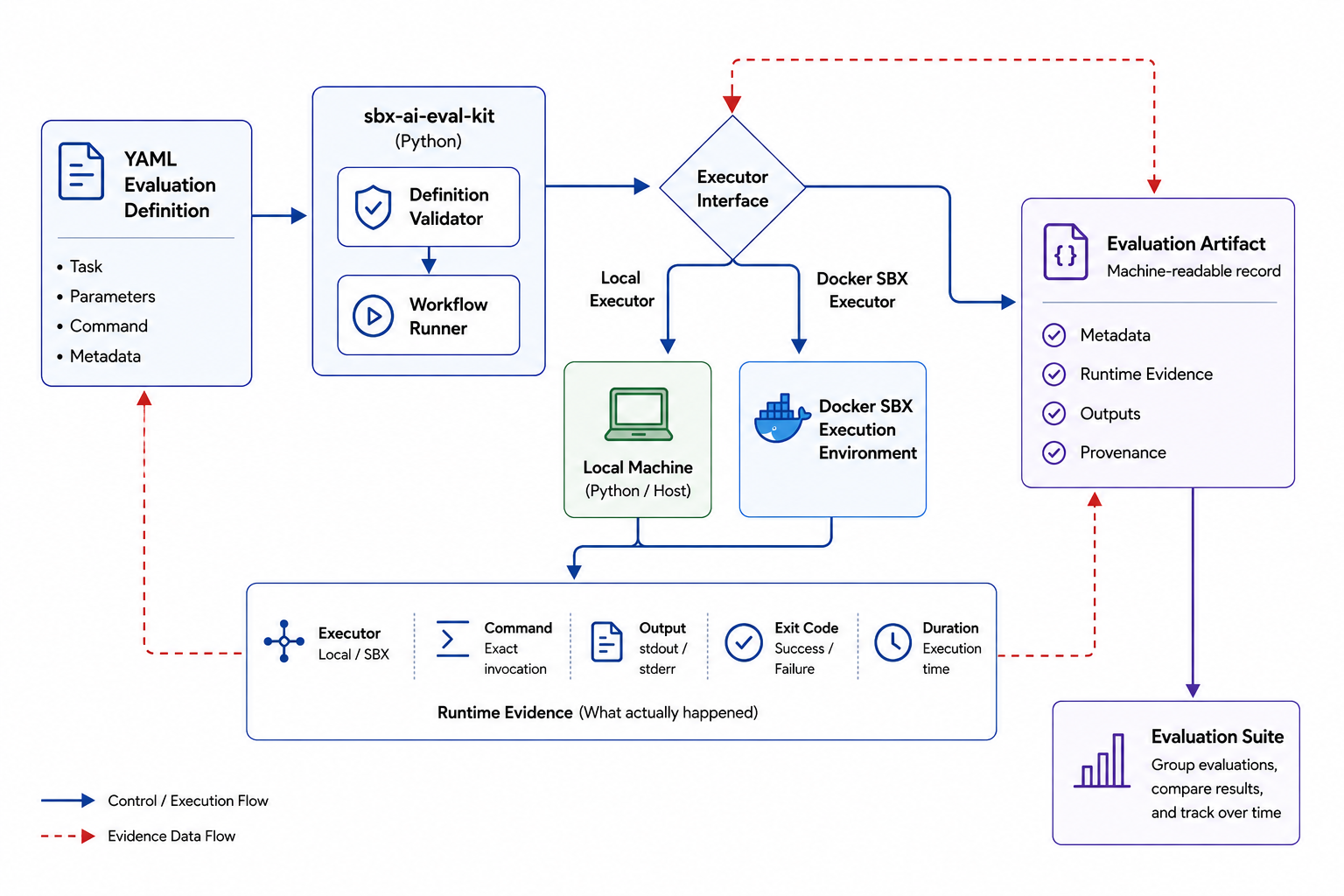
That question eventually became the SBX AI Evaluation Kit, an open-source Docker Sandboxes Mixin Kit focused on repeatable execution, structured evaluation records, and runtime evidence. The current implementation does not execute AI models or automatically derive evaluation judgments. Instead, it executes configured commands consistently and preserves evidence of what actually ran.

In Practice

In practice, the workflow starts by choosing where the evaluation command should run through the execution block:

execution:
executor: sbx
command:
– python3
– -c
– print("hello from sbx")

With executor: sbx, the runner delegates command execution to Docker Sandboxes and writes the runtime evidence into the resulting artifact.

The repository is also packaged as an SBX Mixin Kit, so it can be applied when starting a Claude sandbox:

sbx run claude –kit .

The runner reads the configured executor and delegates the command to SBX, which executes it inside the sandbox:

python run_evaluation.py

From Documentation to an Executable Workflow

Each evaluation is defined in a YAML file that describes the evaluation and the command to run. The repository validates that definition, executes it, and produces a structured JSON record of the result. The difference is in what gets recorded. A written evaluation captures what someone intended to do. An execution-backed evaluation captures what actually happened.

Separating Evaluation from Execution

I wanted the evaluation definition to stay independent of where it ran. A workflow written during local development shouldn’t need to change simply because it later executes inside Docker Sandboxes.

To keep those concerns separate, I introduced an executor abstraction. The evaluation describes what should run; the executor determines where it runs.

With the local executor, the configured command runs on the host. With the SBX executor, command execution is delegated to Docker Sandboxes. Switching between the two only requires changing the executor configuration, not rewriting the surrounding evaluation workflow.

Figure 1. Evaluation definitions remain independent of the execution environment. The same workflow can use either the local or SBX executor while producing runtime evidence in the same structure.

Capturing Evidence Instead of Assumptions

For each execution, the runner records enough information to inspect what actually happened:

the selected executor,

the command that was executed,

standard output (stdout) and standard error (stderr),

the exit code,

and the execution time.

These details are stored in the evaluation artifact. The repository also generates a digest of the evaluation configuration. This creates a deterministic link between the evaluation configuration and the artifact it produced, without trying to replace full experiment-tracking systems.

{
"executor": "sbx",
"command": ["python3", "-c", "print("hello from sbx")"],
"stdout": "hello from sbxn",
"stderr": "",
"exit_code": 0,
"duration_ms": 120.0
}

Scaling from One Evaluation to Many

Real-world evaluation rarely consists of one isolated run. Teams compare prompts, validate behavior, measure regressions between releases, and test multiple scenarios. That led to evaluation suites.

Rather than changing how an individual evaluation works, a suite groups multiple evaluation definitions into a single repeatable workflow. Each evaluation still produces its own structured artifact, while the suite also generates an aggregated summary of the overall run.

Reusable SBX Kits Beyond Evaluation

The same pattern isn’t limited to evaluation. An SBX Kit can package more than a development environment; it can also package the setup an engineering workflow depends on. The same model could support regression testing, policy checks, security analysis, code-generation experiments, and other workflows that depend on consistent execution and inspectable results.

Conclusion

The SBX AI Evaluation Kit doesn’t replace evaluation frameworks, benchmarks, or scoring systems. Its job is narrower: execute configured evaluation workflows in a way that is easier to rerun and inspect.

The question I came away with is simple: before comparing benchmark scores or choosing a judge model, can someone else reliably run the same workflow under comparable conditions?

You can explore the code, experiment with custom evaluation YAMLs, and run the workflow yourself in the sbx-ai-eval-kit repository on GitHub.

Resources

SBX AI Evaluation Kit – Source code, example evaluation definitions, and the implementation described in this article.

Docker Sandboxes documentation – Official documentation for setting up and running Docker Sandboxes.

Customizing Docker Sandboxes with Kits – Official documentation for extending Docker Sandboxes with reusable Kits.

Quelle: https://blog.docker.com/feed/

Below the Harness: Governing a Multi-Model, Multi-Harness World

We believe the future is a multi-model, multi-harness world. And we think it needs a new trust model.

In 1988, Norm Hardy described a problem that had been quietly breaking systems for years: the confused deputy. A program that takes action using its permissions instead of yours.

Today, every AI agent is that deputy. It inherits your authority: Your credentials, your repo access, your ability to call APIs. But its behavior is probabilistic. It might be acting on an instruction found in its environment, on a step it invented, or on a confident wrong answer. 

The industry didn’t fix the confused deputy problem by making the deputy itself more careful. They fixed it by moving its authority a layer away. Forty years on, that’s still the answer.

Everyone is converging on the same future

Three facts are pushing the industry toward the same conclusion.

Agents are expensive loops. An agent takes many steps, and you pay for every token of every one. We all can agree that it makes no economic sense to call the latest frontier model for simple tasks. 

The leader of frontier capability changes often. We’re all aware that the top model of the day (and its vendor) changes every couple of months.

Your workflows may need custom models. Many teams are recognizing that intelligence is commodifying and the differentiator is custom models, derived from custom context.

As a result, all of us are quickly ending up with a portfolio of multiple models across multiple harnesses. 

A similar convergence is happening one layer up. Developers pick certain tools for the right task, the way they always have. For example, perhaps Claude Code for long refactors, Codex for daily work, Hermes for quick scripts. 

It’s reasonable to expect the future of work to be multi-model and multi-harness.

Which makes trust the defining question

A lot of agents work the same way. 

They read material that is often out of our control: support tickets, web pages, documentation, and code written by strangers. But they act with authority you granted: your credentials, repo access, production APIs, and the open internet. And they usually do both from a developer’s laptop, outside typical security guardrails like VPCs and IAM.

Private data and the ability to act autonomously, together, is what makes an agent worth deploying. Your deputy needs the ability to execute in order to be useful. Which means the interesting question is no longer which model is best. It’s what happens when one of these deputies is wrong, or manipulated.

Per-harness guardrails break down

The obvious answer is that each harness ships its own guardrails. Many do. But relied on as your security boundary, they fail in three ways.

The agent talks past them. Guardrails inside the harness are enforced in the same loop the agent is running. Deny it a git push and it reaches for the API. Deny the API and it opens a gist. Deny the gist and it tucks the data into a channel you trust and never inspect. Researchers showed last year that a single malicious issue filed in a public GitHub repo could steer a coding agent into reading a company’s private repositories and publishing the contents in a pull request the agent opened itself. Nothing was hacked since every step used the agent’s own legitimate access, through a channel everyone trusts. A boundary the agent can negotiate with is not a boundary.

The rails move without you. Most harness’s isolation models are closed source and ship on their vendor’s schedule. The major coding agents have each revised their default sandbox and approval behavior several times in the past year alone. Updates to sandboxing models should be treated as a security event. Multiply this by ten harnesses and your security posture is, at any moment, whatever is the patchwork of your half dozen vendors’ measures.

The rails don’t cover the fleet. The custom agent your platform team built has exactly the guardrails your platform team wrote. The agent inside your support SaaS has whatever its vendor chose, and most expose no isolation controls to you at all. Every new harness means building or auditing governance again, from scratch, differently. You end up with a dozen implementations that drift apart, each blind to the others’ traffic, with no single place to set a rule and no single record to understand why something went wrong.

Safety cannot depend on the agent making the right decision, or on someone else’s release schedule.

A layer below

So here is what we believe. The future is multi-model and multi-agent. And given that future, we believe every organization will need a layer below: a runtime layer, below the harness, that all of them run on top of.

The reasoning is straightforward. Strip away the model, the vendor, and the framework, and an agent has two ways to affect anything. It runs code, which touches files and opens network connections. Or it calls a tool, which acts on a system. Everything an agent does travels one of those paths. And both paths cross the same surface: the runtime, where processes execute, credentials get used, and requests leave the machine. Every agent passes through it, no matter which model powers it, which vendor shipped it, or whether you built it yourself. That makes it the one place where rules you define can be enforced across all your agents. It is also the same fix as 1988, applied to today’s deputy: the authority sits a layer away.

Put enforcement there and each of the three failure scenarios we spoke about flips around.

Your agents can’t talk past themselves. The boundary for an agent sits outside the loop the agent is running, so it holds steady no matter if the model is with you, hallucinating, or compromised. A hard neutral boundary at the runtime is more effective than a prompt-level boundary the agent creates for itself.

The rails stop moving randomly. Policy is yours, written once, covering execution, tool calls, credentials, and spend. Now, a model or agent vendor making an update won’t randomly change your security posture.

The rails cover your whole fleet. A policy you write up will apply to every harness. And every action, by all your agents, lands in one record: what ran, what it touched, which rule decided. 

This is what lets you be nuanced about agents. Without a boundary below your harnesses, you have three bad options: block agents completely, allow all of them and hope for the best, or wedge a manual approval into every step and give up the productivity you wanted.

A boundary at the runtime gives you a fourth option. When consequences are bounded even if an agent goes off the rails, you can start granting it true autonomy, which is the goal.

We expect models to keep changing and new harnesses to land in all of our toolkits. That part is healthy. The boundary underneath them is the part that should hold steady.

At We Are Developers in San Jose, Tushar Jain, Docker’s CTO, will talk more about this world: multiple models, multiple harnesses, and a single runtime under it all.
Quelle: https://blog.docker.com/feed/

Second-generation AWS Outposts racks now in the AWS GovCloud (US) Regions

Second-generation AWS Outposts racks are now supported in the AWS GovCloud (US-East) and AWS GovCloud (US-West) Regions. Outposts racks extend AWS infrastructure, AWS services, APIs, and tools to virtually any on-premises data center or colocation space for a truly consistent hybrid experience. Organizations from startups to enterprises and the public sector can now order their Outposts racks connected to the new supported regions, optimizing for their latency and data residency needs. Outposts allows customers to run workloads that need low latency access to on-premises systems locally while connecting back to their home Region for application management. Customers can also use Outposts and AWS services to manage and process data that needs to remain on-premises to meet data residency requirements. This regional expansion provides additional flexibility in the AWS Regions that customers’ Outposts can connect to. To learn more about second-generation Outposts racks, read this blog post and user guide. For the most updated list of countries and territories and the AWS Regions where second-generation Outposts racks are supported, check out the Outposts rack FAQs page.
Quelle: aws.amazon.com

Amazon Connect Customer announces general availability of agentic CX designer

Amazon Connect Customer announces the general availability of agentic CX designer, a no-code canvas for designing and deploying AI-powered self-service experiences. You can now build and launch voice and digital experiences that bring agentic and deterministic AI together to transform how you serve customers with the control and reliability enterprises demand. Your business teams users can go from designing conversations and integrating with the systems that run your business, to testing, to launching production-ready experiences in weeks, not months.
Agentic CX designer gives you the clarity of a flowchart with the power of a large language model. On a visual canvas you define the logic, guardrails, and integrations, and the model handles the natural conversation. For outcomes that have to be exact, such as eligibility, approvals, routing, or compliance, you define the workflow and the conversation follows it. You build, test, and deploy in the same place, so the team that designs an experience can validate it and put it into production without writing code or handing the work to engineering.
Quelle: aws.amazon.com

Amazon Quick adds new tool settings and Model Context Protocol (MCP) sync support for connectors

Amazon Quick connectors let users leverage tools and services such as Outlook, Slack, Salesforce, Jira, and homegrown MCP servers directly into their workflows across chat, agents, apps, flows, and deep research. Today, Amazon Quick introduces new tool settings and MCP sync support that give admins and connector owners more control over how connectors are deployed and kept up to date.
Connector owners and admins can now selectively enable or disable individual tools within a connector to ensure only approved tools are available to end users. Additionally, new tool permission settings let connector owners decide which tools require consent before proceeding or give end users the flexibility to decide for themselves. Lastly, MCP sync keeps connectors current as external MCP servers add new tools, update descriptions, and evolve their capabilities, ensuring users always have the latest information to get their work done.
These features are available in all AWS Regions where Amazon Quick is available. To learn more, visit the Amazon Quick User Guide.
Quelle: aws.amazon.com

Amazon Connect Customer expands automated performance evaluations to Malay

Amazon Connect Customer now automates evaluations of human and AI agents in Malay using generative AI. Managers define custom evaluation criteria in natural language and receive AI-generated evaluations with justifications in their preferred language. Performance evaluations also supports cross-language evaluation and can complete assessments in English, even when the conversation is in Malay. This enables multilingual contact centers to use a standardized evaluation framework across languages.
This feature is supported in 8 AWS regions including US East (N. Virginia), US West (Oregon), Europe (Frankfurt), Europe (London), Canada (Central), Asia Pacific (Sydney), Asia Pacific (Tokyo), and Asia Pacific (Singapore). For information about Amazon Connect pricing, please visit our pricing page. To learn more, please visit our documentation and our webpage.
Quelle: aws.amazon.com

Web Search on Amazon Bedrock is now available in AWS GovCloud (US-West)

The Web Search built-in server-side tool on Amazon Bedrock is now available in AWS GovCloud (US-West), helping bring grounded web results to compliance-sensitive government and public-sector workloads. Web Search helps supported OpenAI GPT models ground responses with information from the web. Responses include citations to the sources the model used so users can trace each claim back to its web origin. This can be especially valuable whenever an answer depends on information that changes over time or is more recent than a model’s training data, such as current events, recent releases or live pricing. Because the tool runs inside Amazon Bedrock, you don’t host a search index, manage crawlers, or write the tool-call loop yourself.
Web Search is designed to support the governance and data-handling standards AWS GovCloud (US) customers require. By default, it keeps your request data within the AWS boundary, serving results from a web index and cache maintained by Amazon. As an AWS-native capability governed by AWS Identity and Access Management (IAM), administrators can allow or deny it at the account or organization level and restrict it by Region, giving teams centralized control while keeping request data within the AWS boundary by default. To get started, add a tool of type web_search to the tools array in your OpenAI Responses API request using your existing OpenAI client library with an Amazon Bedrock API key. The model uses the tool only when it determines a request needs current information. At launch, Web Search in AWS GovCloud (US-West) supports GPT-5.4 , GPT-5.6 Terra and Luna models.
Web Search is available in AWS GovCloud (US-West), in addition to US East (N. Virginia), US East (Ohio), and US West (Oregon). To get started, see the Web Search technical blog. For implementation guidance, see the Web Search documentation. For pricing, see the Amazon Bedrock pricing page.
Quelle: aws.amazon.com






