In this article
Rethinking performance in the cloudAccelerating AI workloads with system-level performanceScaling cloud-native applications without sacrificing performanceSustaining performance for business-critical systemsPerformance as a coordinated systemPractical guidance: Optimizing for your workloadBuild on a foundation designed for performance
This blog post is the third part of a blog series called Azure IaaS which will share best practices and guidance to help you build a trusted infrastructure platform—from performance, resiliency, and security to scalability and cost efficiency.
Performance has become one of the most defining factors in how applications succeed or fail in the cloud. Whether you’re training AI models, scaling a Kubernetes platform, or running a business-critical database, performance is no longer a single decision about CPU, storage, or networking. It’s the outcome of how all three work together and requires a system-level approach.
Learn how Azure IaaS delivers system-level performance
Many organizations still approach performance by provisioning more resources—larger virtual machines (VMs), faster disks, or higher network bandwidth. But modern workloads don’t behave predictably enough for that strategy to hold. Bottlenecks shift dynamically. A database may be constrained by storage latency at one moment and network bandwidth shortly after that. An AI pipeline may stall not because of compute limitations, but because data cannot move fast enough between nodes.
This is why performance in the cloud has evolved from a resource-level concern to a system-level challenge. And it’s why Azure approaches performance differently, engineering it into the platform so customers can achieve consistent, scalable outcomes without manually tuning every layer.
Rethinking performance in the cloud
Performance today is not just about peak speed. It’s about consistency, scalability, and responsiveness under real-world conditions.
For customers, that means evaluating performance across multiple dimensions:
Latency—including tail latency (P99/P99.9), which directly impacts user experience.
Throughput—or how much work can be completed over time.
Scalability—the ability to maintain performance as demand increases.
Consistency—ensuring performance doesn’t degrade unpredictably under load.
Equally important is time-to-performance, how quickly infrastructure can be provisioned, scaled, or recovered. In many cases, how fast you can respond to change matters just as much as how fast your system runs.
Azure IaaS brings these dimensions together, aligning compute, storage, and networking capabilities to the needs of specific workloads. The result is performance that is delivered as a coordinated system, not assembled from isolated components.
Accelerating AI workloads with system-level performance
AI workloads are among the most demanding environments for performance. Training and inference pipelines require massive parallel compute, high-throughput data access, and low-latency communication between distributed components.
In these scenarios, performance is only as strong as the weakest layer. Azure addresses this by optimizing the full data path.
Compute efficiency through platform acceleration
Azure Boost helps improve VM performance by offloading storage and networking processing from the host CPU to dedicated hardware and software components. This helps reduce hypervisor overhead and helps free up compute cycles for model training and inference, improving both throughput and latency consistency.
High-throughput storage for sustained data access
AI workloads depend on continuous access to large datasets. Azure storage options are designed to help deliver sustained IO performance and help ensure that compute resources are not idle while waiting on data. Services like Azure Blob Storage and ADLS help deliver the high-throughput, low-latency, and massively scalable data foundation AI workloads need—enabling fast ingestion and retrieval of large datasets for training and inference. Their optimized parallel data access and seamless integration with AI tools help maximize compute utilization and help eliminate pipeline bottlenecks.
Low-latency, high-bandwidth networking
Distributed training requires rapid communication between nodes. Azure’s networking services, such as Azure ExpressRoute, help enable fast data movement across clusters, reducing synchronization delays and improving overall training efficiency. This can help prevent compute resources from sitting idle.
Together, these capabilities help ensure that performance improvements in compute are not constrained by storage or networking bottlenecks. This helps organizations to process more data and train models faster without unnecessary infrastructure overhead.
Scaling cloud-native applications without sacrificing performance
Cloud-native applications introduce a different kind of performance challenge. Instead of fixed workloads, they must handle unpredictable demand, scaling up and down dynamically while maintaining responsiveness.
Azure Kubernetes Service (AKS) helps provide the foundation for this elasticity, enabling workloads to scale horizontally across nodes. But compute scaling alone is not enough; stateful services must scale with the same level of performance.
This is where Azure’s integrated approach becomes critical.
Dynamic, high-performance storage for Kubernetes
Azure Container Storage enables AKS workloads to consume local NVMe disks through Kubernetes-native provisioning. This helps remove the need for manual disk configuration while delivering sub-millisecond latency and high IOPS for stateful services.
Production-ready data platforms on Kubernetes
With tools like CloudNativePG, organizations can run PostgreSQL and other databases directly on AKS with built-in high availability, failover, and backup capabilities without sacrificing performance. Adding flexible data access across both file and object storage further enhances this foundation, enabling applications to use the most appropriate storage interface for their needs while simplifying data movement and recovery across environments.
Low-latency service communication
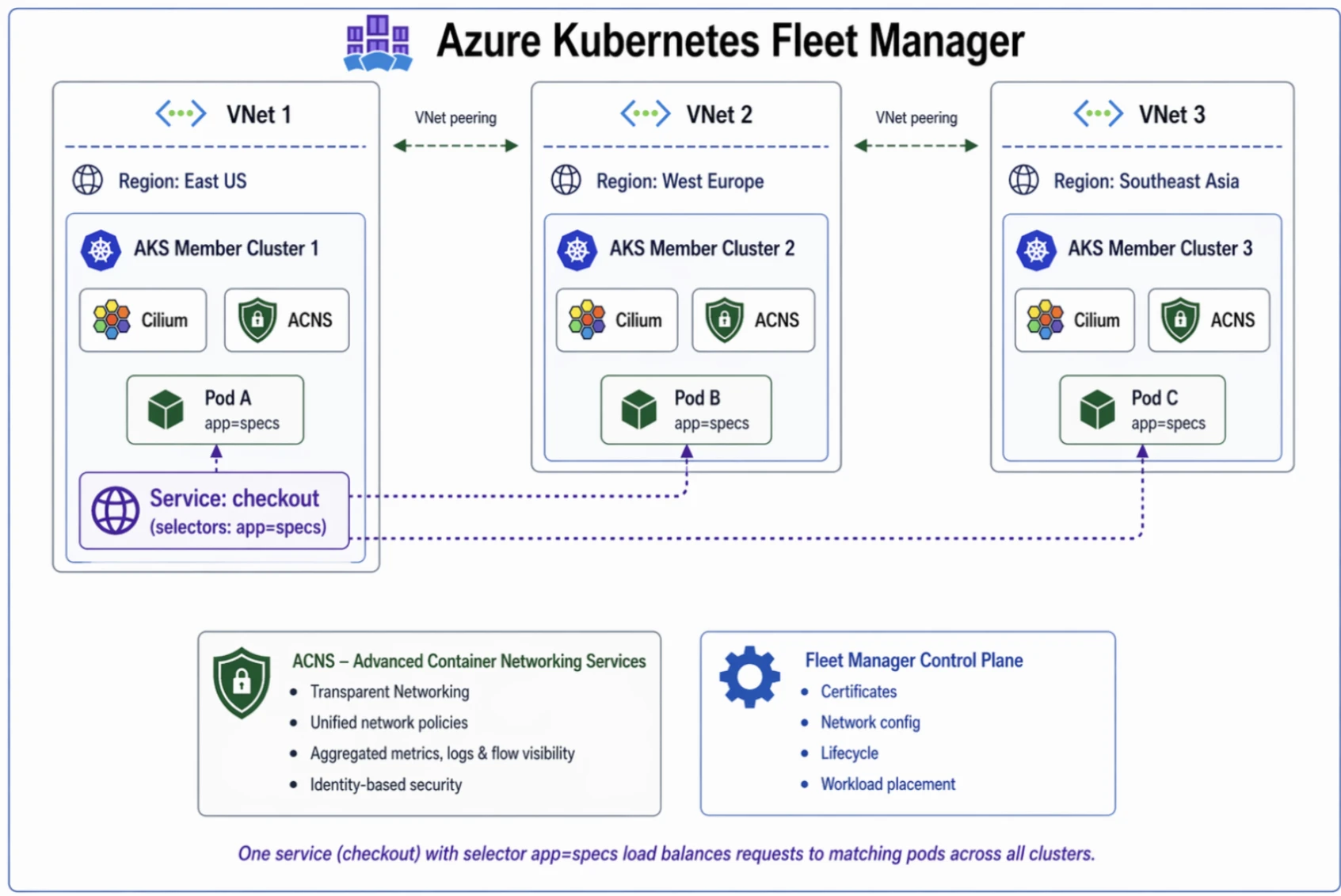
Microservices architectures depend on frequent communication between components. Using eBPF host routing in Cilium, Advanced Container Networking Services improves datapath efficiency by reducing latency and increasing throughput, enabling high-performance communication across large-scale microservices environments. Azure’s networking helps ensure interactions remain fast and consistent, helping to prevent inter-service latency from becoming a bottleneck.
The result is a platform where both stateless and stateful workloads can scale dynamically while maintaining performance. And because resources can be provisioned and scaled on demand, organizations benefit from improved cost efficiency, paying only for what they use while maintaining application responsiveness.
Sustaining performance for business-critical systems
For business-critical workloads (enterprise databases, SAP environments, and transactional systems), performance is not just about speed. It’s about predictability and reliability.
These systems must deliver consistent performance under sustained load, often with strict latency and availability requirements. Variability, even at the margins, can have significant business impact.
Azure addresses this through precise control and platform-level optimization.
Consistent compute performance
Azure helps deliver consistent compute performance through purpose-built VM architectures, intelligent placement, and platform-level orchestration. Virtual Machine Scale Sets (VMSS) automatically distribute and scale workloads across fault and update domains, helping maintain predictable performance under changing demand. Azure further enhances consistency with Azure Boost, which offloads virtualization and I/O processing to dedicated hardware, reducing contention and improving efficiency.
Tunable storage performance
Azure Ultra Disk and Premium SSD v2 allow customers to independently configure capacity, IOPS, and throughput. This decoupling helps enable precise alignment of storage performance to workload requirements, avoiding both underperformance and unnecessary cost.
In addition to tunable block storage options like Ultra Disk and Premium SSD v2, Azure also offers highly durable object and file storage services—such as Azure Blob Storage and Azure Files—that provide geo-redundancy and long-term data protection for unstructured data and shared workloads, complementing performance tuning with enterprise-grade durability and scale.
Reliable, low-latency networking
Consistent communication between application tiers is essential for transactional systems. Azure’s networking infrastructure helps ensure that latency remains low and predictable across environments through features such as Accelerated Networking, which reduces network latency by bypassing the virtual switch path, and proximity placement groups, which keep latency-sensitive workloads physically close together within the datacenter. Combined with Azure Boost, which offloads networking processing to dedicated hardware, and support for high-bandwidth, multi-NIC configurations on optimized VM series, these capabilities help enable fast, deterministic data movement and help maintain consistent application performance at scale.
Faster recovery
Performance also includes how quickly systems can recover. Instant Access Snapshots help enable disks to be restored immediately—without waiting for data hydration—reducing downtime and accelerating recovery from failures.
This is complemented by Azure Backup fast restore capabilities, which further shorten restore times, while zone-redundant storage (ZRS) maintains data across availability zones to reduce the impact of localized disruptions.
For broader incidents, Azure Site Recovery orchestrates failover across regions to rapidly bring workloads back online. Together, these capabilities are enhanced by Azure Disk incremental snapshots, which capture only changed data to reduce recovery point objectives (RPO) with minimal overhead, enabling faster, more efficient recovery across scenarios.
This combination helps ensure that performance is maintained not only during normal operations, but also during peak demand and recovery scenarios—where it matters most.
Performance as a coordinated system
Across AI, cloud-native, and business-critical workloads, a clear pattern emerges: performance is not achieved by optimizing a single component in isolation.
Instead, it depends on how compute, storage, and networking are tailored in tandem for the workload at hand.
This alignment helps reduce bottlenecks and helps ensure that improvements in one area are reinforced by capabilities in others. It also simplifies operations, allowing teams to focus on workload design and business outcomes rather than infrastructure tuning.
Practical guidance: Optimizing for your workload
While Azure provides a strong foundation, achieving optimal performance still requires aligning infrastructure choices to workload needs:
For AI workloads, prioritize balanced throughput across compute, storage, and networking to avoid idle resources and maximize efficiency.
For cloud-native applications, design for horizontal scaling and leverage Kubernetes-native storage to maintain performance for stateful services.
For business-critical systems, focus on consistency and predictability, using tunable storage and optimized compute to meet strict performance requirements.
Across all scenarios, evaluate performance holistically and leverage platform capabilities to reduce overhead and simplify optimization.
Build on a foundation designed for performance
Performance directly impacts every aspect of your application—from user experience to operational efficiency and the ability to scale innovation.
By integrating compute, storage, and networking into a cohesive platform, Azure enables organizations to deliver high performance across their most demanding workloads—without the complexity of managing each layer independently.
Explore how Azure delivers performance across AI, cloud-native, and business-critical workloads.
To go deeper, explore the Azure IaaS Resource Center for tutorials, best practices, and guidance across compute, storage, and networking to help you design and operate resilient infrastructure with greater confidence.
Create a resilient infrastructure with Azure
Visit the Azure IaaS Resource Center to start building a stronger, more efficient infrastructure today.
Get started with Azure
Did you miss these posts in the Azure IaaS series?
Explore new resources for building a stronger, more efficient infrastructure
Keep critical applications running with built-in resiliency at scale
Defense in depth built on secure-by-design principles
The post Azure IaaS: Deploy high-performance workloads with a system-level approach appeared first on Microsoft Azure Blog.
Quelle: Azure