PyTorch on Azure with streamlined ML lifecycle

It's exciting to see the Pytorch Community continue to grow and regularly release updated versions of PyTorch! Recent releases improve performance, ONNX export, TorchScript, C++ frontend, JIT, and distributed training. Several new experimental features, such as quantization, have also been introduced.

At the PyTorch Developer Conference earlier this fall, we presented how our open source contributions to PyTorch make it better for everyone in the community. We also talked about how Microsoft uses PyTorch to develop machine learning models for services like Bing. Whether you are an individual, a small team, or a large enterprise, managing the machine learning lifecycle can be challenging. We'd like to show you how Azure Machine Learning can make you and your organization more productive with PyTorch.

Streamlining the research to production lifecycle with Azure Machine Learning

One of the benefits of using PyTorch 1.3 in Azure Machine Learning is Machine Learning Operations (MLOps). MLOps streamlines the end-to-end machine learning (ML) lifecycle so you can frequently update models, test new models, and continuously roll out new ML models alongside your other applications and services. MLOps provides:

Reproducible training with powerful ML pipelines that stitch together all the steps involved in training your PyTorch model, from data preparation, to feature extraction, to hyperparameter tuning, to model evaluation.
Asset tracking with dataset and model registries so you know who is publishing PyTorch models, why changes are being made, and when your PyTorch models were deployed or used in production.
Packaging, profiling, validation, and deployment of PyTorch models anywhere from the cloud to the edge.
Monitoring and management of your PyTorch models at scale in an enterprise-ready fashion with eventing and notification of business impacting issues like data drift.


Training PyTorch Models

With MLOps, data scientists write and update their code as usual and regularly push it to a GitHub repository. This triggers an Azure DevOps build pipeline that performs code quality checks, data sanity tests, unit tests, builds an Azure Machine Learning pipeline, and publishes it to your Azure Machine Learning workspace.

The Azure Machine Learning pipeline does the following tasks:

Train model task executes the PyTorch training script on Azure Machine Learning compute. It outputs a model file which is stored in the run history.
Evaluate model task evaluates the performance of the newly trained PyTorch model with the model in production. If the new model performs better than the production model, the following steps are executed. If not, they will be skipped.
Register model task takes the improved PyTorch model and registers it with the Azure Machine Learning model registry. This allows us to version control it.

You can find example code for training a PyTorch model, doing hyperparameter sweeps, and registering the model in this PyTorch MLOps example.

Deploying PyTorch models

The Machine Learning extension for DevOps helps you integrate Azure Machine Learning tasks in your Azure DevOps project to simplify and automate model deployments. Once a new model is registered in your Azure Machine Learning workspace, you can trigger a release pipeline to automate your deployment process. Models can then be automatically packaged and deployed as a web service across test and production environments such as Azure Container Instances and Azure Kubernetes Service (AKS). You can even enable gated releases so that, once the model is successfully deployed to the staging or quality assurance (QA) environment, a notification is sent to approvers to review and approve the release to production. You can see sample code for this in the PyTorch ML Ops example.

Next steps

We’re excited to support the latest version of PyTorch in Azure. With Azure Machine Learning and its MLOps capabilities, you can use PyTorch in your enterprise with a reproducible model lifecycle. Check out the MLOps example repository for an end to end example of how to enable a CI/CD workflow for PyTorch models.
Quelle: Azure

Bing delivers its largest improvement in search experience using Azure GPUs

Over the last couple of years, deep learning has become widely adopted across the Bing search stack and powers a vast number of our intelligent features. We use natural language models to improve our core search algorithm’s understanding of a user’s search intent and the related webpages so that Bing can deliver the most relevant search results to our users. We rely on deep learning computer vision techniques to enhance the discoverability of billions of images even if they don’t have accompanying text descriptions or summary metadata. We leverage machine-based reading comprehension models to retrieve captions within larger text bodies that directly answer the specific questions users have. All these enhancements lead toward more relevant, contextual results for web search queries.

Recently, there was a breakthrough in natural language understanding with a type of model called transformers (as popularized by Bidirectional Encoder Representations from Transformers, BERT). Unlike previous deep neural network (DNN) architectures that processed words individually in order, transformers understand the context and relationship between each word and all the words around it in a sentence. Starting from April of this year, we used large transformer models to deliver the largest quality improvements to our Bing customers in the past year. For example, in the query "what can aggravate a concussion", the word "aggravate" indicates the user wants to learn about actions to be taken after a concussion and not about causes or symptoms. Our search powered by these models can now understand the user intent and deliver a more useful result. More importantly, these models are now applied to every Bing search query globally making Bing results more relevant and intelligent.

Deep learning at web-search scale can be prohibitively expensive

Bing customers expect an extremely fast search experience and every millisecond of latency matters.  Transformer-based models are pre-trained with up to billions of parameters, which is a sizable increase in parameter size and computation requirement as compared to previous network architectures. A distilled three-layer BERT model serving latency on twenty CPU cores was initially benchmarked at 77ms per inference. However, since these models would need to run over millions of different queries and snippets per second to power web search, even 77ms per inference remained prohibitively expensive at web search scale, requiring tens of thousands of servers to ship just one search improvement.

Leveraging Azure Virtual Machine GPUs to achieve 800x inference throughput

One of the major differences between transformers and previous DNN architectures is that it relies on massive parallel compute instead of sequential processing. Given that graphics processing unit (GPU) architecture was designed for high throughput parallel computing, Azure’s N-series Virtual Machines (VM) with GPU accelerators built-in were a natural fit to accelerate these transformer models. We decided to start with the NV6 Virtual Machine primarily because of the lower cost and regional availability.  Just by running the three-layer BERT model on that VM with GPU, we observed a serving latency of 20ms (about 3x improvement). To further improve the serving efficiency, we partnered with NVIDIA to take full advantage of the GPU architecture and re-implemented the entire model using TensorRT C++ APIs and CUDA or CUBLAS libraries, including rewriting the embedding, transformer, and output layers.  NVIDIA also contributed efficient CUDA transformer plugins including softmax, GELU, normalization, and reduction.

We benchmarked the TensorRT-optimized GPU model on the same Azure NV6 Virtual Machine and was able to serve a batch of five inferences in 9ms, an 8x latency speedup and 43x throughput improvement compared to the model without GPU acceleration. We then leveraged Tensor Cores with mixed precision on a NC6s_v3 Virtual Machine to even further optimize the performance, benchmarking a batch size of 64 inferences at 6ms (~800x throughput improvement compared to CPU).

Transforming the Bing search experience worldwide using Azure’s global scale

With these GPU optimizations, we were able to use 2000+ Azure GPU Virtual Machines across four regions to serve over 1 million BERT inferences per second worldwide. Azure N-series GPU VMs are critical in enabling transformative AI workloads and product quality improvements for Bing with high availability, agility, and significant cost savings, especially as deep learning models continue to grow in complexity. Our takeaway was very clear, even large organizations like Bing can accelerate their AI workloads by using N-series virtual machines on Azure with built-in GPU acceleration. Delivering this kind of global-scale AI inferencing without GPUs would have required an exponentially higher number of CPU-based VMs, which ultimately would have become cost-prohibitive.  Azure also provides customers with the agility to deploy across multiple types of GPUs immediately, which would have taken months of time if we were to install GPUs on-premises.  The N-series Virtual Machines were essential to our ability to optimize and ship advanced deep learning models to improve Bing search, available globally today.

N-series general availability

Azure provides a full portfolio of Virtual Machine capabilities across the NC, ND, and NV series product lines. These Virtual Machines are designed for application scenarios for which GPU acceleration is common, such as compute-intensive, graphics-intensive, and visualization workloads.

NC-series Virtual Machines are optimized for compute-intensive and network-intensive applications.
ND-series Virtual Machines are optimized for training and inferencing scenarios for deep learning.
NV-series Virtual Machines are optimized for visualization, streaming, gaming, encoding, and VDI scenarios.

See our Supercomputing19 blog for recent product additions to the ND and NV-series Virtual Machines.

Learn more

Join us at Supercomputing19 to learn more about our Bing optimization journey, leveraging Azure GPUs.
Quelle: Azure

ExxonMobil and IBM Cloud fuel customer satisfaction at the pump

As digital technology has dramatically transformed how people live, it has also reshaped how consumers experience brands, turning transactions into experiences, and experiences into relationships. But digital transformation is more than simply building an app and going digital. It’s also about changing the way people think.
Many people can remember having to go to the bank to deposit a check with a teller. Overnight, the ATM transformed the way consumers interacted with banks, and the days of depending on tellers to cash checks were over.
That was a “wow” moment for me. The convenience this innovation created helped cement my loyalty to my bank. My expectations of my bank were reset, and that “wow” factor became the minimum requirement the bank needed to meet to keep my business. Fast forward to the present, and the check I once presented to the bank teller, I now photograph and deposit with my smartphone from the comfort of home.
Returning to the days of driving to a bank to deposit a check is now unthinkable. Savvy business innovation has created customers attuned to frictionless transactions. Businesses interested in thriving must meet that demand by continuing to provide exponentially greater “wow” experiences.
The same approach is leading ExxonMobil, an innovator in technology and innovation to solve the world’s toughest energy challenges and to innovate at the fuel pump. In 1986, we were the first fuel retailer in the United States to offer a pay-at-the-pump solution, creating a groundbreaking innovation to allow customers to stay by their vehicles while fueling, leading to self-service fueling at any time.
Innovating payment at the pump
In 1997, we introduced SpeedPass+, now called Exxon Mobil Rewards+, a touchless payment system using RFID-enabled technology. Similar to electronic payment systems commonly used for tolls, buses and subways, the Exxon Mobil Rewards+ app provided our customers a tag for their key rings that allowed them to fuel up while keeping their credit cards safely stowed in their wallets.
When mobile technology transformed digital payment systems, ExxonMobil recognized an opportunity to integrate our payment and loyalty programs into a single mobile application. Building on our longstanding relationship with IBM, we worked with IBM Services and IBM iX to develop the first mobile fueling app deployed by a major retail brand. Built on the IBM Cloud, the Exxon Mobil Rewards+ app gives our valued customers the freedom to earn, pay and save, all from the comfort of their cars.

Putting customer satisfaction first
The Exxon Mobil Rewards+ app puts the customer front and center. It’s more secure than swiping a credit card and eliminates the need to keep track of yet another loyalty card. The app allows consumers to pay for fuel using their favorite mobile device, from smartphones to watches to in-car dashboards, all without leaving the comfort of their vehicles. Customers can earn loyalty points through Exxon Mobil Rewards+ on every purchase of fuel, car wash or convenience store purchase. The app accepts Apple Pay, Samsung Pay, Google Pay and all major credit or debit cards.
To date, the Exxon Mobil Rewards+ app has been downloaded more than 1 million times and can be used in more than 11,000 fuel stations in the United States and Canada. Download the Exxon Mobil Rewards+ app here.
To learn more about how IBM and ExxonMobil developed Speedpass+, view the video and watch the replay of this session at Think 2019 in San Francisco.
The post ExxonMobil and IBM Cloud fuel customer satisfaction at the pump appeared first on Cloud computing news.
Quelle: Thoughts on Cloud

Helping Our Customers Migrate to the Cloud: Google Acquires CloudSimple

Today, Google is excited to announce that it has acquired CloudSimple, a leading provider of secure, high performance, dedicated environments to run VMware workloads in the cloud. This acquisition builds on our existing partnership with CloudSimple that we announced earlier this year, allowing us to accelerate a fully integrated VMware migration solution with improved support for our customers.Many enterprises are using VMware in their on-premises environments to run a variety of workloads: business applications such as ERP and CRM; databases such as Oracle and SQL Server; development and test environments; virtual desktops; and reporting and analytics systems. As part of their IT modernization initiatives, we hear frequently from enterprise customers that they need a simple way to migrate those workloads to the cloud. To put it simply: they want to be able to run what they want, where they want, and how they want—so they can leverage existing investments with as little toil as possible.Through our existing partnership with CloudSimple, our customers can migrate their VMware workloads from on-premises datacenters directly into Google Cloud VMware Solution by CloudSimple, while also creating new VMware workloads as needed. Their apps can run exactly the same as they have been on-premises, but with all the benefits of the cloud, like performance, elasticity, and integration with key cloud services and technologies. And best of all, customers can do all this without having to re-architect existing VMware-based applications and workloads, which helps them operate more efficiently and reduce costs, while also allowing IT staff to maintain consistency and use their existing VMware tools, workflows and support.  To that end, we believe in a multi-cloud world and will continue to provide choice for our customers to use the best technology in their journey to the cloud. “We look forward to continuing our partnership with Google Cloud as they welcome CloudSimple, a VMware Cloud Verified partner,” said Ajay Patel, senior vice president, Cloud Provider Software Unit at VMware. “Our partnership with Google Cloud enables our mutual customers to run VMware workloads on VMware Cloud Foundation in Google Cloud Platform. With VMware on Google Cloud Platform, customers will be able to leverage all of the familiarity of VMware tools and training, and protect their investments, as they execute on their cloud strategies and rapidly bring new services to market and operate them seamlessly and more securely across a hybrid cloud environment.”The acquisition of CloudSimple continues to demonstrate Google Cloud’s commitment to providing enterprise customers a broad suite of solutions to modernize their IT infrastructure. We’re thrilled about the team that will be joining us, and the expertise they bring to Google Cloud. For more information, you can read CloudSimple co-founder and CEO, Guru Pangal’s blog post and visit our site.
Quelle: Google Cloud Platform

Multi-tenancy support in Identity Platform, now generally available

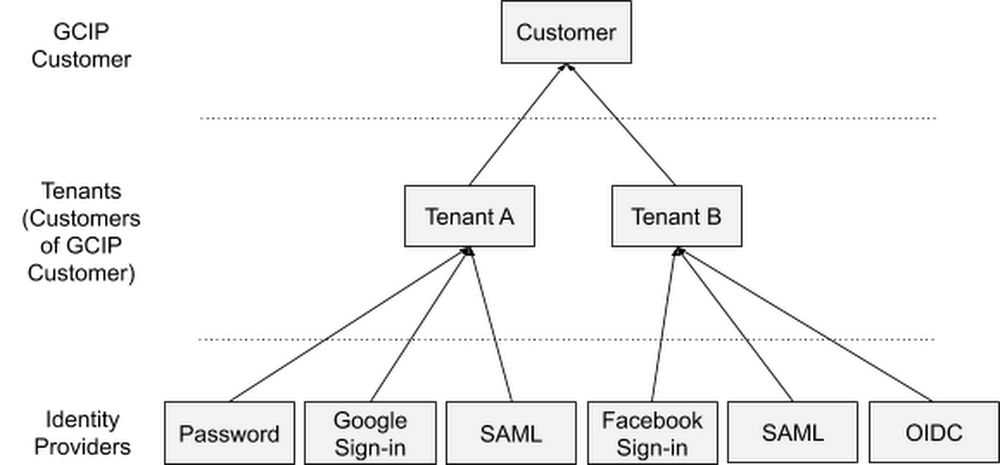
Modern businesses need to manage not only the identities of their employees but also the identities of customers, partners, and Things (IoT). In April, we made Identity Platform generally available to help you add Google-grade identity and access management functionality to your own apps and services, protect user accounts, and scale with confidence. Today, we are making the ability to create and manage multiple tenants within a single instance of Identity Platform generally available to all customers.An example customer-of-customer authentication structureMulti-tenancy allows you to create unique silos of users and configurations within a single Identity Platform instance, and it is most commonly used in business-to-business (B2B) applications to serve your customers and partners. For example, these silos might represent various customer groups with different authentication methods or employees of business units with different SAML identity providers (IdPs), subsidiaries, partners, vendors, and so on.The Identity Platform admin experienceYou can use Identity Platform tenants to establish a data isolation boundary between resource hierarchies. Each tenant has its own:Unique identifierUsersIdentity providers and authentication methodsAuditing and Cloud IAM configurationQuota allocationIdentity Platform usage breakdownThis allows tenants to operate autonomously from one another, with different configurations and users, even though they are part of the same instance.Getting startedTo get started with Identity Platform, enable it in GCP Marketplace, watch our Cloud Next ‘19 presentation, and check out the quickstart and multi-tenancy documentation.
Quelle: Google Cloud Platform

Bringing Hibernate ORM to Cloud Spanner for database adoption

When you’re adopting a new database technology, some things to consider can include learning a new SQL dialect or writing new boilerplate persistence logic. As much as possible, we’d like to make this simpler. For this type of work, Hibernate has become the de facto standard object relational mapping (ORM) solution for Java projects. It supports all major relational databases and enables even more powerful ORM tools like Spring Data JPA. We’ve developed our new open source Cloud Spanner Dialect for Hibernate ORM to make it easier to adopt Cloud Spanner. You can now get the benefits of Cloud Spanner—scalability and relational semantics—with the idiomatic persistence afforded by Hibernate. This can help you migrate existing applications to the cloud or write new ones using the familiar APIs of Hibernate-compatible environments such as JPA, Spring Data JPA, Microprofile, and Quarkus.Hibernate ORM helps address the challenges of adopting a new database technology by providing two major benefits: portability across databases and easier writing of create-read-update-delete (CRUD) logic. These benefits can increase developer productivity and speed up cloud database adoption. For more information, check out our documentation, the git repository, or try out the codelab. How to write a Java app with Hibernate and Cloud SpannerHere, we’ll take you on a quick tour of what it’s like to write a Java application that uses Hibernate to talk to Cloud Spanner. The steps are similar to what you’ll find in the codelab. We’ll create an application that stores musical artists and their albums in Cloud Spanner. Although this is a basic Hibernate example, keep in mind that this can be adapted to JPA-based systems backed by Hibernate as well.We’ll need the Cloud Spanner Dialect for Hibernate, the open source Cloud Spanner JDBC driver, and the Hibernate core. So, let’s add those dependencies to the app.pom.xmlNow, let’s tell Hibernate about the annotated entity classes we’ll be mapping to the database.src/main/resources/hibernate.cfg.xmlHibernate also needs to know how to connect to the Cloud Spanner instance and which dialect to use. So, we’ll tell it to use the SpannerDialect for SQL syntax, the Cloud Spanner JDBC driver, and the JDBC connection string with the database coordinates.src/main/resources/hibernate.propertiesWe’ll make sure that the authentication credentials are already set up, using either a service account JSON file in the GOOGLE_APPLICATION_CREDENTIALS environment variable or the application default credentials configured using the “gcloud auth application-default login” command.Now we’re ready to write some code.We’ll define two plain old Java objects (POJOs) that will map to tables in Cloud Spanner—Singer and Album. The Album will have a @ManyToOne relationship with Singer. We could have also mapped Singers to a list of their Albums with a @OneToMany annotation, but for this example, we don’t really want to load all albums every time we need to fetch a singer from the database.Since we don’t have an existing database schema, we added the hibernate.hbm2ddl.auto=update property to let Hibernate create the two tables in Cloud Spanner when we run the app for the first time.src/main/java/demo/Application.javaDon’t forget to also add a no-arg constructor, hashCode(), and equals(), to each of the entities, as Hibernate requires these. You can see all that in the full example.Also, for this example we’re using an auto-generated UUID for the primary key. This is a preferred ID type in Cloud Spanner because it avoids hotspots as the system divides data among servers by key ranges. A monotonically increasing integer key would also work, but can perform less well.With everything configured and entity objects defined, we can start writing to the database.Create a Hibernate Session.src/main/java/demo/Application.javaIt’s time to write some data into Cloud Spanner.src/main/java/demo/Application.javaAt this point, if you go to the Cloud Spanner console and view the data for the Singer and Album tables in the database, you’ll see something like this:It’s nice to easily explore the tables in the Cloud Console, but we really want to query them in our application. So, finally, let’s query some data using Hibernate. Notice that we’re using HQL, which is portable across various Hibernate dialects, not just Cloud Spanner.src/main/java/demo/Application.javaAt last, make sure to close the Hibernate resources before the application shuts down.src/main/java/demo/Application.javaFor more details, check out a full working example or one of the other code samples we have that use Spring Data JPA, Microprofile, or Quarkus. Give Hibernate a try on Cloud Spanner, and send your feedback through the Github issue tracker.
Quelle: Google Cloud Platform

Cloud against the storm: Clemson’s 2.1 million VCPU experiment

While the phenomena of climate change are complex, it’s an empirical truth that the number of North Atlantic storms big enough to merit a name each year has increased dramatically in the past 20 years, and is projected to increase further, arguably the most obvious impact on the United States of a shifting global climate. When these storms come ashore, destruction follows, sometimes even death. Authorities face a series of dilemmas as they try to manage the risks to the populations of low-lying coastal areas. When is shelter-in-place the best option, and when must people evacuate? How can evacuations be managed safely and efficiently? When public safety officials get the answers to these questions wrong, tragedy can ensue. A team at Clemson University has been exploring the use of Google Cloud to improve disaster planning and management in ways that are both scientifically interesting and instructive for users of Google Cloud computing services. And in doing so, they set a new record for the scale of computation on a single problem in a public cloud: 2.1 million cores. It was an adventure that I think is worth sharing.The problem: Managing evacuation routesEvacuations from threatened coastal areas are almost entirely done by private automobiles on public roads. The evacuation routes tend to be limited in number and capacity by the terrain and the weather: Bridges and causeways are bottlenecks, and alternate routes across low-lying areas may already be flooded. Optimizing vehicular “throughput” over the available channels is incredibly important—and quite difficult.Brandon Posey of Clemson, under the supervision of Professor Amy Apon, has been working on building traffic flow models based on streaming data from existing street-level traffic cameras. Machine vision software capable of anonymously distinguishing vehicles and vehicular motion exists, but processing and correlating the feeds from multiple cameras at the necessary scale is a herculean computational task. A single evacuation zone can have thousands of these cameras, and the full cycle of an evacuation, cleanup, and return, can take days, even weeks. The Clemson team assumed a 10-day cycle for the experiment, and chose an evacuation area with 8500 available camera feeds, which over 10 days generate 2 million hours of video—about 210TB. TrafficVision, a commercial company that participated in the experiment, provided the software for analysis of the video segments, so that vehicle, incident and anomaly detection on an individual video stream could be treated as a “solved problem” for the purposes of the experiment. The problem itself is “embarrassingly parallel,” in that the interpretations of individual video segments are completely independent of one another, and can be done in any order or all at once.The challenge was in provisioning and operating the infrastructure to run the software at the necessary scale, with the scant advance notice one might have in a real climate emergency. It is simply not practical to have millions of cores “on deck” waiting for a hurricane. Public cloud providers, however, have fungible resources that can be procured at a range of service levels. Non-critical resources can be pre-empted and redeployed for emergency management services. The question becomes whether the computation can be provisioned and executed fast enough, at the necessary scale.Architecting the solutionOne common design pattern in high performance computing on Google Cloud is a “node-out” approach, where the first step is to understand and optimize application performance on a single virtual machine instance “node.” Every application has a “sweet spot” in the space of ratios of CPU cores to memory and other storage, GPUs, and other accelerators. When these can’t be computed from first principles, they are generally straightforward to determine experimentally. And once it has been determined, Google Cloud Platform provides the capability to generate an optimal custom node type that can be carved out of the Google infrastructure, as shown in the diagram below. The customer pays only for the resources actually deployed. The sweet spot for the TrafficVision application was 16 virtual CPUs and 16GB of memory per instance.Once the virtual node has been defined, it’s easy to make virtual clusters of them within Google Cloud. These can be persistent or ephemeral, spun up by a job orchestration or batch management system long enough to run the specific work for which they are adapted, at the level of parallel scaling that provides the most cost-effective results, as shown in the following diagram.The Clemson team started with this node-out approach. The processing of individual video segments by the TrafficVision software runs most cost-effectively on small virtual nodes, each with 16 VCPU “cores” and 16GB of memory. This memory/CPU ratio is significantly lower than the default for compute VM instances. “Custom-16-16384” became the custom instance type for the worker nodes. The fact that the processing of the video segments can be done in any order suggested that the team could also take advantage of Google Cloud’s preemptible VMs. These are offered with a discount of up to 80% in return for reduced service levels of availability—the instance can be shut down at any moment, and cannot run for more than 24 hours. Neither of those constraints were problematic for the experiment, since processing time on an individual video is on the order of an hour, not a day, and the small number of jobs that fail because their resources were preempted can simply be restarted. A tale of scaleBut while the nodes of the virtual supercomputer are small, and potentially ephemeral, they are very numerous—up to 2 million of them (now, that’s a tale of scale). To meet this challenge, the Clemson team used their Provisioning And Workflow management tool, PAW (Go Tigers!). PAW is provider- and workflow-agnostic, allowing the team to use GCP infrastructure with CloudyCluster workflow tooling, which had already been demonstrated to work at a million-core scale.Public cloud services like Google Cloud manage very large pools of resources for large pools of clients. Resource management must necessarily be parallel and distributed to operate at scale. This distribution and parallelism is normally transparent to users, but at the scale of this experiment, it was necessary to understand and adapt to the underlying design.Fairness is an important property of a multi-user operating system, and Google Cloud enforces it in various ways. One of those is limiting the rate at which one user can make resource requests of the shared infrastructure. With no limit, a malicious (or more likely simply erroneous) script could saturate the resource management system, acting as a de facto denial-of-service (DOS) attack. Google Cloud solves this problem by putting quotas on the number of GCP REST API requests that can be made per 100 seconds. The default is 2000. At a minimum, an API request is made to create each VM instance, and another is required to delete it when it is no longer needed.2000 API calls per 100 seconds, 20 per second, is more than enough for most applications, but at the scale of Clemson’s experiment, 93,750 virtual machine instances, it would take more than an hour just to provision or free all the worker nodes. The system supports a tripling of the quota to 6000 per 100 seconds, but even at this level, spinning down after a run would take 26 minutes, during most of which tens of thousands of instances are sitting idle—but nevertheless billable.The key to solving this problem lies in the fact that these quotas are defined per GCP project, not per customer. By using CloudyCluster to federate multiple GCP projects, each associated with a specific Google Cloud region (which generally corresponds to a data center), the quotas can be combined. Not only can the provisioning of projects happen in parallel, but the per-region provisioning, having higher locality, is generally faster. Within each regional project, CloudyCluster instantiated a SLURM batch scheduler per zone in a further level of parallel distribution and federation.But while some management processes, like provisioning, would take too long at this scale if one followed the usual cloud playbook, another was so unexpectedly fast on Google Cloud Platform as to create a problem! Getting past 20 instance creations per second was critical to ramping rapidly enough to the required scale, but each instance needs to create an SSH network connection to a CloudyCluster master node. At the full scale of the experiment, with provisioning running open-loop in parallel in multiple zones, the incoming connection rate exceeded the capacity of that node to accept incoming SSH connections, causing some to fail. What was needed was a means to pace instance creation so as not to overwhelm SSH connection services, without increasing the deployment time. Fortunately, Google Cloud provides such a mechanism.To regulate the flow of creation requests, the Clemson team used batching of GCP API requests. Instead of instance creation running open-loop at the aggregate maximum rate, instances were created in bursts of no more than 5000, with randomized pauses between batches. This allowed administrative connection setup to make enough forward progress to avoid timeouts.Clemson’s final operational model was something like the diagram below. They spread the work across six Google Cloud geographical regions (and the administrative zones within the regions), to parallelize the provisioning process and get beyond the API rate limitations. This also allowed them to cast a wide net when looking for available preemptible cores.This tuned, hierarchical scheme allowed the Clemson team to successfully scale up to 2.14 million virtual CPUs executing in parallel to analyze traffic video. The chart below shows the ramp-up and ramp-down of active VCPUs running in the experiment. 967,000 were running at the end of the first hour, 1.5 million in 1.5 hours, and 2.13 after 3 hours, with a peak of 133,573 concurrent VM instances. The peak Google Cloud Storage IO throughput was 128 GB/s.While some ingenuity was required, the experiment was a success. Using Google Cloud, Posey and the Clemson team showed it is possible to draw on worldwide spare capacity to deploy very large scale emergency computations in the interest of public safety. Most hurricane evacuations won’t require the full 2-million-plus virtual CPUs used here to process evacuation data in real time, but it’s reassuring to know that it’s possible. And a source of some pride to me that it’s possible on Google Cloud.  Kudos to Brandon Posey and Amy Apon of Clemson University, Boyd Wilson and Neeraj Kanhere of TrafficVision, Dan Speck of the Burwood Group, and my Google colleagues Vanessa July, Wyatt Gorman, and Adam Deer.
Quelle: Google Cloud Platform