Forrester names Google Cloud a Leader in the New Wave for Computer Vision Platforms

We’re proud to announce that Forrester has named Google Cloud as a Leader in its report, The Forrester New Wave™: Computer Vision (CV) Platforms Q4, 2019. We believe Forrester’s report validates Google Cloud’s AI ​strategy, and echoes the feedback we’ve heard from customers: Google Cloud offers powerful, flexible, open, and easy-to-use AI building blocks and solutions to parse unstructured content and enable intelligent process automation.Google Cloud offers the full gamut of computer vision building blocks and prepackaged solutions for your organization.Parse and structure your scanned documents with the Document Understanding AI solution and OCR productsDerive insights from your images and videos with our pre-trained Vision API, Vision Product Search, and Video Intelligence APIIntegrate computer vision models in your mobile apps with the Firebase MLKit Train and deploy high-quality custom machine learning models with minimal  effort and machine learning expertise with AutoML Vision, AutoML Video, and the Cloud AI PlatformIntegrating these capabilities enabled our customers and partners to implement intelligent process automation solutions. From document understanding and OCR for procure-to-payment automation, to automated assembly line defect detection, and automated medical imagery analysis for radiologist assistance, Google Cloud is your platform for digital transformation. In this report, Google Cloud received the highest score in the current offering category among the vendors evaluated. Google Cloud was also the only provider to receive the highest possible score of “differentiated” across all 10 Forrester evaluation criteria: Data, Capabilities, Pre-Trained Models, Development, Deployment, Solutions, Ease of Use, Vision, Roadmap, and Market Approach.Some other highlights from Forrester’s research show that Google Cloud:Enables more personas to build a wider, better range of computer vision solutions. Google’s offerings span the full CV solution development lifecycle and enable everyone to easily annotate data, build powerful custom CV models, leverage a wide range of powerful retrained CV models, and scale CV applications across a host of edge devices.Is the platform to pick, that can do the most for the many. From business users to developers and data scientists, Google has powerful CV tools that all of them can use.We are honored to be a leader in this Forrester Wave™, and look forward to continuing to innovate and partner with you on your digital automation journey. Download the full Forrester New Wave™: Computer Vision Platforms, Q4 2019 report here.To learn more about Google Cloud, visit our website, and sign up for a free trial.
Quelle: Google Cloud Platform

How AutoML Vision is helping companies create visual inspection solutions for manufacturing

We consistently hear from our customers that they need new ways to apply the latest technologies, such as AI, to improve efficiency. One area that AI has proven to be particularly beneficial is in helping to automate the visual quality control process for manufacturing customers. These customers tell us they want AI solutions that help them make quality control and inspections more efficient, to improve overall quality. But, there are many factors that make it difficult to prevent the distribution of damaged products. And the later a defect is caught in the manufacturing process, the more costly it is to fix or replace. Visual inspection helps manufacturing customers identify defects early and at a lower cost, and we’re seeing many innovative ways it’s helping our customers revolutionize their processes. Chip making made more efficientOne example of a customer using AI to transform their manufacturing process is GlobalFoundries, a leader in the semiconductor manufacturing industry. The company used AutoML Vision to build a visual inspection solution that can detect random defects in wafer map and scanning electron microscope (SEM) images, which are essential pieces for semiconductor manufacturing. A wafer map shows the performance of a semiconductor device, while an SEM’s images, which are created with a focused beam of electrons, can be used to closely examine a wafer.“Google Cloud AutoML Vision made it easy for our subject matter experts to quickly learn how to navigate and then train the AI,” Dr. DP Prakash, Global Head of AI XR Innovation at GlobalFoundries explained. “In our factory leading the initiative, 40% of the manual inspection workload has already been successfully shifted to the visual inspection solution we built based on AutoML.” GlobalFoundries’ visual inspection solution integrates AutoML Vision into their in-house content management system, and includes SEM image acquisition, image and sample defect management, defect prediction visualization, and product quality report generation among its features. AutoML Vision reads in the images of wafers and sample defects, and trains customized models to detect these defects. The trained model will be used to detect defects in new incoming product images. When evaluating technologies, GlobalFoundries was impressed that AutoML Vision could successfully classify 80% of the images based on a limited amount of training data in the initial pass itself. This fast path to high accuracy let GlobalFoundries quickly move to production, start realizing benefits, and scale up. To capture and control process defects in semiconductor factories, GlobalFoundries deployed hundreds of models in its factories. AutoML Vision’s data and model management features help refresh the data continuously and efficiently, giving the company visibility into all those models. GlobalFoundries also achieved similar success in their lithography process—where a pattern is transferred onto a chip. In the conventional method, due to the practical constraints of time and cost in high volume manufacturing environments, only a sample of the wafers produced are typically inspected for systematic defect patterns. The new visual inspection solution developed with AutoML, however, increases the validation rate to 95% of wafers, reducing waste, and improving quality and customer satisfaction.Revolutionizing manufacturing processesSiemens is another company using AutoML Vision to change the way they manage the inspection process. “Siemens leveraged Google’s domain expertise in AI technology to create Factory AI service, which revolutionized our manufacturing with automated visual inspections,” said Tigran Bagramyan, Intrapreneur and Data Scientist, Siemens. “We use AutoML Vision to quickly build prototypes and push them to production on the factory floor. AutoML Vision helps us concentrate on use cases and customer value rather than complexity of AI development.” Meanwhile, LG CNS leverages AutoML Vision Edge to create manufacturing intelligence solutions that detect defects in everything from LCD screens and optical films, to automotive fabrics on the assembly line. AutoML Vision Edge improved defect detection accuracy by 6% and reduced the time to design and train their ML models from seven days to just a few hours. AutoML Vision lets customers train high-quality defect detection models, deploy models, and run inference on production lines. We look forward to supporting customers as they continue to find innovative new ways to deploy AI.To learn more about how you can use our vision products for visual inspection and other use cases, check out Google Cloud Vision AI.
Quelle: Google Cloud Platform

A year of bringing AI to the edge

This post is co-authored by Anny Dow, Product Marketing Manager, Azure Cognitive Services.

In an age where low-latency and data security can be the lifeblood of an organization, containers make it possible for enterprises to meet these needs when harnessing artificial intelligence (AI).

Since introducing Azure Cognitive Services in containers this time last year, businesses across industries have unlocked new productivity gains and insights. The combination of both the most comprehensive set of domain-specific AI services in the market and containers enables enterprises to apply AI to more scenarios with Azure than with any other major cloud provider. Organizations ranging from healthcare to financial services have transformed their processes and customer experiences as a result.


These are some of the highlights from the past year:

Employing anomaly detection for predictive maintenance

Airbus Defense and Space, one of the world’s largest aerospace and defense companies, has tested Azure Cognitive Services in containers for developing a proof of concept in predictive maintenance. The company runs Anomaly Detector for immediately spotting unusual behavior in voltage levels to mitigate unexpected downtime. By employing advanced anomaly detection in containers without further burdening the data scientist team, Airbus can scale this critical capability across the business globally.

“Innovation has always been a driving force at Airbus. Using Anomaly Detector, an Azure Cognitive Service, we can solve some aircraft predictive maintenance use cases more easily.”  —Peter Weckesser, Digital Transformation Officer, Airbus

Automating data extraction for highly-regulated businesses

As enterprises grow, they begin to acquire thousands of hours of repetitive but critically important work every week. High-value domain specialists spend too much of their time on this. Today, innovative organizations use robotic process automation (RPA) to help manage, scale, and accelerate processes, and in doing so free people to create more value.

Automation Anywhere, a leader in robotic process automation, partners with these companies eager to streamline operations by applying AI. IQ Bot, their unique RPA software, automates data extraction from documents of various types. By deploying Cognitive Services in containers, Automation Anywhere can now handle documents on-premises and at the edge for highly regulated industries:

“Azure Cognitive Services in containers gives us the headroom to scale, both on-premises and in the cloud, especially for verticals such as insurance, finance, and health care where there are millions of documents to process.” —Prince Kohli, Chief Technology Officer for Products and Engineering, Automation Anywhere

For more about Automation Anywhere's partnership with Microsoft to democratize AI for organizations, check out this blog post.

Delighting customers and employees with an intelligent virtual agent

Lowell, one of the largest credit management services in Europe, wants credit to work better for everybody. So, it works hard to make every consumer interaction as painless as possible with the AI. Partnering with Crayon, a global leader in cloud services and solutions, Lowell set out to solve the outdated processes that kept the company’s highly trained credit counselors too busy with routine inquiries and created friction in the customer experience. Lowell turned to Cognitive Services to create an AI-enabled virtual agent that now handles 40 percent of all inquiries—making it easier for service agents to deliver greater value to consumers and better outcomes for Lowell clients.

With GDPR requirements, chatbots weren’t an option for many businesses before containers became available. Now companies like Lowell can ensure the data handling meets stringent compliance standards while running Cognitive Services in containers. As Carl Udvang, Product Manager at Lowell explains:

"By taking advantage of container support in Cognitive Services, we built a bot that safeguards consumer information, analyzes it, and compares it to case studies about defaulted payments to find the solutions that work for each individual."

One-to-one customer care at scale in data-sensitive environments has become easier to achieve.

Empowering disaster relief organizations on the ground

A few years ago, there was a major Ebola outbreak in Liberia. A team from USAID was sent to help mitigate the crisis. Their first task on the ground was to find and categorize the information such as the state of healthcare facilities, wifi networks, and population density centers.  They tracked this information manually and had to extract insights based on a complex corpus of data to determine the best course of action.

With the rugged versions of Azure Stack Edge, teams responding to such crises can carry a device running Cognitive Services in their backpack. They can upload unstructured data like maps, images, pictures of documents and then extract content, translate, draw relationships among entities, and apply a search layer. With these cloud AI capabilities available offline, at their fingertips, response teams can find the information they need in a matter of moments. In Satya’s Ignite 2019 keynote, Dean Paron, Partner Director of Azure Storage and Edge, walks us through how Cognitive Services in Azure Stack Edge can be applied in such disaster relief scenarios (starting at 27:07): 

Transforming customer support with call center analytics

Call centers are a critical customer touchpoint for many businesses, and being able to derive insights from customer calls is key to improving customer support. With Cognitive Services, businesses can transcribe calls with Speech to Text, analyze sentiment in real-time with Text Analytics, and develop a virtual agent to respond to questions with Text to Speech. However, in highly regulated industries, businesses are typically prohibited from running AI services in the cloud due to policies against uploading, processing, and storing any data in public cloud environments. This is especially true for financial institutions.

A leading bank in Europe addressed regulatory requirements and brought the latest transcription technology to their own on-premises environment by deploying Cognitive Services in containers. Through transcribing calls, customer service agents could not only get real-time feedback on customer sentiment and call effectiveness, but also batch process data to identify broad themes and unlock deeper insights on millions of hours of audio. Using containers also gave them flexibility to integrate with their own custom workflows and scale throughput at low latency.

What's next?

These stories touch on just a handful of the organizations leading innovation by bringing AI to where data lives. As running AI anywhere becomes more mainstream, the opportunities for empowering people and organizations will only be limited by the imagination.

Visit the container support page to get started with containers today.

For a deeper dive into these stories, visit the following

Automation Anywhere case study
Automation Anywhere’s partnership with Microsoft
Lowell case study
Azure Stack Edge update from Microsoft Ignite 2019
Cognitive Services in Azure Stack Edge demo (at 27:07)

Quelle: Azure

You can cook turkey in a toaster oven, but you don't have to

When I was in college and couldn’t make it home for the Thanksgiving holiday, I would get together with other students in the same situation and do the next best thing: cook a traditional Thanksgiving feast of roast turkey, mashed potatoes and gravy, stuffing, and green beans by ourselves. In a dorm room. Using the kitchen equipment we had available: a toaster oven and a popcorn popper. The resulting dinner wasn’t terrible, but it didn’t hold a candle to the meal my family was enjoying back home, made with the benefit of an oven, high-BTU range, food processor, standing mixer—you get the idea.Software development teams are sometimes in a similar situation. They need to build something new and have a few tools, so they build their application using what they have. Like our dorm-room Thanksgiving dinner, this can work, but it is probably not a good experience and may not get the best result.Today, with cloud computing, software development teams have a lot more resources available to them. But sometimes teams move to the cloud but keep using the same old tools, just on a larger scale. That’s like moving from a toaster oven to a wall of large ovens, but not looking into how things like convection or microwave ovens, broilers, sous-vide cooking, instant pots, griddles, breadmakers, or woks can help you make a meal.In short, if you’re an application developer and you’ve moved to the cloud, you should really explore all the new kinds of tools you can use to run your code, beyond configuring and managing virtual machines.Like the number of side dishes on my parents’ holiday table, the number of Google Cloud Platform products you might use can be overwhelming. Here are a few you might want to look at first:App Engine Standard Environment is a serverless platform for web applications. You bring your own application code and let the platform handle the web server itself, along with scaling and monitoring. It can even scale to zero, so if there are idle periods without traffic, you won’t be paying for computer time you aren’t using.Some of the code you need might not be an application, but just a handler to deal with events as they happen, such as new data arriving or some operation being ready to start. Cloud Functions is another serverless platform that runs code written in supported languages in response to many kinds of events. Cloud Run can do similar tasks for you, with fewer restrictions on what languages and binaries you can run, but requiring a bit more management on your part.Do you need regular housekeeping tasks performed, such as generating daily reports or deleting stale data? Instead of running a virtual machine just so you can trigger a cron job, you can have Cloud Scheduler do the triggering for you. If you want to get really fancy (like your aunt’s bourbon pecan pie), you can implement it with another serverless offering such as Cloud Functions, at specified intervals.Instead of installing and managing a relational database server, use Cloud SQL instead. It’s reliable and secure, and handles backups and replication for you.Maybe you don’t need (or just don’t want to use) a relational database. Cloud Firestore is a serverless NoSQL database that’s easy to use and that will scale up or down as needed. It also replicates your data across multiple regions for extremely high availability.After Thanksgiving dinner, you may feel like a blob. Or you may just need to store blobs of data, such as files. But you don’t want to use a local filesystem, you want replicated and backed up storage. Some teams put these blobs into general purpose databases, but that’s not a good fit and can be expensive. Cloud Storage is designed to store and retrieve blob-format data on demand, affordably and reliably.These products are great starting points in rethinking what kind of infrastructure your application could be built on, once you have adopted cloud computing. You might find they give you a better development experience and great outcomes relative to launching and managing more virtual machines. Now if you’ll excuse me, dinner’s ready!
Quelle: Google Cloud Platform

Stackdriver Logging comes to Cloud Code in Visual Studio Code

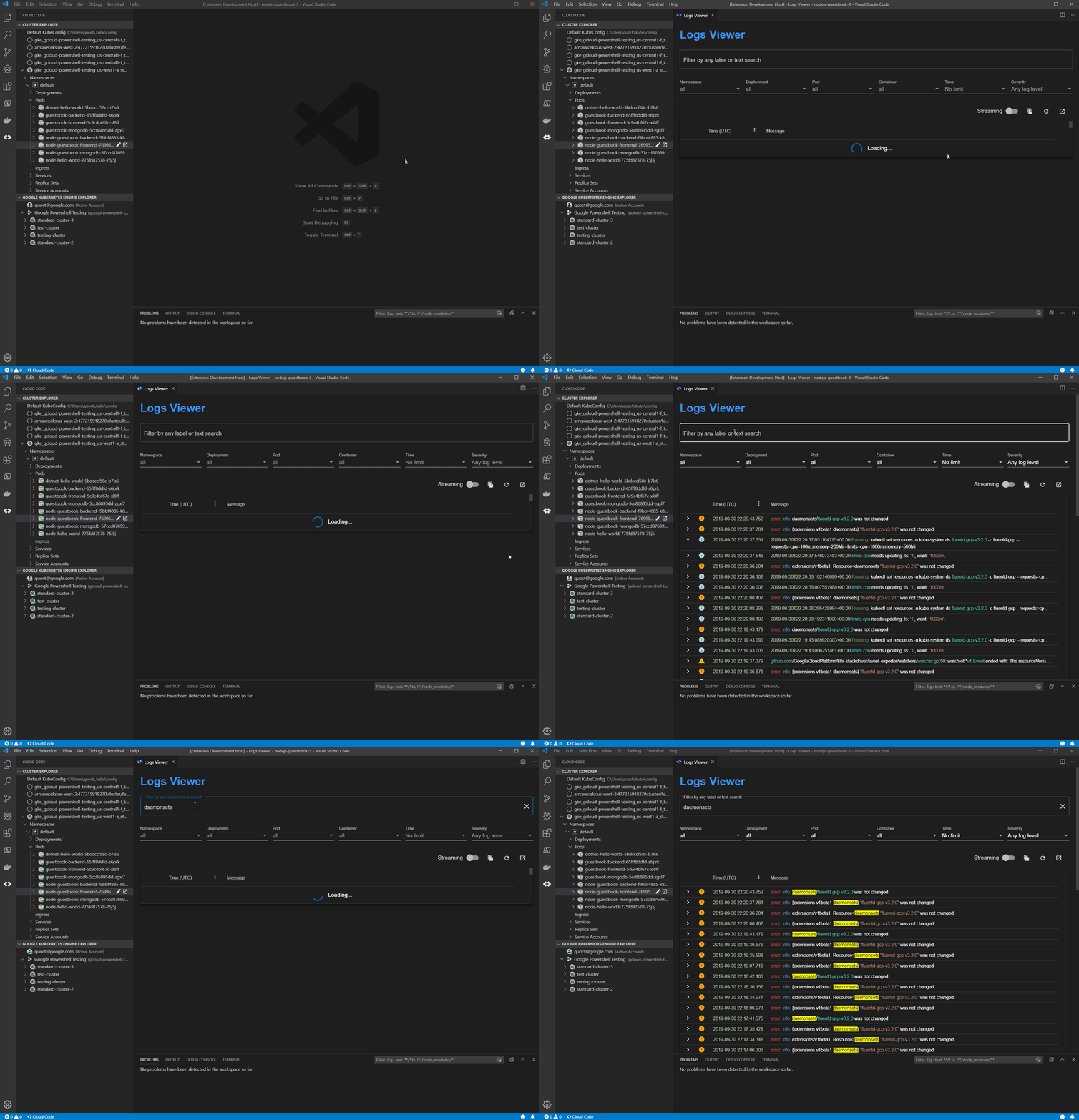
A big part of troubleshooting your code is inspecting the logs. At Google Cloud, we offer Cloud Code, a plugin to popular integrated development environments (IDEs) to help you write, deploy, and debug cloud-native applications quickly and easily. Stackdriver Logging, meanwhile, is the go-to tool for all Google Cloud Platform (GCP) logs, providing advanced searching and filtering as well as detailed information about them. But deciphering logs can be tedious. Even worse, you need to leave your IDE to access Stackdriver Logging. Now, with the Cloud Code plugin, you can access your Stackdriver logs in the Visual Studio Code IDE directly! The new Cloud Code logs viewer helps you simplify and streamline the diagnostics process with three new features:Integration with Stackdriver Logging A customizable logs viewerKubernetes-specific filtering  View Stackdriver logs in VS CodeWith the new Cloud Code logs viewer you can access your Stackdriver logs in VS Code directly. Simply open the logs viewer and Cloud Code displays all your Stackdriver logs. You can edit the filters just like you do in Stackdriver, and if you would like to see more detailed information you can easily return to Stackdriver Logging from the IDE with your filters in place.In contrast to kubectl logs, Stackdriver logs are natively integrated with Google Cloud. Learn more about Stackdriver Logging here. Improved log exploration The new logs viewer provides a structured logs viewing experience that has several new features including: severity filters, colorized output, streaming capabilities, and timezone conversions. The new logs viewer presents an organized view of logs and lets you filter and search your logs from within VS Code. Think of the logs viewer as your first stop for all of your logs without having to leave your IDE.  The logs viewer will supports kubectl logs.Kubernetes-specific filtering Kubernetes logs are complex. The new logs viewer lets you filter on Kubernetes-specific elements including: namespace, deployment, pod, container, and keyword. This allows you to easily see logs for specific pod or all the logs from a given deployment, helping you so you can navigate complex logs more effectively.In addition to manual filtering, you can access the logs viewer from the Cloud Code resource browser and use the tree view to filter your logs. This way, you can locate a resource with the context around it. The tree view shows status and context information that can help you find important logs such as unhealthy or orphaned pods.Get started Accessing Stackdriver Logs in VS Code with Cloud Code brings your logs closer to your code, with advanced filtering options that help you stay focused and in your IDE. To learn more, check out this guide to getting started with the Log Viewer. If you are new to Cloud Code or Stackdriver Logging, start by learning how to install Cloud Code and set up Stackdriver. If you are already using Cloud Code and Stackdriver Logging, there are no prerequisites to get started—just open the new logs viewer with Cloud Code and you’re ready to go!
Quelle: Google Cloud Platform