Making your monolith more reliable

In cloud operations, we often hear about the benefits of microservices over monolithic architecture. Indeed, microservices help manage hardware being abstracted away and push developers towards resilient, distributed designs. However, many enterprises still have monolithic architectures which they need to maintain. For this post, we’ll use Wikipedia’s definition of a monolith: “A single-tiered software application in which the user interface and data access code are combined into a single program from a single platform.”When and why to choose monolithic architecture is usually a matter of what works best for each business. Whatever the reason for using monolithic services, you still have to support them. They do, however, bring their own reliability and scaling challenges, and that’s what we’ll tackle in this post. At Google, we use site reliability engineering (SRE) principles to ensure that systems run smoothly, and these principles apply to monoliths as well as microservices. Common problems with monolithsWe’ve noticed some common problems that arise in the course of operating monoliths. Particularly, as monoliths grow (either scaling with increased usage, or growing more complex as they take on more functionality), there are several issues we commonly have to address:Code base complexity: Monoliths contain a broad range of functionality, meaning they often have a large amount of code and dependencies, as well as hard-to-follow code paths, including RPC calls that are not load-balanced. (These RPCs call to themselves or call between different instances of a binary if the data is sharded.)Release process difficulty: Frequently, monoliths consist of code submitted by contributors across many different teams. With more cooks in the kitchen and more code being cooked up every release cycle, the chances of failure increase. A release could fail QA or fail to deploy into production. These services often have difficulty reaching a mature state of automation where we can safely and continuously deploy to production, because the services require human decision-making to promote them into production. This puts additional burden on the monolith owners to detect and resolve bugs, and slows overall velocity.Capacity: Monolithic servers typically serve various types of requests, and that variation means that in order to complete the requests, differences in compute resources—CPU, memory, storage I/O, and so on—are required. For example, an RDBMS-backed server might handle view-only requests that read from the database and are reasonably cacheable, but may also serve RPCs that write to the database, which must be committed before returning to the user. The impact on CPU and memory consumption can vary greatly between these two. Let’s say you load-test and determine your deployment handles 100 queries per second (qps) of your typical traffic. What happens if usage or features change, resulting in a higher number of expensive write queries? It’s easy to introduce these changes—they happen organically when your users decide to do something different, and can threaten to overwhelm your system. If you don’t check your capacity regularly, you can end up being underprovisioned gradually over time.Operational difficulty: With so much functionality in one monolithic system, the ability to respond to operational incidents becomes more consequential. Business-critical code shares a failure domain with low-priority code and features. Our Google SRE guidelines require changes to our services to be safe to roll back. In a monolith with many stakeholders, we need to coordinate more carefully than with microservices, since the rollback may revert changes unrelated to the outage, slow development velocity, and potentially cause other issues.How does an SRE address the issues commonly found in monoliths? The rest of this post discusses some best practices, but these can be distilled down to a single idea: Treat your monolith as a platform. Doing so helps address the operational challenges inherent in this type of design. We’ll describe this monolith-as-a-platform concept to illustrate how you can build and maintain reliable monoliths in the cloud.Monolith as a platformA software platform is essentially a piece of software that provides an environment for other software to run. Taking this platform approach toward how you operate your monolith does a couple of things. First, it establishes responsibility for the service. The platform itself should have clear owners who define policy and ensure that the underlying functionality is available for the various use cases. Second, it helps frame decisions about how to deploy and run code in a way that balances reliability with development velocity. Having all the monolith code contributors share operational responsibility sets individuals against each other as they try to launch their particular changes. Instead of sharing operational responsibility, however, the goal should be to have a knowledgeable arbiter who ensures that the health of the monolith is represented when designing changes, and also during production incidents.Scaling your platformMonoliths that are run well converge on some common best practices. This is not meant to be a complete list and is in no particular order. We recommend considering these solutions individually to see if they might improve monolith reliability in your organization:Plug-in architecture: One way to manifest the platform mindset is to structure your code to be modular, in a way that supports the service’s functional requirements. Differentiate between core code needed by most/all features and dedicated feature code. The platform owners can be gatekeepers for changes to core code, while feature owners can change their code without owner oversight. Isolate different code paths so you can still build and run a working binary with some chosen features disabled.Policies for new code and backends: Platform owners should be clear with the requirements for adding new functionality to the monolith. For example, to be resilient to outages in downstream dependencies, you may set a latency requirement stating that new back-end calls are required to time out within a reasonable time span (milliseconds or seconds), and are only retried a limited number of times before returning an error. This prevents a serving thread from getting stuck, waiting indefinitely on an RPC call to a backend, and possibly exhausting CPU or memory.Similarly, you might require developers to load test their changes before committing or enabling a new feature in production, to ensure there are no performance or resource requirement regressions. You may want to restrict new endpoints from being added without your operation team’s knowledge.Bucket your SLOs: For a monolith serving many different types of requests, there’s a tendency to define a new SLI and SLO for each request. As the number of SLOs increases, however, it gets more confusing to track and harder to assess the impact of error budget burn for one SLO vs. all the others. To overcome this issue, try bucketing requests based on the similarity of the code path and performance characteristics. For example, we can often bucket latency for most “read” requests into one group (usually lower latency), and create a separate SLO bucket for “write” requests (usually higher latency). The idea is to create groupings that indicate when your users are suffering from reliability issues.Which team owns a particular SLO or deciding whether an SLO is even needed for each feature are important considerations. While you want your on-call engineer to respond to business-critical outages, it’s fine to decide that some parts of the service are lower-priority or best-effort, as long as they don’t threaten the overall stability of the platform.Set up traffic filtering: Make sure you have the ability to filter traffic by various characteristics, using a web application firewall (WAF) or similar method. If one RPC method experiences a Query of Death (QoD), you can temporarily block similar queries, thereby mitigating the situation and giving you time to fix the issue.Use feature flags: As described in the SRE book, giving specific features a knob to disable all or some percentage of traffic is a powerful tool for incident response. If a particular feature threatens the stability of the whole system, you can throttle it down or turn it off, and continue serving all your other traffic safely.Flavors of monoliths: This last practice is important, but should be carefully considered, depending on your situation. Once you have feature flags, it’s possible to run different pools of the same binary, with each pool configured to handle different types of requests. This helps tremendously when a reliability issue requires you to re-architect your service, which may take some time to develop. Within Google, we once ran different pools of the same web server binary to serve web search and image search traffic separately, because performance profiles were so different. It was challenging to support them in a single deployment but they all shared the same code, and each pool only handled its own type of request.There are downsides to this mode of operation, so it’s important to approach this thoughtfully. Separating services this way may tempt engineers to fork services, in spite of the large amount of shared code, and running separate deployments increases operational and cognitive load. Therefore, instead of indefinitely running different pools of the same binary, we suggest setting a limited timeframe for running the different pools, giving you time to fix the underlying reliability issue that caused the split in the first place. Then, once the issue is resolved, merge serving back to one deployment. Regardless of where your code sits on the monolith-microservice spectrum, your service’s reliability and users’ experience are what ultimately matters. At Google, we’ve learned—sometimes the hard way—from the challenges that various design patterns bring. In spite of these challenges, we continue to serve our users 24/7 by calling to mind SRE principles, and putting these principles into practice.
Quelle: Google Cloud Platform

Now generally available: Managed Service for Microsoft Active Directory (AD)

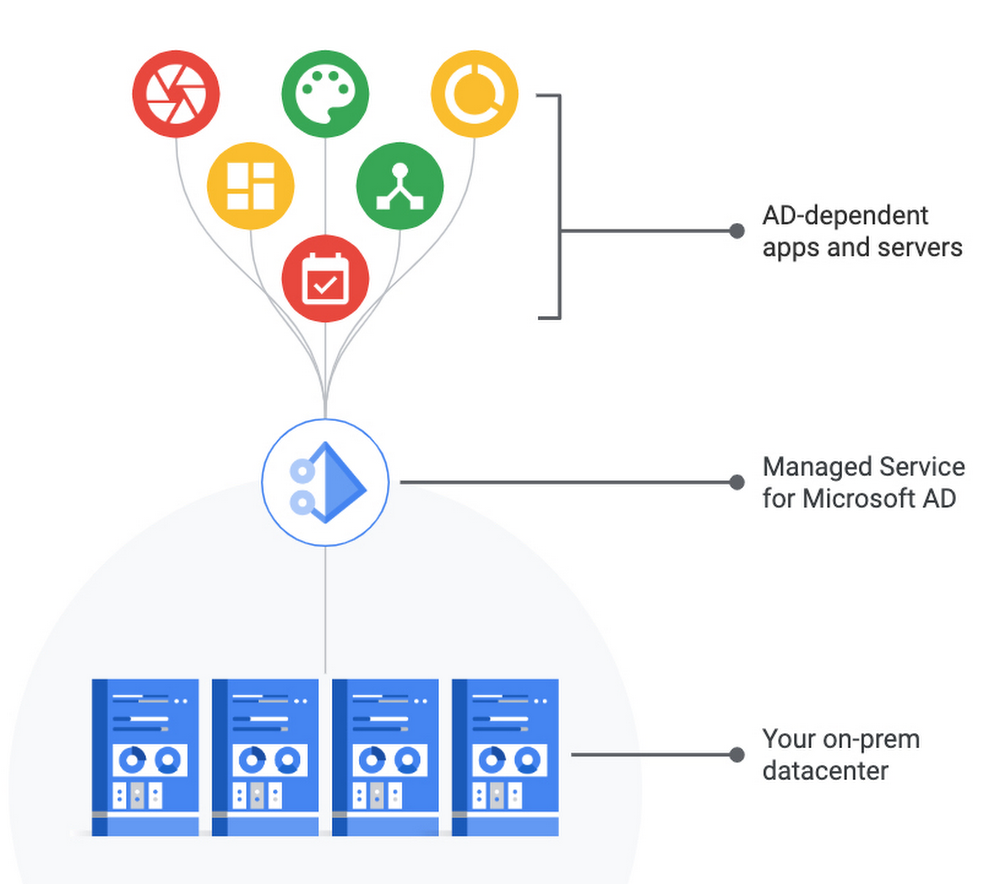
A few months ago, we launched Managed Service for Microsoft Active Directory (AD) in public beta. Since then, our customers have created more than a thousand domains to evaluate the service in their pre-production environments. We’ve used the feedback from these customers to further improve the service and are excited to announce that Managed Service for Microsoft AD is now generally available for everyone and ready for your production workloads.Simplifying Active Directory managementAs more AD-dependent apps and servers move to the cloud, you might face heightened challenges to meet latency and security goals, on top of the typical maintenance challenges of configuring and securing AD Domain Controllers. Managed Service for Microsoft AD can help you manage authentication and authorization for your AD-dependent workloads, automate AD server maintenance and security configuration, and connect your on-premises AD domain to the cloud. The service delivers many benefits, including:Compatibility with AD-dependent apps. The service runs real Microsoft AD Domain Controllers, so you don’t have to worry about application compatibility. You can use standard Active Directory features like Group Policy, and familiar administration tools such as Remote Server Administration Tools (RSAT), to manage the domain. Virtually maintenance-free. The service is highly available, automatically patched, configured with secure defaults, and protected by appropriate network firewall rules.Seamless multi-region deployment. You can deploy the service in a specific region to enable your apps and VMs in the same or other regions to access the domain over a low-latency Virtual Private Cloud (VPC). As your infrastructure needs grow, you can simply expand the service to additional regions while continuing to use the same managed AD domain.Hybrid identity support. You can connect your on-premises AD domain to Google Cloud or deploy a standalone domain for your cloud-based workloads.You can use the service to simplify and automate familiar AD tasks like automatically “domain joining” new Windows VMs by integrating the service with Cloud DNS, hardening Windows VMs by applying Group Policy Objects (GPOs), controlling Remote Desktop Protocol (RDP) access through GPOs, and more. For example, one of our customers, OpenX, has been using the service to reduce their infrastructure management work:”Google Cloud’s Managed AD service is exactly what we were hoping it would be. It gives us the flexibility to manage our Active Directory without the burden of having to manage the infrastructure,” said Aaron Finney, Infrastructure Architecture, OpenX. “By using the service, we are able to solve for efficiency, reduce costs, and enable our highly-skilled engineers to focus on strategic business objectives instead of tactical systems administration tasks.”And our partner, itopia, has been leveraging Managed AD to make the lives of their customers easier: “itopia makes it easy to migrate VDI workloads to Google Cloud and deliver multi-session Windows desktops and apps to users on any device. Until now, the customer was responsible for managing and patching AD. With Google Cloud’s Managed AD service, itopia can deploy cloud environments more comprehensively and take away one more piece of the IT burden from enterprise IT staff,” said Jonathan Lieberman, CEO, itopia. “Managed AD gives our customers even more incentive to move workloads to the cloud along with the peace of mind afforded by a Google Cloud managed service.”Getting startedTo learn more about getting started with Managed Service for Microsoft AD now that it’s generally available, check out the quickstart, read the documentation, review pricing, and watch the webinar.
Quelle: Google Cloud Platform

Azure Security Center for IoT RSA 2020 announcements

We announced the general availability of Azure Security Center for IoT in July 2019. Since then, we have seen a lot of interest from both our customers and partners. Our team has been working on enhancing the capabilities we offer our customers to secure their IoT solutions. As our team gets ready to attend the RSA conference next week, we are sharing the new capabilities we have in Azure Security Center for IoT.

As organizations pursue digital transformation by connecting vital equipment or creating new connected products, IoT deployments will get bigger and more common. In fact, the International Data Corporation (IDC) forecasts that IoT will continue to grow at double-digit rates until IoT spending surpasses $1 trillion in 2022. As these IoT deployments come online, newly connected devices will expand the attack surface available to attackers, creating opportunities to target the valuable data generated by IoT. Organizations are challenged with securing their IoT deployments end-to-end from the devices to applications and data, also including the connections between the two.

Why Azure Security Center for IoT?

Azure Security Center for IoT provides threat protection and security posture management designed for securing entire IoT deployments, including Microsoft and 3rd party devices. Azure Security Center for IoT is the first IoT security service from a major cloud provider that enables organizations to prevent, detect, and help remediate potential attacks on all the different components that make up an IoT deployment—from small sensors, to edge computing devices and gateways, to Azure IoT Hub, and on to the compute, storage, databases, and AI or machine learning workloads that organizations connect to their IoT deployments. This end-to-end protection is vital to secure IoT deployments.

Added support for Azure RTOS operating system

Azure RTOS is a comprehensive suite of real-time operating systems (RTOS) and libraries for developing embedded real-time IoT applications on multi control unit (MCU) devices. It includes Azure RTOS ThreadX, a leading RTOS with the off-the-shelf support for most leading chip architectures and embedded development tools. Azure Security Center for IoT extends support for Azure RTOS operating system in addition to Linux (Ubuntu, Debian) and Windows 10 IoT core operating systems. Azure RTOS will be shipped with a built-in security module that will cover common threats on real-time operating system devices. The offering includes detection of malicious network activities, device behavior baselining based on custom alerts, and recommendations that will help to improve the security hygiene of the device.

New Azure Sentinel connector

As information technology, operational technology, and the Internet of Things converge, customers are faced with rising threats.

Azure Security Center for IoT announces the availability of an Azure Sentinel connector that provides onboarding of IoT data workloads into Sentinel from Azure IoT Hub-managed deployments. This integration provides investigation capabilities on IoT assets from Azure Sentinel allowing security pros to combine IoT security data with data from across the organization for artificial intelligence or advanced analysis. With Azure Sentinel connector you can now monitor alerts across all your IoT Hub deployments, act upon potential risks, inspect and triage your IoT Incidents, and run investigations to track attacker's lateral movement within your network.

With this new announcement, Azure Sentinel is the first security information and event management (SIEM) with native IoT support, allowing SecOps and analysts to identify threats in the complex converged networks.

Microsoft Intelligent Security Association partnership program for IoT security vendors

Through partnering with members of the Microsoft Intelligent Security Association, Microsoft is able to leverage a vast knowledge pool to defend against a world of increasing IoT threats in enterprise, healthcare, manufacturing, energy, building management systems, transportation, smart cities, smart homes, and more. Azure Security Center for IoT's simple onboarding flow connects solutions, like Attivo Networks, CyberMDX, CyberX, Firedome, and SecuriThings—enabling you to protect your managed and unmanaged IoT devices, view all security alerts, reduce your attack surface with security posture recommendations, and run unified reports in a single pane of glass.

For more information on the Microsoft Intelligent Security Association partnership program for IoT security vendors check out our tech community blog.

Availability on government regions

Starting on March 1, 2020, Azure Security Center for IoT will be available on USGov Virginia and USGov Arizona regions.

Organizations can monitor their entire IoT solution, stay ahead of evolving threats, and fix configuration issues before they become threats. When combined with Microsoft’s secure-by-design devices, services, and the expertise we share with you and your partners, Azure Security Center for IoT provides an important way to reduce the risk of IoT while achieving your business goals.

To learn more about Azure Security Center for IoT please visit our documentation page. To learn more about our new partnerships please visit the Microsoft Intelligent Security Association page. Upgrade to Azure Security Center Standard to benefit from IoT security.
Quelle: Azure

Multicluster Management and GitOps Workshop

Illustrated by: Mary Shakshober
The second workshop in our Customer Empathy Workshop series was held during KubeCon San Diego 2019 and was focused on multicluster management and GitOps. We collaborated with Red Hat OpenShift customers from six different companies ranging from finance to energy to manufacturing. 
Over the course of 2.5 hours, we learned about our customers’ OpenShift environments, shared our design thinking strategy in tackling development challenges, and collaboratively brainstormed on how to improve the management of multiple clusters, potentially through a GitOps approach.
At the end of the workshop, we gained valuable insight into our customers’ unique challenges with multicluster management. This insight sparked collaboration—we partnered with users so that we, together, can improve the user experience. Here’s how it all happened. 
What we learned
During this workshop, we ran a few different hands-on activities to drive the discussion and guide our customers through a design thinking approach to problem-solving.
We focused on the first three steps: empathize, define, and ideate.

Empathize 
Before diving in, we took a little time to get to know our customers better. Customers took turns sharing their roles, responsibilities, and how their infrastructure is currently set up. Then they shared where they hoped to take their environments in future.
Next, we wanted to understand what kinds of emotions were evoked by the terms “multicluster management” and “GitOps.” So we asked participants to write down some reaction words. These ranged from “stress,” “complex,” and “chaos” to “hopeful,” “booming,” and “flexible.”

Next, we pulled out the Sharpies and sticky notes. Participants had the opportunity to brainstorm some of their pain points with managing multiple clusters and using GitOps. We reviewed each sticky note and grouped similar problems together. This allowed us to see the big picture as common themes emerged from both groups.  
Here are some of those themes, along with paraphrased responses from customers:

Lack of automation: “It’s hard to push config changes out to all my clusters.” 
Dependency manager: “It’s hard to keep track of cluster settings and services required by certain apps.”
Operator visibility and flexibility: “As a user, I don’t really understand what the Operator is doing–it is a black box to me. Sometimes I need to change things but the Operator prevents this. I need to balance ease of use with flexibility.”
Cluster visibility: “There is a lack of alerts, which makes it hard to understand the state of the entire cluster. I find it even harder to get visibility from multiple clusters. Therefore, I am reactive rather than proactive.”
Cluster identification: “I often switch between a lot of clusters, making it easy to lose context on which cluster I am currently working on.”
Configuration drift: “I need to take immediate action and GitOps takes too long. Sometimes I forget to retrofit the changes back, or I don’t have GitOps in place and forget to apply the changes to all the clusters I manage. It’s easy to get configuration drift with quota management and RBAC management across clusters.”
Scalability: “I’ve never had to manage so many clusters before. I used to only have one big cluster, but now we might have hundreds.”
GitOps best practices: “I don’t know where to start with GitOps; there are so many choices/options and technology is moving too fast. How can I bring all the tools together to create a solution for my problem?”
Too many levers: “There are so many flags you can set in Kubernetes, making it really easy to mess things up.”

Define
After identifying common pain points and converging on major themes, we set out to highlight key problems that we could focus on. Each group selected a theme from the previous exercise and rewrote it as a problem statement: 

How might we detect and remediate the drift, given a centralized policy? 
How might we improve the visibility and management across clusters?
How might we streamline configuration across clusters?

 
Ideate
The ideation portion of our activities allowed participants to offer solutions for the problem statement and encourage other members of the group to add on to the idea or provide a different new idea. This is when the creativity came out and the collaborative nature of design thinking really shone. Participants then had the opportunity to share and discuss their problem(s) and potential solutions with the room. Finally, every participant voted on the solutions they most wanted to see implemented for each problem statement, which will help the OpenShift team prioritize new features in the console.
Problem statement: How might we detect and remediate the drift, given a centralized policy?

Best practices or place to start with GitOps
Detection of manual changes
Export existing cluster config
Visualize config/policy to customer
Configs for different environments
Dynamic policy

Problem statement: How might we improve the visibility and management across clusters?

Single pane of glass
Self healing
Add replication of clusters

Problem statement: How might we streamline configuration across clusters?

Central cluster management, hub and spoke
Notify users when image has been patched

Below are the highest-voted solutions to each problem statement.

What’s next
There’s so much more to come. In the next few weeks, we’ll dive deeper into customer ideas and finish the design thinking process by producing designs, prototyping them, and finally testing their validity.
We also want you to join us. To help influence the future of OpenShift, sign up to be notified about research participation opportunities or provide feedback on your experience by filling out this brief survey. If you’d like to attend the next workshop, keep an eye on the OpenShift Commons calendar for upcoming events. Feel free to reach out by email if you have any questions.
The post Multicluster Management and GitOps Workshop appeared first on Red Hat OpenShift Blog.
Quelle: OpenShift






