Latest Mirantis Addition Provides Developer-Friendly Tool to Run Kubernetes

The post Latest Mirantis Addition Provides Developer-Friendly Tool to Run Kubernetes appeared first on Mirantis | Pure Play Open Cloud.
Latest Mirantis Addition Provides Developer-Friendly Tool to Run Kubernetes
 
Following Docker Enterprise acquisition, the addition of Kontena resources brings technology and expertise to modernize apps at enterprise scale 
 
Campbell, Calif – February 25, 2020 — Following its November acquisition of Docker Enterprise, Mirantis, the open cloud company, took another step to bolster its Kubernetes lineup, announcing today the addition of the engineering and leadership of cloud container services company Kontena.
 
Kontena provides easy-to-use, fully integrated Kubernetes products for DevOps and software development teams to deploy, run, monitor and operate Kubernetes clusters and workloads on private, public, and hybrid cloud infrastructures running bare metal or virtual machines. The software is open source and available under the Apache 2.0 license. Kontena is currently used by hundreds of start-ups and software development teams working for some of the biggest enterprises in the world. The entire Kontena team will join Mirantis. 
 
Mirantis has made significant investments in Kubernetes, and this latest acquisition will accelerate its product roadmap in multi-cluster management, cluster visibility and insights, and tools for application developers. Mirantis will leverage the IP acquired from Kontena for existing Kubernetes technology in Docker Enterprise, including Docker Kubernetes Service (DKS) and Universal Control Plane (UCP). 
 
“We want to deliver the best Kubernetes experience for developers and enterprises,” said Adrian Ionel, Mirantis CEO. “With a small but talented team, Kontena engineers have built tools that make Kubernetes significantly easier for developers to use. Together, Mirantis and talent acquired from Kontena will extend our core Kubernetes offering, based on Docker Enterprise, with key developer-facing capabilities that deliver faster app development.”The post Latest Mirantis Addition Provides Developer-Friendly Tool to Run Kubernetes appeared first on Mirantis | Pure Play Open Cloud.
Quelle: Mirantis

Amazon FSx for Lustre startet persistente Dateisysteme, erhöht die Leistung auf Scratch-Dateisystemen, unterstützt AWS KMS und ermöglicht die Verschlüsselung während des Transports

Amazon FSx for Lustre – ein Service, der es einfach und kostengünstig macht, das weltweit beliebteste Hochleistungsdateisystem Lustre zu starten und auszuführen – führt mehrere Verbesserungen ein, die es noch einfacher machen, ein Lustre-Dateisystem für jede Arbeitslast zu verwenden, in der die Speichergeschwindigkeit wichtig ist: Die Möglichkeit, persistente Dateisysteme zu starten, die dauerhaft und hoch verfügbar sind, der Durchsatz für nicht dauerhafte Scratch-Dateisysteme und verbesserte Verschlüsselungsfunktionen.
Quelle: aws.amazon.com

Now, you can explore Google Cloud APIs with Cloud Code

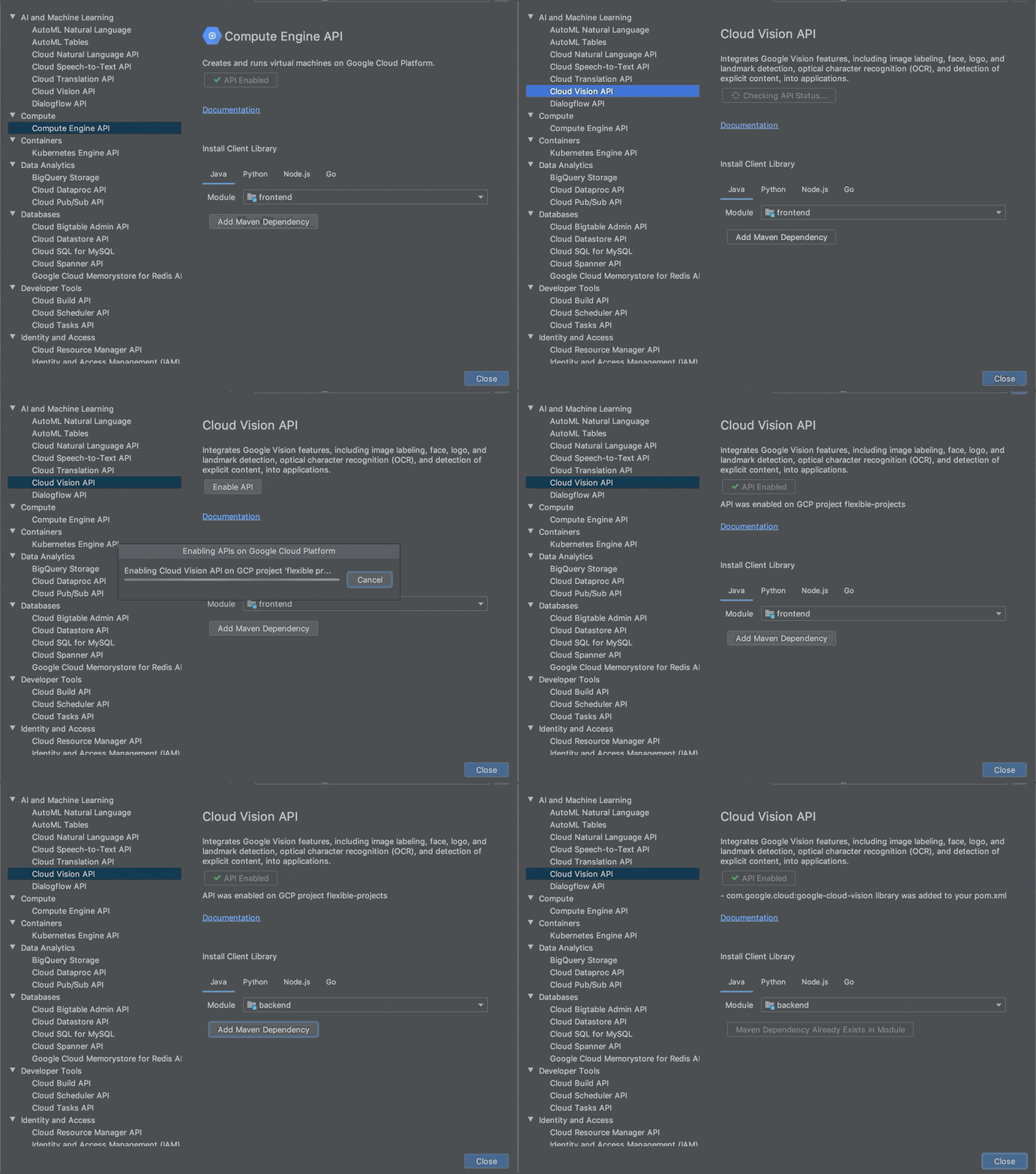
Applications often rely on external services to provide capabilities such as data storage, messaging and networking with the help of APIs. Google Cloud offers a wide array of such APIs—covering everything from translating text, building AI/ML models, managing database operations, through to secret management and storage. But adding an APIs to your application often means performing a number of somewhat repetitive steps outside of the integrated development environment (IDE), across different websites. We are pleased to announce that we have streamlined this process and made it easy to add Google Cloud APIs to your project and start using them without leaving the IDE, with the help of a new API manager in Cloud Code.Cloud Code is our set of extensions for VS Code and the JetBrains family of integrated development environments (IDEs). With extensions to VSCode, IntelliJ, Goland, PyCharm, and WebStorm, Cloud Code can help you develop, deploy, and debug Kubernetes applications.The Cloud Code API manager further enhances the existing Cloud Code feature set by providing several features directly within your favorite IDE that you can use to Google Cloud APIs to your application, whether it runs on Kubernetes or otherwise: Browse and enable Google Cloud APIsInstall corresponding client libraries, with support for Java, NodeJS, Python and GoAccess detailed API documentationEach of these reduces the amount of “context switching” that you need to do and let’s you spend more time focused on writing code. Let’s look at each of these Cloud Code features in a little more depth. Browse and enable Google Cloud APIsFinding the right API to add to your application can take time. For example, even if you develop a simple app like “bookshelf” getting started app, you need to enable Cloud Storage, Logging and Error Reporting APIs. For more complex applications that use more services, it’s even more difficult. The API browser in Cloud Code lets you browse all the Google Cloud APIs, which have been categorized into logical groups and provided in an easy to view format, from within the IDE. You can sort and search for your favorite Google Cloud API and click on it to view more details. In the details page, you can also view the status of a Google Cloud API and enable it for a GCP project.Here, you can see how to navigate between various Google Cloud APIs, view the status of an API, enable an API and automatically add Maven dependency for Java Maven projects in the IntelliJ IDEA.Install client librariesIn addition to showing the information about Google Cloud API in the details page, Cloud Code provides instructions for installing client libraries. Client libraries allow  you to consume your preferred Cloud API in the programming language of your choice, instead of directly consuming low-level REST APIs or protobufs. Currently, installation instructions are available for Java, NodeJS, Python and Go. If you are using Java, diamond dependencies are handled automatically through libraries bom.With Cloud Code, you can now browse the Google Cloud APIs, view documentation for and the status of an API, and copy installation instructionsAccess detailed documentationSo far, the API manager has made it easy to discover and add an API into your code base. When it comes to using the API, you may also often need to refer to the reference documentation. Cloud Code’s API manager brings all of the critical links right into context inside the IDE so that you can easily find examples, review the structure of the overall API and discover details about pricing and additional detailed use cases.Get startedCloud Code helps you get started on various Google Cloud APIs in a seamless manner from within your favorite IDE. To learn more, check out the documentation for Cloud Code for VS Code and JetBrains IDEs. If you are new to Cloud Code, start by learning how to install Cloud Code.
Quelle: Google Cloud Platform

OpenShift Commons Briefing: Data Protection and Disaster Recovery Solutions with Venkat Kolli (Red Hat)

As more and more business critical applications move to OpenShift platform, it is important to start thinking about how to protect these applications and application data.
In this briefing,  Red Hat’s Venkat Kolli walks through the different failure scenarios that will be impacting application availability in OpenShift and the different Backup & Disaster Recovery (DR) solutions that are designed to protect your OpenShift applications against these failures. While the traditional Backup & DR solutions have existed a while in Enterprise DataCenters, these solutions need to evolve to address the needs of the new container infrastructure. We will explore the differences between traditional approaches to backup & DR and the changes in approach required for OpenShift infrastructure.
Briefing Slides: Data Protection and Disaster Recovery Solutions for OpenShift
Additional Resources:
Product Documentation for Red Hat OpenShift Container Storage 4.2
Feedback:
To find out more about OpenShift Container Storage or to take a test drive, visit https://www.openshift.com/products/container-storage/.
If you would like to learn more about what the OpenShift Container Storage team is up to or provide feedback on any of the new 4.2 features, take this brief 3-minute survey.
The post OpenShift Commons Briefing: Data Protection and Disaster Recovery Solutions with Venkat Kolli (Red Hat) appeared first on Red Hat OpenShift Blog.
Quelle: OpenShift