Amazon Aurora mit PostgreSQL-Kompatibilität unterstützt die Amazon Aurora Global Database

Die Amazon Aurora Global Database ist jetzt für die PostgreSQL-kompatible Version von Amazon Aurora verfügbar. Die Aurora Global Database wurde für Anwendungen mit globaler Präsenz entwickelt, sodass eine einzelne Aurora-Datenbank mehrere AWS-Regionen mit bis zu fünf sekundären Regionen umfassen kann. Die schnelle Replikation ermöglicht globale Lesevorgänge mit geringer Latenz und eine schnelle Notfallwiederherstellung nach regionalen Ausfällen.
Quelle: aws.amazon.com

The Block Editor is Now Supported on the WordPress Native Apps

Part of what helps WordPress power 35% of the web is language: WordPress is fully translated into 68 languages. Pair that with the WordPress native apps, which make WordPress available across devices, and you have a globally accessible tool.

Today we’re announcing app updates that bring the new Block editor to mobile devices, so on-the-go publishing is even easier for that 35%.

At Automattic, we speak 88 different languages, so we thought: why not use some of them to tell you about the editor updates? Instead of a few screenshots and bullet points, here are some of the people who build the editor and apps sharing their favorite tools and tricks for the mobile Block editor. To make it more accessible, we’ve also included English translations. 

(And for those who want more detail — yes, there are still screenshots and bullet points!)

Rafael, Brazilian Portuguese

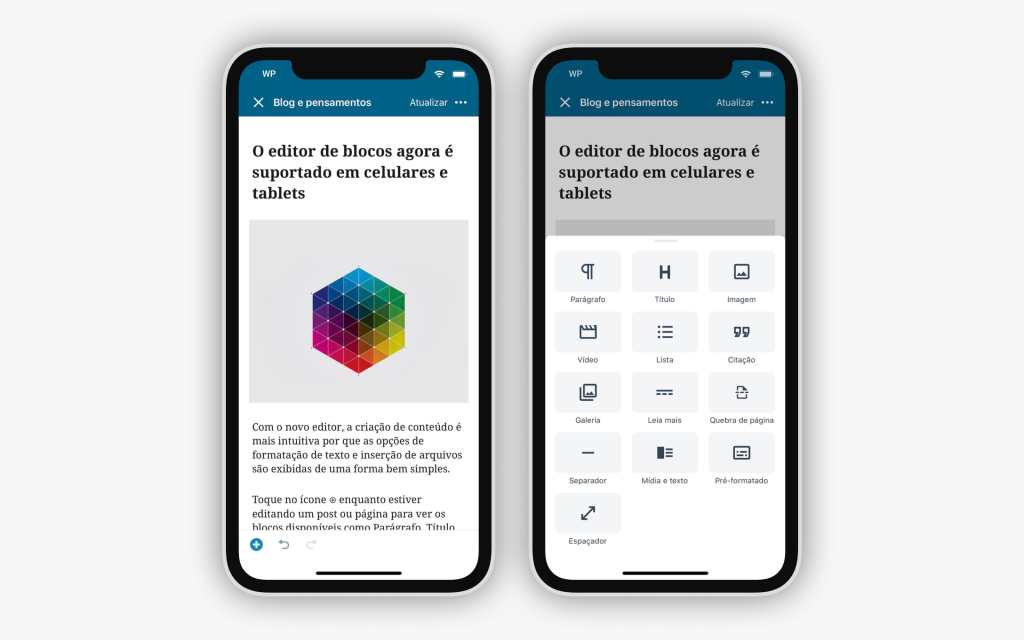
Com o novo editor, a criação de conteúdo é mais intuitiva por que as opções de formatação de texto e inserção de arquivos são exibidas de uma forma bem simples.

Toque no ícone ⊕ enquanto estiver editando um post ou página para ver os blocos disponíveis como Parágrafo, Título, Imagem, Vídeo, Lista, Galeria, Mídia e texto, Espaçador e muitos outros.

Translation

With the new editor, creating content is more intuitive because the options to format text and add media are displayed in a simple way. Tap on the ⊕ icon when editing whether a post or page to see all the available blocks like Paragraph, Heading, Image, Video, List, Gallery, Media & Text, Spacer and more.

Anitaa, Tamil

பயணங்களில் மிகவும் விருப்பமுள்ள எனக்கு, பயண குறிப்புகளை பயண நேரத்திலேயே எழுதுவது வழக்கம். இந்தப் புதிய கைபேசி செயலி என் வேலையே மிகவும் எளிதாக்குகிறது. எனக்குப் பிடித்த சில அம்சவ்கள்:  

கி போர்ட்டில் உள்ள நேக்ஸ்ட் பொத்தானை அழுத்துவதன் மூலமே புதிய பத்தியை தொடங்க முடிவது.பட்டியல் தொகுதியைப் பயன்படுத்தி எனது சொந்த பட்டியலை உருவாக்க முடியும்.

பட்டியலின் உள்ளெ பட்டியலை சரிபார்க்கும், அல்லது, துணை பட்டியலை உள்ளடக்கும் பட்டியல் பத்தியை ஆவலுடன் எதிர்பார்க்கிறேன். எனவே அடுத்த புதுப்பிப்பைப் பற்றி நான் மகிழ்ச்சியடைகிறேன்.

Translation

I love travelling and I spend a lot of time on my blog writing travel tips while on the go. My favorite features in the Block editor include:

Creating a new paragraph block by pressing the RETURN button on the keypad. Adding a List block to create my own lists.You can even add sub-lists!

I look forward to seeing what’s coming next!

Mario, Spanish

Cuando escribo, doy mil vueltas sobre qué palabras utilizar y me cuesta decidirme. Uso mi móvil porque me da la posibilidad de capturar mis ideas justo en el momento que se me ocurren. Es por eso que de las cosas que más me gustan del Editor es que puedo moverme de un bloque de texto a otro con facilidad y también cambiarlos de lugar. Además, se puede hacer/deshacer muy fácilmente, y siempre se mantiene el historial de edición lo que me da mayor seguridad a la hora de cambiar incluso sólo pequeñas partes del contenido que voy escribiendo.

Translation

When I write, I walk around in circles and can never decide which words to use. So I use my mobile phone, which lets me capture ideas right when they occur to me. That’s why the things I appreciate in the new Editor are the abilities to move from block to block with ease and to change their order and since you can undo/redo quite easily and can see your editing history, I have confidence when I change even small bits of the post I’m writing.

Jaclyn, Chinese

用過 Gutenberg 古騰堡後網誌效率高很多!因為寫旅行文章,很多時候是在旅途中或是平日空擋等候時間紀錄和寫下想法,行動 app 讓我隨時隨地都可以編輯文章。行動古騰堡簡化了移動文章段落重新排序的步驟,讓文章的架構變得很清楚,也更容易管理。

Translation

The new block editor truly makes a difference in my blogging efficiency and experience. Since my blog is about traveling, I often scribble notes and thoughts during my trips. The block editor on mobile simplifies the process of moving paragraphs around and organizing content, so the architecture of the post becomes clearer and easier to reorganize.

To start using the block editor on your app, make sure to update to the latest version, and then opt in to using it! To opt in, navigate to My Site → Settings and toggle on Use Block Editor.

We hope you give the latest release a try; tell us about your favorite part of the mobile block editor once you’ve had a chance to try it.

We’d also love to know your thoughts on the general writing flow and on some of the newer blocks like video, list, and quote blocks. For specific feedback, you can reach out to us from within the app by going to Me → Help and Support, then selecting Contact Us.
Quelle: RedHat Stack

Improved Offline Publishing

The best technology is invisible and reliable. You almost forget it’s there, because things just work. Bad technology never disappears into the background — it’s always visible, and worse, it gets in your way. We rarely stop to think “My, what good Wifi!” But we sure notice when the Wifi is iffy.

Good technology in an app requires solid offline support. A WordPress app should give you a seamless, reliable posting experience, and you shouldn’t have to worry whether you’re online or offline while using WordPress Mobile. And if we’ve done our jobs right, you won’t have to! 

We all need fewer worries in life, so if you haven’t already head to https://apps.wordpress.com/get/ to download the apps.

Offline Publishing

On the go and without a connection?  No worries! The apps will now remember your choices and once you’re back online, your content will be saved and published as requested.  But if you changed your mind about publishing a post while you’re still offline, you can still safely cancel it.

The new Offline Publishing flow.

This improved publishing flow comes together with a revamped UI for your post status.  You’ll be able to clearly see which posts are pending, saving or publishing.

Smoother Messaging

We removed several alerts that were being presented while you were offline.  These blocking alerts required you to take action but often provided no insights on either what the problem was, or how to resolve it.

They have been replaced with contextual non-blocking messages both within the UI, and in notices appearingright above the toolbar.

As a result, you’ll see less disruptive and uninformative alerts, and more inline and informative messages, such as the one shown above.

Safeguards

We also added some safeguards to ensure there are no surprises!

You can cancel offline publishing.

Modifying posts that are scheduled for publishing will cancel the publishing action. Don’t worry, though – you can always reschedule the post for publishing.

All queued save and publishing operations will be canceled if your device stays offline for more than 48 hours.  We want you to be in complete control of what gets published and when.
Quelle: RedHat Stack

A Crash Course in Remote Management

Remote work is a prominent topic lately, as people around the world are doing their best to live their lives and keep themselves and their families safe and prepared during the COVID-19 outbreak. The impact of this outbreak is felt across societies and cultures as well as in the workplace.  

Automattic, the company behind WordPress.com, is a primarily distributed company with more than 1,000 employees across 76 countries. I’m an engineering lead, currently working on the Developer Experience team. As Automattic has grown, we’ve learned a lot about working remotely and across time zones, and have shared insights on what we see as the future of work on the Distributed podcast, hosted by our CEO, Matt Mullenweg. 

This week, Nicole Sanchez, the founder of Vaya Consulting and an expert on workplace culture, and I had an opportunity to co-present a Crash Course in Remote Management, a free one-hour webinar hosted on Zoom. Nicole has previously held social impact and leadership roles at GitHub and the Kapor Center for Social Impact.

Nicole and I walked an engaged audience through proven practices and what they’ve learned about leading, communicating with, and measuring the success of remote teams. Participants offered insightful questions, leading to lively discussions around:

Collaboration and relationship-building.The cost, benefit, and ideal frequency of bringing teams together for face-to-face interaction (in general, if not as commonly right now).Communicating and prioritizing messages across a variety of channels. Encouraging people to go outside, exercise, spend time with family, or otherwise step away from the computer (also known as being “AFK,” or “Away From Keyboard”) without the fear of being judged or anxiety over being less productive.

Some companies are encouraging employees to experiment with working from home, which can feel very different from in-person and office work. If you’re interested in learning more, please check out the full video recording of the course:

Matt’s latest blog post, “Coronavirus and the Remote Work Experiment No One Asked For,” is also worth a read. For more information and advice on COVID-19, please visit resources from the CDC, World Health Organization, and other health authorities.
Quelle: RedHat Stack