Local SSDs + VMs = love at first (tera)byte

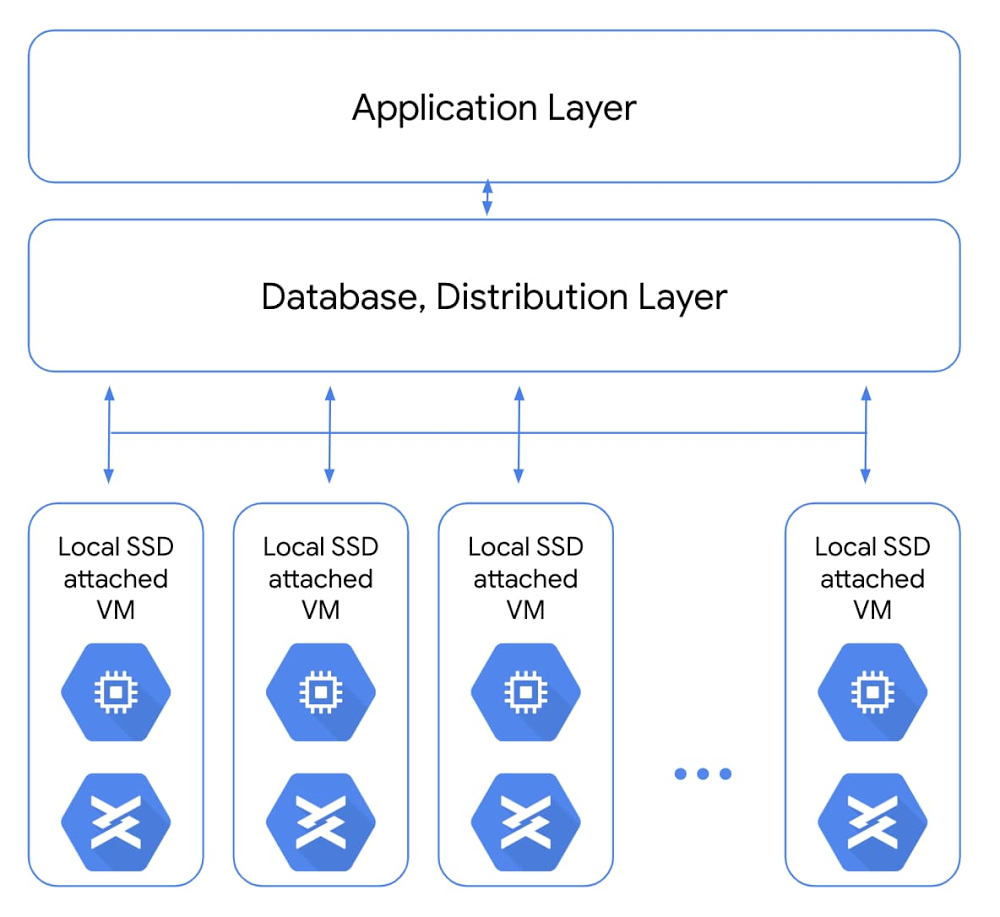
Data storage is the foundation for all kinds of enterprises and their workloads. For most of those, our Google Cloud standard object, block, and file storage products offer the necessary performance. But for companies doing compute-intensive work like analytics for ecommerce websites, or gaming and visual effects rendering, compute performance can have a big impact on the bottom line. A slow website experience, or slow processing causing missed deadlines, just can’t happen. To make sure your workloads are set up for performance and latency, the first place to start is your storage. For the fastest storage available, that’s local solid state drives, or Local SSDs. With that in mind, we’re announcing that you can now attach 6TB and 9TB Local SSDs to your Compute Engine virtual machines. The throughput and IOPS (per VM) of these new offerings will be up to 3.5 times our current 3TB offering. This means fewer instances will be needed to meet your performance goals, which frequently leads to reduced costs. If you’re already using Local SSDs, you can access these larger sizes with the same APIs you use today. How Local SSDs workLocal SSDs are high-performance devices that are physically attached to the server that hosts your VM instances. This physical coupling translates to the lowest latency and highest throughput to the VM. These local disks are always encrypted, not replicated, and used as temporary block storage. Local SSDs are typically used as high-performance scratch disks, cache, or the high I/O hot tier in distributed data stores and analytics stacks. A common use case for local SSDs is in flash-optimized databases that have distribution and replication built into the layers above storage. For apps like real-time fraud detection or ad exchanges, only local SSDs can bring the necessary sub-millisecond latencies combined with very high input/output operations per second (IOPS).Another common use for Local SSDs is as a hot storage tier (typically for caching and indexing) as part of tiered storage in performance-sensitive analytics stacks. For example, Google Cloud customer Mixpanel caches hundreds of terabytes of data on local SSDs onCompute Engine to maintain sub-second query speeds for their data analytics platform.When using larger, faster Local SSDs, performance is the goal. The new SSDs we’re announcing combine enhanced performance with unique attach-flexibility, translating to a highly compelling price per IOPS and price per throughput for locally attached storage. These new SSDs bring you new capabilities and can help reduce the total cost of ownership (TCO) for distributed workloads. For example, a SaaS provider doing real-time analytics on a flash-optimized database cluster can now see better performance and TCO benefits. And highly transactional, performance-sensitive workloads like analytics or media rendering can now transact millions of IOPS on a wide variety of VMs.Here’s a look at how to attach a 9TB Local SSD with a Compute Engine instance.We hear that users like the flexibility of Local SSDs, like the ability to attach them with a wide range of custom VM shapes (rather than being tied to specific VM shape per SSD size), and this extends to the new 6TB and 9TB Local SSDs as well. Both the 6TB and 9TB instances will retain the current per-GB pricing. Visit our pricing page to see the specific pricing in your region. 6TB and 9TB Local SSDs can be attached on N1 VMs (now in beta). This capability will be available on N2 VMs shortly. For more details, check out our documentation for Local SSDs. If you have questions or feedback, check out the Getting Help page.
Quelle: Google Cloud Platform

Modern analytics made easy with new Redshift, S3 migration tools

Editor’s note: This blog takes a closer look at some of the recently announced BigQuery product innovations and deepened partnerships that are helping enterprises fast-track their migration to BigQuery.In the past 40 years, the data warehouse has gone through many transformations, driven by business needs and fueled by technological advancements. Data warehouses have transformed from operational reporting and ad-hoc reporting to today’s real-time, predictive analytics. But growing advanced analytics needs, and the need for reduced operational expenses, mean these legacy data warehouses are no longer a long-term solution. We hear from customers around the globe that they’re migrating to Google Cloud to overcome their IT hurdles and quickly modernize their analytics strategy.Organizations are unlocking faster, actionable insights by migrating to BigQuery, Google’s cloud-native, enterprise data warehouse. We’re also streamlining customer migrations to BigQuery with the recently announced general availability of our Redshift and S3 migration tools.Financial services company KeyBank is taking advantage of these tools. “We are modernizing our data analytics strategy by migrating from an on-premises data warehouse to Google’s cloud-native data warehouse, BigQuery,” says Michael Onders, chief data officer at KeyBank. “This transformation will help us scale our compute and storage needs seamlessly and lower our overall total cost of ownership. Google Cloud’s smart analytics platform will give us access to a broad ecosystem of data transformation tools and advanced machine learning tools so that we can easily generate predictive insights and unlock new findings from our data.” With the recently announced general availability of the Redshift to BigQuery and S3 to BigQuery migration services, you can now easily move data from these legacy environments right into BigQuery. Redshift and S3 migration services join the Teradata service that’s already available. VPC support is included in the Redshift migration service. In addition, general availability of the DTS-based S3 Loader allows you to move data from S3 seamlessly to Google Cloud.  Better together with partnersAt Google Cloud, we are also collaborating with tech partners to expedite data warehouse migrations. Our tech partners can help you migrate without having to rewrite queries. You can find the partner that’s right for your migration and decide whether to convert incoming requests into BigQuery dialect on the fly or just once. In addition to these tech partners, we have partnered with system integrators that have supported many customers in their migration journeys. Close ties and deep investments in our partner ecosystem have helped us deliver the foundational support needed for organizations to fast-track their migration journeys. Wipro, Infosys, Accenture, and other system integrators have built end-to-end migration programs. We’ve built three main pillars in our system integrator partnerships:  Strategic alignment: Our systems integrators have dedicated teams committed to define and execute against a joint business plan with Google Cloud. Expertise: Global system integrators (GSIs) have built dedicated Google Cloud practices with Centers of Excellence around data and analytics with certified Google Cloud resources, and expertise in building accelerators for Google Cloud-native solution architectures across many use cases. Examples include the Accenture Data Studio for Google Cloud, Infosys Migration Workbench (MWB), Wipro’s GCP Data and Insights Migration Studio, and other accelerators across our GSI ecosystem. Each of them brings unique strengths and capabilities and the ability to deliver globally.Delivery: GSI partner solutions are validated for alignment with our solution plays and technology partners we recommend. We’ve heard from one of our key systems integrators, Wipro Limited, about their clients’ use of Google Cloud to simplify data warehouse migrations and get started easily with advanced analytics and other features.“Wipro partners with its clients to transform them into intelligent enterprises,” says Jayant Prabhu, Vice President and Global Head, Data, Analytics and AI. “BigQuery enables our customers to jump-start their modern analytics journey while lowering their total cost of ownership (TCO). BigQuery’s ability to scale seamlessly and simplify machine learning allows us to implement new intelligent analytics solutions for smarter decision making. Furthermore, these benefits come with zero operational overhead, thus helping us focus on making enterprises intelligent.”Our continued investment in capabilities that help streamline data warehouse migrations to BigQuery is helping enterprises quickly unlock IT innovation. Get started on your modernization journey with our data warehouse migration offer to get funding support along with expert design guidance, tools, and partner solutions to expedite your cloud migration. Learn more about Redshift to BigQuery migration service Learn more about DTS-based S3 LoaderLearn more about Teradata to BigQuery Migration service
Quelle: Google Cloud Platform

Ankündigung des AWS Game Tech-Lernpfads

Wir freuen uns, Ihnen einen neuen Lernpfad vorstellen zu können. Hier finden Sie alle AWS Training-Kurse an einem Ort. Egal ob Sie Architekt, Spieleentwickler, Dateningenieur oder Datenanalyst sind, bietet der Lernpfad eine strukturierte Anleitung, wie Sie beginnen, sowie weitere Schritte, um sich Game Tech-Fachwissen anzueignen.
Quelle: aws.amazon.com

AWS Serverless Application Repository bietet Unterstützung für die Freigabe von Anwendungen für AWS Organizations

Sie können jetzt in der AWS Serverless Application Repository (SAR) gespeicherte Anwendungen mit einer einzigen AWS Organizations-ID für alle AWS-Konten innerhalb einer AWS-Organisation freigeben Sie können außerdem separate ressourcenbasierte Richtlinienanweisungen direkt in der Konsole definieren und die unter jeder Anweisung zulässigen Aktionen auswählen. Dieses Update ermöglicht es Ihnen, serverlose Anwendungen organisationsübergreifend einfach und maßstabsgetreu freizugeben.
Quelle: aws.amazon.com





