Greyhound auf Apple TV+: Netflix wollte Tom-Hanks-Film, aber Apple zahlte mehr
Apple hat Netflix ausgestochen. Für 70 Millionen US-Dollar läuft der Tom-Hanks-Film Greyhound auf Apple TV+. (Apple TV+, Apple)
Quelle: Golem

Apple hat Netflix ausgestochen. Für 70 Millionen US-Dollar läuft der Tom-Hanks-Film Greyhound auf Apple TV+. (Apple TV+, Apple)
Quelle: Golem

Oneplus bezeichnete sich einst als “Flagship-Killer”, mittlerweile stellt sich die Frage, wer hier für wen gefährlich wird: Das X50 Pro des Schwesterunternehmens Realme ist ein wahrer “Oneplus-Killer”. Ein Test von Tobias Költzsch (Smartphone, Android)
Quelle: Golem

Microsofts App ermöglicht das Erstellen diverser Listen, die durch Regeln automatisiert werden können. Eine Version für Teams ist geplant. (Office 365, Microsoft)
Quelle: Golem

Die Lücke im Qmail-Mailserver war seit 2005 bekannt, galt aber als praktisch kaum ausnutzbar. (E-Mail, Debian)
Quelle: Golem
kai-waehner.de – This blog post covers use cases and architectures for Apache Kafka and Event Streaming in Pharma and Life Sciences. The technical example explores drug development and discovery with real time data p…
Quelle: news.kubernauts.io
aws.github.io – This guide provides advice about protecting information, systems, and assets that are reliant on EKS while delivering business value through risk assessments and mitigation strategies. The guidance h…
Quelle: news.kubernauts.io
tinkerbell.org – Tinkerbell has four major components: a DHCP server (boots), a workflow engine (tink), an in-memory operating system (OSIE) and a metadata service (hegel). The workflow engine is comprised of a serve…
Quelle: news.kubernauts.io
medium.com – Today I’ll be writing about another one of OpenEBS storage engines. I’ll be going through how to deploy Mayastor on GKE. If you’re new to OpenEBS, take a look at the concepts about cStor and how you …
Quelle: news.kubernauts.io

Creating content is easier than ever before. Many applications rise to fame by encouraging creativity and collaboration for the world to enjoy: think of the ubiquity of online video uploads, streaming, podcasts, blogs and comment forums, and much more. This variety of platforms gives users the freedom to post original content without knowing how to host their own app or website.Since new applications can become extremely popular in a matter of days, however, managing scale becomes a real challenge. While application creators wish to maximize new users and content, keeping track of that content is complex. The freedom to post their own content empowers creators, but it also creates an administration challenge for the platform. This forces organizations providing the platform to straddle between protecting the creator and the user: How can they ensure that creators have the freedom to post what they wish, while ensuring that the content they are displaying to users is appropriate for their audience? This isn’t a black-and-white issue, either. Different audience segments may react differently to the same content. Take music, for example. Some adults may appreciate an artist’s freedom to use explicit language, but that same language may be inappropriate for an audience of children. For podcasts, the problem is even more nuanced. An application needs to consider both the problem of ensuring that a listener feels safe as well as how to manage this moderation. While a reviewer only needs to spend three minutes listening to a song to determine if it’s appropriate, they may need to listen for 30 minutes to an hour—or more—to gauge the content of a podcast. Providing content that serves both audiences is an important task that requires careful management. In this blog, we’ll look more closely at the challenges that scaling presents, and how Google Cloud can help providers scale efficiently and responsibly.The challenge of scalabilityPlatforms rarely have a scalable model for evaluating or triaging content uploads to their site—especially when they can receive multiple new posts per second. Some rely on users or employees to manually flag inappropriate content. Others may try to sample and evaluate a subset of their content at regular intervals. Both of these methods, however, are prone to human error and potentially expose their users to toxic content. Without a workable solution for dealing with this firehose of content, some organizations have had to turn off commenting on their sites or even disable user new uploads until they catch up on evaluating old posts. The problem becomes even more complex when evaluating different forms of input. Written text can be screened and passed through machine learning (ML) models to extract words that are known to be offensive. Audio, however, must first be transcribed in a preprocessing step to convert it to text by applying various machine learning algorithms. These algorithms utilize deep learning to predict the written text, given their knowledge of grammar, language, and overall context of what’s being said. Because of this, transcription models typically prefer a sequence of speech which is more common in everyday usage. However, since profane words or sentences occur less often, the speech-to-text model may not prefer them, thus highlighting the complexity of audio content moderation. The solutionTo help platform providers manage content at scale, we combined a variety of Google Cloud products, including the Natural Language API and Jigsaw’s Perspective API, to create a processing pipeline to analyze audio content and a corresponding interface to view the results. This fosters a safe environment for content consumers and lets creators trust that they can upload their content and collaborate without being incorrectly shut down.Click to enlargeStep 1: Upload the audio contentThe first step of the solution involves uploading an audio file to Cloud Storage, our object storage product. This upload can be performed directly, either in Cloud Storage from the command-line interface (CLI) or web interface, or from a processing pipeline, such as a batch upload job in Dataflow. This upload is independent of our pipeline.In our architecture, we want to begin performing analysis whenever new files are uploaded, so we’ll set up notifications to be triggered whenever there’s a new upload. Specifically, we’ll enable an object finalize notification to be sent whenever a new object is added to a specific Cloud Storage bucket. This object finalize event triggers a corresponding Cloud Function, which will allow us to perform simple serverless processing, meaning that it scales up and down based on the resources that it needs to run. We use Cloud Functions here because they are fully managed, meaning we don’t have to provision any infrastructure, and they are triggered based on a specific type of event. In this function, our event is the upload to Cloud Storage. There are many different ways to trigger a Cloud Function, however, and we use them multiple times throughout this architecture to decouple the various types of analysis that we will perform. Step 2: Speech-to-text analysisThe purpose of the first Cloud Function is to begin the transcription process. Because of this, the function sends a request to the Speech-to-Text API, which immediately returns a job ID for this specific request. The Cloud Function then publishes the job ID and name of the audio file to Cloud PubSub. This lets us save the information for later, until the transcription process is complete, and lets us queue up multiple transcription jobs in parallel.Step 3: Poll for transcription results To allow for multiple uploads in parallel, we’ll create a second Cloud Function that checks whether transcription jobs are complete. The trigger for this Cloud Function is different from the first. Since we’re not using object uploads as notifications in this case, we’ll use Cloud Scheduler as the service to call the function to make it begin. Cloud Scheduler allows us to execute recurring jobs at a specified cadence. This managed cron job scheduler means that we can request the Cloud Function to run at the same time each week, day, hour, or minute, depending on our needs. For our example, we’ll have the Cloud Function run every 10 minutes. After it pulls all unread messages from PubSub it iterates through them to extract out each job ID. It then calls the Speech-to-Text API with the specified job ID to request the transcription job’s status. If the transcription job isn’t done, the Cloud Function republishes the job ID and audio file name back into PubSub so that it can check the status again the next time it’s triggered. If the transcription job is done, the Cloud Function receives a JSON output of the transcription results and stores them in a Cloud Storage bucket for further analysis. The next two steps involve performing two types of machine learning analysis on the transcription result. Each creates separate Cloud Functions that are triggered by the object finalize notification generated from uploading the transcription to Cloud Storage. Step 4: Entity and sentiment analysisThe first step calls the Natural Language API to perform both entity and sentiment analysis on the written content. For entity analysis, the API looks at various segments of text to extract out the various subjects that may be mentioned in the audio clip and groups them into known categories—“Person,” “Location,” “Event,” and much more. For sentiment analysis, it rates the content on a scale of -1 to 1 to determine if certain subjects are spoken about in a positive or negative way. For example, suppose we have the API analyze the phrase “Kaitlin loves pie!” It will first work to understand what the text is talking about. This means that it will extract out both “pie” and “Kaitlin” as entities. It will then look to categorize them as particular nouns and generate the corresponding labels of “Kaitlin” as “Person” and “pie” as “Other.” The next step is to understand the overall attitude or opinion conveyed by the text. For this specific phrase, “pie” would generate a corresponding high sentiment score, likely between 0.9 and 1, due to the positive attitude conveyed by the verb “loves.” The output from this phrase would indicate that it’s a person speaking favorably about a noun.Going back to our pipeline, the Cloud Function for this step calls the Natural Language API to help us better understand the overall content of the audio file. Since it’s time-consuming for platforms to listen to all uploaded files in their entirety, the Natural Language API helps generate a quick initial check of the overall feeling of each piece of content so users can understand what is being spoken about and how. For example, the output from “Kaitlin loves pie!” would let a user quickly identify that the spoken content is positive and probably OK to host on their platform.In this step, the Cloud Function begins once the transcription is uploaded to Cloud Storage. It then reads the transcription and sends it to the Natural Language API with a request for both sentiment and entity analysis. The API returns the overall attitude and entities described in the file, broken up into logical chunks of text. The Cloud Function then stores this output in Cloud Storage in a new object to be read later. Step 5: toxicity analysisThe next Cloud Function invokes the Perspective API, also when the transcription is uploaded to Cloud Storage, meaning that it runs in parallel with the previous step. This API analyzes both chunks of text and individual words and rates their corresponding toxicity. Toxicity can refer to explicitness, hatefulness, offensiveness, and much more. While toxicity is traditionally used for small comments to enable conversations on public forums, it can be used for other formats as well. For an example, let’s look at the case of an employee trying to moderate an hour-long podcast that contains some dark humor. It can be difficult to absorb longform content like this in a digestible format. So, if a user flags the podcast’s humor as offensive it would require a moderator on the platform to listen to the entire file to decide if the content is truly presented in an offensive manner, or if it was playful, or even flagged by accident. Given the amount of podcasts and large audio files on popular sites, listening to each and every piece of flagged content would take a significant amount of time. This means that offensive files may not be taken down in a swift manner and could continue to offend other users. Similarly, some content might include playful humor that may seem insulting but could be innocuous. To help with this challenge, the Cloud Function analyzes the text to generate predictions about the content. It reads in the transcription from Cloud Storage, calls the Perspective API, and supplies the text as input. It then receives back predictions on the toxicity for each chunk of text, and stores it in a new file in Cloud Storage. With this, the analysis is complete. To understand the full context, we come to the final piece of the solution: the user interface (UI).Click to enlargeThe user interfaceThe UI is built on top of App Engine, which allows us to deploy a fully managed application without managing servers ourselves. Under the hood, the UI simply reads in the produced output from Cloud Storage and presents it in a user-friendly fashion that’s easy to digest and understand.The UI first allows users to view a list of the file names of each transcription in Cloud Storage. After selecting a file, a moderator can see the full audio transcription divided into logical, absorbable pieces. Each piece of text is then sorted based on its level of toxicity, as generated by the Perspective API, or by the order it appears in the file. Alongside the text is a percentage that indicates the probability that it contains toxic content. Users can filter the results based on the generated toxicity levels, and for quick consumption, organizations can choose a certain threshold above which they should manually review all files. For instance, a file that contains scores that are all less than 50% may not need an initial review, but a file containing sections consistently rating above 90% probably warrants a review. This allows moderators to be more proactive and purposeful when looking at audio content, rather than waiting for users to flag content or needing to listen to the whole piece. Each piece of text also contains a pop-up that indicates the results from the Natural Language API. It shows the various attitudes and subjects of each piece of content, presenting the user with a quick summary of what the content is about. OutcomeWhile this architecture uses Google Cloud’s pre-trained Speech-to-Text API and Natural Language API, you can customize it with more advanced models. As one example, the Speech-to-Text API can be augmented by including in the speech context configuration option. The speech context provides an opportunity to include hints, or expected words, that may be included in the audio. By including known profanity or other inappropriate words, clients can customize their API requests with these hints to help provide context when the model is determining the transcription.Additionally, suppose, for example, that your platform is interested in flagging certain types of content or is aware of certain subjects that you want to categorize in certain ways. Perhaps you want to know about political comments that may be present in an audio segment. With AutoML Natural Language, you can train your custom model against specific known entities, or use domain-specific terms. The advantage here is similar to the Natural Language API: It doesn’t require a user to have machine learning expertise—Google Cloud still builds the model for you, now with your own data.If you want to supply your own model for more custom analysis, you can use TensorFlow or transferred learning. The upside is that your model and analysis will be custom to your use cases, but it doesn’t leverage Google Cloud’s managed capabilities, and you have to maintain your own model over time. The pipeline we demonstrated in this blog enables organizations to moderate their content in a more proactive manner. It lets them understand the full picture of audio files, so they know what topics are being discussed, the overall attitude of those topics, and the potential for any offensive content. It drastically speeds up the review process for moderators by providing a full transcript, with key phrases highlighted and sorted by toxicity, rather than having to listen to a full file when making a decision. This pipeline touches all phases of the content chain—platforms, creators, and users—helping us all have a great user experience while enjoying all the creative work available at our fingertips. To learn more about categorizing audio content, check out this tutorial, concept document, and source code.
Quelle: Google Cloud Platform
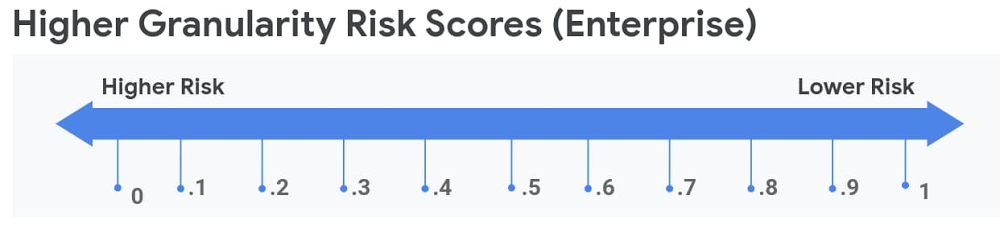
As more enterprises are requiring customers to create accounts to do things like access services or make a purchase, attackers have increased their focus on account takeovers. These attackers are highly motivated and can be extremely evasive when trying to avoid detection during campaigns. For example, bad actors often attempt to hide their activities by acting during normal traffic times to blend in with genuine customer activity. reCAPTCHA Enterprise can help protect your websites from fraudulent activity like this. Last week, we talked about how reCAPTCHA Enterprise can help keep your end users safe against a variety of attacks, including fraudulent transactions, scraping, synthetic accounts, and account takeovers. Today, we’re going to take a deeper look at how reCAPTCHA Enterprise can help you combat account takeovers and hijacking. Account takeover and hijacking basicsAccount takeovers and hijacking are when a bad actor uses a stolen or leaked credential to login and take over a legitimate user’s account. Account takeovers happen when an attacker uses someone else’s login credentials, successfully gets into his or her account, and then starts to perform fraud, such as the transferring of money or gift card and purchase fraud. How do these bad actors obtain stolen credentials? There are a number of ways, but the easiest is simply to purchase them from the dark web or other sources. This can be done extremely inexpensively, and in the last several years, billions of account records have been leaked from breaches. With exponential growth anticipated for credentials available after a data breach, that number will only continue to increase. When a malicious actor has a large set of these stolen or purchased credentials, it’s not financially feasible for them to manually attempt to login to an account. So, they rely on automated credential stuffing attacks to login and verify the accounts before they manually perform fraud on the accounts. This process of validating stolen credentials typically requires three parts: a list of potential credentials and accountsa distributed botnet (large swaths of infected “zombie” machines)some type of automation software or toolkit to orchestrate the attacking botnet Since these credentials have a long list of potential username and password combinations, attackers usually use a botnet to see which logins are correct. Botnets generally attack through proxy servers or ephemeral addresses that can be hard to blacklist or block, which also allows attackers to quickly change where the attacks are originating from. Determined attackers will pivot and attempt to evade detection as quickly as possible if they realize they’ve been noticed. Account takeover and hijacking attacks have been on the rise over the last years, and they are very costly to the organizations that are targeted. According to a study by Javelin Strategy & Research, billions of dollars are spent each year cleaning up and containing the stolen accounts to try to combat fraudulent activity. How reCAPTCHA can helpDue to the growing sophistication of attacks, it has become increasingly difficult for security teams to manage the line between letting valid customers in and keeping out fraudulent attackers and bots. reCAPTCHA Enterprise is here to help. reCAPTCHA Enterprise is a frictionless fraud detection service that leverages our experience from more than a decade of defending the internet with reCAPTCHA and data for our network of four million sites. A simple JavaScript snippet enables reCAPTCHA Enterprise to verify that requests on your webpages are coming from real humans. This is done through behavioral analysis that uses site-specific training and models. reCAPTCHA Enterprise will detect malicious requests and give you actionable insights to help protect your enterprise. reCAPTCHA Enterprise gives you the granularity and flexibility to help protect your webpages in the way that makes the most sense to your business. Our enterprise API provides risk scores for an interaction with your site. With 1.0 being a likely good interaction and 0.0 likely being an abusive one, you can decide which action to take based on that score. This means there’s no one-size-fits-all approach to managing your risk, you can have different levels of protection for different web pages. For example, a suspected fraudulent request on a login page could force a two-factor authorization challenge, while you could just block the request on a less valuable webpage.Using reCAPTCHA Enterprise, you can train your site specific model by sending reCAPTCHA IDs back to Google labeled as false positives or false negatives. SDKs are available for both iOS and Android to provide the same controls for your mobile applications. The danger of bot-led account takeover and hijacking attacks are on the rise, costing organizations large amounts of money and consuming the time of valuable internal resources in security, legal, and fraud teams. reCAPTCHA Enterprise can help detect these botnets and give you the insights you need to block the requests while allowing real users into your website and their account. To learn more about how you can help protect your enterprise from account takeovers and hijacking, visit our documentation. To get started with reCAPTCHA today, contact sales.
Quelle: Google Cloud Platform






