Dev-Sec-Ops
medium.com – How to Autoscale the DNS Service in a Kubernetes Cluster Kubernetes Autoscaler
Quelle: news.kubernauts.io
medium.com – How to Autoscale the DNS Service in a Kubernetes Cluster Kubernetes Autoscaler
Quelle: news.kubernauts.io
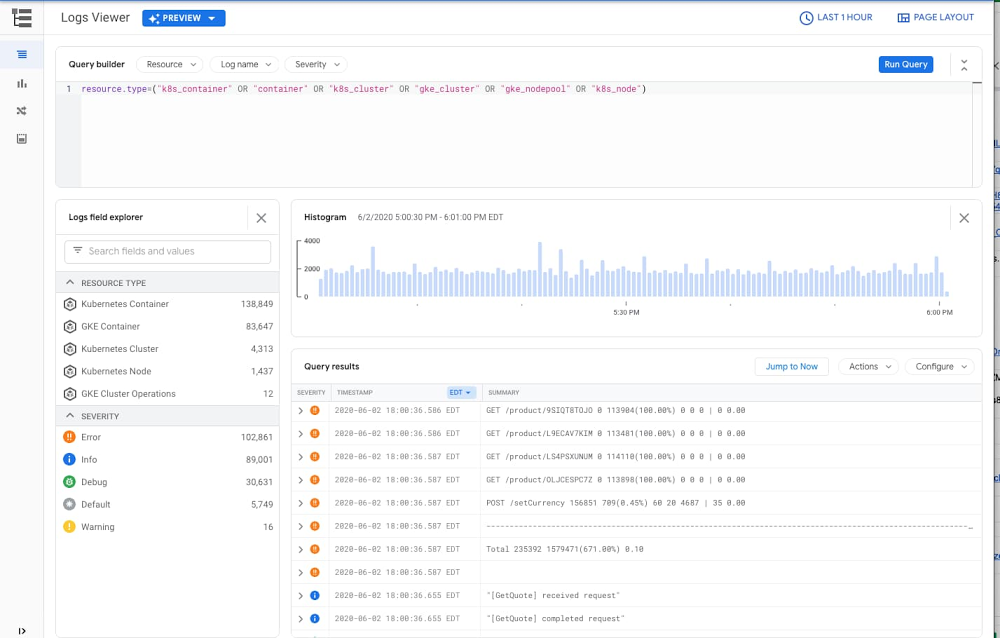
Logs are an important part of troubleshooting and it’s critical to have them when you need them. When it comes to logging, Google Kubernetes Engine (GKE) is integrated with Google Cloud’s Logging service. But perhaps you’ve never investigated your GKE logs, or Cloud Logging? Here’s an overview of how logging works in GKE, and how to configure, find, and interact effectively with the GKE logs stored in Cloud Logging.How your GKE logs get to Cloud LoggingAny containerized code that is running in a GKE cluster—either your code or pre-packaged software—typically generates a variety of logs. These logs are usually written to standard output (‘stdout’) and standard error ‘stderr’, and include error, informational and debugging messages. When you set up a new GKE cluster in Google Cloud, system and app logs are enabled by default. A dedicated agent is automatically deployed and managed on the GKE node to collect logs, add helpful metadata about the container, pod and cluster and then send the logs to Cloud Logging. Both system logs and your app logs are then ingested and stored in Cloud Logging, with no additional configuration needed. Find your GKE logs in Cloud LoggingIn order to find these logs in the Cloud Logging service, all you need to do is filter your logs by GKE-related Kubernetes resources, by clicking this link, or by running the following query in the log viewer: resource.type=(“k8s_container” OR “container” OR “k8s_cluster” OR “gke_cluster” OR “gke_nodepool” OR “k8s_node”)This query surfaces logs that are related to Kubernetes resources in GKE: clusters, nodes, pods and containers. Alternatively, you can access any of your workloads in your GKE cluster and click on the container logs links in your deployment, pod or container details; this also brings you directly to your logs in the Cloud Logging console.If no log entries return with your query, it’s time to look for reasons your logs aren’t being generated or collected into Cloud Logging. Make sure you’re collecting GKE logsAs mentioned above, when you create a GKE cluster, system and app logs are set to be collected by default. You can update how you configure log collection either when you create the cluster or by updating the cluster configuration. If you don’t see any of your logs in Cloud Logging, check whether the GKE integration with Cloud Logging is properly enabled. Follow these instructions to check the status of your cluster’s configuration.If the GKE integration is not enabled, you can enable log collection for the cluster by editing the cluster in the Google Cloud Console, or by using the gcloud container clusters update command line.If you have already enabled the GKE integration with Cloud Logging and Cloud Monitoring and still don’t see any of your GKE logs, check whether your logs they’ve been excluded. Logging exclusions may have been added to exclude logs from ingestion into Cloud Logging either for all or specific GKE logs. Adjusting these exclusions allows you to ingest the GKE logs that you need into Cloud Logging. Beginning with GKE version 1.15.7, you can configure a GKE cluster to only capture system logs. If you have already enabled the GKE integration with Cloud Logging and Cloud Monitoring and only see system logs in Cloud Logging, check whether you have selected this option. To check whether application log collection is enabled or disabled, and to then enable app log collection, follow these instructions. Make your GKE logs more effectiveHaving structured logs can help you create more effective queries. With Cloud Logging, structuring your logs means it parses your JSON object which makes it easier to build queries for your application JSON messages. GKE automatically adds structure to its log messages if your logs contain JSON objects in the log message. As a developer, you can also add specific elements in your JSON object that Cloud Logging will automatically map to the corresponding fields when stored in Cloud Logging. This may be useful to set the severity, traceId or labels for your log messages.Using traces in conjunction with log messages is another common practice to monitor and maintain the health and performance of your app. Traces offer valuable context for every transaction in your application and thus make the troubleshooting effort significantly more effective, especially in distributed applications. If you use Cloud Trace (or any other tracing solution) to monitor distributed application tracing, another way to make your logs more useful is to include the trace id in the log message. With this connection, you can link to Cloud Trace directly from your log messages when you’re troubleshooting your app.Reduce your GKE log usage GKE produces both system and application logs. While useful, sometimes the volume of logs may be higher than you expected. For example, certain log messages generated by Kubernetes such as the kublet logs on the node can be quite chatty and repetitive. These logs can be useful if you’re operating a production cluster for troubleshooting purposes, but may not be as useful in a purely development environment. If you feel you have too many logs, you can use Logging exclusions along with a specific filter to exclude log messages that you may not use. But be thoughtful about excluding logs, since you often won’t need the logs until later when you are for troubleshooting a problem. Excluding some repetitive logs (or excluding a certain percentage of them) can reduce the noise. Kubernetes produces many different kinds of logs and Cloud Logging can help you to make sense of them. For more details about using Cloud Logging with your GKE apps, check out our blog post.
Quelle: Google Cloud Platform
The 2020 Stack Overflow Developer Survey confirms what we already knew: there’s a lot of developer love out there for Docker and it is continuing from last year.
Docker was the #1 most wanted platform and #2 most loved platform, according to the survey results published last week. We also ranked as the #3 most popular platform.
That’s no fluke. The results are based on nearly 65,000 people who code. And it’s the second year running we’ve acquitted ourselves so admirably in the annual survey. As we shared with you here last summer, developers ranked Docker as the #1 most wanted platform, #2 most loved platform and #3 most broadly used platform in the 2019 Stack Overflow Developer Survey. Those responses came from nearly 90,000 developers from around the world.
This year, in the most wanted platform category, nearly 25 percent of developers expressed interest in developing with Docker, ahead of AWS (20.2 percent), Kubernetes (18.5 percent) and Linux (16.6 percent).
In the most loved platform category, 73.6 percent of developers expressed interest in continuing to develop with Docker, trailing only first-placed Linux (76.9 percent), and leading Kubernetes (71.1 percent) and AWS (66.4 percent).
And in the most popular platform category, 35 percent of respondents chose Docker, behind first-placed Linux (55 percent) and second-placed Windows (53.1 percent).
The findings underscore that developers really, really like Docker—whether for its device agnosticism, its ability to automate CI/CD or power productivity, or any number of other factors. Last Thursday, our virtual DockerCon event drew some 77,000 registrants. The survey results also validate our renewed strategy to focus on developers and helping them use containers in their applications.
For almost a decade, Stack Overflow’s Developer Survey had the distinction of being the largest survey of people who code around the world. This year’s survey prioritized diversity over quantity, focusing on a wider demographic of programmers worldwide. The survey also explored the most loved, dreaded and wanted frameworks; developer salaries and careers, community participation and more.
Ready to feel the love? Docker offers free plans for individual developers and teams just starting out. Get started with Docker today.
The post Stack Overflow Survey Reconfirms Developer Love for Docker appeared first on Docker Blog.
Quelle: https://blog.docker.com/feed/

Die Hublot Big Bang e hat ein Gehäuse aus Titan oder Keramik und kommt mit Saphirglas – die technische Ausstattung der Smartwatch ist aber von der Stange. (Smartwatch, Snapdragon)
Quelle: Golem

Passfotos dürfen nur noch digital und manipulationssicher aufgenommen werden. Das ist künftig nicht nur den Meldeämtern erlaubt. (Biometrie, Datenschutz)
Quelle: Golem

In drei Städten probiert die Telekom das langsamere 5G N1 aus, wofür spezielle Smartphones nötig sind. (5G, Telekom)
Quelle: Golem

Das kleinere Verteilzentrum von Amazon braucht braucht aber nur 80 Arbeitskräfte. (Amazon, Wirtschaft)
Quelle: Golem

Doch Telus und Bell legen sich nicht fest, ob die Zusammenarbeit mit Huawei nicht dennoch weitergeht. Das ist Multi-Vendor-Strategie bei 5G. (Huawei, Handy)
Quelle: Golem

The past few months have been tiring for everyone. As the coronavirus spread across the globe, most of us thought that we were going to live with the uncomfortableness of shelter-in-place for a few months before things could return to normal. We thought that what would consume most of our free time was TikTok videos, Animal Crossing, Netflix, and maybe a reignition of hobbies. Unfortunately, this has not been the case.
Fast-forward to today. Society has not returned to normal and instead, we have had more time to engage on the topic of race on a global scale — specifically, how unfairly Black Americans are treated in American society.
We are not only bearing witness to how disproportionately the COVID-19 pandemic has hit Black and Brown Americans, we are seeing the injustices and violence Black Americans face daily in an amplified manner. Whether it’s having the cops called on you following a simple and reasonable request in the park, going jogging in your neighborhood, or being asleep in your own home, the world is watching and finally responding to these injustices. From Eric Garner to George Floyd, the list of people we grieve over is far too long.
We are hurt, confused, frustrated, angry, and just tired.
We are tired but never done.
How can you support your Black colleagues and friends?
Give them a bit more time, space, and compassion.Understand that some of them are whiplashed and at a loss for what to do.Let them come to you with causes you can support.Collectively agree on a way of showing wordless support, like an emoji for example:
How can you support this movement?
Understand that this movement is not history, nor will it soon be over. We need to fight for equality until life, liberty, and the pursuit of happiness are available for all.
Here is a list of places you can amplify, donate to, or sign petitions for change:
Donate
Donate to any of these organizations and petitions to show support and help advance the agenda for equal representation and justice.
Nationwide Bail FundReclaim the BlockBlack Visions CollectiveThe Official GoFundMe of George Floyd’s FamilyJustice for Regis Official FundEqual Justice InitiativeNAACP Empowerment ProgramBlack Lives Matter Network
Sign
Sign any of these petitions to show support for change and accountability in our judicial system.
Color of Change PetitionOfficial Petition for Breonna Taylor Justice for Tony McDade PetitionJustice for Ahmaud Arbery PetitionJustice for George Floyd Petition
Do
Call, tweet, and send posts on your social networks to your elected state or local officials and demand equal justice today.
Educational resources
Dedicate time to learn more deeply about institutionalized racism in America, and how to safely take action against it.
This Anguish and Action post from the Obama Foundation includes a “Get Informed” section with anti-racism articles and resources.This detailed list of anti-racism resources includes articles, books, TV shows, and movies.This post by Barack Obama reflects on how to make this moment the turning point for real change.This Anti-Defamation League guide offers practical tips on how to engage young people in conversations about race and racism.This post compiles resources and links on ways to support and fight for an anti-racist future together.Just Mercy is an important read by lawyer and Equal Justice Initiative founder Bryan Stevenson.
Mental health resources
Ethel’s Club – A Black-owned and -operated social club that offers access to Black therapists and a multitude of creative events for People of Color. Crisis Text Line – A different approach to crisis intervention, Crisis Text Line offers you help when you text 741-741. You’ll be able to chat with someone who is willing to listen and provide you with additional resources.Shine Text – A Black-owned self-care app through which you can sign up to receive cheerful texts and tips every day. Therapy for Black Girls – A Black-owned directory to help you find Black therapists in your area. BEAM Community – A Black emotional and mental health collective committed to the health and healing of Black communities.Self-Care Tips for Black People Who Are Struggling With This Very Painful Week – A resource on VICE with tips that may provide a bit of relief.
Tips for protesting
Knowing your rights – An indispensable resource from the ACLU.How to protest safely and legally – Remember to wear a mask in order to protect yourself!How to help someone who’s been tear-gassed
Lastly, let’s celebrate solidarity and beauty when we see it:
The international community is watching and protesting alongside us across the globe.Protesters doing the cupid shuffle.Protesters take a knee and raise their fists in Upper East Side, New York.Protesting in Harlem, New York.In New York City, chief police officer kneels with protesters.
Stay safe out there!
Quelle: RedHat Stack
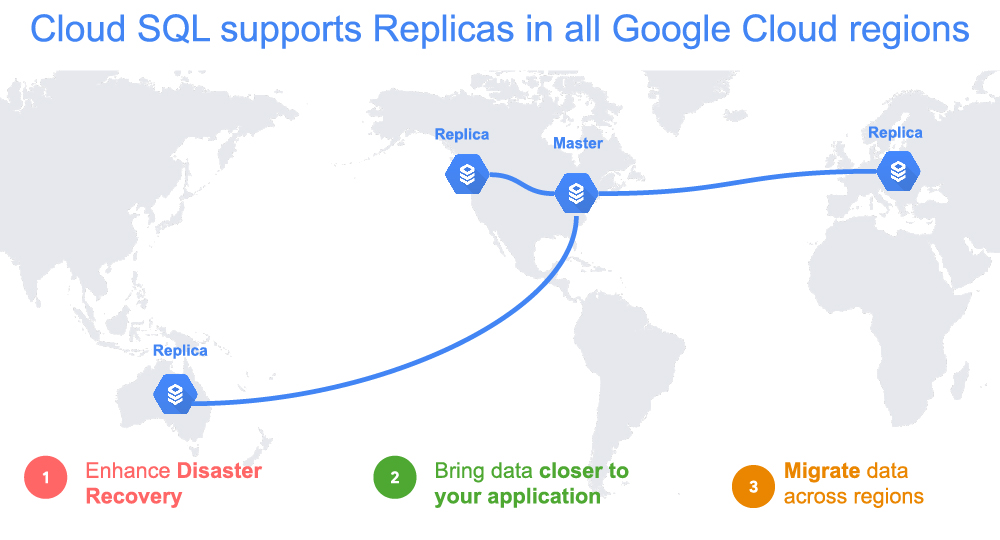
Being responsible for business continuity isn’t easy. You must consider a wide variety of failure scenarios, including the outage of a Google region. In the event of a regional outage, you want your application and database to quickly start serving your customers in another available region if a Google Cloud region fails.We’ve worked closely with Cloud SQL customers facing business continuity challenges to simplify the experience, and we are excited to launch Cloud SQL cross-region replication, which is available for MySQL and PostgreSQL database engines. What is a cross-region replica for Cloud SQL?Cross-region replica makes it easy to create a fully managed read replica in a different region than that of the primary instance. You can create a replica in any Google Cloud region.We’ve heard from Major League Baseball (MLB) that cross-region replicas have been useful. “We store all our important tracking information such as location of player, pitch velocity, and even the wind data on Cloud SQL for PostgreSQL,” says Greg Cain, MLB vice president, Baseball Data. We take great pride as the national pastime with millions of fans across the U.S., but we also have a large fanbase beyond that which spans all seven continents around the world. Our global audiences enjoy watching games at all times of day on MLB.com and our different consumer products. Cross-region replication was a very critical feature for us to implement to provide uninterrupted services to our fans.”Using Cloud SQL cross-region replicasWith cross-region replica, you can: Minimize recovery point objective (RPO): A cross-region replica is a copy of the primary that reflects changes to the primary instance in almost real time, so data loss is very small in the event of a Google Cloud region failure. Minimize recovery time objective (RTO): Cross-region replica maintains an online copy of your data in another region. In the event of Google Cloud region failure, a replica can be promoted within minutes.Make globally distributed applications faster: Read replicas are closer to their application in another region.Migrate data between regions: Use cross-region replicas to minimize downtime when moving data between regions.Simple and secure, by defaultCloud SQL cross-region replication reduces operational overhead and is fully integrated with Google Cloud’s Cloud SQL security and privacy features.Fully managed Easily set up, maintain, manage, and administer replicas in any region on Google Cloud.Google Cloud networkingCreating a cross-region replica requires no networking setup. Global VPC uses private IP for replication traffic between regions—eliminating the need of complex VPN and VPC configuration, which would be otherwise needed to set up cross-region networking.Cross-region replication traffic uses reliable, high-performing, and scalable Google Cloud networking.Network monitoring, verification, and optimization is simplified using proactive network operations with Network Intelligence Center.Cloud SQL security and privacy Data at rest in replicas is encrypted using customer-managed encryption keys (CMEK).Cross-region replication traffic remains private, without access to and from the public internet, when a private IP option is used.Cross-region replicas are supported as part of Access Transparency, which represents Google’s long-term commitment to security and transparency by providing you with logs that capture the actions Google personnel take when accessing your content. Connection org policy control provides centralized control of the public IP settings of Cloud SQL to reduce the security attack surface of Cloud SQL instances from the internet.Cloud SQL will enforce the data residency policy you define. Replicas can only be created in permitted regions.Getting started with cross-region replicaCreating a cross-region replica is as simple as creating a read replica.Get started with cross-region replication today.
Quelle: Google Cloud Platform






