Using Recommenders to keep your cloud running optimally

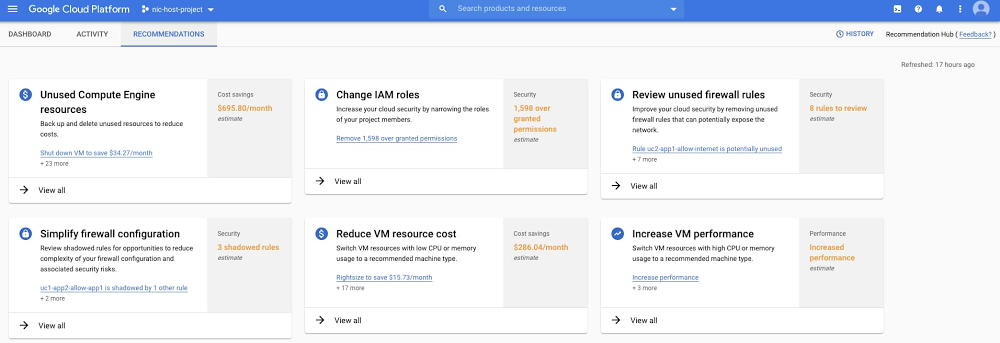
As a cloud project owner, you want your environment to run smoothly and efficiently. At Google Cloud, one of the ways we help you do that is through a family of tools we call Recommenders, which leverage analytics and machine learning to automatically detect issues and present you with optimizations that you can act on. With Recommenders, our goal is to suggest quick, easy ways to optimize your cloud for price, performance, and security. Several Recommenders are already generally available, including VM Recommenders, Firewall Insights and IAM Recommender. In fact, there are many teams at Google Cloud who are working to build Recommenders that help you improve your cloud. But, we want to make sure it’s effortless and simple for you to find and take action on those recommendations. That’s why we’re also releasing the beta of our new Recommendation Hub, which highlights proactive recommendations in one place for you to view and act on. Recommendation Hub is vital to bringing all of these optimization efforts together for you to see and take action on. Not only does the Hub capture the most impactful opportunities in your projects, but it also helps guide you across Google Cloud in general. Whether it’s networking, security, compute and storage resources, cost and billing, or Anthos, the Recommendation Hub will give you the tools you need to prioritize, analyze, and act on all of these valuable insights and recommendations.Click to enlargeRecommendation Hub and Recommenders are also part of a bigger initiative at Google Cloud to use machine learning and analytics to help you make better decisions, drive down costs, and automate your operations. There will be more announcements on that soon, but for now, let’s explore some of the Recommenders currently available for you to use.Optimize resources for cost and performance with VM RecommendersThere will come a day when you might need to scale your virtual machine (VM) instances up or down. For that, we’ve got two types of Recommenders available: one to help you optimize your VMs for cost and performance, and a second to help you identify and delete (or back up) your unused VMs and persistent disks (PD) to avoid paying for resources you don’t use. All of this helps you properly balance your performance and cost based on your unique situation. One customer, VuClip, decided to experiment with the Idle VM Recommender and is now making it a key part of how they optimize their cloud environment: “We were in the midst of a hackathon recently, and we decided to test out Google Cloud’s Idle VM Recommender. We quickly learned that we had over 200 VMs that were sitting idle, but ultimately costing us money, that we wouldn’t have otherwise known about. The real bonus was that it only took a matter of seconds for Google Cloud to shine light on these idle VMs.” – Hrushikesh Kulkarni, Associate Director of Technology, VuClipSecure your network with Firewall InsightsFirewall rule management is a constant challenge for security and network engineers. Firewall configuration can grow in complexity as more accesses are added over time, making it really hard to maintain. Firewall Insights, now in beta, is a new tool that helps secure your cloud environment by detecting and providing easy remediation options for a number of key firewall issues, including:Shadowed rules that can’t be reached during firewall rule evaluation because they overlap with higher-priority rulesUnnecessary allow rules, open ports and IP rangesSudden hit increases on firewall rules (and a drill down into the source of the traffic) that signal an emerging attackRedundant firewall rules, which can be cleaned up to reduce the total firewall rule countDeny firewall rules with hit counts from sources trying to access unauthorized IP ranges and portsFlowmon, a company that develops network performance monitoring and network security products, has been using Firewall Insights to gain new insights into its existing firewall rules:“Firewall Insights has already proven to be an extremely valuable tool. With barely any effort, it gives us precise knowledge about what our firewall rules are actually doing. Through that, we’re able to optimize all of our firewall rules quickly and easily.” – Boris Parák, Cloud Product Manager, FlowmonFor more information on using Firewall Insights (which is also available in Network Intelligence Center), please reference our documentation or check out this video:Lock down unwanted access with IAM RecommenderIn addition to firewall rules, permissions play another crucial role in your overall security posture. WithIAM Recommender, you can remove unwanted access to Google Cloud resources with smart access control recommendations. IAM Recommender uses machine learning to automatically detect overly permissive access and help security teams figure out what permissions their project members really need. Not only does this help establish least-privilege best practices and reduce your organization’s security risks, but also prevents accidental changes to your data and cloud infrastructure. Here’s a video to show you how it works:Many more Recommenders coming soonWe’re busy building more Recommenders which will appear in Recommender Hub. Here are a few that you can expect to see within the next few months: Cost and performanceCompute Engine cross-family recommendations: Select the optimal VM family for your workload (e.g., memory-optimized).Committed Use Discount (CUD) maximizer: Keep your cloud costs on budget by making sure you utilize your discounts to the fullest. SecurityGKE RBAC: Assess and remove over-granted permissions.Security keys: Protect high-risk users against phishing by implementing phone-as-a-security-key.Reliability, availabilityCompute Engine predictive auto-scaling: Reduce latency and costs by scaling compute proactively.VPN tunnel: Proactively detect overutilized tunnels to prevent network packet loss.With Recommenders, we’re trying to take the guesswork and toil out of keeping your cloud running optimally. To learn more about how Recommenders can help you, please check out our upcoming session “Cloud is Complex. Managing it Shouldn’t Be” during our Next OnAir digital event.
Quelle: Google Cloud Platform

Last month today: May in Google Cloud

Last month brought new and continued challenges around the world, and new ways technology can help meet them. Top posts in May on the Google Cloud blog covered news on productivity, G Suite, and much more. Here’s what you missed.  Understanding cloud infrastructure to serve more people fasterThis post goes in-depth on how our Technical Solutions Engineers (TSE) team solved the case of a Google Cloud customer support ticket. Along the way to find the missing DNS packets, you’ll get a look at how support teams evaluate and troubleshoot on the way to finding a solution for customer issues, and what you can do to help fix issues if they occur.In May, we introduced Google Cloud VMware Engine, designed to make it easy to migrate or extend your on-prem workloads to Google Cloud. VMware Engine lets you run your workloads natively in a dedicated VMware environment in Google Cloud, so you don’t have to change any of your tools, processes, or policies.Mark your calendars for Google Cloud Next ‘20: OnAir from July 14 to September 8, where you’ll be able to access developer programs, keynotes, and hundreds of sessions—all free of charge. Each week you’ll find programming on a different topic, including infrastructure, security, app modernization, and cloud AI. Register and get more details on speakers and topics now.Making it easy to get started with G SuiteG Suite Essentials launched last month, giving groups and teams a faster, easier way to get started with G Suite. G Suite Essentials includes premium video conferencing with Google Meet, real-time collaboration and content management with Google Docs, Sheets, Slides, and Drive, and enterprise-grade security and reliability. It’s great for teams that aren’t ready to replace their current email or calendar tools, and it’s completely free through September 30. Doing more with what you haveFor many businesses, using their resources wisely has become especially important over the past few months. This post on understanding the principles of cloud cost optimization offers an overview of cost optimization concepts, tools, and tips on prioritizing your cost optimization projects. That’s a wrap for May. Stay tuned to what’s new in cloud on Twitter.
Quelle: Google Cloud Platform

5 ways to enhance your cloud storage security and data protection

Cloud storage is a foundational technology for many modern businesses, helping to store vast amounts of data that users can easily access and use to power modern data projects. At Google Cloud, we continually invest in protecting our customers’ data across all our products, including Cloud Storage.  For every Google Cloud product, security is always a top priority. As enterprise storage needs grow, our security and compliance protections grow too. Cloud Storage secures data by default with rich security controls and the ability to audit as needed. Features like Bucket Lock, Cloud Key Management Service (KMS), and Access Transparency already help keep your data safe in Cloud Storage. We’re announcing further product updates, now generally available, to protect your data, even in complex, multi-cloud environments. Let’s take a look at some of the new security features available in Cloud Storage.What’s new with Cloud Storage securityV4 signature support with Cloud StorageWe are happy to announce the GA launch of V4 signature support withCloud Storage. This is a critical multi-cloud security capability for our customers and partners. V4 signature capability enables customers to generate signed URLs (also referred to as pre-signed URLs) with limited permissions and duration, which they can issue to their clients/users who don’t need to have a Google identity. Signature-based authentications, especially through signed URLs, is a very common security posture used for content storage and delivery, SaaS platforms and applications, and analytics (enterprise data warehouses and analytics pipelines). You can take a look at a signature-based multimedia content storage and distribution setup example here. Hash-based message authentication (HMAC) for Cloud Storage service accountsYou can now manage and use hash-based message authentication (HMAC) credentials associated with Cloud Storage service accounts, rather than user accounts. This feature strengthens your authentication and security by not having to rely on credentials tied to the user accounts. This feature also lets you interoperate seamlessly among multiple cloud vendors with regards to security and authentication setups and practices.Uniform bucket-level access for Cloud IAMCloud Storage’s support for Cloud Identity and Access Management (Cloud IAM) enables you to apply access policies by role to Cloud Storage users, along with other Google Cloud products. The new uniform bucket-level access feature lets you uniformly configure access through Cloud IAM Policies to your Cloud Storage resources, allowing for manageability at scale. When it’s enabled on a bucket, only bucket-level Cloud IAM permissions grant access to that bucket and the objects it contains.Putting Cloud Storage security best practices into actionSecuring your enterprise storage data requires thinking ahead to protect your data against new threats and challenges. We often hear best practices and tips from Cloud Storage users on how they use Google Cloud products to enhance their company’s security posture. Here are five recommendations to use these new features and help prevent data leaks or hacks:1. Turn on uniform bucket-level access and its org policyUniform bucket-level access for Cloud Storage buckets lets you configure and enforce uniform Cloud IAM policies for your buckets. Turning this feature also ensures that you are safeguarded against any object-level ACLs, which become a challenge to manage access, especially at scale. This feature also offers an organizational policy that lets you enforce the use of uniform IAM access policies on all new buckets, if desired. Enforcing IAM policies at the bucket level can help prevent inadvertent public exposures, which can happen in the absence of this feature if users make individual objects public.This feature has been very useful for our customers in particular from financial services and big tech industries. It lets you manage uniform permissions at scale in situations where there are lots of developers/employees who need to access the data, but it can’t be exposed outside the company.2. Enable domain-restricted sharingOnce you’ve turned on uniform bucket-level access, another useful tool in Cloud Storage is to enforce the domain-restricted sharing constraint in an organization policy to prevent accidental public data sharing, or sharing beyond your organization. With this feature, organizations and development teams can move quickly, while security and governance teams can enforce security at scale and trust that resources have the right controls in place. Domain-restricted sharing can be used in conjunction with uniform bucket-level access to configure rock-solid access control policies and safeguard against accidental public exposures. 3. Encrypt your Cloud Storage data with Cloud KMSRegulations for data access and control are increasingly becoming more strict. For example, GDPR made many companies change the way they collect, store and process personal information. An important piece of this puzzle is encryption key management. Cloud KMS is a cloud-hosted key management service supported by Cloud Storage that lets you manage encryption keys for your cloud storage data. You can generate, use, rotate, and destroy AES256, RSA 2048, RSA 3072, RSA 4096, EC P256, and EC P384 cryptographic keys. This feature offers state-of-the-art encryption management and can help you with various regulations.4. Audit your Cloud Storage data with Cloud Audit LoggingCloud Audit Logs bring visibility into user activity and data access across Google Cloud, including Cloud Storage. Cloud Audit Logs reside in highly protected Cloud Storage, resulting in a secure, immutable, and highly durable audit trail. You can also use Operations (formerly Stackdriver) APIs for programmatic access and ingesting Cloud Storage audit logs into your threat detection analytics systems.5. Secure your data with VPC Service ControlsWith VPC Service Controls, you can configure security perimeters around the resources of your Cloud Storage service and control exfiltration of data across the perimeter boundary. For example, a VM within a VPC network that is part of the service perimeter can read from/write to a Cloud Storage bucket. Any attempt to access data from outside the perimeter will be denied. With your Cloud Storage buckets behind a VPC Service Control security perimeter, you have a private cloud-like security posture for your Cloud Storage data.To learn even more about Cloud Storage and ways to enhance data protection and security, check out the access control documentation and our presentation at Cloud Next ‘19.
Quelle: Google Cloud Platform





