Preparing for what’s next: Financial considerations for cloud migration

Co-authored by Jorge Magana, Director, Azure Finance (Financial Planning and Analysis).

In the kick off blog of this series, I shared our top recommendations to accelerate your cloud migration journey, one of which was around aligning key stakeholders across your organization. As you move through assessments and plan your migration, it is critical to get buy in from your CFO and other financial stakeholders—even more so in today’s challenging macro-climate.

IT and finance organizations need to be aligned around how to be agile to adjust to rapidly shifting demands while ensuring that their cost structure is lean enough to weather tough market conditions. With this dual focus, it is critical to understand not only the technical benefits of a cloud transition, but also the financial and economic opportunities associated with it. Today I'm sharing my own experience of partnering with finance along with the wisdom that customers have shared about their journey.

How can cloud migration affect CFO priorities?

Here are three key areas that IT organizations need to internalize and align on with their finance organization as they plan cloud migration:

What’s the holistic impact to the organization’s financial posture? 
What will the impact be on external and internal finance KPIs and processes?
What operational changes are required during and after migration to ensure that budget/ROI controls are met? 

How is the organization’s financial posture going to change?

Azure customers constantly unlock new, positive ROI projects previously not possible on-premises as they migrate workloads. By design, Azure is built to facilitate business agility, creating opportunities for true competitive advantage and substantial decrease in time to market. As a result, our customers recognize significant financial benefits driven in large part by cloud flexibility and elasticity and changes in businesses’ financial operating models that reduce asset purchases and upfront cash investments.

Cloud flexibility and elasticity

First, Azure customers can adjust their cost structure to improve their organization’s bottom line, which is table stakes in today’s environment. In recent earnings calls, CFOs of companies not leveraging the cloud mentioned their inability to reduce fixed expenses, which hurt profitability. As our customers migrate to Azure, they are shifting to a cost structure that is variable by design:

Figure 1: Cloud cost structure provides flexibility


Next, Azure customers can maximize resource efficiency. We have worked directly with large and small customers alike who were running on-premises workloads at very low resource utilization. These customers purchased assets for peak demand and lead-times, but most of the time those servers, and even some datacenters, were sitting idle and underused. By rightsizing and optimizing capacity when migrating to Azure, customers can realize economic benefits from cloud scale and elasticity. As an example, the built-in scalability in Azure has helped Maersk quickly scale up on demand eliminating the need to maintain idle resources during off-peak times.

“Scalability is one of the big benefits we get from Azure. In the past, it might have taken us months to procure and configure servers and get them into production. Now, we can scale up on demand in Azure in a matter of minutes." – Musaddique Alatoor, Head of Equipment Innovation, A.P. Moller – Maersk

Finally, shifting to a cloud model can reduce costs by enabling customers to consume resources only during peak usage periods, while reducing capacity when demand needs drop.

Changes in the financial operating model

Key financial benefits of Azure are driven by a fundamental shift in the IT operating model, which benefits the organization’s core financial statements in the following ways:

Balance sheet: Prior to migrating to Azure, many of our customers owned or operated their datacenters. These were expensive long-term assets that limited the cash and capital required to grow the business, support strategic initiatives, and respond to market conditions. Once on Azure, our customers avoid buying equipment, repurpose expensive real estate, and shift datacenter operations costs into developing cloud applications and other projects that drive business growth. This makes their balance sheet more agile, shifting fixed assets to cash. This is what drove Maersk to move their five regional datacenters to Azure to lower the company’s risks and position them for continued growth.
Cash flow statement: Azure customers save immediate cash by avoiding cyclical and sporadic IT asset purchases. With the “pay for what you use” model along with platform capabilities like policy and tagging that Azure enables, CFOs increase visibility, predictability and delay cash spend.
Income statement (profit and loss): Over time, Azure customers can improve profitability by reducing the cost to deliver equal or larger IT value by taking advantage of Azure’s flexibility, low management costs, its broad portfolio of services and pricing models. Learn how CYTI was able to take advantage of Azure’s flexibility to reduce infrastructure costs.

"We're now saving about 30 percent a year on infrastructure costs just by moving to Azure, with more flexibility, better servers, greater customization, and more freedom to do what we want." – Darren Gourley, Chief Technology Officer, CYTI

How will financial KPIs and processes change?

When migrating from on-premises to Azure, there are several financial benefits that subsequently impact KPIs and finance processes. The two most prominent are: 1) budget and financial reporting processes: expense shifts from capital expenditure (CAPEX) to operational expenditure (OPEX); 2) Impact on EBITDA (earnings before interest, taxes, depreciation, and amortization).

CAPEX to OPEX: During an Azure migration, spend that was previously allocated to CAPEX is now being redeployed to OPEX. This is optimal from a cashflow timing and a balance sheet flexibility perspective but requires CFOs to shift budgets to support the new model. Capstone Mining used this approach to significantly lower their capital costs by moving to Azure.
"We wanted to eliminate $3 million (USD) in capital costs over about three years, and to reduce our operating costs by approximately the same amount. At the same time, we wanted to improve our quality of service. With Azure, we're confident about meeting these goals." – Jim Slattery, Chief Financial Officer, Capstone Mining
EBITDA: EBITDA is a financial metric that companies use to measure profitability. This metric ignores real costs like server spend. When moving to the cloud, EBITDA is impacted because the metric can no longer ignore costs like server depreciation. When moving to the cloud, if your company tracks EBITDA, it will likely be impacted from a migration shift. As opposed to overly focusing on EBITDA, many customers choose to identify additional financial metrics that better measure business value improvements (such as cash flows, operating income, or cost of goods sold efficiency).

Managing financial KPI’s and processes is a critical component of a CFO’s job. By creating a channel of communication with your financial stakeholders and highlighting symbiotic relationships of some of the KPI and process impacts of a cloud migration, you can begin working with your finance team to proactively reset expectations around both capital/operating budgets and EBITDA targets in a cloud vs on-premises world.

Implementing the business case: Ongoing cost-optimization and management

Once the cloud migration project begins, here are a few tips and best financial practices for success:

Reducing on-premises asset acquisitions: There must be broad internal alignment and processes to evaluate and control how and when teams buy new on-premises assets. Every new purchase will add fixed costs that will prevent cloud savings for a longer period.
Initial resource clean-up, rightsizing, and optimization: When migrating to Azure, consider which workloads are no longer needed and can be turned off. For workloads still needed, consider what can be done to optimize those resources and operational hours, leveraging tools such as Azure Migrate.
Continuous cost optimization: Workloads aren’t static. Once in Azure, leverage our tools (including Azure Cost Management and Azure Advisor) and establish processes to monitor resources and patterns to continuously optimize cloud costs.
Resource tagging and spend categorization: Azure allows for simplified resource tagging and cost allocation compared with on-premises. This helps increase spend accountability, while evaluating workload ROI. Through resource tagging you are able to better align your spend to cost categories like the cost of goods sold (COGS) or research and development and allocate costs of workloads directly to underlying business units. Targeted cost allocation can directly help drive efficiencies and reductions.
Billing models: Azure billing models like reserved instances and spot pricing are fantastic opportunities to save money. As an example, Azure three-year Reserved Instances (RI) do not require upfront payment, have tremendous flexibility, and provide discounts up to 72 percent.
Azure Hybrid Benefit: With Azure you can take advantage of your existing Microsoft licenses with Software Assurance to avoid incremental licensing costs for migrating workloads and maximize previous investments.

Figure 2: Well-optimized cloud usage can free up excess capacity

Aligning cloud spend with underlying workload usage

A) Idle capacity: Azure allows customers to eliminate idle capacity intended to cover future growth across workloads. Actions like rightsizing or eliminating unnecessary workloads can help you reduce your idle capacity when moving to the cloud.

B) Variable workloads: Azure customers only pay for the hours they need when demand temporarily peaks above average levels on variable workloads. Taking advantage of tools and actions like VM scale sets and “snoozing” can help you only pay for the resources needed.

C) Predictable workloads: Azure customers can minimize costs of predictable workloads by taking advantage of Azure Reserved Instances and Spot prices.

What’s next?

As the cloud migration team in IT, ensure finance partners and key stakeholders are brought in from the beginning, and include them in appropriate decision-making and progress review forums. Reach out to your finance peers to better understand their expectations and how you can collaborate as you embark on your cloud migration project. Use the Cloud Adoption Framework for Azure for best practice guidance around aligning your organization to a common vision and approach.
Leverage cost-savings offers (including Azure Hybrid Benefit and Reserved Instances) and free tools (Azure TCO calculator, Azure pricing calculator, Azure Migrate) as you plan and prepare for cloud migration.
Use tools like Azure Cost Management and Azure Advisor once on Azure to drive continuous optimization; ensure financial stakeholders have appropriate access and visibility.
For expert assistance from Microsoft or our qualified partners, check out our Cloud Solution Assessment offerings or join the Azure Migration Program (AMP).

We hope this gives you a good understanding of the critical intersection between IT and finance in the context of your organization’s cloud migration journey. Engaging the migration leadership team within your organization to collaboratively create both the technical and correlating financial roadmap ensures alignment, facilitates migration success and long-term organizational success. In the coming weeks, we will continue this blog series with deeper dives on topics like assessments, Landing Zones, infrastructure, data, and application migration best practices.  

Share your feedback

Please share your experiences or thoughts in the comments section below—we appreciate your feedback.
Quelle: Azure

The Road to Kata Containers 2.0

thenewstack.io – The open source Kata Containers project, launched in late 2017, aims to unite the security advantages of virtual machines (VMs) with the speed and manageability of containers. What has the project ac…
Quelle: news.kubernauts.io

Powering past limits with financial services in the cloud

Editor’s note: We asked financial institution KeyBank to share their story of moving their data warehouse from Teradata to Google Cloud. Here are details on why they moved to cloud, how they did their research, and what benefits cloud can bring.At KeyBank, we serve our 3.5 million customers online and in-person, and managing and analyzing data is essential to providing great service. We process more than four billion records every single day, and move that data to more than 40 downstream systems. Our teams use that data in many ways; we have about 400 SaaS users and 4,000 Tableau users exploring analytics results and running reports.We introduced Hadoop four or five years ago as our data lake architecture, using Teradata for high-performance analytics. We stored more than a petabyte of data in Hadoop on about 150 servers, and more than 30 petabytes in our Teradata environment. We decided to move operations to the cloud when we started hitting the limits of what an on-premises data warehouse could do to meet our business needs. We wanted to move to cloud quickly and open up new analytics capabilities for our teams. Considering and testing cloud platformsTeradata had worked well for us when we first deployed it. Back then, Teradata was a market leader in data warehousing, with many of the leading banks invested in it. We chose it for its high-performance analytics capabilities, and our marketing and risk management teams used it heavily. It also worked well with other SaaS tools we were using, and SaaS remains a good tool for accessing our mainframe.Ten years into using Teradata, we had a lot of product-specific data stores. It wasn’t a fully formed data lake architecture. We also maintain more than 200 SaaS models. In 2019, our Teradata appliances were nearing capacity, and we knew they would need a refresh in 2021. We wanted to avoid that refresh, and started doing proof-of-concept cloud testing with both Snowflake and Google Cloud.When we did those trials, we ran comparative benchmarks for load time, ETL time, performance and query time. Snowflake looked just like Teradata, but in the cloud. With Google, we looked at all the surrounding technology of the platform. We couldn’t be on a single cloud platform if we chose Snowflake. We picked Google Cloud, since it would let us simplify and offer us a lot more options to grow over time.Adapting to a cloud platformAlong with changing technology, our teams would have to learn some new skills with this cloud migration. Our primary goal when moving to a cloud architecture was getting the performance of Teradata at the cost of Hadoop, but on a single platform. Managing a Hadoop data lake running on Teradata architecture is complicated—it really takes two different skill sets. There are some big considerations that go into making these kinds of legacy vs. modern enterprise technology decisions. With an on-premises data warehouse like Teradata, you govern in capacity, so performance varies based on the load on the hardware at any given time. That led to analytics users hitting the limits during month-end processing, for example. With Google Cloud, there are options for virtually unlimited capacity. Cost savings was a big reason for our move to cloud. Pricing models are very different with cloud, but ultimately we’re aiming not to pay for storage that’s just sitting there, not in use. Cloud gives us the opportunity to scale up for a month if needed, then back down after the peak, managing costs better. Figuring this out is a new skill we’ve learned. For example, running a bad query in Teradata or Hadoop wouldn’t change the on-premises cost for that query, but would consume horsepower. Running that query on Google Cloud won’t interfere with other users’ performance, but would cost us money. So we’re running training to ensure people aren’t making those types of mistakes, that they’re running the right types of queries.Shifting to cloud computingThe actual cloud migration involved working closely with the security team to meet their requirements. We also needed to align data formats. For example, we had to make sure our ETL processing could talk to Google Cloud Storage buckets and BigQuery data sets. We’re finding that for the most part the queries do port over seamlessly to BigQuery. We’ve had to tweak just a handful of data types. Since moving to cloud, the early results are very promising; we’re seeing 3 to 4x faster query performance, and we can easily turn capacity up or down. We have five data marts in testing to use real-world data volumes to get comparison queries.We’re still making modifications to how we set up and configure services in the cloud. That’s all part of the change that comes when you’re now owning and operating data assets securely in the cloud. We had to make sure that any personally identifiable information (PII) was stored securely and tokenized. We’ll also continue to tune cost management over time as we onboard more production data. Managing change and planning for the futureThe change management of cloud is an important component of the migration process. Even with our modern data architecture, we’re still shifting established patterns and use cases as we move workloads to Google Cloud. It’s a big change to go to a capacity-based model, where we can change capacity on demand to meet our needs, vs. needing more hardware with our old Teradata method. Helping 400 users migrate to newer tools requires some time and planning. We hosted training sessions with help from Google, and made sure business analysts were involved up front to give feedback. We also invested in training and certifications for our analysts.We’re on our way to demonstrating that Google can give us better performance based on the cost per query than Teradata did. And using BigQuery means we can do more analytics in place now, rather than the previous process of copying, storing, and manipulating data, then creating a report. As we think through how to organize our analytics resources, we want to get the business focused on priorities and consumer relationships. For example, we want to know the top five or so areas where analytics can add value, so we can all be focused there. To make sure we would get the most out of these new analytics capabilities, we set up a charter and included cross-functional leaders so we know we’re all keeping that focus and executing on it. We’re retraining with these new skills, and even finding new roles that are developing. We built a dedicated cloud-native team—really an extension of our DevOps team—focused on setting up infrastructure and using infrastructure as code. The program we’ve built is ready for the future. With our people and technology working together, we’re well set up for a successful future.
Quelle: Google Cloud Platform

GKE best practices: Exposing GKE applications through Ingress and Services

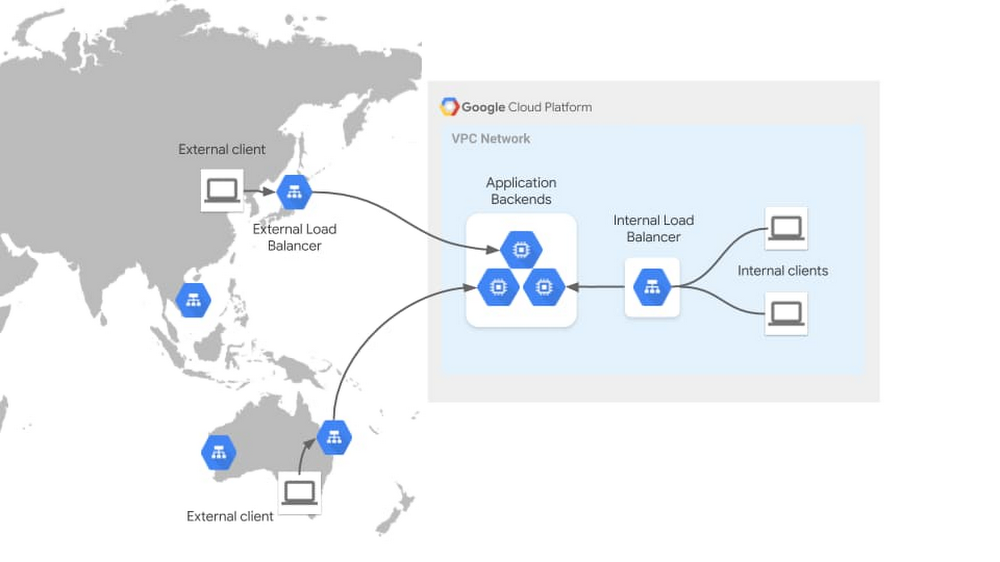
One critical part of designing enterprise applications running on Google Kubernetes Engine (GKE) is considering how your application will be consumed by its clients. This could be as simple as exposing your application outside the cluster, to be consumed by other internal clients, or might involve routing traffic to your application from public clients across the globe.How you should do this depends on many factors. Is the client from the internet or an internal network? Which networking protocols does the application speak? Is the application hosted in a single region or cluster, or is it deployed globally? Determining which solution to use to expose your application requires considering your application requirements in a few key areas. These requirements shouldn’t be assessed in isolation—you should look at them holistically to determine the most appropriate networking solution to expose your application.Let’s walk through the different factors that should be considered when exposing applications on GKE, explain how they impact application exposure, and highlight which networking solutions each requirement will drive you toward. Assuming you’re familiar with Kubernetes concepts such as Deployments, Services, and Ingress resources, we’ll differentiate between different exposure methods from internal, to external, to multi-cluster, and more.Understanding application exposureExposing an application to external clients involves three key elements, which together allow you to route traffic to your application: Frontend: The load balancer frontend defines the scope in which clients can access and send traffic to the load balancer. This is the network location that is listening for traffic—a network, a specific region or subnet within the network, one or more IPs in the network, ports, specific protocols, and TLS certificates presented to establish secure connections. Routing and load balancing: Routing and load balancing define how traffic is processed and routed. Traffic can be routed to services based on parameters such as protocol, HTTP headers, and HTTP paths. Depending on the load balancer you use, it may balance traffic across multiple zones or regions to provide lower latency and increased resiliency to your customers. Backends: Backends are defined by the type of endpoints, application platform, and backend service discovery integration. Specific application environments such as GKE are aided by service discovery integration, which updates load balancer backends dynamically as GKE endpoints come up and down. The following diagram illustrates these concepts for two very different types of traffic flows—external and internal traffic. The External HTTP(S) Load Balancer is listening for traffic on the public internet through hundreds of Google points of presence around the world. This global frontend allows traffic to be terminated at the edge, close to clients, before it load balances it to its backends in a Google data center. The Internal HTTP(S) load balancer depicted here listens within the scope of your VPC network, allowing private communications to take place internally. These load balancer properties make them suited for different kinds of application use cases.GKE load balancing through Ingress and Service controllersTo expose applications outside of a GKE cluster, GKE provides a built-in GKE Ingress controller  and GKE Service controller which deploy Google Cloud Load Balancers (GCLBs) on behalf of GKE users. This is the same VM load balancing infrastructure, except its lifecycle is fully automated and controlled by GKE. The GKE network controllers provide container-native Pod IP load balancing via opinionated, higher-level interfaces that conform to the Ingress and Service API standards. The following diagram illustrates how the GKE network controllers automate the creation of load balancers: An infrastructure or app admin deploys a declarative manifest against their GKE cluster. Ingress & Service controllers watch for GKE networking resources (such as Ingress or MultiClusterIngress objects) and deploy Cloud load balancers (plus IP addressing, firewall rules etc) based on the manifest. The controller continues managing the LB and backends based on environmental and traffic changes. Thus, GKE load balancing becomes a dynamic and self-sustaining load balancer with a simple and developer-oriented interface.Factors that influence application exposureThere are numerous factors that will influence choosing a method for exposing your application in GKE. There are a few core factors that live at the base of your decision tree and will help narrow down the set of networking solutions. These factors are client network, protocol, and application regionality.Client network refers to the network from where your application clients are accessing the application. This influences where the frontend of your load balancer should be listening. For example, clients could be within the same GKE cluster as the application. In this case, they would be accessing your application from within the cluster network, allowing them to use Kubernetes native ClusterIP load balancing. Clients could also be internal network clients, accessing your application from within the Google Cloud VPC or from your on-premises network across a Google Cloud Interconnect. Clients could also be external, accessing your application from across the public internet. Each type of network dictates a different load balancing topology.Protocol is the language your clients speak to the application. Voice, gaming, and low-latency applications commonly speak directly on top of TCP or UDP, requiring load balancers that have granular control at L4. Other applications speak HTTP, HTTPS, gRPC, or HTTP2, and require load balancers with explicit support of these protocols. Protocol requirements further define which kinds of application exposure methods are the best fit. Application regionality refers to the degree that your application is distributed across more than one GCP region or GKE cluster. Hosting a single instance of an application has different requirements than hosting an active-passive application across two independent GKE clusters. Hosting a geographically distributed application across five GKE clusters to place workloads closer to the end user for lower latency requires even more multi-cluster and multi-regional awareness for the load balancer.There may be additional factors that will influence your networking design that aren’t covered below—things like latency requirements, source IP address preservation, or high bandwidth. This list is not intended to be exhaustive, but should help you narrow down your solution options and increase your understanding of the trade-offs between requirements.Application exposure through Ingress and ServicesFortunately, GKE’s suite of native Ingress and Service controllers makes exposing applications seamless, secure, and production-ready by default. These network controllers are tightly integrated with GCLBs, allowing Kubernetes-native interfaces to deploy GCLBs that load-balance natively to container IPs. The following table breaks down all of the GKE Ingress and Service types and details their primary characteristics. For a more detailed comparison of all the GKE and Anthos Ingress capabilities see Ingress Features.There are many native options, all with different capabilities from a protocol, network access, and regional perspective. The following section categorizes these networking solutions by the factors discussed above. Client networkLoad balancers in GKE can broadly be categorized as internal and external load balancers. Internal refers to the VPC network which is an internal private network not directly accessible from the internet. External refers to the public internet. Note that ClusterIP Services are internal to a single GKE cluster so they are scoped to an even smaller network than the VPC network.*Public GKE clusters provide public and private IPs to each GKE node and so NodePort Services can be accessible internally and externally.ProtocolLoad balancers are often categorized as Layer 4, which route traffic based on network information like port and protocol, and Layer 7, which have awareness of application information like client sessions. GKE load balancers can also be categorized as L4 and L7, with specific protocol support in the table below.Application regionalityThe regionality of GKE load balancing solutions can be broken down into two areas:Backend scope (or cluster scope) refers to whether a load balancer can send traffic to backends across multiple GKE clusters. Ingress for Anthos (or multi-cluster Ingress) has the ability to expose a single VIP that directs traffic to pods from different clusters and different Google Cloud regions.Frontend scope refers to whether a load balancer IP listens within a single region or across multiple regions. All of the external load balancers listen on the internet, which is inherently multi-region, but some internal load balancers listen within a single region only.The table below breaks down the GKE load balancing solutions across these two dimensions.While these don’t cover every aspect of application networking, working through each of the factors above can help triangulate which solutions are best for your applications. Most GKE environments host many different types of applications, all with unique requirements, so it’s likely that you’ll be using more than one in any given cluster. For detailed information about their capabilities, check out some of the following resources:Ingress FeaturesMulti-Cluster Ingress (Ingress for Anthos)External IngressInternal IngressExternal LoadBalancer ServicesInternal LoadBalancer ServicesOther solutions for GKE application exposureThe Kubernetes ecosystem is vast, and the above solutions are not the only ones available for exposing applications. The solutions below may also be viable replacements or complements to the native GKE load balancers.In-cluster IngressIn-cluster Ingress refers to software Ingress controllers which have their Ingress proxies hosted inside the Kubernetes cluster itself. This is differentiated from Cloud Ingress controllers, which host and manage their load balancing infrastructure separately from the Kubernetes cluster. These third-party solutions are commonly self-deployed and self-managed by the cluster operator. istio-ingressgateway and nginx-ingress are two examples of commonly used and open source in-cluster Ingress controllers. The in-cluster Ingress controllers typically conform to the Kubernetes Ingress specification, and provide varying capabilities and ease of use. The open-source solutions are likely to require closer management and a higher level of technical expertise, but may suit your needs if they provide specific features your applications require. There is also a vast ecosystem of Enterprise Ingress solutions built around the open-source community which provide advanced features and enterprise support.Standalone NEGsGKE Ingress and Service controllers provide automated, declarative, and Kubernetes-native methods of deploying Google Cloud Load Balancing. There are also valid use cases for deploying load balancers manually for GKE backends, for example having direct and more granular control over the load balancer, or load balancing between container and VM backends. Standalone NEGs provide this ability by updating Pod backend IPs dynamically for a Network Endpoint Group (NEG), but allowing the frontend of the load balancer to be deployed manually through the Google Cloud API. This provides maximum and direct control of the load balancer while retaining dynamic backends controlled by the GKE cluster.Service meshService meshes provide client-side load balancing through a centralized control plane. While the Istio project introduced L7 service meshes to Kubernetes for internal communications, the service mesh ecosystem has rapidly expanded in scope and capabilities. Traffic Director and Anthos Service Mesh power the ability to load balance internal traffic across GKE clusters, across regions, and also between containers and VMs. This blurs the line between internal load balancing (east-west traffic) and application exposure (north-south traffic). With the flexibility and reach of modern service mesh control planes, it’s more likely than ever to have both the client and server within the same service mesh scope. The above GKE Ingress and Service solutions generally deploy middle-proxy load balancers for clients that do not have their own sidecar proxies. However, if a client and server are in the same mesh, then traditional application exposure can be handled via the mesh rather than middle-proxy load balancing.GKE at your serviceDepending on your use case, Google Cloud supports many different ways of exposing a GKE application as a service. We hope that it’s evident that GKE provides the most comprehensive support for all of your container use cases. If this blog post has helped you better understand how to architect application access, feel free to share it so that you can help others understand too.
Quelle: Google Cloud Platform