The Forrester Multi-Cloud Container Development Platforms Wave Report, Reimagined With Docker Enterprise Container Cloud

The post The Forrester Multi-Cloud Container Development Platforms Wave Report, Reimagined With Docker Enterprise Container Cloud appeared first on Mirantis | Pure Play Open Cloud.
It’s difficult to create a report defining the “state of the industry” for an industry that moves as fast as cloud computing.  For example, Forrester recently published its Multi-Cloud Container Development Platforms Wave Report, covering nine leading vendors in the category, and in order to make the report “fair”, every company was represented by the state of its offerings as of April 1, 2020.
Unfortunately, if you’re a company whose new product offering didn’t become generally available until, say April 2, 2020, those new offerings weren’t considered in the report.  For example, if this latest report were based on Mirantis’ current products, support offerings, and services, as well as the Mirantis strategy/vision Mirantis would clearly have been ranked a Leader — just as it was in the previous Forrester Wave Report.
Instead, because Forrester was (understandably) hamstrung by its rules it had to work with what was available on that date.
What the Forrester Wave report left out
For Mirantis, this means the report couldn’t take into account the following:

The Docker Enterprise Container Cloud release that will be available this coming week. Instead, it was based on Docker Enterprise 3.0, shipped back in 2019. Docker Enterprise Container Cloud key capabilities:

Multi-Cluster Management
Multi-Cloud: Public, Private, BM
Self-Service Clusters
Automated Full-Stack LCM
Centralized Observability
Add Existing Docker Enterprise Clusters to Fleet
Lens Kubernetes IDE

Our most recent support offerings ProdCare, a 24×7 follow-the-sun support offering, and OpsCare, a managed service offering with a 99.99% SLA and a cloud, tooling, and ops team 100% focused on the success of your organization.
Our acquisition and strategic integration of Lens, the world’s most popular Kubernetes IDE, one of the top 30 Kubernetes-related projects on GitHub, with over 8,200 stargazers, 52,000 users, and 600,000 downloads.

Why Mirantis Is a Leader
Obviously we can’t guarantee what the results would have been had the report been written today, but given our past experience, we’re fairly certain that we would have maintained our position as a Leader.  Inclusion of Docker Enterprise Container Cloud in the Mirantis profile would have significantly changed the score for each of the following Forrester Wave evaluation criteria:

Platform Operations

Docker Enterprise Container Cloud introduces groundbreaking multi-cluster, multi-cloud lifecycle operations capabilities. Operators and developers can easily create Kubernetes clusters via GUI or API, and the Container Cloud will automatically provision the underlying infrastructure, operating system, and cloud-native Kubernetes stack across public/private clouds and bare metal.
Container Cloud keeps its management clusters and associated child clusters up to date with full-stack continuous updates. Every cluster is automatically updated using Kubernetes rolling updates, ensuring that workloads remain operational. With a single click, child cluster owners can decide when to apply available updates.
Control plane configuration is managed by the Container Cloud. The management cluster is deployed via a bootstrap node and a YAML configuration file with details about the other management cluster nodes. Container Cloud takes care of the remaining deployment steps, with full-stack lifecycle management of the infrastructure, the operating system, and the cloud-native Kubernetes stack.
Container Cloud includes cloud-native logging and monitoring across the entire fleet of clusters. Child cluster owners can observe and monitor real-time Prometheus metrics, review logs, receive alerts, and more. Centralized IT Operations can view data for any cluster as well as aggregated data for the entire fleet.
Through built-in security features and policies, Container Cloud supports RBAC, IAM, LDAP and Active Directory. Container Cloud respects multi-tenancy policies and security permissions of underlying infrastructure when deploying child clusters. Container Cloud builds on industry-leading security features in Docker Enterprise, including FIPS 140-2 Validation and a DISA STIG, and built-in image scanning and signing in Docker Trusted Registry.

Platform Infrastructure

The distributed multi-cluster management capabilities in Docker Enterprise Container Cloud enable robust edge computing support. With a centralized management plane and centralized observability, coupled with automated full-stack lifecycle management and continuous updates, organizations can ensure their entire fleet of Kubernetes clusters are always consistent, available, and up to date, from the data center to the edge.
 
Based on the underlying infrastructure, Container Cloud automatically provisions container storage resources for each of its child clusters. Users don’t need to hassle with the complexity of attaching storage volumes to their VMs, leveraging a centralized Ceph cluster, or using mounted volumes on bare metal nodes.

Platform Experience

Docker Enterprise Container Cloud and Lens provide a developer experience that’s unparalleled in its ease of use and efficiency. By using an intuitive GUI to create and update self-service Kubernetes clusters, developers can deploy, observe and manage their applications without getting slowed down by complex infrastructure. 
By simply importing their clusters’ kubeconfig files into Lens, developers can easily navigate Kubernetes primitives such as deployments, pods, and nodes, with complete situational awareness and control. With a single click. developers can inspect logs, modify YAML files, or open a terminal to use kubectl.
Container Cloud, Docker Enterprise, and Lens also provide a consistent operator experience for platform operations across clouds, with automated full-stack lifecycle management and continuous updates, a centralized management plane, centralized observability, self-service clusters, and a secure software supply chain.
With the intuitive GUI included in Container Cloud, operators can manage an entire fleet of Kubernetes clusters across public and private clouds, as well as bare metal. A centralized cloud-native LMA toolchain provides observability for each cluster, and aggregated data for the entire fleet.
Mirantis is the only leading container platform vendor to offer real enterprise choice at every layer of the stack, from the infrastructure layer to the operating system to the cloud-native Kubernetes ecosystem. Enterprises no longer need to lock themselves into a single virtualization/cloud platform or operating system – with Mirantis they are free to choose the infrastructure and tools that best suit their needs.

Cloud-Native Application Development

With robust open standards-based integration support for RBAC and IAM platforms, DevOps toolchains, Kubernetes-native tooling, and more, Container Cloud enables development environments that are fully integrated across the entire software development lifecycle. Every open standards-based Kubernetes cluster in its fleet can be managed by its intuitive GUI or rich Kubernetes and Cluster APIs, unlocking application and DevOps portability across clouds. 
Container Cloud also provides enterprise-grade SSO, AD/LDAP integration, RBAC, multitenancy, DevOps integration, and policy customization features that integrate with Docker Docker Enterprise, Docker Trusted Registry, and 3rd-party systems, to create a unified and secure software supply chain.

Container Runtime and Registries

Docker Enterprise Container Cloud provides robust image and application lifecycle management features for comprehensive container image support. With Docker Trusted Registry, a private image registry with built-in image scanning and signing that’s included with Docker Enterprise, developers and operators can count on a secure software supply chain that integrates with their preferred CI/CD tooling. 
Container Cloud deploys Kubernetes clusters in HA configuration by default, so that applications can be updated or scaled without downtime. Using its intuitive GUI or through CI/CD automation leveraging the Kubernetes Cluster API, developers and operators can add or remove worker nodes to tune their clusters for application scaling and performance.

Market-Leading Innovation
With the launch of Docker Enterprise Container Cloud, enterprises can benefit from innovative new capabilities for automated full-stack lifecycle management with continuous updates, centralized management & observability, and an industry-leading secure software supply chain. Best of all, it’s free to download and use – give it a try today.
The post The Forrester Multi-Cloud Container Development Platforms Wave Report, Reimagined With Docker Enterprise Container Cloud appeared first on Mirantis | Pure Play Open Cloud.
Quelle: Mirantis
Docker Enterprise Container Cloud: Continuously updated, multi-cloud Kubernetes

The post Docker Enterprise Container Cloud: Continuously updated, multi-cloud Kubernetes appeared first on Mirantis | Pure Play Open Cloud.
Kubernetes is complicated. Leveraging multiple cloud platforms, providers, technology stacks, and flavors of Kubernetes is even more complex, demanding, risky, and expensive. 
That’s why today we are pleased to announce the release of Docker Enterprise Container Cloud, designed to help you ship code faster by providing choice, simplicity, and security.
Docker Enterprise Container Cloud is a multi-cloud management solution that gives you one set of APIs and tools to deploy, manage, and observe secure-by-default, certified, batteries-included Kubernetes clusters on any infrastructure: public cloud, private cloud, or bare metal. What’s more, they are continuously updated by Mirantis, with zero downtime.   
OK, that’s a lot, so let’s look at what it actually means.
Multi-cloud management
At the base of Mirantis offerings has always been freedom from vendor lock-in. In this case it means the ability to spin up Kubernetes clusters on a variety of different providers. For example, you might have some clusters on-prem, on your OpenStack cloud, and others on Amazon Web Services. You can even deploy on bare metal!
It works like this:

Deploy the management cluster.
The management cluster deploys regional clusters. 
Regional clusters deploy and manage child clusters.

For example, you might deploy a regional cluster (Cluster1) on the AWS us-east-1a region, and a second (Cluster2) on your internal OpenStack cloud. Each manages Docker Enterprise Kubernetes clusters in its own region. So Cluster2 would create and manage Kubernetes clusters that run on your local OpenStack resources, while Cluster1 manages Kubernetes clusters running on EC2 servers in the us-east-1a region.
The importance of a standard API
At first it may seem silly to even worry about this; after all, can’t you just use services like Amazon’s Kubernetes Service to create clusters?  Sure you can, but once you’ve done that, you’re locking yourself into the AWS management API, AWS deployment tooling, and thus the AWS cloud (and AWS bills).
By providing a common management API, Docker Enterprise Container Cloud provides a number of advantages:

Freedom to move among different providers as price, capability, and geography dictate
Freedom to stop maintaining multiple provisioning stacks, unique to each infrastructure or provider
The ability to see what’s going on overall from a single pane of management glass
The ability to see aggregated statistics using Stacklight, Mirantis’ Logging, Monitoring, and Alerting framework

This release also brings a few more advantages.
Automated upgrades and other release highlights
Docker Enterprise Container Cloud is a complete lifecycle management system, periodically checking for updates and applying them without disrupting user workloads. It also integrates with ActiveDirectory and other IAM management systems, enabling you to provide your users a public cloud experience right in your own environment.
And of course underlying all clusters, Docker Enterprise Kubernetes is hardened for enterprise production use, and its Docker Engine – Enterprise container runtime features content trust, STIG, OSCAL, FIPS 140-2 encryption, and other technologies required by Gov/Mil and regulated industries.
We also have three new service offerings:

LabCare includes business day support for non-production clusters, hardened software packages with regular maintenance updates and critical fixes, as well as remote incident resolution.
ProdCare includes 24x7x365 support for production, with enhanced SLA and escalation management.
OpsCare includes fully managed remote operations with up to 99.99% SLA, 15 minute initial response time, lifecycle and alert management, and customer advocacy and roadmap planning.

There’s also more for your developers this time around.
Developers, Container Cloud, and Lens
Most of the time, Docker Enterprise releases are all about operators, but not this time; in addition to our goal of providing the equivalent of the public cloud experience on your own infrastructure, we want to help you ship code faster by enabling you to deploy a cluster without having to think about it — or worse, get permission!
And don’t forget about Lens, the world’s most popular Kubernetes IDE, which enables you to work with any Kubernetes cluster, as long as you have the KUBECONFIG. Manage multiple clusters without losing your context, group clusters into workspaces to ease the pain of managing dozens or hundreds (or thousands!) of clusters.
So go ahead and try out both Docker Enterprise Container Cloud and Lens, and join us at Launchpad2020 for more information about both!
The post Docker Enterprise Container Cloud: Continuously updated, multi-cloud Kubernetes appeared first on Mirantis | Pure Play Open Cloud.
Quelle: Mirantis

Docker Enterprise Container Cloud Helps Kubernetes Developers Ship Code Faster on Public and Private Clouds

The post Docker Enterprise Container Cloud Helps Kubernetes Developers Ship Code Faster on Public and Private Clouds appeared first on Mirantis | Pure Play Open Cloud.
Mirantis reduces cloud complexity with real choice, simplicity, and security
MIRANTIS LAUNCHPAD VIRTUAL EVENT, (Campbell, CA) — September 16, 2020 — Announced at the inaugural Mirantis Launchpad 2020 virtual conference, Docker Enterprise Container Cloud offers enterprises unprecedented speed to ship code faster on public clouds and on premise infrastructure. It simplifies Kubernetes with one consistent cloud experience for developers and operators across public and private clouds, with complete app and devops portability.
“Docker Enterprise Container Cloud and Lens will enable businesses to streamline delivery of hundreds of daily deployments across thousands of apps, overcoming the complexity of Kubernetes development at enterprise scale,” said Mirantis customer Don Bauer, Docker Captain and VP Technology Services / DevOps Manager.
Docker Enterprise Container Cloud is available free of charge for up to 3 clusters totaling 15 nodes, without any limitations in functionality.
The launch follows the introduction of Docker Enterprise 3.1 and new 24×7 and managed operations support offerings, which launched in May 2020. The release builds on the Mirantis Kubernetes vision to deliver Your Cloud Everywhere and the recent announcement of Lens, the world’s most popular Kubernetes IDE. Lens greatly simplifies app development by consolidating more than a dozen Kubernetes tools into a single integrated development environment that provides dev and ops teams with situational awareness in their context. 
With Lens and Docker Enterprise Container Cloud, Mirantis empowers a new breed of Kubernetes developers by removing infrastructure and operations complexity through automated full-stack lifecycle management and continuous updates, and providing tools for insights and management that support cloud-native software development.
“Docker Enterprise Container Cloud breaks the mold with real choice at every layer of the stack,” said Adrian Ionel, CEO and co-founder, Mirantis. “Unlike lock-in solutions like IBM/Red Hat and VMware that force you to deploy their rigid stack, Container Cloud empowers you to deploy your own multi cloud everywhere, unlocking speed with freedom of choice, simplicity, and industry-leading security.”
New capabilities in Docker Enterprise Container Cloud include:

Multi-Cloud: Public, Private, and Bare Metal
Multi-Cluster Management
Self-Service Clusters On-Demand
Automated Full-Stack Lifecycle Management with Continuous Updates
Centralized Insights and Management

Container Cloud is the only independent container platform that provides a choice of operating system and virtualization software. Developers can benefit from a frictionless “managed Kubernetes” experience of self-service cluster provisioning across any infrastructure, while enterprise IT can ensure compliance with regulations and corporate policies. Developers can easily deploy and manage clusters via API, CLI, or UI, and can approve automated zero-downtime updates to their clusters as they become available from Mirantis.
Docker Enterprise Container Cloud enables companies to ship code faster with these key capabilities:
Cloud Choice – Provides choice at every level of the stack, from the virtualization layer to the OS to Kubernetes, so that organizations can build on open standards and use their favorite tools and frameworks to ship code faster that runs on any private, public, or hybrid cloud.
Cloud Simplicity – Simplifies Kubernetes for developers and operators with one cohesive cloud experience, built in security, a single pane of glass, and full lifecycle management.  
Cloud Speed – Increases developer velocity with a modern software supply chain for getting secured code to production faster and continuously. Container Cloud provides developers self-service access to Kubernetes clusters, complete app and devops portability, and built-in industry leading security.
Cloud Secured – Enhances the security of your Kubernetes clusters and modern apps through a secure supply chain that integrates security into every stage of the application lifecycle. Container Cloud provides the industry’s most secure container engine with FIPS 140-2 validation along with built-in image scanning and signing.
Cloud Scale – Enables organizations to achieve massive scale from the desktop to the data center, delivering consistent clusters everywhere. Operators benefit from complete observability and management across a fleet of automatically updated Kubernetes clusters.
Pricing and availabilityDocker Enterprise Container Cloud is available for download free HERE, without any limitations in functionality, for up to 3 clusters totaling 15 nodes. For larger-scale deployments requiring enterprise support, Mirantis provides annual subscriptions for LabCare 8×5 support, ProdCare 24×7 support and OpsCare 24×7 managed operations.
To learn more about Docker Enterprise Container Cloud, visit: https://www.mirantis.com/software/docker/docker-enterprise-container-cloud/.
About Mirantis
Mirantis helps organizations ship code faster on public and private clouds. The company provides a public cloud experience on any infrastructure to the data center to the edge. With Lens and Docker Enterprise Container Cloud, Mirantis empowers a new breed of Kubernetes developers by removing infrastructure and operations complexity and providing one cohesive cloud experience for complete app and devops portability, a single pane of glass, and automated full-stack lifecycle management with continuous updates.
Mirantis serves many of the world’s leading enterprises, including Adobe, DocuSign, Liberty Mutual, Nationwide Insurance, PayPal, Reliance Jio, Splunk, and STC. Learn more at www.mirantis.com.
###
Media Contact
Joseph Eckert for Mirantis
jeckert@eckertcomms.com
The post Docker Enterprise Container Cloud Helps Kubernetes Developers Ship Code Faster on Public and Private Clouds appeared first on Mirantis | Pure Play Open Cloud.
Quelle: Mirantis

Deutsche Bӧrse Group continues its journey to the cloud

The word “transformation” brings many things to mind, like innovation, agility, and change. Consistency and stability are probably not as high on the list of synonyms, but for regulated industries undergoing digital transformation initiatives, those characteristics are just as critical—in fact, they’re critically important for digital transformation to succeed.Deutsche Bӧrse Group, an international financial exchange organization offering products and services that cover the entire value chain, plays a role in contributing to the soundness of the global financial system. It is a prime example of how a large company in a highly regulated industry can achieve a delicate balance between innovation and stability. The company sees cloud as an important enabler, supporting its strategic focus on new technologies and helping to keep it on the forefront (of technology) while maintaining its own highly secure, resilient, trusted infrastructure. Under the leadership of CIO and COO Christoph Böhm, Deutsche Bӧrse started its cloud transformation journey more than three years ago, bringing on strategic partners like Google Cloud to advise and support it during the process. Midway through what has been a tumultuous year for organizations and people around the world, Deutsche Bӧrse has made significant progress in its growth strategy, most recently adopting Google Cloud VMware Engine to extend and migrate its on-premises workloads to Google Cloud. The best of all worldsA central part of Deutsche Bӧrse’s growth strategy is to maintain an agile, sophisticated IT infrastructure that spans a wide range of on-prem and cloud apps, as well as multiple cloud platforms. This multi-cloud, hybrid environment helps Deutsche Bӧrse keep the stability, resilience, and control required within a highly regulated environment—without sacrificing the scale, speed, and agility needed to stay ahead of the market and service evolving customer needs.Deutsche Bӧrse has a long list of on-prem VMware applications across its portfolio that have been customized over the years for the company’s unique processes. Many of these applications, especially in the business’s post-trading side, could benefit from the cloud. Using Google Cloud VMware Engine, Deutsche Bӧrse is now migrating these apps to the cloud without the cost or complexity of refactoring applications—in most cases, with just a few mouse clicks.The ability to run and manage workloads consistent with its on-prem environments reduces the team’s operational burden and enables staff to continue using existing skills, tools, policies, and processes that comply with the company’s stringent regulatory requirements. The exchange’s hybrid, multi-cloud approach also helps with choice and portability to avoid vendor lock-in and gives the IT team another option for disaster recovery. Deutsche Bӧrse’s developers are also benefiting from the company’s move to the cloud. According to Böhm, using cloud services has significantly sped up development and testing of new customer-facing services. Prior to this, the team had limited testing capabilities, but can now conduct thousands of tests across three or four environments in the same amount of time, allowing for earlier identification of errors in the development process. By moving VMware workloads to Google Cloud, Deutsche Börse can set up a new private cloud instance in minutes, while maintaining existing policies and tools, including existing cloud constructs such as networking interconnects—all while increasing business agility.In general, the use of cloud services has kept teams fully productive, especially during the peak of the global COVID-19 pandemic, when 95 percent of teams were working remotely. Böhm attributes many of these benefits to scaling in the cloud. He also highlights Google’s AI capabilities and comprehensive machine learning framework. Hyperscaling machine-learning services will enable Deutsche Börse to train data science models in a couple of hours rather than weeks, a huge improvement in supporting Deutsche Börse’s ambitions to further automate internal processes and provide new data-driven services to customers faster than before—in a secure way. For the company, ensuring the security of the data has always been a top priority: a powerful data privacy strategy is applied to all public cloud activities in place, enabling two layers of encryption. From the very beginning, the strict privacy and data security measures Google Cloud is offering and applying were a critical factor in deciding for Google Cloud.Like many companies on their paths to the cloud, Deutsche Bӧrse is not finished with its journey, proving that cloud transformation (or any transformation, for that matter) doesn’t happen overnight. However, the cloud’s productivity benefits and speed of innovation have already prepared the company for the future, without placing too many demands on the present.Learn more here about how Deutsche Börse Group is adopting Google Cloud to lay the foundations for scalability, resilience, and compliance.
Quelle: Google Cloud Platform

What you can learn in our Q3 2020 Google Cloud Security Talks

Cloud deployments and technologies have become an even more central part of organizations’ security program in today’s new normal. As you continue to evolve your strategies and operations, it’s vital to understand the resources at your disposal to protect your users, applications, and data. To help you navigate the latest thinking in cloud security, we hope you’ll join us for the latest installment of our Google Cloud Security Talks, a live online event on September 23rd. We’ll share expert insights into our security ecosystem and cover the following topicsSunil Potti and Rob Sadowski will open the digital event with our latest security announcements.Ansh Patnaik and Svetla Yankova will do a deep dive into threat detection and investigation with Chronicle, followed by a panel discussion with Matthew Svensson from BetterCloud, Ryan Ogden from Groupon and Sean Doyle from Paradigm Quest.Anoosh Saboori and Anton Chuvakin will talk about our new Certificate Authority Service (CAS) that automates the management and deployment of private CAs while meeting the needs of modern developers and applications.Nelly Porter will discuss our two new products in the area of Confidential Computing:  Confidential VMs and Confidential GKE NodesWe’ll look at security solutions such as Cloud Armor and reCAPTCHA Enterprise which can be deployed to protect online applications, preventing denial of service and stopping bots, fraud, and malware, with Cy Khormaee and Emil Kiner. You’ll get a walkthrough of our latest security best practices for Meet, Chat and Gmail with G Suite security experts Brad Meador and Vidya Nagarajan Raman.Finally, Sam Lugani will host the Google Cloud Security Showcase, a special segment where we’ll focus on security use cases. We’ll pick a few security problems and show how we’ve helped customers solve them using the tools and products that Google Cloud provides. We look forward to sharing our latest security insights and solutions with you. Sign-up now to reserve your virtual seat.
Quelle: Google Cloud Platform

Forrester names Google Cloud a Leader in Notebook-based Predictive Analytics and Machine Learning

Forrester Research has named Google Cloud a Leader in its latest report on Notebook-based Predictive Analytics and Machine Learning Solutions. Forrester’s analysis and recognition gives customers the confidence they need as they make important platform choices that will have lasting business impact. This recognition is based on Forrester’s evaluation of Google Cloud’s AI Platform that includes Notebooks, Explainable AI, and AutoML products, amongst a suite of predictive analytics and machine learning services used by data scientists, developers, and machine learning engineers. In the report, Forrester evaluated 12 notebook-based predictive analytics and machine learning solutions against a set of pre-defined criteria. In addition to being named a leader, Google Cloud received the highest possible score in eleven evaluation criteria including explainability, security, open source, and partners.Google offers one-stop AI shopping on Google Cloud Platform The Forrester Wave:™ Notebook-based Predictive Analytics and Machine Learning Solutions, Q3 2020Our AI Platform supports the entire ML lifecycle from data ingestion and preparation all the way up to model deployment, monitoring, and management. And we recently announced new MLOps services that unify ML systems development and operations, removing many of the challenges of scaling production ML workflows.  AI Platform Notebooks is a managed JupyterLab notebook service, with enterprise security features like CMEK, VPC-SC, shared VPC, and private IP controls built-in.  It also comes with deep integration to BigQuery (our serverless, multi-cloud data warehouse), Dataproc (managed Hadoop, Spark and Presto) and Google Cloud Storage (GCS). And with Dataproc Hub, you can use Notebooks to work with Spark and your favorite ML and data science libraries. This streamlines cost management for data science teams and reduces the overhead of managing different environments for IT administrators. AI for all interests and levels of expertiseAt Google Cloud, we think that AI can meaningfully improve people’s lives and that the biggest impact will come when everyone can access it. Between Kaggle Notebooks for enthusiasts, Colab for researchers and students, and AI Platform Notebooks for enterprise users, we are working hard to make sure that all users can build and use AI. Be it domain users, or seasoned data scientists, everyone has a part to play in mapping business objectives against key outcomes achieved through AI. We recently announced that AutoML technology will be integrated as a workflow within AI Platform supporting structured and unstructured data problems. With this integration, AI Platform will provide a unified workflow with no code and code-based options for model builders of all types and experiences. Our vision to empower every enterprise to transform their business with AI is inspired by Google’s mission of universal access to information and shows up in our Responsible AI practice and Explainable AI tools and services. Apart from providing the best-in-class tools for model understanding and evaluation, we are steering a path with best practices, design guides, and education that advocates for AI governance in organizations. Regardless of your experience and expertise, our platform is built with a purpose to help you achieve your business objectives with AI. To learn more about how to make AI work for you, download a complimentary copy of The Forrester Wave™ for Notebook-based Predictive Analytics and Machine Learning Solutions, Q3 2020 report.
Quelle: Google Cloud Platform

Making it easier to manage Windows Server VMs

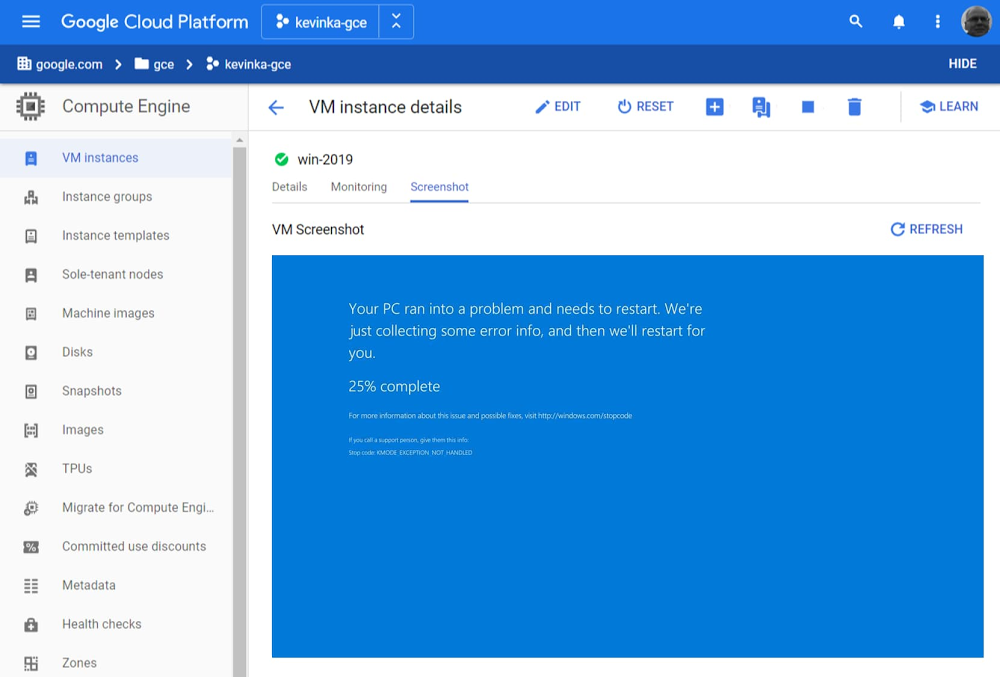
Google Cloud provides a first-class experience for migrating and modernizing Windows workloads. Organizations choose Google Cloud for reliability, performance, and cost savings from the underlying infrastructure, as well as for features, tooling and guidance that helps them modernize. Companies like Geotab rely on Google Cloud to keep ahead of change and increased demand, and reduce licensing costs by modernizing from a proprietary stack to open-source. We’re also incredibly proud to have earned the recognition of analyst firms such as IDC for helping companies migrate and modernize their Windows-based workloads.Today we’re announcing a number of new features that will make running Windows Server workloads in Google Cloud easier: boot-screen diagnostics, auto-upgrade for Windows Server, new diagnostics tooling, and improved license reporting. Read on to learn about these new features.  Boot-screen diagnostics (beta)Windows VMs often rely on a virtual display device to report certain errors, and when connecting by Remote Desktop Protocol (RDP) doesn’t work, accessing the virtual display screen becomes a necessity. Building on the Virtual Displays feature we launched last year, we’re now enabling you to more easily troubleshoot Windows VMs by capturing boot-screen screenshots without having to RDP into the machine. Capturing a screenshot from a VM can help diagnose issues if VMs are not otherwise accessible, for example, during the boot process, or if trying to start a VM with a corrupted disk image.For those of us who miss seeing this blue screen, it is now viewable directly from within the Cloud Console :-)Auto-upgrade for Windows 2008 (beta)Many customers are still using Windows Server 2008 even after end-of-service was reached earlier this year. We want to make it easier for you to upgrade your instances by performing an in-place auto-upgrade for Windows Server 2008 using a single gcloud command. This command backs up your current VM, performs the upgrade, and handles roll-backs automatically if something fails. You can quickly test if a Windows OS in-place upgrade will work and then automate upgrades at scale. Collect diagnostic information (beta)When you try to troubleshoot your Windows VMs or reach out to Google Cloud Support, it can be hard to provide all the necessary diagnostic information that you need to quickly and effectively troubleshoot a problem. A new diagnostic tool for Windows VMs helps collect all the necessary information so you can either troubleshoot the issue yourself or provide the necessary diagnostic information to Support. License reporting toolingIf you bring your own Windows licenses to Google Cloud, calculating licensing usage for Microsoft Enterprise Agreement True-ups and audits can be an onerous task. We have often seen customer procurement, engineering, and operations teams work for months to generate the data to satisfy complex licensing reporting needs. Further, these complex reports often need to be analyzed to identify high watermarks for physical server usage or understand license usage at any given time. For those of you running on sole-tenant nodes, the new Windows licensing reporting tool automates this process so you can quickly and comprehensively generate reports to quantify your physical server usage. The tool, which runs in a Windows environment, ingests log data and outputs graphical results and reports to users. Envision easier Windows managementTogether, we hope these new features will make it easier for you to troubleshoot problems, upgrade, and manage the license requirements of Windows workloads running on Google Cloud. And we’re not done yet—stay tuned as we work to make Google Cloud the best platform on which to migrate, optimize, and modernize your Windows workloads, all with enterprise-class, Microsoft-backed support. Click here to learn more about running Windows on Google Cloud.Related ArticleDriving change: How Geotab is modernizing applications with Google CloudOver time, Geotab converted production servers running Windows Server to containers and open source, saving hundreds of thousands of doll…Read Article
Quelle: Google Cloud Platform

Export data from Cloud SQL without performance overhead

While there are a variety of reasons to export data out of your databases – such as to maintain backups, meet regulatory data retention policies, or feed downstream analytics – exports can put undue strain on your production systems, making them challenging to schedule and manage. To eliminate that resource strain, we’ve launched a new feature for Cloud SQL: serverless exports. Serverless exports enables you to export data from your MySQL and PostgreSQL database instances without any impact on performance or risk to your production workloads.Cloud SQL exports, which offer portable data formats (SQL, CSV), can be triggered anytime and are written to Cloud Storage buckets that you control.If you need to meet regulatory requirements around data retention, you can easily send exports to buckets with Bucket Lock enabled. Bucket Lock allows you to configure a data retention policy for a Cloud Storage bucket that governs how long objects in the bucket must be retained. It also allows you to lock the data retention policy, permanently preventing the policy from being reduced or removed.As another example, you can export data to CSV based on a custom query, then import the data directly to BigQuery for analytics. And if this is for regular reporting, you can schedule a recurring import with Data Transfer Service or Cloud Scheduler.Using the new serverless export feature ensures these exports won’t bog down your Cloud SQL database instance, so you can continue to run predictably and reliably. And until February 2021, you can use serverless exports at no charge.What’s next for Cloud SQLWe’re excited to see what you build with the new serverless exports feature. Have more ideas? Let us know what other features and capabilities you need with our Issue Tracker and by joining the Cloud SQL discussion group. We’re glad you’re along for the ride, and we look forward to your feedback!Related ArticleMySQL 8 is ready for the enterprise with Cloud SQLCloud SQL, our fully managed database service for MySQL, PostgreSQL, and SQL Server, now supports MySQL 8. As a managed service, MySQL 8 …Read Article
Quelle: Google Cloud Platform

Better outcomes with AI: Frost & Sullivan names Microsoft the leading AI platform for healthcare IT

In early 2020, Frost & Sullivan recognized Microsoft as the “undisputed leader” in global Artificial Intelligence (AI) platforms for the Healthcare IT (HCIT) sector on the Frost Radar™. In a field of more than 200 global industry participants, Frost & Sullivan independently plotted the top 20 companies across various parameters indicative of growth and innovation, available for consumption here.

According to Frost & Sullivan, the global AI HCIT market is on a rapid growth trajectory, with sales of AI-enabled HCIT products expected to generate more than $34.83 billion globally by 2025. Government agencies will contribute almost 50.7 percent of the revenue (including public payers), followed by hospital providers (36.3 percent) and physician practices (13 percent). Clinical AI solutions will drive 40 percent of the market revenue, with financial AI solutions contributing the same, and the remaining 20 percent coming from sales of operational AI solutions. Globally, Microsoft earned the top spot because of its industry-leading effort to incorporate next-generation AI infrastructure to drive precision medicine workflows, aid population health analytics, propel evidence-based clinical research, and expedite drug and treatment discovery.

Figure 1: The Frost Radar, "Global AI for Healthcare IT Market", 2020

We’re seeing providers deploy chatbots in their virtual portals to extend 24/7, personalized care to patients, helping them triage a larger volume of inquiries and even extend care services to previously inaccessible remote areas. With the power of predictive analytics, care teams can predict patient volumes and provide preventative care to provide timely escalations of care and prevent unnecessary readmissions. AI has provided tools for scientists at the forefront of precision medicine, accelerating drug discovery, while aiding public health officials with modeling and predicting the progression of disease. In BioPharma and MedTech, AI is being used to provide real-time insights around equipment use for manufacturing R&D departments, while also deploying field technicians to service costly equipment via predictive maintenance and enabling healthcare customers to track inventory and medication across supply chains with greater transparency and agility.

The report cites numerous recent innovations from Microsoft, including the Microsoft Cloud for Healthcare offering, announced in 2020. The Microsoft Cloud for Healthcare brings together trusted and integrated capabilities for customers and partners that enrich patient engagement and connects health teams to help improve collaboration, decision-making, and operational efficiencies. It makes it faster and easier to provide more efficient care and help ensure end-to-end security, compliance, and accessibility of health data.

At Microsoft, we are focused on trust and on empowering our healthcare customers—never monetizing customer or patient data. The Microsoft Cloud for Healthcare also offers an infrastructure built on industry leading scale, with over $15 billion invested in cloud infrastructure and over 1 million physical servers across over 60 global regions. Furthermore, Microsoft has the largest partner ecosystem in the market, with global partners equipped to work with health organizations of all sizes.

Healthcare AI at Microsoft

Microsoft’s growing portfolio of healthcare AI offerings also includes specific services such as:

The Microsoft Health Bot enables health organizations to build and deploy AI-powered, compliant conversational healthcare experiences. With built-in medical intelligence and natural language capabilities, and extensibility tools, the Health bot enables health organizations to build personalized and trusted conversational experiences across digital health portals. Customers such as Premera Blue Cross have leveraged the Microsoft Health Bot to create their own chatbot, Premera Scout, to help customers quickly obtain information on claims, benefits, and other services offered by Premera across their digital portals. In another instance, Walgreens Boots Alliance (WBA) incorporated the Microsoft Healthcare Bot to add a COVID-19 Risk Assessment capability to their website, helping customers quickly find answers to common questions.
Text Analytics for Health is a feature of Azure Cognitive Services that helps health organizations process and extract insights from unstructured medical data (such as; doctor’s notes, medical publications, electronic health records, clinical trial protocols, and more). This enables researchers, analysts, and medical professionals to unlock scenarios based on entities in health data, such as matching patients to clinical trials and extracting insights from large bodies of clinical literature, as was the case when the University College London (UCL) leveraged Text Analytics for health to build a system that identifies relevant research for reviews as and when they are published.
Azure Cognitive Services offers easy-to-deploy AI tools for speech recognition, computer vision, and language understanding. Nuance, a leading provider of AI-powered clinical documentation and decision-making support for physicians, leveraged the Azure Cognitive Services platform to develop their Dragon Medical One platform, one of the leading services of Ambient Clinical Intelligence. The platform allows doctors to enter and search for relevant patient information in electronic health records, using dictation. This enables physicians to reduce time spent on administrative capabilities and redirect more time toward interacting with the patient. The platform can also mine a patient’s medical history with new reported symptoms at an appointment to provide recommendations of potential diagnoses for the doctor to consider.

Partners empowering healthcare AI

We’re also proud to see many of our healthcare partners recognized in the report, with whom we have partnered to design and build our portfolio of AI services and who, in turn, leverage our platforms to infuse AI in their solutions. These include, but are not limited to:

Nuance is partnering with Microsoft to deliver ambient clinical intelligence (ACI), paving the way for the exam room of the future. Take a look at our partner spotlight, Microsoft and Nuance partner to deliver ambient clinical intelligence.
GE Healthcare is developing advanced solutions for secure imaging and data exchange built on Azure.
Optum, the Health Services platform of UnitedHealth Group, joined forces with Microsoft to launch ProtectWell, a return-to-workplace protocol that enables employers to bring employees back to work in a safe environment. Leveraging clinical and data analytics capabilities, as well as the Microsoft Healthcare Bot service for AI-assisted Covid-19 triaging. Take a look at our partner spotlight, UnitedHealth Group and Microsoft join forces to launch ProtectWell.
Allscripts extended their long-term strategic alliance to harness the power of Microsoft’s platform to develop Sunrise, an integrated EHR that provides a clinician-friendly, evidenced-based platform with integrated analytics for delivering better health outcomes in hospitals. Connecting all aspects of care—including; acute, surgical, pharmacy, and laboratory services, to revenue and patient administration systems.
Philips is empowering providers through image-guided, minimally invasive therapies, bringing live imaging and other sources of data into 3D holographic environments controlled by physicians. Take a look at our partner spotlight, Microsoft HoloLens 2: Partner Spotlight with Philips.

We’re honored to have been recognized as a leader in the healthcare space and are proud to work with a growing ecosystem of partners and customers that are building the next generation of healthcare solutions. Together, we’re extending the reach of healthcare services, unlocking new clinical insights, and empowering care teams to drive better outcomes for the communities they serve. Innovation is a journey without end, and we’re committed to building the trusted tools and platforms to help healthcare organizations be future-ready and invent with purpose.

Next steps with Microsoft AI

To learn more about Microsoft AI offerings, explore the following resources:

Microsoft AI for Health page.
Learn more about the Azure AI platform.
Explore even more Azure for Health offerings, from IoT to Mixed Reality.
Read the latest updates on the Microsoft Healthcare blog.
Learn more about the Microsoft Cloud for Healthcare.

Quelle: Azure

Preparing for what’s next: Building landing zones for successful cloud migrations

As businesses look to the cloud to ensure business resiliency and to spur innovation, we continue to see customer migrations to Azure accelerate. Increasingly, we’ve heard from business leaders preparing to migrate that they could learn from our best practices and want general help thinking about migration, and we started a blog series to help share those even more broadly. In our kick-off blog for this series, we shared that landing zones are a key component to anticipating and mitigating complexities as part of your migration. In this blog, we will cover what landing zones are and the importance of getting cloud destinations ready in advance of the physical migration, as that generates significant benefit in the long-term.

IT and business leaders often ask us about how they can both enable their teams to innovate with agility in Azure and remain compliant within organizational governance, security, and efficiency guardrails. Getting this balance right is critical to cloud migration success. One of the most important questions to getting it right is how to set up destination Azure environments we call landing zones.

At Microsoft, we believe that cloud agility isn’t at odds with setting up the right foundation for migration initiatives—in fact, taking time to do the latter sets organizations up for a faster path to success. Our customers and partners have been using Azure landing zones—a set of architecture guidelines, reference implementations, and code samples based on proven practices—to prepare cloud environments.

“With everybody’s limited budget, especially during the pandemic, the support from both a financial perspective and with FastTrack for Azure backing. I very quickly realized that we could deliver in a quicker timeframe than initially planned. The landing zone was a great initiative because that focused everybody in terms of what are the deliverables? What are we looking to achieve? What technologies are we going to use to do that? Microsoft linked in seamlessly with SoftwareOne and as a customer of both of these companies, it was reassuring for us.” – Gavin Scott, Head of IT, Actavo

What are the key decisions to be made in setting-up your cloud destination?

At the onset of migration initiatives, we see customers and partners focus on the key considerations below to define their ideal operating environment in Azure. These considerations are abstracted as operating models, with “central operations” and “enterprise operations” as two options at different ends of the spectrum.

Old roles versus new opportunities: Migrating to the cloud can modernize many workloads as well as how IT operates. Azure can reduce the volume of repetitive maintenance tasks, unlocking opportunities to apply IT staff expertise in new ways. At the same time, Azure does offer options to preserve practices, controls, and structures that are proven to work. A key decision for leaders is where to land on this spectrum.
Change management versus democratized actions: With greater access to self-service deployment and flexibility for decisions, change management and change control can look different in the cloud. While workload teams typically prefer the agility to quickly make changes to workloads and environments, cloud centers of excellence seek to ensure changes are safe, compliant, and operationally efficient. The key decision for leaders here is how much of cloud governance requirements should be automated.
Standardized versus specialized operations: Creating multiple and connected levels of operational controls in Azure to accommodate specialized needs of various workloads is absolutely possible. Central IT, for instance, can ensure basic operational standards for all workloads, while empowering workload teams to set additional guardrails. The key question for leaders is which day-to-day operations will be performed by central IT teams and which by workload teams.
Architecture; as-is versus re-imagined: The first inclination for most teams might be to simply replicate on-premises design and architectures, “as-is” in Azure. When a low complexity and narrowly scoped estate is moving to cloud, that might be the optimal approach. In time, as migration scopes grow—spanning more applications, databases, and infrastructure components—achieving higher efficiency in Azure becomes even more attractive. A key decision for leaders is which path to take during iterative migration initiatives.

Azure landing zones appropriately guide customers and partners in setting up the desired operating model in Azure. Landing zones ensure that roles, change management, governance, and operations are all considered at the beginning of the journey to achieve the desired balance of agility and governance.

Why are Azure landing zones valuable in implementing your design decisions in the cloud?

Examples from two of our customers on each end of the operating model spectrum illustrate how landing zones guide destination decisions, as well as the implementation path.

The first example is a US-based large manufacturing and distribution company, with operations spanning four continents. This customer aimed to establish “central operations” while retiring a series of data centers that would have otherwise required expensive hardware upgrades. One of the complicating (though not uncommon) factors was each regional subsidiary had distinct governance, security, and operations requirements.

To accelerate this complex migration, with the help of our partners, we started by migrating a single subsidiary, enabling the customer to learn and iterate towards the desired centralized operating model. During the first four weeks, the customer migrated hundreds of low-risk VMs to an Azure landing zone. Within eight weeks, the customer established the final operating model, migrating mission-critical, and sensitive data workloads for their first subsidiary. Other subsidiaries then built on this initial operating model to meet their specific needs. The customer now uses Azure Blueprints and Azure Policy to deploy self-service landing zones to comply with global and local standards. Azure landing zones enabled the customer to successfully mitigate complexity and mold the cloud platform architecture to fit the centralized operating model they were looking for.

The second example comes from one of our customers in Germany preparing to move thousands of servers to Azure. Most of those servers hosted low-complexity, steady-state workloads governed by central operations on-premises. As part of the migration effort, the customer needed to transform and modernize IT operations, including adherence to high security and compliance requirements that were to take effect. In eight weeks, this customer was able to start an Azure environment in alignment with the transformation vision while meeting the new security and compliance requirements. The enterprise-scale flavor of Azure landing zones provided implementation options needed for the destination to meet stringent requirements and enabled the enterprise transformation vision.

For an overview of landing zone and considerations you should make to build your landing zone in Azure, view this Azure landing zones video. 

How are Azure landing zones constructed?

To construct Azure landing zones, customers and partners first clarify how they prefer to deploy their landing zones. Next up are decisions on “design area” configuration options. Let’s take a look at a couple of the “design areas” to demonstrate how they contribute to the construction of landing zones.

Deployment options: How to deploy Azure landing zones is an important early design decision. Each implementation option provides slightly different methods to match the skill level of your team and the operating model. User-interface based options and scripting-based methods, as well as deployments directly from GitHub are available.
Identity: Best practice guidance and enabling capabilities Azure Active Directory, Azure role-based access control (RBAC), and Azure Policy help establish and preserve the right levels of identity and access across the cloud platform. The best practices, decision guides, and references in Azure landing zones help design the foundation with a secure and compliant approach.
Resource organization: Sound governance starts with standards for organizing resources. Naming and tagging standards, subscription design (segmentation of resources), management group hierarchy (consistent organization of segments) are needed to reflect operating model preferences. Landing zones provide the guidance to get started.
Business continuity and disaster recovery (BCDR): Reliability and rapid recovery are essential for business continuity. Design areas within landing zones guide customers to set up destination environments with high degrees of protection and faster recovery options.

“The landing zone that serves as a foundation for customers’ identity, security, networking, operations and governance needs, tends to be a lynchpin of success for future migrations. Claranet prides on getting this right in addition to helping build an excellent post migration operational model. Our collaboration with the Azure Migration Program (AMP) team was tremendously helpful to our customers, bringing the best of what we have with Microsoft’s recommendations and focusing on landing zone to better prepare for their growing cloud portfolio.”—Mark Turner, Cloud Business Unit Director, Claranet

Getting started with Azure landing zones

To guide our customers and partners in getting cloud destination environments ready with Azure landing zones, ready section under the Cloud Adoption Framework (CAF) provides step-by-step, prescriptive guidance. We recommend that customers start with the following three steps within CAF to educate and activate their migration crews:

Begin by determining which cloud operating model reflects the right balance for your agility and governance needs.
Continue onto "design areas" for Azure landing zones for an overview of the configuration options available to achieve your operating model.
Select an Azure landing zone implementation option to match your selected operating model, migration scope, and velocity. Once you’ve identified the best option, deployment instructions and supporting scripts can automatically deploy reference implementations of each Azure landing zone.

Customers truly realize the value of migrations once they have started operating from the cloud. Cloud destinations that enable innovation and agility, while ensuring governance and security are key to accelerate that value realization. Azure landing zones are ready to guide customers and partners in setting-up cloud destinations and, more importantly, for setting-up post-migration success.
Quelle: Azure




