Google Cloud Next ‘20: OnAir—delivering infrastructure for all your apps

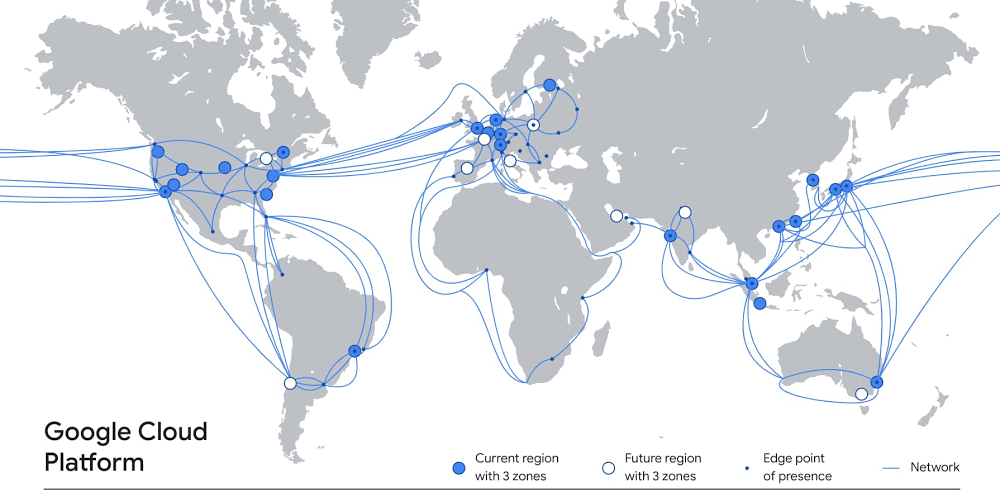
The applications you run on Google Cloud rely on extensive amounts of infrastructure, deployed around the world, in dozens of data centers, across hundreds of points of presence, and connected by a system of high-capacity fiber optic cables that encircle the globe. Inside our data centers, you’ll find the latest compute, storage and network systems and services on which to run a wide variety of workloads—from lightweight microservices to high performance computing to demanding enterprise applications. And that infrastructure is growing all the time, delivering more capacity and resilience, and better performance for your end users.At the same time, we’re always working to simplify that infrastructure complexity for you, so setting up and using Google Cloud infrastructure is easy and seamless. Today, we want to tell you about recent enhancements to Google Cloud’s global infrastructure, as well as new deployment options and functionality that you can take advantage of. A global presenceLet’s start with our worldwide footprint. At Next ‘19 in San Francisco, Google Cloud counted 19 regions around the world. Since then, we’ve opened five new regions in Jakarta, Las Vegas, Osaka, Salt Lake City and Seoul. We’ve also announced new forthcoming regions, including Toronto, Warsaw, Delhi, Doha, and Melbourne. Combined with 144 network edge locations and counting, these regions deliver the services, capacity and performance you need to ensure a terrific experience for your users.Those regions rely on robust networks to transport data between them, including private subsea cables. Today, we announced the new Grace Hopper cable that will run between the United States, the United Kingdom, and Spain. When Grace Hopper is commissioned in 2022, it will be one of the first new transatlantic cables to go live since 2003, delivering 16 fibre pairs of capacity, powering a variety of Google services like Gmail, Meet and of course Google Cloud.A flexible, secure networkEnterprises are increasingly adopting hybrid and multi-cloud to deliver the best experiences for their customers. The network is at the foundation of this transformation, but is getting exponentially more complex to manage, secure, and scale. To help enterprise customers with these challenges, we recently expanded our partnership with Cisco to bring the best of Cisco and Google Cloud technologies together, with a turnkey networking solution: Cisco SD-WAN Cloud Hub with Google Cloud. This joint solution will help our customers simplify enterprise networking and advance security capabilities, while helping IT teams minimize operational costs and meet application service-level objectives.And today, we’re announcing a new secure, easy way to connect to Google Cloud, with Private Service Connect. By taking a service-centric approach to networking and abstracting the underlying infrastructure, Private Service Connect creates service endpoints in consumer VPCs that provide private connectivity and policy enforcement, so you can easily connect services across different networks and organizations. Further, with Private Service Connect, traffic is not exposed to the public internet; customers can access services directly and securely over Google’s global network. Read this blog to learn more. Private Service Connect complements Service Directory, which we launched in March to help customers simplify service management and operations. Together, Private Service Connect and Service Directory let you easily and securely connect to and manage services at scale. As enterprises use Private Service Connect to access more first- and third-party services, Service Directory helps engineering teams to publish and discover them.In addition, you can further manage your network with Network Intelligence Center, Google Cloud’s comprehensive network monitoring, verification and optimization platform. Centralized monitoring reduces troubleshooting time and effort, increases network security and improves overall user experience. We are excited to announce updates to two of the modules in the platform: Firewall Insights is now in beta and Performance Dashboard is generally available. Firewall Insights brings intelligence and proactive management to network security, while Performance Dashboard offers real-time visibility into packet loss and latency at a per-project level. Finally, for customers with hybrid or multi-cloud deployments, Cloud CDN now supports serving content from on-prem data centers, or even other clouds. See this infographic to learn more about Cloud CDN.Industry-leading computeOf course, one of the many reasons people choose Google Cloud is for access to the latest high-performance compute and storage services. On the compute side, Google Compute Engine can be configured with some of the most powerful, cost-effective hardware, like efficient VMs (E2), one of our newest families of general-purpose virtual machines. E2 features dynamic resource management that delivers the lowest total cost of ownership (TCO) on Google Cloud and is our fastest growing new virtual machine family on Compute Engine. It now offers machine types with up to 32 vCPUs and is available in all Google Cloud regions.We also recently announced the Accelerator-Optimized VM family (A2), the first public cloud offering to feature the NVIDIA Ampere A100 GPUs. The A2 was designed for demanding workloads such as machine learning and high performance computing, providing up to 16 A100 GPUs in a single instance.For customers running large VM fleets, we announced the general availability of OS patch management service, to keep your operating systems up-to-date and reduce the risk of security vulnerabilities.The service works on Compute Engine and enables you to apply OS patches across a set of VMs, receive patch compliance data across your Windows or Linux environments, and automate installation of OS patches—all from one centralized location. The current release of OS patch management is available at no cost through December 31, 2020. To learn more about the service, check out our NEXT session: Managing Large Fleets of Compute Engine VM Fleets.The right storage for all your workloadsFor many applications, the performance is only as good as the underlying storage. If you need to support workloads such as Electronic Design Automation (EDA), video processing, genomics, manufacturing and financial modeling, we recently launched Filestore High Scale, a high-performance, scale-out file system. Currently in beta, the new Filestore High Scale tier is a fully managed service and makes it easy to mount file shares on Compute Engine VMs. With High Scale, it’s simple to deploy a file system that can scale to hundreds of thousands of IOPS, 10s GB/s throughput, and 100s of TBs.And if you’re looking for reliable, high-performance block storage, there’s Persistent Disk, which delivers industry-leading price performance for both HDD and SSD to satisfy your needs. Today we’re excited to announce an expanded approach to our Persistent Disk product portfolio, giving you the ability to pick the performance that best fits your workload: Best suited for most enterprise applications, we will have Balanced PD, giving you the best price per GB. For customers seeking the best price per IOPS for performance sensitive workloads such as databases or persistent cache we will have Performance PD. We will also introduce our Extreme PD SKU, well-suited for the highest performance workloads such as SAP HANA or large in-memory databases. This strategy is all about tailoring your storage to your workload, so we can deliver on your price and performance needs. Support for all your workloadsAll this infrastructure is in service of running your workloads, however you see fit. In the early days of Google Cloud, we started with a cloud-native platform as a service (App Engine), but today, our infrastructure supports a broad range of your most demanding enterprise workloads. For example, you can now run your VMware workloads on Google Cloud, using our Google Cloud VMware Engine service, which recently became generally available. This first-party offering lets you run a fully managed VMware environment so you can easily lift and shift your existing on-premises VMware based workloads into Google Cloud with no changes to your apps, tools or processes. Or perhaps you need to run Microsoft and Windows workloads. Google Cloud offers a first-class experience for these, too. Customers cite reliability and performance advantages as reasons they initially chose Google Cloud for migrating these workloads. They can also leverage the platform’s unique features—sole-tenant nodes, CPU overcommit, containerization, and managed services—to reduce their overall license spend. Further, Google Cloud provides an opinionated path to modernization to further reduce licensing costs and move to open-source alternatives.As SAP customers continue to adopt Google Cloud, we are continuously innovating to improve ease of migration, performance and scalability as well as lower barriers to entry for analytics and machine learning. Recently, we updated our SAP HANA certifications to include Google Compute Engine’s N2 family of VM instances, based on 2nd Generation Intel Xeon Scalable Processors. These N2 VMs improve performance and reduce waste with better alignment with SAP licensing increments. We also added SAP NetWeaver certifications for AMD-based N2D VM instances with improved performance compared to prior Google Cloud offerings based on our SAP Application Performance Standard (SAPS) benchmark testing, and at a lower-cost. Finally, in addition to running workloads on Google Cloud Platform, our Bare Metal Solution lets you run specialized workloads such as Oracle databases on dedicated hardware, close to Google Cloud. This can simplify your path of moving from on-premises to cloud, while reducing migration risks and helping you lower overall costs faster. We recently brought Bare Metal Solution to five additional regions, with four more regions on tap by the end of the year. Migrate and manage with easeTo make it easier to rapidly migrate to Google Cloud, today we’re announcing our Rapid Assessment and Migration Program (RAMP), publicly available today. Built on feedback from customers and partners, RAMP offers end-to-end migration guidance and training, as well as incentives to help you offset a significant portion of your migration cost. RAMP also brings together a full suite of tools for every phase of the migration journey to accelerate the process.And once your workloads are on Google Cloud, you don’t want to have to choose between performance and cost, or functionality and ease of use. Our goal is to create a platform that delivers terrific performance, that is easy to use, for a great price. That’s why we built Active Assist, a portfolio of intelligent tools and capabilities to help you manage complexity in your cloud operations. Active Assist leverages data, machine learning, automation, and intelligence to help customers focus on three key areas: making proactive improvements to your cloud with smart recommendations, preventing mistakes from happening in the first place with better analysis, and helping you figure out why something went wrong with intuitive troubleshooting tools. To learn more about Active Assist, be sure to check out our Next OnAir session, CMP100: Cloud is Complex. Managing it Shouldn’t Be. New security controlsWe want you to be able to operate your mission critical workloads securely, efficiently, and effectively, and we strive to simplify and reduce toil along the way. Today we’re simplifying the way you can use Google Cloud Armor to help protect your websites and applications from exploit attempts, as well as Distributed Denial of Service (DDoS) attacks.We’re announcing the beta release of Cloud Armor Managed Protection Plus, a bundle of products and services that helps protect your internet-facing applications for a monthly subscription fee. We’re making curated Named IP Lists available in beta. We’re expanding our set of pre-configured WAF rules with beta rules for Remote File Inclusion (RFI), Local File Inclusion (LFI), and Remote Code Execution (RCE).You can learn more about our security announcements here. Infrastructure is hard; Google Cloud makes it easyBuilding and managing the right infrastructure to power your workloads can be hard—we know, we do it day in, day out, at a scale that few other providers can lay claim to. Thankfully, building and managing your cloud infrastructure doesn’t have to be difficult—simply build your environment on top of Google Cloud, and automatically gain from our global presence, robust network, industry-leading compute and storage hardware, and intelligent, automated management capabilities. To learn more about Google Cloud infrastructure, register for Google Cloud Next ‘20: OnAir, and check out over 50 infrastructure keynote, breakout and spotlight sessions that go live this week.
Quelle: Google Cloud Platform
Google Cloud Armor: Introducing 3 key features to protect your websites and applications

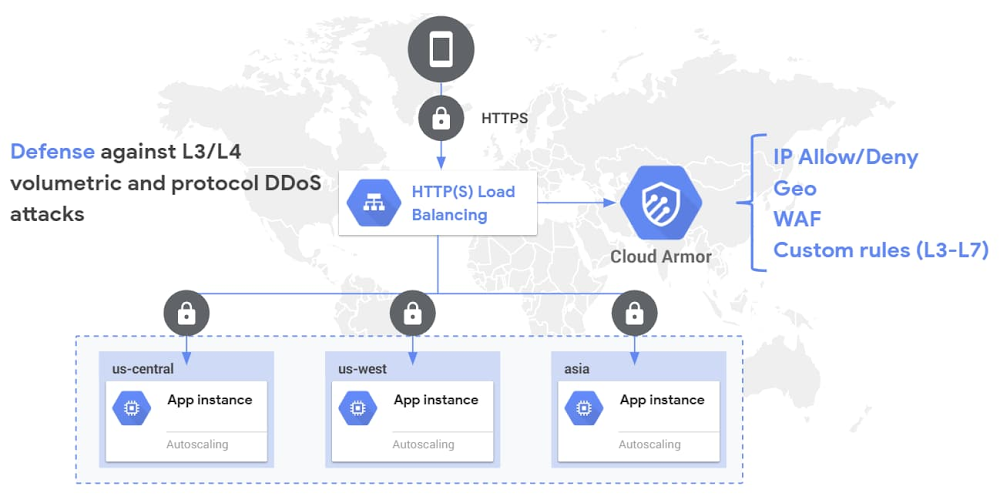
With the seemingly never-ending list of threats, keeping your websites and applications secure is a constant challenge. At Google, we strive to help you operate your mission critical workloads securely and efficiently, while reducing toil along the way. Over the first half of this year we’ve made several critical features and capabilities generally available for Google Cloud Armor, includingWAF rules, geo-based access controls, a custom rules language, support for CDN Origins servers, and support for hybrid deployment scenarios. At Google Cloud Next ’20: OnAir we’re simplifying the way you can use Cloud Armor to help protect your websites and applications from exploit attempts as well as distributed denial-of-service (DDoS) attacks.We’re announcing the beta release of Cloud Armor Managed Protection Plus, a bundle of products and services that helps protect your internet-facing applications for a predictable monthly subscription fee. We’re making Google-curated Named IP Lists available as a beta. We’re continuing to expand our set of pre-configured WAF rules by launching beta rules for Remote File Inclusion (RFI), Local File Inclusion (LFI), and Remote Code Execution (RCE).Cloud Armor: DDoS Prevention and WAF.Introducing Cloud Armor Managed Protection PlusCloud Armor Managed Protection Plus leverages the edge of Google’s network, as well as a set of products and services from across Google Cloud, to help protect your applications from DDoS attacks and targeted exploit attempts. With Managed Protection, you can now benefit from the same scale and expertise Google employs to protect your applications and mission critical services from malicious activity on the internet.Managed Protection tiers (visible to customers enrolled in beta)Managed Protection is available in two service tiers: Standard and Plus. All existing Cloud Armor users, as well as workloads behind any of our global load balancers, are automatically enrolled in Managed Protection Standard. At this level, you get Google-scale volumetric and protocol-based DDoS protection for any of your globally load balanced applications and services, as well as access to Cloud Armor WAF and layer 7 (L7) filtering capabilities, including the pre-configured WAF rules subject to usage based pricing based on rules, policies, and requests. Cloud Armor Managed Protection Plus, which is now in beta, is a subscription service with a predictable, enterprise-friendly monthly pricing model that mitigates cost risk from defending against a large L7 DDoS attack. Managed Protection Plus streamlines and bundles in DDoS protection, Cloud Armor WAF, and other future value added services. Customers that subscribe to Managed Protection Plus will get access to DDoS and WAF services, and curated rule sets for a predictable monthly price based on the size of a deployment. Since Cloud Armor WAF usage is included in Managed Protection Plus, subscribers no longer need to worry about the number of queries processed or the size of an L7 attack. Managed Protection Plus subscribers will also have access to a growing list of advanced capabilities, including Named IP Lists and future Google-curated rule sets and services. Sign up your projects for access to the beta.Managed Protection Plus subscription (visible to customers enrolled in the beta).Introducing Named IP Lists Named IP Lists, now in beta, are Google-curated rule sets containing a pre-configured list of IP addresses that can be referenced and reused across policies and projects. We’re starting with providing Named IP Lists that have source IP ranges for common upstream service providers that many of our users would want to allow through their Cloud Armor security policies.Named IP Lists.Customers often have to configure Cloud Armor security policies with a large set of IP ranges to allow traffic from an upstream provider. With Named IP Lists, customers no longer have to self-manage the list of their upstream providers’ IP addresses and instead can rely on Google to curate and keep up to date the list of IPs. We’re now working with a growing list of service providers to ensure that customers can seamlessly permit traffic from third-party services through a Cloud Armor security policy without having to keep track of the service providers’ changing lists of source IPs. You can now refer to these Named IP Lists while crafting custom rules. The underlying list of IPs is kept up to date by regular syncs with the third-party service providers’ APIs.New WAF rules: RFI, LFI, RCEAs part of our effort to expand the scope of the pre-configured WAF rules to all Cloud Armor customers, we are making RFI, LFI, and RCE rules available as a beta. Collectively, these rules contain industry standard signatures from the ModSecurity core Rule Set to help mitigate the  Command Injection class vulnerabilities while enhancing the out-of-the-box coverage for OWASP Top 10 vulnerabilities as well.Like the other pre-configured WAF rules, the new rules contain dozens of sub-signatures and are tunable on a per-application basis by end users. As usual, a rich set of telemetry including per-request logging, near real-time request volume metrics, and correlated security findings are sent to Cloud Logging, Cloud Monitoring, and Cloud Security Command Center respectively. ConclusionGoogle Cloud Armor is helping protect a rapidly growing set of customers’ mission critical workloads while helping support their compliance requirements, like PCI DSS, for their Google Cloud deployments. With the capabilities and services we announced this week, you can simplify your deployments and reduce operational overhead when integrating with upstream partners and service providers.More resources:Cloud Armor Managed Protection Plus beta sign-up formNamed IP Lists documentationWAF Rule Tuning GuideCloud Armor product page
Quelle: Google Cloud Platform

RAMP up your cloud adoption with new assessment and migration program

Today’s enterprises are under increased pressure to migrate to the cloud. Maybe an enterprise has an upcoming data center contract or hardware refresh cycle that they want to avoid. Perhaps developers are hitting performance thresholds because they don’t have enough capacity, or because procuring hardware takes too long. Or a migration might be triggered by an acquisition, licensing and support issues, or compliance and security concerns. And of course, businesses around the world have been impacted by the global pandemic, causing massive demand to innovate and modernize right now.Helping solve your unique challenges is our top priority. Migrating to the cloud must be simple and provide clear advantages. To help ease the complex challenges our customers are facing, we are launching the Google Cloud Rapid Assessment & Migration Program (RAMP), a holistic, end-to-end migration program that enables a simpler and faster path to success for our customers and partners.Repeatable processes, predictable resultsOver the years, we’ve learned a lot from listening to our customers and helping them migrate to Google Cloud. It has been interesting to learn from their experiences with other cloud providers about why certain projects succeed where others fail. In many cases, the success of cloud migration projects is determined by the ability to accurately and efficiently assess project requirements and dependencies up front. Organizations that take the time to do a complete, thorough analysis of their IT environments are consistently more successful in their cloud projects. By understanding their requirements, organizations can make informed decisions, allowing them to create a more comprehensive migration plan with improved priorities. Many customers tell us that Google Cloud is the easiest platform to build on and work with. To help with your migration planning, we’ve standardized our process into a phased model with predictable steps and repeatable outcomes:Assess and evaluate your IT landscape and workloadsPlan what can move, what should move, and in what orderMigrate by picking a path, and get startedOptimize your operations and save on costsWe want to help you reduce risk and costs while accelerating your success by providing a clear path to business value. To simplify your migration journey across each phase, RAMP is built on six key pillars to meet your cloud adoption and onboarding needs:Guidance – Migration best practices for business and technical leadership including white papers, reference architectures, and CIO guides for application migration, data center transformation, and large-scale migration.Training – Advanced labs and training resources to get you startedTools – Google Cloud-native tools and partners to make assessment and migration easier, faster, and more efficientPartners – Thousands of trusted partners to help you move to, build, and work in Google CloudGoogle Cloud Professionals – Hands-on with Google Cloud subject matter experts including Google Professional ServicesOffers – Customer and partner incentives for workload migrationGet started with your cloud migrationMigrating to the cloud should be easy, even if your project is large and has lots of moving parts. But there’s a right way and a wrong way to migrate—with RAMP, we want to make sure it works right for you. To help get things off the ground, we offer a free discovery and assessment so you can start crafting a migration plan. In addition, here are some other potential first steps you can take as you embark on your migration journey, all of which we’re eager to help you with: Review the material provided as part of RAMPMeet with partners, customer engineers and solution architectsPerform a discovery and assessment of your IT landscapeCraft a pilot for 100 low-risk VMsExperience the ease of migration and power of running VMs in Google CloudCreate a detailed cloud architecture and migration plan for your remaining workloadsOur team has helped scores of enterprises migrate to the cloud. Let your business be the next one we help. To get started, click here to estimate your cloud migration costs with a free assessment.
Quelle: Google Cloud Platform

Helping teach a community cloud skills with Google Cloud Associate Cloud Engineer certification

“Unconventional” doesn’t begin to describe Joy Payton’s career path in technology. Before becoming the Data Education Supervisor at the Children’s Hospital of Philadelphia and an adjunct faculty member at Yeshiva University, Joy spent 10 years working as a full-time volunteer in prisons, schools, and homeless shelters across Spain, Bolivia, and El Salvador. While Joy was always interested in tech, her time volunteering showed her the power of education and its ability to change people’s lives at every level.“I came back to full-time work because I love technology and I love education,” Joy said. “I’m lucky enough to combine the two.” But Joy still has that passion for helping underserved communities. She recently earned her Google Cloud Associate Cloud Engineer certification to grow professionally, but is also excited to use the skills she’s learned to help everyone she’s teaching—from a wide variety of backgrounds—work with the latest technology so they can thrive in a cloud-first world.“It’s exciting knowing that I have the skills in Google Cloud Platform and can help other people at all levels,” Joy explained. “I can really help someone grow their skills that will help them make a living, to help them provide for their families, and also improve a lot of organizations in under-resourced areas that are doing really important, good things.” With her certification, Joy has inspired others outside of her work to earn their own Google Cloud Associate Cloud Engineer certification and change their career path. And these certifications have measurable results. An independent third-party research organization found that almost one-in-five certified individuals were able to switch to a job that better utilizes cloud skills. In fact, 70% of Google Cloud certified individuals who applied for jobs received at least one job offer, with 42% percent receiving two or more. Additionally the Google Cloud certification impact report found that 17%, or almost one-in-five, of individuals received a raise at their existing job after becoming certified. “I had a conversation with someone who has a lot of information science experience but is not a programmer… and she said, ‘Can I pursue this?’” Joy recalled. “I said, ‘Absolutely. This initial associate-level exam is a great overview of lots of different things… If nothing else, this will give you a chance to learn a lot, figure out what parts you like, and what parts you don’t.’” Joy also wants to use the skills she’s built with her certification to help nonprofit organizations that serve under-resourced communities. “At the end of the day what I would love to do is go back into some of these lower-resourced areas and say, ‘Hey, NGOs [non-governmental organizations], I would like to help you boost your signal. Let’s take a look at your data.’’’ Joy explained. “‘And not only can I help you, NGO, can I help the community you serve? What’s the population you serve? What are they like?’ Because the wonderful thing about technology is not the formal degrees you have, it’s what you can do.” Want to learn more about Joy’s story? Watch our full conversation below: If Joy has inspired you to learn more about the Google Cloud Associate Cloud Engineer certification, register for our no-cost “Next Steps: Associate Cloud Engineer Certification (ACE)” Cloud Study Jam session at Next ‘20: OnAir on July 29. Ready to start preparing for your Google Cloud Associate Cloud Engineer certification? Sign up to receive a six-week learning path designed to help you prepare.
Quelle: Google Cloud Platform

Creating cloud ready environments with Azure landing zones

Moving to the cloud creates an opportunity to pause and think about how to operate the IT environment. Most organizations in the world have seen their ability to innovate and adopt cloud technologies slowed down by the rules and operating model that governs their existing IT environments. Organizations have their own set of processes, tools, and dedicated staff to ensure that these environments can continuously support business needs.

With the move to a cloud environment, IT has access to new tools and processes that unblock IT operations. By revisiting the operating model, technology-focused teams and Azure partners can help organizations improve agility, cost, and scale.

Azure landing zones in the Microsoft Cloud Adoption Framework for Azure are designed to accelerate efforts to map, modernize, or even reimagine the operating model. Azure landing zones help build a cloud environment aligned to the optimal technology operations specific to your needs in the cloud.

As the following analogy illustrates, a standardized foundation can’t fit the variety of needs seen by organizations and operating models. Respecting any need for options and customization, we provide a range of landing zone architectures and implementation options. Organizations can use the implementation option that most clearly aligns to their current cloud strategy. As the approach to managing, operating, and governing the cloud platform matures, you can support your customers and refactor their Azure landing zone implementation to reflect changes to their operating model.

Landing zone analogy

The cloud environment is similar to laying a foundation in any construction project. All architects have to consider common decisions when designing and laying the foundation for any building. They all share things like concrete, rebar, and conduits to bring in necessary utilities, like plumbing or electricity. While foundations contain similar elements and considerations, they may have other considerations that make them unique and wildly different. The foundation for a house is concise and well-contained. The foundation for a stadium is larger and more complex. The foundation for a bridge is even more complex and may require stricter governance and performance standards. Designing the right foundation requires an understanding of what that foundation will support.

The cloud environments, created by Azure landing zones, are very similar as they are all built from the same common design elements. While commonalities exist across all environments, each landing zone implementation is customized to support a specific type of structure or cloud operating model. Like traditional foundations, the cloud environment will require review, modification, and iteration by an experienced architect to ensure that it supports the organization’s long-term needs.

When getting started or rethinking operations, Azure landing zones help accelerate the design, review, and implementation of the cloud environment. When working with your customers to accelerate their journey, Azure landing zones can guide your collaboration, as you validate, customize, and expand Azure landing zones to build the foundation for their digital transformation.

Azure landing zones

Azure landing zones provide a clear architecture, reference implementations, and code samples to create the initial cloud environment. This environment will support all other adoption efforts by consistently applying a set of common design areas. These design areas represent how the operating model is supported in the cloud.

Azure landing zones implementation options provides a reference implementation or approach to help make decisions regarding networking, identity, resource organization, governance, operations, and other design areas that impact the environment. The options provide a structure, which organizations can follow, to ensure all minimal design considerations have been made and decisions are reflected consistently across the cloud environment.

Azure landing zones implementation options

Azure landing zones are designed to meet our customers distinct needs based on today’s requirements, and then provide a clear path to customize and mature any personalized landing zone implementation. This starts with choosing an landing zone implementation option, which will quickly deploy a starting point for the cloud environment.

Some of the Azure landing zones are small by design to encourage skills development and customization. The “start small” implementation options establish an infrastructure-as-code approach and then provide the IT team with a series of decisions guides. This approach helps guide the thoughts and decisions that need to happen. This iterative approach builds the foundation in parallel to the cloud adoption plan to help the team make concrete decisions, as cloud experience matures.

For organizations with well-defined operating models, the “enterprise-scale” implementation option fills in those decisions. This option includes very detailed solutions for security, governance, and operations. These solutions are automated and enforced by Azure Policy and other governance tools in the reference implementations. When starting with enterprise-scale, organizations can reduce the number of decision points and implement a proven cloud operating model faster.

Azure landing zones development

Regardless of the landing zone chosen, the Ready methodology of the Cloud Adoption Framework (CAF) for Azure helps guide organizations while developing the skills needed to create and support their cloud environment. The theory behind Azure landing zones brings well-established development practices to the infrastructure management function.

As Azure landing zones are implemented and customized, the team will develop skills in general Azure architecture. It is also important to learn how to refactor landing zones to meet new business and technical requirements and how test-driven development can ensure high-quality changes are adding value to the cloud environment. You’ll also experience how the governance tools in Azure can be used to create an environment factory to provide your customers with the rapid deployment of security, well-governed, well-managed azure landing zones.

As your customer’s cloud adoption efforts advance, you can use the guidance found in the Govern and Manage methodologies to further help them mature their governance and operational management postures. As these processes and disciplines mature, Azure landing zones and the suite of Azure governance tools provide a convenient approach to apply changes to existing environments. This allows the collective technology teams to mature governance and management at the right pace, while ensuring that such progress isn’t stalled by technical compatibility challenges.

Learn more

To learn more about Azure landing zones, check out the Ready section under the Cloud Adoption Framework (CAF) including:

Read Azure landing zones defined.
Review the Azure landing zone design areas and begin thinking about your landing zone requirements.
Evaluate the Azure landing zone implementation options to find the deployment approach that best aligns with your needs.

If you are ready to help your customers deploy Azure landing zones, the following resources will help you get started:

Start small and expand: Deploy the CAF migration landing zone blueprint to start building out a migration ready environment. Add the CAF blueprint to begin adding governance tooling to any environment.
Start with enterprise-scale: For a more robust implementation, deploy the CAF enterprise-scale landing zones leveraging the reference implementation.
Third-party, multi-cloud option: Use CAF Terraform modules to deploy landing zones.

Already have workloads on Azure and want to assess them against best practices? Check out the Microsoft Azure Well-Architected Framework and the Microsoft Azure Well-Architected Review.

Grow your business and strengthen your position, as a trusted cloud advisor, by leveraging Azure landing zones to create the right cloud environment to support your customer’s cloud adoption needs! Building on the right environment, ensures that your own and your customers’ modern operations are able to support the innovation and migration needs of the organization. Adopting the cloud on top of Azure landing zones is the first step to unlocking the agility, scale, and cost benefits of the cloud across your customer’s IT portfolio.
Quelle: Azure

Eight ways to optimize costs on Azure SQL

Across the globe, businesses are emerging into a new normal, eager to restart or rebuild, but still operating in uncertain times. Optimizing costs and redirecting the spend to where it matters most is as important as ever, and many companies see the cloud as a way to control costs, build resilience, and accelerate time to market.

Customers choose Azure for a variety of reasons, but one of the main reasons is to lower their costs. What more could you do if you could save up to 80 percent or more on your database costs? We introduced the Azure SQL family of database services to help businesses cost-effectively adapt and scale to rapidly changing conditions. Here are the top eight ways you can optimize your data spend, with savings available wherever you are in your digital transformation journey.

1. Maintain business continuity in the cloud with free SQL Server licenses

Use your active Software Assurance benefit to get a free license for every SQL Server in your datacenter for a secondary passive replica you can use for disaster recovery to an Azure Virtual Machine.

2. Shift capex to opex with SQL Server on Azure Virtual Machines

Migrating your data to virtual machines hosted on Azure can yield real savings, over $10 million in three years,1 by avoiding the cost and complexity of buying and managing your own physical servers. With SQL Server on Azure Virtual Machines, Azure manages the infrastructure while you purchase, install, configure, and manage your own software. Benefit even more when you register your VM with Resource Provider and operate more productively with a comprehensive set of manageability features like automated backups, patching, and AlwaysOn availability groups.

3. Protect your data with free security updates

For applications that rely upon SQL Server 2008 or 2008/R2, activate three years of free extended security updates when you migrate to Azure Virtual Machines. Use Azure Site Recovery for easy migration to the cloud with pre-configured SQL Server 2008 and 2008 R2 images in Azure Gallery.

4. Boost productivity with fully managed Azure SQL database services

Modernize your existing apps on evergreen, fully managed services that are always on the latest version of SQL Server, where backups, high availability, performance tuning, data protection, and more are performed on your behalf. A recent Forrester Consulting study indicated Azure SQL Database and Azure SQL Managed Instance provide up to a 238 percent return on investment in addition to productivity improvements up to 40 percent.2

“We’ve reduced our operating costs by about 70 percent or one-seventh of our previous IT budget. We’re using those savings to focus on research and development to make our product better and faster.” Shoji Ueda: Senior Architect, Benesse Corporation

5. Use your SQL Server licenses for discounted rates on Azure

Save up to 80 percent3 versus other cloud providers with Azure Hybrid Benefit, a unique offer that maximizes the value of your on-premises licenses in the cloud. Unlike the License Mobility benefit on other clouds, Azure Hybrid Benefit covers your Windows Server licenses, too, and eases the migration of heavily virtualized SQL Server workloads by providing four vCores of SQL Database or SQL Managed Instance for every one core of SQL Server Enterprise. On top of this, you get 180-days of dual-use rights so you can maintain your on-premises operation while migrating to Azure.

6. Optimize costs through better insights

Use Azure Advisor to obtain cost savings insights on idle or underutilized VMs. Or, use Azure Cost Management to monitor and control your storage expenses and optimize usage in your SQL databases.

7. Pay only for the resources you use

Pay by the second with the only serverless SQL in the cloud. SQL Database serverless automatically scales, pauses, and resumes compute resources based upon your workload activity, so you only pay for the resources you consume. Icertis, a leading provider of contract lifecycle management in the cloud, cut its database costs by nearly 70 percent with SQL Database serverless.

“Azure SQL Database serverless enables us to offer an even more robust and resilient solution, helping us build deeper partnerships with our customers and go to market stronger than ever before.” Purna Rao, Senior DevOps Architect, Icertis

8. Commit upfront and lock-in rates for up to three years

Reduce your compute costs by up to 72 percent4 versus pay-as-you-go pricing and budget more effectively with reservation pricing. You can save even more, up to 80 percent, when you combine reservation pricing with Azure Hybrid Benefit. Prepay upfront at a reserved price or with convenient monthly payments at no extra cost.

When you factor in the savings from Azure Hybrid Benefit with the performance on Azure, you get an unbeatable value for your mission-critical workloads, costing up to 86 percent less5 than AWS on SQL Database and up to 84 percent less6 for workloads on SQL Server on Azure Virtual Machines.

Get started with Azure SQL today

Need help with next steps? We can guide you to the right Azure SQL service for your workload and the tools and services to help you cost-effectively migrate to the cloud.

Azure. Invent with Purpose.

1 “The Total Economic ImpactTM of Microsoft Azure IaaS,” a commissioned study conducted by Forrester Consulting in August 2019 on behalf of Microsoft.

2“The Total Economic ImpactTM of Migration to Azure SQL Managed Databases,” a commissioned study conducted by Forrester Consulting in March 2020 on behalf of Microsoft.

3 Calculations based on scenarios running 744 hours/month for 12 months at 3-year Reserved Instances or Reserved Capacity. Prices as of 10/24/2018, subject to change. Azure Windows VM calculations based on one D2V3 Azure VM in US West 2 region at the SUSE Linux Enterprise Basic rate. AWS calculations based on one m5.Large VM in US West (Oregon) using Windows Server pay-as-you-go rate for Reserved Instances under Standard 3-year term, all upfront payment. SQL Server calculations based on 8 vCore Azure SQL Database Managed Instance Business Critical in US West 2 running at Azure Hybrid Benefit rate. AWS calculations based on RDS for SQL EE for db.r4.2xlarge on US West (Oregon) in a multi AZ deployment for Reserved Instances under Standard 3-year term, all upfront payment. Extended security updates cost used for AWS is based on Windows Server Standard open NL ERP pricing in USD. Actual savings may vary based on region, instance size, and performance tier. Savings exclude Software Assurance costs, which may vary based on Volume Licensing agreement. Contact your sales representative for details.

4 The 72 percent saving is based on one M32ts Azure VM for Windows OS in US Gov Virginia region running for 36 months at a Pay as You Go rate of ~$3,660.81/month; reduced rate for a 3-year Reserved Instance of ~$663.45/month. Azure pricing as of 10/30/2018 (prices subject to change). Actual savings may vary based on location, instance type, or usage.

5 Price-performance claim based on data from a study commissioned by Microsoft and conducted by GigaOm in August 2019. The study compared price performance between a single, 80 vCore, Gen 5 Azure SQL Database on the business-critical service tier and the db.r4.16xlarge offering for SQL Server on AWS RDS. Benchmark data is taken from a GigaOm Analytic Field Test derived from a recognized industry standard, TPC Benchmark™ E (TPC-E), and is based on a mixture of read-only and update intensive transactions that simulate activities found in complex OLTP application environments. Price-performance is calculated by GigaOm as the cost of running the cloud platform continuously for three years divided by transactions per second throughput. Prices are based on publicly available US pricing in East US for Azure SQL Database and US East (Ohio) for AWS RDS as of August 2019. Price-performance results are based upon the configurations detailed in the GigaOm Analytic Field Test. Actual results and prices may vary based on configuration and region.

6 Price-performance claims based on data from a study commissioned by Microsoft and conducted by GigaOm in February 2020. The study compared price performance between SQL Server 2019 Enterprise Edition on Windows Server 2019 Datacenter edition in Azure E32as_v4 instance type with P30 Premium SSD Disks and the SQL Server 2019 Enterprise Edition on Windows Server 2019 Datacenter edition in AWS EC2 r5a.8xlarge instance type with General Purpose (gp2) volumes. Benchmark data is taken from a GigaOm Analytic Field Test derived from a recognized industry standard, TPC Benchmark™ E (TPC-E). The Field Test does not implement the full TPC-E benchmark and as such is not comparable to any published TPC-E benchmarks. Prices are based on publicly available US pricing in West US for SQL Server on Azure Virtual Machines and Northern California for AWS EC2 as of January 2020. The pricing incorporates three-year reservations for Azure and AWS compute pricing, and Azure Hybrid Benefit for SQL Server and Azure Hybrid Benefit for Windows Server and License Mobility for SQL Server in AWS, excluding Software Assurance costs. Actual results and prices may vary based on configuration and region.
Quelle: Azure

Three reasons to migrate your ASP.NET apps and SQL Server data to Azure

The way we work and live has changed. Over the last several months, enterprises have had to shift their strategy from “physical first” to digital first and accelerate their digital transformation to enable remote productivity, reduce costs, or rapidly address new opportunities. In a digital first world, websites and web applications play a significant role in how customers interact with a business. To make a great first impression, companies are modernizing their web applications and data to the cloud for optimal performance, and saving money along the way.

Nearly a third1 of the world’s public websites are built on ASP.NET, and for good reasons; it’s fast, scalable, and secure. What if you could combine those benefits with the operational and financial benefits of the cloud? Microsoft Azure offers the only end-to-end application hosting platform to build and manage .NET applications, enabling significant cost savings, operational efficiencies, and business agility.

Here are three ways you’ll benefit from migrating your ASP.NET apps and SQL Server data to Azure.

Optimize costs with fully managed services that do more for you

Operating your .NET applications on a fully managed platform allows your teams to focus on what matters most by offloading apps, infrastructure, and data management to Azure. With our deep expertise in Windows, Visual Studio and ASP.NET, we have designed Azure App Service and Azure SQL Database from the ground up for .NET applications and the SQL Server Databases that power them. Simply put, there is no better place to build, host, manage, and scale your .NET applications.

“After having used Azure for the past couple of years, we don’t want to do it any other way, and the capital cost savings were just too compelling.” —Anand Kulanthaivelu, Solutions Architect for autoTRADER.ca

Use the power of built-in AI, with capabilities that surface savings opportunities for you. Azure SQL Database offers automatic tuning and adaptive query optimization to support peak performance. You can break down how increased traffic or upstream dependencies are affecting website response times with rich out of the box monitoring for ASP.NET applications in Application Insights.

Operate confidently with mission-critical performance and security

App Service and SQL Database can help simplify your operations while enabling you to operate confidently to address any business need. With App Service on Windows operating on an Internet Information Services (IIS) server in the backend and SQL Database sharing the same codebase with on-premises SQL Server, your developers and database admins can continue to use their familiar tools and processes to be effective from day one without a steep learning curve.

Azure .NET app hosting platform serves over 2 million websites and processes, 41 billion requests and 9 trillion SQL queries per day. Built-in auto-scaling quickly adapts to meet workload demand from these apps, ensuring that user experiences stay great. Cloud-native technology like Azure SQL Database Hyperscale removes many of the limits seen in other cloud databases, with a flexible storage architecture that grows as needed, up to 100 TB. Both App Service and SQL Database are available in all 60+ Azure regions, enabling you to deploy your applications closer to customers and meet local regulatory compliance needs.

“Hyperscale made it easy for us to support our growing workload and the dozens of microservices that power our core ecosystem.” —Andrew Wieck, Manager of Business Analytics, Clearent

Azure Security Center provides enterprise grade protection for all your Azure resources, so you can monitor all your applications and databases and receive recommendations to improve your security posture and threat protection. Azure SQL Database offers the broadest range of built-in security controls across T-SQL, authentication, networking and key management as well as advanced data security that proactively detects threats and vulnerabilities. You can protect applications with Azure Web Application Firewall, leverage Azure CDN to optimize performance or use Azure Front Door to route user traffic to the lowest latency backend, all while gaining built-in distributed denial of service (DDoS) protection and global load balancing.

“We looked at moving to the cloud for better DDoS protection and lowered cost of operations for our apps. We have successfully migrated 200 apps to Azure, while using the App Service Migration Assistant to migrate 60 different .NET Apps. The Azure Migrate App Service Migration Assistant really simplified our migration journey by identifying any migration blockers and enabling us to migrate apps with just a few clicks. As an App development team, we really like the value proposition of Azure managed services for .NET Apps such as App Service and Azure SQL Database. We don’t have to worry about patching virtual machines or containers.” —Tim Fragakis, Director of Cloud Services, IT, Clover Imaging Group

Accelerate innovation and ship new features faster

Native integration between Visual Studio, GitHub, App Service and CI/CD enable developers to build and ship changes faster. Features such as remote and live-site debugging for ASP.NET apps let developers and operators diagnose issues in production environments and resolve them quickly, without impacting traffic.

Building on Azure opens the door to new features and services that provide off-the-shelf value to accelerate innovation. Developers can easily connect to new data sources and backend systems with 300+ pre-built connectors for Azure Logic Apps. Turn legacy web services into modern REST-based APIs by creating façades with Azure API Management, then innovate with many of the pre-built APIs for Azure Cognitive Services such as Speech, Text and Image processing. Add interactivity to your website with Azure Bot Service to serve customers more efficiently and deliver personalized results faster with Azure Cognitive Search.

Get started today

Azure offers easy-to-use tools with step by step guidance to help you migrate your apps and data quickly and efficiently. Use the Azure App Service Migration Assistant to perform readiness checks on your application and receive a detailed assessment that walks you through the migration process. Azure Database Migration Service provides a step-by-step guide to help you get to the cloud with near-zero downtime from multiple database sources. Go through this Microsoft Learn module for migrating .NET Apps to get a hands-on migration experience.

Learn more about building .NET applications on Azure and view our on-demand webinar to learn more about the tools you can use to migrate those apps to the cloud. For best-practice guidance and access to Azure engineers, consider the Azure Migration Program. If you are a Microsoft Partner, view our recent session at Microsoft Inspire to learn how you can build and grow your .NET Apps Modernization practice.

1 Framework Usage Distribution on the Entire Internet (as of July 2020).
Quelle: Azure

Monitoring Azure Arc enabled Kubernetes and servers

Azure Arc is a preview service that enables users to create and attach Kubernetes clusters both inside and outside of Azure. Azure Arc also enables the user to manage Windows and Linux machines outside of Azure the same way native Azure Virtual Machines are managed. To monitor these Azure Arc enabled clusters and servers, you can use Azure Monitor the same way you would use it for the Azure resources.

With Azure Arc, the Kubernetes clusters and servers are given a full-fledged Azure Resource ID and managed identity, enabling various scenarios that simplifies management and monitoring of these resources from a common control plane. For Kubernetes, this enables scenarios such as deploying applications through GitOps-based management, applying Azure policy, or monitoring your containers. For servers, users also benefit from applying Azure policies and collecting logs with Log Analytics agent for virtual machine (VM) monitoring.

Monitoring Azure and on-premises resources with Azure Monitor

As customers begin their transition to the cloud, monitoring on-premises resources alongside their cloud infrastructure can feel disjointed and cumbersome to manage. With Azure Arc enabled Kubernetes and Servers, Azure Monitor can enable you to monitor your full telemetry across your cloud-native and on-premises resources in a single place. This saves the hassle of having to configure and manage multiple different monitoring services and bridges the disconnect that many people experience when working across multiple environments.

For example, the below view shows the Map experience of Azure Monitor on an Azure Arc enabled server, with the dashed red lines showing failed connections. The graphs on the right side of the map show detailed metrics about the selected connection.

Also, here you can see your data from Azure Kubernetes Services (AKS), Azure Arc, and Azure Red Hat OpenShift side-by-side in Azure Monitor for containers:

Using Azure Monitor for Azure Arc enabled servers

Azure Monitor for VMs is a complete monitoring offering that gives you views and information about the performance of your virtual machines, as well as dependencies your monitored machines may have. It provides an insights view of a single monitored machine, as well as an at-scale view to look at the performance of multiple machines at once.

Azure Arc enabled servers fit right into the existing monitoring view for Azure Virtual Machines, so the monitoring view on an Azure Arc enabled server will look the same as the view of a native Azure Virtual Machines. From within the Azure Arc blade, you can look at your Azure Arc machines and dive into their monitoring, both through the Performance tab, which shows insights about different metrics such as CPU Utilization and the Map tab, which shows dependencies.

In the at-scale monitoring view, your Azure Arc machines are co-mingled with your native Azure Virtual Machines and Virtual Machines Scale Sets to create a single place to view performance information about your machines. The monitoring data shown in these at-scale views will include all VMs, Virtual Machines Scale Sets, and Azure Arc enabled servers that you have onboarded to Azure Monitor.

The Getting Started tab provides an overview of the monitoring status of your machines, broken down by subscription and resource group.

The Performance tab shows trends at scale, as the performance in certain metrics of all the machines in the chosen subscription and resource group. Within the at-scale view, with the provided Type filter, you can drill down any view to show either your native Azure Virtual Machines, native Azure Virtual Machine Scale Sets, or your Azure Arc enabled servers.

You can check out our onboarding documentation to learn how to start monitoring your Azure Arc enabled Servers.

Using Azure Monitor for Azure Arc enabled Kubernetes

Azure Monitor for Containers provides numerous monitoring features to create a thorough experience to understand the health and performance for your Azure Arc clusters.

Azure Monitor provides both an at-scale view for all your clusters, ranging from standard AKS, AKS-engine, Azure Red Hat OpenShift, and Azure Arc. Azure Monitor provides important details, such as:

Health statuses (healthy, critical, warning, unknown).
Node count.
Pod count (user and system).

At the resource level for your Azure Arc enabled Kubernetes, there are several key performance indicators for your cluster. Users can toggle the metrics for these charts based on percentile and pin them to their Azure Dashboards.

In the Nodes, Controllers, and Containers tab, data is displayed across various levels of hierarchy with detailed information in the context blade. By clicking on the View in Analytics, you can take a deep dive into the full container logs to analyze and troubleshoot.

Next steps

There are Azure Monitor Workbooks and Grafana integrations available as well if you want to explore additional metrics or create your own custom monitoring experiences.

You can check out our onboarding documentation to learn how to start monitoring your Azure Arc enabled Kubernetes clusters.
Quelle: Azure

Containerized Python Development – Part 3

This is the last part in the series of blog posts showing how to set up and optimize a containerized Python development environment. The first part covered how to containerize a Python service and the best development practices for it. The second part showed how to easily set up different components that our Python application needs and how to easily manage the lifecycle of the overall project with Docker Compose.

In this final part, we review the development cycle of the project and discuss in more details how to apply code updates and debug failures of the containerized Python services. The goal is to analyze how to speed up these recurrent phases of the development process such that we get a similar experience to the local development one.

Applying Code Updates

In general, our containerized development cycle consists of writing/updating code, building, running and debugging it.

For the building and running phase, as most of the time we actually have to wait, we want these phases to go pretty quick such that we focus on coding and debugging.

We now analyze how to optimize the build phase during development. The build phase corresponds to image build time when we change the Python source code. The image needs to be rebuilt in order to get the Python code updates in the container before launching it.

We can however apply code changes without having to build the image. We can do this simply by bind-mounting the local source directory to its path in the container. For this, we update the compose file as follows:

docker-compose.yaml…  app:
    build: app
    restart: always
    volumes:      – ./app/src:/code

With this, we have direct access to the updated code and therefore we can skip the image build and restart the container to reload the Python process.

Furthermore, we can avoid re-starting the container if we run inside it a reloader process that watches for file changes and triggers the restart of the Python process once a change is detected. We need to make sure we have bind-mounted the source code in the Compose file as described previously.

In our example, we use the Flask framework that, in debugging mode, runs a very convenient module called the reloader. The reloader watches all the source code files and automatically restarts the server when detects that a file has changed. To enable the debug mode we only need to set the debug parameter as below:

server.pyserver.run(debug=True, host=’0.0.0.0′, port=5000)

If we check the logs of the app container we see that the flask server is running in debugging mode.

$ docker-compose logs app
Attaching to project_app_1
app_1 | * Serving Flask app “server” (lazy loading)
app_1 | * Environment: production
app_1 | WARNING: This is a development server. Do not use it in a production deployment.
app_1 | Use a production WSGI server instead.
app_1 | * Debug mode: on
app_1 | * Running on http://127.0.0.1:5000/ (Press CTRL+C to quit)
app_1 | * Restarting with stat
app_1 | * Debugger is active!
app_1 | * Debugger PIN: 315-974-099

Once we update the source code and save, we should see the notification in the logs and reload.

$ docker-compose logs app
Attaching to project_app_1
app_1 | * Serving Flask app “server” (lazy loading)

app_1 | * Debugger PIN: 315-974-099
app_1 | * Detected change in ‘/code/server.py’, reloading
app_1 | * Restarting with stat
app_1 | * Debugger is active!
app_1 | * Debugger PIN: 315-974-099

Debugging Code

We can debug code in mostly two ways. 

First is the old fashioned way of placing print statements all over the code for checking runtime value of objects/variables. Applying this to containerized processes is quite straightforward and we can easily check the output with a docker-compose logs command.

Second, and the more serious approach is by using a debugger. When we have a containerized process, we need to run a debugger inside the container and then connect to that remote debugger to be able to inspect the instance data.

We take as an example again our Flask application. When running in debug mode, aside from the reloader module it also includes an interactive debugger. Assume we update the code to raise an exception, the Flask service will return a detailed response with the exception.

Another interesting case to exercise is the interactive debugging where we place breakpoints in the code and do a live inspect. For this we need an IDE with Python and remote debugging support. If we choose to rely on Visual Studio Code to show how to debug Python code running in containers we need to do the following to connect to the remote debugger directly from VSCode. 

First, we need to map locally the port we use to connect to the debugger. We can easily do this by adding  the port mapping to the Compose file:

docker-compose.yaml…  app:
    build: app
    restart: always
    volumes:      – ./app/src:/code
    ports:      – 5678:5678…

Next, we need to import the debugger module in the source code and make it listen on the port we defined in the Compose file. We should not forget to add it to the dependencies file also and rebuild the image for the app service to get the debugger package installed. For this exercise, we choose to use the ptvsd debugger package that VS Code supports.

server.py…import ptvsdptvsd.enable_attach(address=(‘0.0.0.0′, 5678))…

requirements.txtFlask==1.1.1
mysql-connector==2.2.9
ptvsd==4.3.2

We need to remember that for changes we make in the Compose file, we need to run a compose down command to remove the current containers setup and then run a docker-compose up to redeploy with the new configurations in the compose file.

Finally, we need to create a ‘Remote Attach’ configuration in VS Code to launch the debugging mode.

The launch.json for our project should look like:

{    “version”: “0.2.0”,    “configurations”: [        {            “name”: “Python: Remote Attach”,            “type”: “python”,            “request”: “attach”,            “port”: 5678,            “host”: “localhost”,            “pathMappings”: [                {                    “localRoot”: “${workspaceFolder}/app/src”,                    “remoteRoot”: “/code”                }            ]        }    ]}

We need to make sure we update the path map locally and in the container. 

Once we do this, we can easily place breakpoints in the IDE, start the debugging mode based on the configuration we created and, finally, trigger the code to reach the breakpoint.

Conclusion

This series of blog posts showed how to quickly set up a containerized Python development environment, manage project lifecycle and apply code updates and debug containerized Python services.  Putting in practice all we discussed should make the containerized development experience identical to the local one. 

Resources

Project samplehttps://github.com/aiordache/demos/tree/master/dockercon2020-demoBest practices for writing Dockerfileshttps://docs.docker.com/develop/develop-images/dockerfile_best-practices/https://www.docker.com/blog/speed-up-your-development-flow-with-these-dockerfile-best-practices/Docker Desktop https://docs.docker.com/desktop/Docker Compose https://docs.docker.com/compose/Project skeleton samples  https://github.com/docker/awesome-compose
The post Containerized Python Development – Part 3 appeared first on Docker Blog.
Quelle: https://blog.docker.com/feed/




